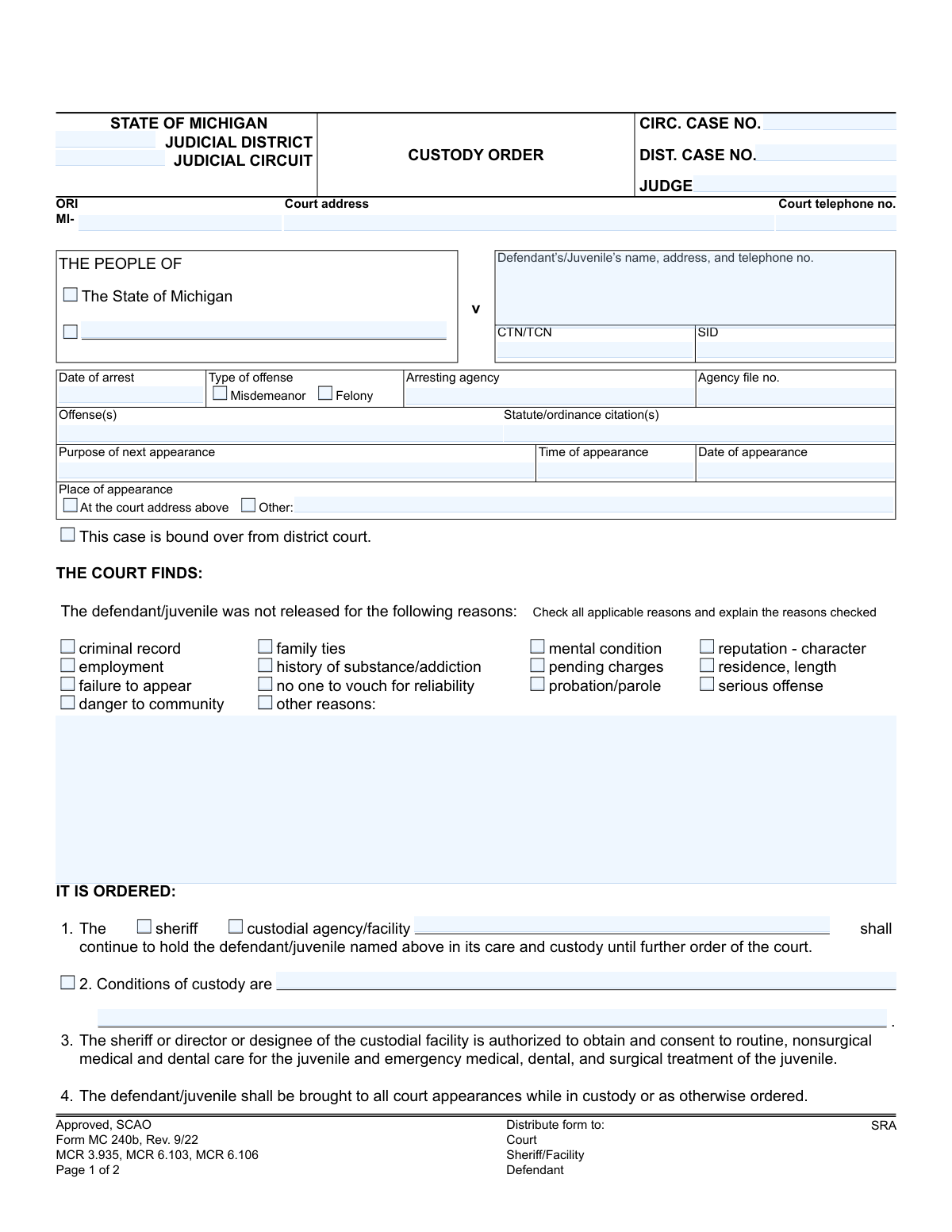
Yes! You can use AI to fill out Form MC 240b, Custody Order

Form MC 240b, the Custody Order, is a legal document issued by Michigan courts to formalize the decision to keep a defendant or juvenile in custody. It details the reasons for detention, such as flight risk or danger to the community, and specifies the conditions under which the individual will be held. Today, this form can be filled out quickly and accurately using AI-powered services like Instafill.ai, which can also convert non-fillable PDF versions into interactive fillable forms.
MC 240b is part of the Michigan court forms category on Instafill.
Our AI automatically handles information lookup, data retrieval, formatting, and form filling.
It takes less than a minute to fill out MC 240b using our AI form filling.
Securely upload your data. Information is encrypted in transit and deleted immediately after the form is filled out.

Form specifications

Form name: Form MC 240b, Custody Order
Number of fields: 68
Number of pages: 1
Language: English
main-image

Instafill Demo: How to fill out PDF forms in seconds with AI

How to Fill Out MC 240b Online for Free in 2026

Are you looking to fill out a MC 240B form online quickly and accurately? Instafill.ai offers the #1 AI-powered PDF filling software of 2026, allowing you to complete your MC 240B form in just 37 seconds or less.
Follow these steps to fill out your MC 240B form online using Instafill.ai:
  1. 1 Navigate to Instafill.ai and upload or select the Michigan Custody Order, Form MC 240b.
  2. 2 Provide the initial case information, including the judicial district/circuit, case number, and defendant's or juvenile's details.
  3. 3 Enter the offense information, date of arrest, and the purpose of the next court appearance.
  4. 4 Use the AI assistant to check the boxes that correspond to the court's findings for why the individual was not released.
  5. 5 Specify the custodial agency (e.g., sheriff), detail any specific conditions of custody, and note any actions regarding previously posted bonds.
  6. 6 Review all the auto-filled information for accuracy, ensuring all court-ordered details are correctly reflected.
  7. 7 Download, print, or securely share the completed MC 240b for the judge's signature and distribution to the required parties.

Our AI-powered system ensures each field is filled out correctly, reducing errors and saving you time.

Why Choose Instafill.ai for Your Fillable MC 240b Form?

Speed

Complete your MC 240b in as little as 37 seconds.

Up-to-Date

Always use the latest 2026 MC 240b form version.

Cost-effective

No need to hire expensive lawyers.

Accuracy

Our AI performs 10 compliance checks to ensure your form is error-free.

Security

Your personal information is protected with bank-level encryption.

Frequently Asked Questions About Form MC 240b

This form is a legal document issued by a Michigan court to order that a defendant or juvenile be held in custody. It outlines the reasons for detention and the conditions of that custody until a further court order is issued.

A judge, magistrate, or referee in a Michigan court completes and signs this form. It is an official court record and not a form for the defendant or the public to fill out.

Yes, the form is designed for both adult defendants and juveniles. It includes specific provisions, such as authorization for medical care, that are particularly relevant for juveniles in custody.

The judge checks boxes to indicate why a person is being held in custody. These reasons can include criminal record, flight risk, danger to the community, pending charges, or failure to appear at past hearings.

Your next court appearance details, including the date, time, and location, are specified in the 'Purpose of next appearance' section on the first page. Additional scheduled dates may be listed on the second page.

If your bond is 'revoked,' the court has canceled it, and you are being returned to custody. If it is 'forfeited,' you have lost the money you posted for the bond, typically for violating a condition of your release.

This indicates that your case, likely a felony, has passed the preliminary stage in district court and has been transferred to the higher circuit court for trial or further proceedings.

According to the form, copies are distributed to the Court, the Sheriff or custodial facility, the Defendant, and the SRA (State Repository and Analysis).

This is a section where the judge can write specific rules or requirements for an individual's detention. This could include being held in a specific unit, restrictions on contact, or other orders related to security.

Yes, while the court issues this form, you can use AI services like Instafill.ai to manage your legal documents. These tools can help extract key information like court dates and case numbers to keep your records organized.

You can upload any form to the Instafill.ai platform. The AI will analyze the document, identify all form fields, and allow you to fill them out digitally, saving time and ensuring accuracy.

Instafill.ai can convert any flat, non-fillable PDF into an interactive, fillable form. Simply upload the document, and the platform will make it easy for you to complete and save online.

Michigan's court system has different levels, and a case may move from a district court to a circuit court. Including both numbers ensures a clear and continuous record of the case's history and current status.

Compliance MC 240b
Validation Checks by Instafill.ai

1
Case Number Presence
This check ensures that at least one case number, either the Circuit Case No. (ccaseno) or the District Case No. (dcaseno), is provided. A case number is essential for uniquely identifying the legal case to which this custody order applies. If neither is provided, the form submission should be rejected as the order cannot be correctly filed or referenced.
2
Defendant/Juvenile Name Required
Validates that the 'Defendant’s/Juvenile’s name' field (dname) is not empty. The identity of the person being placed in custody is the most critical piece of information on this form. A failure to provide a name makes the order unenforceable and legally invalid, so the submission must be blocked until a name is entered.
3
Appearance Date and Arrest Date Logical Sequence
This validation confirms that the 'Date of appearance' (appdate) is on or after the 'Date of arrest' (adate). A court appearance cannot logically occur before the arrest related to the case. This check prevents data entry errors that would create a nonsensical timeline, and a failed validation would require the user to correct one or both dates.
4
Valid Date Formatting
Ensures that all date fields, including 'Date of arrest' (adate) and 'Date of appearance' (appdate), are entered in a valid and recognizable date format (e.g., MM/DD/YYYY). This is crucial for legal record-keeping and scheduling. An invalid format could lead to misinterpretation or system errors, so the user must correct the entry before proceeding.
5
Offense Type Selection
This check verifies that at least one of the offense type checkboxes, 'Misdemeanor' (mischeck) or 'Felony' (felcheck), is selected. Classifying the offense is fundamental for determining the appropriate legal procedures and potential severity of the situation. If neither is selected, the form is incomplete and should prompt the user to make a selection.
6
Appearance Location Exclusivity and Completeness
Validates that if 'Other' (otherloccheck) is selected for the place of appearance, the corresponding text field (otherloc) must be filled in. It also ensures that 'At the court address above' (ctaddcheck) and 'Other' are mutually exclusive. This prevents ambiguity about where the defendant must appear, and a failure would require the user to either provide the 'Other' location or select the default court address.
7
Custodial Agency Specification
This check ensures that if the 'custodial agency/facility' checkbox (agencycheck) is selected, the name of the agency (agencyname) is provided. The order must clearly state which entity is responsible for the defendant's custody. If the checkbox is ticked but the name is missing, the submission is invalid until the agency name is specified.
8
Conditional 'Other Reasons' Explanation
Verifies that if the 'other reasons' checkbox (othercheck) is selected under the reasons for detention, the corresponding explanation field (otherlist) is not empty. The court requires a specific justification for any reason not explicitly listed. A failed validation means the user has indicated 'other reasons' without providing the mandatory explanation.
9
Page 2 Case Number Consistency
This validation cross-references the 'Case No.' (caseno) on Page 2 with the case numbers (ccaseno, dcaseno) on Page 1. The number must match one of the initial entries to ensure the second page is correctly associated with the first. A mismatch would indicate a serious clerical error, potentially invalidating the orders on the second page.
10
Bond Status Exclusivity
Ensures that if a previously posted bond is being addressed, only one status, either 'revoked' (revokcheck) or 'forfeited' (forfeitcheck), is selected. These two actions are mutually exclusive legal outcomes for a bond. Selecting both would create a conflicting and invalid order, so the system must enforce a single choice.
11
Release Conditions Status Exclusivity
Validates that for conditions of release under MCL 765.6b, only one option, 'are canceled' (cancelcheck) or 'shall remain in place' (remaincheck), is selected. These are opposing instructions regarding the defendant's release conditions. The form must be unambiguous, so a failure to select exactly one option should block submission.
12
Offense and Citation Presence
This check ensures that the 'Offense(s)' and 'Statute/ordinance citation(s)' fields are populated. A custody order must be based on specific alleged violations of the law. Without this information, the legal basis for the detention is unclear, making the form incomplete and legally questionable.
13
Judge Name Presence
Validates that the 'Judge' field is filled out. A judicial order, such as this custody order, is only valid if it is issued by an authorized judicial officer. Missing this information would render the entire document void, so its presence is a mandatory requirement for a valid submission.
14
Court Telephone Number Format
This check verifies that the 'Court telephone no.' (cttelno) field contains a valid phone number format (e.g., (XXX) XXX-XXXX). While not as critical as the defendant's name, a valid contact number for the court is essential for administrative purposes and for parties needing to contact the court. This validation improves data quality and usability.

Common Mistakes in Completing MC 240b

Incorrect or Incomplete Case Numbers

People often confuse the Circuit Court Case No. (ccaseno) and District Court Case No. (dcaseno) or transcribe them incorrectly from other documents. This critical error can lead to the order being misfiled, causing significant administrative delays and legal complications in tracking the case. To avoid this, meticulously double-check the case number against official court records and ensure it is entered in the correct field.

Mismatching Offenses with Statute Citations

This form requires listing both the offense(s) and the corresponding statute/ordinance citation(s). A frequent error is incorrectly pairing an offense with its legal citation or using an unofficial abbreviation for the statute. Such mistakes can create legal ambiguity and challenges to the custody order's basis, so it's crucial to reference the official charging documents to ensure accuracy.

Checking Custody Reasons Without Explanation

The section detailing why a defendant was not released requires not only checking the applicable boxes (e.g., 'criminal record,' 'danger to community') but also explaining those reasons. A common oversight is to check the boxes without providing the necessary explanatory details in the space provided. An order lacking this justification may be challenged for insufficient findings, so always provide a clear, concise explanation for each reason checked.

Omitting the Custodial Facility Name

In the 'IT IS ORDERED' section, if the 'custodial agency/facility' box is checked instead of 'sheriff,' the specific name of that facility must be written in. Filers often check the box but forget to name the facility, leaving ambiguity about where the defendant is to be held. This can cause delays in transfer and booking, so always specify the facility's full name when that option is selected.

Incorrectly Marking Bond or Release Condition Status

The form has critical choices regarding previously posted bonds ('revoked'/'forfeited') and conditions of release ('canceled'/'shall remain in place'). Accidentally checking the wrong box can have immediate financial and legal consequences, such as improperly revoking a bond or prematurely canceling a no-contact order. It is vital to carefully review the court's directive and mark the correct status for these items.

Data Entry Errors in Scheduled Appearances

The table for scheduling future court dates is prone to simple data entry errors, such as transposing numbers in the date or time, or listing the wrong court location. These seemingly minor mistakes can cause the defendant to miss a mandatory appearance, leading to a warrant for their arrest. Each entry should be meticulously cross-referenced with the official court schedule to ensure accuracy.

Transcribing Law Enforcement Identifiers Incorrectly

Fields like CTN (Complaint Tracking Number), TCN, and SID (State Identification Number) use long, complex alphanumeric codes that are easily mistyped. A transcription error, such as swapping letters or numbers, can prevent the custody order from linking to the correct individual in state and national databases. These numbers should be copied with extreme care, character by character, to ensure data integrity.

Failing to Specify 'Other' Appearance Location

The form defaults to the appearance being at the court address listed at the top, but allows for an 'Other' location. A common mistake is to write in an alternate location without checking the 'Other' box, or vice-versa. This ambiguity can lead to parties going to the wrong courthouse, resulting in delays and missed hearings.

Illegible Handwriting on a Non-Fillable Form

This form is often provided as a non-fillable PDF, forcing users to print and fill it out by hand. Illegible handwriting, especially in critical fields like names, case numbers, and conditions, can render the order unenforceable or cause significant processing errors. To prevent this, it's best to use an AI-powered tool like Instafill.ai, which can convert the flat PDF into a fillable version, allowing you to type information clearly and accurately.
Saved over 80 hours a year

“I was never sure if my IRS forms like W-9 were filled correctly. Now, I can complete the forms accurately without any external help.”

Kevin Martin Green

Your data stays secure with advanced protection from Instafill and our subprocessors

Robust compliance program

Transparent business model

You’re not the product. You always know where your data is and what it is processed for.

ISO 27001, HIPAA, and GDPR

Our subprocesses adhere to multiple compliance standards, including but not limited to ISO 27001, HIPAA, and GDPR.

Security & privacy by design

We consider security and privacy from the initial design phase of any new service or functionality. It’s not an afterthought, it’s built-in, including support for two-factor authentication (2FA) to further protect your account.

Fill out MC 240b with Instafill.ai

Worried about filling PDFs wrong? Instafill securely fills form-mc-240b-custody-order forms, ensuring each field is accurate.