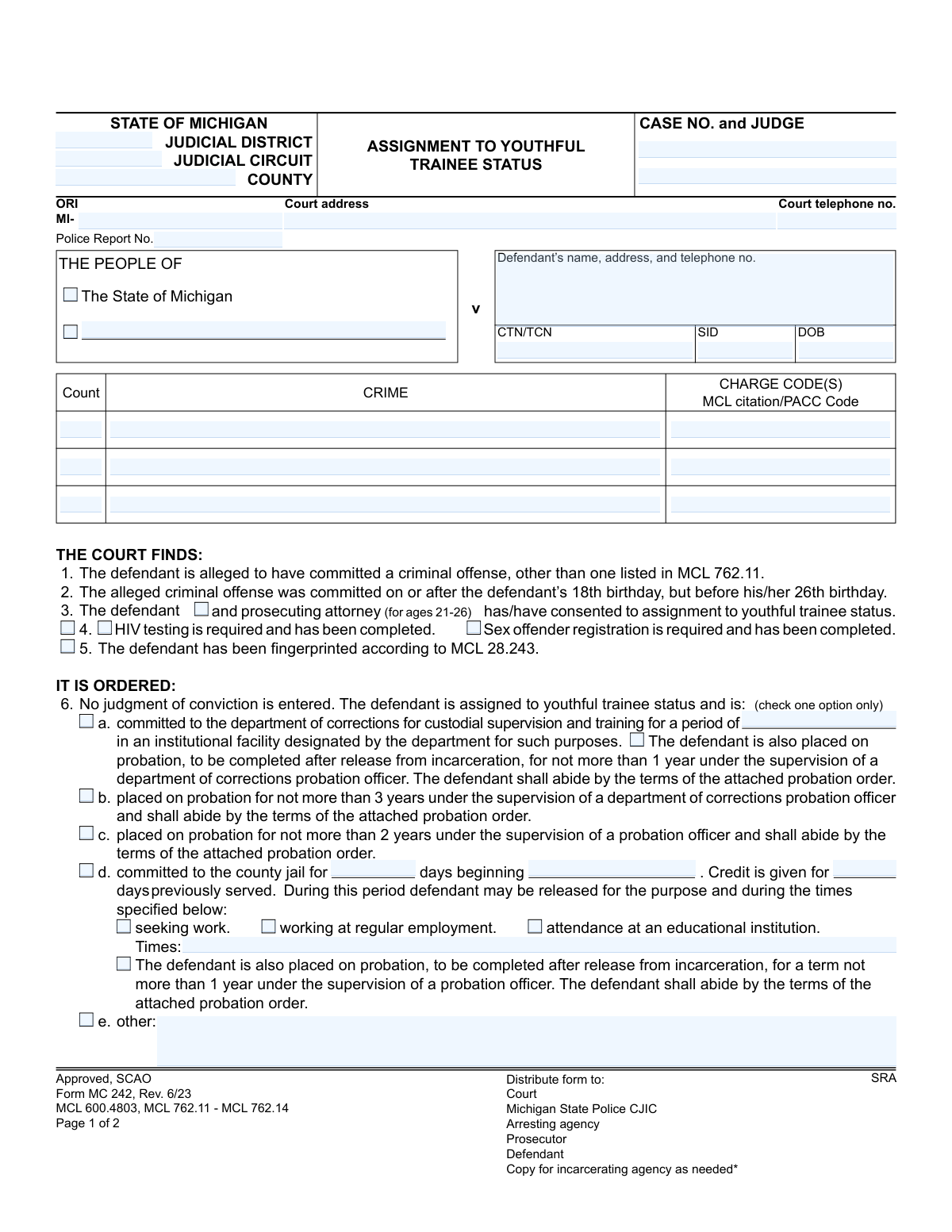
Yes! You can use AI to fill out Form MC 242, Assignment to Youthful Trainee Status

The Assignment to Youthful Trainee Status, Form MC 242, is a legal document issued by Michigan courts for individuals between 18 and 26 years old who have committed certain offenses. It officially grants them youthful trainee status under MCL 762.11, which allows them to avoid a permanent criminal record upon successful completion of a court-ordered program. Today, this form can be filled out quickly and accurately using AI-powered services like Instafill.ai, which can also convert non-fillable PDF versions into interactive fillable forms.
MC 242 is part of the Michigan court forms category on Instafill.
Our AI automatically handles information lookup, data retrieval, formatting, and form filling.
It takes less than a minute to fill out MC 242 using our AI form filling.
Securely upload your data. Information is encrypted in transit and deleted immediately after the form is filled out.

Form specifications

Form name: Form MC 242, Assignment to Youthful Trainee Status
Number of fields: 58
Number of pages: 1
Language: English
main-image

Instafill Demo: How to fill out PDF forms in seconds with AI

How to Fill Out MC 242 Online for Free in 2026

Are you looking to fill out a MC 242 form online quickly and accurately? Instafill.ai offers the #1 AI-powered PDF filling software of 2026, allowing you to complete your MC 242 form in just 37 seconds or less.
Follow these steps to fill out your MC 242 form online using Instafill.ai:
  1. 1 Navigate to Instafill.ai and upload or select the Michigan Form MC 242.
  2. 2 Use the AI assistant to input all case-identifying information, such as the judicial district, county, case number, and defendant's personal details.
  3. 3 Enter the specific criminal charges, including the crime, charge codes, and MCL citation for each count.
  4. 4 Check the boxes corresponding to the court's findings, confirming the defendant's eligibility, consent, and completion of any required testing or fingerprinting.
  5. 5 Select the appropriate order for the assignment, detailing the terms of probation, custodial supervision, or jail time.
  6. 6 Fill in the financial section, itemizing all required payments like fines, court costs, and restitution.
  7. 7 Review all auto-filled information for accuracy before the judge provides a final signature to execute the order.

Our AI-powered system ensures each field is filled out correctly, reducing errors and saving you time.

Why Choose Instafill.ai for Your Fillable MC 242 Form?

Speed

Complete your MC 242 in as little as 37 seconds.

Up-to-Date

Always use the latest 2026 MC 242 form version.

Cost-effective

No need to hire expensive lawyers.

Accuracy

Our AI performs 10 compliance checks to ensure your form is error-free.

Security

Your personal information is protected with bank-level encryption.

Frequently Asked Questions About Form MC 242

This is a court order (MC 242) used in Michigan to assign an eligible young adult to a special rehabilitative status instead of entering a criminal conviction. It outlines the terms of supervision, such as probation or jail time, while keeping the record nonpublic.

Individuals who are alleged to have committed a qualifying criminal offense on or after their 18th birthday but before their 26th birthday can be considered. The defendant must consent, and for those aged 21-26, the prosecuting attorney must also consent.

The primary benefit is that no judgment of conviction is entered against you. Upon successful completion of the program, the case is dismissed and the record remains nonpublic, which helps protect your future from the consequences of a public criminal record.

No, this is an official court order that is completed and signed by a judge. You will receive a copy for your records, but you are not responsible for filling it out.

The judge can order several outcomes, including commitment to a corrections facility, probation for up to three years, or a sentence in the county jail. The specific option chosen by the court for your case will be checked on the form.

This means that the official records of the case held by the court, police, and other state agencies are not available to the general public. This prevents the offense from appearing on most standard background checks.

The form advises you to contact the court immediately if you are unable to pay due to financial hardship. You can request a payment alternative, but be aware that a 20% late penalty can be added to amounts not paid on time.

The probation order is a separate, detailed document that lists all the specific rules and conditions you must follow while on probation. This Assignment form confirms that you are subject to that separate order.

Upon successful completion of all court-ordered terms, the proceedings against you are dismissed without a conviction. The nonpublic record is maintained, effectively clearing you of a public criminal record for this offense.

Yes, the form indicates the court must verify that you have been fingerprinted. Depending on the offense, the court also confirms that required HIV testing or sex offender registration has been completed.

Yes, services like Instafill.ai use AI to help you manage your copy of the form. It can accurately extract key information like payment deadlines and supervision terms to help you stay organized and compliant.

You can upload your PDF copy of the MC 242 form to Instafill.ai. The platform can help you create a secure digital record, set reminders for important dates, and easily access the details of your court-ordered obligations.

Yes, Instafill.ai can convert flat, non-fillable PDFs into interactive forms. This allows you to add your own notes, highlight important sections, and manage the information on your court order more effectively.

Compliance MC 242
Validation Checks by Instafill.ai

1
Defendant's Age Eligibility
Validates that the defendant's date of birth (DOB) indicates they were between 18 and 26 years old at the time of the alleged offense, as required by MCL 762.11. This check is critical as youthful trainee status is strictly age-restricted. If the defendant's age falls outside this range, the assignment is legally invalid and the form should be rejected.
2
Exclusive Order Selection
Ensures that only one of the disposition options under 'IT IS ORDERED:' (items 6a, 6b, 6c, 6d, or 6e) is selected. The form explicitly states 'check one option only'. Selecting multiple or no options creates an ambiguous and unenforceable order, requiring correction before processing.
3
Financial Obligation Total Calculation
Verifies that the 'Total' financial amount is the correct sum of all individual cost, fee, and restitution fields (State Minimum, Crime Victim, Restitution, Court Costs, etc.). This check prevents mathematical errors and ensures the defendant's total financial liability is accurately recorded. An incorrect total can lead to billing disputes and collection problems.
4
Conditional Requirement for Commitment Period (6a)
Checks that if option 6a ('committed to the department of corrections') is selected, the corresponding commitment period ('committtime') is specified. This period is a mandatory component of the order. Failure to specify the duration renders the commitment order incomplete and legally unenforceable.
5
Conditional Requirements for County Jail Commitment (6d)
Validates that if option 6d ('committed to the county jail') is selected, both the number of days ('jaildays') and the sentence start date ('jailstartdate') are provided. These details are essential for the jail to properly execute the sentence. An omission makes the order impossible to carry out as written.
6
Case Number Completeness and Consistency
Confirms that the 'Case No.' field is not empty and is consistent on both pages of the form. The case number is the primary identifier for the legal proceeding and is required to link the document to the correct file in the court system. A missing or inconsistent case number makes the form impossible to file and track accurately.
7
Prosecutor Consent for Ages 21-26
Validates that if the defendant's age (calculated from 'dob') is between 21 and 26, the checkbox indicating the prosecuting attorney has consented ('procheck') is marked. This is a statutory requirement for older individuals to receive youthful trainee status. Failure to document this consent when required would invalidate the assignment.
8
Valid Date Formatting
Ensures that all date fields, including Date of Birth ('dob'), Jail Start Date ('jailstartdate'), and Payment Due Date ('paydue'), are entered in a valid and recognizable date format (e.g., MM/DD/YYYY). This is fundamental for data integrity, age calculations, and scheduling. An invalid format would cause system processing errors and could invalidate the legal document.
9
Minimum Charge Information Requirement
Validates that at least one complete charge is detailed, including the crime ('c1'), charge code ('ch1'), and MCL citation ('cnt1'). A defendant cannot be assigned to this status without a corresponding criminal offense. The absence of this information makes the entire basis for the order void.
10
Credit for Time Served Logic
Ensures that the number of days credited for time previously served ('creditdays') is not greater than the total number of days sentenced to county jail ('jaildays'). Granting more credit than the total sentence is logically impossible and indicates a data entry error. This check maintains the integrity of the sentencing information.
11
Conditional Sentence Days for Non-Payment
Ensures that if the box for a conditional sentence for failure to pay ('condservcheck') is checked, the corresponding number of jail days ('condservdays') is specified. This is a critical component of the sentence. An incomplete entry makes this part of the sentence ambiguous and unenforceable.
12
Defendant Information Completeness
Verifies that the defendant's name, address, and telephone number ('dinfo') are fully provided. This information is essential for all official communication, service of documents, and supervision by probation or corrections. Incomplete information can hinder the entire process and prevent effective case management.
13
ORI Code Format Validation
Checks that the Originating Agency Identifier ('ori') field follows the expected format, which is 'MI-' followed by a specific agency code. This ensures the case is correctly associated with the originating law enforcement agency for statistical and record-keeping purposes. An incorrect format could lead to mis-routing of information to the Michigan State Police.
14
Mandatory Fingerprinting Finding
Verifies that the checkbox for finding #5 ('fingercheck') is marked, confirming the defendant has been fingerprinted according to MCL 28.243. This is a mandatory prerequisite for the assignment to youthful trainee status. If this finding is not confirmed, the legal basis for the order is incomplete.

Common Mistakes in Completing MC 242

Incorrectly Entering Case and Judge Information

Users often mistype the Case Number or enter an incomplete name for the judge. This happens due to typographical errors or referencing outdated documents. An incorrect case number can lead to the form being misfiled or rejected by the court clerk, causing significant processing delays and confusion in tracking the case status.

Incomplete or Inaccurate Defendant Identifiers

Fields like CTN/TCN, SID, and DOB are frequently filled with incorrect data or left partially blank. These errors occur from simple data entry mistakes or not having the correct information readily available. The consequences are severe, potentially leading to incorrect criminal history linkage, identity verification failures, and delays in processing the youthful trainee status.

Ambiguous or Missing Charge Information

Failing to provide the specific MCL citation or PACC code for the crime is a common oversight. This usually happens when the person filling out the form is in a hurry or does not have the charging documents handy. An order without a precise charge code is legally ambiguous and may be deemed invalid, as it doesn't clearly state the offense for which the trainee status is being granted.

Selecting Multiple Mutually Exclusive Orders

A critical error is checking more than one option in section 6 (e.g., checking both 6b for probation and 6d for jail time). This mistake stems from misunderstanding that these are alternative, not cumulative, sentencing options. Such a form is contradictory and legally unenforceable, requiring it to be returned for correction and resubmission.

Omitting Required Details for a Selected Order

When an option in section 6 is chosen, filers often forget to fill in the associated details, such as the duration of commitment in 6a or the number of jail days and start date in 6d. This oversight renders the specific order incomplete and unenforceable. For example, an order for jail time without a specified number of days cannot be executed by the correctional facility.

Miscalculating the Total Financial Obligation

In section 7, simple arithmetic errors when summing up costs, fees, fines, and restitution to arrive at the 'Total' are very common. This leads to incorrect billing, causing the defendant to either overpay or underpay. Correcting this mistake requires additional administrative work and can delay case closure or trigger unwarranted late penalties.

Forgetting to Check Foundational Findings

Overlooking the checkboxes in 'THE COURT FINDS' section (items 1-5), such as consent or fingerprinting completion, is a frequent mistake. This happens when rushing through the form. Failing to check these boxes means the legal prerequisites for the assignment are not documented, which can be grounds for challenging and invalidating the entire order.

Incorrectly Identifying the Probation Supervising Agency

The form distinguishes between a 'department of corrections probation officer' (state level) and a generic 'probation officer' (often local/district). Users may not understand this distinction and select the wrong probation type for the sentence. This error causes the case to be routed to the wrong supervisory agency, delaying the start of the defendant's probation and creating inter-agency confusion.

Leaving Payment Due Date Blank

The 'due date for payment' in section 7 is often left empty, either because it was overlooked or not yet determined. This creates ambiguity for both the court and the defendant regarding when the financial obligations must be met. It complicates the enforcement of payments and the calculation of the 20% late penalty, which is triggered 56 days after the due date.

Vague Description for 'Other' Order

When selecting option 6e ('other'), filers sometimes provide a description that is too brief, vague, or legally imprecise. This occurs when the custom terms of the order are complex and not easily summarized. An unclear 'other' order is open to misinterpretation by the defendant, probation officers, and other agencies, potentially leading to compliance issues or future legal disputes.
Saved over 80 hours a year

“I was never sure if my IRS forms like W-9 were filled correctly. Now, I can complete the forms accurately without any external help.”

Kevin Martin Green

Your data stays secure with advanced protection from Instafill and our subprocessors

Robust compliance program

Transparent business model

You’re not the product. You always know where your data is and what it is processed for.

ISO 27001, HIPAA, and GDPR

Our subprocesses adhere to multiple compliance standards, including but not limited to ISO 27001, HIPAA, and GDPR.

Security & privacy by design

We consider security and privacy from the initial design phase of any new service or functionality. It’s not an afterthought, it’s built-in, including support for two-factor authentication (2FA) to further protect your account.

Fill out MC 242 with Instafill.ai

Worried about filling PDFs wrong? Instafill securely fills form-mc-242-assignment-to-youthful-trainee-status forms, ensuring each field is accurate.