
Yes! You can use AI to fill out Form MC 244, Petition and Order for Amendment of Order of Probation
Don't type 60 fields by hand. Tell our AI about yourself, or upload a document you already have, and it fills every field in seconds. You check it, then download, print or sign.
The AI does the filling. You just check it.
No typing into boxes, nothing to install.
What this form asks for
The AI fills all of it, from your answers or your documents.
Let AI fill out your MC 244
No typing. Every field filled in seconds, checked, ready to sign.
How to Fill Out MC 244 Online for Free in 2026
What the AI walks you through.
- Navigate to Instafill.ai and upload the MC 244 form or select it from the template library.
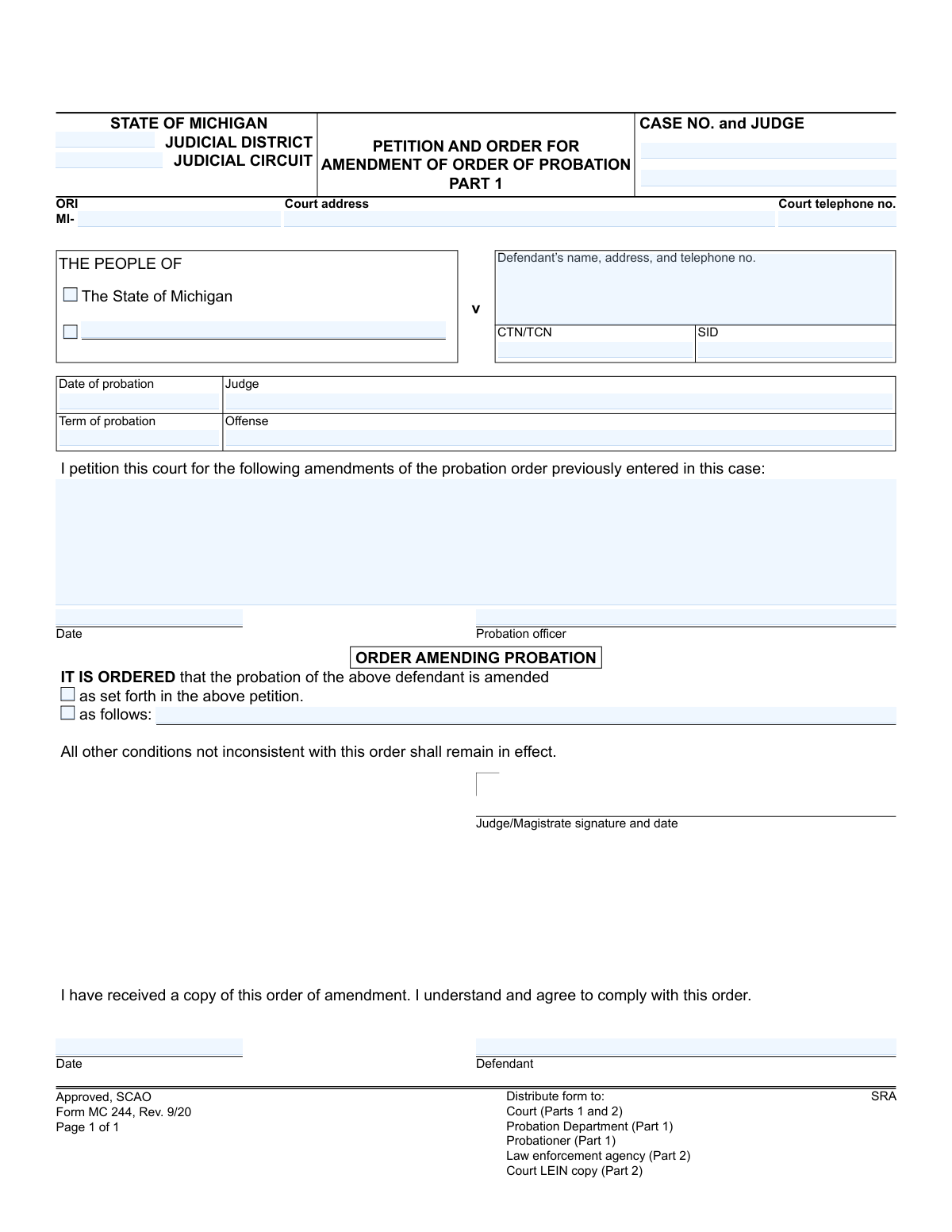
- Use the AI assistant to accurately fill in the case information, including the judicial district, circuit, case number, and judge's name.
- Enter the defendant's full name and address, along with details of the original probation order such as the date, term, and offense.
- Clearly state the proposed amendments to the probation order in the petition section.
- The probation officer digitally signs and dates the petition part of the form.
- Once the petition is submitted, the judge will review it and complete the 'Order Amending Probation' section, indicating approval and signing the order.
- Review the entire completed form for accuracy before downloading, printing, and distributing it to the required parties as listed on the form.
Common Mistakes in Completing MC 244
The ones the AI is built to catch.
Incorrect or Incomplete Case Number
Vague Description of Requested Amendment
Failure to Complete LEIN Section on Part 2
Omitting or Transposing Tracking Numbers (CTN/SID)
Using Outdated Defendant Contact Information
Missing Required Signatures and Dates
Incorrectly Stating Original Probation Details
Improper Form Distribution After Signing
Confusing Part 1 and Part 2
Frequently Asked Questions About MC 244
Is it really free for 7 days?
Can I fill other forms too?
How do I cancel?
How does the AI fill out MC 244?
What happens to my information?
How complex is MC 244 to fill out?
What is the purpose of the Petition and Order for Amendment of Order of Probation form?
Who typically fills out this form?
What is the difference between Part 1 and Part 2 of this form?
What information is required to complete this form?
As the defendant, what does my signature on this form signify?
What does the phrase 'All other conditions not inconsistent with this order shall remain in effect' mean?
When is the section on Part 2 with my physical description (height, weight, etc.) filled out?
What happens after the judge signs the order?
Can I use an AI tool to help me fill out this form?
My copy of the MC 244 form is a PDF that I can't type into. What can I do?
How can I use Instafill.ai to complete this probation amendment form?
What are some common reasons for amending a probation order?
What should I do if I disagree with the proposed amendments to my probation?
Get your MC 244 filled out by AI
$0 today. Cancel before Nov 10 and you pay nothing.
Other forms like this one
Michigan court forms: Form MC 03, Answer, Civil, Form MC 02, Appearance, Form MC 6, Notice to Appear, Form MC 01, Summons, State of Michigan, Form MC 01a, Complaint, Form MC 01b, Motion for Second Summons and Order, State of Michigan Blank Court Form, Form MC 07, Default Request and Entry, Form MC 07a, Default Request, Entry, and Judgment (Sum Certain), Form MC 09, Dismissal, Form MC 09a, Dismissal, Nonservice/No Progress, Form MC 10, Judgment, Civil, Form MC 11, Subpoena, Order to Appear and/or Produce, Request and Writ for Garnishment (Periodic), Form MC 13, Request and Writ for Garnishment (Nonperiodic), Form MC 14, Garnishee Disclosure, Form MC 15, Motion and Affidavit for Installment Payments/To Amend Order for Installment Payments, Form MC 15a, Order Regarding Installment Payments, Form MC 16, Motion to Set Aside Order for Installment Payments, State of Michigan, Form MC 16a, Order on Motion to Set Aside Order for Installment Payments
Let AI fill out your MC 244
Your trial starts once a card is added. You pay nothing before Nov 10.
Our AI already knows this form, all 60 fields of it. Skip the typing: tell it about yourself, or upload what you have, and it fills the whole form in seconds.
- AI fills every field on both pages, checkboxes included
- No typing into boxes: answer a few questions, or upload a document you already have, an old copy of this form, a photo of a document
- The AI checks the answers; you review and change anything before you download
- Download the finished PDF, print it, or sign it online
- Encrypted, and never used to train AI
Cancel before Nov 10 and you pay nothing.
A card is needed to start the trial. Cancel in two clicks from your account.
Terms · Privacy