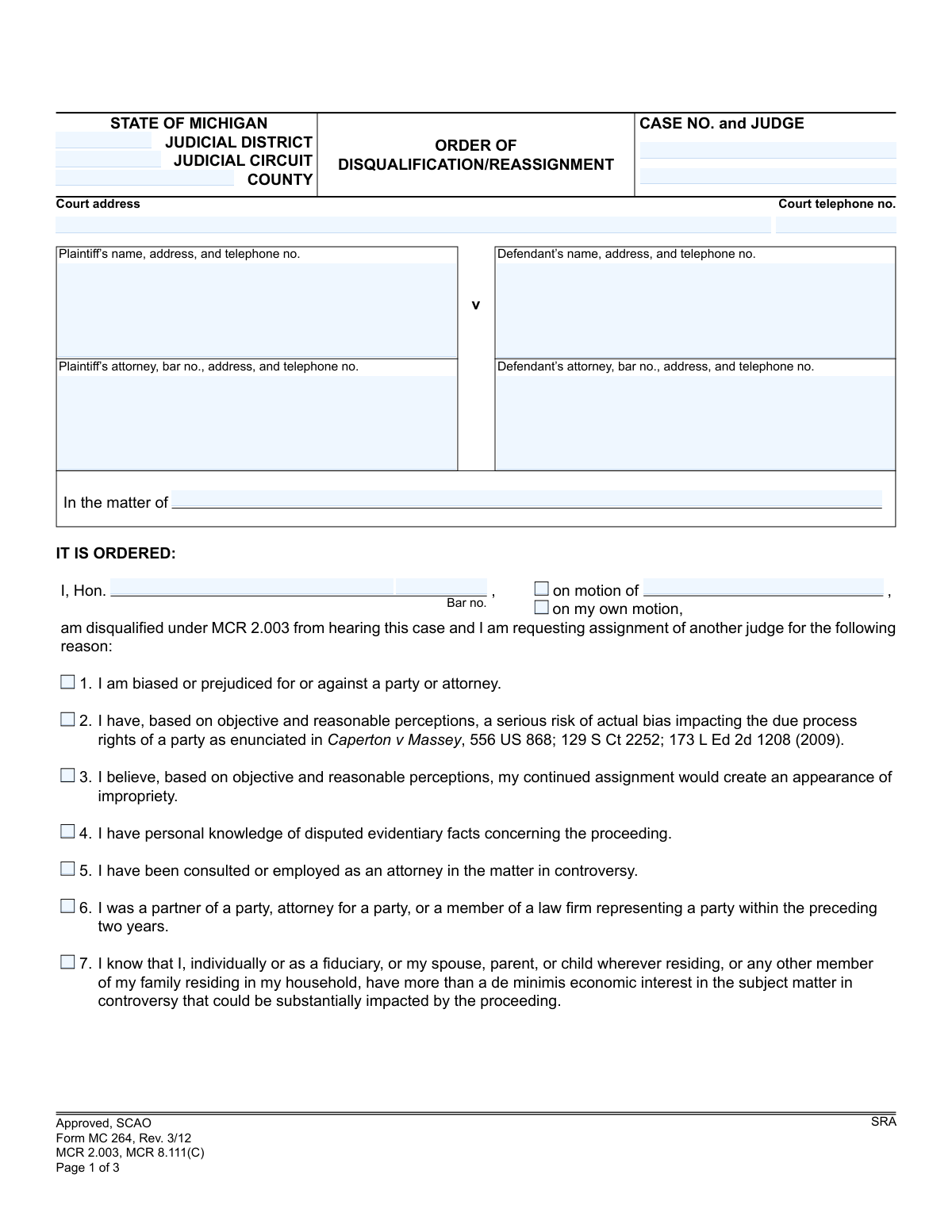
Yes! You can use AI to fill out Form MC 264, Order of Disqualification/Reassignment

Form MC 264 is a legal document used in the Michigan judicial system for a judge to formally disqualify themselves from a case. This order is issued when a judge has a conflict of interest, bias, or another reason as outlined in MCR 2.003 that prevents them from presiding impartially, ensuring the integrity of the legal proceedings. Today, this form can be filled out quickly and accurately using AI-powered services like Instafill.ai, which can also convert non-fillable PDF versions into interactive fillable forms.
MC 264 is part of the Michigan court forms category on Instafill.
Our AI automatically handles information lookup, data retrieval, formatting, and form filling.
It takes less than a minute to fill out MC 264 using our AI form filling.
Securely upload your data. Information is encrypted in transit and deleted immediately after the form is filled out.

Form specifications

Form name: Form MC 264, Order of Disqualification/Reassignment
Number of fields: 63
Number of pages: 1
Language: English
main-image

Instafill Demo: How to fill out PDF forms in seconds with AI

How to Fill Out MC 264 Online for Free in 2026

Are you looking to fill out a MC 264 form online quickly and accurately? Instafill.ai offers the #1 AI-powered PDF filling software of 2026, allowing you to complete your MC 264 form in just 37 seconds or less.
Follow these steps to fill out your MC 264 form online using Instafill.ai:
  1. 1 Navigate to Instafill.ai and upload or select the MC 264, Order of Disqualification/Reassignment form.
  2. 2 Use the AI assistant to input the court information, including the judicial district/circuit, county, case number, and judge's name.
  3. 3 Provide the full details for the plaintiff and defendant, along with their attorneys' information, including names, addresses, and bar numbers.
  4. 4 Indicate whether the disqualification is on the judge's own motion or the motion of another party.
  5. 5 Select the appropriate reason(s) for disqualification from the checklist provided, which corresponds to the rules in MCR 2.003.
  6. 6 If additional judges are also disqualified, enter their signatures, dates, and reasons in the designated section.
  7. 7 Review all entered information for accuracy before the judge signs and dates the order to finalize the disqualification and initiate the reassignment process.

Our AI-powered system ensures each field is filled out correctly, reducing errors and saving you time.

Why Choose Instafill.ai for Your Fillable MC 264 Form?

Speed

Complete your MC 264 in as little as 37 seconds.

Up-to-Date

Always use the latest 2026 MC 264 form version.

Cost-effective

No need to hire expensive lawyers.

Accuracy

Our AI performs 10 compliance checks to ensure your form is error-free.

Security

Your personal information is protected with bank-level encryption.

Frequently Asked Questions About Form MC 264

This form, MC 264, is an official court order used by a judge in Michigan to formally step down from a case due to a conflict of interest or bias. It also initiates the process of reassigning the case to a new judge.

A judge completes and signs this order to disqualify themselves. While a party in the case can file a motion requesting disqualification, this specific form is an internal court document executed by the judiciary.

No, you cannot fill out this form directly. If you believe the judge has a conflict, you must file a formal 'motion to disqualify' with the court, which may then lead to the judge issuing this order.

This indicates that the judge has independently recognized a reason for their disqualification, such as a personal bias or conflict, and is voluntarily recusing themselves without being prompted by a motion from either party.

The form lists several reasons based on court rule MCR 2.003, including bias for or against a party, personal knowledge of the facts, a financial interest in the case, or a close family or professional relationship with a party or attorney.

The judge can check box #9 for 'Other' and must then write a specific explanation for the disqualification in the 'COMMENT' section on the second page of the form.

If another judge is available in the same court, the case is reassigned internally. If all judges in the court are disqualified, the order is sent to the State Court Administrative Office (SCAO) for assignment of an outside judge.

An 'Internal Reassignment' moves the case to another judge within the same local court. A 'Referral to SCAO' is only used when all local judges are disqualified, requiring the state to appoint a visiting judge from another jurisdiction.

Yes, the second page of the form includes a section titled 'ADDITIONAL DISQUALIFICATIONS' where other judges from the same court can also sign and state their reason for disqualification.

Yes, services like Instafill.ai can use AI to accurately auto-fill case information, party names, and addresses. This helps court staff or attorneys prepare the order for the judge's signature quickly and with fewer errors.

Simply upload the MC 264 PDF to the Instafill.ai platform. The service will make the document interactive, allowing you to easily type case details and other information directly into the correct fields before printing for signatures.

You can use a tool like Instafill.ai, which is designed to convert non-fillable PDFs into interactive forms. This allows you to complete the form on your computer, ensuring it is neat and legible.

This legal term refers to a financial interest that is too trivial or minor to be considered significant. A judge must step down if they, or a close family member, have more than a 'de minimis' interest that could be affected by the case's outcome.

Compliance MC 264
Validation Checks by Instafill.ai

1
Ensures Case Number Consistency Across Pages
This check verifies that the 'Case No.' field is populated on all pages of the form and that the value is identical across all instances. This is crucial for ensuring all pages of the order are correctly associated with the same legal case. A mismatch or missing number could lead to filing errors and legal complications.
2
Validates Attorney and Judge Bar Number Format
This validation ensures that all bar number fields ('barno', 'pattyname' bar no., 'dattyname' bar no.) follow the standard Michigan State Bar format, typically a 'P' followed by a sequence of digits. This is important for correctly identifying the legal professionals involved. An invalid format would prevent proper record-keeping and verification.
3
Requires Movant Name if 'on motion of' is Selected
This check validates that if the 'on motion of' checkbox is marked, the corresponding text field specifying the movant's name is not empty. This is necessary to clearly document who initiated the disqualification motion. Failure to provide the name would result in an incomplete and ambiguous court order.
4
Ensures Exclusive Selection of Motion Source
This validation ensures that only one of the two checkboxes, 'on motion of' or 'on my own motion', is selected. The disqualification must originate from either a party's motion or the judge's own initiative, and it cannot be both. Selecting both would create a logical contradiction in the court order.
5
Requires at least one Reason for Disqualification
This check verifies that at least one of the nine enumerated reason checkboxes for disqualification has been selected for the primary judge. A judge cannot be disqualified without a stated reason as per MCR 2.003. The form would be legally insufficient if no reason is provided.
6
Requires Specification for 'Other' Disqualification Reason
This validation enforces that if checkbox 9 ('Other') is selected as a reason for disqualification, the corresponding 'otherlist' text field must contain an explanation. This is critical for creating a clear and complete legal record, as an unspecified 'other' reason is ambiguous and legally insufficient. The form explicitly states this requirement.
7
Requires Comment for 'Other' Reason in Additional Disqualifications
This check ensures that for any additional disqualified judge, if their reason for disqualification is listed as '9' (Other), the corresponding 'COMMENT' field must be completed. The form explicitly notes this rule to prevent ambiguity. An entry with reason 9 but no comment would be incomplete and require correction.
8
Validates Reason Number in Additional Disqualifications
This validation confirms that the value entered in the 'REASON' column for any additional disqualified judge is a valid integer between 1 and 9. This ensures the reason corresponds to one of the official, enumerated reasons listed on the first page. An invalid number would make the entry meaningless.
9
Validates All Date Fields for Correct Format
This check ensures that all date fields on the form (e.g., 'Judge signature and date', 'Chief Judge signature and date') are entered in a valid and recognizable format, such as MM/DD/YYYY. Correct date formatting is essential for establishing a clear timeline of events and ensuring the order's legal validity. An invalid date could lead to the order being rejected.
10
Ensures Court Telephone Number is a Valid Format
This validation checks that the 'Court telephone no.' field contains a valid phone number format, including area code. This information is vital for communication and contact purposes. An improperly formatted number could hinder the ability of parties or other officials to contact the court.
11
Verifies Completeness of Case Header Information
This validation ensures that the essential case identification fields at the top of the form, such as Judicial District, Judicial Circuit, and County, are all populated. This header information is critical for routing, filing, and identifying the case's jurisdiction. An incomplete header would cause significant processing and filing delays.
12
Ensures Primary Judge's Disqualification Section is Complete
This check verifies that the name of the disqualifying judge ('Hon.'), their bar number ('Bar no.'), and their signature and date are all present. This information is fundamental to the order, identifying who is being disqualified and when. Missing any of these elements would render the primary disqualification order invalid.
13
Ensures Mutually Exclusive Case Type Identification
This validation checks that the form identifies the case either through Plaintiff/Defendant names or through the 'In the matter of' field, but not both simultaneously. A case is typically structured as an adversarial proceeding (v.) or an inquisitorial/subject matter proceeding (In the matter of). Filling both would create ambiguity about the nature of the case.
14
Requires Party Identification
This check validates that either the Plaintiff ('pname') and Defendant ('dname') fields are populated, or the 'In the matter of' field is populated. Identifying the parties or the subject matter is fundamental to any court order. The form is invalid if all three of these fields are left blank.

Common Mistakes in Completing MC 264

Incomplete or Incorrect Case Number

Users often forget to enter the case number on pages 2 and 3, or they enter it incorrectly. Because this is a multi-page order, missing case numbers can cause pages to be lost or misfiled, delaying the reassignment process. To avoid this, carefully check that the full, correct case number is present in the header of every single page before submission. AI-powered tools like Instafill.ai can automatically populate recurring information like case numbers across all pages of a document, preventing this error.

Confusing Internal Reassignment with SCAO Referral

A frequent error is filling out the wrong section on page 3. Users may complete the 'Internal Reassignment Request' when all judges are disqualified, which actually requires a 'Request for Referral to SCAO', or vice-versa. This mistake leads to incorrect routing and significant delays, as the case is sent to the wrong administrative body for reassignment. It is crucial to determine if any local judges are available before choosing which section to complete.

Selecting 'Other' Reason Without Specification

A judge may check box 9 for 'Other' as the reason for disqualification but fail to provide the mandatory explanation in the space provided. The form explicitly states '(specify)', and failing to do so renders the reason for disqualification incomplete and invalid. This requires the form to be returned for correction, halting the case. Always provide a clear and concise explanation when selecting the 'Other' option.

Omitting Comments for Reason 9 in Additional Disqualifications

On page 2, when multiple judges are disqualifying themselves, the form explicitly states that if 'Reason 9' is used, the 'COMMENT' section must be completed. It is common for a judge to enter '9' as the reason but leave the comment field blank, which invalidates their disqualification entry. To prevent rejection, ensure a specific comment is provided for every entry that cites reason 9.

Missing Attorney or Judge Bar Numbers

Filers frequently omit the bar numbers for the plaintiff's attorney, defendant's attorney, or the disqualifying judge. The bar number is a unique identifier essential for the court's record-keeping and verification processes. Its absence forces court clerks to look up the information manually, causing unnecessary delays. Using a tool like Instafill.ai can help by saving and auto-filling professional details like bar numbers, ensuring accuracy and completeness.

Forgetting the Disqualifying Judge's Signature or Date

An order of disqualification is not legally valid without the signature and date of the judge disqualifying themselves. This is a simple oversight that has major consequences, as it invalidates the entire order and stops the case from moving forward until it is properly signed and dated. Always perform a final review to ensure the primary judge's signature and the corresponding date are present on page 1.

Ambiguous Court Identification

The form includes fields for both 'JUDICIAL DISTRICT' and 'JUDICIAL CIRCUIT'. Users sometimes fill in both when only one is applicable for their court, or they enter the information in the wrong field. This ambiguity can cause confusion and potential misrouting of the document within the court system. Before filling, confirm whether the case belongs to a district or circuit court and enter the information only in the correct field.

Incorrectly Checking the Motion's Origin

The form requires the judge to indicate whether the disqualification is 'on motion of' a party or 'on my own motion'. A common mistake is to check both boxes or neither, creating ambiguity about what prompted the action. This can lead to procedural questions and require clarification. The judge must select only one of these two options to clearly state the origin of the disqualification.

Missing Chief Judge Signature for Reassignment

Both the SCAO referral and the internal reassignment approval on page 3 require the Chief Judge's signature to be executed. This crucial authorization is often missed, which completely halts the reassignment process as the final step is incomplete. The form cannot be processed until the Chief Judge reviews and signs the appropriate section, making this a critical checkpoint before filing.

Incorrectly Identifying Case Parties

The form provides fields for 'Plaintiff' and 'Defendant' as well as a separate field for 'In the matter of'. Users may get confused and fill in the wrong section, for example, using the plaintiff/defendant fields for a probate matter that should be listed under 'In the matter of'. This can cause confusion for court administration regarding the nature of the case. It's important to use the party fields that correctly correspond to the case type.

Failing to Attach Additional Sheets for Numerous Disqualifications

In courts with many judges, the table on page 2 may not have enough rows for every judge who needs to disqualify themselves. The form instructs users to attach additional sheets, but this step can be overlooked. Failing to do so results in an incomplete record of disqualifications, potentially causing procedural issues later. If more space is needed, always create and clearly label a continuation sheet and attach it to the order.
Saved over 80 hours a year

“I was never sure if my IRS forms like W-9 were filled correctly. Now, I can complete the forms accurately without any external help.”

Kevin Martin Green

Your data stays secure with advanced protection from Instafill and our subprocessors

Robust compliance program

Transparent business model

You’re not the product. You always know where your data is and what it is processed for.

ISO 27001, HIPAA, and GDPR

Our subprocesses adhere to multiple compliance standards, including but not limited to ISO 27001, HIPAA, and GDPR.

Security & privacy by design

We consider security and privacy from the initial design phase of any new service or functionality. It’s not an afterthought, it’s built-in, including support for two-factor authentication (2FA) to further protect your account.

Fill out MC 264 with Instafill.ai

Worried about filling PDFs wrong? Instafill securely fills form-mc-264-order-of-disqualificationreassignment forms, ensuring each field is accurate.