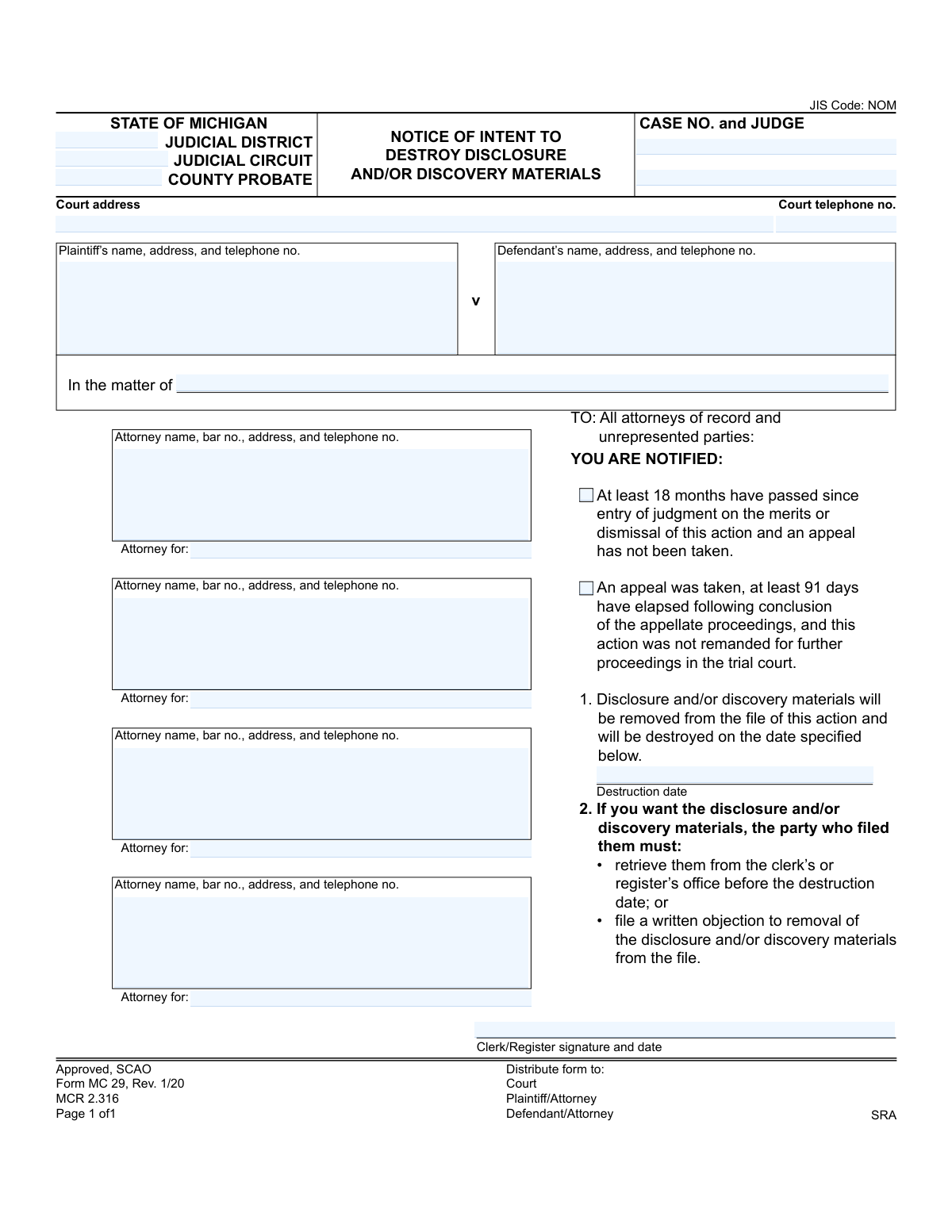
Yes! You can use AI to fill out Form MC 29, Notice of Intent to Destroy Disclosure and/or Discovery Materials

This is Form MC 29, a legal notice used in the State of Michigan by the court clerk to inform all parties of record that disclosure and discovery materials from a case will be destroyed on a specific date. This action is taken after a case has been closed for a certain period without an appeal, or after appellate proceedings have concluded, as outlined in MCR 2.316. Today, this form can be filled out quickly and accurately using AI-powered services like Instafill.ai, which can also convert non-fillable PDF versions into interactive fillable forms.
MC 29 is part of the Michigan court forms category on Instafill.
Our AI automatically handles information lookup, data retrieval, formatting, and form filling.
It takes less than a minute to fill out MC 29 using our AI form filling.
Securely upload your data. Information is encrypted in transit and deleted immediately after the form is filled out.

Form specifications

Form name: Form MC 29, Notice of Intent to Destroy Disclosure and/or Discovery Materials
Number of fields: 22
Number of pages: 1
Language: English
main-image

Instafill Demo: How to fill out PDF forms in seconds with AI

How to Fill Out MC 29 Online for Free in 2026

Are you looking to fill out a MC 29 form online quickly and accurately? Instafill.ai offers the #1 AI-powered PDF filling software of 2026, allowing you to complete your MC 29 form in just 37 seconds or less.
Follow these steps to fill out your MC 29 form online using Instafill.ai:
  1. 1 Navigate to Instafill.ai and upload the MC 29 form or select it from the template library.
  2. 2 Provide the court and case information, including the judicial district/circuit, county, case number, and judge's name.
  3. 3 Enter the full names, addresses, and contact information for the plaintiff, defendant, and all attorneys of record.
  4. 4 Select the appropriate checkbox to indicate the condition that has been met for destruction (e.g., 18 months since judgment or 91 days since appeal conclusion).
  5. 5 Specify the exact date on which the discovery materials are scheduled for destruction.
  6. 6 The court clerk or register will sign and date the form to officially issue the notice.
  7. 7 Review all the information for accuracy, then download, print, or electronically file the completed MC 29 form for distribution to all parties.

Our AI-powered system ensures each field is filled out correctly, reducing errors and saving you time.

Why Choose Instafill.ai for Your Fillable MC 29 Form?

Speed

Complete your MC 29 in as little as 37 seconds.

Up-to-Date

Always use the latest 2026 MC 29 form version.

Cost-effective

No need to hire expensive lawyers.

Accuracy

Our AI performs 10 compliance checks to ensure your form is error-free.

Security

Your personal information is protected with bank-level encryption.

Frequently Asked Questions About Form MC 29

This form, MC 29, is an official notice from a Michigan court that it plans to destroy discovery materials from a closed case file. It informs parties of the destruction date and gives them a chance to retrieve the materials or object.

The court clerk or register's office prepares and sends this notice. It is distributed to all attorneys of record and any parties in the case who are not represented by an attorney.

This notice is sent after a case is fully concluded, typically at least 18 months after a judgment with no appeal, or 91 days after an appeal has been resolved. It is part of the court's record management process.

These are documents exchanged between parties during a lawsuit, such as depositions, interrogatories, and other evidence. They are being removed from the court file to save space.

Before the destruction date listed on the form, you must either visit the clerk's office to retrieve the materials yourself or file a formal written objection with the court to stop their destruction.

If you do not act by the specified destruction date, the court will permanently destroy the discovery materials from the case file. After that date, you will no longer be able to access them through the court.

The court clerk will check the box that applies to the case. It will either be the box for cases where 18 months have passed since judgment or the box for cases where 91 days have passed since an appeal was concluded.

As indicated on the form, copies must be distributed to the court file, the plaintiff and/or their attorney, the defendant and/or their attorney, and the SRA (State Records Administrator).

This section requires complete case identification information, including the court, case number, judge, and the names, addresses, and phone numbers for all parties and their attorneys.

Yes, services like Instafill.ai use AI to help you accurately auto-fill form fields with your saved information. This can save significant time and help prevent errors when completing various legal documents.

To fill a form using Instafill.ai, you just need to upload the document to the platform. The AI will make the form interactive, allowing you to click and fill each field with your saved information in seconds.

If you have a non-fillable or 'flat' PDF, you can use Instafill.ai to make it interactive. The service automatically converts the document into a fillable format that you can complete on your computer.

Filing a written objection formally requests that the court not destroy the materials. The court will then review your objection and decide on the appropriate next steps regarding the storage of the documents.

Compliance MC 29
Validation Checks by Instafill.ai

1
Case Number Presence
This check verifies that the 'CASE NO.' field is not empty. The case number is the primary identifier for the legal action and is essential for associating the notice with the correct court file. If the case number is missing, the form cannot be processed or filed, as it would be impossible to determine which case's materials are slated for destruction.
2
Exclusive Time Condition Selection
This validation ensures that only one of the two justification checkboxes is selected. The form provides two mutually exclusive conditions for destruction: '18 months have passed' or '91 days have elapsed post-appeal'. Selecting both would create ambiguity about the legal basis for the notice, so the system should enforce that only one condition can be marked as true.
3
Required Time Condition Selection
This check confirms that at least one of the two justification checkboxes ('18 months have passed' or '91 days have elapsed post-appeal') has been selected. This is crucial as it provides the legal justification for the intent to destroy materials under MCR 2.316. A notice without a selected justification is incomplete and legally insufficient.
4
Future Destruction Date
This validation ensures the 'Destruction date' is a date in the future. The purpose of the notice is to inform parties of a future event, giving them time to object or retrieve materials. A past or current date would defeat the purpose of the notice period, so the system must reject any date that is not after the current date.
5
Destruction Date Presence
This check verifies that the 'Destruction date' field is filled out. This date is the most critical piece of information for the recipients, as it defines the deadline for their response. Failure to provide this date makes the notice invalid and unactionable, as parties would not know the deadline to retrieve materials or file an objection.
6
Court Jurisdiction Identification
This validation ensures that at least one of the court identification fields ('JUDICIAL DISTRICT', 'JUDICIAL CIRCUIT', or 'COUNTY PROBATE') is completed. This information is necessary to identify the specific court holding the case file. Without this, the notice is ambiguous and cannot be correctly routed or filed within the Michigan court system.
7
Party Identification Completeness
This check verifies that the parties to the case are identified, either through the 'Plaintiff' and 'Defendant' fields or the 'In the matter of' field. For a notice to be valid, it must clearly state the case it pertains to, which includes identifying the involved parties. The system should require one of these two identification methods to be used.
8
Attorney Bar Number Format
This validation checks that any provided attorney 'bar no.' follows the standard Michigan format, which is typically a 'P' followed by a series of digits (e.g., P12345). This ensures the accuracy of attorney identification, which is vital for record-keeping and communication. An incorrectly formatted number could lead to misidentification of legal counsel.
9
Attorney Role Association
This check ensures that if an attorney's information is entered, the corresponding 'Attorney for:' field is also completed. It is not enough to list an attorney; the form must specify which party (e.g., Plaintiff, Defendant) they represent. This validation prevents ambiguity and ensures all parties understand who is representing whom.
10
Standard Telephone Number Format
This validation verifies that all telephone number fields on the form adhere to a standard format, such as (XXX) XXX-XXXX or XXX-XXX-XXXX. Consistent formatting improves data quality and ensures that the contact information is usable and can be correctly parsed by other systems. An invalid format could prevent successful communication with the court, parties, or attorneys.
11
Clerk Signature Date Logic
This check ensures the date accompanying the 'Clerk/Register signature' is on or before the specified 'Destruction date'. The clerk's signature date marks when the notice was officially issued. It is logically impossible for the notice to be issued after the materials have already been scheduled for destruction, so this check prevents a chronological inconsistency.
12
Case Party Exclusivity
This validation checks for logical consistency between the party identification fields. It ensures that if the 'In the matter of' field is filled, the 'Plaintiff' and 'Defendant' fields are empty, and vice versa. This reflects the different structures of non-adversarial versus adversarial cases and prevents confusing or contradictory information from being entered on the same form.

Common Mistakes in Completing MC 29

Entering an Incorrect or Incomplete Case Number

Filers often make typos or omit parts of the complex case number, which is the primary identifier for the court file. An incorrect case number will cause the clerk to reject the filing, as it cannot be matched to the proper record, leading to significant delays. To avoid this, meticulously copy the full case number from a previous official court document and double-check it for accuracy before submission.

Providing Wrong Jurisdictional Information

People frequently confuse the Judicial District, Judicial Circuit, and County Probate fields, or they enter information for the wrong county. This error leads to the notice being filed in the incorrect court system, resulting in rejection and the need to refile, wasting time and resources. Always verify the correct court jurisdiction by consulting the original case filings.

Using Outdated Plaintiff or Defendant Information

The form requires current names, addresses, and phone numbers for all parties, but filers often use old information from the beginning of the case. This can result in failure to properly serve the notice, which violates due process and could invalidate the entire destruction process. Use the most recent address of record from the court file and verify it if possible.

Missing or Incorrect Attorney Bar Number

An attorney's bar number is a unique and mandatory identifier, but it is often entered incorrectly or omitted entirely. Without the correct bar number, the clerk cannot verify the attorney's identity or good standing, which can lead to the form being rejected. This can be avoided by looking up the attorney's current information and bar number on the official State Bar of Michigan directory.

Selecting the Incorrect Justification Checkbox

The form provides two checkboxes to justify the destruction (18 months post-judgment or 91 days post-appeal), and filers may miscalculate the timeline or check the wrong one. This invalidates the legal basis for the notice and will likely cause the clerk to reject it upon reviewing the case history. Carefully review the case's timeline to confirm the correct condition has been met before selecting only one of the two boxes.

Setting an Unreasonable or Ambiguous Destruction Date

Filers may set a destruction date that is too soon, not allowing enough time for mail delivery and for parties to respond, or use an unclear format like '01-02-23'. This violates procedural rules for adequate notice and can lead to a successful legal objection to the destruction. To prevent this, set a date at least 30-45 days in the future using a clear MM/DD/YYYY format.

Filer Signing in the Clerk/Register Section

A very common mistake is for the person filling out the form to sign in the space reserved for the 'Clerk/Register signature and date'. This section must be left blank for the court official to complete upon processing. Signing here will invalidate the form, forcing the clerk to return it and delaying the entire process.

Incorrectly Assigning an Attorney to a Party

The 'Attorney for:' field is often filled out incorrectly, for instance, by listing the plaintiff's attorney next to the defendant's name. This creates significant confusion for the court and other parties, making the filing appear unprofessional and potentially causing it to be rejected. Carefully match each attorney with the specific party they represent as documented in the court record.

Misusing the 'In the matter of' Field

This field is intended for cases without a standard 'Plaintiff v Defendant' structure, such as probate matters, but people often fill it out for adversarial cases. This demonstrates a misunderstanding of the case type and creates confusion for the court clerk. This field should be left blank unless the case caption specifically uses the 'In the matter of' format.

Submitting Incomplete or Illegible Information

Forms are often submitted with blank fields or handwriting that is difficult to read, especially on non-fillable PDF versions. Missing information like a court address or party's phone number will lead to an automatic rejection by the clerk. AI-powered tools like Instafill.ai can convert flat PDFs into fillable forms to ensure legibility and can help prevent these errors by validating that all required fields are completed with correctly formatted data.
Saved over 80 hours a year

“I was never sure if my IRS forms like W-9 were filled correctly. Now, I can complete the forms accurately without any external help.”

Kevin Martin Green

Your data stays secure with advanced protection from Instafill and our subprocessors

Robust compliance program

Transparent business model

You’re not the product. You always know where your data is and what it is processed for.

ISO 27001, HIPAA, and GDPR

Our subprocesses adhere to multiple compliance standards, including but not limited to ISO 27001, HIPAA, and GDPR.

Security & privacy by design

We consider security and privacy from the initial design phase of any new service or functionality. It’s not an afterthought, it’s built-in, including support for two-factor authentication (2FA) to further protect your account.

Fill out MC 29 with Instafill.ai

Worried about filling PDFs wrong? Instafill securely fills form-mc-29-notice-of-intent-to-destroy-disclosure-andor-discovery-materials forms, ensuring each field is accurate.