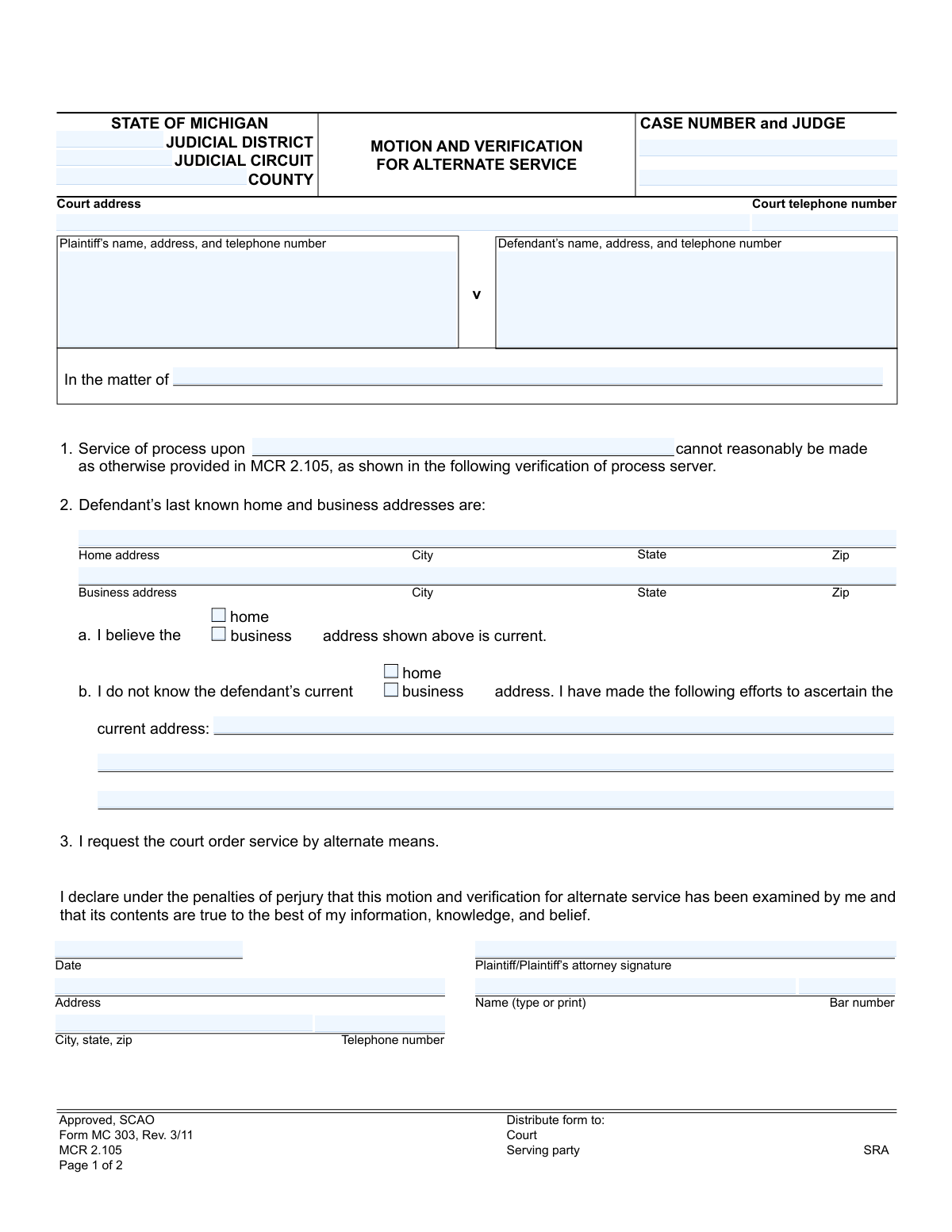
Yes! You can use AI to fill out Form MC 303, Motion and Verification for Alternate Service

Form MC 303, Motion and Verification for Alternate Service, is a legal document used in Michigan courts. It is filed by a plaintiff who has been unable to serve a defendant with legal papers through standard methods as outlined in court rules. This motion asks the court to authorize an alternative method of service to ensure the defendant is properly notified of the lawsuit. Today, this form can be filled out quickly and accurately using AI-powered services like Instafill.ai, which can also convert non-fillable PDF versions into interactive fillable forms.
MC 303 is part of the Michigan court forms category on Instafill.
Our AI automatically handles information lookup, data retrieval, formatting, and form filling.
It takes less than a minute to fill out MC 303 using our AI form filling.
Securely upload your data. Information is encrypted in transit and deleted immediately after the form is filled out.

Form specifications

Form name: Form MC 303, Motion and Verification for Alternate Service
Number of fields: 32
Number of pages: 1
Language: English
main-image

Instafill Demo: How to fill out PDF forms in seconds with AI

How to Fill Out MC 303 Online for Free in 2026

Are you looking to fill out a MC 303 form online quickly and accurately? Instafill.ai offers the #1 AI-powered PDF filling software of 2026, allowing you to complete your MC 303 form in just 37 seconds or less.
Follow these steps to fill out your MC 303 form online using Instafill.ai:
  1. 1 Navigate to Instafill.ai and upload the MC 303 form or select it from the template library.
  2. 2 Provide the case details, including the court, county, case number, and judge's name.
  3. 3 Enter the full names and addresses for both the plaintiff and the defendant.
  4. 4 Specify the defendant's last known home and business addresses, or detail the efforts made to locate them if their current address is unknown.
  5. 5 Complete the 'Verification of Process Server' section, describing each attempt to serve the defendant, including dates, places, and outcomes.
  6. 6 Review all the information automatically populated by the AI to ensure accuracy and completeness.
  7. 7 Electronically sign and date the motion before downloading the completed form for filing with the appropriate Michigan court.

Our AI-powered system ensures each field is filled out correctly, reducing errors and saving you time.

Why Choose Instafill.ai for Your Fillable MC 303 Form?

Speed

Complete your MC 303 in as little as 37 seconds.

Up-to-Date

Always use the latest 2026 MC 303 form version.

Cost-effective

No need to hire expensive lawyers.

Accuracy

Our AI performs 10 compliance checks to ensure your form is error-free.

Security

Your personal information is protected with bank-level encryption.

Frequently Asked Questions About Form MC 303

This form is used to ask a Michigan court for permission to serve legal documents to a defendant using a method other than standard personal delivery, such as by mail or publication, when you've been unable to serve them through normal means.

You should use this form after you or your process server have made multiple, documented attempts to serve a defendant with legal papers according to standard court rules (MCR 2.105) but have been unsuccessful.

The process server must detail each attempt they made to serve the defendant. This includes the date, place, and a description of what occurred during each attempt to demonstrate that reasonable efforts were made.

This section must be completed and signed by the professional process server or the individual who attempted to serve the documents. It acts as their sworn statement detailing their unsuccessful attempts.

In Section 2, you must check the box indicating you don't know the current address and then describe the specific efforts you made to find it. This could include checking public records, contacting known associates, or using online search tools.

A reasonable effort typically involves multiple attempts by a process server to deliver documents in person at the defendant's known home and/or workplace at different times of the day. The judge will review the process server's verification to determine if the efforts were sufficient.

A judge will review your motion and the process server's verification. If the judge agrees that standard service is not reasonably possible, they will issue an order specifying the alternate method you are allowed to use to serve the defendant.

You will need your case number, the court's address, the full names and last-known addresses for both the plaintiff and defendant, and the detailed log of service attempts from your process server.

While you can file this motion yourself (pro se), legal procedures can be complex. Consulting with an attorney is recommended to ensure you are following all court rules correctly and to improve your chances of the motion being granted.

MCR 2.105 is the Michigan Court Rule that outlines the proper and required methods for serving process (delivering legal papers) in a civil case. This motion is filed when the methods described in that rule cannot be reasonably accomplished.

Yes, AI-powered services like Instafill.ai can help you complete this form quickly and accurately. These tools can auto-fill your case information, addresses, and other repetitive data, reducing the chance of errors and saving you time.

You can use a service like Instafill.ai to easily fill out this form online. Simply upload the MC 303 form, and the AI will identify the fields, allowing you to type your information directly and then download the completed, ready-to-file document.

If you have a non-fillable or 'flat' PDF, you can use a tool like Instafill.ai to make it interactive. Upload the PDF, and the service will automatically convert it into a fillable form that you can complete on your computer.

Compliance MC 303
Validation Checks by Instafill.ai

1
Case Number Consistency
This check ensures the 'Case Number' field on page 2 matches the 'Case Number' entered on page 1. This is critical for ensuring all pages of the motion are correctly associated with the same legal case file. If the numbers do not match, the filing could be rejected or misfiled, causing significant delays.
2
Required Process Server Narrative
Validates that the 'State date, place, and what occurred on each occasion' text area is not empty. This section is the core evidence for the motion, detailing the failed attempts at service. An empty or incomplete narrative means the filer has not provided the necessary justification for requesting alternate service, leading to an automatic denial of the motion.
3
Address Declaration Logical Consistency
Ensures the user does not select conflicting checkboxes in section 2. For example, a user cannot check both 'I believe the home address shown above is current' and 'I do not know the defendant’s current home address'. This check prevents logically impossible submissions and forces the filer to make a clear declaration, which is essential for the court's decision-making process.
4
Mandatory Efforts Explanation
This validation confirms that if the user checks 'I do not know the defendant’s current home/business address', the corresponding text area describing the efforts made to find the address is filled out. The court requires proof of due diligence before granting alternate service. Failure to provide this explanation when required will result in the motion being deemed incomplete and likely denied.
5
Required Case Identifiers
Verifies that essential case identifiers, specifically the 'Case Number' and 'County', are not left blank. These fields are the minimum information required to identify the case and the jurisdiction in which it is being heard. A submission without this information cannot be processed or filed correctly by the court clerk.
6
Plaintiff/Attorney Signature Presence
Checks that the 'Plaintiff/Plaintiff’s attorney signature' field has been completed. An unsigned motion is legally invalid and holds no authority. This validation ensures the document is properly executed by the filing party, confirming they attest to the truthfulness of the contents under penalty of perjury.
7
Process Server Signature Presence
Confirms that the 'Signature' field in the 'Verification of Process Server' section is completed. The process server's signed declaration is a sworn statement verifying the service attempts. Without this signature, the verification is incomplete and legally insufficient, invalidating the primary evidence for the motion.
8
Printed Name for Signatures
Ensures that the 'Name (type or print)' fields accompanying both the plaintiff/attorney signature and the process server signature are filled in. Signatures can be illegible, and the printed name is required for clear identification of the individual signing the document. This prevents ambiguity and ensures proper record-keeping.
9
Valid Date Format
Validates that all date fields ('Date' for plaintiff's signature and 'Date' for process server's signature) contain a real, correctly formatted date (e.g., MM/DD/YYYY). This ensures the timeline of events is clear and the document is dated appropriately for legal purposes. An invalid date format could lead to rejection of the form.
10
Completeness of Defendant Address Section
This check ensures that section 2 regarding the defendant's address is not left entirely blank. The filer must either provide a last known address (home or business) or explicitly state that the address is unknown and detail the efforts to find it. Skipping this section entirely fails to provide the court with any basis for ruling on the motion for alternate service.
11
Attorney Bar Number Format
If the 'Bar number' field is filled, this validation checks that it conforms to the expected format for the state of Michigan (e.g., a 'P' followed by a sequence of digits). This helps verify that the person signing as an attorney is a registered member of the bar. While the field may be optional for self-representing plaintiffs, an incorrect format for an attorney can raise red flags.
12
Party Identification Completeness
Verifies that the fields for 'Plaintiff’s name, address, and telephone number' and 'Defendant’s name, address, and telephone number' are not empty. The court must be able to clearly identify all parties involved in the motion. Missing party information would render the document fundamentally incomplete and un-fileable.

Common Mistakes in Completing MC 303

Incorrect or Mismatched Case Information

Filers often enter an incorrect Case Number, Judge name, or select the wrong Judicial District/Circuit. This typically happens due to typographical errors or referencing the wrong case file. An error in this critical header information can lead to the motion being rejected by the clerk or filed in the wrong case, causing significant delays and requiring refiling. To avoid this, meticulously cross-reference all case details with the original complaint or official court notices before submission.

Insufficient Description of Efforts to Locate Defendant

In section 2b, simply stating 'cannot find' is a common but critical mistake. The court requires a detailed account of all diligent efforts made to find the defendant's current address to justify alternate service. A vague entry will almost certainly result in the judge denying the motion, wasting time and money. To prevent this, document every specific action taken, such as dates of online searches, calls to relatives, and visits to last known addresses, providing a clear and comprehensive record of due diligence.

Missing or Incomplete Process Server Verification

A frequent error is submitting the motion without the 'Verification of Process Server' section on page 2 being completed and signed. The plaintiff or their attorney may fill out page 1 and forget that a separate individual, the process server, must provide their own sworn statement. Without this verification, the motion lacks the necessary evidence of failed service attempts and will be denied. Always ensure the process server completes and signs their section before the entire document is filed with the court.

Contradictory Checkbox Selections in Section 2

Users sometimes mistakenly check conflicting boxes, such as indicating in 2a that they believe an address is current while also checking a box in 2b stating they do not know the current address. This logical contradiction happens from rushing or misunderstanding the form's flow. Such an error makes the motion incoherent and will lead to its rejection. Carefully read each option and select only the one that accurately reflects your situation: either you know the address (2a) or you don't and have searched for it (2b).

Vague Descriptions of Service Attempts

In the 'Verification of Process Server' section, a process server might write a generic entry like 'Tried to serve three times.' This lacks the specificity a judge needs to determine if service attempts were diligent. The consequence is a denied motion for alternate service. The process server must detail the exact date, time, and location of each attempt, along with observations like 'No answer at the door, lights were off' or 'A person at the address stated the defendant moved a year ago.'

Missing Signatures or Dates

Forgetting to sign or date the motion in the plaintiff's declaration or the process server's verification is a simple but fatal error. An unsigned legal document is invalid and will be immediately rejected by the court clerk, halting all progress. This oversight often occurs when filers are in a hurry. To prevent this, implement a final review checklist, specifically looking for required signatures and dates on both pages before filing.

Incomplete Party Information

Leaving fields for the plaintiff's or defendant's name, address, or telephone number blank is a common mistake. This can happen when the filer doesn't have all the information on hand and forgets to come back to it. Incomplete forms may be rejected by the court clerk, and missing contact information can hinder communication from the court. It's crucial to gather all required information for all parties before starting the form to ensure a complete and acceptable filing.

Attorney Forgetting Their Bar Number

When an attorney fills out the form, they sometimes forget to include their state bar number alongside their name and signature. This is a small detail, but it is required for identification and verification by the court. Omitting the bar number can lead to filing delays as the clerk's office may need to look it up, and it appears unprofessional. AI-powered form filling tools like Instafill.ai can help prevent this by saving recurring information like a bar number and automatically populating it in the correct field.

Using an Outdated Version of the Form

The form indicates it is 'Rev. 3/11', and courts periodically update their forms for legal or administrative reasons. A filer might use an old version saved on their computer or found on an unofficial website. Courts can reject outdated forms, forcing the filer to transfer all the information to the new version and start the filing process over. Always download the most current version of any legal form directly from the official court or State Court Administrative Office (SCAO) website.

Illegible Handwriting on Non-Fillable PDFs

Many court forms are only available as non-fillable PDFs, forcing users to print and fill them out by hand. This often results in illegible entries for names, addresses, and detailed descriptions, which can cause the court clerk to misinterpret information or reject the form. This can be a significant issue in the sections requiring detailed explanations of service or location efforts. Tools like Instafill.ai can convert flat, non-fillable PDFs into interactive, fillable forms, ensuring all entries are typed, clear, and professional.
Saved over 80 hours a year

“I was never sure if my IRS forms like W-9 were filled correctly. Now, I can complete the forms accurately without any external help.”

Kevin Martin Green

Your data stays secure with advanced protection from Instafill and our subprocessors

Robust compliance program

Transparent business model

You’re not the product. You always know where your data is and what it is processed for.

ISO 27001, HIPAA, and GDPR

Our subprocesses adhere to multiple compliance standards, including but not limited to ISO 27001, HIPAA, and GDPR.

Security & privacy by design

We consider security and privacy from the initial design phase of any new service or functionality. It’s not an afterthought, it’s built-in, including support for two-factor authentication (2FA) to further protect your account.

Fill out MC 303 with Instafill.ai

Worried about filling PDFs wrong? Instafill securely fills form-mc-303-motion-and-verification-for-alternate-service forms, ensuring each field is accurate.