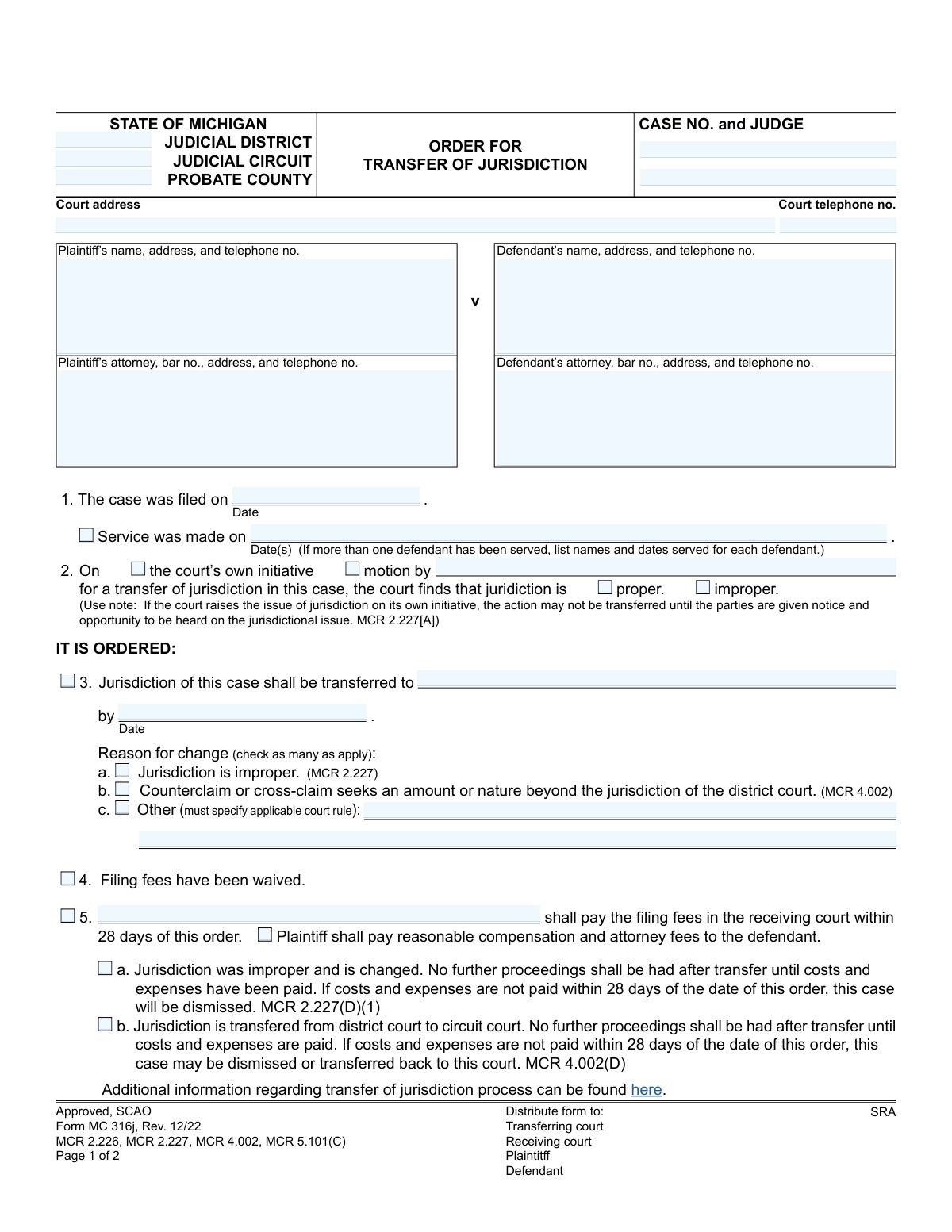
Yes! You can use AI to fill out Form MC 316j, Order for Transfer of Jurisdiction
Form MC 316j is a legal document issued by the State of Michigan courts to formalize the transfer of a case from one judicial district or circuit to another. It is used when the original court's jurisdiction is deemed improper or when other court rules necessitate a change, outlining the reasons for the transfer and any associated costs. Today, this form can be filled out quickly and accurately using AI-powered services like Instafill.ai, which can also convert non-fillable PDF versions into interactive fillable forms.
MC 316j is part of the
Michigan court forms category on Instafill.
Our AI automatically handles information lookup, data retrieval, formatting, and form filling.
It takes less than a minute to fill out MC 316j using our AI form filling.
Securely upload your data. Information is encrypted in transit and deleted immediately after the form is filled out.
Form specifications
| Form name: | Form MC 316j, Order for Transfer of Jurisdiction |
| Number of fields: | 41 |
| Number of pages: | 1 |
| Language: | English |
More forms in Michigan court forms
Instafill Demo: How to fill out PDF forms in seconds with AI
How to Fill Out MC 316j Online for Free in 2026
Are you looking to fill out a MC 316J form online quickly and accurately? Instafill.ai offers the #1 AI-powered PDF filling software of 2026, allowing you to complete your MC 316J form in just 37 seconds or less.
Follow these steps to fill out your MC 316J form online using Instafill.ai:
- 1 Navigate to Instafill.ai and upload or select the 'Order for Transfer of Jurisdiction' (Form MC 316j).
- 2 Provide the initial case information, including the court, case number, judge, and contact details for the court.
- 3 Enter the full details for the plaintiff and defendant, including their names, addresses, and their attorneys' information if applicable.
- 4 Specify the basis for the order, indicating whether it's on the court's initiative or by motion, and the finding on whether the original jurisdiction was proper or improper.
- 5 Clearly state the court to which the case is being transferred, the transfer date, and check the boxes for the specific reasons for the transfer as per Michigan Court Rules.
- 6 Indicate any financial obligations, such as who is responsible for paying filing fees in the receiving court and the deadline for payment.
- 7 Review all the AI-populated fields for accuracy, then download the completed MC 316j form, ready for the judge's signature and official distribution.
Our AI-powered system ensures each field is filled out correctly, reducing errors and saving you time.
Why Choose Instafill.ai for Your Fillable MC 316j Form?
Speed
Complete your MC 316j in as little as 37 seconds.
Up-to-Date
Always use the latest 2026 MC 316j form version.
Cost-effective
No need to hire expensive lawyers.
Accuracy
Our AI performs 10 compliance checks to ensure your form is error-free.
Security
Your personal information is protected with bank-level encryption.
Frequently Asked Questions About Form MC 316j
This form is a legal court order in Michigan used to officially move a case from one court to another. It is signed by a judge when it's determined that a different court is the proper venue to hear the case.
While an attorney may prepare the form, it is a court order that must be signed by a judge to become effective. The parties involved in the case, such as the plaintiff or defendant, do not sign this order.
You need the complete case information, including the case number, court details, judge's name, and the names and addresses of the plaintiff and defendant. You must also specify the court the case is being transferred to and the legal reason for the transfer.
The form states that if you fail to pay the required fees in the receiving court within 28 days, your case may be dismissed or transferred back to the original court. Prompt payment is crucial to proceed with your case.
After the judge signs the order, the court clerk will prepare the case records and securely send them to the new court. Copies of the order are then distributed to the plaintiff, defendant, and both the transferring and receiving courts.
This section is used by the receiving court if it rejects the transfer. This typically happens if the order is incomplete or lacks the necessary information, causing the case to be returned to the original court for a proper order.
A transfer can be started in two ways: either by a motion filed by one of the parties in the case (the plaintiff or defendant) or by the court itself on its own initiative. The order will indicate which of these prompted the transfer.
MCR stands for Michigan Court Rules. These codes refer to the specific legal rules that govern court procedures and provide the legal authority for transferring a case's jurisdiction.
'Denied' means the judge has reviewed the request to transfer and has decided against it. 'Dismissed' often occurs for procedural reasons, and the judge can specify the exact reason on the form.
The form specifies that copies must be distributed to the transferring court, the receiving court, the plaintiff, and the defendant. This ensures all parties are officially notified of the change.
Yes, services like Instafill.ai use AI to help you accurately auto-fill form fields with your case information, which saves time and reduces errors. However, a legal professional should determine the appropriate legal reasons for the transfer.
You can upload the 'Order for Transfer of Jurisdiction' PDF to the Instafill.ai platform. Its AI will make the form fillable online, allowing you to easily type in all the required information before downloading the completed document.
If you have a non-fillable 'flat' PDF, you can use a tool like Instafill.ai. It can convert the document into an interactive, fillable form so you can easily type your information into the correct fields.
The case number is repeated on each page to ensure the pages are always associated with the correct case file, even if they get separated. This is a standard practice for multi-page legal documents to prevent administrative errors.
Compliance MC 316j
Validation Checks by Instafill.ai
1
Case Number Consistency Across Pages
Validates that the 'Case No.' entered on page 1 is identical to the 'Case No.' on page 2. This is critical for ensuring the entire document pertains to a single, unique case and prevents administrative errors during processing. If the numbers do not match, the form is considered invalid and cannot be processed.
2
Valid Date Formatting
Ensures all date fields, including 'Case filed on', 'Service was made on', and 'transferred to by', are entered in a valid and consistent format, such as MM/DD/YYYY. This prevents data entry errors and ensures dates are machine-readable for docketing and scheduling systems. An invalid format will trigger an error message requiring the user to correct the entry.
3
Logical Date Sequence (Filing and Service)
Verifies that the 'Service was made on' date(s) are on or after the 'Case filed on' date. It is legally and logically impossible to serve a defendant in a case before the case has been officially filed with the court. This check prevents fundamental procedural errors and ensures the timeline of events is accurate.
4
Michigan Attorney Bar Number Format
Checks that the 'Plaintiff’s attorney, bar no.' and 'Defendant’s attorney, bar no.' fields adhere to the official Michigan State Bar format, which typically starts with a 'P' followed by a sequence of digits. This validation confirms the attorney is licensed and properly identified within the state's system. An incorrect format would require correction to ensure the attorney of record is valid.
5
Mutually Exclusive Order Outcomes
This check ensures that the form does not contain conflicting orders. The user cannot both order a transfer (by filling out section 3) and simultaneously deny or dismiss the motion (by checking a box in section 7). These are mutually exclusive outcomes, and selecting both would make the order legally ambiguous and unenforceable.
6
Conditional Requirement for 'Other' Reason
If the checkbox for 'Other' reason for transfer (3c) is selected, this validation requires that the corresponding text field specifying the applicable court rule is filled. An empty 'Other' reason makes the basis for the transfer unclear and incomplete. The form will be rejected until a specific rule is provided.
7
Conditional Requirement for Dismissal Reason
Verifies that if the 'dismissed' checkbox in section 7 is selected, the 'dismissed because' text area is populated with an explanation. A dismissal order must state the grounds on which it is based to be legally sound and to inform the parties of the court's reasoning. Failure to provide a reason will result in a validation error.
8
Mandatory Jurisdiction Finding
Ensures that one of the two checkboxes in section 2, 'proper' or 'improper', is selected. The court must make a finding on the issue of jurisdiction before it can order a transfer or take other action. Leaving this section blank makes the basis for the subsequent order unclear and invalid.
9
Mandatory Reason for Transfer
If a transfer is ordered (section 3 is completed), this validation confirms that at least one reason from the checklist (3a, 3b, or 3c) is selected. The order must specify the legal basis for the transfer of jurisdiction as required by court rules. An order without a stated reason is incomplete and may be rejected by the receiving court.
10
Transfer Destination and Date Requirement
This check ensures that if a transfer is ordered, both the 'transferred to' field (naming the receiving court) and the 'by Date' field are filled out. Without a specified destination and deadline, the order to transfer is ambiguous and cannot be executed by the court clerk. The form will be considered incomplete if this information is missing.
11
Phone Number Structure Validation
Validates that all telephone number fields ('Court telephone no.', 'Plaintiff’s...telephone no.', etc.) follow a standard format, such as a 10-digit number. This ensures that contact information is accurate and usable for communication between the courts and the parties involved. An improperly formatted number would prompt the user for correction.
12
Logical Consistency for Improper Jurisdiction Finding
This validation checks for logical consistency between the court's finding and the reason for the order. If the 'improper' checkbox is selected in section 2, the system verifies that the 'Jurisdiction is improper' checkbox (3a) is also selected as the reason for transfer. This ensures the order's reasoning is consistent and not contradictory.
Common Mistakes in Completing MC 316j
Users often fail to provide the complete Case Number, Judge's name, and the specific Judicial District or Circuit in the header. This happens when the information is not readily available or is entered hastily. An incomplete header can cause the order to be misfiled, delayed, or rejected by either the transferring or receiving court, halting the legal process. To avoid this, double-check the original case filings for the exact case number and assigned judge before filling out the form.
The form explicitly requires the bar number for both the plaintiff's and defendant's attorneys, but this is frequently overlooked. This information is crucial for court administration to verify attorney credentials and manage communications. Leaving it blank can lead to processing delays as court clerks must look up the information manually. Always ensure the attorney's full name, address, and state bar number (e.g., a P-number in Michigan) are entered correctly.
The form requires the date(s) service was made, with a specific instruction to list names and dates for each defendant if there are multiple. People often just list one date, even in multi-defendant cases, or leave the field blank entirely. This is a critical procedural step, and its omission can lead to the order being challenged or rejected. Ensure you list every defendant served and the corresponding date of service to create a clear record.
In Section 2, filers may neglect to check whether the transfer was initiated by the court or by a party's motion, or they might forget to name the moving party. This ambiguity makes it unclear what prompted the order, which can be a basis for the receiving court to question its validity. To prevent this, clearly check one box and, if 'motion by' is selected, write the name of the plaintiff or defendant who filed the motion.
When the reason for transfer doesn't fit options 'a' or 'b' in Section 3, users check 'c. Other' but then forget to write in the specific court rule that applies. An order without a stated legal basis is invalid and will likely be refused by the receiving court, as noted in the 'NOTICE OF REFUSAL' section. If you select 'Other,' you must cite the exact Michigan Court Rule (MCR) that authorizes the transfer.
In Section 3, filers sometimes enter a generic court name like 'District Court' or 'Wayne County Court' without the specific district number or full address. This ambiguity forces the clerk of the transferring court to guess where to send the case files, leading to significant delays or the file being sent to the wrong location. Always provide the full, official name of the receiving court (e.g., '48th District Court') to ensure a smooth transfer.
A common error is checking box 4, indicating 'Filing fees have been waived,' while also checking box 5 and naming a party responsible for paying the fees. These are mutually exclusive options that create confusion and can stall the transfer process until clarified. Carefully review the case status and select only one of these options to provide clear instructions on financial responsibility.
This two-page form requires the case number to be entered at the top of both page 1 and page 2. It's very common for people to fill out the first page completely but forget to add the case number to the second. If the pages become separated, page 2 is rendered useless, potentially invalidating the judge's signature or clerk's actions. Always fill in the case number on all pages of a legal document.
If the motion for transfer is denied or the case is dismissed (Section 7), the form provides space to explain why. Filers sometimes leave this section blank, providing no legal or factual basis for the decision. This lack of reasoning can lead to confusion for the parties and may be grounds for an appeal. A clear, concise explanation for the denial or dismissal is essential for the court record.
This form is often distributed as a non-fillable PDF, forcing users to print and complete it by hand. Illegible handwriting for names, addresses, or case numbers can make the form impossible for court clerks to process accurately, resulting in rejections or data entry errors. To avoid this, use a tool like Instafill.ai that can convert the flat PDF into a digitally fillable version, ensuring all entries are clear and legible.
Saved over 80 hours a year
“I was never sure if my IRS forms like W-9 were filled correctly. Now, I can complete the forms accurately without any external help.”
Kevin Martin Green
Your data stays secure with advanced protection from Instafill and our subprocessors
Robust compliance program
Transparent business model
You’re not the product. You always know where your data is and what it is processed for.
ISO 27001, HIPAA, and GDPR
Our subprocesses adhere to multiple compliance standards, including but not limited to ISO 27001, HIPAA, and GDPR.
Security & privacy by design
We consider security and privacy from the initial design phase of any new service or functionality. It’s not an afterthought, it’s built-in, including support for two-factor authentication (2FA) to further protect your account.
Fill out MC 316j with Instafill.ai
Worried about filling PDFs wrong? Instafill securely fills form-mc-316j-order-for-transfer-of-jurisdiction forms, ensuring each field is accurate.