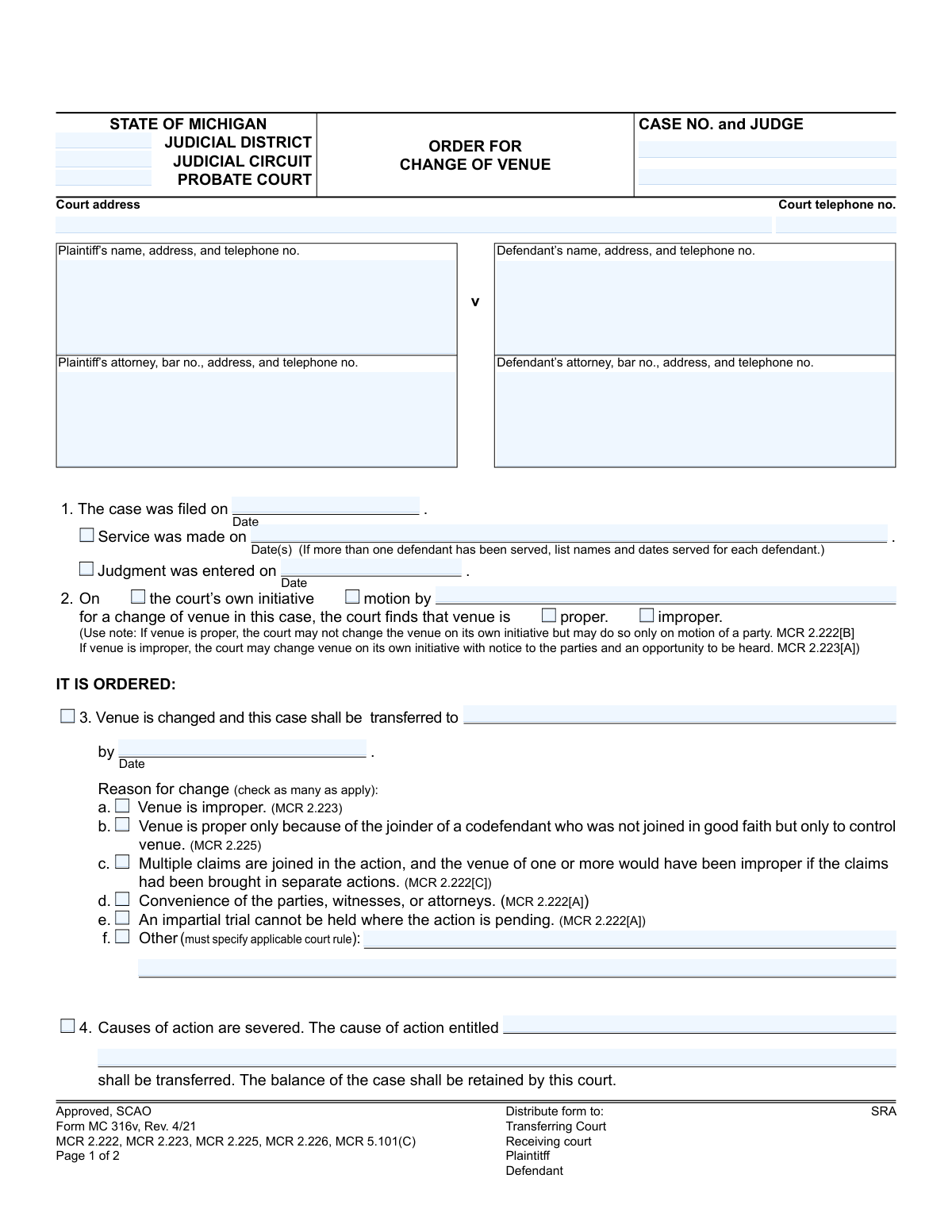
Yes! You can use AI to fill out Form MC 316v, Order for Change of Venue

Form MC 316v is an official judicial order issued by a Michigan court to approve or deny a request to move a case to a different venue. It's used when the original venue is improper, for the convenience of parties, or to ensure an impartial trial, formalizing the court's decision and outlining any associated costs. Today, this form can be filled out quickly and accurately using AI-powered services like Instafill.ai, which can also convert non-fillable PDF versions into interactive fillable forms.
MC 316v is part of the Michigan court forms category on Instafill.
Our AI automatically handles information lookup, data retrieval, formatting, and form filling.
It takes less than a minute to fill out MC 316v using our AI form filling.
Securely upload your data. Information is encrypted in transit and deleted immediately after the form is filled out.

Form specifications

Form name: Form MC 316v, Order for Change of Venue
Number of fields: 51
Number of pages: 1
Language: English
main-image

Instafill Demo: How to fill out PDF forms in seconds with AI

How to Fill Out MC 316v Online for Free in 2026

Are you looking to fill out a MC 316V form online quickly and accurately? Instafill.ai offers the #1 AI-powered PDF filling software of 2026, allowing you to complete your MC 316V form in just 37 seconds or less.
Follow these steps to fill out your MC 316V form online using Instafill.ai:
  1. 1 Navigate to Instafill.ai and upload your Order for Change of Venue form or select it from the template library.
  2. 2 Provide the case information, including the case number, judge, court address, and details for the plaintiff and defendant, including their attorneys.
  3. 3 Enter the key dates for the case, such as when it was filed, when service was made, and when any judgment was entered.
  4. 4 Indicate whether the change of venue is on the court's initiative or by motion, and specify the court's finding on whether the current venue is proper or improper.
  5. 5 Complete the 'IT IS ORDERED' section by checking the appropriate reasons for the venue change (e.g., improper venue, convenience of parties) and specifying the new court location and transfer date.
  6. 6 Detail any financial obligations as ordered by the court, such as who is responsible for filing fees, costs, and attorney fees.
  7. 7 Review all the information auto-filled by the AI for accuracy, then download the completed form for the judge's signature and distribution to all required parties.

Our AI-powered system ensures each field is filled out correctly, reducing errors and saving you time.

Why Choose Instafill.ai for Your Fillable MC 316v Form?

Speed

Complete your MC 316v in as little as 37 seconds.

Up-to-Date

Always use the latest 2026 MC 316v form version.

Cost-effective

No need to hire expensive lawyers.

Accuracy

Our AI performs 10 compliance checks to ensure your form is error-free.

Security

Your personal information is protected with bank-level encryption.

Frequently Asked Questions About Form MC 316v

This is an official court order issued by a judge in Michigan. It documents the court's decision to either move a case to a different court location (change of venue) or deny a request to do so.

A judge or authorized court personnel completes and signs this form. It is the official ruling on a motion for a change of venue, not a form that a plaintiff or defendant fills out to make the request.

A change of venue is the legal term for moving a case from the court where it was originally filed to a different court, often in another county or judicial district.

Common reasons include the original venue being legally improper, the convenience of parties and witnesses, or the inability to have an impartial trial in the current location.

If you fail to pay the fees within the specified time (usually 28 days), the case may be dismissed or transferred back to the original court, depending on the reason for the venue change.

The judge determines who is responsible for paying filing fees and other costs, as indicated in sections 6 and 7 of the order. This is often based on whether the original venue was proper or improper.

The clerk of the original court prepares and sends the case records to the new court specified in the order. Once any required fees are paid, the case will proceed in the new location.

This section is for the receiving court to use if they reject the transfer from the original court. This typically happens if the order is incomplete or lacks the necessary information for them to accept the case.

This means your case involves multiple legal claims, and the court is splitting them up. Only a specific part of the case is being transferred to the new court, while the rest of the case remains in the original court.

No, because this is a court order completed by a judge. However, AI services like Instafill.ai are very useful for filling out the *motion* you would file to request a change of venue, saving time and ensuring accuracy.

You can upload your legal forms, like a motion, to Instafill.ai. The AI technology will identify the fields and help you auto-fill your information, which simplifies the process of preparing documents for court.

While you don't need to fill out the order itself, if you have other non-fillable court forms, services like Instafill.ai can convert them into interactive, fillable forms. This makes it much easier to complete any documents you need to file.

If the court acts on its 'own initiative,' it means the judge decided to consider changing the venue without a formal request. If it's on 'motion by' a party, it means the plaintiff or defendant formally requested the change.

Compliance MC 316v
Validation Checks by Instafill.ai

1
Case and Service Date Chronology
This validation ensures that the key dates on the form are in a logical chronological order. The 'Service was made on' date must be on or after the 'Case was filed on' date, and the 'Judgment was entered on' date (if present) must be on or after the 'Case was filed on' date. This prevents illogical or impossible timelines from being entered, which could invalidate the order. If the dates are out of sequence, the system should flag an error and require correction before submission.
2
Attorney Bar Number Format
This check verifies that the Plaintiff's and Defendant's attorney bar numbers are entered in the correct format for the State of Michigan (e.g., 'P' followed by a series of digits). This is crucial for correctly identifying the legal counsel of record and ensuring the document is legally sound. An incorrect bar number can lead to administrative delays and rejection by the court. If the format is invalid, the user should be prompted to correct the entry.
3
Venue Change Logic Check
This validation enforces the rule stated in MCR 2.222[B]. If the court finds that venue is 'proper' (box checked), the change must have been initiated by a 'motion by' a party. The system will check that the 'the court’s own initiative' box is not selected in this scenario. This is a critical check for legal compliance, as a court cannot change a proper venue on its own. A failure would trigger a warning explaining the rule and requiring the user to correct the selections.
4
Conditional 'Other' Reason Specification
This check ensures that if the 'f. Other' checkbox is selected as a reason for the change of venue, the corresponding text field specifying the court rule is not left empty. The form explicitly states '(must specify applicable court rule)', making this a required field when its parent option is chosen. This ensures the order is complete and the justification is clearly documented. If the checkbox is ticked but the field is blank, an error should prevent submission.
5
Mutually Exclusive Order Outcome
This validation ensures that the form does not contain conflicting outcomes. If any part of Section 9 ('The motion is denied/dismissed') is filled out, then Sections 3, 4, 6, and 7, which detail the specifics of a transfer, must be empty. Conversely, if a transfer is ordered, Section 9 must be empty. This prevents the creation of an ambiguous and unenforceable order that both grants and denies the motion. The system should return an error if both outcomes are specified.
6
Conditional Denial/Dismissal Reason
This check verifies that if the motion is marked as 'denied' or 'dismissed' in Section 9, the corresponding text box explaining the reason is filled out. A simple denial without justification is insufficient and may be grounds for appeal or rejection. This ensures the order provides a clear basis for the court's decision. If 'denied' or 'dismissed' is checked and the reason is blank, the form submission should be blocked.
7
Mutually Exclusive Fee Status
This validation confirms that the checkboxes for 'Filing fees have been waived' (Section 5) and the order for payment of fees (Section 6) are mutually exclusive. A case cannot simultaneously have fees waived and have a party ordered to pay them. This check prevents contradictory financial instructions in the court order. If both are selected, the system should display an error and require the user to choose only one.
8
Conditional Fee Payer Identification
This check ensures that if Section 6 is selected, indicating that filing fees must be paid, the field identifying who 'shall pay the filing fees' is populated. Without a designated payer, the instruction is incomplete and unenforceable, which would cause delays at the receiving court. If Section 6 is active but the payer is not specified, the system should halt submission and prompt for the required information.
9
Reason for Change Completeness
This validation ensures that if a transfer is ordered (i.e., Section 3 is filled out), at least one reason from the list of checkboxes (3a through 3f) is selected. An order to change venue must be justified by a specific legal reason as outlined in the court rules. Failing to provide a reason invalidates the order's basis. The system should prevent submission if a transfer is ordered without a corresponding reason being checked.
10
Conditional Severance Details
This check verifies that if the 'Causes of action are severed' box (Section 4) is checked, the corresponding text field specifying 'The cause of action entitled' is filled out. This detail is essential for the receiving court to understand which specific part of the case is being transferred. An incomplete severance instruction would create confusion and is not actionable. If the box is checked but the detail is missing, an error should be triggered.
11
Transfer Destination and Date Completeness
This validation ensures that when a venue change is ordered, both the destination court ('transferred to') and the deadline for the transfer ('by Date') are specified in Section 3. These are the most critical components of the transfer order itself. Without this information, the order is meaningless and cannot be executed by the court clerk. The system must require both fields to be filled if the transfer is granted.
12
Case Number Presence and Format
This check validates that the 'CASE NO.' field is not empty and conforms to the expected format for the jurisdiction. The case number is the primary identifier for the legal action and is essential for linking the order to the correct file in both the transferring and receiving courts. An absent or malformed case number would render the document impossible to process correctly. The system should flag this as a critical error if the field is empty or invalid.

Common Mistakes in Completing MC 316v

Incorrect Case Number or Judge Name

Users frequently make typographical errors when entering the case number or misspell the presiding judge's name. This often happens due to manual data entry from other documents. An incorrect case number can cause the order to be rejected by the clerk's office or misfiled with the wrong case, leading to significant processing delays and requiring a corrected order to be issued.

Omitting Service Dates for Multiple Defendants

In Section 1, the form specifically instructs users to list names and service dates for each defendant if there are more than one. Filers often overlook this parenthetical instruction and only list a single date. This creates an incomplete record, which can lead to the order being challenged or refused by the receiving court for failing to show proper service on all parties.

Contradictory Selections for Venue Status

A critical error is checking contradictory boxes, such as stating venue is 'proper' in Section 2 but then checking box 3a, 'Venue is improper,' as the reason for the change. This mistake stems from a misunderstanding of the legal basis for the transfer. It creates a legally incoherent order that will almost certainly be refused by the receiving court, as it lacks a clear legal justification for the transfer.

Failing to Specify the Receiving Court

In Section 3, filers sometimes leave the line 'transferred to' blank, assuming the destination is implied or will be filled in later. An order without a specified receiving court is unenforceable and incomplete. This brings the entire legal process to a halt, as the transferring court clerk has no direction on where to send the case files, necessitating a new, corrected order.

Incomplete Justification for 'Other' Reason

When the standard reasons for a change of venue do not apply, a user might check box 3f, 'Other,' but then fail to specify the applicable court rule as required. This omission renders the justification for the transfer incomplete and legally insufficient. The receiving court is likely to refuse the transfer because the legal basis for the order is not clearly stated.

Ambiguous Assignment of Fees and Costs

In Sections 6 and 7, the form requires specifying which party is responsible for paying filing fees and other costs. Filers may forget to fill in the party's name, leading to ambiguity and future disputes. This can delay the transfer, as the receiving court may not proceed until fee arrangements are clear, and failure to pay within the deadline can result in case dismissal.

Misunderstanding Consequences for Non-Payment of Fees

Section 6 contains two distinct consequences for non-payment (6a and 6b) that depend on whether the original venue was proper or improper. Filers often don't realize this distinction and may apply the wrong clause. This provides incorrect information to the parties about the potential outcome (e.g., dismissal vs. transfer back), leading to confusion and improper case management.

Missing Judge's Signature or Date

An order is not legally valid until it is signed and dated by the judge. This fundamental step is sometimes missed due to simple administrative oversight. An unsigned or undated order has no legal effect and cannot be acted upon by the court clerk or the parties, causing a complete stop to the process until it is properly executed.

Providing Incomplete or Outdated Attorney Information

The fields for attorney information, including their bar number, are often filled with outdated or incorrect data. This happens when filers use old records without verifying the current attorney of record. Sending notices to the wrong attorney can cause due process violations, while an incorrect bar number can cause rejection by e-filing systems, delaying the case.

Manual Data Entry Errors on Non-Fillable Versions

Often, legal forms are only available as flat, non-fillable PDFs, forcing users to fill them out by hand. This frequently leads to illegible handwriting, typos, and information being written in the wrong sections. To avoid this, AI-powered tools like Instafill.ai can convert non-fillable PDFs into interactive forms, allowing for clean, typed entries and data validation to ensure accuracy before printing.
Saved over 80 hours a year

“I was never sure if my IRS forms like W-9 were filled correctly. Now, I can complete the forms accurately without any external help.”

Kevin Martin Green

Your data stays secure with advanced protection from Instafill and our subprocessors

Robust compliance program

Transparent business model

You’re not the product. You always know where your data is and what it is processed for.

ISO 27001, HIPAA, and GDPR

Our subprocesses adhere to multiple compliance standards, including but not limited to ISO 27001, HIPAA, and GDPR.

Security & privacy by design

We consider security and privacy from the initial design phase of any new service or functionality. It’s not an afterthought, it’s built-in, including support for two-factor authentication (2FA) to further protect your account.

Fill out MC 316v with Instafill.ai

Worried about filling PDFs wrong? Instafill securely fills form-mc-316v-order-for-change-of-venue forms, ensuring each field is accurate.