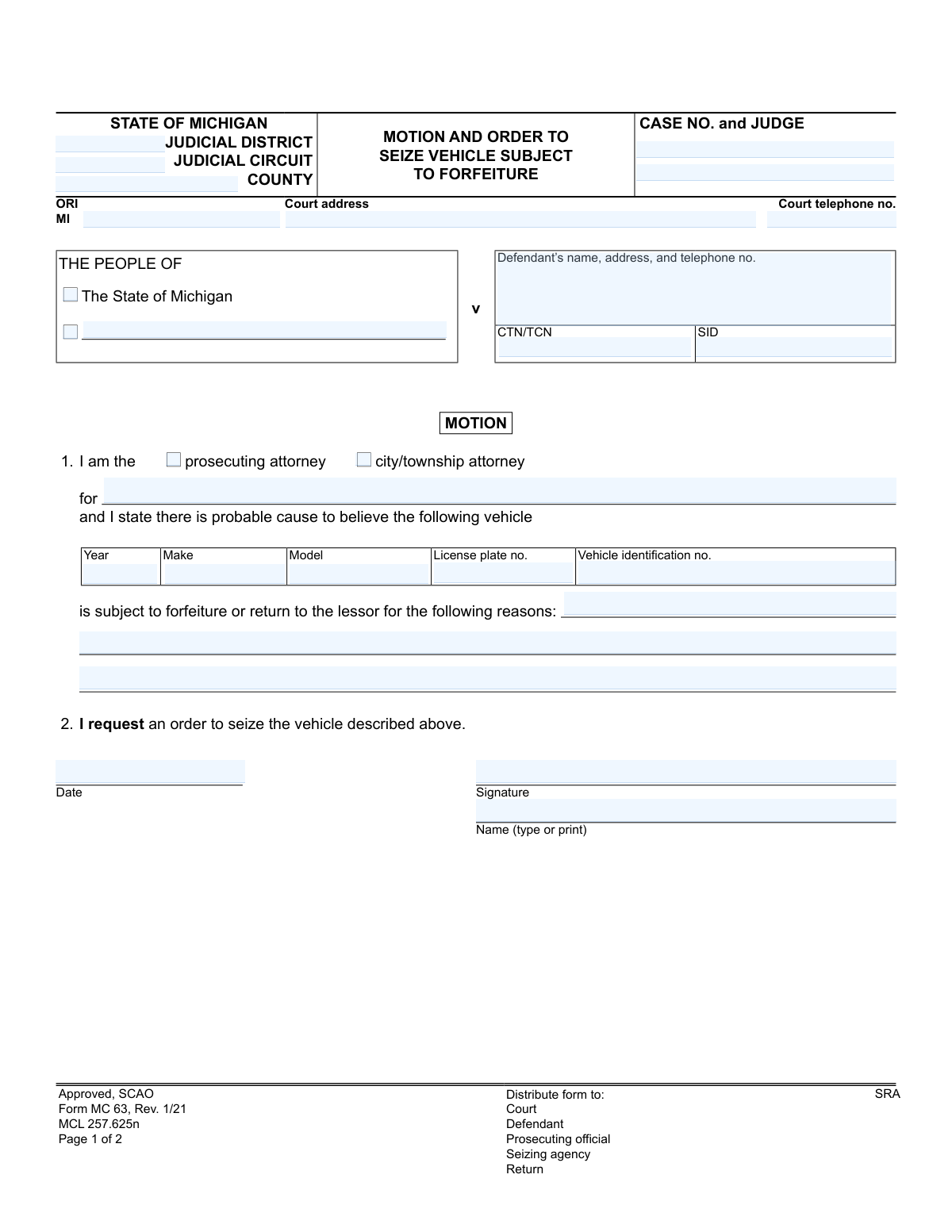
Yes! You can use AI to fill out Form MC 63, Motion and Order to Seize Vehicle Subject to Forfeiture

Form MC 63, Motion and Order to Seize Vehicle Subject to Forfeiture, is a legal document used in the state of Michigan by a prosecuting or city/township attorney to petition a court to seize a vehicle. This form is critical when there is probable cause to believe a vehicle is subject to legal forfeiture, often in connection with a crime. It includes sections for the motion (the request), the judge's order, and a return on seizure. Today, this form can be filled out quickly and accurately using AI-powered services like Instafill.ai, which can also convert non-fillable PDF versions into interactive fillable forms.
MC 63 is part of the Michigan court forms category on Instafill.
Our AI automatically handles information lookup, data retrieval, formatting, and form filling.
It takes less than a minute to fill out MC 63 using our AI form filling.
Securely upload your data. Information is encrypted in transit and deleted immediately after the form is filled out.

Form specifications

Form name: Form MC 63, Motion and Order to Seize Vehicle Subject to Forfeiture
Number of fields: 44
Number of pages: 1
Language: English
main-image

Instafill Demo: How to fill out PDF forms in seconds with AI

How to Fill Out MC 63 Online for Free in 2026

Are you looking to fill out a MC 63 form online quickly and accurately? Instafill.ai offers the #1 AI-powered PDF filling software of 2026, allowing you to complete your MC 63 form in just 37 seconds or less.
Follow these steps to fill out your MC 63 form online using Instafill.ai:
  1. 1 Navigate to Instafill.ai and upload the MC 63 form or select it from the available templates.
  2. 2 Provide the court and case information, including the judicial district, circuit, county, and case number.
  3. 3 Enter the defendant's name and address, and indicate your role as the prosecuting or city/township attorney.
  4. 4 Input the specific details of the vehicle to be seized, such as its year, make, model, VIN, and license plate number.
  5. 5 Clearly state the reasons and probable cause for believing the vehicle is subject to forfeiture.
  6. 6 Review all the information populated by the AI for accuracy, then sign and date the motion section.
  7. 7 Download the completed form to file with the court and distribute to the defendant, seizing agency, and other required parties.

Our AI-powered system ensures each field is filled out correctly, reducing errors and saving you time.

Why Choose Instafill.ai for Your Fillable MC 63 Form?

Speed

Complete your MC 63 in as little as 37 seconds.

Up-to-Date

Always use the latest 2026 MC 63 form version.

Cost-effective

No need to hire expensive lawyers.

Accuracy

Our AI performs 10 compliance checks to ensure your form is error-free.

Security

Your personal information is protected with bank-level encryption.

Frequently Asked Questions About Form MC 63

This form is used by a prosecuting attorney to request a court order to seize a vehicle that is believed to be subject to legal forfeiture, often in connection with a crime. The form includes the motion, the judge's order, and the official return after seizure.

The 'Motion' section is completed by a prosecuting or city/township attorney. A judge fills out the 'Order' section to either grant or deny the motion, and a law enforcement official completes the 'Return on Seizure' section after taking possession of the vehicle.

It means the prosecution believes your vehicle was involved in a crime and is asking the court for permission to seize it as part of a forfeiture action. The judge will decide whether to approve or deny this request.

You must provide the vehicle's year, make, model, license plate number, and the full Vehicle Identification Number (VIN).

In this context, the prosecuting attorney must state the specific reasons why they have a reasonable belief that the vehicle is connected to a crime and is legally subject to being forfeited to the state.

Yes, the notice on the form explains that you can file a motion with the court to request the vehicle's return. If you can prove ownership and necessity, the court may return the vehicle to you after placing a lien on it.

According to the notice on the form, the court will hear a defendant's motion to return the vehicle within 7 days after it is filed.

A law enforcement agency is authorized to seize the vehicle and store it at a specified location until the court issues a further order. The seizing official then completes the 'Return on Seizure' portion of the form.

The judge's order will specify the name and address of the storage location where the vehicle is to be held.

As indicated on the form, copies are distributed to the Court, the Defendant, the Prosecuting official, and the Seizing agency.

Yes, services like Instafill.ai use AI to accurately auto-fill form fields from your case management system, which can save significant time for legal staff preparing the motion.

If the PDF is not fillable, you can use a service like Instafill.ai. It can convert flat, non-fillable PDFs into interactive forms that you can easily complete and save online.

Simply upload the MC 63 form to Instafill.ai, and its AI will identify all the fields. You can then quickly type in the information or connect it to your data source to populate the fields automatically.

This section is a certification completed by the law enforcement official who physically seizes the vehicle. It documents the date of seizure and confirms the vehicle's description.

Compliance MC 63
Validation Checks by Instafill.ai

1
VIN Format and Structure Validation
This check verifies that the 'Vehicle identification no.' (VIN) field contains exactly 17 alphanumeric characters. It also validates that the characters used are valid for a VIN, specifically excluding 'I', 'O', and 'Q'. This is critical for uniquely and accurately identifying the vehicle, as an incorrect VIN could lead to the seizure of the wrong vehicle.
2
Case Number Consistency Across Pages
This validation ensures that the 'Case No.' entered on Page 2 of the form exactly matches the 'Case No.' entered on Page 1. This is a crucial integrity check to prevent the second page of the order from being mismatched with the first page of the motion. A mismatch could invalidate the entire document or associate the order with the wrong case file.
3
Mutually Exclusive Attorney Type Selection
The form requires the filer to identify as either a 'prosecuting attorney' or a 'city/township attorney'. This validation ensures that one, and only one, of these options is selected. Failure to select an option or selecting both would create ambiguity about the filer's legal authority to bring the motion.
4
Conditional Requirement for Attorney Jurisdiction
This check ensures that if either 'prosecuting attorney' or 'city/township attorney' is selected, the accompanying 'for' field must be filled out. This field specifies the jurisdiction (e.g., county or city) the attorney represents, which is essential for establishing their standing to file the motion. The motion is invalid without this clarifying information.
5
Logical Coherence of Court Order
The 'ORDER' section has three mutually exclusive outcomes: 'is subject to forfeiture', 'is not subject to forfeiture', or 'motion is denied'. This validation confirms that only one of these three states is selected by the judge. For example, the form cannot indicate that the vehicle 'is subject to forfeiture' while also indicating the 'motion is denied', as this is a logical contradiction that would make the order unenforceable.
6
Completeness of 'Return on Seizure' Section
This validation triggers if any field in the 'RETURN ON SEIZURE OF VEHICLE' section is filled. It then verifies that all other fields in that section are also complete, including the seizure date, storage location, seizing official's name, title, and unit of government. This ensures a complete and official record of the seizure action is captured, which is necessary for legal chain of custody and accountability.
7
Chronological Order of Dates
This check validates the logical sequence of dates on the form. Specifically, it ensures the 'Seizure date' on the 'Return on Seizure' is on or after the date the judge signed the 'ORDER'. A vehicle cannot be legally seized based on this order before the order itself is granted and dated by the court.
8
Mandatory Probable Cause Justification
The text field explaining the reasons for forfeiture is the legal basis for the entire motion. This validation ensures the field is not empty and contains a substantive entry. An empty or missing justification would mean the motion lacks probable cause on its face, making it legally insufficient and subject to immediate denial.
9
Vehicle Year Plausibility Check
This validation checks that the 'Vehicle Year' is a 4-digit number within a reasonable range (e.g., greater than 1900 and not later than the current year plus one). This simple check prevents common data entry errors, such as typos or entering the current date. It ensures the vehicle data is credible and accurate for identification purposes.
10
Conditional Requirement for Judge's Signature and Date
An order from the court is not valid until it is signed and dated by a judge. This validation ensures that if any decision is marked in the 'ORDER' section (e.g., 'is subject to forfeiture' or 'motion is denied'), the 'Judge signature and date' fields must be completed. Without the judge's dated signature, the order is not legally binding.
11
Completeness of Defendant Information
This check verifies that the 'Defendant’s name, address, and telephone no.' field is not empty. This information is essential for properly serving notice to the defendant and associating the motion with the correct party in the legal proceedings. A failure to identify the defendant makes the motion procedurally deficient.
12
Court Telephone Number Format
This validation ensures the 'Court telephone no.' field contains a valid phone number format, such as (XXX) XXX-XXXX or a 10-digit number. This is important for ensuring that parties involved in the case can contact the court if necessary. An invalid number hinders communication and can delay proceedings.

Common Mistakes in Completing MC 63

Entering an Incorrect Vehicle Identification Number (VIN)

This error often happens due to manual data entry, such as transposing letters or numbers from a police report. An incorrect VIN can render the seizure order invalid or, in a worst-case scenario, lead to the seizure of the wrong vehicle. To avoid this, meticulously double-check the 17-character VIN against official records; AI-powered tools like Instafill.ai can help by validating the VIN format and checksum to catch typos automatically.

Providing Vague or Legally Insufficient Reasons for Forfeiture

The motion requires a clear statement of probable cause. Attorneys sometimes provide a conclusory statement like 'Used in a crime' without citing the specific statute or detailing the facts linking the vehicle to the offense. This can lead to the judge denying the motion for failing to meet the legal standard. Always articulate the factual basis and reference the specific legal code, such as MCL 257.625n as noted on the form, that authorizes the forfeiture.

Incomplete or Incorrect Court and Case Identifiers

Filers often omit or mistype the 'Case No.', 'Judicial District', 'Judicial Circuit', or 'ORI' number at the top of the form. This happens when working on multiple cases and can cause the motion to be rejected by the clerk, misfiled, or significantly delayed. To prevent this, carefully verify all header information against the primary case file before submission.

Forgetting the Signature or Date on the Motion

In the rush to file, the prosecuting official may forget to sign or date the motion in the designated section. An unsigned or undated motion is legally invalid and will be rejected by the court, requiring a refiling and causing unnecessary delays in the seizure process. Always perform a final review of the document to ensure all signature and date fields are properly completed before filing.

Mismatched Vehicle Descriptions on the 'Return on Seizure'

The seizing official, when completing the 'Return on Seizure' section, may accidentally write down vehicle details that do not exactly match the information in the judge's order. This discrepancy can create legal challenges regarding the validity of the seizure and chain of custody. The seizing official must carefully copy the vehicle's year, make, model, and VIN directly from the court order onto the return section.

Omitting Critical Defendant Identifiers (CTN/SID)

The 'CTN/TCN' (Complaint Tracking Number/True Copy Number) and 'SID' (State Identification Number) are crucial for linking the forfeiture action to the defendant's criminal case and record. Omitting these numbers makes administrative tracking difficult and can slow down the process of associating the motion with the correct file. These numbers should be carefully transcribed from the official criminal complaint or case record.

Contradictory Selections in the 'Order' Section

This mistake is typically made by court staff, where they might inadvertently check both 'The motion is denied' and also fill out the details for the seizure order. This creates a legally ambiguous and unenforceable order that must be corrected and re-issued. The person completing the order must ensure that only the sections relevant to the judge's actual decision—either denial or granting the seizure—are filled out.

Failing to Specify the Prosecuting Authority

The form requires the filer to check whether they are a 'prosecuting attorney' or 'city/township attorney' and to specify the jurisdiction they represent (e.g., 'for Wayne County'). Leaving this section blank or incomplete creates ambiguity about who is bringing the motion and whether they have the authority to do so. Always check the appropriate box and write the full name of the governmental entity you represent.

Providing an Incomplete Storage Location Address

When the seizing agency fills out the 'Return on Seizure,' they may list a vague storage location, such as 'City Impound Lot,' without a full street address. This makes it difficult for the defendant or their legal counsel to locate the vehicle for inspection or to arrange for its release if ordered by the court. The full, specific name and physical address of the storage facility must be provided.

Using a Non-Fillable PDF Version of the Form

Often, official forms are only available online as flat, non-fillable PDFs, forcing users to print and fill them out by hand. This leads to illegible handwriting, data entry errors, and an unprofessional appearance that can cause processing delays. Using a service like Instafill.ai can convert any flat PDF into an interactive, fillable form, ensuring all entries are clear, properly formatted, and easy to read.
Saved over 80 hours a year

ā€œI was never sure if my IRS forms like W-9 were filled correctly. Now, I can complete the forms accurately without any external help.ā€

Kevin Martin Green

Your data stays secure with advanced protection from Instafill and our subprocessors

Robust compliance program

Transparent business model

You’re not the product. You always know where your data is and what it is processed for.

ISO 27001, HIPAA, and GDPR

Our subprocesses adhere to multiple compliance standards, including but not limited to ISO 27001, HIPAA, and GDPR.

Security & privacy by design

We consider security and privacy from the initial design phase of any new service or functionality. It’s not an afterthought, it’s built-in, including support for two-factor authentication (2FA) to further protect your account.

Fill out MC 63 with Instafill.ai

Worried about filling PDFs wrong? Instafill securely fills form-mc-63-motion-and-order-to-seize-vehicle-subject-to-forfeiture forms, ensuring each field is accurate.