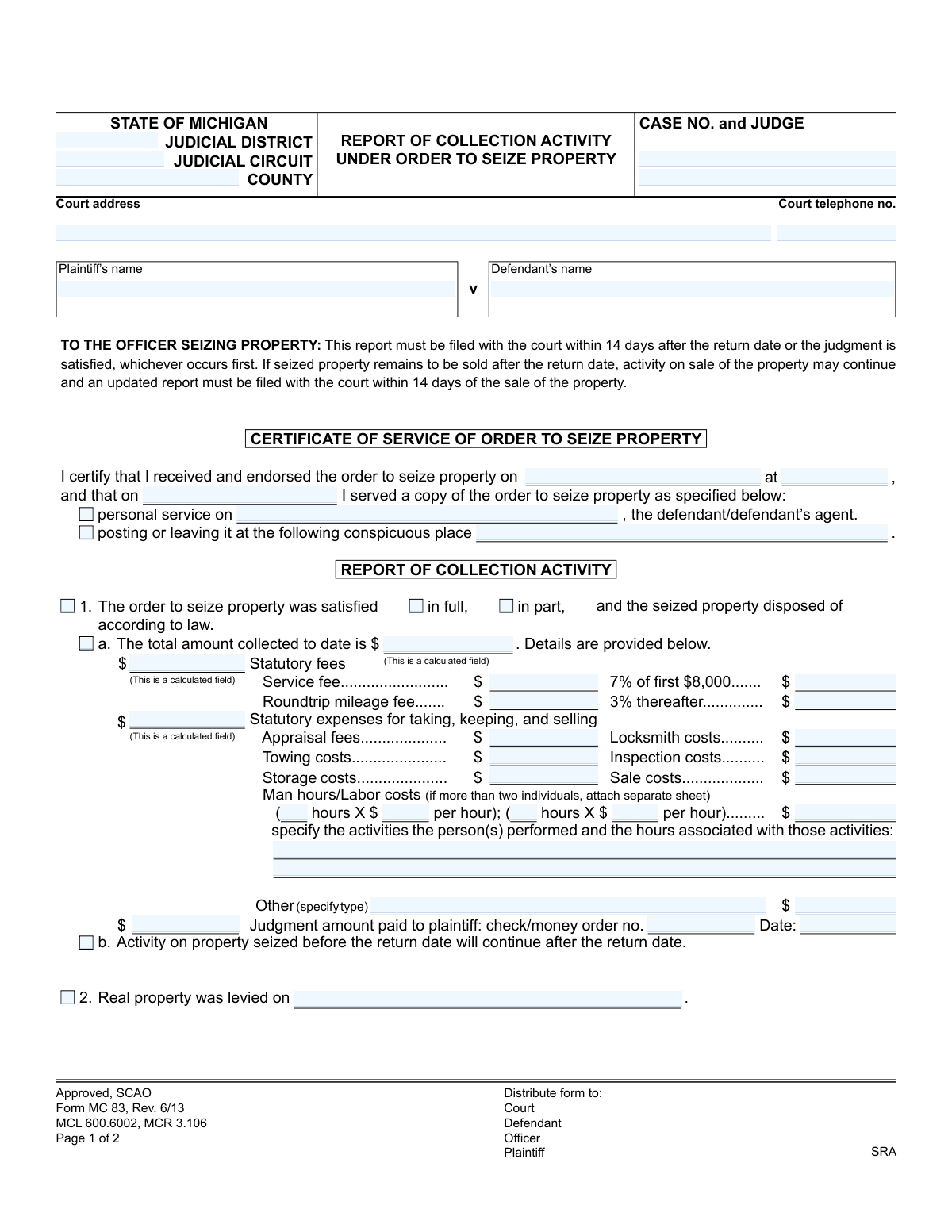
Yes! You can use AI to fill out Form MC 83, Report of Collection Activity under Order to Seize Property
This is the State of Michigan's Form MC 83, Report of Collection Activity under Order to Seize Property. It is used by a court officer or sheriff to officially report to the court the actions taken and outcomes of an Order to Seize Property. The form documents whether the judgment was satisfied, details the amounts collected, lists statutory fees and expenses, and provides an inventory of any property sold. Today, this form can be filled out quickly and accurately using AI-powered services like Instafill.ai, which can also convert non-fillable PDF versions into interactive fillable forms.
MC 83 is part of the
Michigan court forms category on Instafill.
Our AI automatically handles information lookup, data retrieval, formatting, and form filling.
It takes less than a minute to fill out MC 83 using our AI form filling.
Securely upload your data. Information is encrypted in transit and deleted immediately after the form is filled out.
Form specifications
| Form name: | Form MC 83, Report of Collection Activity under Order to Seize Property |
| Number of fields: | 70 |
| Number of pages: | 1 |
| Language: | English |
More forms in Michigan court forms
Instafill Demo: How to fill out PDF forms in seconds with AI
How to Fill Out MC 83 Online for Free in 2026
Are you looking to fill out a MC 83 form online quickly and accurately? Instafill.ai offers the #1 AI-powered PDF filling software of 2026, allowing you to complete your MC 83 form in just 37 seconds or less.
Follow these steps to fill out your MC 83 form online using Instafill.ai:
- 1 Navigate to Instafill.ai and upload or select the MC 83, Report of Collection Activity under Order to Seize Property form.
- 2 Use the AI assistant to input the case information, including the court, case number, judge, and plaintiff/defendant names.
- 3 Complete the 'Certificate of Service' section, providing the date the order was received and the date and method of service on the defendant.
- 4 Fill out the 'Report of Collection Activity' section, indicating if the order was satisfied and detailing all amounts collected, statutory fees, and expenses.
- 5 If property was sold, complete the 'Inventory of Property Sold' table with descriptions, quantities, and values for each item.
- 6 If the order was not satisfied, check the box corresponding to the reason, such as an incorrect address or inability to locate property.
- 7 Review all AI-populated fields for accuracy, then e-sign and date the form before filing it with the court and serving copies to the plaintiff and defendant.
Our AI-powered system ensures each field is filled out correctly, reducing errors and saving you time.
Why Choose Instafill.ai for Your Fillable MC 83 Form?
Speed
Complete your MC 83 in as little as 37 seconds.
Up-to-Date
Always use the latest 2026 MC 83 form version.
Cost-effective
No need to hire expensive lawyers.
Accuracy
Our AI performs 10 compliance checks to ensure your form is error-free.
Security
Your personal information is protected with bank-level encryption.
Frequently Asked Questions About Form MC 83
This form, MC 83, is used by a court officer or deputy sheriff to report the outcome of an Order to Seize Property. It details what property was seized, how much money was collected, and the associated costs to satisfy a court judgment.
The court officer or deputy sheriff who was assigned to execute the Order to Seize Property is responsible for completing and filing this form with the court.
The report must be filed with the court within 14 days after the return date on the order or after the judgment is satisfied, whichever occurs first. An updated report is needed if property is sold after the return date.
According to the form, copies must be distributed to the Court, the Defendant, the Plaintiff (or their attorney), and the Officer who completed the report.
You should calculate 7% of the first $8,000 collected and 3% of any amount collected after that. Add these amounts to the service fee and roundtrip mileage fee to get the total statutory fees.
If a diligent search reveals no personal property of the defendant's that exceeds the statutory exemption, you should check box 3.c. on the form and submit the report to the court.
If the defendant has filed for bankruptcy, you must cease collection activities. On the form, check box 3.b. and enter the date of the bankruptcy filing and the case number, if you have it.
This section requires a detailed list of each item sold, including the quantity, a full description with any model or serial numbers, and the final amount or value it was sold for.
You can claim statutory expenses for taking, keeping, and selling the property. This includes costs for towing, storage, locksmiths, appraisals, sale costs, and specific labor costs for individuals involved in the seizure.
You should check box 1.b. to indicate that activity on the seized property will continue after the return date. You must then file an updated report within 14 days after the property is eventually sold.
Yes, services like Instafill.ai use AI to help you accurately auto-fill form fields from your case data, which saves time and helps prevent errors.
Simply upload the MC 83 form to the Instafill.ai platform. The AI will make the document interactive, allowing you to quickly fill in all the required information, save, and download the completed PDF.
You can upload the non-fillable PDF to a service like Instafill.ai. It will automatically convert the flat form into an interactive, fillable version that you can complete, save, and print from your computer.
This section is your official declaration of when and how you delivered the original 'Order to Seize Property' to the defendant or their agent, or posted it at a conspicuous location as required by law.
Compliance MC 83
Validation Checks by Instafill.ai
1
Case Number Consistency and Format
This check verifies that the 'Case No.' field is present on both pages of the form and that the value is identical in both locations. It also validates that the number conforms to the court's standard case number format. This is critical for ensuring the report is correctly filed and associated with the proper legal case, preventing administrative errors and delays.
2
Service Date Logical Order
This validation ensures the 'served date' is on or after the 'received and endorsed date'. It is logically impossible to serve an order before receiving it. An invalid sequence suggests a data entry error that could challenge the legal validity of the service, so the form should not be accepted until the dates are corrected.
3
Conditional Service Method Details
This check ensures that if 'personal service' is indicated, the 'defendant/defendant’s agent' name is provided. Conversely, if service was completed by 'posting', the 'conspicuous place' field must be filled. This validation enforces completeness and provides necessary details to legally document how the service was executed, which is a critical procedural requirement.
4
Mutually Exclusive Outcome Selection
This validation ensures that the user can only report one primary outcome: 'The order to seize property was satisfied', 'Real property was levied on', or 'The order to seize property was not satisfied'. These are mutually exclusive events. The system should prevent the submission of a form where more than one of these primary outcomes is selected to avoid ambiguity and ensure a clear report status.
5
Collection Amount Cross-Validation
This check verifies that the 'total amount collected to date' is equal to the sum of all itemized costs: 'Total Statutory fees', 'Total Statutory expenses', and 'Judgment amount paid to plaintiff'. This is a crucial financial reconciliation to ensure the report is mathematically sound and all collected funds are accounted for. A mismatch would indicate a calculation error and must be corrected before submission.
6
Required Reason for Non-Satisfaction
This validation confirms that if the 'The order to seize property was not satisfied' option is selected, at least one of the subsequent reasons (a, b, c, or d) is also checked. A report of non-satisfaction is incomplete without an explanation. This rule ensures the court and plaintiff understand why collection efforts were unsuccessful.
7
Conditional Bankruptcy Information
This check is triggered if the reason for non-satisfaction is 'Defendant states he/she filed bankruptcy'. It validates that both the 'bankruptcy date' and 'bankruptcy case number' fields are filled. This information is vital for the plaintiff to verify the bankruptcy claim and cease collection activities as required by law, so its absence makes the report incomplete.
8
Conditional 'Other' Reason Explanation
This validation ensures that if the 'Other' checkbox is selected as a reason for non-satisfaction (3.d) or for expenses (1.a), the corresponding text field explaining the reason is not empty. An 'Other' selection without an explanation is meaningless and provides no useful information. The check forces the user to provide necessary context for the report to be understood.
9
Monetary Field Format
This check validates that all fields intended for currency values (e.g., 'service fee', 'towing costs', 'amount to plaintiff') contain only valid, non-negative numeric data. This prevents the entry of text or negative numbers into financial fields, ensuring data integrity for all financial calculations and reporting. An error would block submission until the invalid characters are removed.
10
Inventory Requirement for Collected Funds
This validation ensures that if the 'total amount collected to date' is greater than zero, the 'Inventory of Property Sold' section must contain at least one item entry. It is illogical to have collected money from a property sale without listing the property that was sold. This check ensures a complete record of the assets that were liquidated.
11
Telephone Number Format
This check verifies that the 'Court telephone no.' and the 'officer telephone no.' fields adhere to a standard phone number format (e.g., 10 digits, possibly with parentheses and hyphens). Proper formatting ensures the data is clean and that the phone numbers are usable for any necessary follow-up communication. Invalid formats would be flagged for correction.
12
Universal Date Format Validation
This validation ensures that all date fields on the form ('received and endorsed date', 'served date', 'check money order date', 'levy date', 'bankruptcy date', and the final signature 'date') are entered in a valid and consistent format (e.g., MM/DD/YYYY). This prevents data corruption and ensures dates are interpreted correctly by the system and by any person reading the report. It also checks that the dates themselves are logical (e.g., no month 13).
13
Satisfaction Status Requirement
If the main checkbox for 'The order to seize property was satisfied' is checked, this validation ensures that one of the sub-options, either 'in full' or 'in part', is also selected. This level of detail is required to understand the final status of the judgment. The form should not be considered complete without this specific status.
14
Officer Certification Completeness
This validation ensures that the certifying officer has provided their printed name, signature, and the date of signature before the form can be submitted. These elements are legally required to attest to the truth and accuracy of the report's contents. A missing signature or date would render the document invalid and legally non-binding.
Common Mistakes in Completing MC 83
The form requires several calculations, such as the 7% fee on the first $8,000 collected and 3% thereafter, plus totals for various expenses. Officers often make manual math errors, leading to incorrect fee assessments and improper accounting. These errors can result in financial discrepancies, disputes from the plaintiff or defendant, and require the filing of a corrected report. To avoid this, meticulously double-check all calculations before submission. AI-powered tools like Instafill.ai can eliminate these errors by performing the calculations automatically based on the initial amounts entered.
When listing seized property, officers may provide generic descriptions like 'television' or 'computer' in the 'INVENTORY OF PROPERTY SOLD' section. This is insufficient and can lead to disputes over the identity and value of the items sold. A proper inventory must include specific details like brand, model, and serial number or V.I.N. to create an unambiguous record. Failing to do so can compromise the integrity of the sale and the report. Always provide the most detailed description possible for each item.
Entering the wrong Case Number, Judge, or party names is a frequent and critical error. This often happens when an officer is handling multiple cases simultaneously and transposes information. An incorrect case number can cause the report to be misfiled or rejected by the court clerk, delaying the entire process and potentially causing procedural deadlines to be missed. Always verify this information against the original court order before filling out the rest ofthe form.
The 'Man hours/Labor costs' section requires a specific breakdown of hours worked and the corresponding hourly rate for each individual. A common mistake is to simply enter a total labor cost without showing the calculation, or to provide a vague description of the activities performed. This lack of transparency can lead to the costs being challenged and disallowed. To prevent this, clearly document the hours, rate, and specific tasks (e.g., '2 hours @ $50/hr for inventory and loading') for each person involved.
Users sometimes create a contradiction between the checkboxes and the financial details. For example, an officer might check 'satisfied in full' but the 'Judgment amount paid to plaintiff' does not match the required total, or they might check 'not satisfied' while also reporting a partial collection without explanation. This inconsistency confuses the court and requires clarification, delaying case closure. Ensure that the selected status ('in full', 'in part', 'not satisfied') logically aligns with all financial figures and explanations provided in the report.
The form requires several key dates, including when the order was received, when it was served, and the date of the report itself. Forgetting to fill in a date or entering an incorrect one can invalidate the timeline of the collection activity and create legal vulnerabilities. For instance, an incorrect service date could call the legality of the seizure into question. It is crucial to reference logs and the original order to ensure every date field is filled in accurately.
Many official forms are only available as flat, non-fillable PDFs, leading officers to print and fill them out by hand. Rushed or poor handwriting can make names, numbers, and descriptions illegible, leading to data entry errors by the court clerk and potential rejection of the form. To avoid this, it is best to use a tool that can convert the document into a fillable format. For example, Instafill.ai can make any PDF fillable, ensuring all entries are typed, clear, and professional.
The inventory section is small and the form explicitly states 'Attach additional sheets if necessary.' When numerous items are seized, officers may forget to attach the supplemental inventory list or fail to reference it on the main form. This results in an incomplete official record of the property seized and sold, which can cause significant problems if the sale is later scrutinized. Always ensure that any attachments are securely included and clearly referenced on the primary MC 83 form.
The form includes 'Other' fields for both expenses and reasons for non-satisfaction. A common mistake is to use unhelpful placeholders like 'miscellaneous' for expenses or 'complications' for non-satisfaction. These vague entries provide no meaningful information to the court and will likely prompt a request for more detail, delaying the process. Always provide a specific and concise explanation, such as 'Emergency after-hours locksmith fee' or 'Defendant is actively deployed military and protected from collection'.
Saved over 80 hours a year
“I was never sure if my IRS forms like W-9 were filled correctly. Now, I can complete the forms accurately without any external help.”
Kevin Martin Green
Your data stays secure with advanced protection from Instafill and our subprocessors
Robust compliance program
Transparent business model
You’re not the product. You always know where your data is and what it is processed for.
ISO 27001, HIPAA, and GDPR
Our subprocesses adhere to multiple compliance standards, including but not limited to ISO 27001, HIPAA, and GDPR.
Security & privacy by design
We consider security and privacy from the initial design phase of any new service or functionality. It’s not an afterthought, it’s built-in, including support for two-factor authentication (2FA) to further protect your account.
Fill out MC 83 with Instafill.ai
Worried about filling PDFs wrong? Instafill securely fills form-mc-83-report-of-collection-activity-under-order-to-seize-property forms, ensuring each field is accurate.