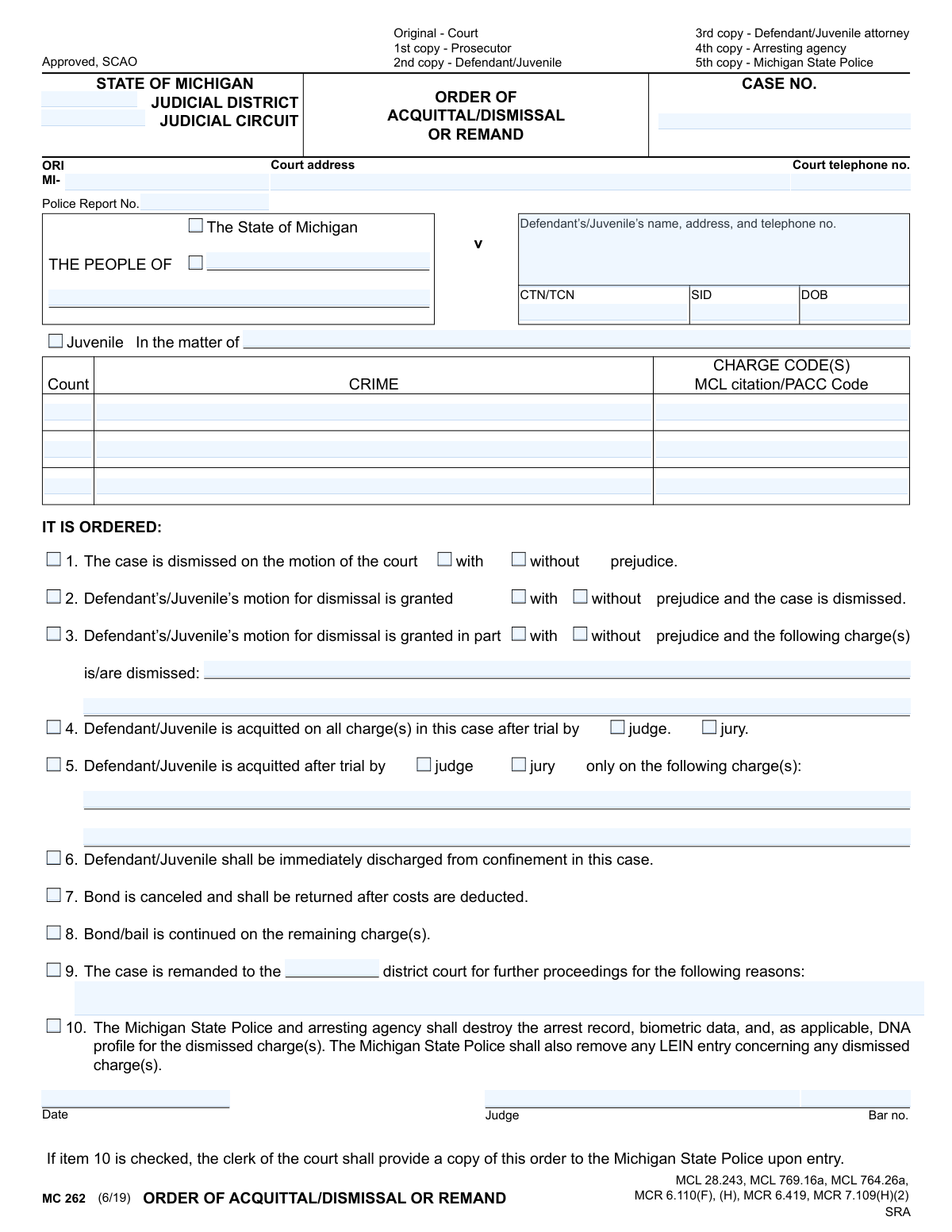
Yes! You can use AI to fill out MC 262, Order of Acquittal/Dismissal or Remand

Form MC 262, Order of Acquittal/Dismissal or Remand, is a legal document used in the State of Michigan's judicial system. A judge issues this order to formally acquit a defendant, dismiss charges (with or without prejudice), or remand a case back to a lower court for further proceedings. This form is critical as it legally finalizes the outcome of a case or a specific charge within it. Today, this form can be filled out quickly and accurately using AI-powered services like Instafill.ai, which can also convert non-fillable PDF versions into interactive fillable forms.
MC 262 is part of the Michigan court forms category on Instafill.
Our AI automatically handles information lookup, data retrieval, formatting, and form filling.
It takes less than a minute to fill out MC 262 using our AI form filling.
Securely upload your data. Information is encrypted in transit and deleted immediately after the form is filled out.

Form specifications

Form name: MC 262, Order of Acquittal/Dismissal or Remand
Number of fields: 55
Number of pages: 1
Language: English
main-image

Instafill Demo: How to fill out PDF forms in seconds with AI

How to Fill Out MC 262 Online for Free in 2026

Are you looking to fill out a MC 262 form online quickly and accurately? Instafill.ai offers the #1 AI-powered PDF filling software of 2026, allowing you to complete your MC 262 form in just 37 seconds or less.
Follow these steps to fill out your MC 262 form online using Instafill.ai:
  1. 1 Navigate to Instafill.ai and upload or select the MC 262 form.
  2. 2 Enter the court and case information, including the judicial district/circuit, case number, and parties involved.
  3. 3 Provide the defendant's or juvenile's personal information, such as name, address, CTN/SID, and date of birth.
  4. 4 List the specific charges involved, including the crime, charge code, and MCL citation for each count.
  5. 5 Check the appropriate boxes to indicate the court's order, such as dismissal, acquittal by judge or jury, or remand, specifying if it's with or without prejudice.
  6. 6 Select any additional directives, like the immediate discharge from confinement, cancellation of bond, or destruction of arrest records.
  7. 7 Review all entered information for accuracy before the judge signs and dates the order to make it official.

Our AI-powered system ensures each field is filled out correctly, reducing errors and saving you time.

Why Choose Instafill.ai for Your Fillable MC 262 Form?

Speed

Complete your MC 262 in as little as 37 seconds.

Up-to-Date

Always use the latest 2026 MC 262 form version.

Cost-effective

No need to hire expensive lawyers.

Accuracy

Our AI performs 10 compliance checks to ensure your form is error-free.

Security

Your personal information is protected with bank-level encryption.

Frequently Asked Questions About Form MC 262

This is an official court order used in Michigan to document a judge's decision to find a defendant not guilty (acquittal), drop the charges (dismissal), or send the case back to a lower court (remand).

No, this form is completed and signed by a judge to formalize a court ruling. You will receive a copy for your records after it has been issued by the court.

An acquittal means you have been found not guilty of the charges after a trial. A dismissal means the court has dropped the charges against you, which can happen for various legal reasons without a full trial on the merits of the case.

A dismissal 'with prejudice' is final, meaning the prosecutor cannot refile the same charges against you. A dismissal 'without prejudice' allows the prosecutor the possibility of refiling the charges at a later date.

This is a very important provision that instructs the Michigan State Police and the arresting agency to destroy records of your arrest, including fingerprints and biometric data, for the dismissed charges. This helps clear your public record related to this specific event.

If the judge checks box 7, your bond is canceled. The money you posted should be returned to you, although the court may deduct any outstanding costs or fees first.

If box 9 is checked, it means a higher court is sending your case back to the lower district court for further proceedings. The form will specify the reasons for this action.

As listed on the form, copies are distributed to the court, the prosecutor, the defendant and their attorney, the arresting agency, and the Michigan State Police to ensure all parties are aware of the order.

These are unique identification numbers used within the criminal justice system to track individuals and cases. They stand for Charge Tracking Number (CTN), Transaction Control Number (TCN), and State Identification Number (SID).

The judge will use box 3 or 5 to specify exactly which charges are dismissed or acquitted. Your case will proceed on any remaining charges, and your bond may be continued as indicated in box 8.

Yes, services like Instafill.ai use AI to auto-fill form fields accurately by pulling data from case management systems. This helps court staff save time and reduce the risk of data entry errors.

For forms you need to complete yourself, you can use a service like Instafill.ai. You can upload any form, and the platform makes it instantly fillable so you can type your information directly onto it.

You can use Instafill.ai to convert any flat, non-fillable PDF into an interactive, fillable form. This allows you to easily complete and sign your documents digitally without needing to print them.

Compliance MC 262
Validation Checks by Instafill.ai

1
Case Number Format and Presence
This check ensures the 'CASE NO.' field is not empty and follows the expected format for Michigan courts. A valid case number is critical for uniquely identifying the legal proceeding and ensuring the order is filed correctly against the proper record. If the case number is missing or malformed, the system should reject the submission and prompt the user for a correction to prevent misfiling.
2
Date of Birth Validity
Validates that the 'DOB' field contains a complete and logical date that is in the past. This is important for correctly identifying the defendant or juvenile and for cross-referencing with other legal and state databases. An invalid or future date would indicate a data entry error, and the form should not be processed until a valid date of birth is provided.
3
ORI Code Format
This check verifies that the 'ORI' (Originating Agency Identifier) field begins with 'MI-' followed by the agency-specific code. The ORI is essential for routing the order to the correct law enforcement agencies for record-keeping purposes. An incorrect ORI could lead to the order not being received by the arresting agency, failing to update records as required by law.
4
Mutually Exclusive Primary Order Selection
Ensures that logically conflicting primary orders are not selected simultaneously. For example, a case cannot be both fully dismissed (Item 1 or 2) and fully acquitted (Item 4) at the same time. This validation prevents the creation of a legally ambiguous or nonsensical order, forcing the user to select a single, clear disposition for the entire case.
5
Conditional Prejudice Selection for Dismissal
If any dismissal option is checked (Items 1, 2, or 3), this validation requires that either 'with prejudice' or 'without prejudice' is also selected. This distinction is legally critical, as it determines whether the charges can be brought again in the future. Failure to specify would make the order legally incomplete and unenforceable, so the submission must be blocked until a choice is made.
6
Conditional Charge Specification for Partial Orders
This check mandates that if a partial dismissal (Item 3) or partial acquittal (Item 5) is selected, the corresponding text fields for listing the specific charges must be filled out. Without this information, the order is ambiguous as to which charges are affected. The system must prevent submission until the specific charges are enumerated to ensure the order is clear and precise.
7
Conditional Trial Type for Acquittal
If an acquittal is ordered (Item 4 or 5), this validation ensures that the user selects whether the trial was by 'judge' or 'jury'. This detail is a required part of the court record and procedural history. An order of acquittal without this information is incomplete, and the system should flag this as an error requiring correction before proceeding.
8
Mandatory Remand Reason
Verifies that if the 'remand' option (Item 9) is checked, the 'reasons' text field is not empty. The legal basis for remanding a case to a lower court must be explicitly stated on the order. An order lacking this justification is procedurally deficient, so the system must require the user to provide the reason for the remand.
9
Logical Prerequisite for Record Destruction
This validation ensures that the 'destroy the arrest record' option (Item 10) can only be selected if a charge has actually been dismissed (i.e., Item 1, 2, or 3 is checked). It is legally inappropriate to destroy records for an acquittal where the charge was valid but not proven, or for a remand. This check prevents the creation of an improper order that could lead to the unlawful destruction of records.
10
Judge's Bar Number Format and Presence
This check confirms that the 'Bar no.' field is filled and follows the Michigan State Bar format (e.g., 'P' followed by numbers) whenever a judge's signature is present. The bar number is the official identifier for the presiding judge, ensuring the order's authenticity and authority. A missing or invalid bar number would call the document's validity into question, so it must be required for a complete order.
11
Signature Date Logic
Validates that the 'Date' field in the signature block is a valid calendar date and is not set to a future date. The signature date establishes when the order becomes effective and is a critical piece of metadata for the court record. A future or invalid date is a logical impossibility and must be corrected before the form can be accepted.
12
Charge Information Completeness
For any row where a 'Count' is entered, this validation ensures that the corresponding 'CRIME' and 'CHARGE CODE(S)' fields are also filled. These three fields form a complete record for a single charge, and all parts are necessary for clear identification. The system should prevent submission if a count is listed with an incomplete description, avoiding ambiguity in the legal record.
13
Defendant/Juvenile Name Presence
This check ensures that the 'Defendant’s/Juvenile’s name' field is not empty. The identity of the person to whom the order applies is the most fundamental piece of information on the form. An order without a named defendant is meaningless and cannot be processed, so this field must be mandatory.
14
At Least One Order Action Selected
This validation confirms that at least one of the numbered checkboxes (Items 1-10) has been selected by the user. An order form with no order selected is an empty document that performs no legal action. The system must require that at least one disposition is chosen to ensure the form serves its intended purpose.
15
Court Identifier Presence
Verifies that either the 'JUDICIAL DISTRICT' or 'JUDICIAL CIRCUIT' field is filled out. This information is essential for identifying which court issued the order and establishing its jurisdiction. Without a court identifier, the order's origin and authority are unknown, making it legally invalid.

Common Mistakes in Completing MC 262

Using Incorrect or Incomplete Case Identifiers

Mistakes in fields like 'CASE NO.', 'CTN/TCN', or 'SID' are common due to typos or referencing the wrong file. This can lead to the order being applied to the wrong case, rejected by the clerk, or failing to update state records correctly, causing significant delays. To avoid this, all identifiers must be meticulously cross-referenced with official court documents. AI-powered tools like Instafill.ai can help prevent these data entry errors by validating number formats and pulling data from a central source to ensure accuracy.

Confusing 'With Prejudice' and 'Without Prejudice'

This is a critical legal distinction that is often misunderstood. Selecting 'with prejudice' means the charge cannot be re-filed, while 'without prejudice' allows it. An incorrect selection has profound legal consequences, potentially barring a valid future prosecution or allowing a charge that should be permanently closed to be brought again. This error occurs from a misunderstanding of the judge's order and can be avoided by carefully confirming the exact ruling before marking the box.

Failing to Specify Charges in a Partial Dismissal or Acquittal

When only some charges are dismissed or acquitted (options 3 or 5), filers sometimes check the box but forget to list the exact charges in the space provided. This makes the order ambiguous and unenforceable, as it's unclear which charges are affected and which remain active, leading to rejection and delays. To prevent this, always list the specific count numbers and crime descriptions as they appear in the original complaint. Smart form-filling tools can make these fields mandatory if a 'partial' option is selected.

Neglecting to Request Destruction of Records

Option 10, which orders the destruction of arrest records and biometric data, is a crucial step for the defendant but is easily overlooked. Failing to check this box when a defendant is eligible means their arrest record may persist unnecessarily, impacting background checks for employment and housing. This denies the defendant the full relief intended by the law. Since this form is a non-fillable PDF, a tool like Instafill.ai can convert it into an interactive version, making it easier to spot and select crucial but easily missed checkboxes.

Creating an Ambiguous Order by Checking Contradictory Boxes

In haste, a filer might check multiple, conflicting boxes, such as checking both 'dismissal' (item 2) and 'acquittal' (item 4) for the same charge. This renders the order invalid because it presents a logical impossibility for the court clerk and state police to interpret. The form must clearly state one single outcome for a given set of charges. An intelligent form filler like Instafill.ai can be programmed to enforce rules that prevent the selection of mutually exclusive checkboxes.

Entering an Incorrect MCL Citation or Charge Code

The 'MCL citation/PACC Code' and 'CHARGE CODE(S)' must be precise for the state's record-keeping systems. Using an outdated code, a general description, or making a typo can lead to the wrong charge being cleared from the defendant's record or the order being rejected entirely. This mistake happens when filers work from memory or incomplete notes. AI tools like Instafill.ai can help by connecting to legal databases to validate MCL citations and charge codes in real-time, ensuring accuracy.

Remanding a Case Without Providing Reasons

When a case is sent back to a lower court (remanded), option 9 requires the filer to state the reasons. Filers sometimes check the box but leave the 'reasons' field blank, making the order incomplete and causing it to be rejected by the receiving court. The justification is legally required and provides necessary context for future proceedings. A tool like Instafill.ai can make the 'reasons' field a required entry if the 'remand' checkbox is selected, ensuring the form cannot be submitted without this critical information.

Using Inaccurate or Outdated Defendant Information

Entering a misspelled name, an old address, or an incorrect Date of Birth (DOB) for the defendant is a common error. This can lead to critical notices being sent to the wrong location and, more seriously, cause the acquittal to be linked to the wrong person's criminal history. Form-filling automation from tools like Instafill.ai can pull data directly from a master case file, drastically reducing the chance of manual typos or using outdated information.

Forgetting to Specify Trial by Judge or Jury

For acquittals (items 4 and 5), the form requires specifying whether the trial was conducted by a 'judge' or a 'jury'. This detail is a key part of the official court record, and its omission makes the form incomplete, causing it to be returned for correction. This mistake often happens due to haste. Since this is a flat PDF, a tool like Instafill.ai can convert it to a fillable form and highlight required radio buttons like the judge/jury selection, making it impossible to overlook.

Incorrectly Marking Bond Status Disposition

The form has separate options for canceling a bond (item 7) or continuing it for remaining charges (item 8). A common mistake is to check the wrong box or forget to check either, leading to financial confusion for the defendant and the court. This can result in a bond being held unnecessarily or released prematurely when other charges are still active. It is crucial to confirm the exact order regarding the bond and mark the appropriate box to ensure proper financial processing.
Saved over 80 hours a year

“I was never sure if my IRS forms like W-9 were filled correctly. Now, I can complete the forms accurately without any external help.”

Kevin Martin Green

Your data stays secure with advanced protection from Instafill and our subprocessors

Robust compliance program

Transparent business model

You’re not the product. You always know where your data is and what it is processed for.

ISO 27001, HIPAA, and GDPR

Our subprocesses adhere to multiple compliance standards, including but not limited to ISO 27001, HIPAA, and GDPR.

Security & privacy by design

We consider security and privacy from the initial design phase of any new service or functionality. It’s not an afterthought, it’s built-in, including support for two-factor authentication (2FA) to further protect your account.

Fill out MC 262 with Instafill.ai

Worried about filling PDFs wrong? Instafill securely fills mc-262-order-of-acquittaldismissal-or-remand forms, ensuring each field is accurate.