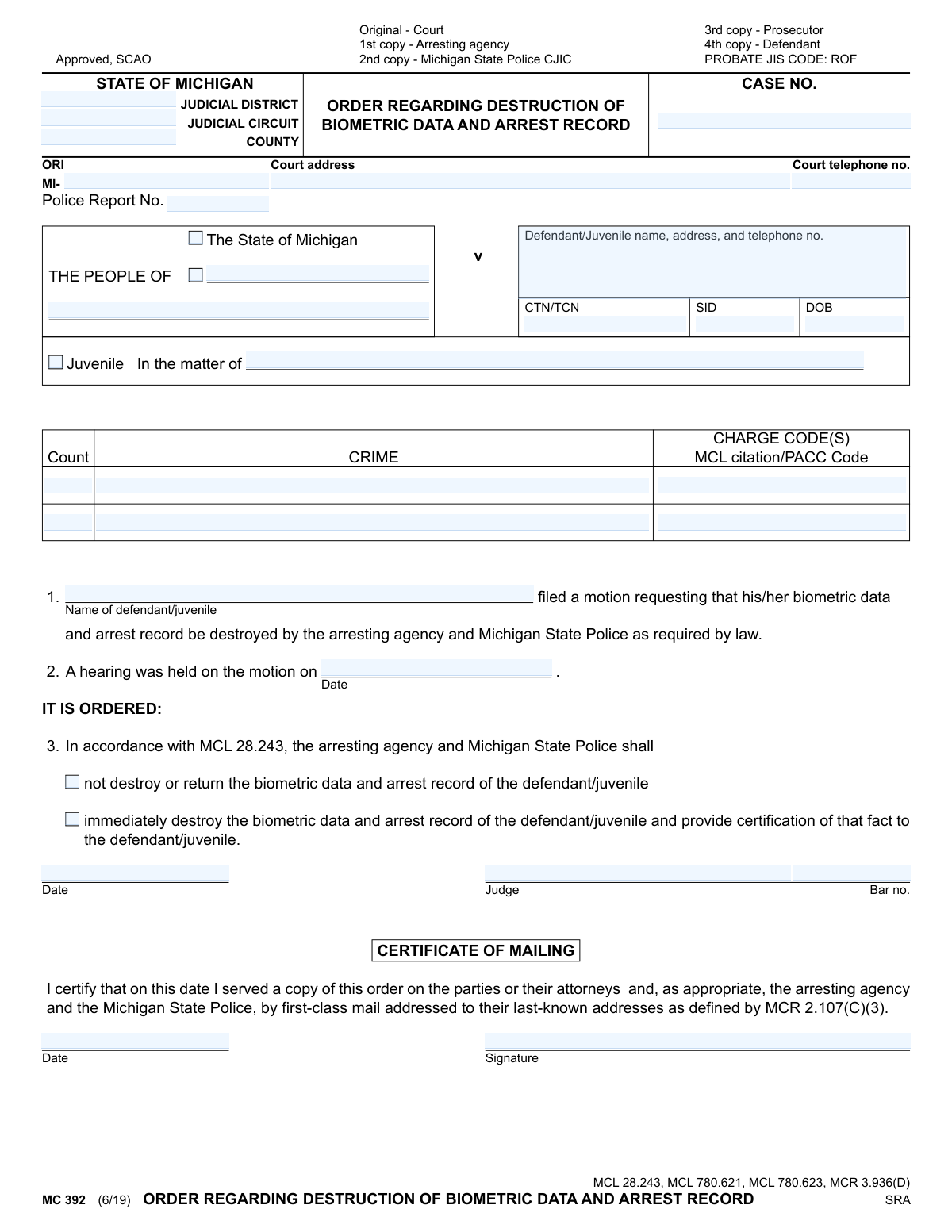
Yes! You can use AI to fill out MC 392, Order Regarding Destruction of Biometric Data and Arrest Record

Form MC 392, Order Regarding Destruction of Biometric Data and Arrest Record, is a legal document used by Michigan courts. It is issued after a hearing to decide on a motion to expunge a person's arrest record and associated biometric data, such as fingerprints and photographs. This order is crucial for individuals seeking to clear their record after an acquittal, dismissal, or other qualifying event. Today, this form can be filled out quickly and accurately using AI-powered services like Instafill.ai, which can also convert non-fillable PDF versions into interactive fillable forms.
MC 392 is part of the Michigan court forms category on Instafill.
Our AI automatically handles information lookup, data retrieval, formatting, and form filling.
It takes less than a minute to fill out MC 392 using our AI form filling.
Securely upload your data. Information is encrypted in transit and deleted immediately after the form is filled out.

Form specifications

Form name: MC 392, Order Regarding Destruction of Biometric Data and Arrest Record
Number of fields: 33
Number of pages: 1
Language: English
main-image

Instafill Demo: How to fill out PDF forms in seconds with AI

How to Fill Out MC 392 Online for Free in 2026

Are you looking to fill out a MC 392 form online quickly and accurately? Instafill.ai offers the #1 AI-powered PDF filling software of 2026, allowing you to complete your MC 392 form in just 37 seconds or less.
Follow these steps to fill out your MC 392 form online using Instafill.ai:
  1. 1 Navigate to Instafill.ai and upload or select the MC 392 form.
  2. 2 Enter the court and case details, including the judicial district/circuit, county, case number, and police report number.
  3. 3 Provide the defendant's or juvenile's full name, address, date of birth, and other identifying numbers (CTN/SID).
  4. 4 List the specific crimes, charge codes, and MCL citations for which the record destruction is being considered.
  5. 5 Input the date the hearing on the motion was held.
  6. 6 The judge will complete the order section, checking the box to either deny or grant the destruction of records, then date and sign the order.
  7. 7 Review all information for accuracy before the court clerk completes the Certificate of Mailing to distribute the order to all relevant parties.

Our AI-powered system ensures each field is filled out correctly, reducing errors and saving you time.

Why Choose Instafill.ai for Your Fillable MC 392 Form?

Speed

Complete your MC 392 in as little as 37 seconds.

Up-to-Date

Always use the latest 2026 MC 392 form version.

Cost-effective

No need to hire expensive lawyers.

Accuracy

Our AI performs 10 compliance checks to ensure your form is error-free.

Security

Your personal information is protected with bank-level encryption.

Frequently Asked Questions About Form MC 392

This is a legal document issued by a Michigan court that officially orders law enforcement agencies to either destroy or retain an individual's biometric data (like fingerprints) and arrest record for a specific case.

You do not fill out this form yourself. A judge completes and signs this order after you have filed a separate motion and a hearing has been held on your request to destroy your records.

You must first file a 'Motion' with the court to request the destruction of your arrest record and biometric data. This form, MC 392, is the final order that results from that legal process.

Biometric data refers to unique physical characteristics collected during an arrest, such as your fingerprints, palm prints, and photographs (mugshots).

If the judge checks 'immediately destroy,' the arresting agency and Michigan State Police must destroy your records. If the judge checks 'not destroy,' your records will be kept.

The order requires the law enforcement agencies to 'provide certification of that fact to the defendant/juvenile' after they have destroyed the records. You should receive a confirmation document.

These case-related identification numbers are typically found on your original arrest or court paperwork. If you cannot find them, you may need to contact the court clerk or your attorney.

Copies are officially distributed to the court, the arresting agency, the Michigan State Police Criminal Justice Information Center (CJIC), the prosecutor, and you (the defendant/juvenile).

If the judge denies your request, your biometric data and arrest record will be retained by the law enforcement agencies as permitted by law and will continue to appear on background checks.

The order uses the term 'immediately destroy,' meaning the agencies are directed to act without delay. The exact processing time can vary by agency, but it is intended to be a prompt action.

Yes. While you don't fill out this specific order, AI-powered services like Instafill.ai can help you accurately and quickly complete the initial motion form required to start the record destruction process.

You can use Instafill.ai to fill out the motion form you file with the court. Upload the correct motion form to the platform, and its AI will help you populate the fields with your case information, saving time and reducing errors.

Services like Instafill.ai are designed to solve this problem. You can upload the flat, non-fillable PDF, and the tool will convert it into an interactive form that you can easily fill out online.

Compliance MC 392
Validation Checks by Instafill.ai

1
Mutually Exclusive Order Selection
This validation ensures that only one of the two primary order checkboxes ('not destroy or return' or 'immediately destroy') is selected. It is logically impossible for both to be true. This check is critical to prevent ambiguity in the court's final order, which could lead to incorrect action or inaction by the arresting agency and state police.
2
Order Date and Hearing Date Chronology
This check verifies that the 'IT IS ORDERED' date is on or after the 'hearing date'. A judicial order cannot be issued before the hearing on the matter has taken place. If the order date precedes the hearing date, it indicates a data entry error that invalidates the document's timeline and legal sequence of events.
3
Case Number Presence and Format
Validates that the 'CASE NO.' field is not empty and conforms to the expected format for the specified judicial circuit/district. The case number is the primary unique identifier for the court proceeding. Without a valid and correctly formatted case number, the order cannot be filed or linked to the correct legal record.
4
Date of Birth (DOB) Validity
This check ensures the 'DOB' field contains a valid date that is in the past and represents a reasonable age for a defendant. It should reject future dates, invalid date formats (e.g., 02/30/2000), and dates that are excessively far in the past (e.g., over 120 years ago). This validation is important for correctly identifying the individual and for cross-referencing with other records.
5
Judge's Bar Number Format
This validation verifies that the 'Bar no.' associated with the judge's signature follows the official Michigan State Bar format, which typically starts with a 'P' followed by a sequence of digits. An invalid bar number could indicate a data entry error or call into question the authority of the signatory. This ensures the order is authenticated by a valid member of the judiciary.
6
Defendant Name Consistency
This check compares the 'Name of defendant/juvenile' in the body of the motion text with the name provided in the 'Defendant/Juvenile name, address, and telephone no.' field at the top. While a perfect match isn't required, it flags significant discrepancies. This is crucial to ensure the order is being applied to the correct individual throughout the document.
7
Mailing Date and Order Date Chronology
This validation ensures the 'Certificate of Mailing date' is on or after the 'IT IS ORDERED' date. An order cannot be certified as mailed before it has been officially signed and dated by the judge. This check maintains the integrity of the legal process timeline and provides accurate proof of service.
8
Charge Information Group Completeness
This check verifies that if a 'Count' number is entered, the corresponding 'CRIME' and 'CHARGE CODE(S)' fields are also filled. Listing a count without its associated details is incomplete and provides insufficient information for the record. This ensures that any charge referenced on the order is fully described.
9
ORI Number Format
This validation checks that the value entered in the 'ORI' field (following the 'MI-' prefix) is a valid numerical sequence. The Originating Agency Identifier (ORI) is a standardized code used to identify the arresting agency. An incorrect ORI could result in the order being sent to the wrong agency or being rejected by the Michigan State Police system.
10
Required Defendant Identifiers
This check ensures that in addition to the defendant's name, at least one of the primary tracking numbers ('CTN/TCN', 'SID') or the 'DOB' is provided. A name alone may not be unique enough for the Michigan State Police to locate the correct record for destruction. Requiring a secondary identifier is critical for accurate record processing and to prevent accidental destruction of the wrong person's data.
11
Court Jurisdiction Completeness
This validation ensures that the 'COUNTY' field and at least one of the 'JUDICIAL DISTRICT' or 'JUDICIAL CIRCUIT' fields are filled out. These fields define the legal jurisdiction of the court issuing the order. Missing this information makes it impossible to determine the origin and authority of the document, potentially rendering it unenforceable.
12
Police Report Number Presence
This check verifies that the 'Police Report No.' field is not empty. This number is a key cross-reference for the arresting agency to locate the original arrest record associated with the court case. Without this number, the agency may have difficulty complying with the order to destroy the record, causing delays or failure to execute the order.

Common Mistakes in Completing MC 392

Incorrect Case and Police Report Numbers

Entering the wrong 'Case No.' or 'Police Report No.' is a frequent error, often due to a simple typo. Since these numbers are the primary identifiers for the legal record, a mistake here can cause the order to be rejected by the court clerk or misfiled, leading to significant delays in the destruction of records. Always double-check these numbers against the original court and police documents before submission.

Missing Critical Identifiers (CTN/SID/ORI)

Applicants often leave the 'CTN/TCN', 'SID', or 'ORI' fields blank because they don't know what they are or where to find them. These numbers (Charge Tracking Number, State ID, Originating Agency Identifier) are crucial for law enforcement agencies to locate the correct records for destruction. Leaving them blank will likely result in the agency being unable to comply with the order, rendering it ineffective.

Vague or Incorrect Crime and Charge Code Information

This form requires the specific 'MCL citation/PACC Code' and official 'CRIME' description, not a colloquial summary. People often write something like 'shoplifting' instead of the precise statutory citation and charge code. This lack of specificity can lead to ambiguity and rejection, as the court and police need the exact legal charge to process the destruction request correctly.

Incomplete Defendant/Juvenile Contact Information

The field for 'Defendant/Juvenile name, address, and telephone no.' is sometimes filled out incompletely, missing a current address or phone number. This is critical because the court and agencies must serve copies of the order and certification of destruction to the individual. Incomplete information can prevent proper notification and legal service, jeopardizing the entire process.

Forgetting the 'Juvenile' Checkbox

When the case involves a minor, it is essential to check the 'Juvenile' box. Overlooking this simple step is a common mistake that can cause significant processing errors. The legal procedures and record-handling protocols for juveniles are different from those for adults, and failing to identify the case as such can lead to the application being processed under the wrong standards.

Inconsistent Defendant Name

A person's name may appear in multiple places on the form, such as the header and the main body ('Name of defendant/juvenile'). It is a mistake to use variations, such as using a middle initial in one place but not another. The name must be written identically in all fields to ensure legal consistency and avoid any confusion when linking the order to the correct person's records.

Omitting Court Jurisdictional Details

The 'Judicial District', 'Judicial Circuit', and 'County' fields at the top of the form are essential for routing the document correctly within the Michigan court system. People unfamiliar with the court structure may leave these blank. An order without proper jurisdictional information cannot be filed and will be returned, causing unnecessary delays.

Failure to Complete the Certificate of Mailing

After the judge signs the order, the party responsible for mailing it to all other parties (prosecutor, police, etc.) must sign and date the 'Certificate of Mailing'. Forgetting this step means there is no official record that service was completed. This can invalidate the proof of service, creating legal challenges and potentially requiring the process to be repeated.

Incorrect Date of Birth (DOB) Entry

Entering an incorrect Date of Birth is a common data entry error. The DOB is a key piece of identifying information used by law enforcement to pinpoint the exact arrest record. A single digit error can cause a mismatch, leading the agency to report that no record was found, thereby preventing the destruction of the actual record.

Illegible Handwriting on a Printed Form

This form is a non-fillable PDF, meaning it must be printed and filled out by hand. Poor or illegible handwriting can make critical information like names, case numbers, and charge codes unreadable. This often leads to rejection by the court clerk or data entry errors by agency staff. Using an AI tool like Instafill.ai can convert the form into a fillable version, allowing you to type directly into the fields for perfect clarity and legibility.
Saved over 80 hours a year

“I was never sure if my IRS forms like W-9 were filled correctly. Now, I can complete the forms accurately without any external help.”

Kevin Martin Green

Your data stays secure with advanced protection from Instafill and our subprocessors

Robust compliance program

Transparent business model

You’re not the product. You always know where your data is and what it is processed for.

ISO 27001, HIPAA, and GDPR

Our subprocesses adhere to multiple compliance standards, including but not limited to ISO 27001, HIPAA, and GDPR.

Security & privacy by design

We consider security and privacy from the initial design phase of any new service or functionality. It’s not an afterthought, it’s built-in, including support for two-factor authentication (2FA) to further protect your account.

Fill out MC 392 with Instafill.ai

Worried about filling PDFs wrong? Instafill securely fills mc-392-order-regarding-destruction-of-biometric-data-and-arrest-record forms, ensuring each field is accurate.