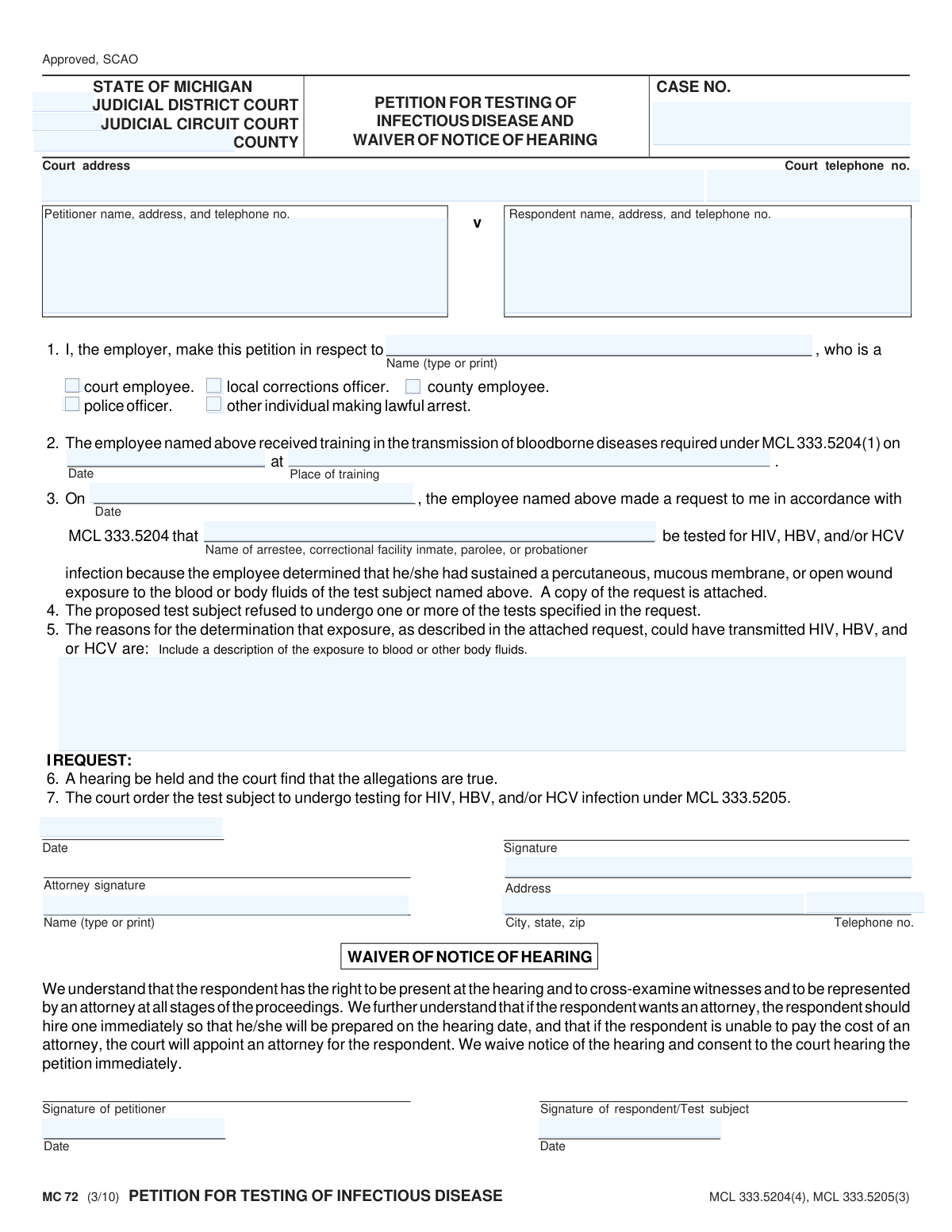
Yes! You can use AI to fill out MC 72, Petition for Testing of Infectious Disease and Waiver of Notice of Hearing
Form MC 72, Petition for Testing of Infectious Disease and Waiver of Notice of Hearing, is a legal document used in the state of Michigan. It allows an employer to request a court to order an individual (such as an arrestee or inmate) to undergo testing for HIV, HBV, and/or HCV after an employee (like a police or corrections officer) has been exposed to their blood or body fluids and the individual has refused voluntary testing. This petition is crucial for protecting the health and safety of first responders and other public employees. Today, this form can be filled out quickly and accurately using AI-powered services like Instafill.ai, which can also convert non-fillable PDF versions into interactive fillable forms.
MC 72 is part of the
Michigan court forms category on Instafill.
Our AI automatically handles information lookup, data retrieval, formatting, and form filling.
It takes less than a minute to fill out MC 72 using our AI form filling.
Securely upload your data. Information is encrypted in transit and deleted immediately after the form is filled out.
Form specifications
| Form name: | MC 72, Petition for Testing of Infectious Disease and Waiver of Notice of Hearing |
| Number of fields: | 26 |
| Number of pages: | 1 |
| Language: | English |
More forms in Michigan court forms
Instafill Demo: How to fill out PDF forms in seconds with AI
How to Fill Out MC 72 Online for Free in 2026
Are you looking to fill out a MC 72 form online quickly and accurately? Instafill.ai offers the #1 AI-powered PDF filling software of 2026, allowing you to complete your MC 72 form in just 37 seconds or less.
Follow these steps to fill out your MC 72 form online using Instafill.ai:
- 1 Navigate to Instafill.ai and upload or select the MC 72 form.
- 2 Provide the court information, including the judicial district/circuit, county, and case number.
- 3 Enter the petitioner's (employer's) information and identify the employee who was exposed, along with their role (e.g., police officer, corrections officer).
- 4 Detail the exposure incident, including the date, the name of the test subject, and a description of how the exposure to blood or body fluids occurred.
- 5 Input the date and location of the employee's mandatory training in the transmission of bloodborne diseases.
- 6 Review all the information auto-filled by the AI for accuracy, then sign and date the petition section.
- 7 If applicable, complete the 'Waiver of Notice of Hearing' section with the required signatures and dates.
Our AI-powered system ensures each field is filled out correctly, reducing errors and saving you time.
Why Choose Instafill.ai for Your Fillable MC 72 Form?
Speed
Complete your MC 72 in as little as 37 seconds.
Up-to-Date
Always use the latest 2026 MC 72 form version.
Cost-effective
No need to hire expensive lawyers.
Accuracy
Our AI performs 10 compliance checks to ensure your form is error-free.
Security
Your personal information is protected with bank-level encryption.
Frequently Asked Questions About Form MC 72
This form is used by an employer to ask a Michigan court to order an individual (like an arrestee or inmate) to be tested for infectious diseases such as HIV, HBV, or HCV after an employee was exposed to their blood or body fluids.
The employer of the exposed individual is the petitioner who fills out and files this form. The employee is typically a police officer, corrections officer, court employee, or another person who made a lawful arrest.
The 'test subject' or 'respondent' is the person whose blood or body fluids the employee was exposed to. This individual is usually an arrestee, correctional facility inmate, parolee, or probationer.
Before filing, the exposed employee must have requested testing, and the test subject must have refused to undergo the requested tests. This refusal is a key requirement for the court to consider the petition.
You must attach a copy of the employee's original written request for testing. This document supports the claim that a request was made and refused.
In section 5, you need to describe the exposure incident in detail. Include how the employee came into contact with the blood or body fluids, such as through a percutaneous injury, mucous membrane splash, or contact with an open wound.
This optional section allows both the petitioner and the respondent to agree to an immediate court hearing, waiving the standard notice period. It requires signatures from both parties to be valid and can speed up the legal process.
After the petition is filed, the court will hold a hearing to determine if the facts are true. If the court agrees with the petition, it will issue an order compelling the test subject to undergo testing for the specified infectious diseases.
Yes, the form requires you to provide the date and location of the employee's mandatory training in the transmission of bloodborne diseases. This is a prerequisite for the petition under Michigan law MCL 333.5204(1).
Yes, the form clearly states that the respondent has the right to be represented by an attorney at all stages. If the respondent cannot afford an attorney, the court will appoint one for them.
Yes, services like Instafill.ai use AI to help you accurately auto-fill form fields. This can save time and help ensure the information is entered correctly.
You can use a service like Instafill.ai to complete the form online. Simply upload the form, and the platform will guide you through filling out the necessary fields interactively.
If you have a non-fillable or 'flat' PDF, you can use a tool like Instafill.ai. It can convert the static document into an interactive, fillable form that you can easily complete on your computer.
Compliance MC 72
Validation Checks by Instafill.ai
1
Exclusive Employee Type Selection
Validates that exactly one employee type (e.g., 'police officer', 'county employee') is selected in section 1. This is crucial as the legal basis and jurisdiction for the petition under MCL 333.5204 can depend on the employee's specific role. A failure to select one, or selecting multiple, would make the petition ambiguous and potentially invalid.
2
Consistent Respondent Identification
Ensures the name of the test subject listed in the petition body ('Name of arrestee...') exactly matches the respondent's name in the case caption ('rname'). This check prevents legal ambiguity about who the court order applies to. A mismatch could lead to the petition being dismissed or an order being issued against the wrong individual.
3
Mandatory Exposure Incident Description
Verifies that the text field in section 5 describing the exposure incident is not empty and meets a minimum length requirement. This description is the primary evidence for the court to determine if a significant exposure occurred. An empty or insufficient description would prevent the court from making a finding and result in the denial of the petition.
4
Logical Sequence of Dates
Validates that the dates on the form follow a logical chronological order: Training Date (section 2) must be on or before the Exposure Request Date (section 3), which must be on or before the Petition Signing Date. This ensures the events described are plausible and meet statutory requirements. An illogical sequence of dates would undermine the credibility of the petition and likely cause it to be rejected.
5
Verification of Required Training Details
Checks that both the date and place of the required bloodborne disease training are provided in section 2. MCL 333.5204(1) mandates this training as a prerequisite for the employee to request testing. Missing this information would indicate a failure to meet a statutory requirement, making the petition legally insufficient.
6
Required Attachment Presence
Confirms that a file has been uploaded, corresponding to the statement 'A copy of the request is attached' in section 3. The employee's original written request is a key piece of evidence showing the process was initiated correctly under MCL 333.5204. Failure to attach this document means the petitioner has not provided all required evidence, which could be grounds for dismissal.
7
Valid Court Jurisdiction Selection
Validates that a 'COUNTY' is specified and that either 'JUDICIAL DISTRICT COURT' or 'JUDICIAL CIRCUIT COURT' is selected, but not both. Proper jurisdiction is fundamental for the court to have authority to hear the case. Incorrect or ambiguous jurisdiction information will result in the petition being rejected for filing.
8
Complete Petitioner Contact Information
Verifies that the petitioner's name, address, and telephone number are all provided and that the telephone number is in a valid format. This information is essential for the court and the respondent to communicate with the petitioner. Incomplete information can halt the legal process and lead to dismissal for failure to prosecute.
9
Complete Respondent Contact Information
Verifies that the respondent's name, address, and telephone number are all provided and that the telephone number is in a valid format. Accurate respondent information is critical for proper service of process, ensuring the respondent is legally notified of the hearing. Failure to provide this information violates due process and will prevent the case from moving forward.
10
Employee Name Specification
Ensures the name of the employee who was exposed ('in respect to' field) is filled in section 1. This field identifies the individual on whose behalf the petition is being filed and who is the subject of the training and exposure. Omitting this name makes the petition fundamentally incomplete, as it's unclear who the 'employee' is.
11
Waiver Signature and Date Correlation
Checks that if a signature is present in the 'Waiver of Notice of Hearing' section (for either petitioner or respondent), the corresponding date field is also filled. A signature is legally invalid without a date. This ensures that if the waiver is executed, it is done so properly, preventing future challenges to the validity of the waiver.
12
Petitioner Name and Signature Consistency
Ensures the typed or printed name under the petitioner's signature line matches the petitioner's name in the case caption. This confirms the identity of the person signing the petition on behalf of the employing entity. A discrepancy could raise questions about the authority of the signatory and the validity of the petition.
13
Standard Phone Number Formatting
Validates that all telephone number fields ('courttelno', petitioner's 'Telephone no.', respondent's 'Telephone no.') adhere to a standard format, such as (XXX) XXX-XXXX. This ensures data consistency and usability, allowing for reliable communication. Invalid formats can lead to failed communication attempts.
14
Valid Date Format
Ensures all date fields on the form are entered in a valid and consistent format, such as MM/DD/YYYY. This prevents data entry errors and ambiguity, which is critical for legal documents where dates determine timelines and statutory compliance. An invalid date format could cause the entire form submission to be rejected.
Common Mistakes in Completing MC 72
Petitioners often fill in the wrong court (e.g., District instead of Circuit) or leave the 'CASE NO.' field blank, assuming it's not needed. This is a critical error as filing in the wrong jurisdiction will lead to immediate dismissal, and the case number is essential for tracking. To avoid this, verify the correct court jurisdiction for this type of petition and ask the court clerk how to obtain a case number upon filing.
In section 1, filers may fail to check any box or check multiple boxes for the employee's status (e.g., 'police officer,' 'county employee'). This ambiguity can cause the court to question the employee's standing under the statute, potentially delaying or invalidating the petition. Always select one, and only one, classification that accurately describes the exposed employee's role.
Section 2 requires the specific date and location of the employee's mandatory training in bloodborne diseases. This information is frequently missing because filers cannot locate the training records. This is a fatal flaw, as the training is a statutory prerequisite under MCL 333.5204(1), and its absence will likely result in the petition being denied.
A common data entry error is using dates that are not in logical order, such as the exposure date (section 3) occurring before the training date (section 2). These inconsistencies undermine the credibility of the petition and can lead to its dismissal for being factually incoherent. Carefully review all dates to ensure they form a logical timeline before submitting the form.
In section 5, petitioners must provide a detailed description of the exposure, but often provide vague statements like 'was exposed to fluids.' This is insufficient for a judge to make a legal finding that a significant exposure occurred, leading to the denial of the testing order. The description must include the type of fluid, the specific route of exposure (e.g., needle stick, splash to eyes), and the context of the incident.
The form explicitly states in section 3, 'A copy of the request is attached,' referring to the employee's original request for the test subject to be tested. Forgetting to include this attachment is a frequent oversight that renders the petition incomplete. This will cause the court to reject the filing or delay the hearing until the required documentation is provided.
The form's structure can lead to confusion between the 'Petitioner' (the employer filing the form), the 'employee' (the exposed individual), and the 'Respondent/Test subject' (the person to be tested). People mistakenly enter names and addresses in the wrong sections. This creates a legally flawed document that will be rejected by the court and require a complete refiling.
The 'Waiver of Notice of Hearing' section is often misunderstood and signed prematurely or by the wrong party. This section has significant legal consequences, as it waives the respondent's right to advance notice of the hearing. Signing this without the respondent's full, informed consent (preferably with legal counsel) can lead to the entire proceeding being challenged on due process grounds.
Filers may use informal names or nicknames for the parties involved instead of their full, official legal names. As a formal court petition, this document requires precise legal identification to be valid and enforceable. Using incorrect names can cause the petition to be rejected or create legal challenges down the line. AI-powered form filling tools like Instafill.ai can help prevent this by storing and accurately populating full legal names.
Since this form is a non-fillable PDF, it is often printed and completed by hand, resulting in illegible entries. Court clerks may refuse to file a document they cannot read, and any misinterpretation of names, dates, or facts can have severe legal consequences. To avoid this, use a typewriter or a service like Instafill.ai, which can convert the document into a digitally fillable version, ensuring every entry is clear, legible, and professional.
Saved over 80 hours a year
“I was never sure if my IRS forms like W-9 were filled correctly. Now, I can complete the forms accurately without any external help.”
Kevin Martin Green
Your data stays secure with advanced protection from Instafill and our subprocessors
Robust compliance program
Transparent business model
You’re not the product. You always know where your data is and what it is processed for.
ISO 27001, HIPAA, and GDPR
Our subprocesses adhere to multiple compliance standards, including but not limited to ISO 27001, HIPAA, and GDPR.
Security & privacy by design
We consider security and privacy from the initial design phase of any new service or functionality. It’s not an afterthought, it’s built-in, including support for two-factor authentication (2FA) to further protect your account.
Fill out MC 72 with Instafill.ai
Worried about filling PDFs wrong? Instafill securely fills mc-72-petition-for-testing-of-infectious-disease-and-waiver-of-notice-of-hearing forms, ensuring each field is accurate.