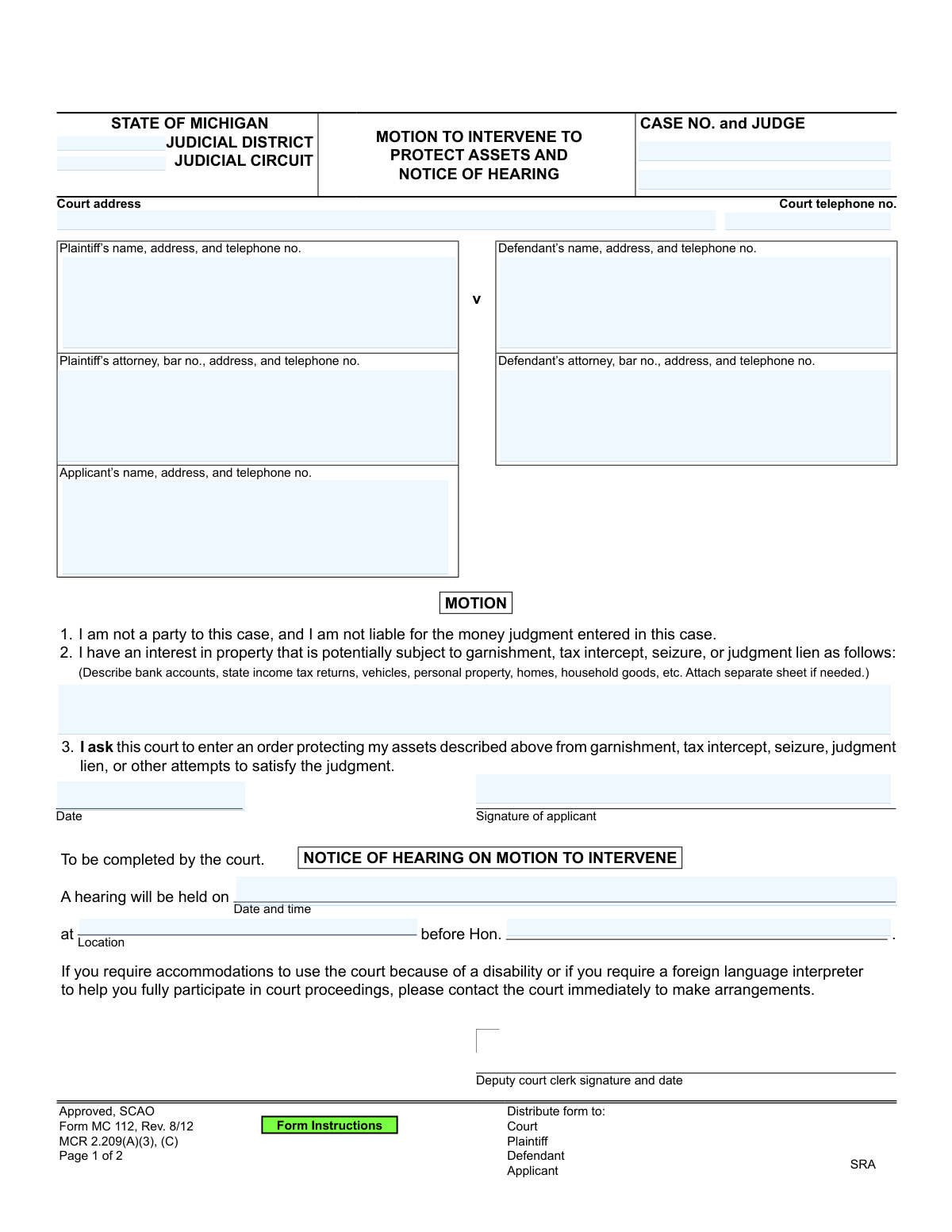
Yes! You can use AI to fill out State of Michigan Form MC 112, Motion to Intervene to Protect Assets and Notice of Hearing
Form MC 112 is a legal document used in Michigan courts by a person who is not a party to a lawsuit to protect their assets from being taken to satisfy a judgment against one of the parties. This is crucial if you share property, like a joint bank account, with a defendant who owes a debt. Today, this form can be filled out quickly and accurately using AI-powered services like Instafill.ai, which can also convert non-fillable PDF versions into interactive fillable forms.
MC 112 is part of the
Michigan court forms category on Instafill.
Our AI automatically handles information lookup, data retrieval, formatting, and form filling.
It takes less than a minute to fill out MC 112 using our AI form filling.
Securely upload your data. Information is encrypted in transit and deleted immediately after the form is filled out.
Form specifications
| Form name: | State of Michigan Form MC 112, Motion to Intervene to Protect Assets and Notice of Hearing |
| Number of fields: | 21 |
| Number of pages: | 1 |
| Language: | English |
More forms in Michigan court forms
Instafill Demo: How to fill out PDF forms in seconds with AI
How to Fill Out MC 112 Online for Free in 2026
Are you looking to fill out a MC 112 form online quickly and accurately? Instafill.ai offers the #1 AI-powered PDF filling software of 2026, allowing you to complete your MC 112 form in just 37 seconds or less.
Follow these steps to fill out your MC 112 form online using Instafill.ai:
- 1 Navigate to Instafill.ai and upload or select the Michigan MC 112 form.
- 2 Use the AI assistant to input the court and case details, including the judicial district, case number, and judge's name.
- 3 Enter the names and addresses of the plaintiff, defendant, and their respective attorneys.
- 4 Provide your own information as the applicant, including your name, address, and telephone number.
- 5 Clearly describe the assets you have an interest in that you are seeking to protect from garnishment, seizure, or lien.
- 6 Review all entered information for accuracy, then digitally sign and date the motion and the certificate of mailing.
- 7 Download the completed form to file with the court and serve copies to the plaintiff and defendant as required.
Our AI-powered system ensures each field is filled out correctly, reducing errors and saving you time.
Why Choose Instafill.ai for Your Fillable MC 112 Form?
Speed
Complete your MC 112 in as little as 37 seconds.
Up-to-Date
Always use the latest 2026 MC 112 form version.
Cost-effective
No need to hire expensive lawyers.
Accuracy
Our AI performs 10 compliance checks to ensure your form is error-free.
Security
Your personal information is protected with bank-level encryption.
Frequently Asked Questions About Form MC 112
This form is used by someone who is not a party to a lawsuit to ask a judge to protect their property from being taken to pay a debt owed by the defendant in that case.
The applicant is the person who is not the plaintiff or defendant in the case but has an ownership interest in property that might be seized, such as a joint bank account holder.
Yes, if you are a co-owner of an asset like a joint bank account and are not legally responsible for the debt, this form allows you to ask the court to protect your interest in the property.
You must specifically describe the property you want to protect. For a bank account, include the bank name and account number; for a vehicle, include the make, model, and VIN.
After you file the motion, the court clerk will fill in the 'Notice of Hearing' section with the date, time, and location for you to appear before the judge.
This is your sworn statement confirming that you have mailed a copy of the motion to the plaintiff and defendant. You must sign this section after sending the copies via first-class mail.
This information is on the original court documents for the lawsuit, such as the judgment or a notice of garnishment you may have received. You must include it at the top of the form.
After filing the form and mailing copies, you must attend the scheduled court hearing. At the hearing, you will have the opportunity to explain to the judge why your assets should be protected.
You must file the original form with the court clerk and mail a copy to both the plaintiff and the defendant (or their attorneys) at their last-known addresses.
Yes, services like Instafill.ai use AI to auto-fill form fields accurately and save time, which is especially helpful for forms with many detailed sections.
You can use a service like Instafill.ai to complete this form online. Simply upload the document, and the AI-powered platform will help you fill in the fields before you download or print it.
You can use Instafill.ai to solve this problem. The platform can convert flat, non-fillable PDFs into interactive forms that you can easily type your information into.
Compliance MC 112
Validation Checks by Instafill.ai
1
Case Number Consistency Across Pages
This check verifies that the 'CASE NO.' entered on the first page matches the 'Case No.' entered on the second page. It is crucial for ensuring document integrity and that all pages of the motion are correctly associated with each other and the proper case file. A mismatch could lead to the document being rejected or misfiled, causing significant delays.
2
Applicant Is Not a Listed Party
This validation confirms that the 'Applicant’s name' does not match either the 'Plaintiff’s name' or the 'Defendant’s name'. The motion's first point explicitly states, 'I am not a party to this case,' so this check enforces the legal premise of the intervention. If the names match, the form submission should be flagged for review as it indicates a potential misunderstanding of the motion's purpose.
3
Mandatory Property Interest Description
Ensures that the text field describing the applicant's interest in the property is not empty. This description is the entire basis for the motion, as it specifies which assets need protection. If this field is left blank, the motion is legally insufficient and cannot be acted upon by the court, so the submission must be prevented until the information is provided.
4
Logical Date Sequence for Hearing
This check validates that the 'hearing date' is on or after the 'motion date'. A hearing cannot be scheduled for a date that has already passed or for a date before the motion is officially filed. This prevents logical impossibilities and scheduling errors, ensuring the timeline of legal events is coherent. An error would prompt the user to correct one or both dates.
5
Applicant Signature Presence
Verifies that the 'Signature of applicant' field has been completed, whether through a digital signature, an uploaded image, or a confirmation checkbox. An unsigned motion has no legal validity and will be rejected by the court. This check is a critical gate to ensure the document is legally binding and ready for submission.
6
Attorney Bar Number Format
This validation checks if the 'bar no.' field, when provided, matches the expected format for the jurisdiction (e.g., a 'P' followed by a series of numbers for Michigan). This helps ensure that the attorney listed is a valid, registered member of the bar. An invalid format could indicate a typo or an incorrect entry, and the system should flag it for correction.
7
Standard Phone Number Format
This check ensures that all telephone number fields ('Court telephone no.', 'Plaintiff’s telephone no.', etc.) adhere to a standard, valid format like (XXX) XXX-XXXX or XXX-XXX-XXXX. Proper formatting is essential for data consistency and ensures that court staff and other parties can successfully make contact. An invalid entry would require the user to re-enter the number in a recognized format.
8
Hearing Notice Information Completeness
This is a conditional validation that checks if the 'hearing location' and 'hearing judge' fields are filled out when the 'hearing date and time' field is populated. A hearing cannot be scheduled without knowing where it will be and which judge will preside. This ensures that if a hearing is set, all necessary logistical information is provided to the parties.
9
Certificate of Mailing Date Logic
Validates that the 'COM date' on the Certificate of Mailing is on or after the 'motion date'. A person cannot certify that they have mailed a document before the document itself is dated. This logical check prevents chronological errors and ensures the certificate is credible. If the date is invalid, the user must correct it before proceeding.
10
Case Number Format Validation
This check verifies that the 'CASE NO.' field conforms to the specific format required by the judicial district or circuit (e.g., YY-######-XX). Using the correct format is essential for the court's automated and manual systems to locate and file the document correctly. An incorrect format will cause a processing failure, so the system should reject the submission until the case number is correctly formatted.
11
Required Applicant Contact Information
This validation ensures that the applicant's name, address, and telephone number are all provided. This information is critical for the court and other parties to communicate with the person filing the motion. Missing contact information can halt proceedings, so the form should not be submittable until all three pieces of information are complete.
12
Valid Hearing Date and Time Format
This check ensures the 'hearing date and time' field contains both a valid date in a recognized format (e.g., MM/DD/YYYY) and a valid time (e.g., HH:MM AM/PM). This prevents ambiguous entries and ensures all parties have clear, actionable information about the hearing schedule. The system should reject entries that are not parsable as a specific date and time.
Common Mistakes in Completing MC 112
Applicants often list assets too vaguely, such as 'my bank account' or 'our car,' without providing specific identifiers. This happens because they may not realize the level of detail required for a court order to be enforceable. A vague description can result in the court being unable to issue a clear order, leaving the assets vulnerable to seizure or garnishment. To avoid this, provide specific details like the financial institution and last four digits of an account number, or the make, model, and VIN of a vehicle.
This form requires two separate signatures: one for the motion itself on page 1 and another for the Certificate of Mailing on page 2. It's a common oversight to miss one of them, especially the one on the second page. An unsigned motion is legally invalid and will be rejected by the court, while an unsigned Certificate of Mailing invalidates the proof of service, causing significant delays. Always double-check both pages for signature lines before filing.
Applicants, especially those without legal representation, often misunderstand the process of 'service.' They may file the motion with the court but forget to mail copies to the plaintiff and defendant, or they mail the copies but forget to sign the Certificate of Mailing. This failure to notify other parties violates due process and will cause the hearing to be canceled or the motion to be dismissed. You must mail copies to all parties and then sign the certificate to prove you did so.
The 'Notice of Hearing' section contains fields for the hearing date, time, and location, and is clearly marked 'To be completed by the court.' However, applicants sometimes fill this section out themselves, assuming they need to propose a date. This creates confusion and will be ignored or corrected by the court clerk, but it can slow down the scheduling process. Leave any sections designated for court use completely blank.
Mistakes in the Case Number, Judicial District/Circuit, or Judge's name are frequent and can have serious consequences. This often happens when transcribing information from other documents. An incorrect case number can lead to the motion being filed in the wrong case or rejected outright, causing critical delays in protecting your assets. Always verify this information against an official court document from the original case, like the judgment or complaint.
A named defendant in the case might see the title 'Motion to Protect Assets' and assume this form is for them. However, the form's first sentence explicitly states, 'I am not a party to this case.' This motion is exclusively for a third-party 'intervener,' not the defendant. Filing this form as the defendant is legally incorrect, will be denied, and wastes valuable time that should be spent filing the proper motions to claim exemptions.
The form requests the case number on both page 1 and page 2. It is very common for filers to enter it on the first page but overlook the field on the second. If the pages become separated during court processing, the second page containing the vital Certificate of Mailing cannot be linked to the case file. This could invalidate your proof of service and jeopardize your motion. AI-powered tools like Instafill.ai can help prevent this by auto-populating recurring fields across all pages of a form.
Confused by the layout, the person filing the motion (the 'Applicant') sometimes puts their own name and address in the 'Plaintiff' or 'Defendant' boxes. This creates confusion for the court clerk and judge, who may not be able to determine who is actually filing the motion. This can lead to rejection or delays. The filer must carefully use the specific field labeled 'Applicant’s name, address, and telephone no.'
The applicant is responsible for providing the current names and addresses for the plaintiff, defendant, and their attorneys to ensure proper service. Using old information from initial case filings can result in the notice being sent to the wrong address. If parties are not properly served, the hearing cannot proceed, causing delays. It is crucial to use the 'last-known addresses' as defined by court rules, which can often be found on the most recent filings in the case.
When the space provided for describing property is insufficient, applicants may use a separate sheet but fail to manage it correctly. Common errors include forgetting to attach the sheet, or failing to label the attachment with the case number and applicant's name. An unattached or unidentified sheet will not be considered by the court, meaning the assets listed on it will not be protected. Always reference the attachment on the main form (e.g., 'See Attachment A') and clearly label the attached page itself.
Saved over 80 hours a year
“I was never sure if my IRS forms like W-9 were filled correctly. Now, I can complete the forms accurately without any external help.”
Kevin Martin Green
Your data stays secure with advanced protection from Instafill and our subprocessors
Robust compliance program
Transparent business model
You’re not the product. You always know where your data is and what it is processed for.
ISO 27001, HIPAA, and GDPR
Our subprocesses adhere to multiple compliance standards, including but not limited to ISO 27001, HIPAA, and GDPR.
Security & privacy by design
We consider security and privacy from the initial design phase of any new service or functionality. It’s not an afterthought, it’s built-in, including support for two-factor authentication (2FA) to further protect your account.
Fill out MC 112 with Instafill.ai
Worried about filling PDFs wrong? Instafill securely fills state-of-michigan-form-mc-112-motion-to-intervene-to-protect-assets-and-notice-of-hearing forms, ensuring each field is accurate.