Yes! You can use AI to fill out State of Michigan, Form MC 527b, Order After Hearing on Reinstating Conviction(s) for Failure to Pay Restitution

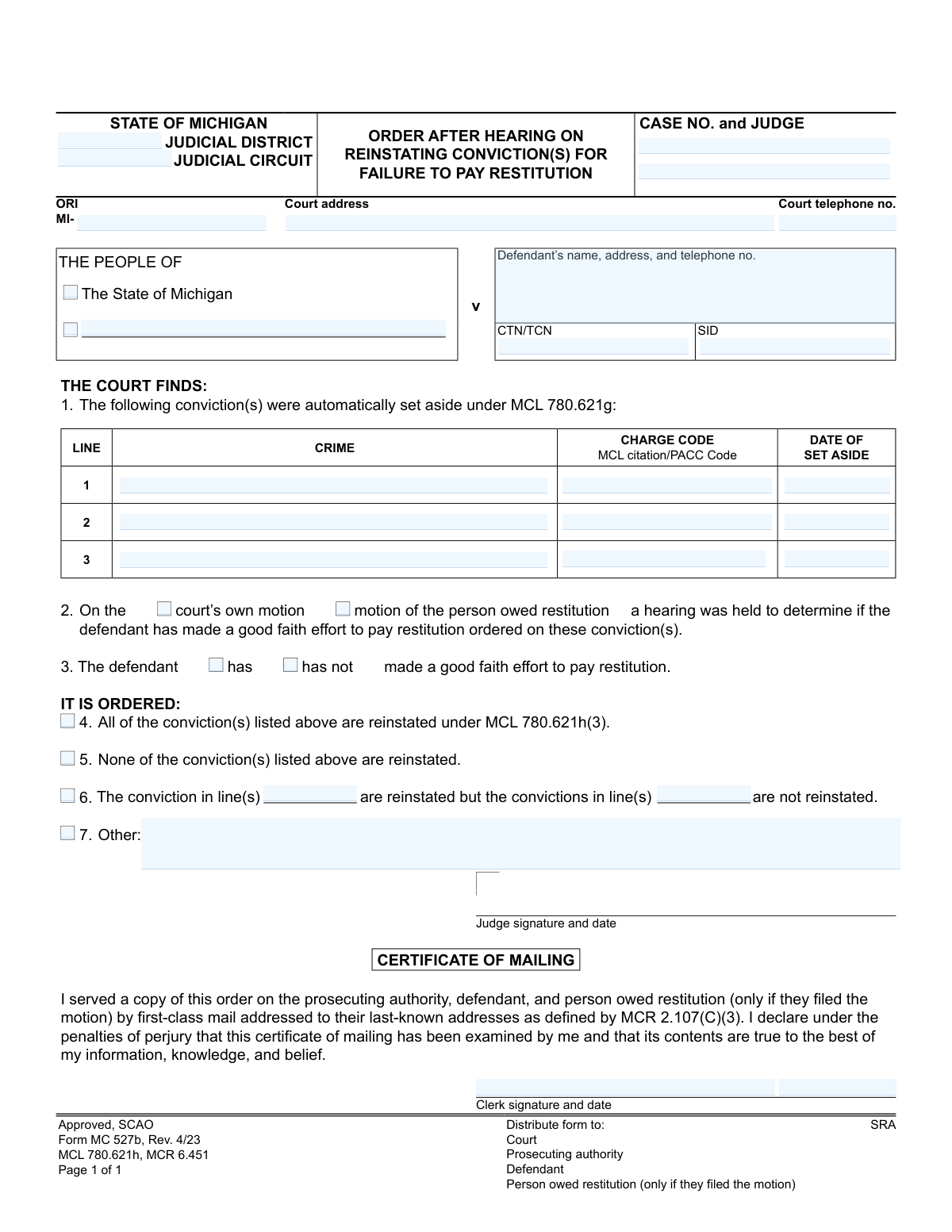
Form MC 527b, Order After Hearing on Reinstating Conviction(s) for Failure to Pay Restitution, is a legal document used by the Michigan judicial system. It is issued by a court following a hearing to assess whether a defendant has made a good faith effort to pay restitution for convictions that were previously set aside. The form documents the court's findings and officially orders whether the convictions are reinstated due to non-payment. Today, this form can be filled out quickly and accurately using AI-powered services like Instafill.ai, which can also convert non-fillable PDF versions into interactive fillable forms.
MC 527b is part of the Michigan court forms category on Instafill.
Our AI automatically handles information lookup, data retrieval, formatting, and form filling.
It takes less than a minute to fill out MC 527b using our AI form filling.
Securely upload your data. Information is encrypted in transit and deleted immediately after the form is filled out.

Form specifications

Form name: State of Michigan, Form MC 527b, Order After Hearing on Reinstating Conviction(s) for Failure to Pay Restitution
Number of fields: 35
Number of pages: 1
Language: English
main-image

Instafill Demo: How to fill out PDF forms in seconds with AI

How to Fill Out MC 527b Online for Free in 2026

Are you looking to fill out a MC 527B form online quickly and accurately? Instafill.ai offers the #1 AI-powered PDF filling software of 2026, allowing you to complete your MC 527B form in just 37 seconds or less.
Follow these steps to fill out your MC 527B form online using Instafill.ai:
  1. 1 Navigate to Instafill.ai and upload or select Form MC 527b.
  2. 2 Provide the case details, including the judicial district/circuit, case number, and judge's name.
  3. 3 Enter the defendant's full name, address, and other identifying numbers like CTN/TCN and SID.
  4. 4 List the specific convictions that were previously set aside, including the crime, charge code, and date of set aside.
  5. 5 Indicate the court's findings from the hearing, specifying whether the defendant made a good faith effort to pay restitution.
  6. 6 Clearly state the court's order, whether all, some, or none of the convictions are being reinstated, and add any other specific instructions.
  7. 7 Review all entered information for accuracy, then allow the AI to populate the form for the judge and clerk to sign and date.

Our AI-powered system ensures each field is filled out correctly, reducing errors and saving you time.

Why Choose Instafill.ai for Your Fillable MC 527b Form?

Speed

Complete your MC 527b in as little as 37 seconds.

Up-to-Date

Always use the latest 2026 MC 527b form version.

Cost-effective

No need to hire expensive lawyers.

Accuracy

Our AI performs 10 compliance checks to ensure your form is error-free.

Security

Your personal information is protected with bank-level encryption.

Frequently Asked Questions About Form MC 527b

This form is a court order that documents a judge's decision after a hearing. It specifies whether a conviction that was previously set aside (expunged) should be put back on a person's record because they failed to pay restitution.

This is an official court document that is completed and signed by a judge and court clerk. Defendants, prosecutors, or victims do not fill out this form themselves.

A hearing is held if there is a belief that a defendant has not made a 'good faith effort' to pay court-ordered restitution for a conviction that was automatically set aside under Michigan law.

When a conviction is 'set aside,' it is removed from a person's public criminal record, similar to an expungement. This order determines if that removal should be reversed.

If the judge determines you have not made a good faith effort, they can order that one or more of your previously set-aside convictions be reinstated, meaning they will reappear on your criminal record.

The judge can order that all, some, or none of the convictions are reinstated. The specific decision is checked off in boxes 4, 5, or 6 of the order.

As stated in the 'Certificate of Mailing' section, copies are sent to the court, the prosecuting authority, the defendant, and the person owed restitution if they were the one who filed the motion.

The form requires case details like the case number and judge, defendant information, and a list of the specific convictions at issue, including the crime, charge code, and the date they were set aside.

Read the 'IT IS ORDERED' section carefully to understand the outcome. If your conviction is reinstated or you have questions about the decision, you should consult with an attorney to understand your rights and next steps.

Since this is a court order filled out by a judge, you would not fill it out yourself. However, for related motions or other legal forms you must complete, AI services like Instafill.ai can auto-fill fields to save time and improve accuracy.

You can upload your document to Instafill.ai, which uses AI to identify all the form fields. You then enter your information once, and the tool automatically and accurately populates it throughout the form.

You can use a service like Instafill.ai to solve this problem. It can convert flat, non-fillable PDFs into interactive forms that you can easily fill out online.

Compliance MC 527b
Validation Checks by Instafill.ai

1
Mutually Exclusive Hearing Motion Selection
This check ensures that only one of the checkboxes for the hearing's origin, 'court’s own motion' or 'motion of the person owed restitution', is selected. Selecting both or neither would create an ambiguous and legally invalid record of who initiated the hearing. If validation fails, the user should be prompted to select exactly one option.
2
Mutually Exclusive Good Faith Finding
Validates that exactly one of the 'has' or 'has not' options is selected regarding the defendant's good faith effort to pay restitution. This finding is the central conclusion of the hearing, and it must be clear and unambiguous. An invalid submission would make the subsequent order logically baseless.
3
Mutually Exclusive Order Outcome Selection
Ensures that only one of the primary order outcomes ('All...are reinstated', 'None...are reinstated', or 'The conviction in line(s)...') is chosen. These options are mutually exclusive, and selecting more than one would result in a contradictory and unenforceable court order. The system must enforce a single choice.
4
Conditional Requirement for Partial Reinstatement
If the user selects the option to reinstate some convictions but not others, this validation ensures that the corresponding text boxes ('lines reinstated' and 'lines not reinstated') are filled out. Without this information, the order is incomplete and fails to specify which convictions are affected. The form cannot be processed if this data is missing when required.
5
Valid Line Number Reference in Partial Order
When a partial reinstatement is ordered, this check verifies that the line numbers entered refer to conviction lines that actually contain data (e.g., entering '3' is only valid if 'crime 3' is filled out). This prevents the order from referencing non-existent or empty entries, which would cause confusion and require manual correction. It ensures the order is precise and internally consistent.
6
At Least One Conviction Specified
This validation confirms that at least the first conviction line (crime, charge code, and date) is completed. The entire purpose of the form is to address the status of one or more convictions. A form without any specified convictions is meaningless and cannot be processed.
7
Completeness of Each Conviction Line
For each conviction line that is started, this check ensures all associated fields (crime, charge code, date of set aside) are filled. An incomplete line, such as a crime with no date, is ambiguous and insufficient for a legal order. This prevents incomplete records and ensures each listed conviction is fully identified.
8
Valid Case Number Format
Verifies that the 'CASE NO.' field is not empty and conforms to the expected format for the judicial district (e.g., contains specific prefixes, year indicators, and sequence numbers). The case number is the primary identifier linking this order to the correct court file. An incorrect or missing case number could lead to the order being misfiled or rejected.
9
Valid 'Date of Set Aside' Format and Logic
This check ensures that any entered 'DATE OF SET ASIDE' is in a valid date format (e.g., MM/DD/YYYY) and represents a date in the past. An invalid format would be un-parsable, and a future date is logically impossible for a past event. This maintains data integrity and the chronological accuracy of the court record.
10
Required Defendant Name
Ensures the 'Defendant’s name' field is not left blank. A court order must be directed at a specific individual. Failing to name the defendant makes the order legally deficient and unenforceable, as it's unclear who the order applies to.
11
Logical Consistency of Finding and Order
This check verifies the logical relationship between the 'good faith effort' finding and the final order. For example, if the court finds the defendant 'has' made a good faith effort, the order should logically be 'None of the conviction(s) are reinstated.' This business rule prevents the creation of a self-contradictory order that would likely be overturned or require clarification.
12
Judge Signature Date Validation
Validates that the Judge's signature date is present and is a valid date. Furthermore, it checks that this date is not before any of the 'DATE OF SET ASIDE' fields listed on the form. An order cannot be signed before the events it is ruling upon occurred, ensuring the chronological integrity of the legal process.
13
Required Court Identifier Fields
This check ensures that essential court identification fields, such as 'Court address' and 'JUDICIAL DISTRICT', are filled out. This information is critical for verifying the origin and jurisdiction of the order. Without it, the document's authenticity and authority are questionable.

Common Mistakes in Completing MC 527b

Entering Incorrect Case Identifiers

Users often mistype or transpose characters in the 'CASE NO.', 'CTN/TCN', or 'SID' fields. These complex alphanumeric codes must be exact, and even a small error can cause the order to be rejected by court systems or linked to the wrong file. To prevent this, meticulously double-check these numbers against official case documents. AI-powered tools like Instafill.ai can help by validating formats or auto-filling this data from a central case file, ensuring accuracy.

Contradictory Checkbox Selections

A frequent error is selecting checkboxes that create a logical contradiction, such as checking that the defendant 'has' made a good faith effort (Section 3) but then also checking that 'All of the conviction(s)...are reinstated' (Section 4). This makes the order legally nonsensical and unenforceable, requiring correction and causing delays. Always ensure the finding in Section 3 logically supports the order made in Sections 4, 5, or 6.

Incomplete Conviction Information

Filers sometimes leave columns like 'CHARGE CODE' or 'MCL citation/PACC Code' blank in the conviction table, providing only a general crime description. This ambiguity can make it difficult to identify the precise conviction being reinstated, potentially leading to legal challenges or errors in updating the defendant's record. It is crucial to copy all information for each conviction verbatim from the original judgment or set-aside order.

Ambiguous Partial Reinstatement Orders

When using Section 6 for partial reinstatements, users may enter the wrong line numbers or list the same conviction as both reinstated and not reinstated. This creates a confusing and invalid order that cannot be executed. To avoid this, carefully cross-reference the line numbers from the table in Section 1 and clearly delineate which specific convictions are being reinstated and which are not.

Using an Outdated Defendant Address

The defendant's address is critical for proper service of the order, as confirmed by the 'Certificate of Mailing'. Using an old or incorrect address means the defendant may not be legally notified, which can be a violation of due process and grounds for appealing the order. Always verify the defendant's last-known address from the official court file before completing this section.

Missing Signatures or Dates

An order is not legally valid until it is signed and dated by the judge and, where required, the clerk. Forgetting to secure a signature or enter the date of signing is a critical error that renders the entire document null and void until corrected. Implementing a final review checklist before filing is essential to catch such omissions.

Entering the Wrong 'Date of Set Aside'

People sometimes mistakenly enter the original date of conviction instead of the 'DATE OF SET ASIDE'. The timeline of events is legally significant, and this error creates an inaccurate court record that can cause confusion in future proceedings. Always refer to the specific court order that initially set the conviction aside to find the correct date.

Failure to Complete the Certificate of Mailing

The clerk may sign the order itself but neglect to fill out and sign the 'CERTIFICATE OF MAILING' section at the bottom. This omission means there is no official proof of service, which can invalidate the notification process and give the defendant grounds to challenge the order. Completing this certificate is a mandatory step to ensure the order is properly served and recorded.

Incorrect Court Jurisdiction Information

Entering the wrong 'JUDICIAL DISTRICT', 'JUDICIAL CIRCUIT', or court address in the header is a common mistake, especially in offices that handle cases from multiple courts. This can lead to the document being misfiled, rejected, or significantly delayed. The case number should always be used to confirm the correct jurisdiction and court details before filling out the form. Since this form is often a non-fillable PDF, tools like Instafill.ai can convert it into an interactive version, making it easier to fill and reducing manual entry errors.
Saved over 80 hours a year

“I was never sure if my IRS forms like W-9 were filled correctly. Now, I can complete the forms accurately without any external help.”

Kevin Martin Green

Your data stays secure with advanced protection from Instafill and our subprocessors

Robust compliance program

Transparent business model

You’re not the product. You always know where your data is and what it is processed for.

ISO 27001, HIPAA, and GDPR

Our subprocesses adhere to multiple compliance standards, including but not limited to ISO 27001, HIPAA, and GDPR.

Security & privacy by design

We consider security and privacy from the initial design phase of any new service or functionality. It’s not an afterthought, it’s built-in, including support for two-factor authentication (2FA) to further protect your account.

Fill out MC 527b with Instafill.ai

Worried about filling PDFs wrong? Instafill securely fills state-of-michigan-form-mc-527b-order-after-hearing-on-reinstating-convictions-for-failure-to-pay-restitution forms, ensuring each field is accurate.