Yes! You can use AI to fill out Case Action/Payment Request Form

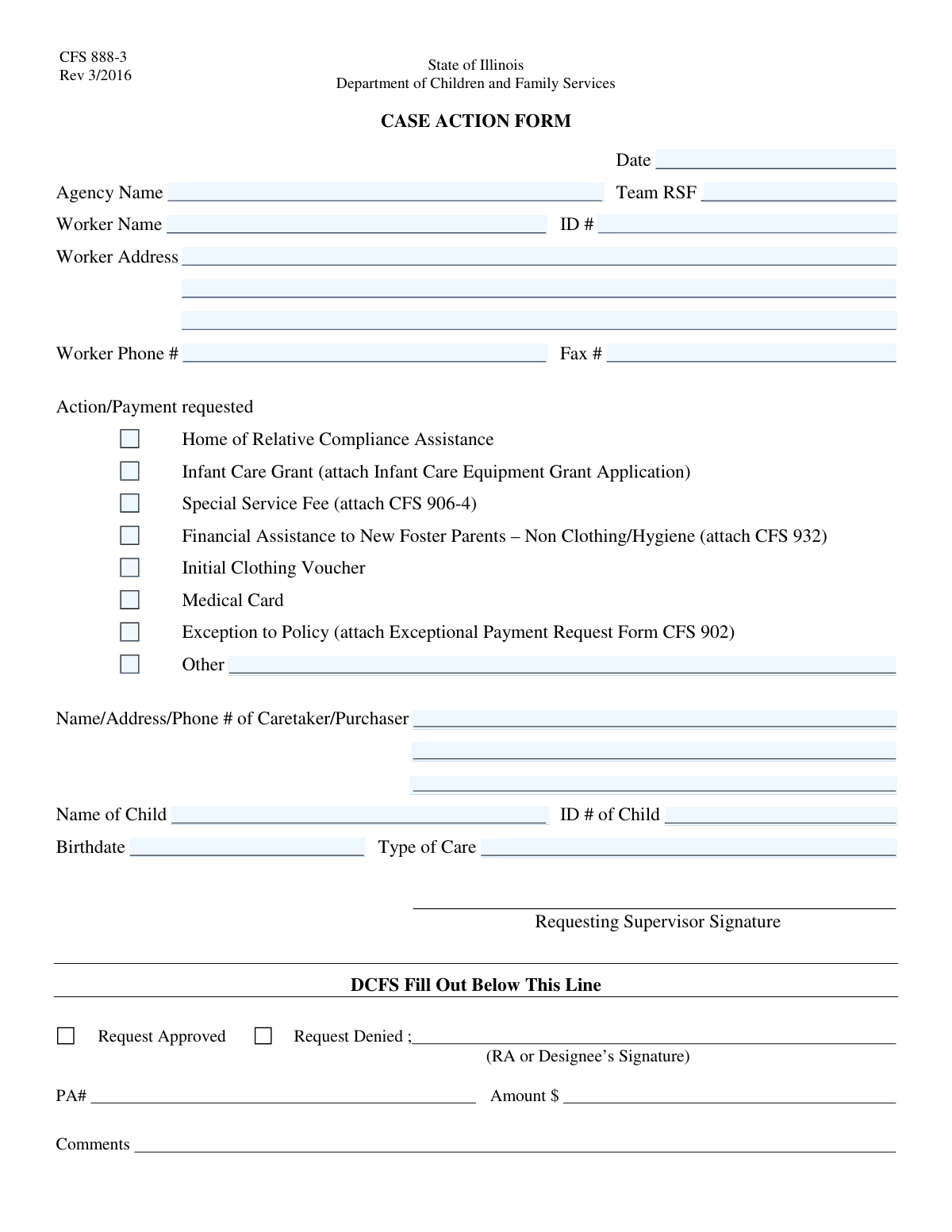
The Case Action/Payment Request Form is a document used by social workers and case managers to formally request various types of assistance or payments for a child under agency care. It standardizes requests for services like infant care grants, clothing vouchers, and medical cards, ensuring proper documentation and authorization. Today, this form can be filled out quickly and accurately using AI-powered services like Instafill.ai, which can also convert non-fillable PDF versions into interactive fillable forms.
CFS Case Action/Payment Request is part of the payment forms category on Instafill.
Our AI automatically handles information lookup, data retrieval, formatting, and form filling.
It takes less than a minute to fill out CFS Case Action/Payment Request using our AI form filling.
Securely upload your data. Information is encrypted in transit and deleted immediately after the form is filled out.

Form specifications

Form name: Case Action/Payment Request Form
Number of fields: 28
Number of pages: 1
Filled form examples: Form CFS Case Action/Payment Request Examples
Language: English
main-image

Instafill Demo: How to fill out PDF forms in seconds with AI

How to Fill Out CFS Case Action/Payment Request Online for Free in 2026

Are you looking to fill out a CFS CASE ACTION/PAYMENT REQUEST form online quickly and accurately? Instafill.ai offers the #1 AI-powered PDF filling software of 2026, allowing you to complete your CFS CASE ACTION/PAYMENT REQUEST form in just 37 seconds or less.
Follow these steps to fill out your CFS CASE ACTION/PAYMENT REQUEST form online using Instafill.ai:
  1. 1 Navigate to Instafill.ai and upload or select the Case Action/Payment Request Form.
  2. 2 Use the AI assistant to accurately fill in the agency, team, and worker information, including your name, ID, and contact details.
  3. 3 Select the appropriate checkbox under 'Action/Payment Requested,' such as 'Initial Clothing Voucher' or 'Infant Care Grant,' and note any required attachments.
  4. 4 Enter the child's full name, ID, birthdate, and type of care, along with the details for the caretaker or purchaser if applicable.
  5. 5 If your request isn't listed, check the 'Other' box and provide a clear, detailed description of the needed action or payment.
  6. 6 Review all entered information for accuracy, ensuring all required fields are complete and any necessary supporting forms are mentioned or attached.
  7. 7 Electronically sign the form (if required) and submit it according to your agency's procedures for processing.

Our AI-powered system ensures each field is filled out correctly, reducing errors and saving you time.

Why Choose Instafill.ai for Your Fillable CFS Case Action/Payment Request Form?

Speed

Complete your CFS Case Action/Payment Request in as little as 37 seconds.

Up-to-Date

Always use the latest 2026 CFS Case Action/Payment Request form version.

Cost-effective

No need to hire expensive lawyers.

Accuracy

Our AI performs 10 compliance checks to ensure your form is error-free.

Security

Your personal information is protected with bank-level encryption.

Frequently Asked Questions About Form CFS Case Action/Payment Request

This form is used by agency workers to request specific actions or payments on behalf of a child in their care. These requests can include financial assistance, grants, medical cards, and other special services.

A designated worker from a social services agency, such as a case worker, is responsible for filling out this form. You must provide your own information as the worker, as well as details for the child and caretaker involved.

Review the 'Action/Payment Requested' section carefully. Several options, such as 'Infant Care Grant' (requires Infant Care Equipment Grant Application) or 'Special Service Fee' (requires form CFS 906-4), explicitly state that another specific form must be attached.

If your request is not one of the standard options, check the 'Other' box in the 'Action/Payment Requested' section. You must then provide a clear and detailed description of the requested action or payment in the space provided.

This box should only be checked if your request falls outside of standard agency policies and requires special approval. You must also attach the 'Exceptional Payment Request Form CFS 902' to justify the request.

'Financial Assistance to New Foster Parents' is for non-clothing and non-hygiene related needs and requires form CFS 932. The 'Initial Clothing Voucher' is a separate request type specifically for purchasing clothing for the child.

Provide the full name, address, and phone number of the person who is the primary caretaker for the child or who will be making purchases on the child's behalf. This could be a foster parent, relative, or other guardian.

Before you begin, have your complete worker details (name, ID, address), the agency and team name, the child's full name, ID, and birthdate, and the caretaker's contact information. Having this ready will make the process much faster.

'Team RSF' likely refers to an identifying code or name for your specific team or unit within the agency. If you are unsure of your Team RSF code, please consult your supervisor or internal agency directory.

Yes, services like Instafill.ai use AI to accurately auto-fill form fields, which can save you significant time and reduce errors. This is especially helpful for repetitive information like your worker details.

You can use Instafill.ai to fill out the form online. Simply upload a scan or PDF of the form, and the service will convert it into an interactive, fillable format for you to complete on your computer.

Services like Instafill.ai can convert non-fillable or 'flat' PDFs into interactive forms. Just upload your file, and the platform will make the fields clickable and fillable so you can type your information directly.

You must provide the child's full legal name, their unique identification number (Child ID), their date of birth, and the type of care they are currently receiving.

Compliance CFS Case Action/Payment Request
Validation Checks by Instafill.ai

1
Case Action Date Validity
This check ensures the 'Date' field contains a valid date in MM/DD/YYYY format and is not a future date. Case actions must be recorded on or after they occur, so a future date is logically impossible and indicates a data entry error. If the date is invalid or in the future, the form submission will be rejected and the user will be prompted to enter a correct date.
2
Action/Payment Selection Requirement
Validates that at least one checkbox is selected in the 'Action/Payment Requested' section. This is a critical check to ensure the form has a clear purpose and is not submitted without a requested action. A submission without a selected action is incomplete and would be rejected, requiring the user to specify the reason for the submission.
3
Conditional 'Other' Field Requirement
This validation ensures that if the 'Other' checkbox is selected under 'Action/Payment Requested', the corresponding 'Other Requested Action/Payment' text field is not empty. This is crucial for processing, as selecting 'Other' without providing details leaves the request ambiguous. Failure to provide details will result in an error message prompting the user to specify the action.
4
Conditional 'Other' Field Exclusivity
This check ensures that the 'Other Requested Action/Payment' text field is left empty if the 'Other' checkbox is not selected. This prevents confusion and the submission of extraneous, potentially conflicting information. If text is present without the 'Other' box being checked, the system will flag it as an error and ask the user to either check the box or clear the field.
5
Infant Care Grant Attachment Verification
If the 'Infant Care Grant' checkbox is selected, this validation confirms that the 'Infant Care Equipment Grant Application' has been attached. The grant cannot be processed without the required application, making this check essential for completeness. If the box is checked but the attachment is missing, the submission will be flagged as incomplete and the user will be notified to attach the required document.
6
Exception to Policy Attachment Verification
This check verifies that the 'Exceptional Payment Request Form CFS 902' is attached when the 'Exception to Policy' box is checked. Requests for policy exceptions require specific documentation for review and approval. Submitting without this form would lead to immediate rejection, so this validation prevents incomplete submissions from entering the workflow.
7
Worker Information Completeness
Ensures that the 'Worker Name', 'Worker ID', and 'Worker Address' fields are all filled out. This information is fundamental for identifying the case worker responsible for the action and for maintaining accurate records. A submission lacking any of this core information will be rejected, and the user will be required to complete all mandatory worker fields.
8
Child Information Completeness
This validation confirms that the 'Child Name', 'Child ID', and 'Birthdate' fields are all populated. The child is the subject of the case action, so their identifying information is non-negotiable for processing any request. The form will be considered invalid if any of these fields are empty, preventing submission until the required child details are provided.
9
Child Birthdate Logical Check
Validates that the child's 'Birthdate' is a valid date that occurs in the past. A future birthdate is a logical impossibility and a clear sign of a data entry error. This check prevents corrupt data from entering the system and ensures the integrity of the child's record, rejecting any submission with a future or invalid birthdate.
10
Worker Phone Number Format
This check ensures the 'Worker Phone Number' is entered in a valid, standard format (e.g., XXX-XXX-XXXX or (XXX) XXX-XXXX). Consistent formatting is important for database integrity and for ensuring the contact number is usable by automated systems or other personnel. An invalid format will trigger an error, prompting the user to correct the number before proceeding.
11
Worker ID Format Validation
This validation checks that the 'Worker ID' conforms to a predefined format, such as being a specific length or alphanumeric pattern. Worker IDs are unique identifiers used to link actions to personnel across different systems, so format consistency is key to data integrity. If the entered ID does not match the expected format, the submission will be blocked until a valid ID is provided.
12
Logical Age for Infant Care Grant
This is a cross-field validation that checks if the 'Infant Care Grant' is requested for a child who is actually an infant. It calculates the child's age based on the 'Birthdate' and verifies it falls within the eligible age range (e.g., under 24 months). This prevents incorrect requests and ensures program funds are allocated appropriately, flagging a potential mismatch for user review.
13
Caretaker/Purchaser Information Completeness
This check ensures that if a payment-related action is selected, the 'Caretaker/Purchaser' name, address, and phone number fields are complete. This information is essential for issuing payments or delivering items to the correct person and location. The system will flag the submission as incomplete if a payment is requested but the recipient's details are missing.
14
Agency Information Completeness
Validates that the 'Agency Name' and 'Team RSF' fields are both filled out. This information is required for routing the form to the correct department and for tracking actions by agency and team. An incomplete submission would cause processing delays, so the form will be rejected until this information is provided.

Common Mistakes in Completing CFS Case Action/Payment Request

Forgetting to Include Required Attachments

This is one of the most common reasons for rejection. Applicants check a box for a specific request, like 'Special Service Fee' or 'Exception to Policy', but forget to attach the required corresponding forms (e.g., CFS 906-4, CFS 902). This oversight leads to an immediate halt in processing and requires the applicant to resubmit everything, causing significant delays. To avoid this, create a checklist of all required documents before you begin filling out the form and double-check that all attachments are included before submission.

Entering an Incorrect Worker or Child ID

The Worker ID and Child ID are critical unique identifiers used to link the request to the correct case file. A simple typo, like transposing two numbers, can cause the request to be rejected, applied to the wrong case, or create a data mismatch that requires manual investigation. To prevent this, carefully copy the ID numbers from an official source document and double-check them for accuracy before submitting the form. AI-powered tools like Instafill.ai can help by storing and accurately auto-filling these critical numbers, reducing the risk of manual entry errors.

Selecting 'Other' Without Providing a Description

Applicants sometimes check the 'Other' box under 'Action/Payment Requested' but fail to specify the request in the corresponding text field. This makes the form incomplete and the request ambiguous, forcing the agency to contact the worker for clarification. This back-and-forth communication inevitably delays the processing of the request. Always ensure that if you select 'Other', you provide a clear and concise description of the action or payment needed.

Providing an Incomplete Worker Address

The form splits the address field into multiple lines, which can lead to confusion and incomplete entries. People often forget to include the city, state, and zip code, or leave out a suite or apartment number. An incomplete address will cause important documents or communications sent by mail to be returned, delaying the entire case action. Always fill out every part of the address field completely to ensure reliable communication.

Omitting Caretaker or Purchaser Details

When a request involves a payment, voucher, or purchase, the information for the 'Caretaker/Purchaser' is essential for processing. Applicants may mistakenly leave this section blank, assuming their own worker information is sufficient. This omission will stop any financial transaction, as the agency does not know who to issue the payment or goods to. If the request involves a third party receiving funds or items, their full name, address, and phone number must be provided.

Using Vague Terminology for 'Type of Care'

The 'Type of Care' field requires a specific, official designation recognized by the agency's system, such as 'Foster Family Home' or 'Relative Placement'. Applicants often use informal or vague descriptions like 'with aunt' or 'in a good home,' which are not system-compliant. This forces a processing agent to manually interpret and correct the entry, slowing down the approval process. Use the official terminology found in case documentation to ensure the form is processed without delay.

Abbreviating the Agency Name

In an effort to save time, workers may use a common acronym or abbreviation for the 'Agency Name' instead of the full legal name. This can create ambiguity, especially in large systems where multiple agencies might have similar names or acronyms. Using an unrecognized abbreviation can lead to routing errors or rejection. To avoid this, always write out the full, official name of the agency as it is legally registered.

Mistyping the Child's Birthdate

A simple typo in the child's birthdate can have significant consequences, affecting eligibility for age-dependent services, grants, or medical cards. It can also create a data conflict within the child's main file, flagging the record for a manual review and causing delays. Always verify the birthdate against an official document, like a birth certificate or the official case file, and enter it in the required format. Using a tool like Instafill.ai can help by saving and consistently entering correct data across multiple forms.

Selecting Multiple or Conflicting Actions

When unsure which category a request falls under, an applicant might check multiple boxes in the 'Action/Payment Requested' section. For example, checking both 'Initial Clothing Voucher' and 'Financial Assistance to New Foster Parents' creates confusion for the processor, who must then contact the applicant for clarification. This indecision halts the process until a single, clear request is confirmed. If unsure, review the guidelines or contact the agency for clarification before submitting the form with only one, correct action selected.

Incorrectly Formatting Phone and Fax Numbers

Users often enter phone and fax numbers in various formats, such as omitting the area code or using inconsistent punctuation (e.g., parentheses vs. dashes). This can cause errors in automated data entry systems and make it difficult for agency staff to make contact if the number is not immediately dialable. To ensure clear communication, always enter the full 10-digit number, including the area code, in a standard format. If the form is a non-fillable PDF, a tool like Instafill.ai can convert it into a fillable version and help format such fields correctly.
Saved over 80 hours a year

“I was never sure if my IRS forms like W-9 were filled correctly. Now, I can complete the forms accurately without any external help.”

Kevin Martin Green

Your data stays secure with advanced protection from Instafill and our subprocessors

Robust compliance program

Transparent business model

You’re not the product. You always know where your data is and what it is processed for.

ISO 27001, HIPAA, and GDPR

Our subprocesses adhere to multiple compliance standards, including but not limited to ISO 27001, HIPAA, and GDPR.

Security & privacy by design

We consider security and privacy from the initial design phase of any new service or functionality. It’s not an afterthought, it’s built-in, including support for two-factor authentication (2FA) to further protect your account.

Fill out CFS Case Action/Payment Request with Instafill.ai

Worried about filling PDFs wrong? Instafill securely fills case-actionpayment-request-form forms, ensuring each field is accurate.