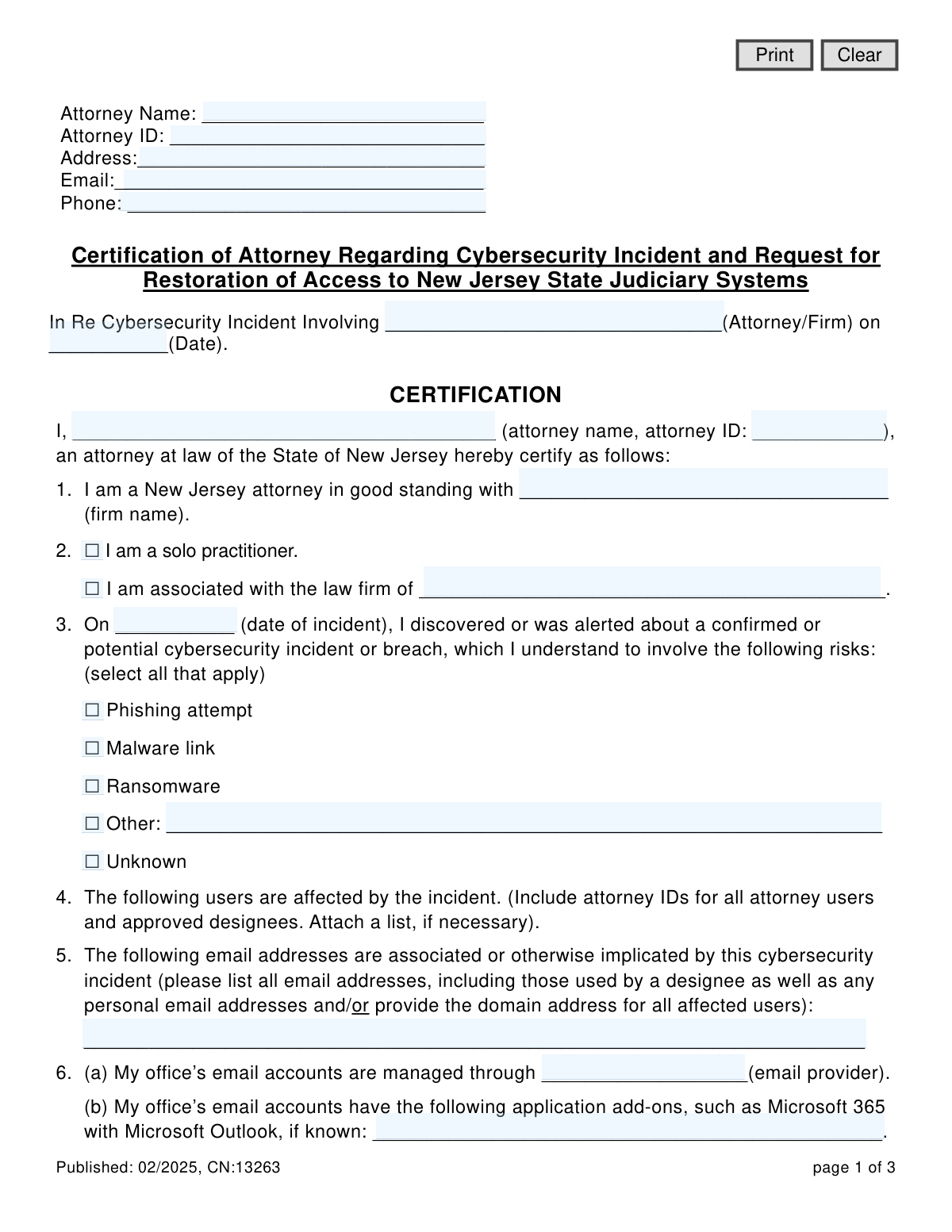
Yes! You can use AI to fill out Certification of Attorney Regarding Cybersecurity Incident and Request for Restoration of Access to New Jersey State Judiciary Systems
This form is a certification required by the New Jersey Judiciary for attorneys who have experienced a cybersecurity incident, such as a phishing attack or malware breach. Attorneys use it to formally declare the details of the incident, the corrective actions taken to secure their systems, and the preventative measures implemented to avoid future issues. Submitting this certification is a critical step for attorneys to regain access to essential electronic judiciary systems after their accounts have been suspended. Today, this form can be filled out quickly and accurately using AI-powered services like Instafill.ai, which can also convert non-fillable PDF versions into interactive fillable forms.
CN:13263 is part of the
New Jersey forms category on Instafill.
Our AI automatically handles information lookup, data retrieval, formatting, and form filling.
It takes less than a minute to fill out CN:13263 using our AI form filling.
Securely upload your data. Information is encrypted in transit and deleted immediately after the form is filled out.
Form specifications
| Form name: | Certification of Attorney Regarding Cybersecurity Incident and Request for Restoration of Access to New Jersey State Judiciary Systems |
| Number of fields: | 50 |
| Number of pages: | 1 |
| Language: | English |
Instafill Demo: How to fill out PDF forms in seconds with AI
How to Fill Out CN:13263 Online for Free in 2026
Are you looking to fill out a CN:13263 form online quickly and accurately? Instafill.ai offers the #1 AI-powered PDF filling software of 2026, allowing you to complete your CN:13263 form in just 37 seconds or less.
Follow these steps to fill out your CN:13263 form online using Instafill.ai:
- 1 Navigate to Instafill.ai and upload the 'Certification of Attorney Regarding Cybersecurity Incident' form or select it from their template library.
- 2 Provide your personal and firm information, including your name, attorney ID, address, and contact details in the designated fields.
- 3 Detail the specifics of the cybersecurity incident, such as the date, type of threat, and a list of all affected users and email addresses.
- 4 Certify the remediation steps you have taken, confirming that passwords have been reset, malicious software has been removed, and vulnerabilities have been patched.
- 5 Describe the preventative measures you have implemented, such as enabling multi-factor authentication, running security scans, and updating internal policies.
- 6 Carefully review all the information auto-filled by the AI to ensure accuracy and completeness before finalizing the document.
- 7 Electronically sign and date the certification to formally request the restoration of your access to the New Jersey Judiciary systems.
Our AI-powered system ensures each field is filled out correctly, reducing errors and saving you time.
Why Choose Instafill.ai for Your Fillable CN:13263 Form?
Speed
Complete your CN:13263 in as little as 37 seconds.
Up-to-Date
Always use the latest 2026 CN:13263 form version.
Cost-effective
No need to hire expensive lawyers.
Accuracy
Our AI performs 10 compliance checks to ensure your form is error-free.
Security
Your personal information is protected with bank-level encryption.
Frequently Asked Questions About Form CN:13263
This form is used by New Jersey attorneys to certify that they have addressed a cybersecurity incident and to request the restoration of their suspended access to New Jersey State Judiciary systems.
Any New Jersey attorney whose access to Judiciary electronic systems has been suspended due to a confirmed or potential cybersecurity incident involving their firm's accounts must complete this form.
You will need your Attorney ID, details of the cybersecurity incident (date, type), a list of all affected users and email addresses, and specifics on the remediation and prevention steps you have taken.
The form should be submitted to the Superior Court Clerk’s Office as directed, as part of the process to have your access to Judiciary systems reinstated.
In Section 3 of the form, there is an 'Unknown' checkbox you can select if you are unsure of the specific nature of the cybersecurity risk.
Section 2 of the form provides a specific checkbox for you to easily indicate that you are a solo practitioner.
This section requires you to certify that you have reset all affected account passwords, removed any malicious software, and patched system vulnerabilities to resolve the incident.
You must describe the preventative measures you've implemented, such as enabling multi-factor authentication, completing a full system scan, and potentially adding advanced threat detection software.
You may need to attach a separate list of affected users if there are too many to list on the form. You also have the option to attach relevant reports from an IT or cybersecurity consultant.
The form does not state a specific processing time. Submitting a complete and accurate certification is a critical step, and you should follow up with the Superior Court Clerk’s Office for status updates.
Yes, services like Instafill.ai use AI to accurately auto-fill form fields. This can save you significant time and help reduce errors when completing the certification.
You can upload the form's PDF to the Instafill.ai platform. The AI will make the document interactive, allowing you to quickly provide your information and generate a completed, downloadable form.
If you have a non-fillable or 'flat' PDF, you can use a service like Instafill.ai. It can convert the document into an interactive, fillable form that you can complete easily on your computer.
Compliance CN:13263
Validation Checks by Instafill.ai
1
Attorney ID Format and Consistency
This check verifies that the Attorney ID fields ('idAtt', 'text7', 'text10') conform to the New Jersey Attorney ID format. It also ensures that the ID entered in the header, the certification body, and the signature block are identical. This is critical for correctly identifying the attorney and preventing submission errors, and failure should block submission until the IDs match and are valid.
2
Contact Information Consistency
Validates that the attorney's personal information (Name, Address, Email, Phone) is consistent between the header section and the final signature block. Maintaining consistency is crucial for data integrity and ensures the Judiciary has the correct contact details on record. A mismatch would trigger a warning asking the user to confirm which set of information is correct.
3
Incident Date Validity
Ensures the 'date of incident' field ('dateIncident') contains a validly formatted date (e.g., MM/DD/YYYY). The validation also checks that the date is not in the future and is on or before the submission date. This is essential for establishing an accurate timeline of the cybersecurity event, and an invalid or future date would prevent form submission.
4
Practitioner Type Logic
This check enforces conditional logic on section 2. If the 'I am associated with the law firm of' checkbox is selected, the corresponding firm name field ('assoc_lawFirm') becomes mandatory. Conversely, if 'I am a solo practitioner' is checked, the firm name field should be disabled or ignored. This ensures the form accurately captures the attorney's practice structure.
5
Conditional 'Other' Field Requirement
Verifies that if an 'Other' checkbox is selected in any section (e.g., section 3 for risk type or section 16 for additional measures), the corresponding text field ('otherComment', 'otherComment2') must be filled out. This prevents incomplete submissions where the user indicates a custom reason but fails to provide the necessary explanation. Failure would prompt the user to either provide details or uncheck the 'Other' option.
6
Conditional Detail Field Requirement
This validation applies to sections 7 and 14. If the user checks 'I reported the cybersecurity incident to...' or 'This scan revealed the following vulnerabilities...', the respective text fields ('nameAgency', 'scanVuln') must be completed. This ensures that affirmative declarations are properly substantiated with required details, which are critical for the Judiciary's assessment.
7
Email Address Syntax Validation
Scans all fields intended for email addresses ('emailAtt', 'emailAdd_Domain', 'txtbox1') to ensure they contain strings that follow the standard '[email protected]' format. For fields that may contain multiple addresses, it checks each one. This is vital for ensuring communication channels can be re-established and that data is recorded correctly.
8
Mandatory Risk Identification
Confirms that at least one checkbox is selected in section 3, which details the nature of the cybersecurity incident. The form cannot be submitted without specifying the type of risk, even if it is 'Unknown'. This is a fundamental requirement for the form's purpose, and failure to select an option would block submission.
9
Mandatory Remediation Software Identification
This check ensures that the text fields for naming the software used for scanning ('nameSoftware' in section 14) and monitoring ('softWare1' in section 15) are not left empty. Providing the software names is a key part of certifying that remediation steps have been taken. An empty field would trigger an error, as this information is required for the Judiciary to verify the response.
10
Mutually Exclusive 'None' Selection
In section 16, if the 'None' checkbox is selected, this validation ensures that no other checkboxes in that same section are also selected. This prevents contradictory submissions where the user claims no additional measures were taken while also selecting specific measures. If a conflict is detected, the user will be prompted to correct their selection.
11
Final Signature and Date Presence
Verifies that the 'Attorney’s Signature' field ('sig') and the final 'Date' field in the signature block are not empty upon submission. As a legal certification, the signature and date are non-negotiable requirements for the document to be considered valid and binding. The submission will be blocked until both fields are completed.
12
Phone Number Format
Validates that the phone number fields ('phoneAtt', 'txtbox2') match a standard US phone number format (e.g., XXX-XXX-XXXX, (XXX) XXX-XXXX). This ensures the data is clean and usable for any necessary voice communication. An invalid format would prompt the user to correct the entry before proceeding.
13
Firm Name Consistency Check
This validation compares the firm name provided in section 1 ('text8') with the selection made in section 2. If 'I am a solo practitioner' is checked, the firm name in section 1 should logically be 'N/A' or the attorney's own name. If 'I am associated with the law firm of...' is checked, the firm name in section 1 should match the firm name provided in section 2 ('assoc_lawFirm'). This prevents logical inconsistencies in the submitted data.
14
At Least One Affected User/Email
Ensures that the fields for listing affected users (section 4) and affected email addresses (section 5) are not empty. The purpose of the form is to address an incident affecting specific accounts, so this information is critical. Submission should be blocked if no affected users or emails are listed, as the request for restoration would be incomplete.
Common Mistakes in Completing CN:13263
This form requests the attorney's name, ID, and contact details in three separate places: the header, the main certification body, and the final signature block. Attorneys often fill these out inconsistently or miss one section, assuming the others suffice. This can cause processing delays as the Judiciary must verify the filer's identity. To avoid this, carefully review the entire document to ensure all personal information fields are filled out completely and identically.
The Attorney ID is the primary unique identifier used by the New Jersey Judiciary to locate an attorney's record and system access rights. Entering an incorrect ID, or omitting it from one of the required fields, will prevent the Judiciary from processing the restoration request. This results in significant delays in regaining access to critical systems. Always double-check your Attorney ID against your official bar records before submitting the form.
In sections 4 and 5, attorneys must list all affected users (including designees) and email addresses. A common error is forgetting to include non-attorney staff, personal email addresses used for work, or entire firm domains if the incident was widespread. This oversight means some users will remain locked out even after the form is processed, prolonging the disruption. To prevent this, consult with IT staff to compile a comprehensive list and consider attaching a separate document if the list is long.
When the nature of the incident (Section 3) or remedial actions (Section 16) don't fit the provided checkboxes, the 'Other' field must be used. Filers often enter vague terms like 'security breach' or leave it blank, which provides no useful information. This forces the Judiciary to follow up for clarification, delaying the restoration of access. Be as specific as possible, for example, 'Business Email Compromise (BEC) resulting in unauthorized inbox rule creation'.
Sections 14 and 15 require the filer to name the software used for vulnerability scanning and advanced threat detection. Many attorneys leave these fields blank because they are unsure of the technical details. This weakens the certification, as it provides no proof that credible remediation tools were actually used. To avoid this, contact your IT consultant or service provider to get the exact names of the software (e.g., 'Malwarebytes', 'CrowdStrike Falcon') before filling out the form.
The form explicitly mentions the option to attach a list of affected users (Section 4) and relevant reports from IT or cybersecurity consultants (Section 16). Forgetting to include these attachments makes the submission incomplete and prevents a full assessment of the incident and remediation efforts. This will almost certainly lead to follow-up requests and delays. Always gather all supporting documents before submission and ensure they are sent as a single package.
The form asks for multiple dates, including the date of the incident and the date of signature, but does not specify a format. Users may enter dates ambiguously (e.g., 02/03/24), which can be misinterpreted, or use inconsistent formats throughout the document. This can create confusion about the timeline of the incident and response. Always use a clear, four-digit year format (MM/DD/YYYY) consistently across all date fields to ensure clarity.
The signature block on the final page repeats fields for name, Attorney ID, and contact information that are also present in the header. Filers sometimes sign and date the form but neglect to fill out these redundant fields, assuming the header information is sufficient. An incomplete signature block can render the certification invalid, forcing a resubmission. To prevent this, treat the signature block as a standalone section and fill in every field completely.
This form is often distributed as a non-fillable PDF, creating confusion about how to apply a valid signature. Typing a name on the signature line may not be legally sufficient, while printing, signing, and scanning can result in a low-quality document. An improper signature can lead to the form's rejection. To avoid this, AI-powered tools like Instafill.ai can convert the flat PDF into a fillable version, allowing you to apply a clean, compliant digital signature directly.
In Section 14, if a scan revealed vulnerabilities, the form requires a description of what they were and confirmation that they have been resolved. Attorneys may simply state that issues were found and fixed without providing the required detail. This lack of transparency can cause the Judiciary to question the thoroughness of the remediation. It is crucial to specify the vulnerability (e.g., 'malicious email forwarding rule created') and the corrective action ('the rule was identified and deleted').
Saved over 80 hours a year
“I was never sure if my IRS forms like W-9 were filled correctly. Now, I can complete the forms accurately without any external help.”
Kevin Martin Green
Your data stays secure with advanced protection from Instafill and our subprocessors

Robust compliance program
Transparent business model
You’re not the product. You always know where your data is and what it is processed for.
ISO 27001, HIPAA, and GDPR
Our subprocesses adhere to multiple compliance standards, including but not limited to ISO 27001, HIPAA, and GDPR.
Security & privacy by design
We consider security and privacy from the initial design phase of any new service or functionality. It’s not an afterthought, it’s built-in, including support for two-factor authentication (2FA) to further protect your account.
Fill out CN:13263 with Instafill.ai
Worried about filling PDFs wrong? Instafill securely fills certification-of-attorney-regarding-cybersecurity-incident-and-request-for-restoration-of-access-to-new-jersey-state forms, ensuring each field is accurate.