Yes! You can use AI to fill out New Jersey Judiciary – Tax Court Case Jacket Access Request

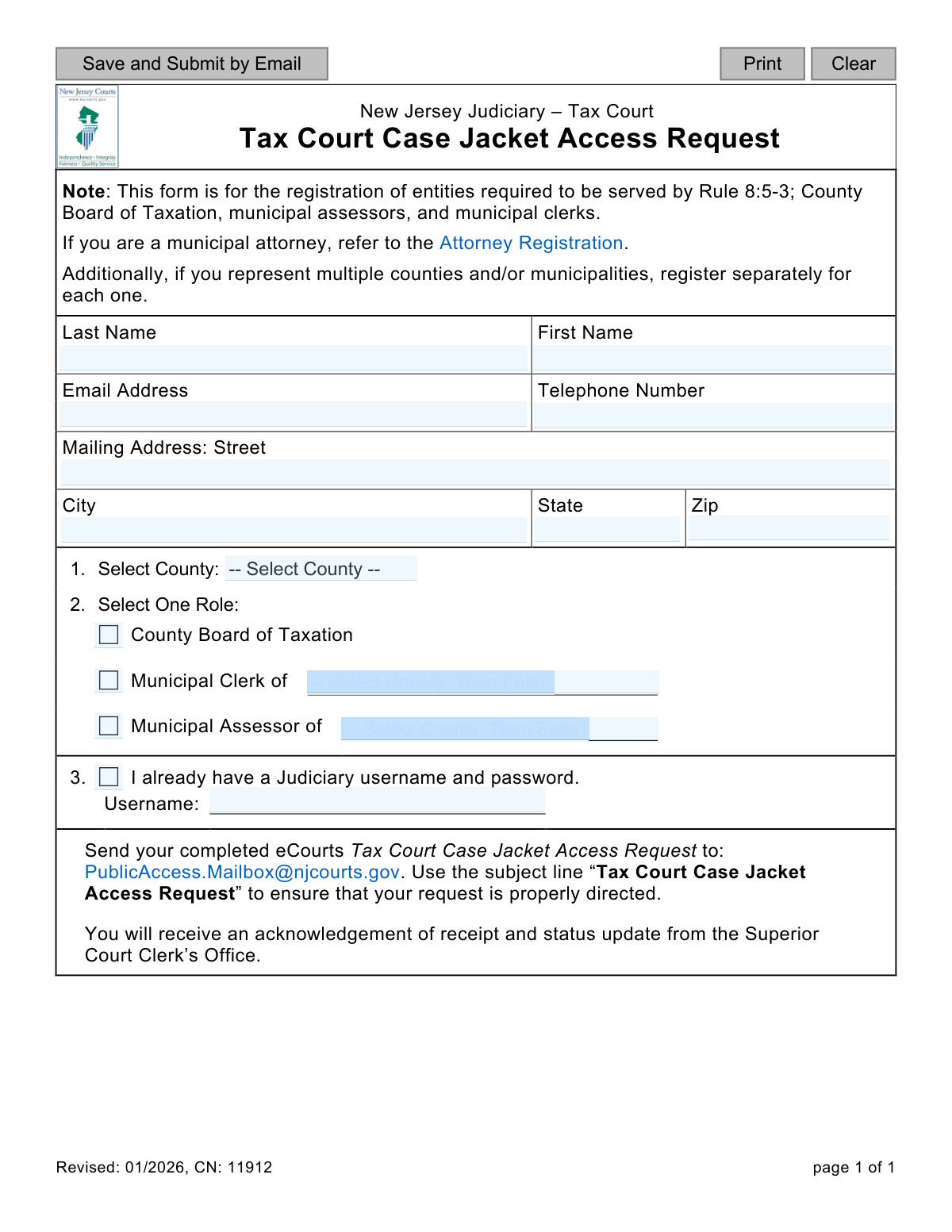
This form is a request submitted to the New Jersey Judiciary for the purpose of registering certain entities for electronic access to Tax Court case jackets via the eCourts system. It is specifically for County Boards of Taxation, municipal assessors, and municipal clerks as required by Rule 8:5-3. Today, this form can be filled out quickly and accurately using AI-powered services like Instafill.ai, which can also convert non-fillable PDF versions into interactive fillable forms.
CN 11912 is part of the New Jersey forms category on Instafill.
Our AI automatically handles information lookup, data retrieval, formatting, and form filling.
It takes less than a minute to fill out CN 11912 using our AI form filling.
Securely upload your data. Information is encrypted in transit and deleted immediately after the form is filled out.

Form specifications

Form name: New Jersey Judiciary – Tax Court Case Jacket Access Request
Number of fields: 61
Number of pages: 1
Language: English
main-image

Instafill Demo: How to fill out PDF forms in seconds with AI

How to Fill Out CN 11912 Online for Free in 2026

Are you looking to fill out a CN 11912 form online quickly and accurately? Instafill.ai offers the #1 AI-powered PDF filling software of 2026, allowing you to complete your CN 11912 form in just 37 seconds or less.
Follow these steps to fill out your CN 11912 form online using Instafill.ai:
  1. 1 Navigate to Instafill.ai and upload or select the Tax Court Case Jacket Access Request form.
  2. 2 Provide your personal details, including your full name, email address, telephone number, and mailing address.
  3. 3 Select your county from the dropdown menu.
  4. 4 Choose your official role: County Board of Taxation, Municipal Clerk, or Municipal Assessor, and specify the municipality if required.
  5. 5 If you already have a Judiciary username and password, indicate this and enter your username.
  6. 6 Review all the information populated by the AI for accuracy and make any necessary edits.
  7. 7 Download the completed form to your device and email it to [email protected] as instructed.

Our AI-powered system ensures each field is filled out correctly, reducing errors and saving you time.

Why Choose Instafill.ai for Your Fillable CN 11912 Form?

Speed

Complete your CN 11912 in as little as 37 seconds.

Up-to-Date

Always use the latest 2026 CN 11912 form version.

Cost-effective

No need to hire expensive lawyers.

Accuracy

Our AI performs 10 compliance checks to ensure your form is error-free.

Security

Your personal information is protected with bank-level encryption.

Frequently Asked Questions About Form CN 11912

This form is used to register specific government officials for electronic access to New Jersey Tax Court case jackets through the eCourts system. This access is required for entities that must be served legal documents under Rule 8:5-3.

This form is intended for individuals working for a County Board of Taxation, or serving as a municipal assessor or municipal clerk in New Jersey. It is not for the general public or other types of professionals.

No, this form is not for attorneys. The form instructions state that municipal attorneys must use the separate 'Attorney Registration' process to gain access.

Yes, the form requires you to register separately for each county and/or municipality you represent. You must complete and submit a new form for each distinct role and location.

You must email the completed form to [email protected]. It is critical to use the subject line 'Tax Court Case Jacket Access Request' to ensure your request is properly directed.

After you submit your request, the Superior Court Clerk’s Office will send you an acknowledgement of receipt. They will also provide a subsequent status update on your access request.

If you have an existing Judiciary account, check the box for 'I already have a Judiciary username and password' and enter your username in the provided field. This will help link the new access permissions to your existing account.

You will need to provide your full name, email, phone number, mailing address, the county you work in, and your specific role. You must select one role: County Board of Taxation, Municipal Clerk, or Municipal Assessor.

The form does not specify a processing time. However, it does state that you will receive an acknowledgement of receipt and a status update from the Superior Court Clerk’s Office after submission.

Yes, services like Instafill.ai can use AI to accurately auto-fill form fields with your information. This can help you save time and reduce the chance of making errors.

You can upload the PDF form to the Instafill.ai platform. The service will allow you to type your information directly into the fields online, then save or download the completed document for submission.

If you have a non-fillable or 'flat' PDF, you can use a tool like Instafill.ai. It can convert the document into an interactive, fillable form that you can easily complete on your computer.

Compliance CN 11912
Validation Checks by Instafill.ai

1
Last Name Presence
This check ensures the 'Last Name' field is not empty. A last name is a fundamental piece of identifying information required to process the access request and create or locate the user's account. If this field is left blank, the form submission will be rejected and the user will be prompted to provide their last name.
2
First Name Presence
This check verifies that the 'First Name' field has been filled out. The first name is essential for proper identification and communication with the requester. Failure to provide a first name will result in a validation error, preventing form submission until the field is completed.
3
Email Address Format
This validation ensures that the value entered in the 'Email Address' field follows the standard format for an email address (e.g., '[email protected]'). A valid email is critical for sending the acknowledgement of receipt, status updates, and login credentials. If the format is invalid, the user will receive an error message and must correct the entry before submission.
4
US Phone Number Format
This check validates that the 'Telephone Number' field contains a number in a recognizable US format (e.g., 10 digits, possibly with parentheses, spaces, or hyphens). A valid phone number is necessary for contact if there are issues with the request that cannot be resolved via email. An invalid format will trigger an error, requiring the user to correct the number.
5
US ZIP Code Format
This validation ensures the 'Zip' code field contains either a 5-digit or 9-digit (ZIP+4) numerical value. A correct ZIP code is required for verifying the mailing address and ensuring any physical correspondence is deliverable. An invalid entry will prevent submission and prompt the user for a valid US ZIP code.
6
County Selection Requirement
This check confirms that a county has been selected from the 'Select County' dropdown list. The county is a mandatory piece of information that defines the geographic jurisdiction for the user's role. The form cannot be processed without this information, so submission will be blocked until a county is chosen.
7
Role Selection Requirement
This validation ensures that the user has selected one of the three available roles: 'County Board of Taxation', 'Municipal Clerk', or 'Municipal Assessor'. The selected role determines the user's access level and permissions within the system. The submission will fail if no role is selected, as it is fundamental to the purpose of the access request.
8
Conditional Municipality Selection for Clerk
This is a logical check that triggers if the user selects 'Municipal Clerk' as their role. It verifies that a specific municipality has also been selected from the corresponding list. This is crucial because a clerk's access is tied to a specific municipality; without it, the request is incomplete. If the role is selected but no municipality is, an error will be displayed.
9
Conditional Municipality Selection for Assessor
This validation runs if the user's selected role is 'Municipal Assessor'. It ensures that a specific municipality has been chosen from the assessor's list. An assessor's permissions are specific to one municipality, so this information is mandatory for that role. The form will not submit without a selected municipality for an assessor.
10
Prohibits Municipality for County Board Role
This check ensures that if the role 'County Board of Taxation' is selected, no municipality is also selected. This role's jurisdiction is at the county level, not the municipal level, so selecting a municipality would be a logical contradiction. The validation prevents data inconsistency and ensures the request is clear, rejecting submissions that incorrectly pair this role with a municipality.
11
Conditional Username Requirement
This validation is triggered if the user checks the box for 'I already have a Judiciary username and password.' It ensures that the 'Username' text field is not left empty. If the user indicates they have an existing account, providing the username is mandatory to link the new access request to it. The form will show an error if the box is checked but the username is missing.
12
Full Mailing Address Completeness
This check verifies that all components of the mailing address ('Street', 'City', 'State', 'Zip') are filled out. A complete and valid mailing address is required for official records and potential correspondence. If any part of the address is missing, the submission will be blocked and the user will be prompted to complete the address information.

Common Mistakes in Completing CN 11912

Incorrect User Registration

Municipal attorneys frequently fill out this form by mistake, overlooking the note directing them to a separate 'Attorney Registration' process. This form is exclusively for County Board of Taxation members, municipal assessors, and municipal clerks. Submitting this form as an attorney will result in a rejected application and significant delays in gaining access.

Improperly Consolidating Multiple Municipalities

Users who represent multiple municipalities often attempt to list all of them on a single form to save time, directly violating the instruction to 'register separately for each one.' This leads to confusion and processing errors, often resulting in the form being rejected or only the first listed entity being registered. To avoid this, a distinct form must be completed and submitted for each individual county or municipality you represent.

Missing or Mismatched Municipality Information

A frequent error is selecting the role of 'Municipal Clerk' or 'Municipal Assessor' but failing to write in the name of the corresponding municipality in the space provided. This leaves the application incomplete and impossible to process. To prevent this, double-check that you have clearly specified the municipality for your selected role and that the spelling is correct.

Inconsistent Judiciary Username Information

Users often create confusion regarding their Judiciary account status. Common mistakes include checking the box for 'I already have a Judiciary username' but failing to enter the username, or entering a username without checking the box. This ambiguity forces manual verification by court staff, delaying your access request. Ensure you accurately report your status and provide the username only if you have one.

Incorrect Email Submission Procedure

Many submissions are delayed because the applicant fails to follow the specific email instructions. This includes sending the form to the wrong email address or, more commonly, failing to use the exact subject line 'Tax Court Case Jacket Access Request'. Without the correct subject line, automated email filters may misdirect the request, causing it to be overlooked or significantly delayed.

Using Personal Instead of Official Contact Information

Applicants sometimes provide a personal email address (e.g., Gmail, Yahoo) instead of their official government or work-related email. Since this access is tied to an official role, using a personal email can cause security concerns and communication issues if the person leaves their position. Always use the official contact information associated with your role as a clerk, assessor, or board member.

Omitting the County Selection

In a rush to complete the form, applicants may forget to select their county from the provided list. The county is a critical piece of information that determines which municipalities are relevant and how the request is routed. An omission here makes the form incomplete and guarantees it will be sent back for correction, delaying the entire process.

Selecting More Than One Role

The form clearly asks the user to 'Select One Role,' yet some applicants check multiple boxes, such as both 'Municipal Clerk' and 'Municipal Assessor.' This creates ambiguity for the processing office, as they cannot be certain which role the access should be granted under. To avoid rejection, choose the single primary role for which you are requesting access on this specific application.

Submitting an Illegible Handwritten Form

If the form is only available as a non-fillable PDF, users may print it, fill it out by hand, and then scan it. Poor handwriting can lead to critical data entry errors by the clerk's office when they process the form, such as misspelling a name or email address. To prevent this, it is best to use a tool like Instafill.ai, which can convert a flat PDF into a fillable version, ensuring all entries are typed and legible.

Mailing Address Typos and Formatting Errors

Simple data entry errors in the mailing address fields, such as typos in the street name or an incorrect zip code, are very common. While this form is submitted electronically, the address is used for official records and potential future correspondence, and errors can lead to failed verification or returned mail. AI-powered tools like Instafill.ai can help prevent these mistakes by using auto-completion and data validation to ensure the address is accurate.
Saved over 80 hours a year

“I was never sure if my IRS forms like W-9 were filled correctly. Now, I can complete the forms accurately without any external help.”

Kevin Martin Green

Your data stays secure with advanced protection from Instafill and our subprocessors

Robust compliance program

Transparent business model

You’re not the product. You always know where your data is and what it is processed for.

ISO 27001, HIPAA, and GDPR

Our subprocesses adhere to multiple compliance standards, including but not limited to ISO 27001, HIPAA, and GDPR.

Security & privacy by design

We consider security and privacy from the initial design phase of any new service or functionality. It’s not an afterthought, it’s built-in, including support for two-factor authentication (2FA) to further protect your account.

Fill out CN 11912 with Instafill.ai

Worried about filling PDFs wrong? Instafill securely fills new-jersey-judiciary-tax-court-case-jacket-access-request forms, ensuring each field is accurate.