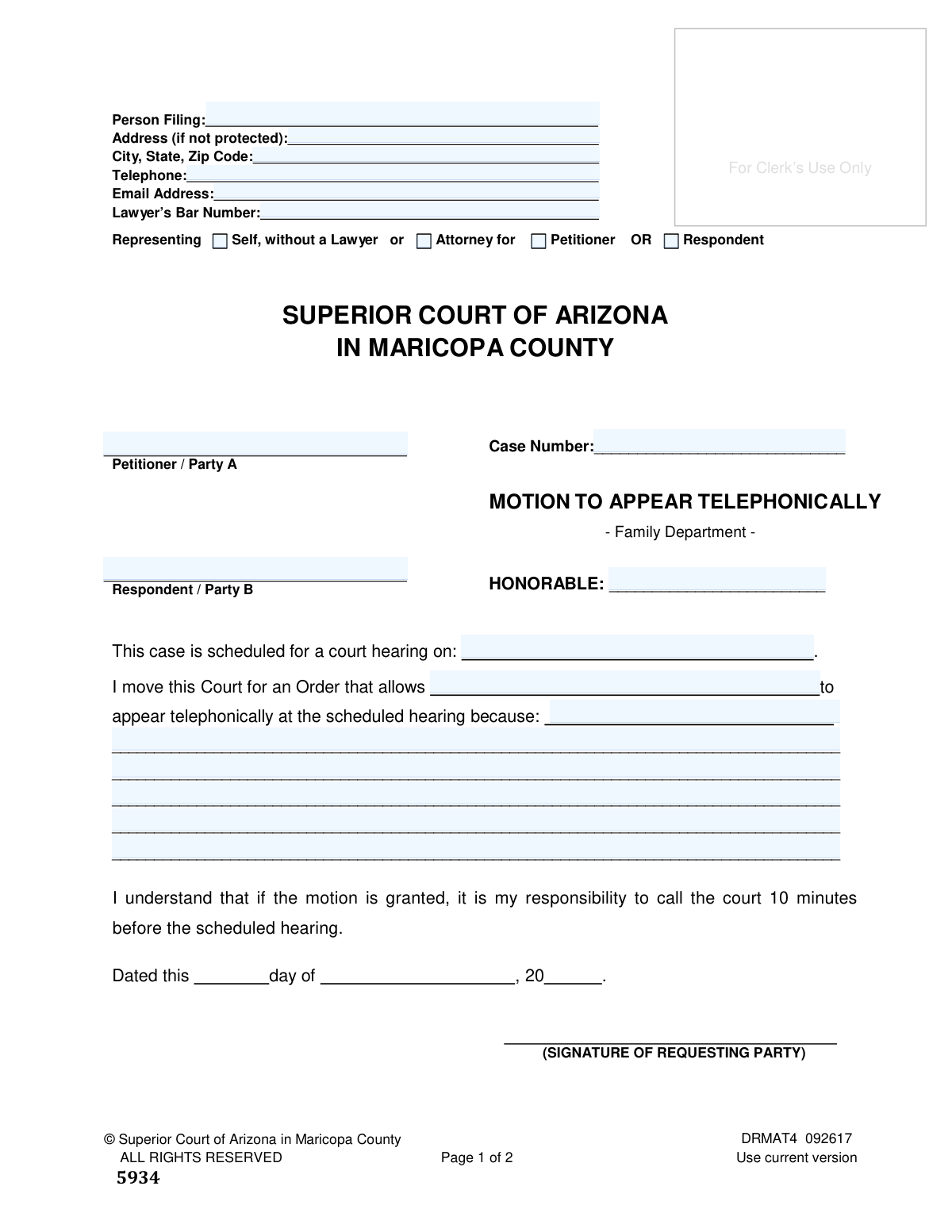
Yes! You can use AI to fill out Motion and Order to Appear Telephonically
Form DRMAT4, the Motion and Order to Appear Telephonically, is a formal request submitted to the Superior Court of Arizona in Maricopa County. It is used by a party in a legal case to ask the court for permission to participate in a scheduled hearing via telephone instead of appearing in person, which is crucial for individuals with valid reasons preventing their physical presence. Today, this form can be filled out quickly and accurately using AI-powered services like Instafill.ai, which can also convert non-fillable PDF versions into interactive fillable forms.
DRMAT4 is part of the
County court forms, family court forms, family law forms and superior court forms categories on Instafill.
Our AI automatically handles information lookup, data retrieval, formatting, and form filling.
It takes less than a minute to fill out DRMAT4 using our AI form filling.
Securely upload your data. Information is encrypted in transit and deleted immediately after the form is filled out.
Form specifications
| Form name: | Motion and Order to Appear Telephonically |
| Number of fields: | 67 |
| Number of pages: | 1 |
| Language: | English |
Instafill Demo: How to fill out PDF forms in seconds with AI
How to Fill Out DRMAT4 Online for Free in 2026
Are you looking to fill out a DRMAT4 form online quickly and accurately? Instafill.ai offers the #1 AI-powered PDF filling software of 2026, allowing you to complete your DRMAT4 form in just 37 seconds or less.
Follow these steps to fill out your DRMAT4 form online using Instafill.ai:
- 1 Navigate to Instafill.ai and upload the DRMAT4 PDF or select it from the template library.
- 2 Enter your personal details, case number, assigned judge, and the names of the petitioner and respondent in the designated fields.
- 3 Clearly state the date of the scheduled hearing and provide a detailed reason for your request to appear telephonically in the provided text box.
- 4 Use the AI assistant to review all entered information for accuracy and completeness, ensuring you've filled out all required sections for both the Motion and the Order pages.
- 5 Electronically sign and date the motion where indicated.
- 6 Download the completed document and carefully follow the court's specific instructions for filing, which involve making copies, preparing self-addressed stamped envelopes, and delivering the documents to the Clerk of Court and the assigned judge.
Our AI-powered system ensures each field is filled out correctly, reducing errors and saving you time.
Why Choose Instafill.ai for Your Fillable DRMAT4 Form?
Speed
Complete your DRMAT4 in as little as 37 seconds.
Up-to-Date
Always use the latest 2026 DRMAT4 form version.
Cost-effective
No need to hire expensive lawyers.
Accuracy
Our AI performs 10 compliance checks to ensure your form is error-free.
Security
Your personal information is protected with bank-level encryption.
Frequently Asked Questions About Form DRMAT4
This form is used to formally request permission from the court to attend a scheduled hearing by phone instead of appearing in person. It is intended for parties in an existing case, not for starting a new one.
Any party (Petitioner or Respondent) in an existing Family Department case in Maricopa County Superior Court who cannot attend a hearing in person and wishes to participate by telephone should complete this form.
You will need your case number, the name of the assigned judge, the date of the court hearing, and a clear, written reason explaining why you need to appear by phone.
The 'Motion' is the document you fill out to make your request to the court. The 'Order' is the document the judge will sign to either approve or deny your request, so you only fill out the top portion with case information.
You must file the original Motion with the Clerk of Court, deliver a stamped copy and the original Order to the judge, and mail a copy of the Motion to the other party in your case.
You need to make three copies of the Motion and one copy of the Order for each party. You will also need to provide self-addressed, stamped envelopes for yourself and all other parties.
The court will mail you a signed copy of the Order or a Minute Entry in the self-addressed, stamped envelope you provided. This document will state whether your motion was granted or denied.
If your motion is granted, the Order will specify the phone number to call and the judicial officer to contact. It is your responsibility to call the court at least five to ten minutes before the hearing is scheduled to begin.
Yes, you are required to mail or deliver a copy of all filed documents to the opposing party and their attorney, if they have one. You must certify that you have done this on the second page of the motion.
Yes, services like Instafill.ai use AI to help you accurately auto-fill form fields. This can save you time and help reduce errors when completing your legal documents.
To fill out this form online, you can use a service like Instafill.ai. Simply upload the PDF, and the platform's AI will make the fields interactive so you can type in your information, then download the completed form for printing and filing.
If you have a non-fillable or 'flat' PDF, you can use a tool like Instafill.ai to convert it into an interactive form. The service automatically detects where the fields are, allowing you to type your answers directly onto the document.
Failure to follow the filing and mailing procedures outlined in the instructions could result in a delay in your case or the judge not reading your motion.
Compliance DRMAT4
Validation Checks by Instafill.ai
1
Case Number Presence and Format
This check verifies that the 'Case Number' field is not empty and conforms to the format used by the Maricopa County Superior Court. The case number is the primary identifier for a legal case, and an incorrect or missing number will prevent the document from being correctly filed and associated with the case record. Failure to provide a valid case number will result in the clerk rejecting the filing.
2
Exclusive Representation Status Selection
This validation ensures that the filer selects exactly one option from the representation choices: 'Self, without a Lawyer', 'Attorney for Petitioner', or 'Attorney for Respondent'. It is logically impossible to be both self-represented and an attorney for a party in the same filing. This check prevents ambiguity and ensures the filer's role is clearly established for the court.
3
Conditional Lawyer's Bar Number
This check requires the 'Lawyer’s Bar Number' field to be completed if the filer has identified themselves as an 'Attorney for Petitioner' or 'Attorney for Respondent'. The bar number is a unique identifier that validates an individual's authority to practice law. A missing bar number for a purported attorney would invalidate the filing and could lead to sanctions.
4
Future Hearing Date
This validation confirms that the date entered for the 'court hearing on' field is a valid date that occurs in the future. A motion to appear telephonically is only relevant for an upcoming hearing. Submitting a motion for a hearing that has already passed is nonsensical and would be summarily denied, wasting the court's and the filer's time.
5
Justification for Motion is Provided
This check ensures that the free-text area following 'because:' contains an explanation for the request. This justification is the core of the motion, and the judge's decision depends entirely on the reason provided. An empty justification field would mean the motion has no basis and will be denied outright.
6
Judicial Officer Name Consistency
This validation compares the name in the 'HONORABLE' field on the first page with the 'Judge (or Commissioner)' field on the mailing certificate page. These fields must match to ensure the motion is delivered to the correct judicial officer for review. A mismatch could cause significant delays or result in the motion never reaching the assigned judge.
7
Chronological Service Date Logic
This check verifies that the dates listed on the mailing certificate (date filed with clerk, date mailed to judge, date mailed to opposing party) are on or after the signature date ('Dated this day of...') on the motion. A party cannot certify that they mailed a document before they officially signed it. This validation prevents logical impossibilities and upholds the integrity of the certification.
8
Mailing Certificate to Opposing Party
This validation ensures that the section for mailing a copy to the 'Opposing Party and/or his/her Attorney' is fully completed, including the date, name, and address. Proper service on the other party is a fundamental requirement of due process, giving them notice and an opportunity to respond. Failure to complete this section indicates improper service and is grounds for the judge to refuse to consider the motion.
9
Email Address Format
This check validates that any entry in the 'Email Address' field follows the standard '[email protected]' format. This is important for ensuring that any electronic notices or communications from the court are successfully delivered to the filer. An invalid email address could cause the filer to miss critical updates or orders in their case.
10
Telephone Number Format
This validation ensures the 'Telephone' number is entered in a recognizable format (e.g., XXX-XXX-XXXX) and contains a plausible number of digits. The court or staff may need to contact the filer directly, especially regarding a telephonic appearance. An incorrect or poorly formatted number could prevent crucial last-minute communication and jeopardize the telephonic appearance.
11
Consistent Identification of Person Appearing
This check ensures the name of the person who 'shall contact the following judicial officer' on the Order page matches the name of the person who is allowed 'to appear telephonically' in the Motion. The filer prepares both documents, and consistency is crucial for creating an enforceable order. A mismatch would make the resulting order ambiguous or incorrect.
12
Presence of Party Names
This validation confirms that both the 'Petitioner / Party A' and 'Respondent / Party B' fields are filled out. These names are essential for identifying the case and the parties involved. Omitting this information would make the document legally insufficient and lead to its rejection by the court clerk.
13
Completeness of Filer's Address
This check ensures that if the 'Address (if not protected)' field is filled, the corresponding 'City, State, Zip Code' field is also completed. A partial address is unusable for official mailings from the court or other parties. This validation prevents submission of incomplete contact information, which is essential for proper case administration.
14
Signature Date Presence
This validation verifies that the date fields ('day of', '20__') next to the signature line on the motion are filled out. The signature date legally establishes when the motion was executed by the filer. A missing date can render the document invalid or create ambiguity about its timeliness.
Common Mistakes in Completing DRMAT4
Filers often forget to enter the Case Number and the name of the assigned Judge ('HONORABLE') on both the Motion and Order pages. This information is critical for the Clerk of Court to correctly file the document and forward it to the proper judicial division. A motion without a case number cannot be docketed, leading to immediate rejection and delays. To avoid this, carefully copy the information from previous court documents in your case. AI-powered tools like Instafill.ai can help by storing and auto-filling this recurring case information across all related forms.
In the section explaining why a telephonic appearance is needed, many people provide weak justifications like 'it is more convenient' or 'I am busy.' The court requires 'good cause,' such as significant travel distance, a non-refundable travel conflict, a medical condition, or prohibitive cost. Failing to provide a specific, compelling reason will likely result in the judge denying the motion, forcing an in-person appearance. Always be detailed and honest about the hardship that appearing in person would cause.
The 'ORDER RE: MOTION TO APPEAR TELEPHONICALLY' page is for the judge's use only. A common mistake is for the filer to check the 'GRANTED' box or fill in the judge's contact information themselves, assuming they are pre-filling the form. This will cause the entire filing to be rejected, as it appears the filer is attempting to issue their own court order. Filers should only complete the top portion of this page (party names, case number) and leave the rest entirely blank for the judge to complete.
The instructions explicitly require the filer to provide self-addressed, stamped envelopes for themselves and all other parties. This is how the court mails back the signed Order or Minute Entry, informing everyone of the judge's decision. Forgetting this step means you will not receive the decision in the mail, potentially causing you to miss the hearing or be unaware if your request was denied. Always double-check that you have included enough stamped envelopes addressed to each party before submitting your packet to the judge's division.
The final page is a sworn statement confirming you have sent copies to all required parties, but it is often filled out incorrectly or incompletely. People forget to date each section, list the opposing party's lawyer, or sign and date the bottom. An incomplete certificate can lead a judge to disregard the motion, assuming the other parties were not properly notified. This page should be filled out carefully *after* you have mailed the copies, ensuring the dates reflect when the mailing actually occurred.
The procedures require a specific number of copies: the original Motion plus three copies, and enough copies of the Order for each party. This is a multi-step process that is easy to get wrong. Submitting the wrong number of copies can cause the Clerk to reject the filing or result in delays while the court requests the correct paperwork. To prevent this, create a checklist based on the instructions before going to the courthouse.
The form asks the filer to identify as 'Representing Self, without a Lawyer' or 'Attorney for Petitioner OR Respondent.' Individuals filing on their own (pro se litigants) sometimes mistakenly circle 'Attorney for' their own party. This creates confusion in the court record about whether a lawyer is involved. If you do not have a lawyer, you must select 'Representing Self, without a Lawyer' to ensure your status is clear to the court.
An unsigned legal document is invalid and has no legal effect. In the rush to assemble copies and envelopes, filers frequently forget to physically sign and date the motion near the bottom of the first page. The Clerk's office will not accept an unsigned motion for filing, which will halt the entire process until a properly signed version is submitted. Always perform a final review of the original document to ensure it is signed and dated.
The instructions outline a two-part submission process: the original Motion is filed with the Clerk of Court, and then a 'conformed copy' of the Motion and the original Order are delivered to the assigned Judge. A common error is to give everything to the Clerk or everything to the Judge's staff, which disrupts the official workflow. This will cause significant delays as court staff will have to reroute the documents. To avoid this, follow the steps precisely, filing with the Clerk first and then delivering the required items to the Judge's division.
This form is often provided as a flat, non-fillable PDF, forcing users to print it and fill it out by hand. This frequently leads to illegible handwriting, which can cause the clerk or judge to misread names, dates, or the reason for the request, potentially leading to denial or data entry errors in the court system. To ensure clarity, it is better to use a tool like Instafill.ai that can convert any non-fillable PDF into an electronically fillable version, allowing you to type your answers cleanly before printing.
Saved over 80 hours a year
“I was never sure if my IRS forms like W-9 were filled correctly. Now, I can complete the forms accurately without any external help.”
Kevin Martin Green
Your data stays secure with advanced protection from Instafill and our subprocessors

Robust compliance program
Transparent business model
You’re not the product. You always know where your data is and what it is processed for.
ISO 27001, HIPAA, and GDPR
Our subprocesses adhere to multiple compliance standards, including but not limited to ISO 27001, HIPAA, and GDPR.
Security & privacy by design
We consider security and privacy from the initial design phase of any new service or functionality. It’s not an afterthought, it’s built-in, including support for two-factor authentication (2FA) to further protect your account.
Fill out DRMAT4 with Instafill.ai
Worried about filling PDFs wrong? Instafill securely fills motion-and-order-to-appear-telephonically forms, ensuring each field is accurate.