Yes! You can use AI to fill out Motion to Set Trial Date and Certificate of Readiness
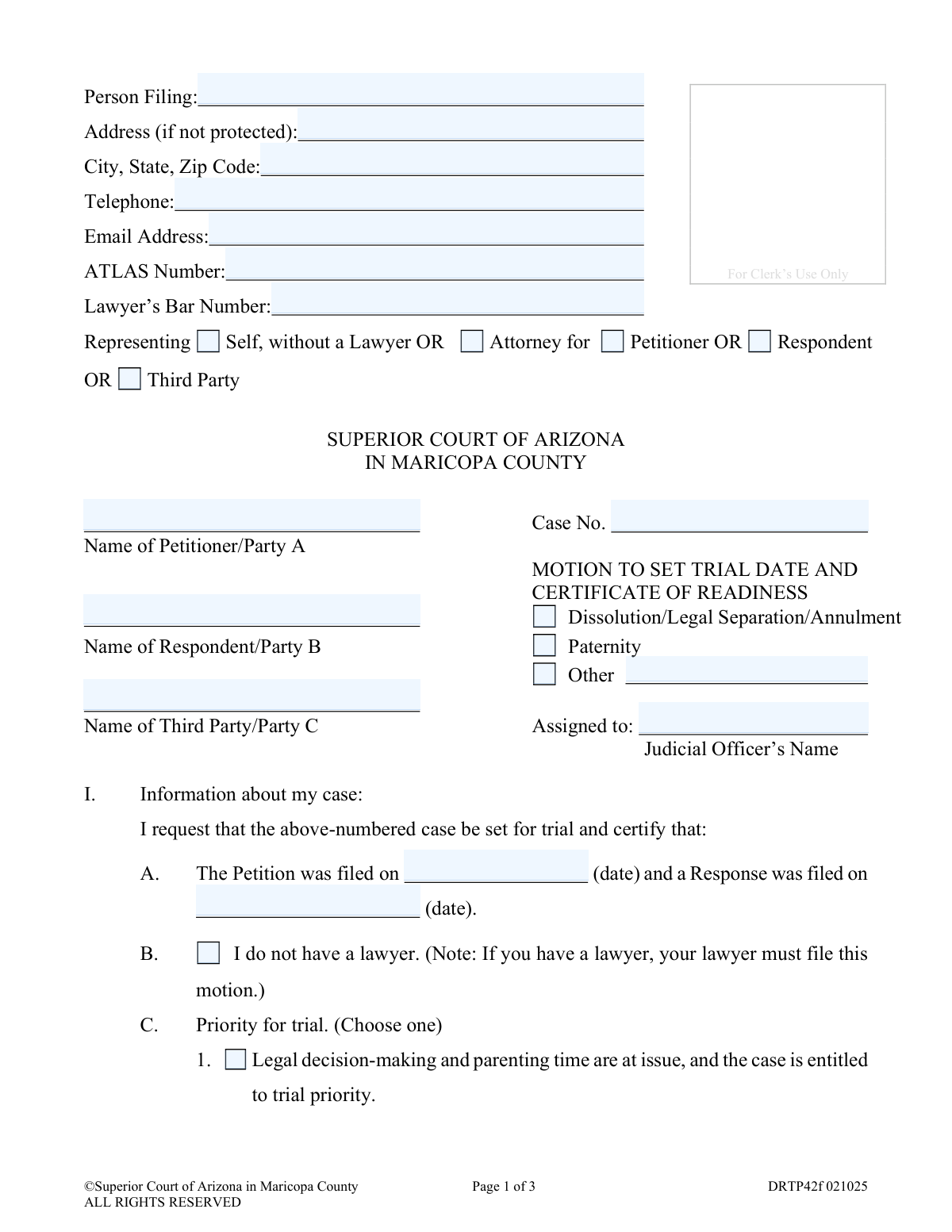
The Motion to Set Trial Date and Certificate of Readiness is a legal document filed in the Superior Court of Arizona in Maricopa County to request that the court schedule a trial for a family law case, such as a divorce or paternity action. By filing this form, a party certifies to the court that all pre-trial procedures, like discovery, have been completed and the case is ready for a final hearing. Today, this form can be filled out quickly and accurately using AI-powered services like Instafill.ai, which can also convert non-fillable PDF versions into interactive fillable forms.
DRTP42f is part of the
County court forms, family court forms, family law forms and superior court forms categories on Instafill.
Our AI automatically handles information lookup, data retrieval, formatting, and form filling.
It takes less than a minute to fill out DRTP42f using our AI form filling.
Securely upload your data. Information is encrypted in transit and deleted immediately after the form is filled out.
Form specifications
| Form name: | Motion to Set Trial Date and Certificate of Readiness |
| Number of fields: | 56 |
| Number of pages: | 1 |
| Language: | English |
Instafill Demo: How to fill out PDF forms in seconds with AI
How to Fill Out DRTP42f Online for Free in 2026
Are you looking to fill out a DRTP42F form online quickly and accurately? Instafill.ai offers the #1 AI-powered PDF filling software of 2026, allowing you to complete your DRTP42F form in just 37 seconds or less.
Follow these steps to fill out your DRTP42F form online using Instafill.ai:
- 1 Navigate to Instafill.ai and upload or select the 'Motion to Set Trial Date and Certificate of Readiness' form.
- 2 Enter your personal and case information, including the case number, names of the parties, and the assigned judicial officer.
- 3 Use the AI assistant to fill in details about the case, such as the dates the petition and response were filed, and whether the case has priority.
- 4 Certify the status of required programs like the Parent Information Program and mediation, and indicate when your case will be ready for trial.
- 5 Estimate the length of the trial and provide contact information for the other party or their legal representative.
- 6 Complete the certification section, confirming that discovery is complete and you are ready to proceed.
- 7 Review the entire document for accuracy, then sign and date it before following the instructions for mailing or delivering copies to the judge and the other party.
Our AI-powered system ensures each field is filled out correctly, reducing errors and saving you time.
Why Choose Instafill.ai for Your Fillable DRTP42f Form?
Speed
Complete your DRTP42f in as little as 37 seconds.
Up-to-Date
Always use the latest 2026 DRTP42f form version.
Cost-effective
No need to hire expensive lawyers.
Accuracy
Our AI performs 10 compliance checks to ensure your form is error-free.
Security
Your personal information is protected with bank-level encryption.
Frequently Asked Questions About Form DRTP42f
This form is used to officially ask the Superior Court of Arizona in Maricopa County to schedule a trial for your family law case and to certify that you are fully prepared to proceed.
This form is intended for individuals representing themselves without a lawyer in a family law case. The form notes that if you are represented by an attorney, your attorney must file this motion on your behalf.
Certifying your case is ready means you have gathered all the facts and information you need from the other party (a process called 'discovery') and have responded to all of their requests. It confirms for the court that you have completed all necessary pre-trial preparations.
You must select a date that is at least 60 days after the date you plan to file this motion with the court. This is a mandatory timeframe to ensure all parties have adequate time for final preparations.
You will need your court case number, the names of all parties, the date the original Petition and Response were filed, and the contact information for the other party or their attorney. You also need to know if you have completed the Parent Information Program and mediation, if applicable.
The Parent Information Program is a mandatory class for all parties in a family law case involving children. If legal decision-making and parenting time are issues in your case, you must complete this program before a trial can be set.
After signing the form, you must file the original with the Clerk of the Court, provide a copy to the assigned judge, and mail or deliver a copy to the other party or their attorney as outlined in Section III.
Yes, you are required to mail or deliver a copy of the completed motion to the other party or their lawyer. You must certify on the form that you have done this, including the date and the address used.
The form defines a 'short case' as one that can likely be resolved in an hour or less. If your case involves multiple witnesses, complex issues, or significant disputes, you should select 'not a short trial' and estimate the required time in hours or days.
This means that you and the other party have exchanged all relevant information, documents, and evidence as required by court rules. By signing, you are stating you have everything you need from the other party to present your case at trial.
Yes, services like Instafill.ai use AI to help you accurately auto-fill form fields, which can save time and reduce errors. This is especially helpful for repetitive information like your name, address, and case number.
You can upload the PDF of the Motion to Set Trial Date form to the Instafill.ai platform. The AI will make the document interactive, allowing you to fill it out online and securely save your information for future use.
You can use a service like Instafill.ai, which specializes in converting flat, non-fillable PDFs into interactive, fillable forms. Simply upload the document to the platform to make it easy to complete on your computer.
Compliance DRTP42f
Validation Checks by Instafill.ai
1
Ensures Case Number is Provided
This check verifies that the 'Case No.' field is not empty. The case number is the primary identifier for the legal proceeding, and without it, the motion cannot be correctly filed or associated with the existing case file. A missing case number will result in the clerk rejecting the document for being incomplete.
2
Validates Single Representation Status
Ensures that the filer has selected exactly one option from the 'Representing' choices: 'Self, without a Lawyer', 'Attorney for Petitioner', or 'Attorney for Respondent'. This information is critical for the court to understand who is filing the motion and in what capacity. Selecting multiple or no options creates ambiguity and will cause the form to be rejected for clarification.
3
Requires Lawyer's Bar Number if Representing a Party
This check validates that if the filer indicates they are an 'Attorney for' a party, the 'Lawyer’s Bar Number' field is filled. The bar number is a unique identifier that confirms the filer is a licensed attorney in good standing. Filing without a valid bar number when acting as an attorney is a serious issue and will lead to immediate rejection of the motion.
4
Ensures Consistency for Self-Represented Filers
Verifies that if the filer selects 'Representing Self, without a Lawyer', the checkbox for 'I do not have a lawyer' in Section I.B is also checked. This dual confirmation prevents ambiguity and ensures the filer understands the implications of self-representation as stated on the form. A mismatch would require the filer to correct the form before it can be processed.
5
Validates Trial Readiness Date is at least 60 Days in the Future
This rule checks that the date entered in Section I.D.1 ('My case will be ready for trial on or after') is a minimum of 60 days after the date the motion is filed. This 60-day period is a court requirement to ensure all parties have adequate time to prepare for trial. An invalid date will cause the motion to be denied, delaying the trial setting process.
6
Verifies Logical Sequence of Petition and Response Dates
This validation ensures the 'Response was filed on' date in Section I.A is on or after the 'Petition was filed on' date. A response cannot logically be filed before the initial petition that started the case. This check prevents data entry errors and maintains the chronological integrity of the case timeline.
7
Requires Estimated Trial Length for Non-Short Trials
If the filer selects 'This is not a short trial' in Section I.E, this check ensures that a value is entered for the estimated length in hours or days. This information is essential for the court's calendar clerk to allocate the appropriate amount of time for the trial. Failure to provide an estimate will result in the motion being returned for completion.
8
Ensures Completion of Sub-Questions for Priority Trial Requests
This validation confirms that if 'Legal decision-making and parenting time are at issue' (Section I.C.1) is selected, the filer has answered 'Yes' or 'No' to the sub-questions regarding the Parent Information Program and Mediation. These are prerequisites for obtaining a priority trial setting in such cases. Incomplete answers will prevent the court from determining if the case qualifies for priority scheduling.
9
Confirms Certification of Readiness is Marked
Verifies that the checkbox in Section I.F, certifying that discovery is complete and the filer is ready for trial, has been marked. This certification is a formal declaration to the court and is a primary purpose of the form. Without this box being checked, the 'Certificate of Readiness' is incomplete and the motion to set a trial will be denied.
10
Validates Certification of Service to Other Party
This check ensures the filer has selected 'Yes' for mailing/delivering a copy to the other party (Section III.B) and has provided a valid date and address. Proper service is a fundamental legal requirement to ensure due process, giving the other party notice of the motion. Failure to certify service will result in the motion being rejected by the court.
11
Ensures Assigned Judicial Officer's Name is Provided
This validation checks that the name of the assigned judicial officer is filled in. This information is necessary to route the motion to the correct judge or commissioner for review and scheduling. Omitting the judicial officer's name will delay processing as the clerk's office will have to look up the assignment or return the document.
12
Verifies Filer's Signature and Date
This check ensures that the signature and date fields at the end of the form are completed. The signature, made under penalty of perjury, authenticates the document and makes the filer responsible for its contents, while the date establishes the official filing date. An unsigned or undated motion is legally invalid and will be rejected.
Common Mistakes in Completing DRTP42f
In Section I.D, filers must provide a date for trial readiness that is at least 60 days after the motion is filed. People often miscount the days or misunderstand the rule, causing their motion to be denied for being premature. To avoid this, carefully count 60 calendar days from the filing date to find the earliest valid readiness date. AI-powered tools like Instafill.ai can help prevent this by automatically calculating and validating date-based rules.
Section I.F is a binding legal certification that all discovery is complete and you are ready for trial. Eager to move their case forward, many filers check this box without realizing they are waiving their right to request more information from the other party. This can severely weaken their case and should only be checked when discovery is truly finished and all necessary information has been exchanged.
The case number is the court's primary identifier for your file, and it is required on every page of the motion. A common mistake is entering the number with a typo, or forgetting to fill it in on pages 2 and 3. This can lead to the document being rejected by the clerk or misfiled, causing significant delays. Always double-check the case number against official court documents before submitting.
An unsigned or undated legal document is invalid and will be immediately rejected by the court. It is a simple but frequent oversight for filers to complete the entire form but forget the final, crucial step of signing and dating it at the bottom of page 3. This requires the filer to correct the error and refile the motion, delaying the process of getting a trial date.
Section III requires the filer to certify that a copy of the motion was delivered to both the judge and the opposing party. People often forget to check the appropriate boxes, fill in the date of mailing, or write the address where the copy was sent. An incomplete certification section makes the filing defective, as the court has no proof that all parties were properly notified.
In Section I.E, filers often incorrectly mark their case as a 'short case' (one hour or less) when it involves multiple issues or witnesses. This causes significant scheduling problems for the court and can result in the trial being cut short or postponed midway through. It is critical to realistically assess the time needed and provide an accurate estimate in hours or days to ensure the court allocates sufficient time.
Section II asks for contact information for the 'other party or his/her lawyer,' explicitly stating to use the lawyer's information if one exists. A frequent error is listing the opposing party's personal details even when they are represented by counsel. All official communication must go through a party's attorney, so failing to list them is a procedural error that can invalidate the service.
Filers may select the option for trial priority in Section I.C without meeting the requirements, such as completing the Parent Information Program or mediation. This is often done in an attempt to speed up the case, but it will lead to the motion being denied if the certifications are found to be false. Before claiming priority, you must confirm that all prerequisites have been met and the certificates of completion are on file with the court.
This form is often available as a non-fillable PDF, leading people to fill it out by hand. This can result in illegible handwriting or information written outside the designated fields, which may cause the clerk to reject the document or make data entry errors. To avoid this, use a service like Instafill.ai, which can convert flat PDFs into easily fillable forms, ensuring the final document is clean, professional, and easy to process.
Section I.A requires the dates when the original Petition and Response were filed to establish the case's procedural timeline. Filers often leave these fields blank because they do not have the information readily available. A motion with missing dates is considered incomplete and may be rejected, as the court needs this information to verify the case is ready to be set for trial.
The case caption at the top of the form requires the name of the assigned Judicial Officer. Many self-represented litigants are unaware of this requirement or do not know where to find the information. Submitting the motion without the judge's name can cause processing delays, as court staff must manually look up the assignment to route the document to the correct chambers.
Saved over 80 hours a year
“I was never sure if my IRS forms like W-9 were filled correctly. Now, I can complete the forms accurately without any external help.”
Kevin Martin Green
Your data stays secure with advanced protection from Instafill and our subprocessors

Robust compliance program
Transparent business model
You’re not the product. You always know where your data is and what it is processed for.
ISO 27001, HIPAA, and GDPR
Our subprocesses adhere to multiple compliance standards, including but not limited to ISO 27001, HIPAA, and GDPR.
Security & privacy by design
We consider security and privacy from the initial design phase of any new service or functionality. It’s not an afterthought, it’s built-in, including support for two-factor authentication (2FA) to further protect your account.
Fill out DRTP42f with Instafill.ai
Worried about filling PDFs wrong? Instafill securely fills motion-to-set-trial-date-and-certificate-of-readiness forms, ensuring each field is accurate.