Yes! You can use AI to fill out New Jersey Superior Court Appellate Division Pretrial Detention Appeal (PDA) – State’s Response
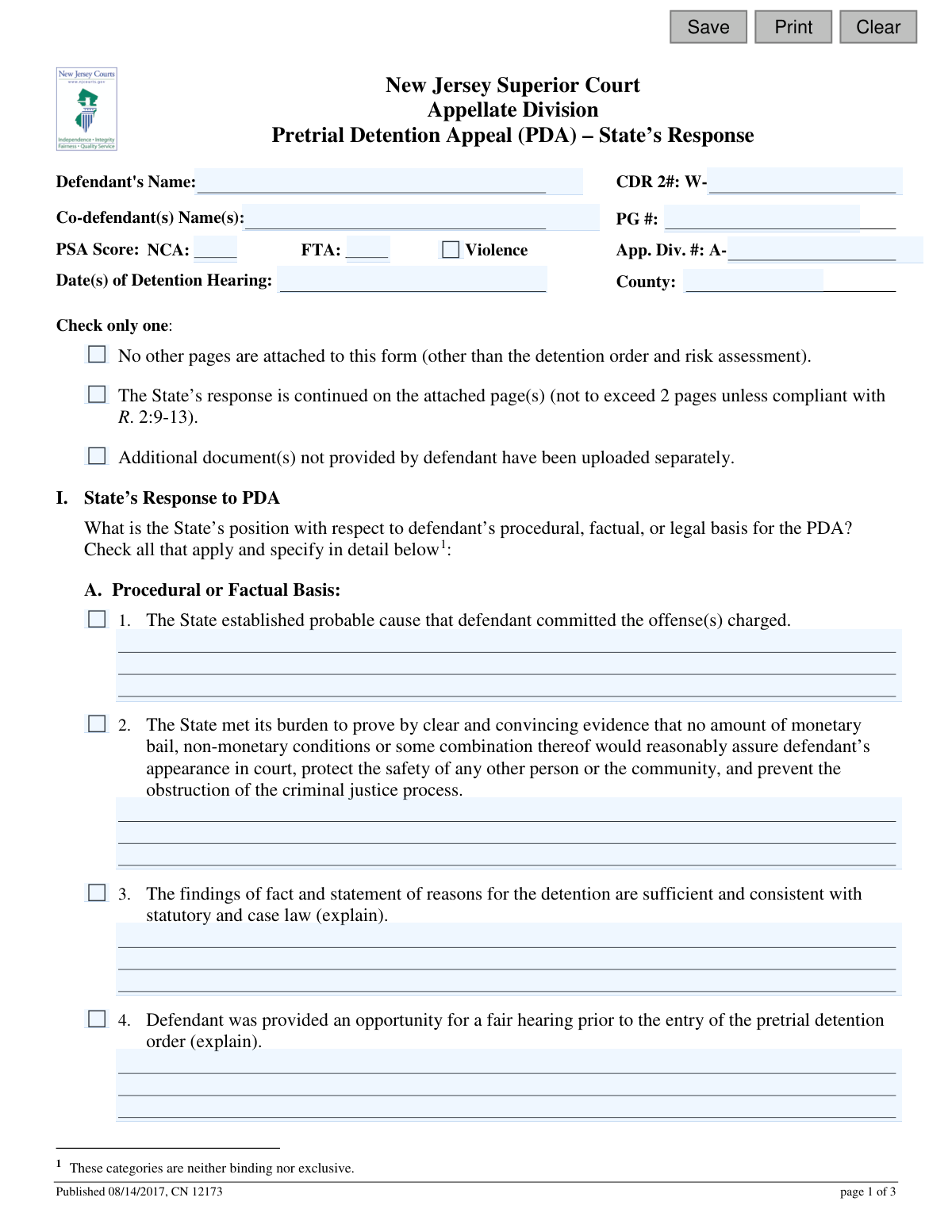
This form is the official document for the State of New Jersey to respond to a defendant's appeal of a pretrial detention order. The prosecution uses it to present its arguments for upholding the detention, addressing the procedural, factual, and legal points raised by the defense. Today, this form can be filled out quickly and accurately using AI-powered services like Instafill.ai, which can also convert non-fillable PDF versions into interactive fillable forms.
CN 12173 is part of the
court appeal forms, court response forms, New Jersey forms and superior court forms categories on Instafill.
Our AI automatically handles information lookup, data retrieval, formatting, and form filling.
It takes less than a minute to fill out CN 12173 using our AI form filling.
Securely upload your data. Information is encrypted in transit and deleted immediately after the form is filled out.
Form specifications
| Form name: | New Jersey Superior Court Appellate Division Pretrial Detention Appeal (PDA) – State’s Response |
| Number of fields: | 53 |
| Number of pages: | 1 |
| Language: | English |
Instafill Demo: How to fill out PDF forms in seconds with AI
How to Fill Out CN 12173 Online for Free in 2026
Are you looking to fill out a CN 12173 form online quickly and accurately? Instafill.ai offers the #1 AI-powered PDF filling software of 2026, allowing you to complete your CN 12173 form in just 37 seconds or less.
Follow these steps to fill out your CN 12173 form online using Instafill.ai:
- 1 Navigate to Instafill.ai and upload or select the 'Pretrial Detention Appeal (PDA) – State’s Response' form.
- 2 Use the AI assistant to automatically populate case information, including the Defendant's Name, CDR 2#, and Appellate Division Number.
- 3 In Section I, 'State’s Response to PDA,' check the boxes that apply to the state's argument and use the AI to help draft detailed explanations for each selected basis.
- 4 Provide the key legal citations (statutes, case law) in the 'Legal Basis' subsection that support the state's opposition to the appeal.
- 5 Complete Section II, 'Record on Appeal,' by answering questions about the completeness of the record and the necessity of transcripts for the appeal.
- 6 Digitally sign and date the form, and enter the responding attorney's name, Bar ID, title, and office location.
- 7 Review the entire form for accuracy and then securely download, print, or submit the completed document as required by the court.
Our AI-powered system ensures each field is filled out correctly, reducing errors and saving you time.
Why Choose Instafill.ai for Your Fillable CN 12173 Form?
Speed
Complete your CN 12173 in as little as 37 seconds.
Up-to-Date
Always use the latest 2026 CN 12173 form version.
Cost-effective
No need to hire expensive lawyers.
Accuracy
Our AI performs 10 compliance checks to ensure your form is error-free.
Security
Your personal information is protected with bank-level encryption.
Frequently Asked Questions About Form CN 12173
This form is used by the State's attorney (prosecutor) to formally respond to a defendant's appeal of a pretrial detention order. It outlines the State's legal and factual arguments for why the detention order should be upheld by the New Jersey Superior Court, Appellate Division.
An attorney representing the State, such as a prosecutor or deputy attorney general, is responsible for completing and signing this form. It is not intended for the defendant or their legal counsel.
You will need the defendant's name, CDR 2 number, Appellate Division number (A-), Public Safety Assessment (PSA) scores, and the date(s) of the original detention hearing. This information is crucial for correctly identifying the case.
In Section I, check all boxes that apply to the State's argument and provide detailed explanations in the corresponding text fields. This is where you articulate the specific factual and procedural reasons why the trial court's detention order was correct.
In this part of Section I, you must list the most important legal citations that support your opposition to the appeal. This includes relevant court rules, statutes, case law, and constitutional provisions that justify the defendant's continued detention.
You must ensure the court has the detention order and risk assessment. If the defendant did not provide a complete record, you must identify and upload any missing documents separately to support the State's position.
In Section II.A, you must indicate that the record is not complete, explain what is missing, and identify any documents you are submitting separately. It is the State's responsibility to ensure the Appellate Division has all necessary materials.
A transcript is generally necessary if the appeal challenges witness testimony, an oral ruling, or alleges a discrepancy between the court's oral decision and the written order. Use Section II.B to explain why a transcript is required if the defendant has not already ordered one.
Yes, the form specifies that any continuation of the State's response on attached pages should not exceed two pages. This limit is subject to exceptions outlined in court rule R. 2:9-13.
The PSA (Public Safety Assessment) scores predict risk. 'NCA' stands for New Criminal Activity, while 'FTA' stands for Failure to Appear, and these scores are used to assess the risk a defendant poses if released.
Yes, services like Instafill.ai use AI to accurately auto-fill form fields with known case and defendant information, which helps save time and reduce errors. This allows you to focus on crafting the legal and factual arguments.
You can use a service like Instafill.ai to fill out the form online. Simply upload the PDF, and the platform will allow you to type directly into the fields, save your progress, and download the completed document.
If you have a non-fillable or 'flat' PDF, you can upload it to Instafill.ai. The service can convert it into an interactive, fillable form, allowing you to easily complete it on your computer.
The attorney representing the State must sign the form, certifying that the factual statements are true. They must also provide their printed name, Bar ID number, title, and office location.
Compliance CN 12173
Validation Checks by Instafill.ai
1
Defendant and Case Identifier Presence
Checks that the Defendant's Name, CDR 2#, and App. Div. # fields are all provided. These fields are critical for uniquely identifying the case and the individual involved in the appeal. A submission without these core identifiers is incomplete and cannot be processed, leading to rejection or delay.
2
CDR-2 Number Format Validation
Validates that the CDR 2# field follows the expected format, starting with 'W-'. This ensures data consistency and helps prevent data entry errors for this specific case identifier. If the format is incorrect, it could lead to lookup failures in the court's case management system.
3
Appellate Division Number Format
Ensures the App. Div. # field begins with the 'A-' prefix as shown on the form. This standardized format is crucial for correct docketing and routing within the Appellate Division. An incorrectly formatted number will be rejected by the court's electronic filing system.
4
Valid Detention Hearing Date
Verifies that the 'Date(s) of Detention Hearing' is a valid, past or present date. This date is a critical piece of the case history and must be accurate for the appeal to be contextualized correctly. The system should reject any future dates or improperly formatted date strings to ensure the record is factually correct.
5
Exclusive Attachment Option Selection
Confirms that only one option is selected from the checkbox group regarding attachments ('No other pages are attached...', 'The State’s response is continued...', 'Additional document(s)...'). The form explicitly states to 'Check only one,' and selecting multiple options creates ambiguity about the submission's contents. This validation prevents conflicting information about the completeness of the filing.
6
State's Position Completeness
Ensures at least one checkbox from A1 through A8 under 'State’s Response to PDA' is selected. The purpose of the form is to outline the State's position, so at least one basis for opposition must be indicated. A submission without any selected basis is considered incomplete and fails to fulfill its primary function.
7
Conditional Explanation for Factual/Procedural Basis
Requires an explanation in the corresponding text area if checkboxes 3, 4, 5, 6, or 8 under 'Procedural or Factual Basis' are checked. The form explicitly requests an explanation for these items to provide context for the State's position. Failure to provide the required detail makes the response incomplete and less useful for judicial review.
8
Conditional Explanation for Incomplete Record
Validates that if the 'No' radio button is selected for question II.A.1 ('is the record supplied by defendant complete'), the corresponding explanation text box is filled. This is necessary to inform the court precisely what is missing from the record provided by the defendant. Without this explanation, the claim of an incomplete record is unsubstantiated and cannot be acted upon.
9
Conditional Explanation for Additional Documents
Checks that if the 'Yes' radio button is selected for question II.A.2 ('Are you relying on any other document(s)...'), the explanation identifying the documents is provided. This ensures the court and the opposing party are aware of all materials being considered by the State. The system must enforce this to maintain a complete and transparent appellate record.
10
Conditional Explanation for Transcript Necessity
Requires an explanation in the text area under II.B.2 if 'Yes' is checked for any of the questions from II.B.1.a through II.B.1.d regarding transcripts. This justification is crucial for the court to assess whether a transcript is truly necessary for the appeal. An un-explained 'Yes' does not provide enough information for the court to make a decision or potentially order the transcript.
11
PSA Score Numeric Validation
Verifies that the values entered for the Public Safety Assessment (PSA) scores (NCA, FTA, Violence) are numeric. These scores are quantitative outputs from a risk assessment tool and must be numbers to be valid. The validation prevents text or special characters from being entered, ensuring data integrity for these critical data points.
12
Signature Block Completeness
Ensures all fields in the signature section (Date, Signature, Printed Name, Bar ID, Title, Office) are filled out. A complete and signed attestation is legally required to certify the truthfulness of the statements in the document. An incomplete signature block invalidates the submission and can lead to its rejection by the court clerk.
13
Valid Attorney Bar ID
Validates that the 'Bar ID #' field is filled and checks it against a known format for New Jersey attorney IDs. This unique identifier confirms the signing attorney is in good standing and authorized to practice. An invalid or missing Bar ID can call the authenticity of the entire submission into question.
14
Valid Signature Date
Confirms the 'Date' in the signature block is a valid date and is not in the future. The signature date establishes when the certification was made. A future date is logically impossible and would invalidate the legal certification, while an invalid format would cause processing errors.
15
Logical Date Consistency Check
Verifies that the signature date is on or after the 'Date(s) of Detention Hearing'. It is logically impossible for the response to be signed before the hearing it discusses has occurred. This check prevents significant chronological errors in the case record that could undermine the document's credibility.
Common Mistakes in Completing CN 12173
Users often mistype or omit critical identification numbers like the 'CDR 2#', 'App. Div. #', or 'PG #'. These numbers are essential for correctly routing and associating the response with the proper case file. An error here can lead to significant processing delays or the document being rejected, as it cannot be matched to the defendant's appeal. Double-checking these numbers against the original appeal documents is crucial before submission.
In Section I-A, several checkboxes are followed by '(explain)'. A frequent mistake is checking a box, such as A.3 or A.5, but failing to provide the mandatory detailed explanation in the space below. This renders the assertion unsubstantiated and weakens the State's position. The court relies on this detailed narrative to understand the reasoning behind the State's claims, and its absence may lead the court to disregard the checked item entirely.
In Section I-B, attorneys may provide vague references or improperly formatted legal citations for statutes, court rules, or case law. For example, writing 'the Bail Reform Act' instead of the specific statutory section (e.g., N.J.S.A. 2A:162-19). This forces court staff and judges to spend extra time locating the correct legal authority, undermining the persuasiveness of the argument. All citations should be complete and follow standard legal formatting.
Forgetting to sign the form, providing an illegible printed name, or entering an incorrect 'Bar ID #' are common and critical errors. The signature and Bar ID are required to certify the document's authenticity and attribute it to a licensed attorney. An omission or error can invalidate the filing, cause it to be returned, and delay the appeal process. Using a tool like Instafill.ai can help by saving and auto-populating this recurring information accurately.
In Section II-A, if a user answers 'No' to the record being complete or 'Yes' to relying on other documents, they must provide a detailed explanation. A common mistake is to select the checkbox but leave the explanation field blank. This leaves the Appellate Division uncertain about what documents are missing or being added, which can halt the expedited review process until the record is clarified.
In Section II-B, users may check 'Yes' to one of the questions indicating a transcript is necessary (e.g., the appeal depends on witness testimony) but then fail to provide a compelling reason in the subsequent explanation field. This inconsistency weakens the request for a transcript. The explanation must clearly justify why the transcript is essential for the court's review, especially if the defendant has not already ordered one.
The form explicitly states 'Check only one' regarding attachments, yet users frequently check multiple boxes or none at all. This creates ambiguity about whether the submission is complete or if other documents are supposed to be included. Failing to make a clear, single selection can cause confusion and delays as the clerk's office may need to seek clarification on the contents of the filing.
The Public Safety Assessment (PSA) score has three distinct components: 'NCA' (New Criminal Activity), 'FTA' (Failure to Appear), and 'Violence'. A common error is to only fill in one or two of these fields, leaving the score incomplete. All three values are critical for the court's assessment of risk, and omitting any part of the score provides an incomplete picture that may hinder the court's evaluation of the detention order.
Instead of providing case-specific details, filers sometimes use generic, boilerplate text in the explanation fields throughout Section I. This fails to address the unique facts and arguments raised in the defendant's appeal. To be persuasive, the response must directly counter the defendant's specific claims with tailored facts and legal reasoning, not with generic statements that could apply to any case.
This form is often distributed as a non-fillable PDF, leading to submissions that are handwritten, illegible, and prone to errors. Manually filling it out increases the chance of typos and missed fields. AI-powered tools like Instafill.ai can convert such flat PDFs into smart, fillable forms, ensuring all data is typed, legible, and validated, which prevents many of the common data entry mistakes and produces a more professional and reliable submission.
Saved over 80 hours a year
“I was never sure if my IRS forms like W-9 were filled correctly. Now, I can complete the forms accurately without any external help.”
Kevin Martin Green
Your data stays secure with advanced protection from Instafill and our subprocessors

Robust compliance program
Transparent business model
You’re not the product. You always know where your data is and what it is processed for.
ISO 27001, HIPAA, and GDPR
Our subprocesses adhere to multiple compliance standards, including but not limited to ISO 27001, HIPAA, and GDPR.
Security & privacy by design
We consider security and privacy from the initial design phase of any new service or functionality. It’s not an afterthought, it’s built-in, including support for two-factor authentication (2FA) to further protect your account.
Fill out CN 12173 with Instafill.ai
Worried about filling PDFs wrong? Instafill securely fills new-jersey-superior-court-appellate-division-pretrial-detention-appeal-pda-states-response forms, ensuring each field is accurate.