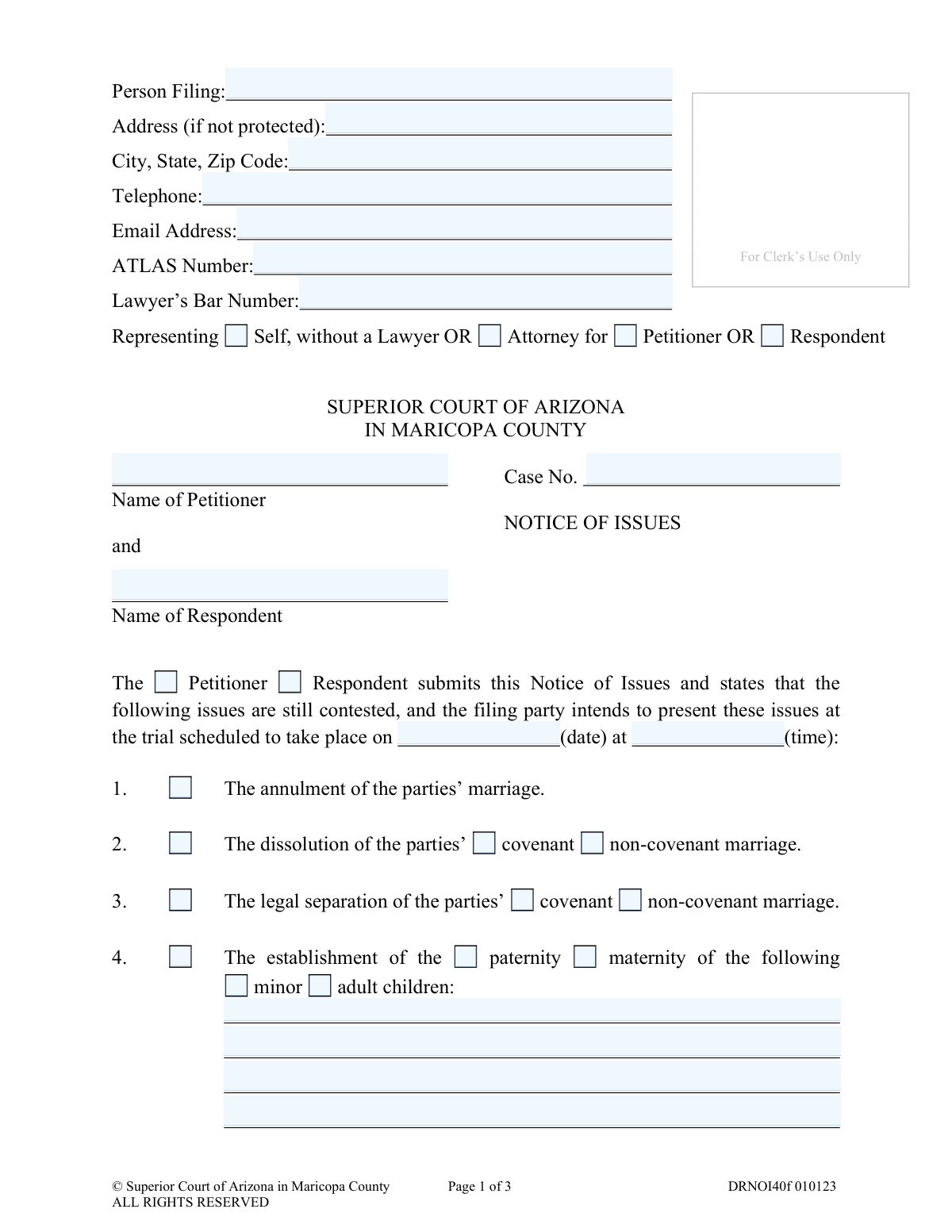
Yes! You can use AI to fill out Superior Court of Arizona in Maricopa County, Notice of Issues
Form DRNOI40f, the Notice of Issues, is a critical document used in Arizona family court proceedings to formally declare which legal issues remain in dispute and require a judge's decision at trial. Filing this form properly ensures that the trial focuses only on contested matters, saving time and resources for all involved. Today, this form can be filled out quickly and accurately using AI-powered services like Instafill.ai, which can also convert non-fillable PDF versions into interactive fillable forms.
DRNOI40f is part of the
County court forms, family court forms, family law forms and superior court forms categories on Instafill.
Our AI automatically handles information lookup, data retrieval, formatting, and form filling.
It takes less than a minute to fill out DRNOI40f using our AI form filling.
Securely upload your data. Information is encrypted in transit and deleted immediately after the form is filled out.
Form specifications
| Form name: | Superior Court of Arizona in Maricopa County, Notice of Issues |
| Number of fields: | 122 |
| Number of pages: | 1 |
| Language: | English |
Instafill Demo: How to fill out PDF forms in seconds with AI
How to Fill Out DRNOI40f Online for Free in 2026
Are you looking to fill out a DRNOI40F form online quickly and accurately? Instafill.ai offers the #1 AI-powered PDF filling software of 2026, allowing you to complete your DRNOI40F form in just 37 seconds or less.
Follow these steps to fill out your DRNOI40F form online using Instafill.ai:
- 1 Navigate to Instafill.ai and upload or select the Notice of Issues, Form DRNOI40f.
- 2 Enter your personal details, case number, and specify whether you are the Petitioner or Respondent.
- 3 Use the AI assistant to check the boxes corresponding to all the issues that are still contested, such as dissolution of marriage, child support, or division of property.
- 4 For each selected issue, provide any required details, such as the names of children involved or the specific orders being requested.
- 5 Carefully review the entire form generated by the AI, ensuring all information is accurate and all contested issues are correctly marked.
- 6 Electronically sign and date the form to certify the information provided.
- 7 Download the completed Notice of Issues and follow the court's instructions for filing it with the Clerk of Superior Court and serving it to the other party.
Our AI-powered system ensures each field is filled out correctly, reducing errors and saving you time.
Why Choose Instafill.ai for Your Fillable DRNOI40f Form?
Speed
Complete your DRNOI40f in as little as 37 seconds.
Up-to-Date
Always use the latest 2026 DRNOI40f form version.
Cost-effective
No need to hire expensive lawyers.
Accuracy
Our AI performs 10 compliance checks to ensure your form is error-free.
Security
Your personal information is protected with bank-level encryption.
Frequently Asked Questions About Form DRNOI40f
This form is used to officially inform the Superior Court and the other party in your case which specific legal matters are still disagreed upon (contested) and need to be resolved by a judge at your scheduled trial.
Either the Petitioner or the Respondent in a family law case (such as divorce, legal separation, or paternity) must file this form before a trial to outline the issues that remain in dispute.
A contested issue is any topic or request that you and the other party have not been able to agree on. By checking an issue on this form, you are telling the judge that you need them to make a final decision on that matter.
Go through the list of numbered items and check the box for each issue that is still contested in your case. For some items, you will also need to circle the relevant action (e.g., 'establishment' or 'modification') and list the names of any children involved.
You must provide your personal details, your case number, the full names of the Petitioner and Respondent, and indicate which party you are. If you have an attorney, they will also include their information.
You must file the signed original with the Clerk of the Superior Court. You are also required to send copies to the assigned judge and to the other party or their legal counsel.
If you have a contested issue that is not covered in items 1-13, you can use item 14, 'Other relief authorized by statute,' to write in and describe the specific issue you need the court to address.
An ATLAS number is a case number from the Arizona Department of Economic Security (DES) related to child support services. You only need to fill this in if you have been assigned one and child support is an issue in your case.
Filing the Notice of Issues helps the court prepare for your trial by understanding exactly what needs to be decided. The judge will generally limit the trial to addressing only the issues you have listed as contested.
Yes, services like Instafill.ai use AI to accurately auto-fill form fields with your personal and case information, which can save you time and help reduce errors.
You can use a service like Instafill.ai to upload the PDF and fill it out on your computer. The platform allows you to type directly into the fields, check boxes, and then download the completed document for printing and filing.
If you have a non-fillable or 'flat' PDF, you can upload it to a service like Instafill.ai. Their technology can convert the document into an interactive, fillable form that you can easily complete online.
Compliance DRNOI40f
Validation Checks by Instafill.ai
1
Case Number Presence and Format
This check ensures the 'Case No.' field is not empty and conforms to the Maricopa County Superior Court's expected format (e.g., 'DR' followed by numbers). This is critical for correctly associating the document with the existing court case. A failure to provide a valid case number will result in the document being rejected by the clerk's office.
2
Filing Party Consistency
Validates that the party identified in the 'Representing' section at the top of the form (e.g., 'Petitioner' or 'Respondent') is consistent with the party selected in the main body ('The Petitioner / Respondent submits...') and the signature block ('Self-Represented Petitioner / Respondent'). This consistency is crucial for legal clarity and to avoid ambiguity about who is filing the notice. An inconsistency could lead to the document being voided or requiring amendment.
3
Lawyer's Bar Number Requirement
This check verifies that if the 'Representing' field is selected as 'Attorney for Petitioner' or 'Attorney for Respondent', the 'Lawyer’s Bar Number' field is filled. The bar number is a unique identifier for a licensed attorney and is required for any legal filing they make. Failure to provide it when required will cause the filing to be rejected as incomplete or invalid.
4
Trial Date and Time Validity
Ensures that the 'date' and 'time' fields for the scheduled trial are filled with valid, correctly formatted values. The date should be a real calendar date, and the time should be a plausible time of day. This information is essential for all parties to know when the hearing will occur, and its absence makes the notice incomplete and ineffective.
5
Minimum One Contested Issue Selection
This validation confirms that at least one of the checkboxes for issues 1 through 14 has been selected. The entire purpose of a 'Notice of Issues' is to inform the court and the opposing party which matters are still contested. If no issues are selected, the form serves no purpose and will be considered an invalid or empty filing.
6
Child Name Requirement for Child-Related Issues
For any issue involving specific children (issues #4, #5, #6, #7, #12), this check ensures that if the issue is selected, at least one child's name is entered in the corresponding text area. Failing to name the children makes the notice ambiguous and legally insufficient to address matters concerning them. The court cannot make orders regarding unnamed individuals.
7
Spousal Maintenance Payer/Payee Logic
If issue #8 (Spousal Maintenance) is selected, this validation ensures that the party selected as the payer is different from the party selected as the payee. A person cannot be ordered to pay spousal maintenance to themselves. This logical check prevents a nonsensical and legally impossible request from being submitted to the court.
8
Specification Requirement for 'Other' Options
This check verifies that if 'Other' is selected in issue #13 (Registration of foreign orders) or if issue #14 (Other relief) is checked, the corresponding text field specifying the details is not empty. The court requires specific details for any 'other' relief requested to understand the nature of the request. A blank specification makes the selection meaningless.
9
Issue Sub-Option Completeness
For issues with mandatory sub-options (e.g., 'covenant/non-covenant' for issues #2/3; 'establishment/modification/enforcement' for issues #5, #6, #7, #8, #10, #12), this check ensures one of the sub-options is selected. Selecting only the main issue number without specifying the action requested (e.g., modification vs. enforcement) leaves the notice too vague for the court or opposing party to act upon.
10
Signature Date Presence
This validation ensures the 'Dated' field in the signature block is filled with a valid date. The signature date is a fundamental component of any legal document, establishing when it was executed by the filer. A missing date can call the document's validity into question and may lead to its rejection.
11
Filer Name Consistency
Verifies that the 'Name' provided in the signature block matches the 'Person Filing' name at the top of the form. This confirms the identity of the individual submitting the document. A mismatch could indicate an error or an unauthorized filing, creating legal uncertainty.
12
Certificate of Service Completion
This check ensures that the Certificate of Service section is properly filled out, including selecting a delivery method ('mailed' or 'delivered') and providing the date of service. Proper service is a legal requirement to ensure all parties have received the document. An incomplete certificate can invalidate the notice and delay court proceedings.
13
Email Address Format
This validation checks that the value entered in the 'Email Address' field follows the standard '[email protected]' format. A valid email address is crucial for electronic communication and service from the court and other parties. An invalid format could lead to missed notifications and deadlines.
14
Telephone Number Format
Ensures the 'Telephone' field contains a string that can be parsed as a valid phone number (e.g., 10 digits with optional formatting like parentheses or hyphens). This contact information is vital for the court or opposing counsel to be able to reach the filing party. An invalid number hinders communication and can delay the case.
Common Mistakes in Completing DRNOI40f
Saved over 80 hours a year
“I was never sure if my IRS forms like W-9 were filled correctly. Now, I can complete the forms accurately without any external help.”
Kevin Martin Green
Your data stays secure with advanced protection from Instafill and our subprocessors

Robust compliance program
Transparent business model
You’re not the product. You always know where your data is and what it is processed for.
ISO 27001, HIPAA, and GDPR
Our subprocesses adhere to multiple compliance standards, including but not limited to ISO 27001, HIPAA, and GDPR.
Security & privacy by design
We consider security and privacy from the initial design phase of any new service or functionality. It’s not an afterthought, it’s built-in, including support for two-factor authentication (2FA) to further protect your account.
Fill out DRNOI40f with Instafill.ai
Worried about filling PDFs wrong? Instafill securely fills superior-court-of-arizona-in-maricopa-county-notice-of-issues forms, ensuring each field is accurate.