Yes! You can use AI to fill out Financial Statement for Summary Support Actions
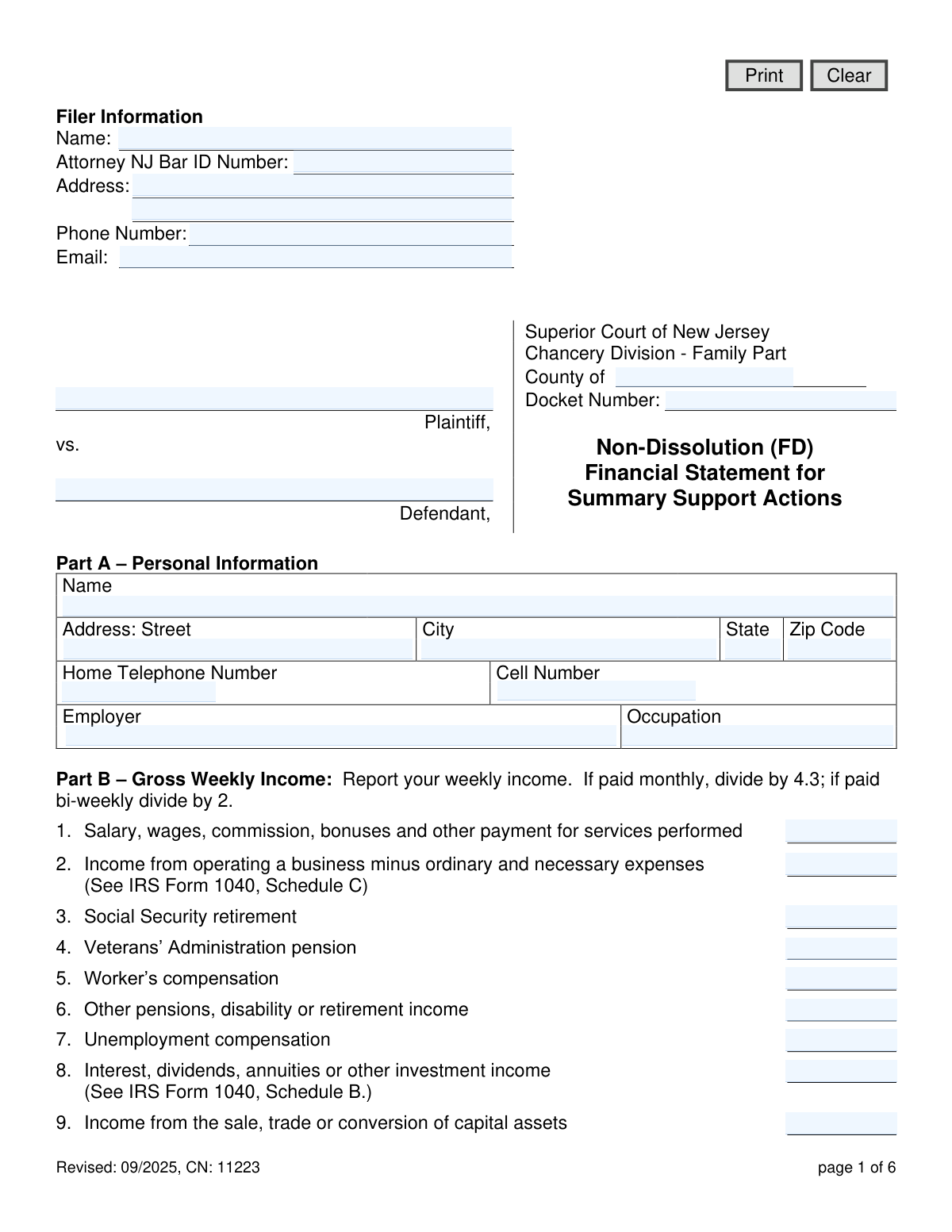
The Financial Statement for Summary Support Actions is a legal document required by the Superior Court of New Jersey, Family Part, for non-dissolution (FD) cases. It compels individuals to provide a comprehensive overview of their financial situation, including income, expenses, assets, and liabilities, which is crucial for the court to make fair decisions regarding child support. Today, this form can be filled out quickly and accurately using AI-powered services like Instafill.ai, which can also convert non-fillable PDF versions into interactive fillable forms.
Our AI automatically handles information lookup, data retrieval, formatting, and form filling.
It takes less than a minute to fill out CN 11223 using our AI form filling.
Securely upload your data. Information is encrypted in transit and deleted immediately after the form is filled out.
Form specifications
| Form name: | Financial Statement for Summary Support Actions |
| Number of fields: | 287 |
| Number of pages: | 1 |
| Language: | English |
Instafill Demo: How to fill out PDF forms in seconds with AI
How to Fill Out CN 11223 Online for Free in 2026
Are you looking to fill out a CN 11223 form online quickly and accurately? Instafill.ai offers the #1 AI-powered PDF filling software of 2026, allowing you to complete your CN 11223 form in just 37 seconds or less.
Follow these steps to fill out your CN 11223 form online using Instafill.ai:
- 1 Navigate to Instafill.ai and upload or select the Financial Statement for Summary Support Actions form.
- 2 Use the AI assistant to accurately fill in your personal details, case information, and employment status in Part A.
- 3 Enter your gross weekly income from all sources as prompted, following the instructions for Part B.
- 4 Provide information on weekly exemptions, other dependents, and childcare expenses in Parts C, D, and E.
- 5 Detail all your assets, such as real estate, bank accounts, vehicles, and retirement plans, in the appropriate sections of Part H.
- 6 List all your liabilities and debts, including mortgages, loans, and credit card balances, as required in Part H.
- 7 Review the entire statement for accuracy, digitally sign the certification in Part I, and download the completed form along with its required attachments like tax returns and pay stubs.
Our AI-powered system ensures each field is filled out correctly, reducing errors and saving you time.
Why Choose Instafill.ai for Your Fillable CN 11223 Form?
Speed
Complete your CN 11223 in as little as 37 seconds.
Up-to-Date
Always use the latest 2026 CN 11223 form version.
Cost-effective
No need to hire expensive lawyers.
Accuracy
Our AI performs 10 compliance checks to ensure your form is error-free.
Security
Your personal information is protected with bank-level encryption.
Frequently Asked Questions About Form CN 11223
This form is used in New Jersey Family Court for non-dissolution cases to provide a complete picture of your financial situation. It helps the court determine appropriate levels of financial support, such as child support.
Both the plaintiff and the defendant in a summary support action case filed in the New Jersey Superior Court, Family Part, are typically required to complete and file this financial statement.
You must attach your last federal and state income tax returns, your three most recent pay stubs, and your last W-2 or 1099 statement. If you are self-employed, you must also include your most recent federal business tax return.
The form provides instructions for this calculation. If you are paid monthly, divide your gross monthly income by 4.3; if you are paid bi-weekly, divide your gross bi-weekly income by 2.
This section is for requesting a credit for supporting other legal children who live with you but are not part of the current case. You must provide financial information for the child's other parent to be considered for this deduction.
These letters specify who owns the asset or is responsible for the debt. Use 'P' for the Plaintiff, 'D' for the Defendant, and 'B' if the asset or liability belongs to both parties.
Yes, the form explicitly states that if you are requesting a credit or deduction, you must attach proof of your expenses or obligations, such as receipts or court orders.
You should only complete this section if your child receives regular payments from a government source, like Social Security or veteran's benefits, that are issued in your name. You must attach proof of these benefits.
By signing the certification, you are legally swearing that all the information you have provided is true to the best of your knowledge. Be aware that providing willfully false statements can subject you to punishment.
Yes, services like Instafill.ai use AI to accurately auto-fill form fields from your saved profile information, which can save you significant time and help reduce errors.
Simply upload the Financial Statement PDF to the Instafill.ai platform. It will make the form fillable online, allowing you to use AI-powered tools to quickly populate your information before downloading the completed document.
You can use a service like Instafill.ai, which is designed to convert flat, non-fillable PDFs into interactive, fillable forms. This allows you to type your information directly into the fields instead of printing and filling it out by hand.
You must provide a detailed description of each asset and liability, indicate who owns or owes it (Plaintiff, Defendant, or Both), and list its current value or the total amount owed.
Compliance CN 11223
Validation Checks by Instafill.ai
1
Verifies Total Gross Weekly Income Calculation
This check sums the values entered in Part B, lines 1 through 17 (fields b1 through b17) and compares the result to the value entered in the total field (bTot). This is crucial for ensuring the foundational income figure is accurate for all subsequent support calculations. A discrepancy would require the user to review and correct their income entries before submission.
2
Validates Docket Number Format
This check ensures the Docket Number (docketNum) follows the standard format for New Jersey Superior Court cases, such as 'FD-XX-NNNNNN-YY'. This is essential for the document to be correctly filed and associated with the proper legal case. An invalid format could lead to filing rejection or administrative delays.
3
Verifies Total Weekly Exemptions Calculation
This validation adds the values from Part C, lines 2 through 6 (fields c2 to c6) and ensures the sum matches the total entered in line 7 (cTot). Accurate exemptions are critical for determining net available income for support. If the calculated sum does not match the user-entered total, an error is flagged to prevent miscalculation of the support obligation.
4
Enforces Conditional Logic for Other Dependent Deduction (Part D)
This check ensures that if any fields in Part D (d2 through dTot) are filled out, the 'Number of your other legal dependents' field (d1) must be greater than zero. This prevents inconsistent data entry where deductions are claimed without any dependents being declared. Failure would prompt the user to either enter the number of dependents or clear the deduction fields.
5
Validates Asset and Liability Ownership Code
This validation confirms that all 'Owned by' fields in Part H for Assets and Liabilities (e.g., hAssets1aOwner, hLiabilities1aOwner) contain only one of the three allowed values: 'P' (Plaintiff), 'D' (Defendant), or 'B' (Both). This is essential for correctly attributing assets and debts during financial evaluation. Any other character or an empty field (when a corresponding asset/liability is described) would trigger an error.
6
Validates Signature Date Format and Plausibility
This check verifies that the signature date (sigDt) is a valid date in a recognized format (e.g., MM/DD/YYYY) and is not a date in the future. It ensures the certification is properly dated, which is a legal requirement for affidavits. An invalid or future date would render the certification questionable and could lead to rejection of the form.
7
Verifies Total Gross Assets Calculation
This validation sums all the asset subtotals in Part H (hAssets1Tot through hAssets11Tot) and compares the result to the 'Total Value of Gross Assets' field (hAssetsTot). This cross-check ensures the overall financial picture presented by the assets section is arithmetically correct. An error would highlight a calculation mistake that could significantly misrepresent the filer's financial standing.
8
Verifies Total Liabilities Calculation
This check adds the subtotals for all liability categories in Part H (hLiabilities1OwedTot through hLiabilities4OwedTot) and verifies the sum against the 'Total Amount of Liabilities' field (hLiabilitiesOwedTot). Accuracy here is vital for determining the filer's net worth. A mismatch would require the user to correct the liability figures to ensure the court receives an accurate financial statement.
9
Ensures Key Case Information is Complete
This validation checks for the presence of essential case identification information, including County (cnty), Docket Number (docketNum), Plaintiff Name (plaName), and Defendant Name (defName). These fields are fundamental for identifying the legal case to which this financial statement pertains. If any of these fields are empty, the form is considered incomplete and cannot be properly filed.
10
Requires Description for 'Other Income' Entries
This check ensures that if a monetary value is entered for 'Other income' in Part B, line 16 (b16) or 17 (b17), the corresponding description field (b16Details or b17Details) is not empty. This provides necessary context for the source of the income, which is required for a complete financial disclosure. Failure to provide a description would prompt the user to specify the source of the income.
11
Ensures Completeness of Asset and Liability Rows
This check verifies that if a value ('Value of Asset' or 'Total Debt Owed') is entered for any line item in Part H, the corresponding 'Description' and 'Owned by' fields are also filled. An entry with a value but no description is ambiguous and incomplete. This validation enforces a complete and understandable declaration of all assets and liabilities.
12
Validates Email Address Format
This validation checks that the filer's email address (filerEmail) contains a string that conforms to the standard email address format (e.g., [email protected]). This is crucial for ensuring reliable electronic communication and service of documents. An invalid email address would prevent the filer from receiving important case-related notifications.
13
Validates NJ Attorney Bar ID Format
This check validates that the 'Attorney NJ Bar ID Number' field (filerAttyBarIdNum), if filled, matches the expected format for a New Jersey Bar ID. This helps verify the credentials of the filing attorney and ensures proper record-keeping. An invalid ID could indicate a data entry error or an issue with the attorney's status, requiring correction.
14
Conditional Requirement for Child Support Case Number
This check ensures that if an amount is entered for 'Child support paid' (c6), the corresponding 'State' (c6State) and 'Case Number' (c6CaseNum) fields must also be filled. This provides necessary identifying information for the other support order, which is required to verify the deduction. An incomplete entry would prompt the user to provide the missing details.
Common Mistakes in Completing CN 11223
Filers often miscalculate their gross weekly income by using their net (take-home) pay instead of their gross pay, or by failing to use the correct conversion formula (divide monthly pay by 4.3, bi-weekly by 2). This leads to an inaccurate representation of their financial situation, which can significantly impact support calculations and cause delays. To avoid this, carefully read the instructions in Part B and use a calculator to verify your figures before entering them. AI-powered tools like Instafill.ai can automatically perform these calculations from uploaded pay stubs, ensuring accuracy.
People frequently forget to include all sources of income, such as overtime, bonuses, commissions, or earnings from a part-time job (Part B, lines 1 and 14). These amounts are often viewed as variable or supplemental, but they must be reported to provide a complete financial picture. Omitting them can be viewed as a willful misrepresentation to the court and may result in sanctions or incorrect support orders. Always review the past year's earnings and include an averaged weekly amount for any variable pay.
A very common and critical error is failing to attach all mandatory documents listed in Part I, such as the last three pay stubs, W-2s, and complete federal/state tax returns. Submitting an incomplete package will almost certainly lead to the court rejecting the filing, causing significant delays in the legal process. Before submitting, create a checklist based on Part I and ensure every required document is included. If the form is a non-fillable PDF, a tool like Instafill.ai can make it fillable and help manage the attachment process.
Filers often overlook or intentionally omit certain assets in Part H, such as retirement accounts (401k, IRA), the cash surrender value of life insurance policies, or stocks and bonds. This may happen due to oversight or a misunderstanding of what constitutes a reportable asset. Incomplete disclosure can lead to serious legal consequences, including the court imputing value or finding the filer in contempt. It is crucial to gather statements for all financial accounts and policies to ensure every asset is listed with its current value.
In Part H, many people mistakenly list the purchase price or the remaining loan balance for an asset instead of its current fair market value. For example, they might list the mortgage balance as the value of their home, rather than its appraised market value. This provides a misleading picture of their net worth and can negatively affect the outcome of the case. To avoid this, use recent appraisals for real estate and reliable sources like Kelley Blue Book for vehicles to determine the current market value.
A frequent mistake in the Liabilities section of Part H is listing regular monthly living expenses (like rent, utilities, or groceries) instead of actual debts. This section is exclusively for long-term and short-term debts such as mortgages, car loans, student loans, and credit card balances. Listing incorrect items inflates liabilities and skews the financial statement. Carefully distinguish between a recurring bill and a formal debt obligation with a total balance owed.
In Part C, filers sometimes include voluntary deductions from their paycheck, such as 401(k) loan repayments, extra tax withholding, or charitable contributions. The form specifically asks for mandatory deductions like mandatory retirement contributions and union dues. Including voluntary amounts will incorrectly lower your available income for support calculations and will be disallowed by the court. Review your pay stub to identify which deductions are truly mandatory.
Filers may incorrectly complete Part D without meeting all the strict criteria, such as the other child living with them and being their legal dependent by birth or adoption. This section is not for all other children; it is a specific legal credit that requires proof. Claiming this deduction improperly will lead to its rejection and may require refiling the entire form, delaying the case. Ensure you meet every condition listed before filling out this section.
Overlooking the fields for County and Docket Number at the top of the form is a simple but disruptive mistake. This information is essential for the court clerk to correctly file the document with your specific case. Without it, the financial statement can be lost, misfiled, or rejected outright, halting progress on your case until a corrected version is submitted. Always double-check that this crucial administrative data is present and accurate.
When completing Part H, individuals often provide vague descriptions like 'Car' or 'Credit Card' without the required details. The form requires specific information, such as the vehicle's make/model/year or the bank's name for a credit card or bank account. This lack of detail can raise questions about transparency and may require the court to request clarification, causing delays. Be as specific as possible for each entry to ensure clarity and completeness. AI form-filling tools like Instafill.ai can prompt users for these specific details, preventing vague entries.
Saved over 80 hours a year
“I was never sure if my IRS forms like W-9 were filled correctly. Now, I can complete the forms accurately without any external help.”
Kevin Martin Green
Your data stays secure with advanced protection from Instafill and our subprocessors

Robust compliance program
Transparent business model
You’re not the product. You always know where your data is and what it is processed for.
ISO 27001, HIPAA, and GDPR
Our subprocesses adhere to multiple compliance standards, including but not limited to ISO 27001, HIPAA, and GDPR.
Security & privacy by design
We consider security and privacy from the initial design phase of any new service or functionality. It’s not an afterthought, it’s built-in, including support for two-factor authentication (2FA) to further protect your account.
Fill out CN 11223 with Instafill.ai
Worried about filling PDFs wrong? Instafill securely fills financial-statement-for-summary-support-actions forms, ensuring each field is accurate.