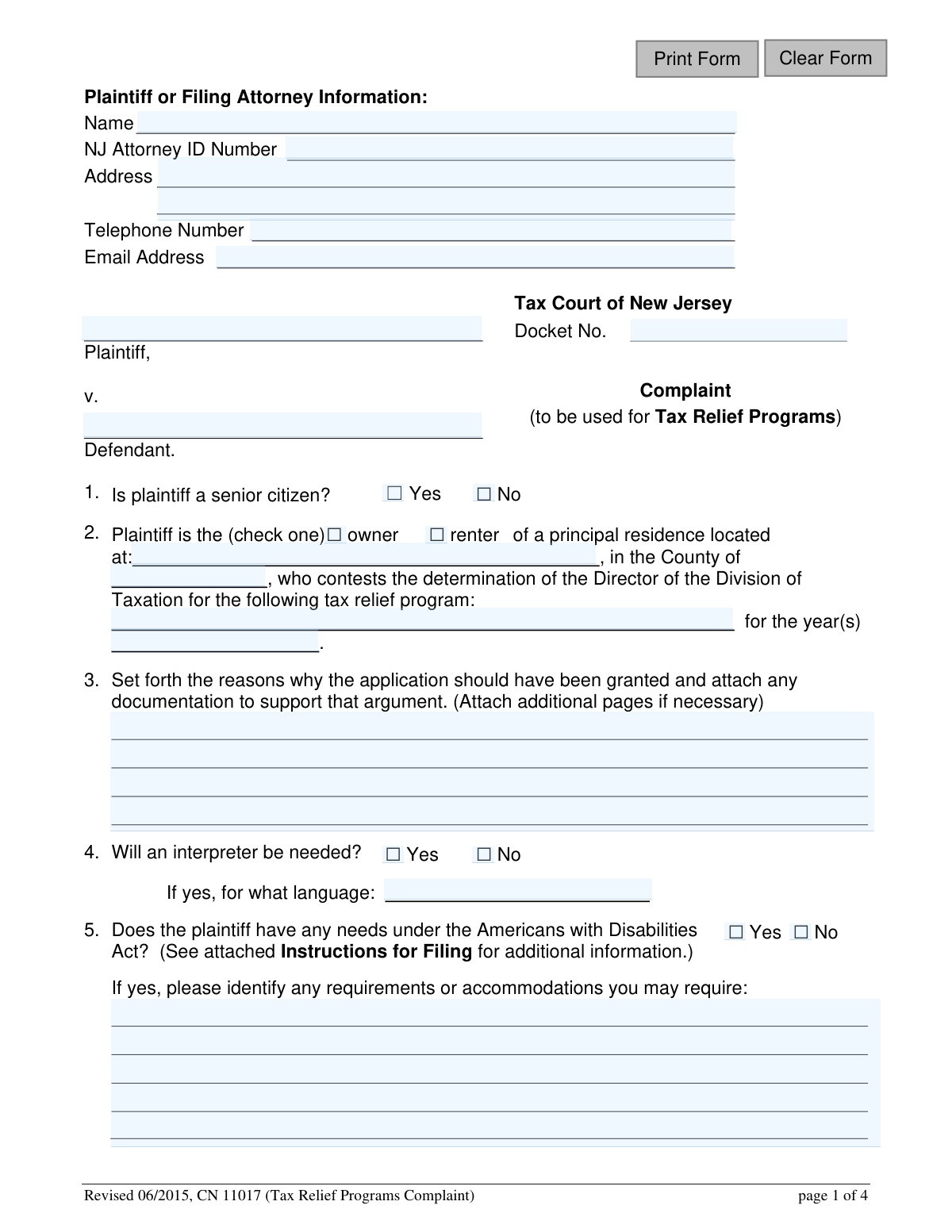
Yes! You can use AI to fill out Tax Relief Programs - Complaint Form (CN 11017)
The Tax Relief Programs Complaint Form (CN 11017) is a legal document filed with the Tax Court of New Jersey by taxpayers who wish to contest the denial of their application for a state tax relief program. It provides a formal process for residents to challenge a determination made by the Director of the Division of Taxation and seek the benefits they believe they are entitled to. Today, this form can be filled out quickly and accurately using AI-powered services like Instafill.ai, which can also convert non-fillable PDF versions into interactive fillable forms.
Our AI automatically handles information lookup, data retrieval, formatting, and form filling.
It takes less than a minute to fill out CN 11017 using our AI form filling.
Securely upload your data. Information is encrypted in transit and deleted immediately after the form is filled out.
Form specifications
| Form name: | Tax Relief Programs - Complaint Form (CN 11017) |
| Number of fields: | 28 |
| Number of pages: | 1 |
| Language: | English |
Instafill Demo: How to fill out PDF forms in seconds with AI
How to Fill Out CN 11017 Online for Free in 2026
Are you looking to fill out a CN 11017 form online quickly and accurately? Instafill.ai offers the #1 AI-powered PDF filling software of 2026, allowing you to complete your CN 11017 form in just 37 seconds or less.
Follow these steps to fill out your CN 11017 form online using Instafill.ai:
- 1 Navigate to Instafill.ai and upload the Tax Relief Programs Complaint Form (CN 11017) or select it from the available templates.
- 2 Provide your information as the plaintiff, including your full name, address, and contact details. If represented by an attorney, enter their information as well.
- 3 Identify the case details by specifying the tax relief program and year(s) you are contesting, and indicate whether you are the owner or renter of the property.
- 4 Clearly articulate the reasons why your application should have been granted in the designated section. Attach any additional pages if necessary.
- 5 Use the platform to attach required supporting documents, such as the final determination letter from the Division of Taxation and copies of your NJ-1040 tax return if applicable.
- 6 Answer the questions regarding the need for an interpreter or any accommodations required under the Americans with Disabilities Act (ADA).
- 7 Review all entered information for accuracy, then complete the certification section by signing and dating the form to verify the truthfulness of your statements and confirm service of the complaint.
Our AI-powered system ensures each field is filled out correctly, reducing errors and saving you time.
Why Choose Instafill.ai for Your Fillable CN 11017 Form?
Speed
Complete your CN 11017 in as little as 37 seconds.
Up-to-Date
Always use the latest 2026 CN 11017 form version.
Cost-effective
No need to hire expensive lawyers.
Accuracy
Our AI performs 10 compliance checks to ensure your form is error-free.
Security
Your personal information is protected with bank-level encryption.
Frequently Asked Questions About Form CN 11017
This form is used to file a formal complaint with the Tax Court of New Jersey if you disagree with a final decision made by the Director of the Division of Taxation about your application for a tax relief program.
You should use this form if you have received a final determination letter from the New Jersey Division of Taxation denying your application for a tax relief program and you wish to appeal that decision.
Yes, your complaint must be filed with the Tax Court Management Office within 90 days of the date printed on the final determination letter you received from the Director, Division of Taxation.
You must attach a copy of the final determination letter from the Division of Taxation. You should also include any other documents that support your argument for why your application should have been approved.
Yes, if you are filing a complaint regarding the Homestead Rebate, you must also attach a copy of pages 1 and 2 of your New Jersey Gross Income Tax Return (Form NJ-1040) to your complaint.
Mail the original complaint to the Tax Court of New Jersey and a copy to the Director, Division of Taxation. The specific mailing addresses for both are provided in the 'Instructions for Filing' section of the form.
In this section, clearly explain why you believe the Division of Taxation's decision was incorrect and why you qualify for the tax relief program. Be specific and reference any supporting documents you are attaching.
This means you must black out or remove sensitive information like your Social Security number, driver's license number, or full bank account numbers from all documents you submit to the court to protect your privacy.
The form has a section where you can indicate that you need an interpreter and specify the language required. The court can provide interpretation services to ensure you can fully participate.
Section 5 of the form allows you to state if you have needs under the Americans with Disabilities Act (ADA) and describe any specific accommodations you require, such as an assistive hearing device.
Yes, services like Instafill.ai use AI to accurately auto-fill form fields with your information, which can save you time and help prevent errors.
You can use a service like Instafill.ai to complete the form digitally. Simply upload the PDF to their platform, and their AI will help you fill in the fields before you print it for mailing.
If you have a non-fillable PDF, you can upload it to a platform like Instafill.ai. Their technology can convert flat PDFs into interactive, fillable forms that you can complete on your computer.
Serving the complaint means you must officially deliver a copy to the Director of the Division of Taxation. You must certify on the form that you have done this either in person or by ordinary mail on a specific date.
Compliance CN 11017
Validation Checks by Instafill.ai
1
Plaintiff and Property Identification
Ensures the Plaintiff's full name (PlaNameFull), property address (PropAddrFull), and county (TypeCounty) are all provided. These fields are fundamental to identifying the complainant and the property at the center of the dispute. A failure to provide this information makes the complaint incomplete and impossible to process.
2
Residency Status Selection
Validates that the plaintiff has selected either 'owner' or 'renter' for their residency status (PlaOwn). This information is critical for determining eligibility for certain tax relief programs and is a required field. The form cannot be submitted until one of the two options is checked.
3
Contested Year(s) Format and Logic
Verifies that the 'year(s)' field (YrsContest) contains a valid year (YYYY) or year range (YYYY-YYYY) and does not include future years. This ensures the complaint is tied to a valid and historical tax period. Incorrect or future-dated entries would prevent the correct case records from being located and reviewed.
4
Complaint Rationale Completeness
Checks that the text field for explaining the reasons for the complaint (ApplyReasonDesc) is not empty. A minimum character length may be enforced to ensure a substantive explanation is provided, as this justification is the core of the complaint. An empty or insufficient explanation would lead to an immediate rejection or a request for more information.
5
Conditional Interpreter Language
This validation ensures that if the plaintiff indicates a need for an interpreter by selecting 'Yes' (InterpNeeds), the corresponding language field (InterpNeedsDesc) is filled out. This is crucial for arranging the necessary resources for the plaintiff to participate fully in proceedings. If 'Yes' is selected without a language specified, the form submission should be halted with an error message.
6
Conditional ADA Accommodation Details
This check verifies that if the plaintiff answers 'Yes' to needing accommodations under the ADA (AdaNeeds), the description field (AdaNeedsDesc) is completed. Providing these details is essential for the court to make the necessary arrangements, ensuring accessibility. The form should not be accepted if 'Yes' is checked but the needs are not specified.
7
Service Date Logical Check
Validates that the 'Date Served' (DtServedDay, DtServedMo) forms a valid calendar date that is not in the future. This date certifies when the plaintiff notified the Division of Taxation and Attorney General. An invalid or future date would compromise the legal certification and could invalidate the filing.
8
Signature Date and Sequence Validation
Ensures the Signature Date (SigDt) is present, valid, and is not in the future. It also checks that the signature date is on or after the 'Date Served'. This maintains the logical and legal sequence of events, where service of the complaint precedes or coincides with the final certification and signing.
9
Filing Deadline Adherence
This is a critical business rule check to ensure the complaint is filed within the 90-day statutory limit from the date of the Director's final determination. The system would compare the submission date (or SigDt) against the date of the determination letter, which must be attached. A filing outside this window is legally invalid and would be rejected.
10
Mandatory Determination Letter Attachment
Verifies that a file has been uploaded for the 'final determination letter'. This document is the official trigger for the complaint and is required evidence for the court to begin its review. The submission process must be blocked if this mandatory attachment is missing.
11
Conditional NJ-1040 Attachment for Homestead Rebate
This validation is triggered if the plaintiff specifies 'Homestead Rebate' in the ProgramContest field. It checks that the filer has attached a copy of their NJ-1040 tax return, as explicitly required by the instructions. Failure to attach this document for a Homestead Rebate complaint will result in an incomplete filing and processing delays.
12
Redaction Certification Acknowledgment
Confirms that the plaintiff has checked the box certifying that all confidential personal identifiers have been redacted from the submitted documents, in accordance with Rule 1:38-7(b). This is a crucial legal acknowledgment to protect personal data and comply with court rules. The form cannot be submitted without this certification.
13
Attorney Email Format
Validates that the attorney email field (attyEmail), if provided, contains a string in a valid email format (e.g., [email protected]). This ensures that any electronic correspondence from the court to the filing attorney will be deliverable. An invalid format could lead to missed communications and deadlines.
14
NJ Attorney ID Conditional Requirement
Checks if the NJ Attorney ID (attyIDNo) is provided when an attorney's name (attyName) is entered. This is important for verifying the credentials of the legal representative. If an attorney's name is present but the ID is missing, the form submission should be flagged for review or rejected until the ID is provided.
Common Mistakes in Completing CN 11017
Filers often overlook the instructions on page 3, failing to attach a copy of the final determination letter from the Division of Taxation. For Homestead Rebate complaints, filers also frequently forget to include pages 1 and 2 of their NJ-1040 tax return. Missing these mandatory documents can lead to significant delays or an outright rejection of the complaint, as the court lacks the necessary evidence to proceed.
Despite explicit warnings on pages 2 and 4, many individuals submit supporting documents without redacting sensitive information like Social Security numbers, bank account numbers, or driver's license numbers. This mistake violates court rule 1:38-7(b) and creates a serious privacy risk, as the documents become part of a public record. It is the filer's responsibility to remove this information, not the court's.
A common procedural error is sending the complaint only to the Tax Court and neglecting to serve the other required parties. The instructions clearly state that a copy must also be sent to the Director of the Division of Taxation, and subsequent filings must go to the Deputy Attorney General. Failure to properly serve all parties can result in the complaint being dismissed for procedural deficiency.
The form specifies that the complaint must be filed within 90 days of the final determination date, but filers often miscalculate this window or procrastinate. Filing even one day late can result in the Tax Court refusing to hear the case, permanently forfeiting the right to appeal that decision. It is crucial to calculate the deadline immediately upon receiving the determination letter.
In section 2, filers sometimes write a generic term like 'tax relief' instead of the specific program name, such as 'Homestead Rebate' or 'Senior Freeze (Property Tax Reimbursement)'. They may also list the incorrect year(s) or leave the field blank. This ambiguity forces the court and the Division of Taxation to guess the subject of the complaint, causing unnecessary delays and potential confusion.
In section 3, many filers simply state that the 'decision was wrong' without providing a detailed, factual basis for their appeal. A successful complaint requires a clear explanation of why the application should have been granted, referencing specific facts, figures, or documents. A weak or emotional justification without supporting evidence is unlikely to succeed.
Forgetting to sign and date the certification on page 2 is a simple but critical error that completely invalidates the filing. An unsigned complaint is not legally binding and will be rejected by the court clerk. This often happens when filers are in a rush and overlook the final step before mailing the form.
Filers, especially those without legal representation, may mistakenly list their local municipality or a specific person as the defendant. The proper defendant in these cases is the 'Director, Division of Taxation,' as this is the entity that issued the determination being appealed. Naming the wrong party is a legal error that will need to be corrected, delaying the case.
Applicants frequently leave the email address or telephone number fields blank, providing only a mailing address. This slows down communication significantly, as the court or opposing counsel cannot quickly ask for clarification or provide updates. To avoid delays, it is essential to provide multiple, accurate methods of contact. AI-powered tools like Instafill.ai can help ensure these crucial fields are not left empty.
On page 2, the filer must certify the date they served a copy of the complaint on the Division of Taxation. People sometimes fill in this date before they have actually mailed the copies, which constitutes a false certification. To avoid this, one should fill out the entire form, make copies, mail the copies to the required agencies, and then enter the correct mailing date on the original form before sending it to the court.
This form is a non-fillable PDF, forcing many to fill it out by hand, which often results in illegible entries for names, addresses, and justifications. Unclear handwriting can lead to data entry errors by court staff, misdirected mail, and a misinterpretation of the filer's argument. To prevent this, one should write slowly in clear block letters or use a tool like Instafill.ai to convert the PDF into a digitally fillable version for clean, typed entries.
Saved over 80 hours a year
“I was never sure if my IRS forms like W-9 were filled correctly. Now, I can complete the forms accurately without any external help.”
Kevin Martin Green
Your data stays secure with advanced protection from Instafill and our subprocessors

Robust compliance program
Transparent business model
You’re not the product. You always know where your data is and what it is processed for.
ISO 27001, HIPAA, and GDPR
Our subprocesses adhere to multiple compliance standards, including but not limited to ISO 27001, HIPAA, and GDPR.
Security & privacy by design
We consider security and privacy from the initial design phase of any new service or functionality. It’s not an afterthought, it’s built-in, including support for two-factor authentication (2FA) to further protect your account.
Fill out CN 11017 with Instafill.ai
Worried about filling PDFs wrong? Instafill securely fills tax-relief-programs-complaint-form-cn-11017 forms, ensuring each field is accurate.