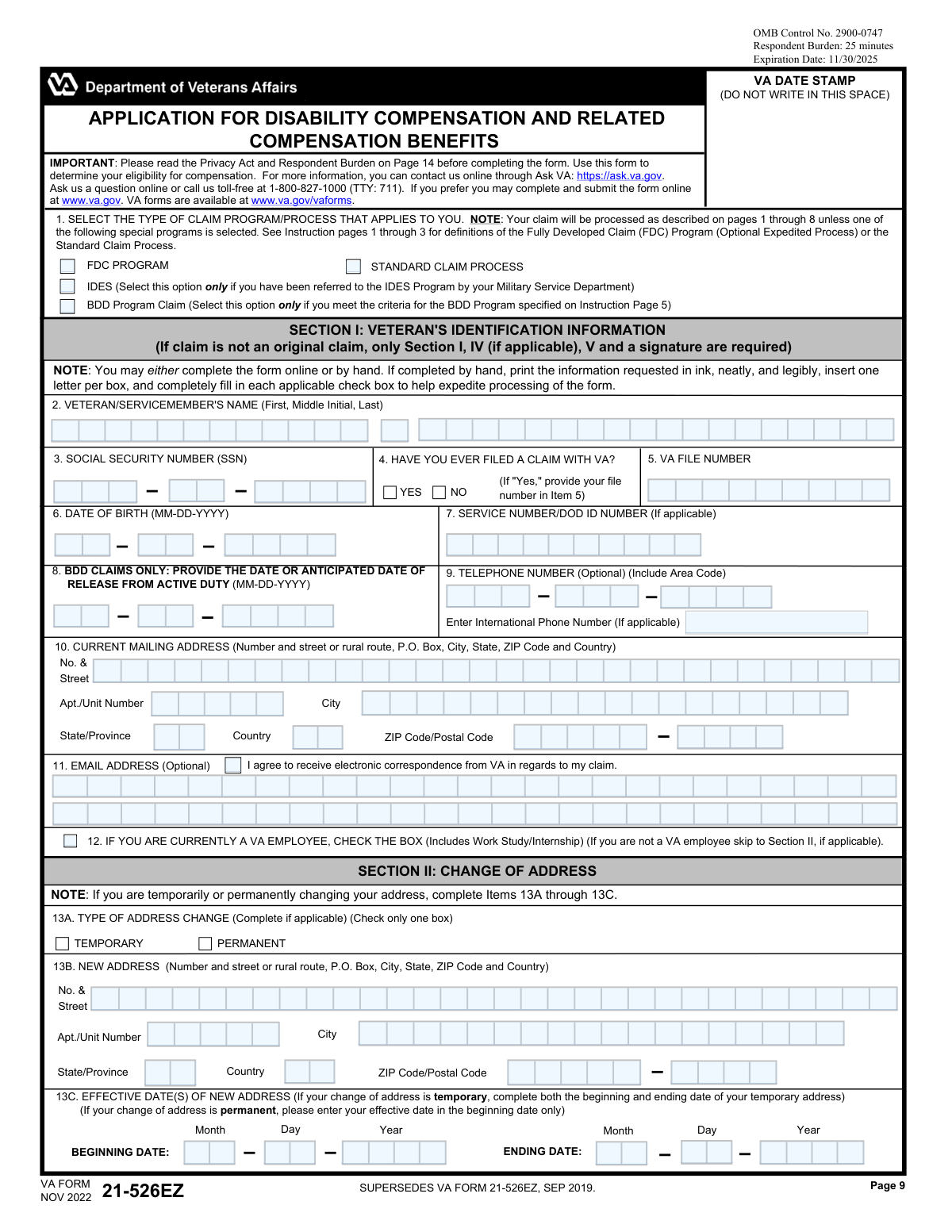
Yes! You can use AI to fill out VA Form 21-526EZ, Application for Disability Compensation and Related Compensation Benefits
VA Form 21-526EZ, Application for Disability Compensation and Related Compensation Benefits, is the official document used by U.S. military veterans to apply for disability benefits from the Department of Veterans Affairs. Filing this form is a critical step for veterans seeking compensation for injuries, illnesses, or conditions that were incurred or aggravated during their service, allowing the VA to evaluate the claim and determine eligibility. Today, this form can be filled out quickly and accurately using AI-powered services like Instafill.ai, which can also convert non-fillable PDF versions into interactive fillable forms.
VA Form 21-526EZ is part of the
disability application forms, disability benefits forms and disability compensation forms categories on Instafill.
Our AI automatically handles information lookup, data retrieval, formatting, and form filling.
It takes less than a minute to fill out VA Form 21-526EZ using our AI form filling.
Securely upload your data. Information is encrypted in transit and deleted immediately after the form is filled out.
Form specifications
| Form name: | VA Form 21-526EZ, Application for Disability Compensation and Related Compensation Benefits |
| Number of fields: | 388 |
| Number of pages: | 7 |
| Language: | English |
Instafill Demo: How to fill out PDF forms in seconds with AI
How to Fill Out VA Form 21-526EZ Online for Free in 2026
Are you looking to fill out a VA FORM 21-526EZ form online quickly and accurately? Instafill.ai offers the #1 AI-powered PDF filling software of 2026, allowing you to complete your VA FORM 21-526EZ form in just 37 seconds or less.
Follow these steps to fill out your VA FORM 21-526EZ form online using Instafill.ai:
- 1 Navigate to Instafill.ai and upload your VA Form 21-526EZ, or select it from their library of templates.
- 2 Provide your personal identification details in Section I and your complete service history in Section VI, including branches, dates, and any special circumstances.
- 3 In Section V, carefully list each disability or symptom you are claiming, explaining how it relates to your military service, exposure, or a specific in-service event.
- 4 If applicable, complete Section IV to provide details about any exposure to hazards like Agent Orange, burn pits, or contaminated water at Camp Lejeune.
- 5 List the VA and DoD medical facilities where you received treatment for your claimed disabilities to help the VA gather relevant medical records.
- 6 Complete the direct deposit information in Section VIII for payment, review your choices regarding military pay, and then certify and digitally sign the application in Section IX.
- 7 Let the AI review your completed form for any errors or omissions before you download and submit it to the VA as instructed.
Our AI-powered system ensures each field is filled out correctly, reducing errors and saving you time.
Why Choose Instafill.ai for Your Fillable VA Form 21-526EZ Form?
Speed
Complete your VA Form 21-526EZ in as little as 37 seconds.
Up-to-Date
Always use the latest 2026 VA Form 21-526EZ form version.
Cost-effective
No need to hire expensive lawyers.
Accuracy
Our AI performs 10 compliance checks to ensure your form is error-free.
Security
Your personal information is protected with bank-level encryption.
Frequently Asked Questions About Form VA Form 21-526EZ
This form is the 'Application for Disability Compensation and Related Compensation Benefits.' It is used by veterans and servicemembers to apply for VA disability benefits for conditions they believe are related to their military service.
Veterans, and servicemembers nearing release from active duty (under the BDD program), should use this form to apply for disability compensation for the first time or to claim new disabilities.
No, if this is not your original claim, the form states you only need to complete Section I (Veteran's Identification), Section IV (if applicable), Section V (Claim Information), and provide a signature.
The Fully Developed Claim (FDC) program is an optional expedited process if you submit all evidence at once. The Benefits Delivery at Discharge (BDD) program is for servicemembers who are 90 to 180 days from release. The Standard Claim Process is the default option if you need more time to gather evidence.
For each condition, you must list the disability, the approximate date it began or worsened, and explain how it connects to a specific in-service event, injury, or exposure like Agent Orange or burn pits.
If you run out of space, you should use Section XIII, the 'Claim Information (Addendum)' page, to list your additional disabilities. You can make copies of this page if you need even more space.
Yes, you should complete Section III, 'Homeless Information.' Providing this information can help the VA prioritize your claim and connect you with necessary resources.
Submitting this application acts as a waiver of your military retired pay in an amount equal to any VA compensation you are awarded, as you generally cannot receive both. VA compensation is non-taxable, so it may be the greater financial benefit.
Yes, the Department of the Treasury requires all federal benefit payments to be made by direct deposit. You must provide your bank information in Section VIII or contact the Treasury to request a waiver.
All VA forms, such as those for dependents or individual unemployability, are available for download on the VA's official website at www.va.gov/vaforms.
An alternate signer, such as a court-appointed representative or a person responsible for the claimant's care, can sign in Section XI. They must also attach a completed VA Form 21-0972, Alternate Signer Certification.
Yes, services like Instafill.ai use AI to accurately auto-fill form fields, which can save you time and help reduce errors. This is especially helpful for repetitive information like your name and SSN on multiple pages.
You can use a service like Instafill.ai to upload the PDF and fill it out on your computer. The platform allows you to type directly into the fields and then download the completed form for submission.
If you have a non-fillable or 'flat' PDF, you can upload it to a service like Instafill.ai. Their technology can convert the document into an interactive, fillable form that you can complete online.
Compliance VA Form 21-526EZ
Validation Checks by Instafill.ai
1
Validates Social Security Number Format
This check ensures that the Social Security Number entered in Item 3 consists of exactly nine digits. It is a critical identifier for the veteran across all federal systems. If the SSN is missing, incomplete, or contains non-numeric characters, the form cannot be processed, as it would be impossible to accurately locate the veteran's records or establish a new file.
2
Ensures Date of Birth is Logically Valid
This validation verifies that the Date of Birth in Item 6 is a complete and valid date that occurs in the past. It also checks that the veteran would be of a plausible age to have served in the military (e.g., older than 17). An invalid or future date of birth would halt processing and require correction, as it is fundamental for identity verification and eligibility calculations.
3
Conditional Requirement for VA File Number
This check enforces a conditional rule between Item 4 and Item 5. If the applicant answers 'Yes' to having previously filed a claim with the VA (Item 4), then the VA File Number field (Item 5) must be completed. This is important for correctly associating the new application with the veteran's existing records. Failure to provide the file number when required can lead to processing delays or the creation of a duplicate record.
4
BDD Claim Requires Future Release Date
This validation ensures that if the 'BDD Program Claim' is selected in Item 1, a valid and complete date is provided in Item 8 for the 'Anticipated Date of Release From Active Duty'. The date provided must be in the future, as the BDD program is specifically for service members who are still on active duty. An invalid, past, or missing date would invalidate the BDD claim selection and require clarification.
5
Validates Temporary Address Change Dates
This check verifies that if 'TEMPORARY' is selected in Item 13A for an address change, both a 'BEGINNING DATE' and an 'ENDING DATE' are provided in Item 13C. It also ensures the 'ENDING DATE' is chronologically after the 'BEGINNING DATE'. This logic is crucial for ensuring mail is sent to the correct address during the specified timeframe. If the end date is missing or invalid, the address change may be incorrectly processed as permanent.
6
Ensures Homelessness Details are Provided
This validation checks that if a veteran indicates they are currently homeless by checking 'Yes' in Item 14A, they must also select at least one corresponding living situation in Item 14B. This information is vital for prioritizing the claim and connecting the veteran with appropriate housing resources. An incomplete section would trigger a request for more information, delaying potential assistance.
7
Conditional Requirement for Toxic Exposure Details
This check ensures that if the applicant answers 'Yes' to claiming conditions related to toxic exposures (Item 15A), then further details must be provided in the subsequent fields (15B, 15C, or 15D). The claim must include information about the location, dates, or type of exposure. Without these specifics, the VA cannot properly evaluate the exposure-based claim, leading to a denial or a request for more evidence.
8
Verifies Completeness of Claimed Disabilities
This validation ensures that for every disability listed in the 'CURRENT DISABILITY(IES)' column of Item 16, the corresponding columns for 'HOW THE DISABILITY RELATES TO SERVICE' and 'APPROXIMATE DATE DISABILITY BEGAN' are also filled out. Each claimed condition must have this supporting context to be evaluated. Incomplete rows will be flagged for follow-up, delaying the claims process.
9
Validates Chronology of Service Dates
This check verifies that for all service periods listed (e.g., Item 20A), the 'EXIT DATE' or 'TO' date is on or after the 'ENTRY DATE' or 'FROM' date. This ensures the logical integrity of the service history provided by the applicant. An impossible date range would indicate a data entry error and must be corrected before eligibility can be determined.
10
Ensures Direct Deposit Information is Complete or Waived
This validation checks that if the box in Item 29 ('I do not have an account...') is not checked, then all direct deposit fields (Account Number, Routing Number, Financial Institution Name, and Account Type) are completed. The routing number must also be validated to ensure it is exactly 9 digits. This is required by the Department of the Treasury for electronic payments and prevents payment delays or failures.
11
Mandatory Signature Verification
This check confirms that the form has been properly signed in one of the required sections. A signature must be present in either Item 33A (Veteran), Item 36A (Alternate Signer), or Item 37A (Power of Attorney). An unsigned application is not legally valid and will be returned to the applicant, causing significant delays in processing.
12
Validates Consistency of SSN Across Pages
This check ensures that the Veteran's Social Security Number entered at the top of each page (e.g., pages 10, 11, 12) is present and matches the SSN provided in Item 3 on the first page. This is crucial for multi-page forms to ensure all pages belong to the same application and to prevent pages from being misfiled. A mismatch would halt processing until the discrepancy is resolved.
13
Exclusive Claim Program Selection
This validation ensures that exactly one claim program option (FDC, IDES, BDD, or Standard Claim) is selected in Item 1. The processing path for a claim differs significantly based on this selection. If zero or multiple options are checked, the VA cannot determine how to proceed and will have to contact the applicant for clarification, delaying the entire process.
14
Logical Check of Date of Birth vs. Service Dates
This validation cross-references the veteran's Date of Birth (Item 6) with their service entry dates (Item 20A and 20D). The service entry date must be at least 17 years after the date of birth. This logical check helps catch significant data entry errors in either the birth date or service dates. An illogical timeline would require correction before the claim can be processed.
Common Mistakes in Completing VA Form 21-526EZ
Applicants often overlook the signature block in Section IX (Item 33A/B) after filling out many pages. An unsigned or undated application is considered invalid by the VA and will not be processed. This mistake can lead to significant delays, as the official filing date (which determines potential back pay) is not established until a signed form is received, potentially costing the veteran months of benefits.
In Section VII, veterans may mistakenly check Box 26, declining VA compensation in favor of military retired pay. This often happens due to confusion about the complex rules of concurrent receipt. Checking this box can be a catastrophic financial error, as non-taxable VA compensation is frequently the more valuable benefit. Veterans should carefully read the instructions and consult a benefits advisor before making this selection.
In Section V (Item 16), veterans often list symptoms (e.g., "bad back") instead of a specific diagnosis (e.g., "Lumbosacral Strain") or fail to explain how the disability connects to their service. This lack of detail forces the VA to request clarification, significantly delaying the claims process. To avoid this, list specific medical conditions and clearly, but concisely, describe the in-service injury, event, or exposure that caused or aggravated the condition.
Transposing digits in the bank routing number (Item 32) or account number (Item 30) is a frequent data entry error. This mistake will cause payments to be rejected or, in a worst-case scenario, sent to the wrong account. This results in payment delays until the information is corrected. Always double-check these numbers against a check or bank statement before submitting.
Veterans sometimes forget or fail to report lump-sum payments like disability severance or separation pay in Section VII (Item 27A). The VA is required by law to recoup these payments before disability compensation can be paid. Failure to report it can lead to the discovery of a large overpayment later, resulting in an unexpected debt that the VA will collect from future benefits.
The form instructs applicants to print neatly in ink, with one letter per box. Many people rush or have poor handwriting, leading to entries that are difficult for VA processors or scanning software to read. This can result in incorrect data entry for critical information like names, SSNs, or addresses, causing processing delays and returned mail. Using a fillable PDF version of the form prevents this issue entirely.
Applicants frequently omit crucial details in their address, such as an apartment or unit number (Item 10), or enter an incorrect ZIP code. This mistake can cause important communications, such as requests for evidence or decision letters, to be lost or returned to the VA. This breakdown in communication can lead to missed deadlines and significant delays in the claim's adjudication.
In Section II (Item 13), applicants changing their address can get confused. A common error is to list an end date for a permanent address change or forget to provide an end date for a temporary one. This can result in mail being sent to the wrong address after the temporary period ends, or the VA system not being updated correctly for a permanent move, leading to missed correspondence.
Veterans who are homeless or at risk of homelessness may overlook Section III (Item 14) or feel hesitant to disclose their situation. This is a missed opportunity, as correctly identifying as homeless or at-risk flags the claim for expedited processing. Failing to complete this section means the claim will proceed at the standard, much slower pace, delaying access to critical benefits and housing support.
In Section I (Item 1), veterans must select a claim program but may not understand the differences. For example, selecting the Fully Developed Claim (FDC) program without submitting all required evidence will cause the claim to be moved to the standard process, negating any time savings. It is crucial to read the instructions to understand which program (FDC, Standard, BDD, IDES) best fits your situation to ensure the most efficient processing path.
Saved over 80 hours a year
“I was never sure if my IRS forms like W-9 were filled correctly. Now, I can complete the forms accurately without any external help.”
Kevin Martin Green
Your data stays secure with advanced protection from Instafill and our subprocessors

Robust compliance program
Transparent business model
You’re not the product. You always know where your data is and what it is processed for.
ISO 27001, HIPAA, and GDPR
Our subprocesses adhere to multiple compliance standards, including but not limited to ISO 27001, HIPAA, and GDPR.
Security & privacy by design
We consider security and privacy from the initial design phase of any new service or functionality. It’s not an afterthought, it’s built-in, including support for two-factor authentication (2FA) to further protect your account.
Fill out VA Form 21-526EZ with Instafill.ai
Worried about filling PDFs wrong? Instafill securely fills va-form-21-526ez-application-for-disability-compensation-and-related-compensation-benefits-1 forms, ensuring each field is accurate.