Yes! You can use AI to fill out ACORD 128, Garage and Dealers Section

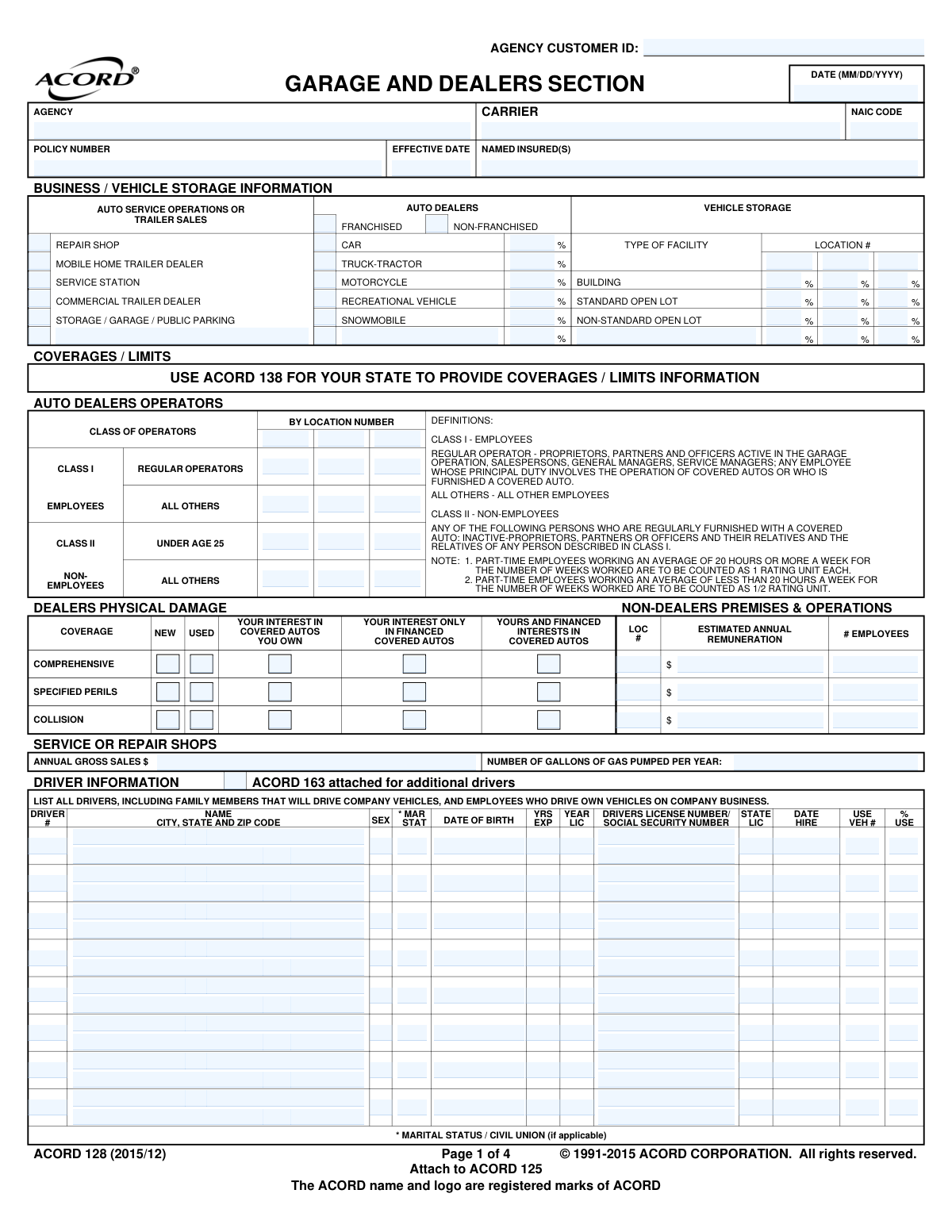
ACORD 128 is a standard insurance form used to collect detailed underwriting information for businesses involved in vehicle sales, service, or storage. It captures critical data on business operations, vehicle inventory, driver information, and specific risks associated with the garage industry, which is essential for calculating premiums and providing appropriate coverage. Today, this form can be filled out quickly and accurately using AI-powered services like Instafill.ai, which can also convert non-fillable PDF versions into interactive fillable forms.
Our AI automatically handles information lookup, data retrieval, formatting, and form filling.
It takes less than a minute to fill out ACORD 128 using our AI form filling.
Securely upload your data. Information is encrypted in transit and deleted immediately after the form is filled out.

Form specifications

Form name: ACORD 128, Garage and Dealers Section
Number of fields: 370
Number of pages: 1
Language: English
main-image

Instafill Demo: How to fill out PDF forms in seconds with AI

How to Fill Out ACORD 128 Online for Free in 2026

Are you looking to fill out a ACORD 128 form online quickly and accurately? Instafill.ai offers the #1 AI-powered PDF filling software of 2026, allowing you to complete your ACORD 128 form in just 37 seconds or less.
Follow these steps to fill out your ACORD 128 form online using Instafill.ai:
  1. 1 Navigate to Instafill.ai and upload or select the ACORD 128 form.
  2. 2 Provide the basic insured, agency, and policy information at the top of the form.
  3. 3 Complete the 'Business / Vehicle Storage Information' section, detailing the types of operations (e.g., repair shop, dealer) and inventory percentages.
  4. 4 Fill out the 'Driver Information' grid with details for all drivers, including their license numbers, date of birth, and hire date.
  5. 5 Answer the series of 'Yes/No' questions in the 'General Information' section to clarify specific operational risks.
  6. 6 List any 'Additional Interest' parties, such as lienholders or loss payees, providing their contact information and interest in the property.
  7. 7 Review all auto-filled information for accuracy, then have the producer and applicant sign and date the form to finalize the application.

Our AI-powered system ensures each field is filled out correctly, reducing errors and saving you time.

Why Choose Instafill.ai for Your Fillable ACORD 128 Form?

Speed

Complete your ACORD 128 in as little as 37 seconds.

Up-to-Date

Always use the latest 2026 ACORD 128 form version.

Cost-effective

No need to hire expensive lawyers.

Accuracy

Our AI performs 10 compliance checks to ensure your form is error-free.

Security

Your personal information is protected with bank-level encryption.

Frequently Asked Questions About Form ACORD 128

The ACORD 128, Garage and Dealers Section, is a supplemental application used by businesses like auto dealers, repair shops, and service stations. It gathers detailed information about operations, drivers, and vehicles to apply for specialized insurance coverage.

You must list all individuals who will drive company vehicles, including owners, employees, and their family members. This also includes any employees who use their own personal vehicles for company business.

Class I operators are employees, proprietors, partners, and officers who are active in the garage operation. Class II operators are non-employees, such as relatives of the owners, who are regularly furnished with a company vehicle.

This section requires you to select the type of coverage (Comprehensive, Specified Perils, Collision) for your new and used vehicle inventory. You must also specify your financial interest in the vehicles, whether you own them outright, they are financed, or a combination.

These questions help the insurance carrier understand the specific risks associated with your business, such as towing, spray painting, or loaning vehicles. You must provide an explanation for any question answered with 'yes'.

The form indicates that you should attach ACORD 163, the Commercial Auto Driver Information Schedule, to list additional drivers. This ensures all driver information is included with your application.

As noted on the form, employees working an average of 20 or more hours per week count as one rating unit. Employees working less than 20 hours per week are counted as a half (1/2) rating unit.

The ACORD 128 is a supplement that provides specific details about your garage or dealer operations. It is not a standalone application and must be attached to the ACORD 125, the main Commercial Insurance Application.

An Additional Interest is a person or entity, other than you, who has a financial stake in your insured property. This typically includes lienholders, loss payees, or lenders who have financed your vehicles or property.

Generally, you must disclose any driver's convictions for moving traffic violations. However, some states, like Kansas as noted on the form, have exceptions for very minor speeding infractions, so check your local regulations.

Yes, AI-powered services like Instafill.ai can help you complete this form accurately and efficiently. These tools use AI to recognize and auto-fill form fields, which saves time and helps reduce errors.

You can use a service like Instafill.ai to upload the form and fill it out in your web browser. The platform allows you to easily enter your information into the correct fields and then save or print the completed document.

If you have a flat, non-fillable PDF, you can use a tool like Instafill.ai to convert it into an interactive, fillable form. This allows you to type your information directly into the fields instead of printing and filling it out by hand.

Compliance ACORD 128
Validation Checks by Instafill.ai

1
Driver Social Security Number Format
This check ensures that the Social Security Number entered in the Driver Information section (Driver_TaxIdentifier_A) follows the standard XXX-XX-XXXX format. Proper formatting is crucial for correct identification and data processing with external systems. If the format is incorrect, the submission will be rejected, and the user will be prompted to re-enter the number correctly.
2
Driver Minimum Age Verification
Validates that the driver's Date of Birth (Driver_BirthDate_A) indicates they are of legal driving age, typically 16 years or older. This is a critical underwriting requirement to ensure all listed drivers are legally permitted to operate a vehicle. A validation failure would prevent form submission and flag the driver's record for review, as insuring an underage driver is a major liability risk.
3
Driving Experience and Age Consistency
This check cross-references the driver's Date of Birth (Driver_BirthDate_A) with their stated years of experience (Driver_ExperienceYearCount_A). The years of experience cannot be greater than the driver's age minus the legal licensing age (e.g., age - 16). This prevents logical impossibilities and ensures data accuracy for rating purposes. An inconsistency would trigger an error requiring the user to correct either the birth date or the years of experience.
4
General Information Conditional Explanation
For each question in the 'General Information' section, if the answer is 'YES', this validation ensures the corresponding 'EXPLAIN' field is not empty. For example, if 'Does applicant use tow trucks?' (GarageAndDealersLineOfBusiness_Question_KALCode_A) is 'Y', the explanation field must be filled. This is vital for underwriters to assess specific risks associated with the applicant's operations, and failure to explain a 'YES' answer will halt the submission process.
5
Vehicle Inventory Percentage Summation
Verifies that the percentages entered for all vehicle types in the 'AUTO DEALERS' section (Car, Truck-Tractor, Motorcycle, etc.) sum to exactly 100%. This ensures a complete and accurate breakdown of the dealer's inventory for physical damage rating. If the total is not 100%, an error message will be displayed, forcing the user to adjust the values before proceeding.
6
Vehicle Storage Facility Percentage Summation
For each location listed under 'VEHICLE STORAGE', this check confirms that the percentages for facility types (Building, Standard Open Lot, Non-Standard Open Lot) add up to 100%. This is essential for accurately assessing property risk and exposure at each business location. A mismatch will result in a validation error, requiring the user to correct the distribution for the specified location.
7
Date Field Format (MM/DD/YYYY)
Ensures that all date fields on the form, such as 'EFFECTIVE DATE' (Policy_EffectiveDate_A) and 'DATE OF BIRTH' (Driver_BirthDate_A), adhere to the MM/DD/YYYY format. Consistent date formatting is fundamental for accurate record-keeping, policy term calculations, and age verification. An invalid format will prevent the data from being parsed correctly and will require user correction.
8
Driver's License State Code Validity
This validation checks that the 'LIC STATE' field (Driver_LicensedStateOrProvinceCode_A) for each driver contains a valid, two-letter state or province abbreviation. Using standardized codes is necessary for integration with motor vehicle record (MVR) databases and for jurisdictional accuracy. An invalid code would trigger an error and prevent the system from pulling a driving record or properly rating the driver.
9
Dealers Physical Damage Coverage Exclusivity
Within the 'DEALERS PHYSICAL DAMAGE' section, this check ensures that for each coverage type (Comprehensive, Specified Perils, Collision), only one option under 'YOUR INTEREST IN COVERED AUTOS' is selected. A business cannot simultaneously have 'Your Interest Only' and 'Yours and Financed Interests' for the same coverage. This prevents contradictory data entry and ensures the policy reflects the correct insurable interest, and a failure would require the user to make a single selection per coverage.
10
Gross Sales and Gallons Pumped Numeric Validation
Validates that the 'ANNUAL GROSS SALES $' (BusinessInformation_AnnualGrossReceiptsAmount_A) and 'NUMBER OF GALLONS OF GAS PUMPED PER YEAR' (GarageAndDealers_AnnualGallonsPumpedCount_A) fields contain only positive numeric values. These figures are key rating factors that determine the scale of the business operations and associated risk. Non-numeric or negative values would cause calculation errors and must be corrected.
11
Signature Date Logical Order
This check verifies that the 'APPLICANT'S SIGNATURE DATE' (NamedInsured_SignatureDate_A) is on or after the form's 'DATE' (Form_CompletionDate_A) and is not a date in the future. This ensures a logical timeline of events, confirming the applicant is signing the completed, final version of the application. An illogical date sequence would invalidate the signature's legal standing and block submission.
12
NAIC Code Structure
Ensures the 'NAIC CODE' (Insurer_NAICCode_A) field contains a valid 5-digit numeric code. The NAIC code is a standard identifier for insurance companies used by regulators and data services. An incorrectly formatted code would prevent the system from identifying the correct carrier. The validation will fail if the entry is not a 5-digit number.
13
Required Header Information Completeness
This validation confirms that essential header fields, specifically 'NAMED INSURED(S)' (NamedInsured_FullName_A) and 'EFFECTIVE DATE' (Policy_EffectiveDate_A), are not left blank. These fields are fundamental to defining who is insured and when the policy term begins. The form cannot be processed without this core information, and a failure would prevent submission until the fields are populated.
14
Conditional 'Other' Business Type Description
Verifies that if the 'Other' checkbox is selected in the 'BUSINESS / VEHICLE STORAGE INFORMATION' section (BusinessInformation_BusinessType_OtherIndicator_A), the corresponding text description field is filled out. This is crucial for the underwriter to understand the nature of any unlisted business operations, which could carry unique risks. Failure to provide a description will result in an error, as the 'Other' category is meaningless without explanation.

Common Mistakes in Completing ACORD 128

Misclassifying Employee and Non-Employee Operators

The form requires applicants to classify operators into Class I (Employees) and Class II (Non-Employees), with specific sub-categories. Applicants often misinterpret these definitions, leading to incorrect counts which can significantly impact the policy premium. To avoid this, carefully read the definitions provided on the form for Class I and Class II operators before filling out the counts for each location.

Inaccurate Business Operation Percentage Breakdown

Applicants must allocate percentages to their various business operations (e.g., Repair Shop, Auto Dealer) and vehicle inventory types. A frequent error is providing percentages that do not total 100%. This forces the underwriter to guess the correct allocation, potentially leading to incorrect coverage, miscalculated premiums, or delays in processing the application. Always double-check that the percentages in each category sum to exactly 100%.

Omitting Required Driver Information

The 'Driver Information' section is detailed, but applicants often fail to list all required drivers, such as family members or employees who use personal vehicles for company business. Furthermore, fields like Driver's License Number, Date of Birth, and Hire Date are frequently left blank or contain typos. This can result in uninsured exposures for the business and significant underwriting delays. Ensure every person who could potentially drive for the business is listed with all details completed accurately.

Unexplained 'Yes' Answers in General Information

The form explicitly states 'EXPLAIN ALL "YES" RESPONSES' for questions about business operations like towing, spray painting, or salvage operations. A very common mistake is to check 'Y' without providing the necessary context in the space provided or in the Remarks section. This forces the underwriter to follow up for clarification, delaying the quoting process. Always provide a detailed explanation for every 'Yes' answer to give the insurer a clear picture of your operations.

Confusing Dealers Physical Damage Coverage Selections

The grid for Dealers Physical Damage requires selecting coverage for different auto types (New, Used) and interests (Owned, Financed). Applicants often get confused and check conflicting boxes or fail to select coverage that matches their actual needs, such as not selecting coverage for 'Used' vehicles when they are a used car dealer. This can lead to significant gaps in coverage at the time of a loss. Carefully review your inventory and financing arrangements to ensure you select the appropriate coverage combinations.

Providing Incomplete Additional Interest Details

When adding a lienholder or loss payee, applicants frequently omit crucial information like the full legal name, complete mailing address, and the specific loan or reference number. They may also fail to specify which vehicle or item the interest applies to. This incomplete data prevents the insurance company from properly notifying the interested party, which can cause contractual issues with lenders and delay claims payments.

Using Incorrect Date or Number Formats

The form specifies a 'MM/DD/YYYY' format for dates, but applicants often use different formats or enter them illegibly. Similarly, monetary values or percentages may be entered inconsistently. These formatting errors can cause data entry issues on the carrier's side, leading to problems with driver record checks, rating, and eligibility. Since this form is often a non-fillable PDF, using a tool like Instafill.ai can convert it to a fillable version and help validate and format data correctly to prevent these errors.

Errors in Annual Financial Figures

Fields like 'ANNUAL GROSS SALES $' and 'ESTIMATED ANNUAL REMUNERATION' are critical for determining premiums. Applicants may accidentally provide monthly or quarterly figures instead of annual ones, or make simple calculation errors. This can lead to a policy being rated on incorrect exposure, resulting in either overpayment or a large audit bill at the end of the policy term. Always verify that these figures represent the full, correct annual amounts.

Failing to Attach Necessary Supplementary Forms

The application references other ACORD forms that may be needed, such as 'ACORD 163 attached for additional drivers' or 'ACORD 138...TO PROVIDE COVERAGES / LIMITS INFORMATION'. Applicants often overlook these instructions and submit an incomplete application package. This results in processing delays as the agency or carrier must request the missing documents. Before submitting, review the entire application for any mention of required attachments to ensure a complete submission.

Incorrectly Counting Part-Time Employees for Rating

The form provides specific instructions for rating part-time employees: those working 20+ hours/week count as 1 rating unit, while those working less than 20 hours/week count as 1/2 a unit. Applicants often overlook this note and simply list the total number of part-time staff, leading to inaccurate remuneration and premium calculations. This can result in overpaying for insurance or facing an audit adjustment. To avoid this, categorize part-time employees based on their average weekly hours as defined on the form.
Saved over 80 hours a year

“I was never sure if my IRS forms like W-9 were filled correctly. Now, I can complete the forms accurately without any external help.”

Kevin Martin Green

Your data stays secure with advanced protection from Instafill and our subprocessors

Robust compliance program

Transparent business model

You’re not the product. You always know where your data is and what it is processed for.

ISO 27001, HIPAA, and GDPR

Our subprocesses adhere to multiple compliance standards, including but not limited to ISO 27001, HIPAA, and GDPR.

Security & privacy by design

We consider security and privacy from the initial design phase of any new service or functionality. It’s not an afterthought, it’s built-in, including support for two-factor authentication (2FA) to further protect your account.

Fill out ACORD 128 with Instafill.ai

Worried about filling PDFs wrong? Instafill securely fills acord-128-garage-and-dealers-section forms, ensuring each field is accurate.