Yes! You can use AI to fill out ACORD 149, Dealers Section

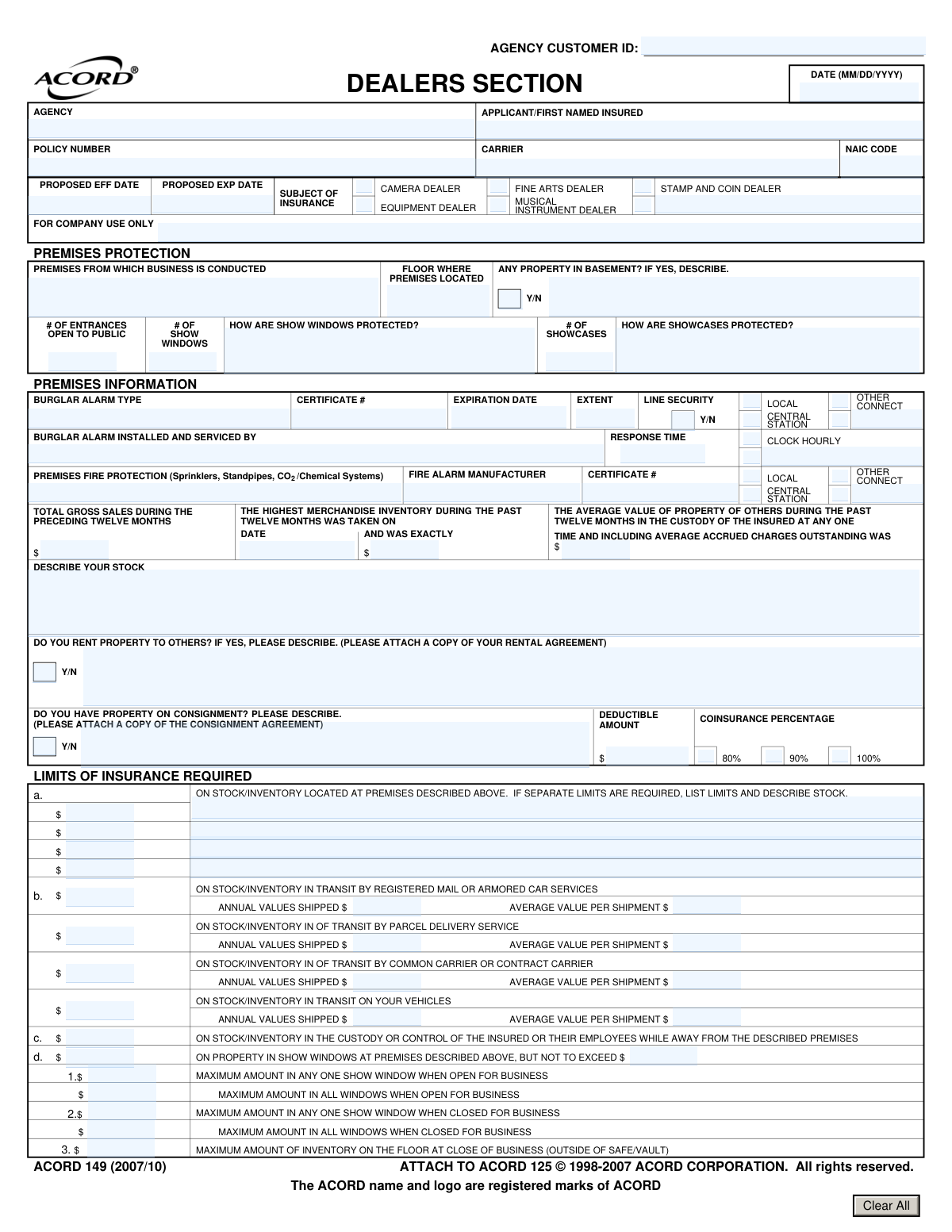
ACORD Form 149, known as the Dealers Section, is a supplemental insurance application used to collect specific underwriting information from businesses like camera, fine arts, or equipment dealers. It details premises protection, inventory values, security measures like safes and alarms, and transit exposures, which is crucial for insurers to assess risk and provide appropriate coverage. Today, this form can be filled out quickly and accurately using AI-powered services like Instafill.ai, which can also convert non-fillable PDF versions into interactive fillable forms.
Our AI automatically handles information lookup, data retrieval, formatting, and form filling.
It takes less than a minute to fill out ACORD 149 using our AI form filling.
Securely upload your data. Information is encrypted in transit and deleted immediately after the form is filled out.

Form specifications

Form name: ACORD 149, Dealers Section
Number of fields: 141
Number of pages: 1
Language: English
main-image

Instafill Demo: How to fill out PDF forms in seconds with AI

How to Fill Out ACORD 149 Online for Free in 2026

Are you looking to fill out a ACORD 149 form online quickly and accurately? Instafill.ai offers the #1 AI-powered PDF filling software of 2026, allowing you to complete your ACORD 149 form in just 37 seconds or less.
Follow these steps to fill out your ACORD 149 form online using Instafill.ai:
  1. 1 Navigate to Instafill.ai and upload or select the ACORD 149, Dealers Section form.
  2. 2 Use the AI assistant to provide basic applicant and policy information, and select the appropriate subject of insurance (e.g., Fine Arts Dealer, Equipment Dealer).
  3. 3 Complete the Premises Information and Protection sections, detailing your business location, security alarms, and physical protections for showcases and windows.
  4. 4 Enter financial data, including historical inventory values, gross sales, and the limits of insurance required for stock at various locations and in transit.
  5. 5 Provide detailed specifications for any safes or vaults used, including manufacturer, UL labeling, and the percentage of inventory secured after hours.
  6. 6 Answer questions about property on consignment, property rented to others, and any exhibition activities.
  7. 7 Review all entered information for accuracy, then securely download, print, or share the completed ACORD 149 form with your insurance agent or carrier.

Our AI-powered system ensures each field is filled out correctly, reducing errors and saving you time.

Why Choose Instafill.ai for Your Fillable ACORD 149 Form?

Speed

Complete your ACORD 149 in as little as 37 seconds.

Up-to-Date

Always use the latest 2026 ACORD 149 form version.

Cost-effective

No need to hire expensive lawyers.

Accuracy

Our AI performs 10 compliance checks to ensure your form is error-free.

Security

Your personal information is protected with bank-level encryption.

Frequently Asked Questions About Form ACORD 149

The ACORD 149 form, known as the Dealers Section, is used to apply for specialized insurance for businesses dealing in high-value stock like fine arts, cameras, or musical instruments. It gathers detailed information about your inventory, premises, and security measures to properly assess risk.

This form should be completed by owners of dealerships, such as fine art galleries, camera stores, or musical instrument shops, when applying for or renewing their commercial property insurance. It is an attachment to the main ACORD 125 Commercial Insurance Application.

You will need your total gross sales from the preceding twelve months, the exact value and date of your highest merchandise inventory during that period, and the average value of property belonging to others that you held in your custody.

The form requires separate limits for inventory at your premises, in transit, and with employees to ensure you have adequate coverage for different risk scenarios. This detailed breakdown allows the insurer to price your policy accurately.

You must indicate that you have property on consignment and provide a description of it. The form also requires you to attach a copy of your consignment agreement for the insurer to review.

You need to provide detailed specifications, including the manufacturer, UL rating for fire or burglary, lock type, and door thickness. You also need to state the percentage of your inventory that is kept in the safe or vault when your business is closed.

You must provide the alarm type (e.g., Central Station), certificate number and expiration date, and the name of the company that installs and services the system. This information helps verify your protective safeguards.

Insurers need to know the maximum value displayed in your show windows, both during business hours and when closed, to assess the risk of theft. This information directly impacts the coverage limits and premiums for that specific exposure.

Coinsurance is a policy provision that requires you to insure your property for a specified percentage (e.g., 80%, 90%, or 100%) of its total value. Selecting a percentage affects your premium and how much you would be paid for a partial loss.

This form is typically submitted to your insurance agent or carrier as part of a complete application package, attached to the ACORD 125 Commercial Insurance Application. Your agent will provide specific instructions for submission.

Yes, services like Instafill.ai use AI to auto-fill form fields accurately by extracting information from your existing documents, which saves time and helps prevent errors on detailed forms like this one.

You can use a service like Instafill.ai to upload the form and fill it out interactively on their website. The platform allows you to easily type in your information, select options from dropdowns, and save your completed form.

You can use a tool like Instafill.ai, which is designed to convert flat, non-fillable PDFs into interactive, fillable forms. Simply upload your document, and the platform will make it easy to complete and sign electronically.

Compliance ACORD 149
Validation Checks by Instafill.ai

1
Valid Policy Period Dates
Ensures the 'PROPOSED EXP DATE' is after the 'PROPOSED EFF DATE'. This is a fundamental check to ensure a valid policy period is defined. A policy cannot expire before it begins, and failure would indicate a critical data entry error that must be corrected before quoting or binding.
2
Standard Date Format (MM/DD/YYYY)
Verifies that all date fields, including 'PROPOSED EFF DATE', 'PROPOSED EXP DATE', and the 'Highest Merchandise Inventory Date', adhere to the MM/DD/YYYY format. Consistent date formatting is crucial for accurate term calculations, premium rating, and data processing across systems. Submissions with invalid formats should be rejected and returned for correction.
3
Mandatory Dealer Type Selection
Validates that at least one dealer type (e.g., 'CAMERA DEALER', 'FINE ARTS DEALER') is selected in the 'SUBJECT OF INSURANCE' section. This selection defines the fundamental nature of the risk being insured and is essential for determining applicable rates and coverages. A form without this information is incomplete and cannot be processed.
4
Conditional Basement Property Description
Checks if the question 'ANY PROPERTY IN BASEMENT?' is answered 'Y' (Yes). If so, it validates that the corresponding description field is filled out. Property stored in a basement has a higher susceptibility to risks like flooding or water damage, so underwriters need this description to properly assess the increased exposure.
5
Show Window Limit Consistency
Verifies that the insurance limit requested for 'PROPERTY IN SHOW WINDOWS' (Section 1.d) does not exceed the 'MAXIMUM AMOUNT IN ALL WINDOWS WHEN CLOSED FOR BUSINESS'. The insurance limit should be capped by the maximum potential loss exposure reported by the applicant. A limit higher than the maximum value at risk would be flagged for review and correction.
6
Inventory Limit vs. Highest Value Consistency
Compares the 'LIMITS OF INSURANCE REQUIRED' for stock at the premises (Section 1.a) against the 'HIGHEST MERCHANDISE INVENTORY' value from the past twelve months. The requested insurance limit should not significantly exceed the highest reported inventory value, as this could indicate a data entry error or moral hazard. This check helps ensure the coverage amount is reasonable and justified by the business's actual inventory levels.
7
Transit Shipment Value Logic
Validates that for each transit method in Section 1.b, the 'AVERAGE VALUE PER SHIPMENT' is less than or equal to the 'ANNUAL VALUES SHIPPED'. It is logically impossible for a single average shipment to be worth more than the total value of all shipments in a year. This serves as a sanity check to catch significant data entry errors in the transit exposure information.
8
Aggregate vs. Per Occurrence Limit
Verifies that the limit for 'IN ANY ONE LOSS, DISASTER OR OCCURRENCE' (Section 1.g) is less than or equal to the limit 'IN THE AGGREGATE AT ALL PLACES' (Section 1.h). The aggregate limit represents the total maximum payout for the entire policy term, so a single loss limit cannot logically exceed this total cap. This check prevents a fundamental structural error in the requested policy limits.
9
Mandatory Description for Rental or Consignment
Validates that if 'Do you rent property to others?' or 'Do you have property on consignment?' is answered 'Y' (Yes), the corresponding description field is not empty. This information is vital for underwriters to understand the additional exposure from property not owned by the insured. A missing description would trigger a request for more information before the policy can be assessed.
10
Exclusive Coinsurance Percentage Choice
Ensures that exactly one option is selected from the 'COINSURANCE PERCENTAGE' choices (80%, 90%, 100%). Coinsurance is a critical factor in the policy contract that determines how losses are shared and affects the premium calculation. The submission must be flagged if zero or multiple options are selected, as this ambiguity makes it impossible to price or issue the policy correctly.
11
Active Burglar Alarm Certificate
Ensures the 'EXPIRATION DATE' for the burglar alarm certificate is in the future relative to the policy's 'PROPOSED EFF DATE'. An active, valid certificate is required to qualify for protective safeguard credits or discounts. If the certificate is expired, the discount may be removed, and the risk may need to be re-evaluated, potentially leading to a higher premium.
12
Complete Alarm System Details
Ensures that if a burglar alarm type (e.g., 'CENTRAL STATION') is indicated, then the associated 'CERTIFICATE #', 'EXPIRATION DATE', and 'INSTALLED AND SERVICED BY' fields are populated. This information is necessary to verify the quality and maintenance of the alarm system, which is a key factor in risk assessment. Incomplete information would prevent the underwriter from applying any relevant premium credits.
13
Valid Safe/Vault Inventory Percentage
Checks that the value for '% OF INVENTORY KEPT IN SAFE/VAULT WHEN THE PREMISES ARE CLOSED' is a valid number between 0 and 100. This percentage is a critical underwriting factor for theft risk, directly impacting the premium. An invalid or missing value prevents accurate risk assessment and must be corrected.
14
Conditional Equipment Dealer Limits
Checks if the 'EQUIPMENT DEALER' box is selected under 'SUBJECT OF INSURANCE'. If it is not selected, the limit fields for 'EQUIPMENT AND ACCESSORIES' (Section 1.e) must be zero or empty. This prevents misapplication of coverage and incorrect premium calculations for dealers not in the equipment business.

Common Mistakes in Completing ACORD 149

Incomplete or Vague Protection Details

Applicants often provide generic descriptions for how showcases and windows are protected, such as 'locks' or 'bars'. Underwriters require specific details like the type of lock (e.g., Medeco), the material and thickness of glass, or the manufacturer of the security gates to accurately assess risk. Vague information leads to follow-up questions, delays in quoting, and potentially higher premiums or denial of coverage. To avoid this, provide precise details about all security measures in place.

Neglecting Transit and Off-Premises Coverage

Business owners frequently overlook or underestimate the value of goods in transit or away from the main premises (e.g., with salespeople, at trade shows, or out for repair). They may leave the 'Limits of Insurance Required' sections for transit and off-premises property blank, assuming it's not a significant risk. This creates a major coverage gap, leaving valuable inventory uninsured against loss outside the store. It is crucial to accurately calculate and request limits for all transit methods used and for any property kept away from the described premises.

Missing or Incorrect Alarm System Information

The alarm section requires specific details like the UL certificate number, expiration date, and installer name, which applicants often don't have readily available. Mistakes include confusing a 'Local' alarm (only makes noise) with a 'Central Station' monitored system, or leaving the certificate number blank. Missing this information prevents the underwriter from verifying the alarm's quality and eligibility for premium credits, causing significant processing delays.

Insufficient Safe and Vault Specifications

This form requires highly technical details about safes and vaults, including UL labels, door/wall thickness, and lock types, which are critical for underwriting high-value dealers. A common mistake is providing a generic description like 'fireproof safe' instead of the specific UL rating (e.g., 'UL TRTL-30x6'). Without precise specifications, the underwriter cannot determine the protective quality of the safe, which can lead to restricted coverage limits or outright rejection of the application.

Misrepresenting Inventory Values and Locations

Applicants may provide inconsistent values for inventory across different sections of the form or misstate the percentage of inventory kept in the safe when closed. For example, the 'Maximum amount in any one show window' might be listed as higher than the total limit requested for show windows. Such discrepancies are red flags for underwriters, and misrepresenting the percentage of inventory secured in a vault—a key underwriting warranty—can lead to the denial of a claim.

Forgetting to Attach Required Agreements

The form explicitly asks applicants to attach a copy of their rental or consignment agreements if they answer 'Yes' to the corresponding questions. A frequent oversight is checking 'Yes' but failing to include the supporting documentation with the submission. This omission brings the underwriting process to a halt, as the agent must contact the applicant to obtain the missing documents before the risk can be evaluated.

Using Estimates for Financial Figures

Fields like 'The Highest Merchandise Inventory during the past twelve months' and 'Total Gross Sales during the preceding twelve months' require exact figures. Applicants sometimes provide rough estimates or round numbers, which can skew the underwriter's assessment of the business's scale and insurance needs. This can result in inadequate coverage limits or incorrect premium calculations. It's essential to consult financial records to provide precise, auditable numbers.

Confusing Different Limit Types

The 'Limits of Insurance Required' section is complex, with separate limits for stock, transit, property on exhibit, and aggregate occurrences. A common error is to put a single, large number in the first field for 'Stock/Inventory' and ignore the sub-limits. This demonstrates a misunderstanding of the coverage structure and can leave the business exposed in specific loss scenarios, such as a large theft from a trade show exhibit that exceeds the unstated sub-limit.

Incorrectly Selecting Coinsurance Percentage

Applicants are required to select a coinsurance percentage (80%, 90%, or 100%) but often do so without understanding the implications. Coinsurance requires the policyholder to carry a limit of insurance equal to a specified percentage of the property's value. Choosing a percentage and then failing to insure to that value can result in a significant penalty at the time of a loss, where the claim payment is reduced. It is vital to understand this clause and select a limit that accurately reflects the required percentage of total inventory value.

Leaving 'Remarks' Section Blank When Necessary

The 'Remarks' section is an opportunity to clarify any unusual circumstances or provide context that doesn't fit elsewhere on the form. Applicants often leave this section blank, even when their operations have unique aspects, such as non-standard security measures or a highly specialized type of inventory. Failing to provide this context can lead to misinterpretations by the underwriter. Using this section to explain nuances can preempt questions and facilitate a more accurate and favorable review. AI-powered tools like Instafill.ai can help by converting flat PDFs into fillable forms and validating data formats to prevent many of these common errors.
Saved over 80 hours a year

“I was never sure if my IRS forms like W-9 were filled correctly. Now, I can complete the forms accurately without any external help.”

Kevin Martin Green

Your data stays secure with advanced protection from Instafill and our subprocessors

Robust compliance program

Transparent business model

You’re not the product. You always know where your data is and what it is processed for.

ISO 27001, HIPAA, and GDPR

Our subprocesses adhere to multiple compliance standards, including but not limited to ISO 27001, HIPAA, and GDPR.

Security & privacy by design

We consider security and privacy from the initial design phase of any new service or functionality. It’s not an afterthought, it’s built-in, including support for two-factor authentication (2FA) to further protect your account.

Fill out ACORD 149 with Instafill.ai

Worried about filling PDFs wrong? Instafill securely fills acord-149-dealers-section forms, ensuring each field is accurate.