Yes! You can use AI to fill out ACORD 23, Vehicle or Equipment Certificate of Insurance
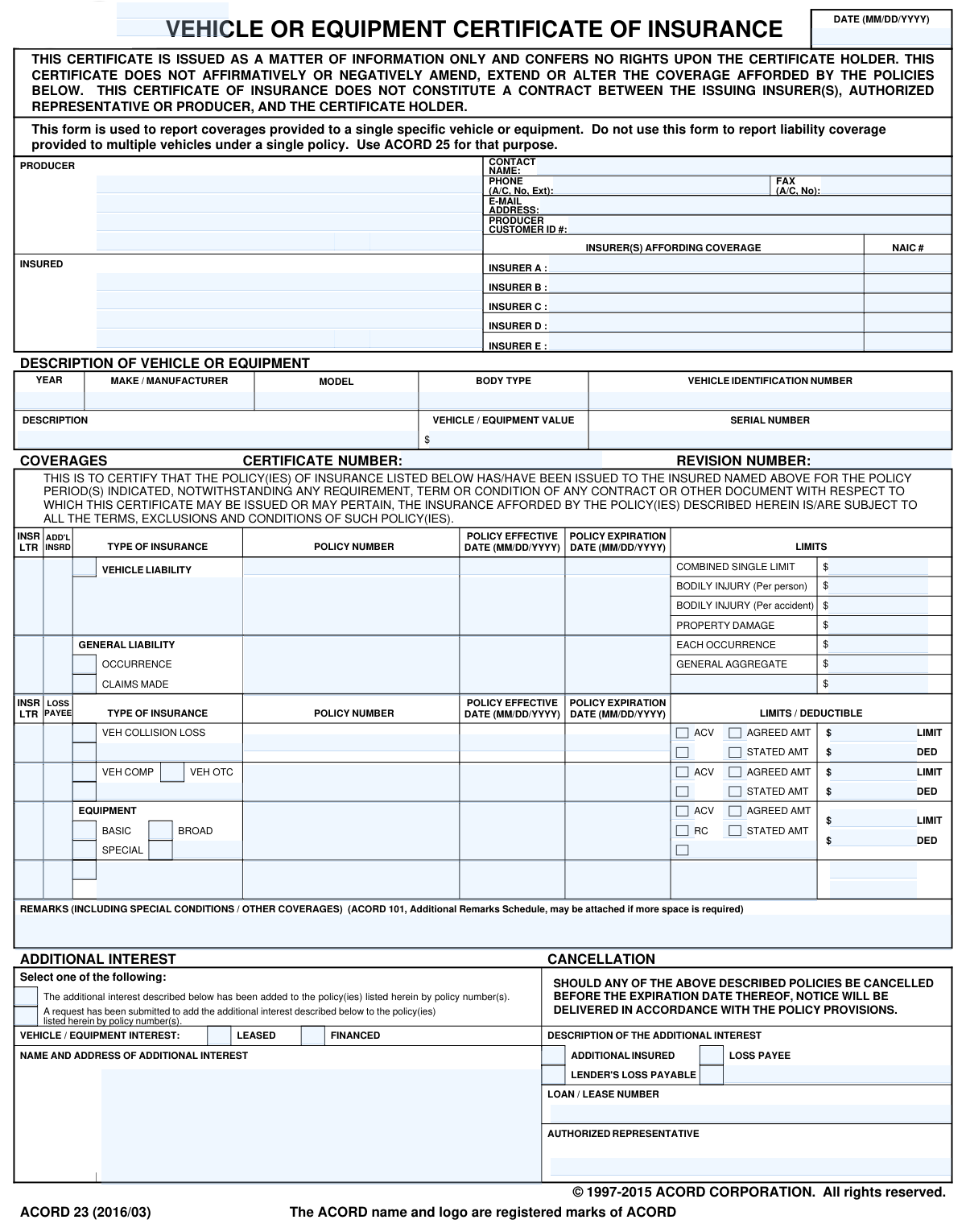
ACORD 23, also known as the Vehicle or Equipment Certificate of Insurance, is a crucial document that verifies insurance coverage for a single, specific asset. It is commonly requested by lenders, lessors, or other parties with a financial interest to confirm that the vehicle or equipment is protected against loss or damage. This form provides detailed information about the policy, coverage limits, and any additional interests. Today, this form can be filled out quickly and accurately using AI-powered services like Instafill.ai, which can also convert non-fillable PDF versions into interactive fillable forms.
ACORD 23 is part of the
ACORD forms category on Instafill.
Our AI automatically handles information lookup, data retrieval, formatting, and form filling.
It takes less than a minute to fill out ACORD 23 using our AI form filling.
Securely upload your data. Information is encrypted in transit and deleted immediately after the form is filled out.
Form specifications
| Form name: | ACORD 23, Vehicle or Equipment Certificate of Insurance |
| Number of fields: | 135 |
| Number of pages: | 1 |
| Language: | English |
More forms in ACORD forms
Instafill Demo: How to fill out PDF forms in seconds with AI
How to Fill Out ACORD 23 Online for Free in 2026
Are you looking to fill out a ACORD 23 form online quickly and accurately? Instafill.ai offers the #1 AI-powered PDF filling software of 2026, allowing you to complete your ACORD 23 form in just 37 seconds or less.
Follow these steps to fill out your ACORD 23 form online using Instafill.ai:
- 1 Navigate to Instafill.ai and upload or select the ACORD 23 form.
- 2 Provide the Producer (insurance agent/broker) and Insured (policyholder) information, including names and addresses.
- 3 Enter the specific details of the vehicle or equipment being insured, such as the VIN/serial number, year, make, and model.
- 4 Input the policy information for each applicable coverage, including the insurer, policy number, effective/expiration dates, and coverage types (e.g., liability, collision, comprehensive).
- 5 Specify the coverage limits and deductibles for each type of insurance listed.
- 6 If applicable, add the details of any additional interest, such as a lender or loss payee, including their name, address, and loan number.
- 7 Review all entered information for accuracy, then have the authorized representative sign the form before downloading or sharing it.
Our AI-powered system ensures each field is filled out correctly, reducing errors and saving you time.
Why Choose Instafill.ai for Your Fillable ACORD 23 Form?
Speed
Complete your ACORD 23 in as little as 37 seconds.
Up-to-Date
Always use the latest 2026 ACORD 23 form version.
Cost-effective
No need to hire expensive lawyers.
Accuracy
Our AI performs 10 compliance checks to ensure your form is error-free.
Security
Your personal information is protected with bank-level encryption.
Frequently Asked Questions About Form ACORD 23
This form, also known as ACORD 23, is used to provide proof of insurance coverage for a single, specific vehicle or piece of equipment. It is typically requested by a third party, such as a lender or lessor, to verify that the asset is properly insured.
Your insurance producer or an authorized representative of the insurance company typically completes and signs this form. The insured person then provides this certificate to the party requesting proof of insurance.
ACORD 23 is specifically for a single vehicle or piece of equipment, detailing its specific coverages. ACORD 25 is a more general form used to show proof of liability insurance, which can cover broader business operations and is not limited to a single item.
No, this certificate is for informational purposes only and does not amend, extend, or alter the coverage provided by your actual insurance policy. All coverage is subject to the terms, conditions, and exclusions of the policy itself.
You will need the Year, Make/Manufacturer, Model, Body Type, and the Vehicle Identification Number (VIN) or Serial Number. This information ensures the certificate is tied to the correct asset.
The 'Additional Interest' is a person or entity, like a bank or leasing company, that has a financial stake in your vehicle or equipment. They are listed to be notified about the insurance coverage and may be entitled to payment in the event of a loss.
A 'Loss Payee' is a party that gets paid for property damage losses, such as a lender who financed the vehicle. An 'Additional Insured' is a party who is granted liability protection under your policy for claims arising from your use of the vehicle.
No, this form is strictly designed to report coverage for only one specific vehicle or piece of equipment. If you need to show proof of insurance for multiple vehicles, you will likely need separate certificates for each one.
The form states that if a policy is cancelled before its expiration date, notice will be delivered to the certificate holder in accordance with the provisions outlined in the actual insurance policy.
Yes, services like Instafill.ai use AI to help you complete forms like this one accurately and efficiently. These tools can auto-fill fields with your saved information, reducing manual entry and saving you time.
To fill this form online, you can upload it to a platform like Instafill.ai. The service will make the document interactive, allowing you to easily type in the required information for the producer, insured, vehicle, and policy details.
If you have a non-fillable or 'flat' PDF, you can use a service like Instafill.ai to instantly convert it into an interactive, fillable form. This allows you to easily enter, edit, and save your information digitally without needing to print it.
You will need your insurance policy number(s), the full details of the vehicle or equipment (VIN, make, model), and the correct name and address of the 'Additional Interest' or certificate holder who is requesting the proof of insurance.
Compliance ACORD 23
Validation Checks by Instafill.ai
1
Policy Dates Consistency
This check ensures that for every policy listed, the 'Policy Expiration Date' is after the 'Policy Effective Date'. This is a critical logical validation to prevent the issuance of certificates with invalid or impossible policy periods. If this validation fails, it indicates a data entry error that could lead to a false representation of coverage.
2
Date Format Validation
Validates that all date fields on the form, including the main certificate date, policy effective dates, and policy expiration dates, adhere to the MM/DD/YYYY format. This ensures data consistency and prevents processing errors in downstream systems that expect a standardized date structure. A failure would require the user to correct the date format before submission.
3
Vehicle Identification Number (VIN) Structure
This check validates that the 'Vehicle Identification Number' field contains a standard 17-character alphanumeric string, excluding the letters I, O, and Q. Since the VIN is a unique identifier for a specific vehicle, ensuring its correctness is paramount for accurately linking the insurance coverage to the asset. An invalid VIN format would trigger an error, preventing submission until corrected.
4
Required Insured Information
Ensures that the 'INSURED' name and address fields are fully populated. A certificate of insurance is meaningless without clearly identifying the policyholder. This check prevents the creation of incomplete or ambiguous documents, and failure would halt submission until the insured party's details are provided.
5
Required Producer Information
Verifies that the insurance 'PRODUCER' name, address, and at least one method of contact (phone or email) are provided. This information is essential for the certificate holder to verify the document's authenticity and to contact the agency with any questions. Missing producer information would render the certificate unverifiable.
6
Mandatory Policy Information
This validation confirms that for each line of coverage listed, a 'Policy Number', 'Policy Effective Date', and 'Policy Expiration Date' are all present. A coverage cannot be certified without its corresponding policy identifier and term. If any of these key fields are missing for an active coverage line, the submission should be rejected for incompleteness.
7
Insurer Letter (INSR LTR) Cross-Reference
Checks that any value entered in the 'INSR LTR' column for a specific coverage corresponds to an insurer (A, B, C, D, or E) that is defined in the 'INSURER(S) AFFORDING COVERAGE' section. This maintains referential integrity, ensuring that every coverage is correctly mapped to its underwriting insurer. An invalid letter would mean the coverage cannot be tied to a specific carrier.
8
Conditional Additional Interest Details
If any checkbox under 'FINANCED VEHICLE / EQUIPMENT INTEREST' (e.g., LOSS PAYEE, ADDITIONAL INSURED) is marked, this validation ensures the 'NAME AND ADDRESS OF ADDITIONAL INTEREST' section is completely filled out. This is crucial because the purpose of marking the checkbox is to extend rights or information to that third party. Failure to provide their details makes the designation ineffective.
9
NAIC Number Format
Validates that the 'NAIC #' for each listed insurer is a 5-digit numeric value. The NAIC number is a standard, unique identifier for insurance companies, and adhering to its format is essential for regulatory compliance and accurate data processing. Incorrect formats can lead to misidentification of the insurer.
10
Currency Field Numeric Validation
This check ensures that all fields intended to hold monetary values, such as 'LIMITS' and 'DEDUCTIBLE', contain only valid numeric characters and currency symbols. Entering text or other non-numeric data in these fields would cause calculation errors and misrepresent the financial aspects of the coverage. The system should flag any non-numeric entries in these fields.
11
Vehicle Identifier Presence
Verifies that the 'DESCRIPTION OF VEHICLE OR EQUIPMENT' section contains either a 'Vehicle Identification Number' or a 'Serial Number'. As this certificate is for a specific piece of equipment, a unique identifier is mandatory to link the policy to the correct asset. A submission lacking both a VIN and a Serial Number should be considered incomplete.
12
Authorized Representative Mandate
Ensures the 'AUTHORIZED REPRESENTATIVE' field is not empty, indicating that the certificate has been officially issued by a person or entity with the authority to do so. While a digital system cannot validate a physical signature, it can require that the corresponding name or digital signature field be populated. An empty field would suggest the certificate is an un-issued draft.
Common Mistakes in Completing ACORD 23
Users often mix up the 'Producer' (the insurance agent or broker) and the 'Insured' (the policyholder) sections, entering their own information in the producer's fields. This mistake happens because people rush and don't read the field labels carefully. This can lead to the certificate being rejected or communications being sent to the wrong party, causing significant delays. To avoid this, carefully read each section header and confirm you are entering the agent's information under 'Producer' and the vehicle owner's information under 'Insured'.
A transposed digit or an outdated policy number is a critical error that completely invalidates the certificate. This often occurs from manual data entry mistakes or referencing an old insurance card. The consequence is immediate rejection by the certificate holder (like a lender), potentially putting the insured in breach of their financing agreement. Always cross-reference the policy number with the most current policy declarations page. AI-powered tools like Instafill.ai can help prevent this by saving and auto-filling correct policy information, and can even make non-fillable PDF forms fillable to reduce manual entry errors.
Entering policy dates that do not align with the actual coverage period is a frequent mistake. This can happen when renewing a policy and accidentally using the old dates. Incorrect dates misrepresent the active coverage period, which can lead to compliance failures with lenders or state agencies and create major issues if a claim occurs during the disputed period. Always verify the dates against the current policy declarations page before filling out the form.
Providing a partial or incorrect VIN is a common oversight. The form requires the full, 17-character VIN to uniquely identify the insured vehicle, not just a general description like 'Ford F-150'. An incomplete VIN makes it impossible for a lender or DMV to confirm that the correct asset is insured, leading to rejection of the certificate. Double-check the VIN on the vehicle itself or on the official title or registration document to ensure accuracy.
A primary purpose of this certificate is to prove coverage to a third party with a financial stake in the vehicle, such as a lender or leasing company. A common mistake is failing to complete the 'Additional Interest' section with the lender's name, address, and the loan number. This omission means the lender won't be properly listed and may not be notified of a policy cancellation, which often violates the terms of the loan agreement and can result in penalties.
The form offers several checkboxes to define the third party's interest, such as 'Lender's Loss Payable', 'Loss Payee', and 'Additional Insured'. These terms have specific legal meanings, and choosing the wrong one is a frequent error. For example, a lender typically requires a 'Lender's Loss Payable' endorsement, which offers them greater protection than a simple 'Loss Payee' status. Selecting the wrong type can lead to the certificate being rejected for failing to meet contractual obligations.
The coverages section has distinct fields for different limits (e.g., Combined Single Limit, Bodily Injury Per Person/Per Accident), which can be confusing. Users may enter a single liability limit in the wrong box or misinterpret the structure of their coverage. This misrepresents the level of insurance protection and can have severe legal and financial consequences if a claim is filed, as the actual coverage may be much lower than stated on the certificate.
When listing Vehicle Collision or Comprehensive (OTC) coverage, users often forget to include the deductible amount and the valuation method (ACV, Agreed Amount, or Stated Amount). Lenders and lessors require this information to verify that their collateral is adequately protected against physical damage. An omission here makes the certificate incomplete and will almost certainly lead to it being sent back for correction, delaying the process.
The form explicitly states, 'Do not use this form to report liability coverage provided to multiple vehicles under a single policy. Use ACORD 25 for that purpose.' Despite this clear instruction, users sometimes try to use this form for fleet coverage. This is incorrect usage and will result in a rejected certificate, as the ACORD 23 is designed only for a single, specific vehicle or piece of equipment. Always choose the correct ACORD form for your specific need.
An unsigned certificate holds no legal weight and is invalid. The signature of an authorized representative (typically the insurance agent) is required to certify that the information is accurate and the policies are in force. Forgetting this final step is a simple but critical mistake that will cause the certificate to be rejected immediately by the recipient. Always ensure the form is signed before it is submitted. Digital signature tools can streamline this process and prevent this oversight.
Saved over 80 hours a year
“I was never sure if my IRS forms like W-9 were filled correctly. Now, I can complete the forms accurately without any external help.”
Kevin Martin Green
Your data stays secure with advanced protection from Instafill and our subprocessors

Robust compliance program
Transparent business model
You’re not the product. You always know where your data is and what it is processed for.
ISO 27001, HIPAA, and GDPR
Our subprocesses adhere to multiple compliance standards, including but not limited to ISO 27001, HIPAA, and GDPR.
Security & privacy by design
We consider security and privacy from the initial design phase of any new service or functionality. It’s not an afterthought, it’s built-in, including support for two-factor authentication (2FA) to further protect your account.
Fill out ACORD 23 with Instafill.ai
Worried about filling PDFs wrong? Instafill securely fills acord-23-vehicle-or-equipment-certificate-of-insurance forms, ensuring each field is accurate.