
Instafill.ai
7 days free
AI form filling · 10 fields · 4 pages · done in seconds

Yes! You can use AI to fill out HTK Investment Advisory Agreement for Selection of Third Party Investment Advisory Services

Don't type 10 fields by hand. Tell our AI about yourself, or upload a document you already have, and it fills every field in seconds. You check it, then download, print or sign.
7 days free, then $19.99/month · Cancel anytime
AI fills it, no typingEncrypted, never used to train AICancel in two clicks
HTK Investment Advisory Agreement for Selection of Third Party Investment Advisory Services, page 1
Basic · 44/100Form Complexity Index

The AI does the filling. You just check it.

No typing into boxes, nothing to install.

Tell the AI about youAnswer a few questions in plain words, or upload a document you already have. That is all the typing there is.
AI fills every field in secondsIt puts each answer in the right box on every page, tables and checkboxes included.
Check it and downloadReview every field, change anything, then download, print or sign the PDF.

What this form asks for

The AI fills all of it, from your answers or your documents.

Form H9105, the HTK Investment Advisory Agreement, formalizes the relationship between a client and HTK for advisory services related to third-party money managers. It outlines the mutual responsibilities, compensation structure, and legal provisions, including a mandatory arbitration clause for resolving disputes. This agreement is crucial for clients who wish to utilize HTK's expertise in selecting and overseeing external investment professionals. Today, this form can be filled out quickly and accurately using AI-powered services like Instafill.ai, which can also convert non-fillable PDF versions into interactive fillable forms.
Fillable fields10
Pages4
Sections5
Tables and lists2
Questions that depend on earlier answers5
Form Complexity IndexBasic, 44/100

The AI checks your answers before you download

12 checks built for this form, so a wrong date or a missing answer is caught before anyone else sees it.

Ensures Primary Client Information is Complete

This validation confirms that both the 'First Client Printed Name' and 'First Client Signature Date' fields are filled. As the primary party to the agreement, the first client's information is essential for the contract to be valid. If either field is missing, the submission is rejected, and the user is prompted to provide both the printed name and the signature date for the primary client.

Ensures Primary HTK Representative Information is Complete

This check verifies that the 'First HTK IAR Name' and 'First HTK IAR Signature Date' fields are both completed. The agreement requires execution by an authorized representative of Hornor, Townsend & Kent, LLC to be legally binding. A failure in this validation prevents the form from being processed, requiring the user to enter the details for the primary IAR.

Validates Signature Date Format (MM/DD/YYYY)

This rule ensures that all entered signature dates strictly adhere to the MM/DD/YYYY format as indicated on the form. Consistent date formatting is crucial for accurate record-keeping, data parsing, and legal clarity. If a date is entered in an incorrect format (e.g., 'June 1, 2023' or '2023-06-01'), the system will flag the field and require the user to correct it before submission.

Ensures Signature Date is Plausible and Not in the Future

This validation checks that any entered signature date is not a future date and is not unreasonably old. It also compares the date against the form's revision date (06/20), ensuring the agreement was signed on or after June 1, 2020. This prevents typographical errors and confirms the correct version of the agreement was used.

Validates Format of Client Printed Name

This check ensures the 'First Client Printed Name' and 'Second Client Printed Name' fields contain valid characters appropriate for a person's name (e.g., letters, hyphens, apostrophes, spaces). It prevents the entry of purely numerical data, random symbols, or placeholder text. This is important for maintaining data integrity and ensuring the legal document correctly identifies the client.

Validates Format of HTK IAR Printed Name

This validation ensures that all 'HTK IAR Name (Print)' fields contain text that appears to be a valid name, consisting of letters and standard name punctuation. This prevents erroneous data entry, such as account numbers or gibberish, from being entered into a legal name field. If the validation fails, the user is prompted to enter the full, correctly spelled name of the representative.

And 6 more checks
  • Ensures Paired Entry for Second Client
  • Ensures Paired Entry for Additional HTK IARs
  • Validates Hierarchical Entry of Signatories
  • Verifies Signature Dates are within a Reasonable Timeframe
  • Ensures Client Signature Date is Not After HTK Signature Date
  • Ensures Distinct Names for Multiple HTK IARs

Let AI fill out your H9105

No typing. Every field filled in seconds, checked, ready to sign.

7 days free, then $19.99/month · Cancel anytime

How to Fill Out H9105 Online for Free in 2026

What the AI walks you through.

  1. Navigate to Instafill.ai and upload or select the HTK Investment Advisory Agreement (Form H9105).
  2. Use the AI assistant to automatically populate your personal information in the client signature section, including your printed name.
  3. Review the sections detailing the advisory services, compensation, and mutual responsibilities to ensure you understand the terms.
  4. Acknowledge the receipt of HTK’s Advisory Services Brochure (Form ADV) and Privacy Policy as stated within the agreement's text.
  5. Carefully read the pre-dispute arbitration clause in Section 14 to understand the process for resolving potential disputes.
  6. Electronically sign and date the agreement in the designated fields for the client, and prepare it for the HTK Investment Adviser Representative's signature.

Common Mistakes in Completing H9105

The ones the AI is built to catch.

Missing Signatures for Joint or Multiple Principals
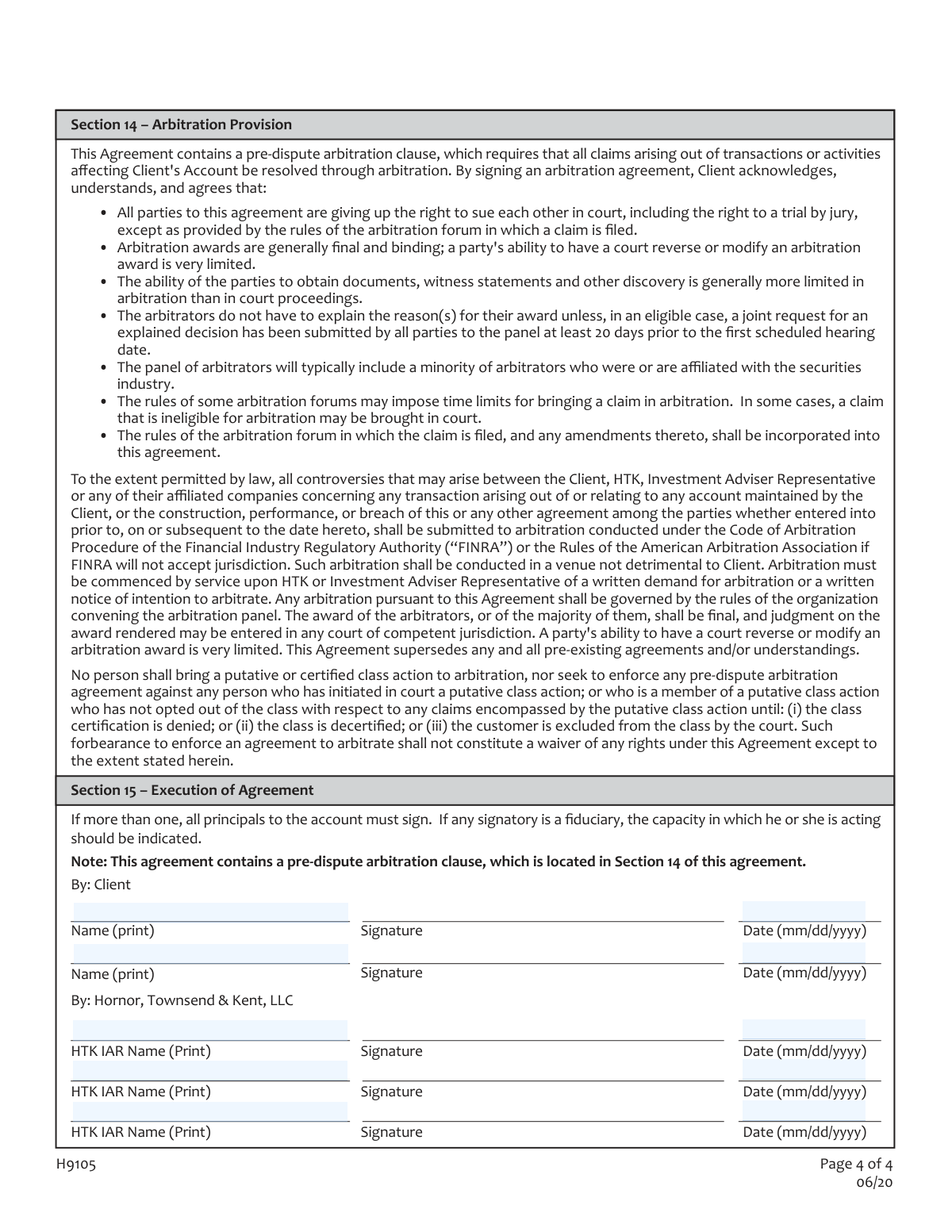
Section 15 explicitly states, 'If more than one, all principals to the account must sign.' This is frequently overlooked when one person fills out the form for a joint account. This oversight invalidates the agreement, causing significant delays in account setup and management until a properly executed form with all signatures is submitted. To avoid this, carefully review the signature block and ensure all required parties sign in the designated client signature areas.
Neglecting to Indicate Fiduciary Capacity
The form requires that if a signatory is a fiduciary (e.g., a trustee for a plan), they must indicate the capacity in which they are signing. People often sign with just their name, forgetting to add 'Trustee' or their specific title. This creates legal ambiguity regarding the authority to enter the agreement, potentially rendering it unenforceable and delaying the management of trust or plan assets. Always add your official title next to your signature if signing on behalf of an entity.
Incorrect or Inconsistent Date Formatting
The signature fields specify the date format '(mm/dd/yyyy)'. Applicants often use other formats like 'dd/mm/yyyy' or write out the month, leading to data entry inconsistencies and potential compliance issues. An incorrect or missing date can raise questions about when the agreement was legally executed. To prevent this, always use the specified numerical format; AI-powered form fillers like Instafill.ai can automatically format dates correctly to meet form requirements.
Overlooking the Arbitration Clause Acknowledgment
Section 14 is a pre-dispute arbitration clause, and the signature block explicitly notes its presence. Clients often sign the agreement without fully reading or understanding that they are waiving their right to sue in court, including the right to a jury trial. This is a significant legal concession that can have major consequences if a dispute arises. It is crucial to read Section 14 carefully and understand its implications before signing.
Signing in the Wrong Section
The signature page has distinct sections for the 'Client' and the 'HTK IAR' (Investment Adviser Representative). In a rush, a client might accidentally sign on a line meant for the adviser, or vice-versa. This simple error invalidates the document's execution and requires the form to be re-signed by all parties, delaying the entire process. Always double-check that you are signing in the correct block designated for the 'Client'.
Falsely Attesting to Receipt of Disclosure Documents
In Section 3, the client attests to receiving HTK’s Advisory Services Brochure (Form ADV Part 2A/2B) and Privacy Policy. Clients sometimes sign this without having actually received or reviewed these critical documents. This is a serious mistake, as it prevents the client from making a fully informed decision and weakens their ability to claim they weren't aware of the fees, services, and conflicts of interest described within. Always insist on receiving and reading all disclosure documents before signing any attestation.
Misunderstanding Ongoing Client Responsibilities
Section 3 states that the client agrees to promptly notify the adviser of any significant changes to their financial situation or investment objectives. Many clients view the form as a one-time event and forget this ongoing obligation. Failure to provide updates can lead to investment strategies that are no longer suitable for the client's circumstances, potentially resulting in financial losses or unmet goals. Set a reminder to review your situation annually or contact your adviser immediately after a major life event.
Failure to Provide Required Supporting Plan Documents
For retirement or employee benefit plan accounts, Section 4 requires the client to furnish true and complete copies of all documents establishing and governing the plan. A client may sign the agreement but forget to provide these essential supporting documents. This halts the process, as the adviser cannot act as a fiduciary or manage the account without them. Ensure you provide all governing plan documents along with the signed agreement.
Illegible Printed Name
While a signature can be stylized, the printed name next to it must be perfectly legible for proper identification and record-keeping. Clients sometimes rush and their printed name is difficult to read, which can cause processing delays or rejection of the form. Take the time to print your full legal name clearly in the designated space. Using digital form-filling tools can eliminate legibility issues for printed fields.
Assuming This Agreement is the Only One Required
The text repeatedly mentions a 'separate agreement' with the selected Third Party Money Manager. A common misunderstanding is believing this HTK agreement is the only contract to be signed. This can lead to confusion and delays when the client is later presented with more paperwork from the money manager. Understand that this is an agreement for advisory and referral services, and a separate contract with the actual asset manager will also be required.

Frequently Asked Questions About H9105


Is it really free for 7 days?
Yes. You pay $0 today. Cancel before Nov 10 and you are never charged. Keep it, and it is $19.99 a month for 5 fills of your H9105.
Can I fill other forms too?
This plan is for your H9105: your own AI agent fills it as often as 5 times a month. To fill other forms and upload your own, choose a Professional plan from your account.
How do I cancel?
From your account, in two clicks, any time. No email, no call.
How does the AI fill out H9105?
You answer a few questions in plain words, or upload a document you already have. The AI reads what you give it and puts each answer into the right field of H9105, on every page, in seconds. It checks the answers against the form's own rules, and you review and change anything before you download, print or sign.
What happens to my information?
It is encrypted in transit and at rest, and it is never used to train AI.
How complex is H9105 to fill out?
H9105 has a Form Complexity Index of 44 out of 100, in the basic tier: 10 fillable fields across 4 pages. Instafill.ai's AI fills it in under a minute, with every field there for you to review before you download.
What is the purpose of the HTK Investment Advisory Agreement?
This agreement is for clients who want Hornor, Townsend & Kent, LLC (HTK) to help them select, monitor, and review the performance of a separate, third-party investment manager for their account.
Who needs to sign this agreement?
This agreement must be signed by you (the "Client") and an authorized Investment Adviser Representative from HTK. If the account has more than one owner, all principals must sign.
How is HTK compensated for these advisory services?
HTK receives a portion of the advisory fees you pay directly to the Third Party Money Manager you select. HTK then pays a portion of that fee to your individual Investment Adviser Representative.
What information am I required to provide?
You must provide current and accurate information about your financial situation, investment objectives, and any restrictions you wish to impose. You are also responsible for promptly notifying your Adviser of any significant changes to this information.
Does this agreement guarantee my investments will be profitable?
No, the agreement explicitly states there is no guarantee of profit or protection from loss. Investing involves risk, and the advisory services may not result in your financial goals being met.
How can I terminate this agreement?
You can terminate this agreement at any time by providing written notice to HTK. The agreement also terminates if your separate agreement with the Third Party Money Manager is terminated.
What is the 'Arbitration Provision' in Section 14?
This is a mandatory clause stating that you agree to resolve any disputes with HTK through binding arbitration rather than suing in court. By signing, you are giving up your right to a jury trial for most claims related to your account.
Are there special rules if my account is an IRA or 401(k)?
Yes, Section 4 outlines specific provisions for retirement accounts. For these accounts, HTK acknowledges it is acting as a 'fiduciary' regarding the advisory services it provides under this agreement.
What happens to this agreement if I pass away or become disabled?
The agreement does not automatically terminate upon your death or disability. However, your legally authorized representative, such as an executor or guardian, can terminate the agreement by giving written notice.
Who is responsible for voting proxies for the stocks in my account?
You, the client, retain the full right and responsibility to vote all proxies for securities held in your account. HTK is expressly precluded from voting proxies on your behalf.
What documents do I need to acknowledge receiving before signing?
By signing, you confirm receipt of HTK’s Advisory Services Brochure (Form ADV Part 2A and Part 2B) and its Privacy Policy. You should review these documents carefully before signing the agreement.
Can I use an AI tool to help me fill out this form?
Yes, services like Instafill.ai use AI to accurately auto-fill your personal information into the form fields, which can save you time and help avoid errors.
How can I fill out this agreement online?
You can use a service like Instafill.ai to upload the PDF and fill it out electronically. The platform allows you to type directly into the fields, add signatures, and then download the completed document.
What should I do if the PDF version of this form I have isn't fillable?
If you have a non-fillable or 'flat' PDF, you can upload it to Instafill.ai. The service can convert it into an interactive, fillable form for you to complete online.
Encrypted in transit and at restNever used to train AIDelete your forms any time

Get your H9105 filled out by AI

$0 today. Cancel before Nov 10 and you pay nothing.

Other forms like this one

investment forms: Form 3468, Investment Credit, Form 8960, Net Investment Income Tax, How to Transfer Assets from Morgan Stanley to Fidelity Investments (Fidelity Stock Plan Services Guide), Fidelity Investments Transfer/Rollover/Exchange Form, Fidelity Investments Standing Transfer Instructions Form, One-Time Withdrawal – IRA, Fidelity Investments, Fidelity Investments Transfer/Rollover Form, Special Tax Notice: Your Rollover Options - Fidelity Investments, Fidelity Investment-Only (Non-Prototype) Retirement Account Application, Fidelity Investments® Beneficiary Distribution Form, Fidelity Investments Distribution Form, One-Time Withdrawal – Investment-Only (Non-Prototype) Retirement Account, Fidelity Investments Withdrawal — One-Time, Fidelity Investments Withdrawals—529 College Savings Plan, Fidelity Investments Change of Account Ownership — Mutual Fund Only Accounts, Fidelity Investments 403(b) Beneficiary Designation, Fidelity Investments Qualified Plan Beneficiary Designation, Fidelity Investments 403(b)/401(a) Beneficiary Designation, Fidelity Investments Qualified Plan Beneficiary Designation, Fidelity Investments Earnings Automatic Withdrawal Plan — IRA

investment agreement forms: CUR8 CAPITAL INVESTMENT & PLATFORM AGREEMENT, Voya Investment Management Traditional, Roth, Rollover, and SEP Individual Retirement Account (IRA) Application and Adoption Agreement, BlackRock Private Investments Fund Subscription Agreement and Application

investment advisor forms: Fidelity Charitable Investment Advisor Program Application, Fidelity Advisor Investment-Only Retirement Plan Master Application

UK investment forms: Triple Point Venture VCT plc | Investor Application Form, Form 3468, Investment Credit, Form 8960, Net Investment Income Tax, How to Transfer Assets from Morgan Stanley to Fidelity Investments (Fidelity Stock Plan Services Guide), Fidelity Investments Transfer/Rollover/Exchange Form, Fidelity Investments Standing Transfer Instructions Form, One-Time Withdrawal – IRA, Fidelity Investments, Fidelity Investments Transfer/Rollover Form, Special Tax Notice: Your Rollover Options - Fidelity Investments, Fidelity Investment-Only (Non-Prototype) Retirement Account Application, Fidelity Investments® Beneficiary Distribution Form, Fidelity Investments Distribution Form, One-Time Withdrawal – Investment-Only (Non-Prototype) Retirement Account, Fidelity Investments Withdrawal — One-Time, Fidelity Investments Withdrawals—529 College Savings Plan, Fidelity Investments Change of Account Ownership — Mutual Fund Only Accounts, Fidelity Investments 403(b) Beneficiary Designation, Fidelity Investments Qualified Plan Beneficiary Designation, Fidelity Investments 403(b)/401(a) Beneficiary Designation, Fidelity Investments Qualified Plan Beneficiary Designation

7 days free, then $19.99/month · Cancel anytime