Yes! You can use AI to fill out Boy Scouts of America Annual Health and Medical Record (Parts A, B1, and B2)
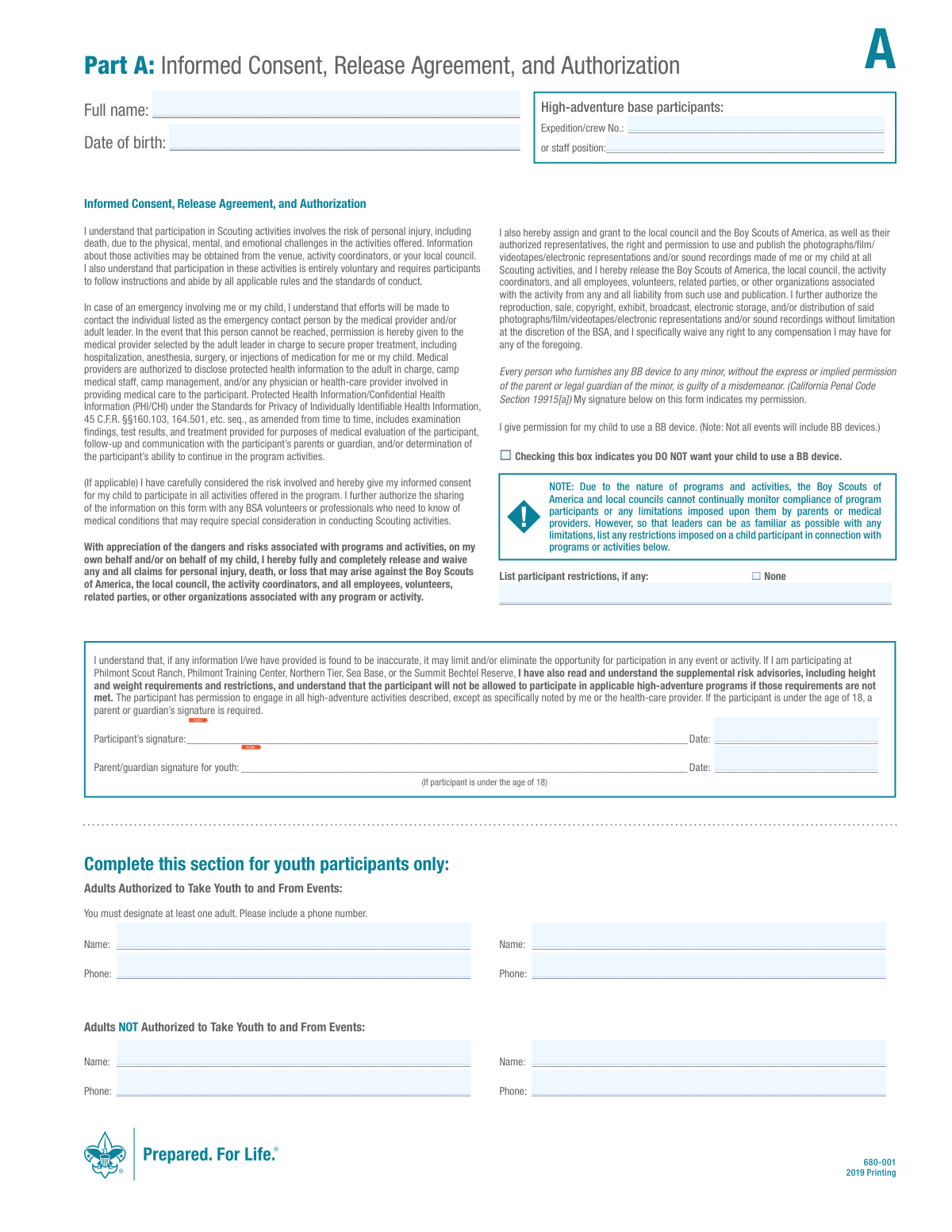
The Boy Scouts of America Annual Health and Medical Record (Form 680-001) is a critical document required for all participants in Scouting events. It combines an informed consent and release agreement (Part A) with a comprehensive health history (Parts B1 and B2) to ensure leaders are prepared for medical situations and have authorization for treatment. This multi-part form is essential for the safety of all Scouts and adult volunteers. Today, this form can be filled out quickly and accurately using AI-powered services like Instafill.ai, which can also convert non-fillable PDF versions into interactive fillable forms.
BSA Form 680-001 is part of the
health record forms, Medi-Cal forms and medical record forms categories on Instafill.
Our AI automatically handles information lookup, data retrieval, formatting, and form filling.
It takes less than a minute to fill out BSA Form 680-001 using our AI form filling.
Securely upload your data. Information is encrypted in transit and deleted immediately after the form is filled out.
Form specifications
| Form name: | Boy Scouts of America Annual Health and Medical Record (Parts A, B1, and B2) |
| Number of fields: | 229 |
| Number of pages: | 3 |
| Language: | English |
Instafill Demo: How to fill out PDF forms in seconds with AI
How to Fill Out BSA Form 680-001 Online for Free in 2026
Are you looking to fill out a BSA FORM 680-001 form online quickly and accurately? Instafill.ai offers the #1 AI-powered PDF filling software of 2026, allowing you to complete your BSA FORM 680-001 form in just 37 seconds or less.
Follow these steps to fill out your BSA FORM 680-001 form online using Instafill.ai:
- 1 Navigate to Instafill.ai and upload the BSA Annual Health and Medical Record form, or select it from the available templates.
- 2 Use the AI assistant to automatically populate personal details in Part A, such as participant name, date of birth, and contact information.
- 3 Complete the Informed Consent and Release Agreement section, designating authorized adults for youth participants and providing necessary electronic signatures.
- 4 Proceed to Part B1 to provide emergency contacts, insurance details, and a thorough health history, explaining any conditions as required.
- 5 In Part B2, accurately list all allergies, current medications, and immunization history to ensure leaders have a complete medical profile.
- 6 Carefully review all sections of the completed form for accuracy and completeness.
- 7 Securely download, print, or share the finalized document as required by your local council or event coordinator.
Our AI-powered system ensures each field is filled out correctly, reducing errors and saving you time.
Why Choose Instafill.ai for Your Fillable BSA Form 680-001 Form?
Speed
Complete your BSA Form 680-001 in as little as 37 seconds.
Up-to-Date
Always use the latest 2026 BSA Form 680-001 form version.
Cost-effective
No need to hire expensive lawyers.
Accuracy
Our AI performs 10 compliance checks to ensure your form is error-free.
Security
Your personal information is protected with bank-level encryption.
Frequently Asked Questions About Form BSA Form 680-001
This form serves as an informed consent agreement, a release of liability, and a detailed health history record. It is used to ensure participant safety and provide authorization for emergency medical treatment during Scouting activities.
All participants, both youth and adults, must complete the form. For participants under 18, a parent or legal guardian must also sign Part A to provide consent and authorization.
You should have the participant's health insurance card, a complete immunization history with dates, a list of all current medications and dosages, and emergency contact information.
This is a critical safety measure to ensure your child is only released to individuals you have explicitly approved. You must list at least one authorized adult with their phone number.
If you do not have medical insurance, you should enter 'none' in the Health/Accident Insurance Company and Policy No. fields in Part B1. Completing the form still grants permission for emergency medical care.
Yes, the form explicitly states that a tetanus immunization is required and must have been received within the last 10 years. Be sure to provide the date of the most recent shot in Part B2.
By signing Part A, you grant the Boy Scouts of America the right to use photographs or video recordings of you or your child from Scouting activities for promotional purposes without compensation. The form does not offer an opt-out for this clause.
Use the table in Part B2 to list each medication, its dose, frequency, and the reason it is taken. If you run out of space, check the box indicating you will attach a separate sheet with the additional information.
In Part B1, simply check the 'No' box for each condition in the health history section. In Part B2, you can check the box that says 'Check here if no medications are routinely taken.'
Typically, you will submit the completed and signed form to your unit leader or the event coordinator. They will keep it on file for reference during Scouting activities and emergencies.
Yes, services like Instafill.ai use AI to help you accurately auto-fill form fields with your saved information, which saves time and helps prevent errors.
Upload the form's PDF to the Instafill.ai platform. The AI will make the fields fillable, and you can then type in your answers or use the auto-fill feature to complete it with your securely stored data.
You can use a service like Instafill.ai, which is designed to convert non-fillable PDFs into interactive, fillable forms. This allows you to easily type your information directly onto the form online.
You must indicate this in Part B2 by checking 'YES' for the epinephrine auto-injector question and providing the expiration date. Also, provide detailed information in the 'Allergies' section and ensure the participant brings the unexpired EpiPen to the event.
Compliance BSA Form 680-001
Validation Checks by Instafill.ai
1
Verifies Parent/Guardian Signature for Minors
This check calculates the participant's age based on the 'Date of Birth'. If the participant is under 18, it verifies that the 'Parent/guardian signature for youth' field is signed. This is a critical legal requirement for consent and liability release, and failure to provide it for a minor will prevent their participation.
2
Ensures at Least One Authorized Adult is Listed for Youth
For participants under 18, this validation ensures that at least one adult, including their name and phone number, is listed in the 'Adults Authorized to Take Youth to and From Events' section. This is a crucial safety and logistical measure to ensure a designated adult is responsible for the youth's transport. If no adult is listed, the form submission is considered incomplete for a youth participant.
3
Validates Tetanus Immunization Date
This check confirms that a date has been entered for the Tetanus immunization and that the date is within the last 10 years from the current date, as explicitly required by the form. An expired or missing tetanus shot record is a significant health risk in outdoor activities. The submission will be flagged for follow-up or rejected until proof of a current immunization is provided.
4
Checks for Mandatory Health Condition Explanations
This validation scans the 'Health History' section in Part B1. If any condition (e.g., Diabetes, Hypertension, Asthma) is marked 'Yes', it ensures the corresponding 'Explain' text field is not empty. This information is vital for leaders and medical staff to understand the participant's health needs and risks, and a missing explanation will require the user to provide the necessary details.
5
Requires Explanation for All Declared Allergies
This check verifies that if 'Yes' is selected for any allergy type (Medication, Plants, Food, Insect bites/stings) in Part B2, the associated 'Explain' field contains a description of the allergy. This is critical for preventing potentially life-threatening allergic reactions. A form with a 'Yes' answer but no explanation will be considered incomplete.
6
Validates Rescue Medication Expiration Dates
If the participant indicates 'Yes' for using an Epinephrine Auto-injector or an Asthma Rescue Inhaler, this check ensures that an expiration date is provided for each. It also validates that the provided date is in the future. Carrying expired life-saving medication is a major safety hazard, and the form will be rejected if the date is missing or has passed.
7
Ensures Consistency of Participant Name and DOB
This validation cross-references the 'Full name' and 'Date of birth' fields across Part A, Part B1, and Part B2 of the form. It ensures the information is identical in all sections to maintain data integrity and prevent confusion. Discrepancies can lead to administrative errors and must be corrected before the form is accepted.
8
Verifies Age Calculation from Date of Birth
This check compares the manually entered 'Age' field in Part B1 against the age calculated from the 'Date of birth' field. This ensures the data is accurate and consistent, which is important for age-appropriate activity planning and legal requirements. If the values do not match, the user will be prompted to correct the discrepancy.
9
Checks Logic for Participant Restrictions Field
This validation ensures that if the 'None' checkbox in the 'List participant restrictions' section is left unchecked, the adjacent text field must contain some text. This prevents ambiguity about whether restrictions exist but were simply not listed. If the box is unchecked and the field is empty, the form will be flagged as incomplete.
10
Validates Completeness of Medication List
This check confirms that if the 'Check here if no medications are routinely taken' box is unchecked, at least one entry in the medication table (including Medication, Dose, and Frequency) is filled out. This ensures that all necessary medications are documented for the participant's safety and proper care. An empty table without the 'no medications' box checked will result in a validation error.
11
Ensures Primary Emergency Contact Information is Complete
This validation verifies that the 'Name' field for the primary emergency contact is filled out, along with at least one of the phone number fields ('Home phone' or 'Other phone'). This information is absolutely critical in the event of an emergency. A submission lacking a named contact with a valid phone number will be rejected.
12
Validates Phone Number Format
This check examines all fields intended for phone numbers (e.g., 'Participant Phone Number', 'Unit Leader’s mobile #', 'Emergency Contact' phones) to ensure they conform to a standard format, such as containing 10 digits. This is important to ensure that all contacts are reachable in case of need. Invalid formats will trigger an error, prompting the user to correct the entry.
13
Requires Specific Date for Seizure History
If a participant marks 'Yes' for 'Seizures or epilepsy', this validation ensures that the 'Last seizure date' field is filled with a valid date. This specific information helps leaders and medical personnel assess the current risk and be prepared for a potential medical event. The form will be considered incomplete if this required follow-up information is missing.
14
Validates Insurance Information Logic
This check ensures that if the 'Insurance Company' field contains a value other than 'none', the 'Policy No.' field must also be filled. This guarantees that when insurance is available, all necessary details for a claim are provided. A missing policy number when an insurance company is listed will cause a validation failure.
Common Mistakes in Completing BSA Form 680-001
Users often check 'Yes' for a medical condition in Part B1 but fail to provide a detailed explanation in the adjacent column. This happens due to haste or not having specific details readily available, rendering the information useless for medical staff. Without a full explanation of the diagnosis, treatment, and severity, event leaders cannot properly prepare for or respond to the participant's needs, potentially delaying care in an emergency. To avoid this, gather all relevant medical information before starting the form and provide complete, clear details for every 'Yes' answer.
The form requires multiple signatures and dates in Part A, including one for the participant and one for a parent/guardian if the participant is a youth. People frequently overlook one of the signature lines or forget to write the date. An incomplete signature section can invalidate the consent and medical authorization, potentially preventing the individual from participating in activities. Always double-check all pages to ensure every required signature and date field is completed correctly before submission.
Part B1 explicitly requests a photocopy of both sides of the insurance card. This is a common oversight as it's an action separate from filling out the form itself. Forgetting the copy can cause significant delays and complications with billing or securing treatment at a medical facility in an emergency. Before submitting the form, ensure a clear, legible copy of the front and back of the insurance card is securely attached as instructed.
Parents or guardians sometimes list themselves as the primary emergency contact, even if they will be attending the event with the child. This is ineffective, as the purpose is to reach someone who is not at the event. This mistake can critically delay communication during an emergency. Always list a primary and alternate contact who will not be at the event and will be reliably reachable by phone.
The participant's full name and date of birth are required at the top of every page (Part A, B1, B2). It's easy to fill this out on the first page and forget the others. If the pages become separated, the unlabelled pages containing critical health information cannot be matched to the participant, creating a serious safety risk. AI-powered tools like Instafill.ai can prevent this by automatically populating repeated fields across all pages of a fillable form.
When listing medications in Part B2, individuals often omit the dosage, frequency, or specific reason for taking the drug, and may also forget to list common over-the-counter medications. This lack of detail makes it impossible for staff to administer medication correctly or understand its purpose, which is dangerous. To prevent this, list every medication with its precise dose, frequency, and the condition it treats, and remember to bring it in its original container as instructed.
The immunization history in Part B2 requires specific dates, especially for the mandatory Tetanus shot. Many people do not have these records handy and either leave the section blank or guess the dates. Inaccurate or missing immunization information can lead to a participant being excluded from an event. It is crucial to consult official medical records to fill in this section accurately before submission.
For youth participants, Part A requires designating at least one adult authorized for pickup, including their phone number. Parents sometimes overlook this section entirely. This creates a significant logistical and safety issue at the end of an event, as leaders cannot release a youth to an unauthorized person. Always list at least one, and preferably multiple, trusted adults with their contact numbers in this section.
The form uses a negative opt-out: 'Checking this box indicates you DO NOT want your child to use a BB device.' Parents wanting to grant permission might mistakenly check the box, thinking they are opting in. This misunderstanding can lead to a child being unnecessarily excluded from an activity. To avoid this, read the instruction carefully and leave the box unchecked to grant permission.
Part B2 asks for the expiration dates of epinephrine auto-injectors and asthma inhalers, which is a critical safety detail. People often forget to check the actual device and leave this field blank, or they bring an expired device to the event. An expired emergency medication may not be effective, which could have life-threatening consequences. Always physically check the devices for the correct expiration date when filling out the form and before packing for the event.
Saved over 80 hours a year
“I was never sure if my IRS forms like W-9 were filled correctly. Now, I can complete the forms accurately without any external help.”
Kevin Martin Green
Your data stays secure with advanced protection from Instafill and our subprocessors

Robust compliance program
Transparent business model
You’re not the product. You always know where your data is and what it is processed for.
ISO 27001, HIPAA, and GDPR
Our subprocesses adhere to multiple compliance standards, including but not limited to ISO 27001, HIPAA, and GDPR.
Security & privacy by design
We consider security and privacy from the initial design phase of any new service or functionality. It’s not an afterthought, it’s built-in, including support for two-factor authentication (2FA) to further protect your account.
Fill out BSA Form 680-001 with Instafill.ai
Worried about filling PDFs wrong? Instafill securely fills boy-scouts-of-america-annual-health-and-medical-record-parts-a-b1-and-b2 forms, ensuring each field is accurate.