Yes! You can use AI to fill out Form SS001 - Claim for Special Benefit

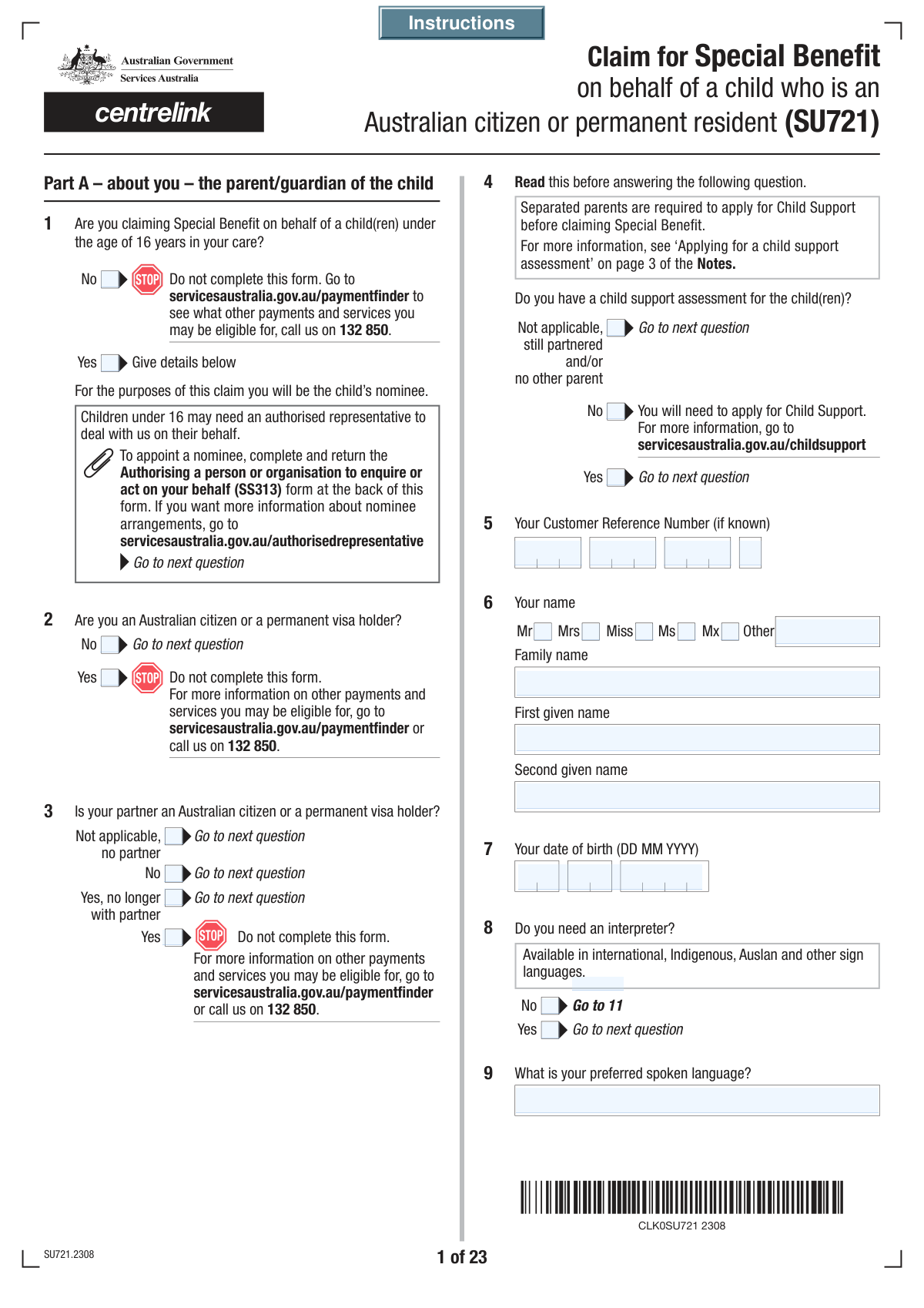
Form SS001, Claim for Special Benefit, is a comprehensive application submitted to Services Australia (Centrelink) for financial assistance during times of severe hardship when an individual is not eligible for other government income support payments. It requires detailed information about your identity, residency, financial situation, and living arrangements to determine eligibility for this safety net payment. This crucial form can be complex, but today it can be filled out quickly and accurately using AI-powered services like Instafill.ai, which can also convert non-fillable PDF versions into interactive fillable forms.
SS001 is part of the benefit forms and VA claim forms categories on Instafill.
Our AI automatically handles information lookup, data retrieval, formatting, and form filling.
It takes less than a minute to fill out SS001 using our AI form filling.
Securely upload your data. Information is encrypted in transit and deleted immediately after the form is filled out.

Form specifications

Form name: Form SS001 - Claim for Special Benefit
Number of fields: 972
Number of pages: 35
Filled form examples: Form SS001 Examples
Language: English
main-image

Instafill Demo: How to fill out PDF forms in seconds with AI

How to Fill Out SS001 Online for Free in 2026

Are you looking to fill out a SS001 form online quickly and accurately? Instafill.ai offers the #1 AI-powered PDF filling software of 2026, allowing you to complete your SS001 form in just 37 seconds or less.
Follow these steps to fill out your SS001 form online using Instafill.ai:
  1. 1 Navigate to Instafill.ai, then upload or select the 'Claim for Special Benefit (SS001)' form to begin.
  2. 2 Use the AI assistant to automatically fill your basic personal information, including your name, contact details, and Customer Reference Number (CRN), then verify the information for accuracy.
  3. 3 Answer guided questions about your residency status, relationship details, and information about your partner, if applicable. The AI will populate the corresponding sections of the form.
  4. 4 Detail your financial circumstances by providing information on your accommodation, employment, income from all sources, and assets. Instafill.ai simplifies this process by guiding you through each financial category.
  5. 5 If you are claiming on behalf of a child, complete the sections regarding the child's personal details, care arrangements, and any financial support they receive.
  6. 6 Review the entire completed form for accuracy, then use the platform to digitally sign the declaration and attach any required supporting documents mentioned in the checklist.
  7. 7 Securely download your completed and signed SS001 form, ready for submission to Services Australia (Centrelink).

Our AI-powered system ensures each field is filled out correctly, reducing errors and saving you time.

Why Choose Instafill.ai for Your Fillable SS001 Form?

Speed

Complete your SS001 in as little as 37 seconds.

Up-to-Date

Always use the latest 2026 SS001 form version.

Cost-effective

No need to hire expensive lawyers.

Accuracy

Our AI performs 10 compliance checks to ensure your form is error-free.

Security

Your personal information is protected with bank-level encryption.

Frequently Asked Questions About Form SS001

This form is used to apply for the Special Benefit, a payment for people in severe financial hardship who are not eligible for any other Centrelink income support payment. It is used to assess your eligibility based on your personal, financial, and living circumstances.

You should fill out this form if you are in severe financial need, live in Australia, and are not eligible for other government income support payments. This version of the form is specifically for those claiming the benefit on behalf of a child under 16 in their care.

A Customer Reference Number (CRN) is your unique identifier for Centrelink services. You can find your CRN on letters from Centrelink, on your concession card, or by logging into your Centrelink online account through myGov.

You should select 'Separated' for your relationship status and provide the date of separation. You may also need to complete a 'Relationship details - Separated under one roof (SS293)' form to provide more information about your situation.

The required documents depend on your circumstances but may include identity documents, payslips, bank statements, lease agreements, and details of your assets. The checklist at the end of the form will help you identify exactly which documents you need to provide.

In the accommodation section (Question 52), you can select 'Other, no fixed address'. You should provide any details you can about your current living situation and ensure your postal address is one where you can reliably receive mail.

This section allows you to give another person (like a family member or support worker) or an organisation permission to deal with Centrelink on your behalf. You can choose different levels of authority, from simply asking questions to managing your payments completely.

Yes, you must declare all forms of support you receive, including money or help from family. The form has a section (Question 85) to detail any other support, as this can affect your eligibility and payment amount.

You'll need to provide the child's full name, date of birth, CRN if they have one, residency and travel history, and details about their care arrangements. You must also declare any other payments the child receives and their education status.

After you submit your completed form and all required documents, Centrelink will assess your claim. They may contact you if they need more information, and you will be notified of their decision in writing.

Yes, services like Instafill.ai can help you fill out this form quickly and accurately. These tools use AI to autofill your information into the correct fields, which can save you time and reduce errors.

You can use a service like Instafill.ai to fill out the form online. Simply upload the PDF, and the platform will make it an interactive, fillable form that you can complete on your computer or mobile device before printing.

If you have a non-fillable or 'flat' PDF, you can use a tool like Instafill.ai to convert it into an interactive, fillable form. This allows you to type your answers directly into the fields instead of printing and filling it out by hand.

Compliance SS001
Validation Checks by Instafill.ai

1
Date of Birth Chronology and Validity
This check ensures that the 'Your Date of Birth' field contains a valid date that is in the past and not the current date or a future date. It is crucial for verifying the applicant's identity and eligibility for age-related benefits. If the date is invalid or in the future, the form submission should be blocked, and an error message should prompt the user to enter a valid past date.
2
Relationship Status Date Consistency
This validation cross-references the applicant's date of birth with dates provided for relationship events (e.g., 'Date Married', 'Date of Divorce', 'Date of Partner's Death'). The event date must be after the applicant's date of birth and not in the future. This prevents logical impossibilities, such as getting married before being born, ensuring data integrity. A failure would trigger an error asking the user to correct the inconsistent dates.
3
Conditional Requirement for Interpreter Details
This check verifies that if the 'Yes' checkbox is selected for 'Interpreter Requirement', the corresponding 'Interpreter Language Details' text field is not left empty. This is important to ensure that the agency can arrange for the correct support for the applicant. If the 'Yes' box is checked but the details are missing, the form should prompt the user to specify the language required before allowing submission.
4
Conditional Requirement for Other Names
This validation ensures that if the applicant selects 'Yes' for the 'Other Names Status' question, at least one of the subsequent 'Other Name' fields is filled out. This is a completeness check to ensure that the declaration of having other names is followed by the provision of those names for identity verification purposes. If the condition is not met, an error message should appear, requiring the user to provide at least one other name or change their selection to 'No'.
5
Partner Details Based on Relationship Status
This check enforces that if the 'Relationship Status' is 'Married', 'Registered relationship', or 'De facto', then the mandatory fields in the partner details section (e.g., 'Partner's Name', 'Partner's Date of Birth') must be completed. Conversely, if the status is 'Never married or lived with a partner', these sections should be disabled or hidden. This ensures that all necessary information for assessing a couple's joint circumstances is collected, which is critical for determining benefit eligibility and payment rates. Failure to provide partner details when required will block form submission.
6
Citizenship and Visa Field Exclusivity
This validation ensures that if a user selects 'Yes' for 'Citizenship or Visa Holder Status' (indicating they are an Australian citizen or permanent visa holder), they cannot fill out fields related to non-citizen visa details (e.g., 'Visa Type on Arrival', 'Visa Subclass'). This prevents contradictory information from being submitted. If a user who identified as a citizen attempts to enter visa data, the fields should be disabled or an error should alert them to the logical conflict.
7
Customer Reference Number (CRN) Format
This check validates that the 'Customer Reference Number' fields, when combined, form a valid CRN, which typically follows a specific format (e.g., 9 digits followed by a letter). The validation should check for the correct number of digits and the presence of an alphabetical character in the correct position. This is essential for correctly identifying the applicant in the Centrelink system. An invalid format would result in an error message requesting the user to re-enter their CRN as it appears on their documents.
8
Australian Business Number (ABN) Format and Checksum
This validation ensures the 'Employer's ABN' is a valid 11-digit number. The check should confirm the field contains only numbers, is exactly 11 digits long when concatenated, and passes the official ABN checksum algorithm. A valid ABN is crucial for verifying employer details and employment income. If the ABN is invalid, the system should flag it and ask the user to confirm the number, as it may indicate a data entry error or an issue with the employer's registration.
9
Asset Share Percentage Logic
For any asset with shared ownership, such as a bank account or motor vehicle, this check ensures that the sum of 'Your Share Percentage' and 'Partner's Share Percentage' does not exceed 100%. This prevents logical errors in asset declaration. While the sum can be less than 100% if a third party has a share, it can never be more. If the total exceeds 100%, an error message will require the user to correct the percentage shares before proceeding.
10
Child's Age Eligibility for Benefit
This validation checks the 'Date of Birth' for any child for whom the benefit is being claimed. Based on the form's context ('child(ren) under the age of 16 years'), the calculated age must be less than 16. This is a fundamental eligibility requirement. If a child's age is 16 or over, the system should display a message indicating the child is not eligible for this specific benefit and may prevent the claim for that child from being submitted.
11
Travel History and Date Logic
This check ensures that if 'Yes' is selected for the 'Travel Outside Australia Question', the 'Year Last Entered Australia' field is completed. Furthermore, it validates that the year entered is not in the future and is on or after the applicant's year of birth. This is important for assessing residency requirements for eligibility. A failure would result in an error prompting the user to provide a valid year.
12
Australian Postcode Format
This validation checks all postcode fields (e.g., 'Permanent Postcode', 'Postal Postcode') to ensure they contain a valid 4-digit Australian postcode. This is critical for ensuring mail can be delivered and for location-based eligibility rules. The check should reject any input that is not exactly four numbers. If an invalid format is entered, the user should be prompted to enter a valid 4-digit postcode.
13
Mutually Exclusive Option Selection
This check applies to all question groups with mutually exclusive options, such as 'Yes'/'No' checkboxes or distinct relationship statuses. The validation ensures that only one option within a group can be selected at a time. For example, a user cannot select both 'Married' and 'Divorced' for their current relationship status. This is a fundamental check to maintain logical consistency and prevent ambiguous data. If a user tries to select a second option, the first should be deselected automatically, or an error should be shown.
14
Asset Disposition Value Logic
This validation is triggered if the user answers 'Yes' to the 'Asset Disposition Inquiry'. It checks that the 'Amount Received for Asset' is less than the 'Market Value of Asset'. This confirms the user's declaration that the asset was sold for less than its value, which is important for asset assessment rules. If the amount received is greater than or equal to the market value, an error should prompt the user to correct the values or change their answer to the initial inquiry.
15
Signature Date Chronology
This check validates that the 'Signature Date' is the current date or a date in the very recent past, but not a future date. It also ensures the signature date is not before the applicant's date of birth or any other significant event date recorded on the form. This confirms the applicant is attesting to the information as it stands on the day of signing. An invalid date would prevent submission and prompt the user to enter a valid signature date.

Common Mistakes in Completing SS001

Misinterpreting or Misstating Relationship Status

The form uses specific legal definitions for 'Married', 'De facto', 'Registered relationship', and 'Separated'. Applicants often misclassify their status, particularly when separated but living under the same roof, or in a relationship they don't consider 'de facto'. This error has significant consequences, as it determines whether the single or partnered payment rate applies and can trigger compliance reviews if inconsistent with other information. To avoid this, carefully read the definitions provided and answer based on the described circumstances, not personal interpretations.

Navigational Errors Due to Complex Form Logic

This form is filled with conditional logic and 'Go To' instructions (e.g., 'Q24GoToQ29a'). When filling out a paper or flat PDF version, it is extremely easy to get lost, follow the wrong path, and either miss crucial questions or waste time on sections that don't apply. This is a leading cause of incomplete applications that are immediately returned or significantly delayed. Using an AI-powered tool like Instafill.ai can prevent this by converting the form into an interactive, fillable version that automatically hides irrelevant sections and guides you to the correct questions based on your previous answers.

Incorrectly Describing Accommodation and Living Arrangements

The questions about accommodation type (Q52) and shared living (Q44, Q60) are extremely detailed to assess eligibility for rent assistance and to identify potential undeclared partners. Common mistakes include misclassifying a living situation (e.g., private rent vs. boarding), being unable to separate board and lodging costs, or providing incomplete details about housemates. These errors can result in being underpaid, receiving an overpayment that becomes a debt, or facing intrusive follow-up questions from the agency.

Providing Incorrect or Incomplete Visa and Residency Details

Eligibility for this benefit is heavily dependent on residency and visa status. The form requires specific visa subclasses, grant dates, and travel history (Q15-Q23), which many applicants find confusing. People may not know their exact visa subclass, confuse a visa grant date with their arrival date, or forget to list short overseas trips. These errors can lead to an incorrect eligibility assessment and major processing delays while details are verified with the Department of Home Affairs.

Reporting Incorrect Employment Income Figures

The form requires gross (before tax) fortnightly income, but people often make mistakes. Common errors include reporting net (take-home) pay, incorrectly averaging income from casual or seasonal work, or forgetting to include allowances and overtime. Inaccurate income reporting is a major reason for incorrect payment calculations, which can lead to significant debts that must be repaid to the government.

Omitting Assets or Miscalculating Their Value

Applicants must declare all assets, including bank accounts, vehicles, property, and less obvious items like managed investments or money loaned to others (Q68, Q77-Q82). People often forget assets held overseas, underestimate the 'current market value' of their car, or don't realize that a life insurance policy with a cash-in value must be declared. Failure to declare all assets can result in payment cancellation, debt creation, and even prosecution for fraud.

Failing to Report 'Gifted' Assets or Income

The form asks about any assets given away or sold for less than their market value within the last 5 years (Q83). Many people do not realize this 'gifting' can impact their payment rate and fail to report money given to family or a car sold cheaply to a friend. This is a serious omission that can lead to penalties and payment reductions once discovered during asset reviews.

Incorrectly Splitting Multi-Part Reference Numbers

The form requires numbers like the Customer Reference Number (CRN) and Australian Business Number (ABN) to be split across multiple fields. Users frequently make transcription errors, transpose digits between boxes, or enter the entire number in the first box. This simple data entry mistake can prevent the system from matching the form to the correct person or business, causing automatic rejections or significant processing delays. AI-powered form fillers like Instafill.ai can help by automatically formatting and validating such numbers.

Forgetting to Include All Previous Names

The form asks for all names the applicant and their partner have been known by, including maiden names, aliases, or previous married names (Q11, Q32). Applicants sometimes forget to list all variations or don't think a name used long ago is relevant. This information is critical for identity verification and cross-referencing government records, and its omission can halt the application process while the agency requests clarification.

Inaccurate Reporting of Shared Child Care Arrangements

When children are involved, the form asks for the percentage of care provided by each parent (Q98). This can be a point of confusion or disagreement between separated parents, leading to conflicting information being provided to the agency. An inaccurate percentage can affect Family Tax Benefit, Child Support assessments, and other related payments. It is crucial to report the care arrangement as accurately as possible, reflecting the reality of the situation over time.
Saved over 80 hours a year

“I was never sure if my IRS forms like W-9 were filled correctly. Now, I can complete the forms accurately without any external help.”

Kevin Martin Green

Your data stays secure with advanced protection from Instafill and our subprocessors

Robust compliance program

Transparent business model

You’re not the product. You always know where your data is and what it is processed for.

ISO 27001, HIPAA, and GDPR

Our subprocesses adhere to multiple compliance standards, including but not limited to ISO 27001, HIPAA, and GDPR.

Security & privacy by design

We consider security and privacy from the initial design phase of any new service or functionality. It’s not an afterthought, it’s built-in, including support for two-factor authentication (2FA) to further protect your account.

Fill out SS001 with Instafill.ai

Worried about filling PDFs wrong? Instafill securely fills form-ss001-claim-for-special-benefit forms, ensuring each field is accurate.