
Instafill.ai
7 days free
AI form filling · 143 fields · 8 pages · done in seconds

Yes! You can use AI to fill out Local Property Tax Complaint Packet (CN 10341)

Don't type 143 fields by hand. Tell our AI about yourself, or upload a document you already have, and it fills every field in seconds. You check it, then download, print or sign.
7 days free, then $19.99/month · Cancel anytime
AI fills it, no typingEncrypted, never used to train AICancel in two clicks
Local Property Tax Complaint Packet (CN 10341), page 1
Moderate · 55/100Form Complexity Index

The AI does the filling. You just check it.

No typing into boxes, nothing to install.

Tell the AI about youAnswer a few questions in plain words, or upload a document you already have. That is all the typing there is.
AI fills every field in secondsIt puts each answer in the right box on every page, checkboxes included.
Check it and downloadReview every field, change anything, then download, print or sign the PDF.

What this form asks for

The AI fills all of it, from your answers or your documents.

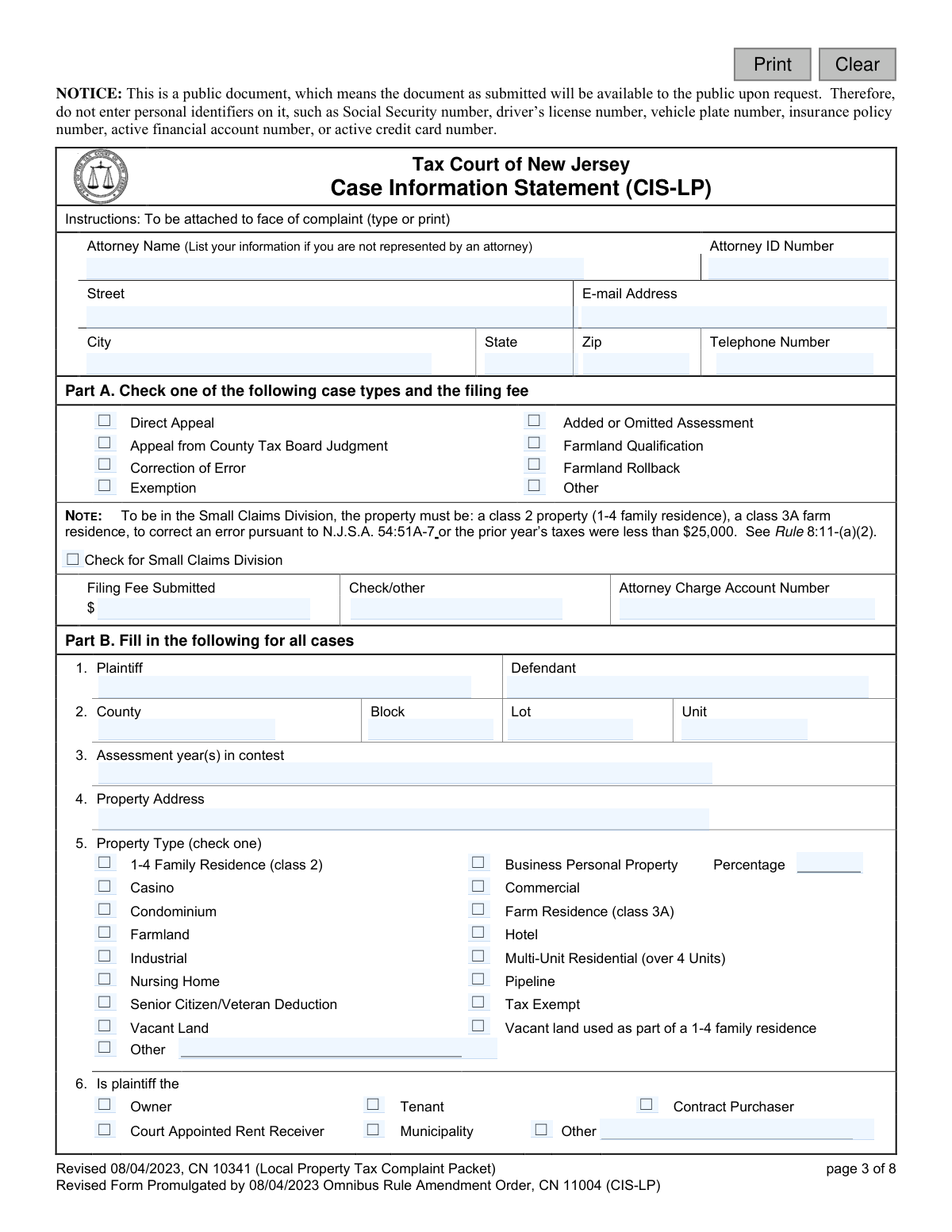
This packet contains all the necessary forms for a New Jersey taxpayer to file a complaint with the Tax Court regarding their local property tax assessment. It includes the Civil Action Complaint, the Local Property Tax Case Information Statement (CIS-LP), and a Proof of Service form. Filing this complaint is a crucial step in formally challenging an assessment that the taxpayer believes is incorrect or unfair. Today, this form can be filled out quickly and accurately using AI-powered services like Instafill.ai, which can also convert non-fillable PDF versions into interactive fillable forms.
Fillable fields143
Pages8
Form Complexity IndexModerate, 55/100

Let AI fill out your CN 10341

No typing. Every field filled in seconds, checked, ready to sign.

7 days free, then $19.99/month · Cancel anytime

How to Fill Out CN 10341 Online for Free in 2026

What the AI walks you through.

  1. Navigate to Instafill.ai and upload the Local Property Tax Complaint Packet or select it from their template library.
  2. Use the AI assistant to automatically populate your personal details, attorney information (if applicable), and property identifiers like County, Block, and Lot on the Case Information Statement (CIS-LP).
  3. Enter the assessment details you are contesting. The AI will correctly place the land, improvement, and total assessment values from the original assessment and the County Tax Board judgment into the appropriate fields.
  4. Complete the main 'Taxpayer Complaint' form by stating the grounds for your appeal. The AI can help ensure all required sections are filled.
  5. Fill out the 'Proof of Service' form, certifying that you have sent copies of the complaint to the municipal clerk, assessor, and the county board of taxation.
  6. Carefully review all the information auto-filled by the AI across all documents in the packet, make any necessary edits, and then e-sign where required.
  7. Download the completed packet, print it, attach the correct filing fee and any other required documents (like the County Board of Taxation Judgment), and mail it to the Tax Court Management Office.

Common Mistakes in Completing CN 10341

The ones the AI is built to catch.

Naming the Incorrect Defendant
Filers often mistakenly name the County Board of Taxation or the Municipal Assessor as the defendant. The instructions explicitly state that for a taxpayer-filed complaint, the proper defendant is the municipality itself. This error can lead to motions to dismiss and significant delays, requiring the filer to amend their complaint and re-serve the correct party.
Submitting an Incomplete Application Packet
The cover letter lists several required documents, including the complaint form, Case Information Statement (CIS), a copy of the County Board of Taxation Judgment, and Proof of Service. Overlooking even one of these documents will cause the Tax Court Management Office to halt processing of the complaint. To avoid this, use the list on the first page as a final checklist before mailing your packet.
Calculating or Submitting the Incorrect Filing Fee
The form states a filing fee is required but does not specify the amount, directing filers to look up Tax Court Rule 8:12. Many people either guess the fee, forget to include it, or make the check payable to the wrong entity. An incorrect or missing fee is a common reason for rejection, and the complaint will not be docketed until the correct payment is received, potentially jeopardizing filing deadlines.
Missing the Strict Filing Deadline
The form outlines several time-sensitive deadlines, such as filing within 45 days of a County Board judgment or by April 1 for certain direct appeals. These deadlines are jurisdictional, meaning if you miss them, your right to appeal is permanently lost. This mistake often happens due to procrastination or miscalculation of the final date, resulting in an automatic dismissal of the case.
Failing to Redact Confidential Personal Identifiers
Despite clear warnings, filers often forget to remove or redact personal information like Social Security numbers, driver's license numbers, or bank account numbers from their submitted documents. This makes sensitive data part of a public record, accessible to anyone upon request, and increases the risk of identity theft. It is crucial to review every page for confidential data before filing.
Incorrect or Incomplete Property Identification
Simple data entry errors when filling in the property's Block, Lot, and Unit numbers are frequent. Transposing digits or omitting a number can lead to the complaint being filed for the wrong property or being rejected as unidentifiable. This causes significant confusion and delays, and can be avoided by carefully cross-referencing the information with your official tax bill or assessment notice. AI-powered tools like Instafill.ai can help validate such data formats to prevent errors.
Improperly Bundling Multiple Properties
A filer owning several properties may attempt to contest all assessments on a single complaint to save time and money. However, the rules require a separate complaint and CIS for each individually assessed parcel unless they are contiguous and under common ownership. This mistake will result in the court rejecting the improperly bundled properties, forcing the filer to submit new, separate complaints for each.
Forgetting to Sign Required Forms
The complaint packet has multiple mandatory signature lines on the Complaint form, the CIS certification, and the Proof of Service. An unsigned document is legally invalid and will be rejected by the court. This common oversight can cause critical delays, potentially making you miss a filing deadline upon resubmission. Always do a final review of every page specifically to check for signatures.
Incomplete or Missing Proof of Service
The rules require serving the complaint on three separate parties: the municipal Clerk, the Assessor, and the County Board of Taxation. Filers often forget one of the three or fail to complete and submit the Proof of Service form to the Tax Court. Failure to properly serve all parties and provide proof can lead to the dismissal of the case for procedural defects.
Submitting an Illegible or Incomplete Handwritten Form
Since the provided form is a non-fillable PDF, many people fill it out by hand, leading to illegible writing, missed fields, or calculation errors in the assessment tables. A form that court staff cannot read or that is missing information will be returned as deficient. To prevent this, it is best to type the information or write very clearly; advanced tools like Instafill.ai can convert such flat PDFs into interactive, fillable forms to ensure clarity and completeness.
Failing to Attach the CIS to the Face of the Complaint
The instructions specify that the Local Property Tax Case Information Statement (CIS-LP) must be attached to the face of the complaint. Filers sometimes submit the documents loose in an envelope, assuming the court staff will assemble them. This can lead to processing errors or a determination that the filing is incomplete, causing delays while the court requests a corrected submission.

Frequently Asked Questions About CN 10341


Is it really free for 7 days?
Yes. You pay $0 today. Cancel before Nov 5 and you are never charged. Keep it, and it is $19.99 a month for 5 fills of your CN 10341.
Can I fill other forms too?
This plan is for your CN 10341: your own AI agent fills it as often as 5 times a month. To fill other forms and upload your own, choose a Professional plan from your account.
How do I cancel?
From your account, in two clicks, any time. No email, no call.
How does the AI fill out CN 10341?
You answer a few questions in plain words, or upload a document you already have. The AI reads what you give it and puts each answer into the right field of CN 10341, on every page, in seconds. It checks the answers against the form's own rules, and you review and change anything before you download, print or sign.
What happens to my information?
It is encrypted in transit and at rest, and it is never used to train AI.
How complex is CN 10341 to fill out?
CN 10341 has a Form Complexity Index of 55 out of 100, in the moderate tier: 143 fillable fields across 8 pages. Instafill.ai's AI fills it in under a minute, with every field there for you to review before you download.
What is the purpose of the Local Property Tax Complaint Packet?
This packet is for taxpayers who wish to appeal their local property tax assessment to the New Jersey Tax Court. It is used when you disagree with a decision from the County Board of Taxation or, in some high-value cases, to file a direct appeal.
Who needs to file a Local Property Tax Complaint?
Any property owner, or a tenant with the owner's authorization, who believes their property assessment is incorrect and wishes to challenge it in the Tax Court should file this complaint. This is typically the next step after receiving an unsatisfactory judgment from the County Board of Taxation.
What documents must I include with my complaint filing?
You must include the completed Civil Action Complaint Form, a Case Information Statement (CIS-LP), Proof of Service, a copy of the County Board of Taxation Judgment, and the correct filing fee. Your complaint will not be processed until all required items are submitted correctly.
Who should I list as the defendant on the complaint form?
The proper defendant is the municipality where the property is located. You should not name the County Board of Taxation or the municipal assessor as the defendant.
How do I file a complaint for multiple properties?
A separate complaint must generally be filed for each tax year for each separately assessed property. If properties are contiguous and under common ownership, you must attach a separate Case Information Statement and county board judgment for each one.
What is the 'Proof of Service' form for?
The Proof of Service form is your certification that you have delivered a copy of your complaint to the municipal Assessor, the municipal Clerk, and the County Board of Taxation. This completed form is sent only to the Tax Court Management Office with your filing.
What happens after I submit my complaint packet?
After your complaint is docketed, the court will send you a Case Management Notice. This notice will contain your case docket number, important deadlines, the anticipated trial month, and contact information for your case manager.
Can I file my appeal directly with the Tax Court?
Yes, you may file a direct appeal with the Tax Court if the property assessment exceeds $1,000,000, or if it is an added or omitted assessment exceeding $750,000. Deadlines for direct appeals are typically April 1 or May 1 of the tax year, depending on the circumstances.
What should I do if I want to withdraw my complaint?
If you decide not to proceed with your appeal, you must complete the 'Withdrawal of Complaint' form found in the packet. Mail the signed form to the Tax Court Management Office and send a copy to your adversary.
Do I need to remove any personal information before filing?
Yes, you are required to redact (remove) confidential personal identifiers like Social Security numbers, driver's license numbers, and financial account numbers from all documents before filing. Court staff will not do this for you.
Is there a fee to file this complaint?
Yes, you must include the correct filing fee with your complaint, payable to the 'Treasurer, State of New Jersey'. The complaint will not be processed until the correct fee is received.
Can I use an AI tool to help me fill out these forms?
Yes, services like Instafill.ai use AI to accurately auto-fill form fields, which can save you time and help prevent errors. This is especially helpful for entering your information across the multiple documents in this packet.
How can I fill out this form packet online?
You can use a service like Instafill.ai to complete the Local Property Tax Complaint Packet online. Simply upload the PDF, and the platform will provide an interactive version where you can type your information directly into the fields.
The PDF form I have is not fillable on my computer. What can I do?
If you have a non-fillable or 'flat' PDF, you can upload it to a platform like Instafill.ai. The service can convert the static document into an interactive, fillable form that you can easily complete online, save, and print.
Encrypted in transit and at restNever used to train AIDelete your forms any time

Get your CN 10341 filled out by AI

$0 today. Cancel before Nov 5 and you pay nothing.

Other forms like this one

property tax forms: Form TC201, Income and Expense Schedule for Rent Producing Properties, Stipulation of Settlement (Local Property Tax), Tax Court of New Jersey, Taxpayer Complaint (Local Property Tax), Taxing District Complaint (Local Property Tax), Stipulation of Settlement With Exemption (Local Property Tax)

New Jersey forms: State of New Jersey Alternate Benefit Program Withdrawal Request Acknowledgement Receipt, Horizon Blue Cross Blue Shield of New Jersey Applied Behavior Analysis Supplemental Information Form, State of New Jersey Application for Employment (Form DPF-663), New Jersey Judiciary Plea Form (Plea 01), Supplemental Plea Form for Certain Sexual Offenses: Megan’s Law/Parole Supervision for Life/Community Supervision for Life (Plea 05), Financial Questionnaire to Establish Indigency, New Jersey Judiciary Resource Family Information Form, Foreclosure Case Information Statement (FCIS) - Appendix XII-B2, New Jersey Judiciary Records Request Form, Superior Court of New Jersey, Application for Appeal and Order, FL Certification of Requested Background Checks for Kinship Legal Guardianship, Certification of Caregiver as to Knowledge of Identity and/or Location of Parents, FL Order Judgment for Kinship Legal Guardianship, New Jersey Judiciary Certification of Repair and Plea of Guilty, Uniform Summary Support Order (USSO), New Jersey Judiciary Volunteer Application (CN 10293), Application to Take the New Jersey Court Interpreter Oral Examination, New Jersey Judiciary Attorney Fee Arbitration Request, Order to Show Cause with Temporary Restraints Pursuant to Rule 4:52, Tax Court of New Jersey, State Tax Complaint

7 days free, then $19.99/month · Cancel anytime