Yes! You can use AI to fill out Tax Court of New Jersey, Taxpayer Complaint (Local Property Tax)
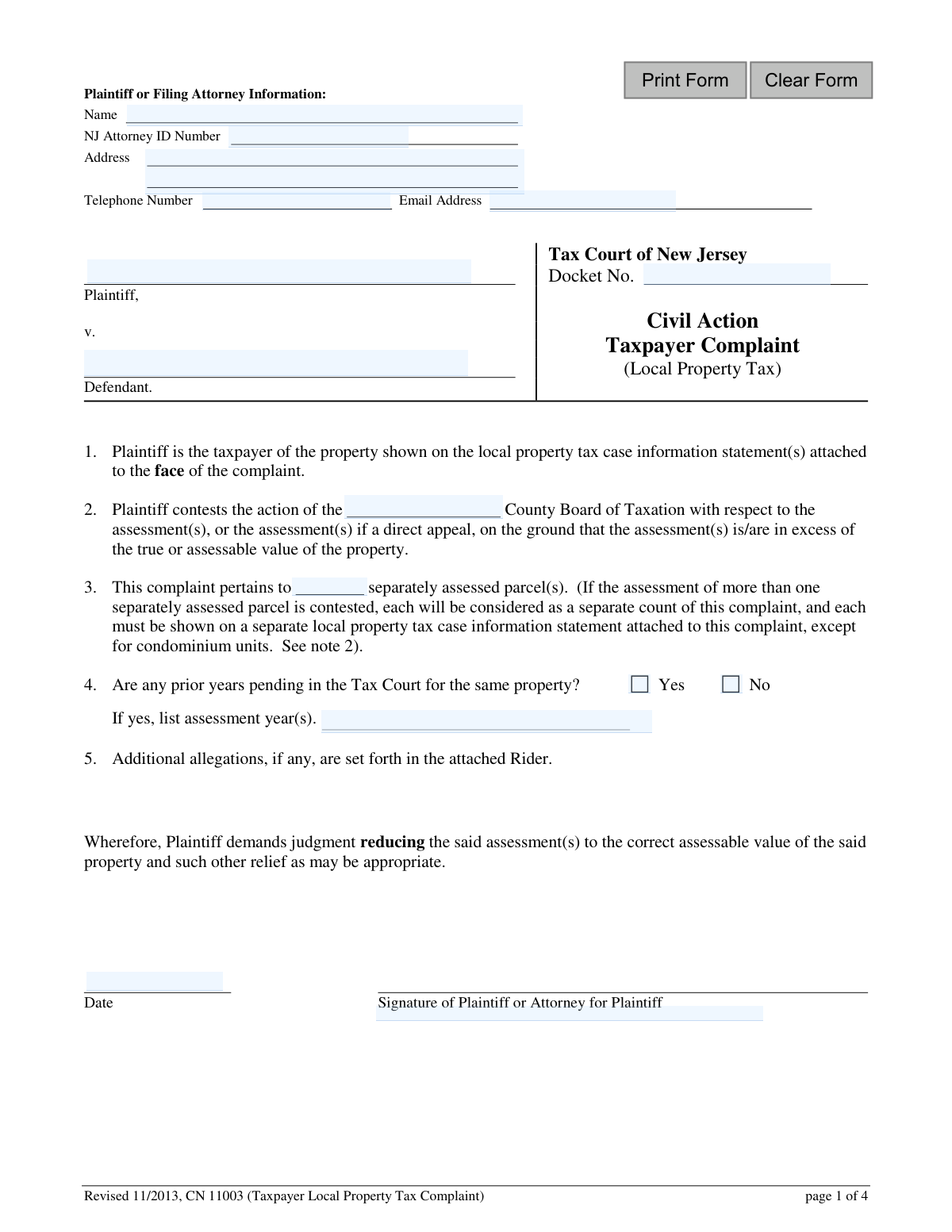
The Taxpayer Complaint (Local Property Tax) form, also known as CN 11003, is a legal document used in New Jersey to formally appeal a local property tax assessment to the Tax Court. It is essential for property owners who believe their assessment is excessive and wish to seek a reduction. Today, this form can be filled out quickly and accurately using AI-powered services like Instafill.ai, which can also convert non-fillable PDF versions into interactive fillable forms.
Our AI automatically handles information lookup, data retrieval, formatting, and form filling.
It takes less than a minute to fill out CN 11003 using our AI form filling.
Securely upload your data. Information is encrypted in transit and deleted immediately after the form is filled out.
Form specifications
| Form name: | Tax Court of New Jersey, Taxpayer Complaint (Local Property Tax) |
| Number of fields: | 25 |
| Number of pages: | 1 |
| Language: | English |
Instafill Demo: How to fill out PDF forms in seconds with AI
How to Fill Out CN 11003 Online for Free in 2026
Are you looking to fill out a CN 11003 form online quickly and accurately? Instafill.ai offers the #1 AI-powered PDF filling software of 2026, allowing you to complete your CN 11003 form in just 37 seconds or less.
Follow these steps to fill out your CN 11003 form online using Instafill.ai:
- 1 Navigate to Instafill.ai and upload or select the New Jersey Taxpayer Complaint (Local Property Tax) form.
- 2 Enter the plaintiff's information, including name, address, and attorney details if represented.
- 3 Identify the defendant municipality and the County Board of Taxation whose action is being contested.
- 4 Provide details about the property, including the number of parcels and whether prior year appeals are pending.
- 5 Complete the Proof of Service section, certifying that copies have been sent to the municipal clerk, assessor, and county tax board administrator.
- 6 Attach all required supporting documents, such as the Local Property Tax Case Information Statement (CIS-LP) and the County Board of Taxation judgment.
- 7 Review all information for accuracy, digitally sign and date the complaint, and submit it to the Tax Court with the appropriate filing fee.
Our AI-powered system ensures each field is filled out correctly, reducing errors and saving you time.
Why Choose Instafill.ai for Your Fillable CN 11003 Form?
Speed
Complete your CN 11003 in as little as 37 seconds.
Up-to-Date
Always use the latest 2026 CN 11003 form version.
Cost-effective
No need to hire expensive lawyers.
Accuracy
Our AI performs 10 compliance checks to ensure your form is error-free.
Security
Your personal information is protected with bank-level encryption.
Frequently Asked Questions About Form CN 11003
This form is used to file a formal complaint with the Tax Court of New Jersey if you believe your local property tax assessment is higher than the true value of your property. It is used to appeal a decision from your County Board of Taxation or, in some cases, to appeal directly to the Tax Court.
Any property owner or authorized tenant who disagrees with their property tax assessment and wishes to appeal the decision of their County Board of Taxation can file this form. You can also file directly with the Tax Court if your assessment value meets certain high-dollar thresholds.
The proper defendant for a local property tax complaint is the municipality where the property is located. You should not name the County Board of Taxation or the municipal assessor as the defendant.
You must include the completed complaint form, a Local Property Tax Case Information Statement (CIS-LP), a copy of the County Board of Taxation judgment, and the correct filing fee. You also need to complete the Proof of Service section certifying you've sent copies to the required parties.
The Proof of Service is your certification that you have sent a copy of your complaint to the required officials. You must serve a copy on the municipal clerk, the municipal assessor, and the administrator of the County Board of Taxation.
If you are appealing a County Board of Taxation judgment, your complaint must be received by the Tax Court within 45 days of the judgment. For direct appeals of assessments over $1,000,000, the deadline is typically April 1 of the tax year.
You can list multiple parcels on one complaint, but you must attach a separate Local Property Tax Case Information Statement (CIS-LP) for each separately assessed property. The only exception is for multiple condominium units, which can be listed on a single schedule.
Yes, a tenant can file a complaint, but you must state whether you have the owner's authorization to do so. You are also required to serve a copy of the complaint on the property owner.
Yes, there is a required filing fee payable to the 'Treasurer, State of New Jersey.' Your complaint will not be processed or docketed until the correct fee is received by the Tax Court Management Office.
Once your complaint is docketed, the Tax Court will send you a Case Management Notice. This notice will include your docket number, important deadlines for your case, and the contact information for your assigned case manager.
Yes, services like Instafill.ai use AI to help you accurately auto-fill form fields, which can save time and reduce errors. This is especially helpful for repetitive information across multiple documents.
You can use a service like Instafill.ai to upload the form and fill it out electronically. Their platform allows you to easily type your information into the fields and then download the completed document for printing and submission.
If you have a non-fillable or 'flat' PDF, you can use a tool like Instafill.ai to convert it into an interactive, fillable form. This allows you to type your answers directly onto the form instead of printing and filling it out by hand.
You may file a direct appeal with the Tax Court if your property assessment exceeds $1,000,000, or if it is an added or omitted assessment exceeding $750,000. The deadline for direct appeals is typically April 1, or May 1 in districts with a recent revaluation.
Yes, you are required to redact (remove) confidential personal identifiers such as Social Security numbers, driver's license numbers, and active financial account numbers from all documents before filing. It is your responsibility to ensure this information is removed.
Compliance CN 11003
Validation Checks by Instafill.ai
1
Plaintiff/Attorney Name Completeness
This check ensures that the 'Name' field under 'Plaintiff or Filing Attorney Information' is not left blank. A name is required to identify the filing party for all official correspondence and legal proceedings. If this field is empty, the form submission will be rejected, and the user will be prompted to provide the full name of the plaintiff or their attorney.
2
NJ Attorney ID Number Format
Validates that the 'NJ Attorney ID Number' field, if filled, contains a valid identification number format. This is crucial for verifying the credentials of the filing attorney with the New Jersey State Bar. An invalid format could indicate a typo or an unauthorized filer, leading to a rejection of the complaint until a valid ID is provided.
3
Valid Defendant Name
This check verifies that the 'Defendant' field contains the name of the municipality, as instructed in the form's notes. It specifically flags entries that incorrectly list the 'county board of taxation' or the 'municipal assessor'. This is important for legal correctness, as the municipality is the proper defendant in these cases, and failure to name it correctly can lead to dismissal of the complaint.
4
County Name Validation
Ensures the county name provided in section 2 ('action of the ... County Board of Taxation') is a valid New Jersey county. This check prevents spelling errors and ensures the complaint is directed to the correct jurisdiction. An invalid county name would cause processing delays and potential misfiling, so the submission is blocked until a valid county is selected or entered.
5
Parcel Count Integrity
This validation ensures that the number entered for 'separately assessed parcel(s)' is a positive integer (1 or greater). The number of parcels is a critical piece of data that determines filing requirements and fees. The system will reject non-numeric or zero values to ensure the complaint accurately reflects the scope of the appeal.
6
Conditional Requirement for Prior Years
This check enforces a logical rule: if the 'Yes' option is selected for 'Are any prior years pending in the Tax Court for the same property?', then the 'list assessment year(s)' field becomes mandatory. This ensures that the court is provided with all necessary information about related pending litigation. If 'Yes' is checked and the years are not provided, the user will be prompted to enter the relevant assessment years before proceeding.
7
Prior Assessment Years Format
Validates that the entry in the 'assessment year(s)' field consists of valid four-digit years (e.g., 2022, 2023). This prevents ambiguous or incorrectly formatted data entry, ensuring clarity for court records. The system would flag any non-year entries or incorrect formats, requiring the user to correct them.
8
Signature Date Validity
This check ensures that the 'Date' field next to the plaintiff's or attorney's signature is a valid date and is not a future date. The signature date legally marks when the complaint was affirmed by the filer. A missing, invalid, or future date would invalidate the document, so the submission is blocked until a valid, current or past date is entered.
9
Proof of Service Date Logic
Verifies that the three service dates listed in the 'Proof of Service' section are valid dates and are on or before the final signature date at the bottom of that section. This confirms that the certification of service was signed after the service was completed. A logical inconsistency, such as a service date after the signature date, would render the proof of service invalid and require correction.
10
Proof of Service County Consistency
This validation cross-references the county name entered in the 'Proof of Service' section with the county name entered in section 2 of the main complaint. The names must match to ensure the complaint was served to the correct county board of taxation. A mismatch indicates a critical error that could invalidate the service, so the submission is halted until the county names are consistent.
11
Attachment Check: Case Information Statement
Verifies that at least one 'Local Property Tax Case Information Statement' (CIS-LP) is attached to the submission. The form explicitly states this document must be attached to the face of the complaint. If the parcel count is greater than one, this check may also prompt the user to confirm that a separate CIS-LP is attached for each parcel, as required.
12
Attachment Check: Judgment or Assessment Notice
This check ensures the correct supporting financial document is attached. It verifies that either a 'Copy of the County Board of Taxation Judgment' is attached for an appeal, or a 'Notice of Assessment card or tax bill' is attached for a direct appeal. Missing this required documentation is a common reason for rejection, so this check prevents incomplete filings.
13
Confidential Information Redaction Check
This validation scans the submitted form data for patterns that match confidential personal identifiers as defined by Rule 1:38-7(a), such as Social Security or driver's license numbers. While not foolproof, it serves as a safeguard to remind the filer of their responsibility to redact such information. If a potential identifier is found, the system will display a prominent warning, asking the user to confirm the information is required or to remove it before final submission.
14
Email Address Format Validation
This check ensures that the value entered in the 'Email Address' field follows the standard format for an email address (e.g., '[email protected]'). A valid email is essential for the court to send case management notices and other electronic communications. An invalid format would prevent communication, so the system requires a correctly formatted email address before submission.
Common Mistakes in Completing CN 11003
Filers frequently name the County Board of Taxation or the municipal assessor as the defendant in the 'v. Defendant' line. The form's instructions explicitly state the proper defendant is the municipality itself. This error can lead to procedural delays or a motion to dismiss, requiring the filer to amend their complaint and re-serve the correct party.
This complaint requires several key attachments, including the Local Property Tax Case Information Statement (CIS-LP) and a copy of the County Board of Taxation Judgment. Forgetting to include these documents is a very common oversight that will result in an incomplete filing and significant processing delays. Use the checklist on page 4 to ensure every required document is attached before submission.
The Proof of Service section must certify that the complaint was sent to three distinct parties: the municipal Clerk, the Assessor, and the County Board of Taxation Administrator. Filers often forget to serve one of the parties, fail to fill in the dates of service, or neglect to sign the certification. An invalid Proof of Service can jeopardize the entire case, as it fails to meet the court's mandatory notification requirements.
The form states that a complaint will not be processed until the correct filing fee is submitted. Filers may miscalculate the fee based on the property's assessed value, forget to include the check, or make it payable to the wrong entity. This mistake halts the filing process immediately, potentially causing the filer to miss crucial deadlines.
Court rules require filers to redact sensitive information like Social Security numbers, driver's license numbers, and active financial account numbers from all documents. People often overlook this step, which violates Rule 1:38-7 and creates a significant privacy risk. Before filing, meticulously review all documents and black out any confidential identifiers to ensure compliance and protect personal data.
The form has specific rules for complaints involving multiple properties, especially condominiums. A common error is filing a separate complaint for each condominium unit instead of a single complaint with an attached schedule, as required. This creates unnecessary paperwork, may result in incorrect filing fees, and can lead to administrative rejection of the filings.
Tax appeals are subject to non-negotiable deadlines, such as within 45 days of the County Board's action or by April 1 for direct appeals. Missing a deadline is a fatal flaw that typically results in the case being dismissed without any consideration of its merits. Filers must be acutely aware of the specific deadline that applies to their situation and ensure the Tax Court *receives* the complaint by that date.
An unsigned complaint is not legally valid. It's a simple but surprisingly common mistake for filers to forget to sign and date the main complaint form or the Proof of Service certification. This oversight will cause the court to reject the filing, leading to delays that could cause you to miss the filing deadline upon resubmission.
The 'Docket No.' field is reserved for the court to assign a number after the complaint is successfully filed. Some filers mistakenly try to invent a number, write 'N/A,' or copy a number from a previous year's filing, which can cause confusion. This field should be left blank by the plaintiff; filling it can slow down the intake process as court staff must correct it.
Beyond forgetting to serve all parties, filers often make smaller errors on the Proof of Service form itself. These include forgetting to write in the name of the taxing district, failing to enter the specific date of service for each party, or not striking out the method of service that was not used ('personally OR by ordinary mail'). These small omissions can render the proof invalid and must be completed with precision.
The provided form is a flat, non-fillable PDF, which forces users to print it and fill it out by hand. This often leads to illegible handwriting, mistakes, and information written in the wrong place, which can cause the filing to be misinterpreted or rejected. Using a tool like Instafill.ai can convert the form into a digitally fillable version, ensuring all entries are clean, legible, and correctly placed, which prevents these common manual entry errors.
Saved over 80 hours a year
“I was never sure if my IRS forms like W-9 were filled correctly. Now, I can complete the forms accurately without any external help.”
Kevin Martin Green
Your data stays secure with advanced protection from Instafill and our subprocessors

Robust compliance program
Transparent business model
You’re not the product. You always know where your data is and what it is processed for.
ISO 27001, HIPAA, and GDPR
Our subprocesses adhere to multiple compliance standards, including but not limited to ISO 27001, HIPAA, and GDPR.
Security & privacy by design
We consider security and privacy from the initial design phase of any new service or functionality. It’s not an afterthought, it’s built-in, including support for two-factor authentication (2FA) to further protect your account.
Fill out CN 11003 with Instafill.ai
Worried about filling PDFs wrong? Instafill securely fills tax-court-of-new-jersey-taxpayer-complaint-local-property-tax forms, ensuring each field is accurate.