Yes! You can use AI to fill out Stipulation of Settlement With Exemption (Local Property Tax)
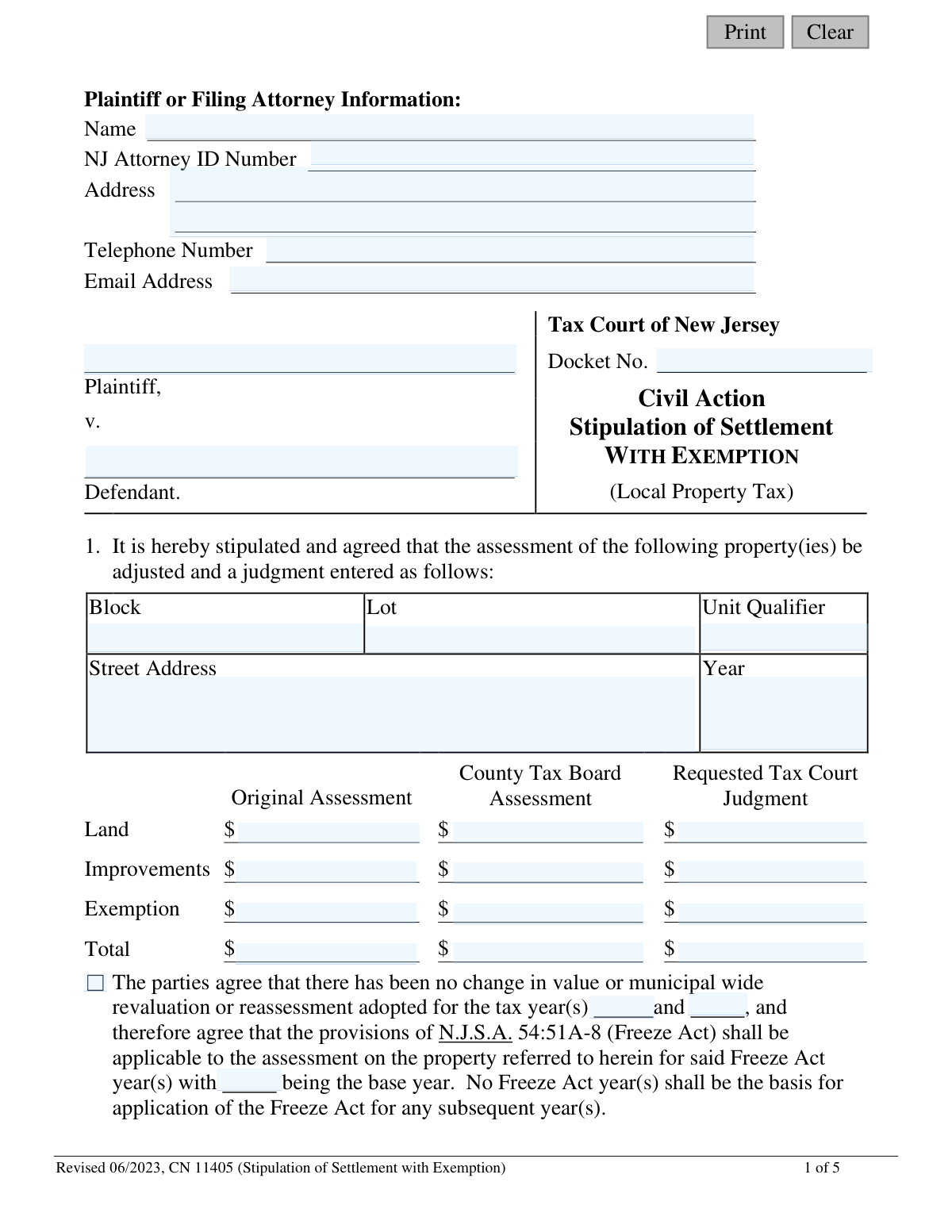
This form, officially known as the Stipulation of Settlement With Exemption, is a legal document filed in the Tax Court of New Jersey to resolve a local property tax appeal. It serves as a formal agreement between the plaintiff (property owner) and the defendant (taxing district) on a new, adjusted property assessment value, which may include specific exemptions. By signing, both parties represent to the court that the settlement results in a fair assessment. Today, this form can be filled out quickly and accurately using AI-powered services like Instafill.ai, which can also convert non-fillable PDF versions into interactive fillable forms.
CN 11405 is part of the
New Jersey forms, property tax forms and tax exemption forms categories on Instafill.
Our AI automatically handles information lookup, data retrieval, formatting, and form filling.
It takes less than a minute to fill out CN 11405 using our AI form filling.
Securely upload your data. Information is encrypted in transit and deleted immediately after the form is filled out.
Form specifications
| Form name: | Stipulation of Settlement With Exemption (Local Property Tax) |
| Number of fields: | 88 |
| Number of pages: | 1 |
| Language: | English |
Instafill Demo: How to fill out PDF forms in seconds with AI
How to Fill Out CN 11405 Online for Free in 2026
Are you looking to fill out a CN 11405 form online quickly and accurately? Instafill.ai offers the #1 AI-powered PDF filling software of 2026, allowing you to complete your CN 11405 form in just 37 seconds or less.
Follow these steps to fill out your CN 11405 form online using Instafill.ai:
- 1 Navigate to Instafill.ai and upload or select the 'Stipulation of Settlement With Exemption' form.
- 2 Use the AI assistant to populate the Plaintiff or Filing Attorney Information section, including name, NJ Attorney ID, address, and contact details.
- 3 Enter the Tax Court Docket Number and the names of the Plaintiff and Defendant for the civil action.
- 4 Input the specific property details such as Block, Lot, Unit, and Street Address, along with the Original Assessment, County Tax Board Assessment, and the final Requested Tax Court Judgment for land, improvements, and exemption.
- 5 Indicate whether the Freeze Act (N.J.S.A. 54:51A-8) applies to the settlement and, if so, specify the applicable years.
- 6 Carefully review all entered information for accuracy, then have the plaintiff (or their attorney) and the defendant's attorney sign and date the stipulation in the designated fields.
- 7 Download, save, or print the completed form for official filing with the Tax Court of New Jersey.
Our AI-powered system ensures each field is filled out correctly, reducing errors and saving you time.
Why Choose Instafill.ai for Your Fillable CN 11405 Form?
Speed
Complete your CN 11405 in as little as 37 seconds.
Up-to-Date
Always use the latest 2026 CN 11405 form version.
Cost-effective
No need to hire expensive lawyers.
Accuracy
Our AI performs 10 compliance checks to ensure your form is error-free.
Security
Your personal information is protected with bank-level encryption.
Frequently Asked Questions About Form CN 11405
This form is a legal document used to finalize an agreement between a property owner (plaintiff) and a municipality (defendant) to settle a property tax appeal in the Tax Court of New Jersey, specifically for cases involving a property tax exemption.
The form is typically completed by the attorneys for both the plaintiff (property owner) and the defendant (taxing district). Both parties must sign to certify their agreement to the settlement terms before it is submitted to the court.
You must provide the property's Block, Lot, Unit, and address, along with three sets of values: the 'Original Assessment' from the municipality, the 'County Tax Board Assessment' if applicable, and the new 'Requested Tax Court Judgment' which is the settlement amount.
The Freeze Act (N.J.S.A. 54:51A-8) allows the new settlement assessment to be locked in for two additional tax years. You and the defendant's attorney must agree on whether it applies and check the corresponding box on the form.
The form includes an 'Additional Properties Schedule' on pages 3 and 4. Use these sections to list the assessment details for each additional property covered by the settlement agreement.
Once completed and signed by both parties, the Stipulation of Settlement must be filed with the Tax Court of New Jersey. It will be added to the case file under the specified docket number to formalize the judgment.
The 'Exemption' line refers to the dollar amount of any property tax exemption that reduces the property's total assessed value. This form is specifically designed for settlements where an exemption is part of the valuation.
No, the assessor does not sign the form directly. However, the form requires the defendant's attorney to certify that they have consulted with the assessor and that the assessor concurs with the settlement.
Yes, services like Instafill.ai use AI to help you accurately auto-fill form fields from your saved data. This can save significant time and help prevent errors, especially when dealing with multiple properties.
To fill this form online, you can upload the PDF to Instafill.ai. The platform's AI will make the form interactive, allowing you to easily enter, edit, and save your information directly into the fields.
If you have a flat or non-fillable PDF, you can use a tool like Instafill.ai. It can convert the document into a smart, fillable form online, making it easy to complete without needing to print and write by hand.
The Plaintiff is the party who filed the appeal, typically the property owner. The Defendant is the other party in the lawsuit, which in a local property tax case is the taxing district (the municipality).
The signatures from the plaintiff's and defendant's attorneys represent a formal agreement to the settlement terms. By signing, they are representing to the court that the settlement is fair and based on a proper examination of the property's value.
Compliance CN 11405
Validation Checks by Instafill.ai
Common Mistakes in Completing CN 11405
Users often make typos or reference the wrong case file when entering the Tax Court Docket Number. An incorrect docket number will cause the stipulation to be misfiled or rejected by the court clerk, significantly delaying the settlement process. To avoid this, always double-check the number against official court documents before submission and ensure it is entered in the correct format.
Mistakes in the Block, Lot, Unit, or Qualifier fields are common, often due to transposing numbers or using outdated tax records. An error in these property identifiers can lead to the judgment being applied to the wrong property or being deemed legally invalid. Always verify these details against the current municipal tax map and the original complaint to ensure accuracy.
The 'Total' assessment must equal the sum of 'Land', 'Improvements', and 'Exemption' for each column. People frequently make manual calculation errors or forget to include the exemption amount, leading to mathematical inconsistencies on the form. A submission with incorrect totals will be rejected by the court, requiring correction and refiling. Using a calculator for each column or an AI-powered tool like Instafill.ai, which can perform automatic calculations, helps prevent these errors.
Filers can easily confuse the 'Original Assessment', 'County Tax Board Assessment', and 'Requested Tax Court Judgment' columns, entering values in the wrong place. This mistake fundamentally misrepresents the settlement terms and will result in an incorrect judgment or an outright rejection of the stipulation. To prevent this, carefully read each column header and confirm that the correct assessment value is entered in its corresponding field.
The Freeze Act (N.J.S.A. 54:51A-8) section is a common point of confusion. Filers may check the wrong box ('shall apply' vs. 'shall not apply') or check the 'applicable' box but forget to specify the base year and the subsequent Freeze Act years. This creates legal ambiguity and can lead to future disputes over the assessment for subsequent years. The parties must clearly agree on the Freeze Act's application and meticulously fill in all required years if it is to be applied.
As this is a 'Stipulation of Settlement With Exemption' form, the exemption amount is a critical piece of data. Users may forget to enter the exemption value, enter it in the wrong column (e.g., under 'Original Assessment' instead of 'Requested Judgment'), or fail to include it in the 'Total' calculation. This omission results in an incorrect total assessment and an inaccurate court judgment, potentially negating the intended tax benefit.
The form requires the filing attorney's name, NJ Attorney ID, address, and contact details. Omitting any of this information, especially the unique NJ Attorney ID number, can prevent the court from processing the document or contacting the filer for necessary clarifications. This oversight leads to administrative delays and requires refiling. Ensure all contact fields are filled out completely and accurately.
When a settlement covers multiple properties, filers sometimes try to cram all information onto the first page or submit separate, unlinked forms instead of using the provided schedule. This creates a confusing and non-compliant submission that is likely to be rejected. If the settlement involves more than one property, each one must be listed separately and clearly on the 'Additional Properties Schedule' on pages 3 and 4.
A stipulation is a legal agreement that is invalid without the signatures of authorized representatives for both the plaintiff and defendant, along with the date of signing. Forgetting to sign or date the document is a frequent and critical oversight that will cause immediate rejection by the court. Before filing, perform a final review to ensure all signature and date lines are properly completed by the correct parties.
Government forms are periodically updated, as indicated by the 'Revised 06/2023' mark on this document. Submitting an older version of the form can lead to rejection because it may lack required fields or contain outdated legal language. Always ensure you are using the most current version available from the NJ Courts website. If you only have a flat PDF, a tool like Instafill.ai can convert it into a fillable version while helping to ensure the data entered is compliant.
Saved over 80 hours a year
“I was never sure if my IRS forms like W-9 were filled correctly. Now, I can complete the forms accurately without any external help.”
Kevin Martin Green
Your data stays secure with advanced protection from Instafill and our subprocessors

Robust compliance program
Transparent business model
You’re not the product. You always know where your data is and what it is processed for.
ISO 27001, HIPAA, and GDPR
Our subprocesses adhere to multiple compliance standards, including but not limited to ISO 27001, HIPAA, and GDPR.
Security & privacy by design
We consider security and privacy from the initial design phase of any new service or functionality. It’s not an afterthought, it’s built-in, including support for two-factor authentication (2FA) to further protect your account.
Fill out CN 11405 with Instafill.ai
Worried about filling PDFs wrong? Instafill securely fills stipulation-of-settlement-with-exemption-local-property-tax forms, ensuring each field is accurate.