Yes! You can use AI to fill out Stipulation of Settlement (Local Property Tax)

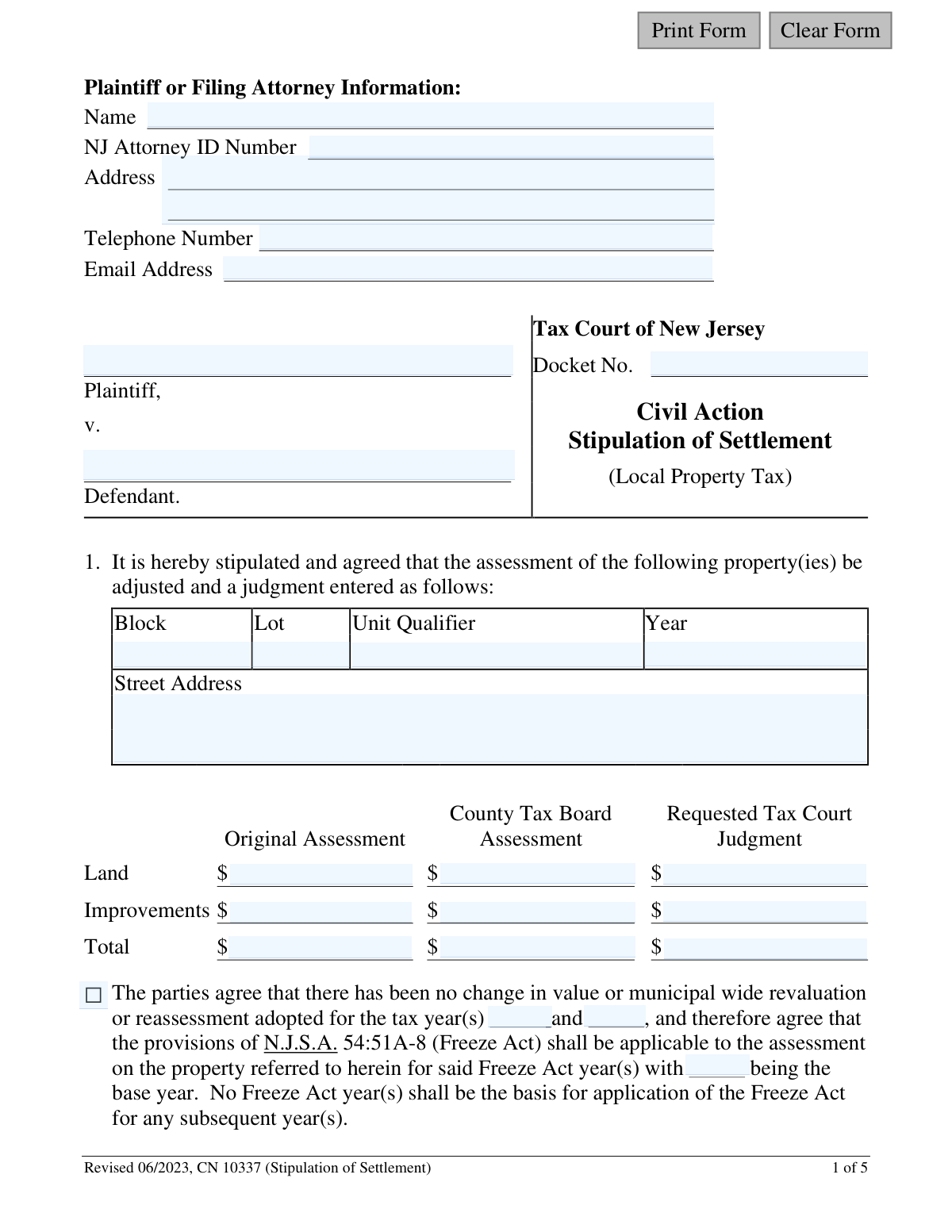
This form is a legal document filed with the Tax Court of New Jersey to record a settlement between a taxpayer (plaintiff) and a taxing district (defendant) in a local property tax appeal. It outlines the agreed-upon adjustments to the property's assessment, thereby avoiding a full court trial. Today, this form can be filled out quickly and accurately using AI-powered services like Instafill.ai, which can also convert non-fillable PDF versions into interactive fillable forms.
CN 10337 is part of the New Jersey forms and property tax forms categories on Instafill.
Our AI automatically handles information lookup, data retrieval, formatting, and form filling.
It takes less than a minute to fill out CN 10337 using our AI form filling.
Securely upload your data. Information is encrypted in transit and deleted immediately after the form is filled out.

Form specifications

Form name: Stipulation of Settlement (Local Property Tax)
Number of fields: 76
Number of pages: 1
Language: English
main-image

Instafill Demo: How to fill out PDF forms in seconds with AI

How to Fill Out CN 10337 Online for Free in 2026

Are you looking to fill out a CN 10337 form online quickly and accurately? Instafill.ai offers the #1 AI-powered PDF filling software of 2026, allowing you to complete your CN 10337 form in just 37 seconds or less.
Follow these steps to fill out your CN 10337 form online using Instafill.ai:
  1. 1 Navigate to Instafill.ai and upload or select the Stipulation of Settlement form.
  2. 2 Use the AI assistant to input case details, including the Tax Court Docket Number, plaintiff information, and defendant information.
  3. 3 Enter the specific details for each property involved in the settlement, such as Block, Lot, Unit, and Street Address.
  4. 4 Fill in the financial assessment values, including the Original Assessment, County Tax Board Assessment, and the final Requested Tax Court Judgment for land and improvements.
  5. 5 Indicate whether the Freeze Act (N.J.S.A. 54:51A-8) applies to the settlement and specify the relevant years.
  6. 6 Review all the information for accuracy, then download the completed form to be signed by the plaintiff (or their attorney) and the attorney for the defendant before filing with the court.

Our AI-powered system ensures each field is filled out correctly, reducing errors and saving you time.

Why Choose Instafill.ai for Your Fillable CN 10337 Form?

Speed

Complete your CN 10337 in as little as 37 seconds.

Up-to-Date

Always use the latest 2026 CN 10337 form version.

Cost-effective

No need to hire expensive lawyers.

Accuracy

Our AI performs 10 compliance checks to ensure your form is error-free.

Security

Your personal information is protected with bank-level encryption.

Frequently Asked Questions About Form CN 10337

This form is used to formally document an agreement between a taxpayer (plaintiff) and a taxing district (defendant) to settle a local property tax appeal filed with the Tax Court of New Jersey.

The form must be completed and signed by both the plaintiff (or their attorney) and the attorney for the defendant taxing district. Taxpayers representing themselves (pro se) can also complete and sign it.

The Freeze Act (N.J.S.A. 54:51A-8) allows the new, settled assessment from the Tax Court judgment to be applied to the next two tax years, provided there has been no change in property value or a municipal-wide revaluation.

Attorneys must file the document electronically using the eCourts system. Self-represented litigants may file through eCourts or mail the signed hard copy to the Tax Court Management Office in Trenton.

Use the 'Additional Properties Schedule' included with the form to list the details for each additional property. If you need more space, you can attach extra schedule pages.

Yes, you can. If you are a taxpayer representing yourself, you should sign the form and write the words 'pro se' after your signature.

These values are part of your property tax appeal records. The 'Original Assessment' is the value from the municipality, and the 'County Tax Board Assessment' is from the judgment you are appealing in Tax Court.

Yes, if the settlement involves condominium units, you must attach a copy of the Condominium Schedule from your original complaint, filling in the 'Requested Tax Court Judgment' column.

The Docket Number is the unique case number assigned by the Tax Court when your appeal was filed. It should appear on all official correspondence you have received from the court about your case.

Yes, services like Instafill.ai use AI to help you accurately auto-fill form fields with your information, which can save time and help prevent errors.

Simply upload the Stipulation of Settlement PDF to the Instafill.ai platform. Its AI will identify the fields, allowing you to quickly and easily enter your case details, property information, and assessment values.

You can use a service like Instafill.ai, which is capable of converting flat, non-fillable PDFs into interactive forms that you can complete and sign electronically.

Compliance CN 10337
Validation Checks by Instafill.ai

1
Verifies Assessment Totals Calculation
This check confirms that for each assessment category (Original, County Tax Board, Requested Judgment), the 'Total' value is the sum of the 'Land' and 'Improvements' values. This is critical for ensuring the mathematical accuracy of the settlement figures and preventing errors in the final judgment. If the totals do not add up, the form is considered invalid and must be corrected before submission.
2
Validates Docket Number Presence and Format
Ensures the 'Docket No.' field is not empty and follows the expected format for the Tax Court of New Jersey. The docket number is the primary identifier for the case, and its absence or incorrect formatting would make it impossible to associate the settlement with the correct legal action. A failed validation would prevent filing until a valid docket number is provided.
3
Conditional Freeze Act Year Requirement
If the checkbox to apply the Freeze Act is selected, this validation ensures that the 'base year' and the applicable 'tax year(s)' fields are filled in. The stipulation is incomplete without these years, as the court cannot apply the Freeze Act as agreed. The form should be rejected if these fields are missing when the Freeze Act application is checked.
4
Mutually Exclusive Freeze Act Selection
The form provides two checkboxes: one to apply the Freeze Act and another to state it shall not apply. This validation ensures that only one of these two options is selected. Selecting both creates a logical contradiction, while selecting neither leaves the parties' intent ambiguous, requiring clarification and delaying the settlement.
5
Ensures Complete Property Identification
Validates that the 'Block', 'Lot', and 'Year' fields are completed for the primary property being settled. These fields are the minimum required to uniquely identify the property in municipal tax records. An incomplete identification makes the stipulation ambiguous and potentially unenforceable, as it's unclear which property is being settled.
6
Validates Signature Date Logic
Checks that the signature dates for both the plaintiff and defendant are valid, properly formatted, and are not set in the future. This confirms that the agreement was executed on a legitimate date. An invalid or future date would call the authenticity and timing of the agreement into question, potentially invalidating the stipulation.
7
Validates Attorney Email Address Format
This check verifies that the provided email address for the filing attorney follows the standard '[email protected]' format. A valid email is essential for electronic communication from the court, including eCourts notifications and status updates. An invalid format would prevent crucial correspondence from being delivered, causing significant delays.
8
Ensures Plaintiff and Defendant Names are Provided
Verifies that the full names of both the Plaintiff and Defendant are entered on the form. These are the fundamental parties to the legal action, and their absence makes the document legally incomplete. The stipulation cannot be processed without clearly identifying who is making the agreement.
9
Validates Numeric Format for All Assessment Fields
This validation ensures that all fields for Land, Improvements, and Total assessments contain only valid numeric or currency data (e.g., numbers, commas, decimal points). Non-numeric characters could cause calculation errors and lead to an incorrect judgment amount being entered. The system should reject any entries that are not valid numbers.
10
Validates NJ Attorney ID Number Presence
Verifies that the 'NJ Attorney ID Number' field is filled out if an attorney is filing the form. This ID is crucial for verifying the attorney's credentials and good standing with the New Jersey Bar. Failure to provide it can halt the processing of the stipulation until the attorney's identity is confirmed.
11
Validates Freeze Act Signature Timing Rule
Based on the form's notes, this check validates that if the Freeze Act is applied, the stipulation signature dates are after October 1 of the year preceding the Freeze Act year. For example, to freeze 2024 based on a 2023 judgment, signatures must be dated after Oct 1, 2023. This is a specific jurisdictional rule that, if violated, would render the Freeze Act portion of the stipulation void.
12
Ensures Completeness of Additional Property Schedules
If any field in an 'Additional Properties Schedule' is filled out (e.g., a Block number), this check ensures that all required fields for that property (Block, Lot, Year, and all assessment values) are also complete. This prevents the submission of partial, unusable data for secondary properties. An incomplete property entry should trigger an error requiring the user to complete the data or clear the partial entry.
13
Validates Telephone Number Format
Ensures the telephone number is entered in a recognizable and valid format (e.g., (XXX) XXX-XXXX or XXXXXXXXXX). This is important for allowing the court or opposing counsel to contact the filer directly if questions or issues arise. An incorrectly formatted number could cause communication delays and slow down the case.

Common Mistakes in Completing CN 10337

Incorrect or Missing Docket Number

Filers often mistype the docket number or leave it blank, especially on the 'Additional Properties Schedule' pages. The docket number is the primary identifier for the case, and an incorrect one can lead to the stipulation being misfiled or rejected, causing significant delays. Always verify the docket number against court correspondence and ensure it is present on every page of the submission.

Inaccurate Property Identification (Block/Lot/Unit)

Entering an incorrect Block, Lot, Unit, or Qualifier is a frequent error that can invalidate the settlement for a specific property. This often happens due to typos or referencing outdated records. To prevent this, meticulously cross-reference these details with the official tax bill or the original complaint document. An AI-powered form filler like Instafill.ai can help by saving and accurately auto-filling this repetitive data across multiple forms.

Mathematical Errors in Assessment Totals

Users frequently make simple addition errors when calculating the 'Total' assessment from the 'Land' and 'Improvements' values. While seemingly minor, these calculation mistakes create discrepancies that require correction and can lead to the form's rejection. It is crucial to double-check all calculations before signing; using a calculator is highly recommended to ensure accuracy.

Improper Handling of the Freeze Act Section

The Freeze Act section is a common source of confusion, leading to filers checking the box to apply the Act but failing to enter the applicable years and the base year. This omission makes the request invalid and unenforceable. To avoid this, if the Freeze Act is part of the settlement, ensure the 'shall be applicable' box is checked and that all corresponding year fields are correctly filled out as per the agreement.

Failure to Use the 'Additional Properties Schedule'

When a settlement involves more than one property, filers sometimes try to cram all the information onto the first page instead of using the provided 'Additional Properties Schedule'. This results in an incomplete and non-compliant submission that will be returned by the court. If your settlement covers multiple properties, you must use the schedule on page 3 and attach more copies if necessary.

Missing Signatures or Dates

A stipulation is a legal agreement that is invalid without the signatures of both parties (or their attorneys) and the date of signing. Forgetting to sign, or failing to have the opposing counsel sign, is a critical error that makes the document void. Always confirm that all signature and date lines are completed before filing. The date is especially important as it can affect the applicability of the Freeze Act.

Forgetting Required Attachments for Condominiums

As stated in Note 5, settlements involving condominium units require a copy of the Condominium Schedule that was filed with the original complaint. Filers often overlook this requirement, leading to an incomplete package and processing delays. If the settlement includes condos, you must find this schedule, fill in the 'Requested Tax Court Judgment' column, and attach it to the stipulation.

Submitting One Copy for Multiple Dockets

Note 6 specifies that if a single stipulation covers properties under different docket numbers, a separate copy of the entire stipulation must be filed for each docket number. A common mistake is to file only one copy, assuming it will be applied to all mentioned dockets. This will result in the settlement only being processed for one case, leaving the others unresolved.

Incorrect 'Pro Se' Designation

Taxpayers representing themselves (pro se) are required to write 'pro se' after their signature, as per Note 2. Many self-represented filers are unaware of this convention and simply sign their name. While it may not always cause an immediate rejection, it is a procedural error that can create confusion. If you are not represented by an attorney, always add 'pro se' after your signature.

Using an Outdated Version of the Form

This form was revised in June 2023, and courts periodically update their documents. Using an old version can lead to rejection because it may lack required fields or contain outdated information. Always download the latest version of any form directly from the official court website (njcourts.gov) before filling it out to ensure compliance. If the form is a non-fillable PDF, a tool like Instafill.ai can convert it into an interactive, fillable version.
Saved over 80 hours a year

“I was never sure if my IRS forms like W-9 were filled correctly. Now, I can complete the forms accurately without any external help.”

Kevin Martin Green

Your data stays secure with advanced protection from Instafill and our subprocessors

Robust compliance program

Transparent business model

You’re not the product. You always know where your data is and what it is processed for.

ISO 27001, HIPAA, and GDPR

Our subprocesses adhere to multiple compliance standards, including but not limited to ISO 27001, HIPAA, and GDPR.

Security & privacy by design

We consider security and privacy from the initial design phase of any new service or functionality. It’s not an afterthought, it’s built-in, including support for two-factor authentication (2FA) to further protect your account.

Fill out CN 10337 with Instafill.ai

Worried about filling PDFs wrong? Instafill securely fills stipulation-of-settlement-local-property-tax forms, ensuring each field is accurate.

Related forms by category

New Jersey forms State of New Jersey Alternate Benefit Program Withdrawal Request Acknowledgement Receipt, Horizon Blue Cross Blue Shield of New Jersey Applied Behavior Analysis Supplemental Information Form, State of New Jersey Application for Employment (Form DPF-663), New Jersey Judiciary Plea Form (Plea 01), Supplemental Plea Form for Certain Sexual Offenses: Megan’s Law/Parole Supervision for Life/Community Supervision for Life (Plea 05), Financial Questionnaire to Establish Indigency, New Jersey Judiciary Resource Family Information Form, Foreclosure Case Information Statement (FCIS) - Appendix XII-B2, New Jersey Judiciary Records Request Form, Superior Court of New Jersey, Application for Appeal and Order, FL Certification of Requested Background Checks for Kinship Legal Guardianship, Certification of Caregiver as to Knowledge of Identity and/or Location of Parents, FL Order Judgment for Kinship Legal Guardianship, New Jersey Judiciary Certification of Repair and Plea of Guilty, Uniform Summary Support Order (USSO), New Jersey Judiciary Volunteer Application (CN 10293), Application to Take the New Jersey Court Interpreter Oral Examination, New Jersey Judiciary Attorney Fee Arbitration Request, Order to Show Cause with Temporary Restraints Pursuant to Rule 4:52, Tax Court of New Jersey, State Tax Complaint · + 113 more →
property tax forms Form TC201, Income and Expense Schedule for Rent Producing Properties, local-property-tax-complaint-packet-cn-10341, tax-court-of-new-jersey-taxpayer-complaint-local-property-tax, taxing-district-complaint-local-property-tax