Yes! You can use AI to fill out Service Authorization Request Form

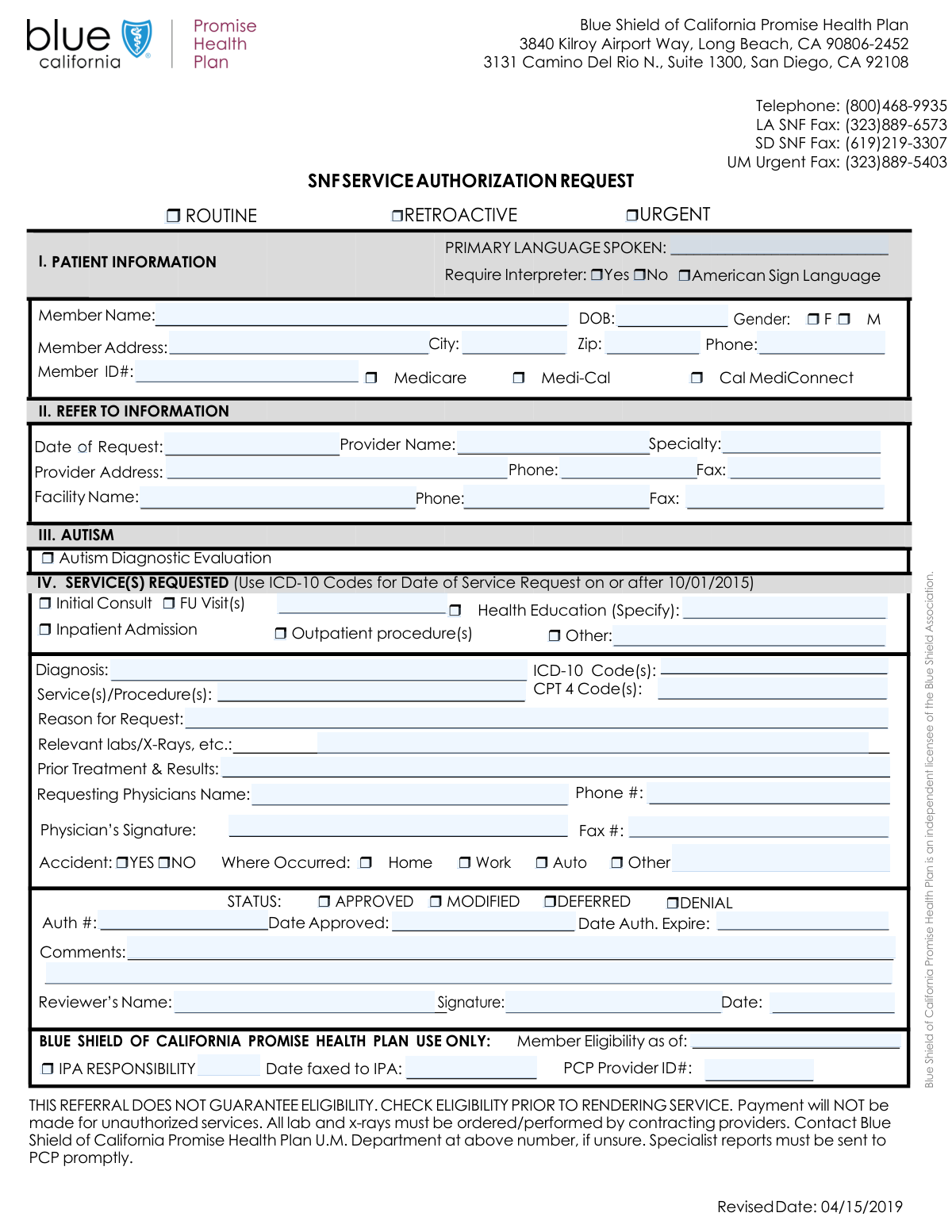
A Service Authorization Request (SAR) form, often called a prior authorization form, is a document used by medical providers to obtain approval from a health insurance plan before a specific service, procedure, or medication is provided to a patient. This process confirms medical necessity and coverage, helping to prevent unexpected denials and billing issues for both the patient and the provider. Today, this form can be filled out quickly and accurately using AI-powered services like Instafill.ai, which can also convert non-fillable PDF versions into interactive fillable forms.
Our AI automatically handles information lookup, data retrieval, formatting, and form filling.
It takes less than a minute to fill out SAR Form using our AI form filling.
Securely upload your data. Information is encrypted in transit and deleted immediately after the form is filled out.

Form specifications

Form name: Service Authorization Request Form
Number of fields: 75
Number of pages: 1
Language: English
Categories: authorization forms, service authorization forms
main-image

Instafill Demo: How to fill out PDF forms in seconds with AI

How to Fill Out SAR Form Online for Free in 2026

Are you looking to fill out a SAR FORM form online quickly and accurately? Instafill.ai offers the #1 AI-powered PDF filling software of 2026, allowing you to complete your SAR FORM form in just 37 seconds or less.
Follow these steps to fill out your SAR FORM form online using Instafill.ai:
  1. 1 Navigate to Instafill.ai and upload your Service Authorization Request Form or select it from the template library.
  2. 2 Use the AI assistant to automatically fill in patient demographics, insurance details (like Member ID), and provider information.
  3. 3 Specify the request type (e.g., Urgent, Routine) and provide details about the requested services, including CPT and ICD-10 codes.
  4. 4 Clearly state the reason for the request, including clinical history, prior treatments, and results of relevant labs or x-rays.
  5. 5 If the request is related to an accident, complete the corresponding section with details about where it occurred.
  6. 6 Review all the AI-populated information for accuracy, then have the requesting physician add their digital signature and date.
  7. 7 Download, print, or securely fax the completed and signed form directly to the insurance plan or IPA for processing.

Our AI-powered system ensures each field is filled out correctly, reducing errors and saving you time.

Why Choose Instafill.ai for Your Fillable SAR Form Form?

Speed

Complete your SAR Form in as little as 37 seconds.

Up-to-Date

Always use the latest 2026 SAR Form form version.

Cost-effective

No need to hire expensive lawyers.

Accuracy

Our AI performs 10 compliance checks to ensure your form is error-free.

Security

Your personal information is protected with bank-level encryption.

Frequently Asked Questions About Form SAR Form

This form is used by healthcare providers to request pre-approval from a patient's health plan for specific medical services, procedures, or admissions before they are rendered.

The requesting provider's office completes the patient, provider, and service details. The health plan or Independent Practice Association (IPA) completes the 'Authorization Details' and 'Plan Use Only' sections after reviewing the request.

A Routine request is for standard services, an Urgent request is for care needed to prevent serious harm, and a Retroactive request is for services that have already been provided.

You will need the patient's demographic and insurance details (including Member ID), the provider's information, and the specific medical codes for the diagnosis (ICD-10) and procedures (CPT 4).

Check the 'Other' box in the 'Requested Services' section and write a clear description of the service in the 'Other Service Specification' field.

Provide a detailed clinical justification in the 'Reason for Request' section, and include supporting information in the 'Relevant Labs/X-Rays' and 'Prior Treatment & Results' fields.

The form includes several fields for fax numbers, such as 'Provider Fax Number' and 'Facility Fax Number', indicating it is designed to be submitted via fax.

In the 'Language Information' section, check the box for 'Yes' if an interpreter is needed, and specify if it is for a spoken language or American Sign Language.

You must check 'YES' for an accident and then specify where it occurred (Home, Work, Auto, or Other). If you select 'Other,' you must provide a description of the location.

This section is completed by the health plan's reviewer after they make a decision. They will indicate if the request is approved, modified, deferred, or denied and provide an authorization number if applicable.

Yes, services like Instafill.ai use AI to accurately auto-fill form fields from your records, which can save significant time and help prevent errors.

Simply upload the form to the Instafill.ai platform. The tool will make the fields interactive and use AI to help you auto-fill patient, provider, and service information quickly.

You can use a service like Instafill.ai, which can instantly convert flat, non-fillable PDFs into interactive, fillable forms that are easy to complete, sign, and save digitally.

Yes, you should attach any relevant clinical documentation that supports the request, such as the lab reports, X-ray results, and prior treatment notes mentioned on the form.

Compliance SAR Form
Validation Checks by Instafill.ai

1
Mutually Exclusive Request Type
This validation ensures that a user cannot select both 'Urgent' and 'Routine' for the Request Type. These two options are mutually exclusive and selecting both would create a logical conflict in how the request is prioritized and processed. If this validation fails, the form should display an error message prompting the user to choose only one of these options.
2
Date of Birth Validity
This check verifies that the 'Date of Birth' is a valid date in a recognized format (e.g., MM/DD/YYYY) and that the date is in the past. It also ensures the date is plausible, for instance, not more than 120 years ago. This is critical for correct patient identification and eligibility verification, and failure to provide a valid date would prevent the form from being submitted.
3
Mutually Exclusive Gender Selection
This validation ensures that the 'Female' and 'Male' checkboxes cannot be selected simultaneously. A patient can only be designated as one or the other on this form. This check prevents data entry errors and ensures the demographic information is logically consistent.
4
ZIP Code Format Validation
This check validates that the 'Zip Code' field contains either a 5-digit or 9-digit (ZIP+4) numeric value. Correctly formatted ZIP codes are essential for mail delivery, patient address verification, and demographic analysis. An invalid format would trigger an error, requiring the user to correct the entry before submission.
5
Conditional Follow-Up Visits Entry
This validation enforces the rule that the 'Number of FU Visits' field can only be filled if the 'FU Visit(s)' checkbox is selected. This prevents extraneous data from being entered and ensures that the number of visits directly corresponds to the service request. If the checkbox is not selected but the number field has a value, an error should be shown.
6
Conditional 'Other' Service Specification
This check ensures that the 'Other Service Specification' text field is filled out if and only if the 'Other' service checkbox is selected. This is important for understanding the nature of the request when a standard service is not chosen. A failure would mean the request is incomplete, as the specific service being requested is unknown.
7
Required Service Selection
This validation verifies that at least one service checkbox (e.g., 'Initial Consult', 'Inpatient Admission', 'Outpatient procedure(s)') has been selected in the 'Requested Services' section. A service authorization request is meaningless without a specified service. If no service is selected, the form submission should be blocked until a selection is made.
8
ICD-10 Code and Diagnosis Completeness
This check ensures that if an 'ICD-10 Code' is provided, a corresponding 'Diagnosis' description is also present, and vice-versa. These two fields are a pair and are both necessary for medical necessity review. Submitting one without the other would result in an incomplete and unprocessable request, so the validation should require both fields to be filled if either one is.
9
Mutually Exclusive Accident Status
This validation ensures that a user cannot select both 'Accident: YES' and 'Accident: NO'. These options are contradictory and selecting both would make the accident-related information ambiguous. The system should enforce the selection of only one of these options to maintain data integrity.
10
Conditional Accident Location
This check verifies that the 'Where Occurred' fields (Home, Work, Auto, Other) can only be selected if 'Accident: YES' is checked. This prevents irrelevant information from being submitted and maintains the logical flow of the form. If 'Accident: NO' is selected, these location fields should be disabled or cleared.
11
Authorization Date Chronology
This validation ensures that the 'Authorization Expiration Date' is on or after the 'Approved Date'. An expiration date cannot precede the date of approval. This logical check is crucial for the validity of the authorization period and prevents data entry errors that could lead to premature service denials.
12
Conditional Authorization Dates
This check ensures that the 'Approved Date' and 'Authorization Expiration Date' fields are filled out if the request status is marked as 'APPROVED' or 'MODIFIED'. These dates are essential components of an approved or modified authorization. Failure to provide them would render the authorization details incomplete and unusable.
13
Member ID Completeness
This validation confirms that the 'Member ID' field is not empty. The Member ID is the primary key for identifying the patient within the insurance system and is absolutely essential for processing the request. A missing Member ID would make it impossible to verify eligibility or link the authorization to the correct patient record.
14
Phone Number Format
This check validates that phone number fields, such as 'Phone Number' and 'Provider Phone Number', adhere to a standard format (e.g., 10 digits, possibly with parentheses or hyphens). Consistent formatting is important for system integration and ensuring the contact information is usable. An invalid format should prompt the user for correction.
15
Conditional IPA Information
This validation ensures that the 'Date Faxed to IPA' and 'PCP Provider ID' fields are filled only when the 'IPA RESPONSIBILITY' checkbox is checked. This rule prevents the entry of unnecessary data and maintains the integrity of the 'Plan Use Only' section. If the IPA is not responsible, this information is irrelevant and should not be provided.

Common Mistakes in Completing SAR Form

Incomplete Conditional Service Details

Users often check a box for a service like 'FU Visit(s)' or 'Other' but forget to complete the corresponding detail field, such as 'Number of FU Visits' or 'Other Service Specification'. This omission makes the request ambiguous and can lead to an automatic deferral or denial pending clarification, delaying patient care. To avoid this, carefully review each checked service and ensure any associated text fields are completed. AI-powered tools like Instafill.ai can prevent this by highlighting required dependent fields when a checkbox is selected.

Incorrect Member ID or Date of Birth

A single mistyped digit in the 'Member ID' or an incorrect 'Date of Birth' can prevent the system from identifying the patient, leading to an immediate rejection of the form. These errors often happen due to simple typos or transposing numbers while rushing. The consequence is a complete halt in processing until a corrected form is submitted. Always double-check these critical fields against the patient's insurance card; using a tool like Instafill.ai can help by auto-filling from saved records and validating date formats.

Vague or Insufficient Medical Justification

The 'Reason for Request' and 'Prior Treatment & Results' fields are frequently filled with generic phrases like 'Patient needs test' or 'Follow-up'. This lack of detailed clinical justification is a primary cause for authorization denials, as reviewers cannot determine medical necessity. To prevent this, provide a concise but thorough clinical summary, including symptoms, duration, failed prior treatments, and why the requested service is necessary for the patient's diagnosis or treatment plan.

Confusion Between Provider, Facility, and Requesting Physician

Users frequently confuse the different contact sections, for example, entering the facility's name in the 'Provider Name' field or the requesting physician's details in the main 'Provider Contact Information' section. This mistake can route communications to the wrong entity, causing significant processing delays. It's crucial to distinguish between the rendering provider, the facility, and the initiating physician, entering their information in the correct, designated fields to ensure smooth communication.

Incorrect or Mismatched Medical Codes

Entering an incorrect ICD-10 or CPT code, or providing codes that do not logically correspond to the written diagnosis or procedure description, is a frequent and critical error. This can happen due to typos or using outdated codebooks, and it almost always results in the request being denied or deferred for correction. Always verify codes against the latest official sources before submission. Form-filling AI can help by validating the format of codes as they are entered.

Filling Out 'Plan Use Only' Sections

Applicants sometimes mistakenly fill out sections clearly marked for internal review, such as 'Authorization Details' (e.g., APPROVED, DENIAL, Authorization Number) or 'Plan Use Only'. This creates confusion in the processing workflow and may require the form to be resubmitted. To prevent this, only complete sections designated for the requester, provider, or patient. If the form is a non-fillable PDF, a tool like Instafill.ai can convert it to a smart, fillable version that can lock or hide these administrative sections.

Missing Physician Signature or Date

A form submitted without the 'Physician's Signature' or the corresponding 'Signature Date' is considered legally incomplete and will be immediately rejected. This is one of the most common reasons for administrative denial, forcing the entire submission process to start over. Before submitting, always perform a final check to ensure the physician has signed and dated the form in the designated area. Digital form solutions can make this field mandatory to prevent submission without it.

Contradictory Information in Conditional Sections

A common logical error is checking 'Accident: NO' but then also checking a location like 'Home' or 'Work' in the 'Where Occurred' sub-section. This contradiction forces the reviewer to seek clarification, halting the authorization process. This occurs when users don't read field dependencies carefully. To avoid it, only fill out the 'Where Occurred' fields if 'Accident: YES' has been selected. Intelligent form fillers can automatically enforce these logical rules.

Incomplete Member Address

Omitting crucial details like an apartment, suite, or unit number from the 'Member Address' field is a frequent oversight that can cause important documents to be returned as undeliverable. This can leave the patient and provider unaware of the authorization status. Always enter the full, complete address as it would appear on a piece of mail. AI-powered tools like Instafill.ai can help by validating addresses against a postal database to ensure they are complete and accurate.

Ambiguous Interpreter Request

Users may check 'Require Interpreter: Yes' but fail to specify if it's for a spoken language or 'American Sign Language,' or they might check both 'Yes' and 'No' simultaneously. This ambiguity requires a follow-up call to clarify the patient's needs, delaying the arrangement of necessary services. To avoid this, select only one option from the mutually exclusive choices. Smart forms can be configured to only allow one selection in such a group, preventing this error.
Saved over 80 hours a year

“I was never sure if my IRS forms like W-9 were filled correctly. Now, I can complete the forms accurately without any external help.”

Kevin Martin Green

Your data stays secure with advanced protection from Instafill and our subprocessors

Robust compliance program

Transparent business model

You’re not the product. You always know where your data is and what it is processed for.

ISO 27001, HIPAA, and GDPR

Our subprocesses adhere to multiple compliance standards, including but not limited to ISO 27001, HIPAA, and GDPR.

Security & privacy by design

We consider security and privacy from the initial design phase of any new service or functionality. It’s not an afterthought, it’s built-in, including support for two-factor authentication (2FA) to further protect your account.

Fill out SAR Form with Instafill.ai

Worried about filling PDFs wrong? Instafill securely fills service-authorization-request-form forms, ensuring each field is accurate.