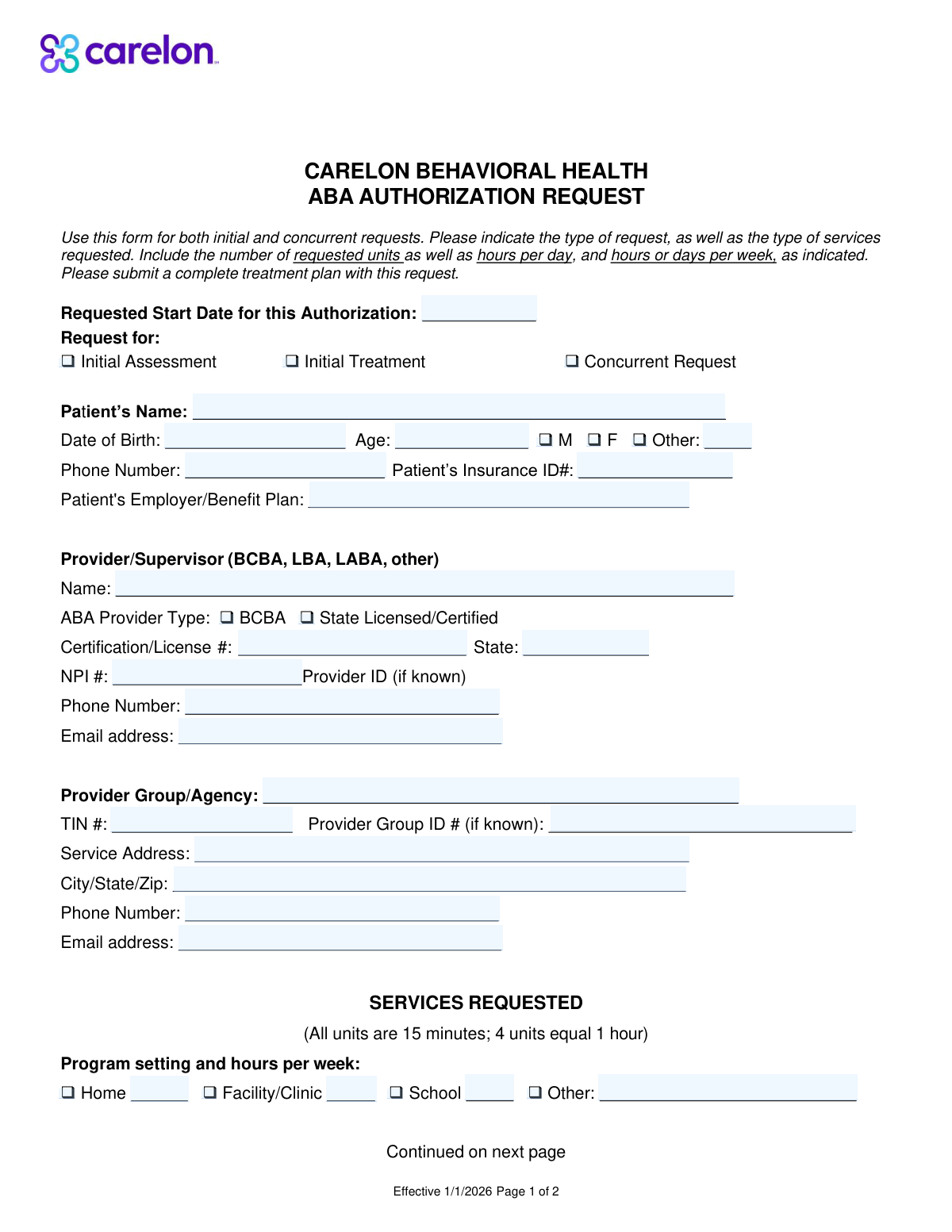
Yes! You can use AI to fill out Applied Behavior Analysis (ABA) Services Request for Authorization Form
The Applied Behavior Analysis (ABA) Services Request for Authorization Form is a critical document for healthcare providers to seek pre-approval from insurance carriers for ABA therapy. It outlines the patient's details, the provider's qualifications, and the specific treatment plan, including CPT codes and service hours, to justify medical necessity. Submitting this form is essential for securing insurance coverage and preventing claim denials. Today this form can be filled out quickly and accurately using AI-powered services like Instafill.ai, which can also convert non-fillable PDF versions into interactive fillable forms.
Our AI automatically handles information lookup, data retrieval, formatting, and form filling.
It takes less than a minute to fill out ABA Authorization Request using our AI form filling.
Securely upload your data. Information is encrypted in transit and deleted immediately after the form is filled out.
Form specifications
| Form name: | Applied Behavior Analysis (ABA) Services Request for Authorization Form |
| Number of fields: | 69 |
| Number of pages: | 2 |
| Language: | English |
| Categories: | ABA authorization forms, ABA forms, authorization forms, service authorization forms |
Instafill Demo: How to fill out PDF forms in seconds with AI
How to Fill Out ABA Authorization Request Online for Free in 2026
Are you looking to fill out a ABA AUTHORIZATION REQUEST form online quickly and accurately? Instafill.ai offers the #1 AI-powered PDF filling software of 2026, allowing you to complete your ABA AUTHORIZATION REQUEST form in just 37 seconds or less.
Follow these steps to fill out your ABA AUTHORIZATION REQUEST form online using Instafill.ai:
- 1 Navigate to Instafill.ai and upload or select the ABA Authorization Request form.
- 2 Allow the AI to scan the document and pre-fill known information from your profile, such as provider group details, NPI, and TIN.
- 3 Enter the patient's personal and insurance details, including their name, date of birth, and insurance ID number.
- 4 Indicate the type of request (e.g., initial assessment, treatment) and complete the supervising provider's information, including their credentials and license number.
- 5 Select the appropriate CPT codes for the ABA services being requested (e.g., 97151, 97153) and enter the corresponding units, hours, and service locations.
- 6 Carefully review all entered information for accuracy and completeness before finalizing the document.
- 7 Download the completed form to submit to the insurance company or share it directly as needed.
Our AI-powered system ensures each field is filled out correctly, reducing errors and saving you time.
Why Choose Instafill.ai for Your Fillable ABA Authorization Request Form?
Speed
Complete your ABA Authorization Request in as little as 37 seconds.
Up-to-Date
Always use the latest 2026 ABA Authorization Request form version.
Cost-effective
No need to hire expensive lawyers.
Accuracy
Our AI performs 10 compliance checks to ensure your form is error-free.
Security
Your personal information is protected with bank-level encryption.
Frequently Asked Questions About Form ABA Authorization Request
This form is used by healthcare providers to request prior authorization for Applied Behavior Analysis (ABA) services, such as initial assessments, treatments, or concurrent care for a patient.
This form should be completed by the ABA provider's office, such as a Board Certified Behavior Analyst (BCBA) or another state-licensed professional who is requesting authorization for services.
Select 'Initial Assessment' for the first evaluation. Choose 'Initial Treatment' for the first block of therapy services after assessment. Select 'Concurrent Request' to continue services that are already in progress.
You will need the patient's full name, date of birth, age, gender, phone number, and their insurance ID number. You should also provide the name of their employer or benefit plan.
The NPI is a unique 10-digit National Provider Identifier for healthcare providers. Enter this number in the 'NPI Number' field under the 'Provider/Supervisor Information' section.
Enter the supervising provider's official number from their certifying or licensing body, such as their BCBA certification number or state license number. This is required if you check the BCBA or State Licensed/Certified boxes.
A 'unit' typically represents a 15-minute increment of service time. For example, if you are requesting one hour of service for a specific code, you would enter '4' in the units field.
Yes, you can check all applicable boxes for the settings where services will be provided, such as Home, Facility/Clinic, or School. Be sure to enter the number of hours per week for each setting you select.
Code 97153 is for adaptive behavior treatment administered directly by a technician. Code 97155 is for the time a qualified professional, like a BCBA, spends directly supervising that technician during a patient's session.
The 'Provider/Supervisor' section is for the individual clinician's details, like their name and license number. The 'Provider Group/Agency' section is for the business entity's information, including the group name and Tax ID Number (TIN).
Yes, services like Instafill.ai use AI to accurately auto-fill form fields from your records, which can save significant time and help reduce data entry errors.
Simply upload the form to the Instafill.ai platform. The AI will identify all the fields, allowing you to quickly fill them in, save your progress, and download the completed document.
You can use a service like Instafill.ai, which can instantly convert flat, non-fillable PDFs into interactive, fillable forms that you can complete and save on your computer.
Compliance ABA Authorization Request
Validation Checks by Instafill.ai
1
Ensures Request Type is Mutually Exclusive
This validation ensures that only one of the 'Request for' checkboxes (Initial Assessment, Initial Treatment, Concurrent Request) is selected. These request types represent distinct workflows and are mutually exclusive. If more than one is selected, the form submission should be rejected to prevent ambiguity in processing the authorization request.
2
Verifies Consistency Between Date of Birth and Age
This check calculates the patient's age based on the entered 'Date of Birth' and compares it to the value entered in the 'Age' field. This is crucial for verifying patient identity and eligibility for age-specific services. A mismatch indicates a data entry error that must be corrected before submission to ensure accurate patient records.
3
Validates Conditional Gender Identity Field
This rule validates the gender selection logic. It ensures that if the 'Other Gender' checkbox is selected, the corresponding text field for specifying the gender is not empty. Conversely, it ensures the text field is empty if the 'Other Gender' checkbox is not selected. This maintains data integrity and ensures complete information is captured when non-binary gender is indicated.
4
Enforces Provider Certification/License Number Requirement
This validation checks that if either the 'BCBA' or 'State Licensed/Certified' checkbox is marked, the 'Certification/License Number' field must be filled out. This is a critical compliance check to verify provider credentials, which is often required for reimbursement and regulatory purposes. A failure to provide the number when required will block the submission.
5
Enforces Provider License State Requirement
This rule ensures that if the 'State Licensed/Certified' checkbox is selected, the 'Certification/License State' field is also completed. This is necessary to verify that the provider's license is valid in the correct jurisdiction where services are rendered. Submitting without this information could lead to claim denials or compliance issues.
6
Validates NPI Number Format
This check verifies that the 'NPI Number' field contains a valid 10-digit number. The National Provider Identifier is a standard, unique identifier for health care providers. Correct formatting is essential for accurate billing, routing, and identification in all healthcare transactions, and an invalid format will cause processing failures.
7
Validates Taxpayer Identification Number (TIN) Format
This validation ensures the 'TIN' field for the provider group contains a 9-digit number. The TIN is required for tax and billing purposes, and an incorrect format will lead to financial processing errors and claim rejections. This check helps ensure the provider group can be correctly identified and paid.
8
Ensures Program Hours are Provided for Selected Settings
This rule checks that for each program setting checkbox selected (Home, Facility/Clinic, School, Other), the corresponding hours field is filled with a valid number. This prevents incomplete requests where a service location is indicated but the service volume is missing. An error would be flagged if a setting is checked but its hours field is empty or zero.
9
Restricts Services to 'Initial Assessment' Request Type
This validation ensures that service codes 97151, 97152, and 0362T can only be selected and have units requested if the 'Request for' type is 'Initial Assessment'. These codes are specifically for assessment procedures and are not applicable to other request types. This prevents incorrect service combinations and ensures the authorization request is logical.
10
Restricts Services to 'Initial Treatment' Request Type
This validation ensures that service codes 97153 and 0373T can only be selected if the 'Request for' type is 'Initial Treatment'. These codes pertain to active treatment protocols and are inappropriate for an initial assessment request. This rule enforces the correct workflow and prevents illogical service requests from being submitted.
11
Validates Maximum Units for Behavior Identification Assessment (97151)
This check ensures that the value entered for 'Units Requested (97151)' does not exceed 32. The form explicitly states a maximum of 32 units for this service code. This validation prevents requests that are outside the pre-defined service limits, reducing the likelihood of automatic denial for exceeding benefit maximums.
12
Verifies Consistency Between Hours and Units for Service 97153
This validation checks that the 'Units Requested' for service 97153 is equal to the 'Hours per Week' multiplied by four, since units are defined in 15-minute increments. This logical check ensures the requested service volume is consistent across different measures. A mismatch would indicate a data entry error and could cause confusion or denial during the review process.
13
Enforces Unit/Hour Entry for Selected Services
This is a general validation that applies to all services with associated units or hours (e.g., 97154, 97156, 97158). It ensures that if a service's checkbox is selected, its corresponding 'Units Requested' and/or 'Hours' fields are filled with a non-zero value. This prevents incomplete submissions where a service is requested without specifying the quantity.
14
Validates Requested Start Date is Plausible
This check ensures the 'Requested Start Date' is a valid date and is not in the distant past or unreasonably far in the future. This is important for ensuring the authorization request is timely and relevant to the patient's current care needs. An invalid or illogical date could cause the request to be rejected or delayed.
Common Mistakes in Completing ABA Authorization Request
Users often select one request type, such as 'Initial Assessment', but then fill out the sections for a different type, like 'Initial Treatment' (e.g., CPT code 97153). This happens due to overlooking the form's conditional logic. This mismatch causes immediate processing errors and rejection, as the requested services do not align with the stated purpose of the authorization, requiring a full correction and resubmission. To avoid this, carefully select the request type first and only complete the corresponding service code sections that become applicable.
The form requires some services to be quantified in 15-minute 'units' and others in 'hours per week'. A frequent error is entering the number of hours into the units field (e.g., entering '1' for a one-hour service instead of '4' units). This leads to a significant under-request of service time, which can disrupt patient care and billing. Always double-check if the field asks for 'Units' or 'Hours' and remember that one hour equals four 15-minute units.
It is common to check the box for 'BCBA' or 'State Licensed/Certified' but then forget to fill in the mandatory 'Certification/License Number' and 'Certification/License State' fields. These fields are conditionally required to verify the provider's credentials. Leaving them blank renders the submission incomplete and will halt the authorization process until the missing information is provided, delaying the start of care.
A user might check a box indicating the program setting, such as 'Home' or 'School', but then fail to enter the corresponding number of hours in the associated field. This creates an incomplete request because the payer cannot determine the intensity of the service in that setting. This omission always requires follow-up, delaying the authorization decision. Ensure that for every setting checkbox selected, the corresponding hours field is also completed.
The patient's name is requested in two different sections ('Patient's Name' and 'Patient Name'). It is easy to introduce a typo or a slight variation (e.g., using a middle initial in one field but not the other). Such inconsistencies can cause data matching errors in the payer's system, leading to processing delays or rejections while the patient's identity is verified. Using an AI-powered tool like Instafill.ai can prevent this by auto-filling consistent information across all relevant fields.
The 'Date of Birth' and 'Age' fields are located next to each other, making it easy to accidentally enter the age in the DOB field or vice-versa. An incorrect date of birth is a critical data error that can lead to claim denials, eligibility verification failures, and patient identification issues. To prevent this, carefully read each field label before entering the data. AI form-filling tools can also help by automatically calculating and populating the age based on the entered date of birth.
Forgetting to enter the provider's 'NPI Number' or the agency's 'TIN' is a frequent and critical mistake. These numbers are essential unique identifiers for billing, credentialing, and regulatory compliance. A submission without these numbers will be automatically rejected, forcing the provider to correct the form and resubmit, which significantly delays authorization and payment for services.
Users sometimes fill in the 'Units Requested' or 'Hours per Week' for a specific CPT code but forget to check the main box for that service to indicate it is being requested. This creates a logical contradiction where details are provided for a service that hasn't been formally selected. Payers cannot process such ambiguous requests, and the form will be returned for clarification, delaying approval. If the form is a non-fillable PDF, a tool like Instafill.ai can convert it to a smart, fillable version with validation rules to prevent such errors.
A 'Concurrent Request' is for the continuation or extension of currently authorized services. A common error is selecting this option for a new patient or for a new treatment plan that is not a direct continuation of a previous one. This misclassification causes processing failure because the payer's system will not find an existing authorization to link it to, resulting in denial and the need to resubmit the request under the correct 'Initial' category.
Saved over 80 hours a year
“I was never sure if my IRS forms like W-9 were filled correctly. Now, I can complete the forms accurately without any external help.”
Kevin Martin Green
Your data stays secure with advanced protection from Instafill and our subprocessors

Robust compliance program
Transparent business model
You’re not the product. You always know where your data is and what it is processed for.
ISO 27001, HIPAA, and GDPR
Our subprocesses adhere to multiple compliance standards, including but not limited to ISO 27001, HIPAA, and GDPR.
Security & privacy by design
We consider security and privacy from the initial design phase of any new service or functionality. It’s not an afterthought, it’s built-in, including support for two-factor authentication (2FA) to further protect your account.
Fill out ABA Authorization Request with Instafill.ai
Worried about filling PDFs wrong? Instafill securely fills applied-behavior-analysis-aba-services-request-for-authorization-form forms, ensuring each field is accurate.