Yes! You can use AI to fill out Commonwealth Seniors Health Card (CSHC) Income Test and Dependent Child Worksheet
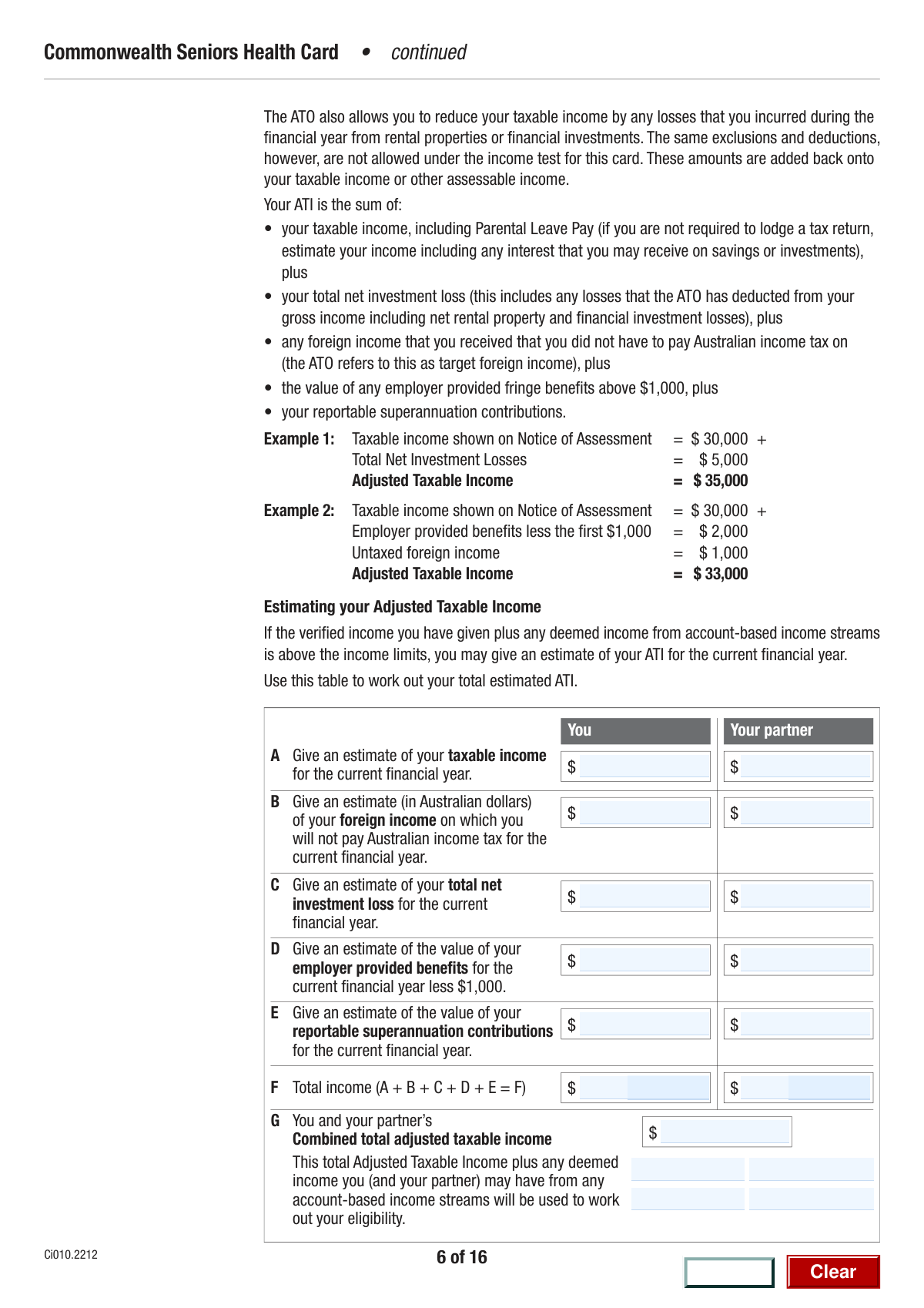
The Commonwealth Seniors Health Card (CSHC) Income Test and Dependent Child Worksheet is a crucial tool for Australians to assess their eligibility for the CSHC. It guides users through calculating their adjusted taxable income and determining if a young person qualifies as a dependent, both of which are key factors in the CSHC income test. Accurately completing this worksheet is essential for accessing benefits like cheaper healthcare and medicines. Today, this form can be filled out quickly and accurately using AI-powered services like Instafill.ai, which can also convert non-fillable PDF versions into interactive fillable forms.
CSHC Income & Dependent Child Worksheet is part of the
CAR forms, health forms, income forms and Work and Income forms categories on Instafill.
Our AI automatically handles information lookup, data retrieval, formatting, and form filling.
It takes less than a minute to fill out CSHC Income & Dependent Child Worksheet using our AI form filling.
Securely upload your data. Information is encrypted in transit and deleted immediately after the form is filled out.
Form specifications
| Form name: | Commonwealth Seniors Health Card (CSHC) Income Test and Dependent Child Worksheet |
| Number of fields: | 47 |
| Number of pages: | 16 |
| Filled form examples: | Form CSHC Income & Dependent Child Worksheet Examples |
| Language: | English |
More forms in CAR forms
Instafill Demo: How to fill out PDF forms in seconds with AI
How to Fill Out CSHC Income & Dependent Child Worksheet Online for Free in 2026
Are you looking to fill out a CSHC INCOME & DEPENDENT CHILD WORKSHEET form online quickly and accurately? Instafill.ai offers the #1 AI-powered PDF filling software of 2026, allowing you to complete your CSHC INCOME & DEPENDENT CHILD WORKSHEET form in just 37 seconds or less.
Follow these steps to fill out your CSHC INCOME & DEPENDENT CHILD WORKSHEET form online using Instafill.ai:
- 1 Navigate to Instafill.ai and upload or select the CSHC Income Test and Dependent Child Worksheet.
- 2 Enter your and your partner's estimated income details, including taxable income, foreign income, and investment losses.
- 3 Provide information about employer-provided benefits and reportable superannuation contributions for both you and your partner.
- 4 Allow the AI tool to automatically calculate your total and combined adjusted taxable income based on the figures you provided.
- 5 Answer the series of yes/no questions to determine if a young person qualifies as a dependent child for the CSHC income test.
- 6 Provide details about the young person's legal status, age, education, residency, and living arrangements as prompted.
- 7 Review all the entered information and calculated totals for accuracy before printing or saving your completed worksheet.
Our AI-powered system ensures each field is filled out correctly, reducing errors and saving you time.
Why Choose Instafill.ai for Your Fillable CSHC Income & Dependent Child Worksheet Form?
Speed
Complete your CSHC Income & Dependent Child Worksheet in as little as 37 seconds.
Up-to-Date
Always use the latest 2026 CSHC Income & Dependent Child Worksheet form version.
Cost-effective
No need to hire expensive lawyers.
Accuracy
Our AI performs 10 compliance checks to ensure your form is error-free.
Security
Your personal information is protected with bank-level encryption.
Frequently Asked Questions About Form CSHC Income & Dependent Child Worksheet
This form is used to estimate your and your partner's annual income to assess your eligibility for certain government benefits, such as the Commonwealth Seniors Health Card (CSHC). It also helps determine if a young person in your care qualifies as a dependent for the income test.
You should complete this form if you are applying for or updating your details for a benefit that requires an income assessment, like the CSHC. You must provide financial estimates for both yourself and your partner, if you have one.
To estimate your taxable income, gather all your expected income from employment, pensions, and investments, and subtract any allowable deductions. Referring to your previous year's tax return can be a helpful starting point.
Eligibility for many government benefits is based on your combined household income. Your partner's financial details are required to accurately calculate your combined adjusted taxable income for the assessment.
Deemed income is an amount of income that the government assumes your financial assets are earning, regardless of the actual return. It is calculated using a set rate on your account-based income streams and other investments.
This section determines if a young person you care for qualifies as a 'dependent child' for the CSHC income test. If they do, your income threshold may be increased, which could help you qualify for the card.
You need to estimate the total value of benefits your employer provides for the financial year, such as a company car for private use, and then subtract $1,000 from that total. Enter the resulting figure on the form.
It is helpful to have recent payslips, superannuation statements, investment portfolio summaries, and your previous tax assessment notice. These documents will help you provide accurate financial estimates.
Yes, the form requires you to calculate your total income by summing your taxable income, foreign income, net investment loss, employer benefits, and reportable superannuation contributions. You must enter this sum in the 'Your Total Income' field.
You are generally required to report significant changes to your income or circumstances to the relevant government agency. This ensures you continue to receive the correct entitlement and avoid potential debts.
Yes, services like Instafill.ai use AI to accurately auto-fill form fields, which can save you time and help prevent errors. You can upload the form and let the tool assist you with filling in your information.
To fill this form online, simply upload the PDF to the Instafill.ai platform. The service will make the form interactive, allowing you to type in your answers or use AI-powered features to auto-fill your details before downloading the completed document.
If you have a non-fillable PDF, you can use a service like Instafill.ai to convert it into an interactive, fillable form. This allows you to easily type your information directly into the fields on your computer.
Compliance CSHC Income & Dependent Child Worksheet
Validation Checks by Instafill.ai
1
Numeric Format for Income Fields
This validation ensures that all fields intended for monetary values, such as 'Taxable Income Estimate' and 'Foreign Income Estimate', contain only numeric characters and at most one decimal point. This is critical for preventing calculation errors when summing up total incomes. If non-numeric data is entered, the form submission will fail, and the user will be prompted to correct the invalid entries.
2
Non-Negative Monetary Values
This check verifies that all entered income, benefit, and contribution amounts are zero or greater. Negative values are logically invalid for these fields and would lead to incorrect calculations for total and combined income. If a negative number is entered, the system should display an error message asking the user to enter a valid, non-negative amount.
3
Your Total Income Calculation Consistency
This validation confirms that the value in 'Your Total Estimated Income' is the exact sum of the five preceding individual income components. This check is crucial for data integrity and prevents user calculation errors from being submitted. If the user-entered total does not match the calculated sum, the system should highlight the discrepancy and require correction before proceeding.
4
Partner's Total Income Calculation Consistency
This check ensures the 'Partner's Total Estimated Income' field accurately reflects the sum of the partner's five individual income and benefit components. Maintaining this logical consistency is essential for the accuracy of the overall household income assessment. A mismatch would trigger an error, forcing a review of the partner's financial entries.
5
Combined Income Calculation Verification
This validation verifies that the 'Combined Adjusted Taxable Income' field is precisely the sum of 'Your Total Estimated Income' and 'Partner's Total Estimated Income'. As a final summary calculation, its accuracy is paramount for the outcome of the form's purpose. An incorrect value would invalidate the entire income assessment, so the system must flag any discrepancy.
6
Mutually Exclusive Yes/No Selections
For all question pairs with 'Yes' and 'No' options (e.g., 'Legal Responsibility for Young Person'), this check ensures that a user can only select one of the two options. Allowing both to be selected would result in contradictory and unusable data. The user interface should enforce this by using radio buttons or logic that deselects the alternative option automatically.
7
Completeness of Mandatory Declarations
This validation ensures that for every binary question (e.g., 'Australian Residency Status', 'Care Status'), one of the 'Yes' or 'No' options has been selected. These questions are fundamental to determining eligibility and status, and leaving them unanswered creates ambiguity. The form should not be submittable until all such required declarations are made.
8
Conditional Requirement for Navigation Fields
This check ensures that conditional fields, such as 'Next Question if Not Legally Responsible', are filled if their triggering condition is met (e.g., selecting 'No' for legal responsibility). These fields direct the logical flow of the form. Failure to provide this information when required would break the questionnaire's sequence, so the field should be made mandatory based on the user's prior selection.
9
Logical Consistency Between Age and Education
This validation checks the relationship between the young person's age and their education status. If the 'Aged 16 to 21' box is checked, the 'Full-time Education Status' question becomes mandatory, as this is a key dependency factor for this age group. The form logic is designed to skip this question for those under 16, so this check ensures the correct path is followed and required data is captured.
10
Mutually Exclusive Age Group Selection
This check ensures that only one option is selected for the 'Young Person's Age Group' ('Under 16' or 'Aged 16 to 21'). Selecting both is a logical impossibility that would corrupt the data. The system must enforce that these are mutually exclusive choices to ensure the correct conditional logic and question flow is triggered.
11
Employer Provided Benefits Floor Value
This validation checks that the value entered for 'Employer Provided Benefits' is not negative. The field instruction specifies entering the value 'less $1,000', so a negative entry would imply the original benefit was under $1,000, which is a possible but unusual scenario that might warrant a warning or confirmation. More importantly, a negative value could disrupt income sums, so it should be disallowed to ensure calculation integrity.
12
Sequential Entry for Deemed Income Streams
This check validates that 'Deemed Income Stream 2' (for both the user and partner) is only filled if 'Deemed Income Stream 1' also contains a value. It is illogical to have a second income stream without a first. This validation enforces sequential data entry and prevents orphaned data that could lead to processing errors or confusion.
13
Legal Responsibility and Care Status Consistency
This validation cross-references the answers for 'Legal Responsibility' and 'Care Status'. It would be contradictory for a user to state they are 'NOT legally responsible' for a young person but then also state the young person is 'wholly or substantially in your care'. The system should flag this logical conflict and require the user to provide consistent answers.
Common Mistakes in Completing CSHC Income & Dependent Child Worksheet
Applicants often enter their gross salary before tax and deductions instead of their 'Taxable Income'. Taxable income is your gross income minus any allowable deductions, and using the wrong figure leads to an incorrect total income calculation. This can result in a rejected application or an incorrect benefit assessment. To avoid this, refer to your most recent tax assessment notice or use current pay slips to estimate your income after deductions.
The form specifically asks for the value of employer-provided benefits 'less $1,000'. A frequent mistake is entering the full, gross value of the benefits without performing this subtraction. This inflates the income estimate and can lead to an incorrect eligibility assessment. Always double-check the calculation and ensure you have subtracted the $1,000 as instructed before entering the final figure.
The form requires manually summing up to five separate income components to arrive at a 'Total Income' figure. Simple arithmetic mistakes are extremely common in this step and can invalidate the entire income assessment, causing significant processing delays or rejection. To prevent this, use a calculator and carefully double-check your addition. AI-powered form filling tools like Instafill.ai can perform these calculations automatically, eliminating the risk of human error.
The form requires all foreign income to be reported in Australian dollars (AUD), but people sometimes enter the value in the original foreign currency. This can drastically misrepresent the income amount, leading to processing delays or an incorrect assessment. Before filling out the form, you must convert any foreign income amounts to AUD using a reliable exchange rate for the relevant period.
The dependency section uses conditional logic, such as 'Next Question if Not Legally Responsible... proceed to Q7'. A common error is to answer all questions sequentially without following these skip instructions. This results in providing contradictory or irrelevant information, which confuses the assessment and can cause the form to be returned. Read each question and its associated instructions carefully to ensure you are following the correct path through the form.
For questions with mutually exclusive Yes/No checkboxes, applicants sometimes check both boxes by mistake or forget to check either one. This creates a logical conflict that makes the response invalid and halts the application process. To avoid this, carefully select only one option for each question. If the form is a non-fillable PDF, tools like Instafill.ai can convert it to a fillable version with radio buttons, which inherently prevents selecting both options.
The form asks separate questions about being 'legally responsible' for a young person and having them 'wholly or substantially in your care'. Applicants often misinterpret these distinct legal and practical concepts, assuming one implies the other. This can lead to an incorrect dependency assessment and affect eligibility. It is crucial to answer each question based on its specific definition, considering legal guardianship separately from day-to-day living arrangements.
When an income or loss category like 'Foreign Income' or 'Net Investment Loss' does not apply, applicants may leave the field blank instead of entering '0'. This ambiguity can be flagged as an incomplete submission or cause system errors during processing. To ensure clarity and prevent delays, it is best practice to explicitly enter '0' in all numerical fields that have no value.
Single applicants can be unsure how to complete the numerous 'Partner's Income' sections. Leaving these fields blank may be interpreted as an incomplete form, while entering incorrect data can cause major processing issues. If you do not have a partner, you should consistently enter '0' in all partner-related financial fields to clearly and accurately reflect your status.
The form requests an 'estimate' for the current financial year, but people often use exact figures from a previous year's tax return. This is a mistake if income or circumstances have changed, leading to an inaccurate assessment. An estimate should be a reasonable projection based on current pay slips, investment statements, and any known changes for the year ahead, not just a copy of historical data.
The 'Combined Adjusted Taxable Income' field requires adding two previously calculated totals ('Your Total Income' and 'Partner's Total Income'). Any error in the initial calculations will be carried forward, and a new mistake can be made during this final addition. This incorrect final figure can lead to an immediate rejection or an incorrect assessment of eligibility. Using a calculator and re-checking all figures is essential, and automated tools like Instafill.ai can prevent such compounded calculation errors.
Saved over 80 hours a year
“I was never sure if my IRS forms like W-9 were filled correctly. Now, I can complete the forms accurately without any external help.”
Kevin Martin Green
Your data stays secure with advanced protection from Instafill and our subprocessors

Robust compliance program
Transparent business model
You’re not the product. You always know where your data is and what it is processed for.
ISO 27001, HIPAA, and GDPR
Our subprocesses adhere to multiple compliance standards, including but not limited to ISO 27001, HIPAA, and GDPR.
Security & privacy by design
We consider security and privacy from the initial design phase of any new service or functionality. It’s not an afterthought, it’s built-in, including support for two-factor authentication (2FA) to further protect your account.
Fill out CSHC Income & Dependent Child Worksheet with Instafill.ai
Worried about filling PDFs wrong? Instafill securely fills commonwealth-seniors-health-card-cshc-income-test-and-dependent-child-worksheet forms, ensuring each field is accurate.



