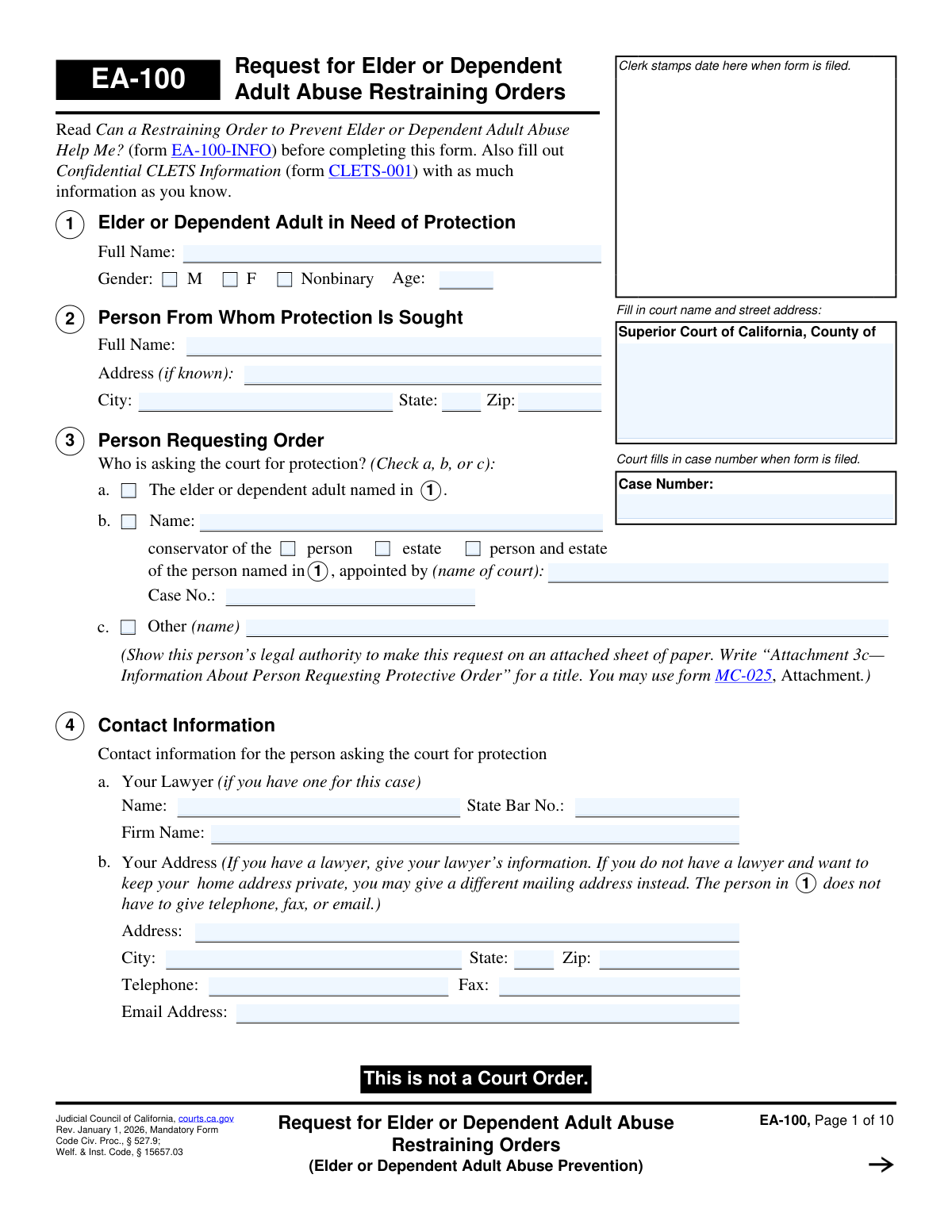
Yes! You can use AI to fill out Form EA-100, Request for Elder or Dependent Adult Abuse Restraining Orders (Elder or Dependent Adult Abuse Prevention)

Form EA-100, Request for Elder or Dependent Adult Abuse Restraining Orders, is a legal petition filed with the Superior Court of California to seek protection for an elder (age 65+) or a dependent adult from abuse, neglect, or financial exploitation. This form initiates the legal process to obtain a court order compelling the abuser to cease contact and stay away from the protected person. Today, this form can be filled out quickly and accurately using AI-powered services like Instafill.ai, which can also convert non-fillable PDF versions into interactive fillable forms.
EA-100 is part of the California court forms and restraining order forms categories on Instafill.
Our AI automatically handles information lookup, data retrieval, formatting, and form filling.
It takes less than a minute to fill out EA-100 using our AI form filling.
Securely upload your data. Information is encrypted in transit and deleted immediately after the form is filled out.

Form specifications

Form name: Form EA-100, Request for Elder or Dependent Adult Abuse Restraining Orders (Elder or Dependent Adult Abuse Prevention)
Number of fields: 259
Number of pages: 1
Language: English
main-image

Instafill Demo: How to fill out PDF forms in seconds with AI

How to Fill Out EA-100 Online for Free in 2026

Are you looking to fill out a EA-100 form online quickly and accurately? Instafill.ai offers the #1 AI-powered PDF filling software of 2026, allowing you to complete your EA-100 form in just 37 seconds or less.
Follow these steps to fill out your EA-100 form online using Instafill.ai:
  1. 1 Navigate to Instafill.ai and upload or select the EA-100 form.
  2. 2 Use the AI assistant to input personal details for the protected person, the person seeking the order, and the person from whom protection is sought.
  3. 3 Describe the relationship between the parties and provide a detailed account of the abuse, including dates, locations, and specific incidents.
  4. 4 Clearly check the boxes and specify the types of protection you are requesting, such as personal conduct orders, stay-away orders, and move-out orders.
  5. 5 Provide information on any other court cases, firearms owned by the restrained person, and any animals that need protection.
  6. 6 Review the entire form with the AI-powered checker to ensure all sections are filled out accurately and completely, including any necessary attachments.
  7. 7 Download and print the completed form for signing and filing with the appropriate California Superior Court clerk.

Our AI-powered system ensures each field is filled out correctly, reducing errors and saving you time.

Why Choose Instafill.ai for Your Fillable EA-100 Form?

Speed

Complete your EA-100 in as little as 37 seconds.

Up-to-Date

Always use the latest 2026 EA-100 form version.

Cost-effective

No need to hire expensive lawyers.

Accuracy

Our AI performs 10 compliance checks to ensure your form is error-free.

Security

Your personal information is protected with bank-level encryption.

Frequently Asked Questions About Form EA-100

This form is used to ask a California court for a restraining order to protect an elder (age 65 or older) or a dependent adult from various forms of abuse, including physical, financial, and emotional harm.

An elder is a California resident aged 65 or older. A dependent adult is a California resident under 65 who has physical or mental limitations that restrict their ability to carry out normal activities or protect their rights.

The request can be filed by the elder or dependent adult themselves, their court-appointed conservator, or another person who can show the court they have legal authority to make the request.

You must also complete and file a Confidential CLETS Information (form CLETS-001). It is also highly recommended that you read the information sheet, form EA-100-INFO, before you begin filling out the request.

Yes, in Section 6, you can request protection for other family or household members, or the conservator, by listing their information and explaining why they also need protection from the person in question.

A TRO is a short-term order that provides immediate protection until your court hearing. You can request one by checking the box in Section 16 and submitting form EA-110 for the judge's signature along with your request.

You must disclose any information you have about firearms, firearm parts, or ammunition in Section 15. If the court grants the restraining order, the person will be prohibited from owning or possessing firearms and ammunition.

Personal Conduct Orders (Section 11) prohibit specific behaviors like harassment, threats, and contact. Stay-Away Orders (Section 12) require the person to maintain a specific physical distance from protected people and places.

Yes, in Section 18, you can list debts or bills caused by the abuser and ask the judge to make a special finding. This finding may help you defend against those debts if you are sued for them later.

Yes, Section 20 allows you to ask the court for sole possession, care, and control of animals you own or that live in your household, and to order the restrained person to stay away from them.

The court papers must be personally served on the person at least five days before the hearing, unless the court approves a shorter time. You can ask the local sheriff or marshal to serve the papers for free.

Yes, services like Instafill.ai use AI to help you accurately auto-fill form fields from your documents. This can save time and reduce the chance of errors when completing complex forms.

You can use a service like Instafill.ai to upload the PDF and fill it out on your computer. Their platform makes it easy to type information directly into the correct fields and save your progress.

If you have a non-fillable or 'flat' PDF, you can use a tool like Instafill.ai to convert it into an interactive, fillable form. Simply upload the document, and the service will make the fields editable online.

Compliance EA-100
Validation Checks by Instafill.ai

1
Protected Person's Age and Status Consistency
This check validates the logical consistency between the protected person's age in Section 1 and their status in Section 5. If 'Is age 65 or older' (5a) is checked, the age in Section 1 must be 65 or greater. This is crucial for establishing the legal basis for an 'elder abuse' claim. If the age and status do not align, the form cannot be processed correctly.
2
Requestor Identity Completeness
Ensures that exactly one option is selected in Section 3 to identify who is requesting the order (the elder, a conservator, or other). If option 'b' (conservator) or 'c' (other) is selected, the corresponding name and any other required fields (e.g., Case No. for conservator) must be filled. This is vital for establishing the filer's legal standing to make the request.
3
Additional Protected Persons Justification
This validation checks that if 'Yes' is selected in Section 6a to request protection for others, then at least one person's details are entered in the table and a reason is provided in 6b. Conversely, if 'No' is selected, the table and reason field should be empty. This prevents incomplete requests and ensures the court has the necessary information to extend protection to others.
4
Abuse Incident Date Validity
Validates that the date of the last abuse incident provided in Section 8b(1) is a valid calendar date and is not a future date. This ensures the information provided is plausible and chronologically correct for legal review. An invalid or future date would render the description of the incident nonsensical and lead to rejection.
5
Conditional Explanation for Weapon Use
This check ensures that if the user checks 'Yes' in Section 8b(5), indicating the person in 2 used or threatened to use a weapon, the corresponding explanation text field is mandatory. This information is critical for assessing the level of threat and immediate danger. Failure to provide the explanation would leave out crucial details for the judge's decision on a Temporary Restraining Order.
6
Venue Justification Requirement
Verifies that at least one checkbox is selected in Section 9 to establish why the case is being filed in this specific county. If the 'Other' checkbox (9c) is selected, the accompanying text field must be filled out. Proper venue is a jurisdictional requirement, and failure to provide a valid reason can lead to the case being dismissed or transferred.
7
Other Court Cases Disclosure
If the user answers 'Yes' in Section 10a, this check confirms that details for at least one other court case are provided in the table. This includes selecting a case type and filling in the county and year. Disclosing related cases is essential for the court to have a complete history and avoid conflicting orders.
8
Stay-Away Order Specificity
When 'Stay-Away Orders' in Section 12 is requested, this validation ensures the 'yards' field contains a positive number and at least one location checkbox is selected. An order without a specified distance or location is unenforceable. This check guarantees the request is clear and actionable if granted by the court.
9
Counseling Order Eligibility Check
This is a logical check that prevents a request for counseling (Section 14) if the abuse was marked as 'solely financial' in Section 8b(4). The form explicitly states this order is not available for purely financial abuse cases. This validation enforces the form's rules and prevents legally impermissible requests.
10
Firearms Disclosure Detail
In Section 15, if the user selects 'Yes' (c) to indicate the person in 2 possesses firearms, this validation requires that at least one row in the subsequent table is filled with a description of the firearm(s). This information is vital for law enforcement to safely serve the order and enforce the firearm relinquishment provisions. An empty table would make the 'Yes' answer useless.
11
TRO Notification Explanation Requirement
This check is triggered if a Temporary Restraining Order is requested in Section 16. If the filer answers 'No' to the question 'Has the person in 2 been told...', the explanation field becomes mandatory. The court needs to understand why notice was not given to determine if issuing an order without notice is justified.
12
Financial Debt Substantiation
If a request is made in Section 18 to have the judge make findings about debts, this check ensures the filer provides all necessary details. It validates that at least one debt is listed in the table in 18a and that a full explanation of how the debt was incurred is provided in 18b. Without these details, the court cannot make the requested finding.
13
Primary Protected Person Completeness
This validation ensures that the core identifying information for the person needing protection in Section 1 is complete. The 'Full Name', 'Age', and a 'Gender' selection are all mandatory fields. Without this fundamental information, a legally binding and enforceable restraining order cannot be created.
14
Signature and Date Requirement
Verifies that the signature and date fields are completed on the final page of the form. The declaration is made 'under penalty of perjury,' which is legally meaningless without a signature and date. An unsigned form is invalid and will be rejected by the court clerk immediately.

Common Mistakes in Completing EA-100

Providing Vague or Incomplete Abuse Descriptions

In Section 8, filers often use emotional or general language like 'he was abusive' instead of providing specific, factual details. They may omit dates, locations, direct quotes, and a chronological account of events, which are crucial for the judge to understand the severity and pattern of abuse. A weak description can lead to the denial of the restraining order, as the court has no factual basis for issuing it. To avoid this, clearly state who did what, when and where it happened, and what the specific harm was, using labeled attachments if more space is needed.

Forgetting or Improperly Labeling Required Attachments

Several sections (e.g., 3c, 5b, 8d) require attachments for additional information or proof of legal authority. A common error is to check the box indicating an attachment will be used but then forget to include it, or to submit unlabeled papers, causing confusion. This can cause the request to be deemed incomplete or lead the judge to disregard critical information, weakening the case. Always label each attachment clearly with the corresponding item number (e.g., 'Attachment 5b—Description of Protected Person') and list the total number of pages in Section 23.

Incorrectly Identifying the Person Requesting the Order

In Section 3, it is critical to correctly identify who is filing the form. A conservator filling it out on behalf of the elder might mistakenly check box 3a ('The elder...'), or if they check 3c ('Other'), they may fail to attach the required proof of legal authority. This fundamental error can lead to immediate procedural delays or an outright dismissal of the request. Carefully read the options and ensure you provide all necessary documentation for conservatorships or other legal standing.

Insufficient Justification for Protecting Additional Persons

When listing other people for protection in Section 6, applicants often assume that just stating their name and relationship is enough. However, the form requires a specific explanation in 6b as to why each person also needs protection from the respondent. Failure to provide a distinct reason for each person, such as specific threats made against them, can result in the judge only granting the order for the primary protected person, leaving others vulnerable.

Omitting Critical Information About the Respondent

Filers may leave the respondent's address in Section 2 blank if they aren't 100% certain, or check 'I don't know' about firearms in Section 15 out of fear. However, providing a last known address, work address, or any details about potential firearms is vital for serving the order and for law enforcement safety. Omitting this information can make it impossible to legally serve the respondent, rendering the order unenforceable. Provide the best information you have, as it is better than leaving it blank.

Failing to Disclose All Related Court Cases

In Section 10, people often forget or choose not to disclose prior legal interactions with the respondent, such as past divorce, domestic violence, or civil harassment cases. The court needs this information to get a full history and avoid issuing conflicting orders with other courts. Failing to disclose other cases can damage your credibility with the judge and cause significant procedural problems that delay your request.

Requesting a 'Move-Out Order' Without Sufficient Legal Grounds

A move-out order (Section 13) is a powerful request with a high legal standard. A frequent mistake is requesting it without establishing that the protected person has a legal right to the residence AND that the respondent does not (i.e., is not on the lease or title). Simply wanting the person gone is not enough to meet the legal requirements. Failure to provide this specific justification will almost certainly lead to the denial of the move-out portion of the order.

Forgetting to Sign and Date the Declaration

The signature and date on the final page (Page 10) are a declaration under penalty of perjury that all information provided is true and correct. It is surprisingly common for filers, overwhelmed by the lengthy form, to forget this final, critical step. An unsigned or undated form is invalid and will be rejected by the court clerk, halting the entire process until it is corrected and refiled.

Failing to Prove 'Dependent Adult' Status

To get an order for a protected person under age 65, they must legally qualify as a 'dependent adult.' This requires checking box 5b and, crucially, attaching a description of the physical or mental limitations that restrict their ability to protect their rights. Many filers check the box but forget to provide the mandatory attachment with specific details. Without this proof, the court cannot establish its authority to issue an order under the Dependent Adult Protection Act, and the request will be denied.

Making Vague or Incomplete 'Stay-Away Order' Requests

In Section 12, filers may forget to specify a distance in yards or fail to check all the locations where protection is needed, such as home, work, and vehicle. They often neglect to add other important places like a doctor's office, bank, or family member's home under the 'Other' category. This oversight can leave the protected person vulnerable in those unlisted locations, defeating the purpose of the order. AI-powered tools like Instafill.ai can help prevent this by flagging empty required fields and ensuring all sections are complete before printing.
Saved over 80 hours a year

“I was never sure if my IRS forms like W-9 were filled correctly. Now, I can complete the forms accurately without any external help.”

Kevin Martin Green

Your data stays secure with advanced protection from Instafill and our subprocessors

Robust compliance program

Transparent business model

You’re not the product. You always know where your data is and what it is processed for.

ISO 27001, HIPAA, and GDPR

Our subprocesses adhere to multiple compliance standards, including but not limited to ISO 27001, HIPAA, and GDPR.

Security & privacy by design

We consider security and privacy from the initial design phase of any new service or functionality. It’s not an afterthought, it’s built-in, including support for two-factor authentication (2FA) to further protect your account.

Fill out EA-100 with Instafill.ai

Worried about filling PDFs wrong? Instafill securely fills form-ea-100-request-for-elder-or-dependent-adult-abuse-restraining-orders-elder-or-dependent-adult-abuse-prevention forms, ensuring each field is accurate.

Related forms by category

California court forms Judicial Council of California Form SC-105, Request for Court Order and Answer (Small Claims), Judicial Council of California Form SC-120, Defendant’s Claim and ORDER to Go to Small Claims Court (Small Claims), Judicial Council of California Form SER-001, Request for Sheriff to Serve Court Papers, Judicial Council of California Form SER-001, Request for Sheriff to Serve Court Papers, Affidavit for Collection of Personal Property California Probate Code Section 13100, Form POS-040, Proof of Service—Civil, Declaration of Facts of Death (California Superior Court), declaration-of-marriage-for-court-proceeding-california-family-law, ADOPT-200, Adoption Request, ADOPT-200, Stepparent Adoption Request, ADOPT-210, Adoption Agreement, ADOPT-310, Contact After Adoption Agreement, Judicial Council of California Form ADOPT-200, Adoption Request, Form ADR-107, Mediation Attendance Sheet, Form ADR-110, Order Appointing Referee, Form ADR-109, Stipulation or Motion for Order Appointing Referee, Form ADR-102, Request for Trial De Novo After Judicial Arbitration, Form ADR-108, Referee's Report (Code Civ. Proc., §§ 638, 639), Form ADR-106, Petition to Confirm, Correct, or Vacate Contractual Arbitration Award, Form ADR-104, Rejection of Award and Request for Trial After Attorney-Client Fee Arbitration · + 557 more →
restraining order forms Form DV-100, Request for Domestic Violence Restraining Order, DV-100, Request for Domestic Violence Restraining Order (Domestic Violence Prevention), Judicial Council of California Form DV-110, Temporary Restraining Order (CLETS-TRO) (Domestic Violence Prevention), Form DV-116, Order on Request to Continue Court Hearing (Temporary Restraining Order) (CLETS-TRO) (Domestic Violence Prevention), Form DV-130, Restraining Order After Hearing (Order of Protection) (Domestic Violence Prevention), Form CH-110, Temporary Restraining Order (CLETS-TCH) (Civil Harassment Prevention), Form CH-120, Response to Request for Civil Harassment Restraining Orders, Form CH-130, Civil Harassment Restraining Order After Hearing (CLETS-CHO), Order on Request to Modify/Terminate Civil Harassment Restraining Order (Civil Harassment Prevention), Form CH-100, Request for Civil Harassment Restraining Orders (Civil Harassment Prevention), Form CH-620, Response to Request to Modify/Terminate Civil Harassment Restraining Order (Civil Harassment Prevention), Form CIV-025, Application and Order for Reissuance of Order to Show Cause and Temporary Restraining Order, Form CD-190, Application for Temporary Restraining Order (Claim and Delivery), Order on Request to Continue Hearing (Temporary Restraining Order) (CLETS-TCH) (Civil Harassment Prevention), Form CH-610, Notice of Hearing on Request to Modify/Terminate Civil Harassment Restraining Order (Civil Harassment Prevention), Form CH-700, Request to Renew Restraining Order (Civil Harassment Prevention), Form CH-730, Order Renewing Civil Harassment Restraining Order (CLETS), Form DV-120, Response to Request for Domestic Violence Restraining Order (Domestic Violence Prevention), Form DV-300, Request to Change or End Restraining Order (Domestic Violence Prevention), Form DV-310, Notice of Court Hearing and Temporary Order to Change or End Restraining Order (Domestic Violence Prevention) · + 54 more →