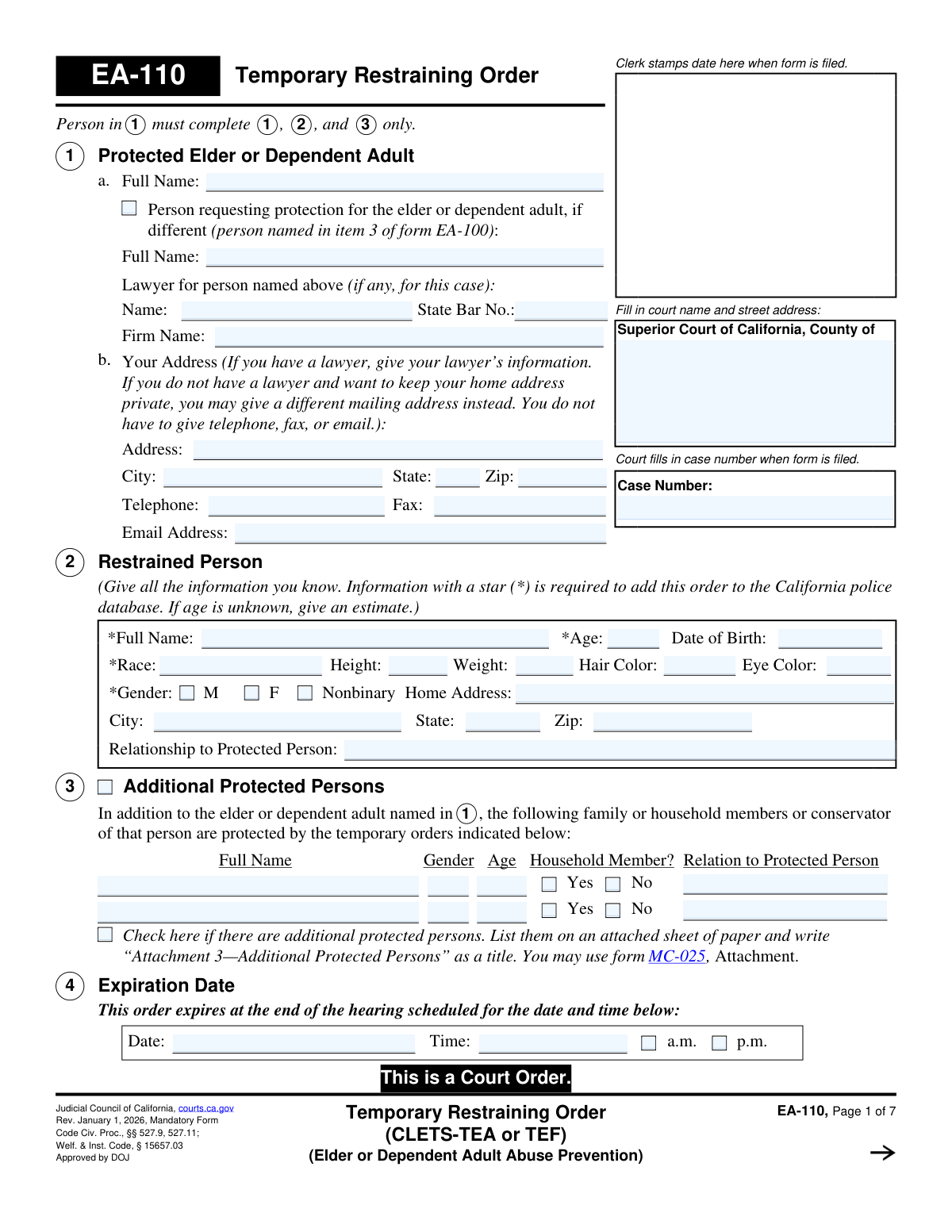
Yes! You can use AI to fill out Form EA-110, Temporary Restraining Order (CLETS—TEA or TEF) (Elder or Dependent Adult Abuse Prevention)

Form EA-110 is a mandatory Judicial Council of California form used by the court to grant a Temporary Restraining Order in cases of elder or dependent adult abuse. It details the specific prohibitions placed on the restrained person, such as no-contact and stay-away orders, until a formal court hearing can take place. This order is critical for providing immediate legal protection to vulnerable individuals. Today, this form can be filled out quickly and accurately using AI-powered services like Instafill.ai, which can also convert non-fillable PDF versions into interactive fillable forms.
EA-110 is part of the California court forms and restraining order forms categories on Instafill.
Our AI automatically handles information lookup, data retrieval, formatting, and form filling.
It takes less than a minute to fill out EA-110 using our AI form filling.
Securely upload your data. Information is encrypted in transit and deleted immediately after the form is filled out.

Form specifications

Form name: Form EA-110, Temporary Restraining Order (CLETS—TEA or TEF) (Elder or Dependent Adult Abuse Prevention)
Number of fields: 157
Number of pages: 1
Language: English
main-image

Instafill Demo: How to fill out PDF forms in seconds with AI

How to Fill Out EA-110 Online for Free in 2026

Are you looking to fill out a EA-110 form online quickly and accurately? Instafill.ai offers the #1 AI-powered PDF filling software of 2026, allowing you to complete your EA-110 form in just 37 seconds or less.
Follow these steps to fill out your EA-110 form online using Instafill.ai:
  1. 1 Navigate to Instafill.ai and upload or select the Form EA-110, Temporary Restraining Order.
  2. 2 Use the AI assistant to input the court information, case number, and the full names and addresses of the protected person, the person requesting the order, and the restrained person.
  3. 3 Provide detailed identifying information for the restrained person as required for the California police database (CLETS).
  4. 4 Clearly specify any additional protected persons and check the boxes for the specific temporary orders granted by the court, such as personal conduct, stay-away, or move-out orders.
  5. 5 Detail the court's rulings on firearms, ammunition, and animal possession, filling in descriptions and locations as ordered.
  6. 6 Confirm the hearing date and time, and specify the law enforcement agencies responsible for entering the order into the system.
  7. 7 Review all auto-filled information for accuracy, then download or print the completed form for the judicial officer's signature and filing with the court clerk.

Our AI-powered system ensures each field is filled out correctly, reducing errors and saving you time.

Why Choose Instafill.ai for Your Fillable EA-110 Form?

Speed

Complete your EA-110 in as little as 37 seconds.

Up-to-Date

Always use the latest 2026 EA-110 form version.

Cost-effective

No need to hire expensive lawyers.

Accuracy

Our AI performs 10 compliance checks to ensure your form is error-free.

Security

Your personal information is protected with bank-level encryption.

Frequently Asked Questions About Form EA-110

Form EA-110 is the official California court form for a Temporary Restraining Order (TRO) in cases of elder or dependent adult abuse. It is a court order that provides immediate, short-term protection for an elder or dependent adult until a full court hearing can be held.

The person requesting the order, or their lawyer, will fill out the initial information about the protected person (Section 1), the restrained person (Section 2), and any other protected people (Section 3). A judge will then review the request and, if granted, will complete the rest of the form to make it an official court order.

This order is temporary and is only effective until the court hearing date and time listed in Section 4. At that hearing, a judge will decide whether to issue a longer-term restraining order.

In Section 2, you must provide as much identifying information as you know, such as their full name, date of birth, and physical description. Information marked with a star (*) is required to enter the order into the police database for enforcement.

Yes, Section 1 allows you to provide a different mailing address instead of your home address if you wish to keep it private. You are not required to provide your telephone, fax, or email address.

Yes, you can list other family members, household members, or a conservator in Section 3 to be included in the protection order. The judge will decide whether to extend the temporary orders to cover them.

If the order is granted, Section 8 prohibits the restrained person from owning, possessing, or buying firearms, firearm parts, and ammunition. They must turn in, sell, or store any they have within 24 hours and file a receipt with the court.

Yes, Section 13 allows the court to grant you sole possession of your pets and order the restrained person to stay away from them. You can identify the specific animals that need protection on the form.

CLETS is the California Law Enforcement Telecommunications System. Entering the order into this statewide police database allows any law enforcement officer in California to see the order is active and enforce it immediately.

If the restrained person violates the order, call the police immediately. A violation is a crime, and law enforcement is required to arrest the person if they have probable cause to believe the order was disobeyed.

Yes, services like Instafill.ai use AI to accurately auto-fill form fields, which can save time and help prevent errors. This is particularly useful for completing the detailed information required in the first few sections of the form.

You can use a service like Instafill.ai to upload the PDF and fill it out on your computer or mobile device. This allows you to type directly into the fields, ensuring the information is neat, legible, and complete before printing.

If you have a non-fillable or 'flat' PDF, you can use a service like Instafill.ai to make it interactive. The tool can convert the static document into a fillable form that you can easily complete online.

Compliance EA-110
Validation Checks by Instafill.ai

1
Restrained Person CLETS Data Completeness
Verifies that all fields marked with a star (*) in Section 2 (Restrained Person) are filled. These fields, including Full Name, Race, and Gender, are required to add the order to the California Law Enforcement Telecommunications System (CLETS). Failure to provide this information prevents law enforcement from being able to identify the restrained person and enforce the order.
2
Restrained Person Age and DOB Consistency
Checks for logical consistency between the 'Age' and 'Date of Birth' fields in Section 2. If both are provided, the age must accurately reflect the date of birth. This validation prevents data entry errors and ensures the identifying information for the restrained person is accurate for legal and enforcement purposes. If the values are inconsistent, the form submission should be flagged for manual review.
3
Protected Elder or Dependent Adult Name Requirement
Ensures the 'Full Name' field for the Protected Elder or Dependent Adult in Section 1a is not empty. This is the primary individual the order is meant to protect, and their name is fundamental to the order's validity and purpose. A missing name would make the entire order unenforceable and legally void.
4
Order Expiration Date and Time Validity
Validates that the 'Expiration Date' and 'Time' in Section 4 are present and represent a point in the future. A temporary restraining order is time-sensitive by nature. An order with a past or invalid expiration date would be ineffective upon issuance, so this check is critical for the order to have any legal power.
5
Stay-Away Order Completeness
If the 'Stay-Away Orders' in Section 6 are 'Granted', this check ensures that the 'yards' field contains a valid positive number and that at least one location checkbox (e.g., home, job, vehicle) is selected. Without a specified distance and location, the order is ambiguous and cannot be enforced by law enforcement. This validation ensures the order is clear and actionable.
6
Move-Out Order Address Requirement
Verifies that if the 'Move-Out Order' in Section 7 is 'Granted', the corresponding address field is filled out completely. A move-out order is legally binding and requires a specific, unambiguous location from which the restrained person must leave. An empty or incomplete address makes this part of the order impossible to enforce.
7
Firearms Order and Financial Abuse Logical Link
Performs a logical cross-check between Section 8 and Section 12. The form states the firearms order must be granted unless only financial abuse is alleged. This validation ensures that if the 'No Firearms' order is 'Granted', the selection in Section 12 is not 'involve solely financial abuse'. This prevents contradictory court orders and ensures legal statutes are followed.
8
Conditional 'Other (specify)' Field Population
Checks that for any section with an 'Other (specify)' option, such as Personal Conduct Orders (5a(4)) or Stay-Away Orders (6a(6)), the corresponding text field is filled if the checkbox is selected. This prevents incomplete orders where a custom provision is indicated but not defined. An empty 'Other' field would create an unenforceable and vague directive.
9
Additional Protected Persons Attachment Check
If the checkbox in Section 3, 'Check here if there are additional protected persons,' is selected, this validation ensures that either at least one person is listed in the table or the 'Number of pages attached' in Section 17 is greater than zero. This confirms that the intent to protect additional people is matched with the required identifying information. Failure would mean these individuals are not legally protected by the order.
10
CLETS Entry Responsibility Selection
Ensures that exactly one of the three options in Section 15 (15a, 15b, or 15c) is selected. This designation is critical as it assigns clear responsibility for entering the protective order into the statewide police database (CARPOS/CLETS). Without a clear assignment, the order may never be entered, rendering it invisible to law enforcement during a traffic stop or incident.
11
CLETS Agency Information Requirement
Validates that if option 15c is selected (indicating the petitioner's lawyer will deliver the order), the 'Name of Law Enforcement Agency' and 'Address' fields are completed. This information is necessary to know which agency is tasked with entering the order into CLETS. Missing this information would leave the order in limbo with no clear path to enforcement.
12
State Bar Number Format
Checks that the 'State Bar No.' field in Section 1a, if filled, contains only numeric characters. This ensures the data integrity of the lawyer's identifying information. Incorrect formatting can lead to issues with record-keeping and lawyer verification.
13
Case Number Propagation Across Pages
Verifies that the 'Case Number' entered by the court on page 1 is correctly populated in the header of all subsequent pages (2 through 7). This is a critical document integrity check, ensuring that all pages of the order are correctly associated with each other and the proper court case. A mismatch could lead to pages being separated or misfiled, compromising the legal document.
14
Animal Protection Order Specificity
If the 'Possession and Protection of Animals' order in Section 13 is 'Granted', this check ensures the animal description field (13a) is filled out. To be enforceable, an order protecting an animal must clearly identify the animal in question. An undefined order is too vague for law enforcement to act upon.

Common Mistakes in Completing EA-110

Missing Critical Information for Law Enforcement

In Section 2, filers often omit the information marked with a star (*), such as the restrained person's race, gender, and date of birth, especially if they are uncertain. This is a critical error because this information is required to enter the restraining order into the California Law Enforcement Telecommunications System (CLETS). Without a CLETS entry, police officers cannot verify the order's existence during a traffic stop or other encounter, making it largely unenforceable and putting the protected person at risk. To avoid this, filers must provide all starred information, even if it requires estimating the person's age as the form allows.

Accidentally Disclosing a Confidential Home Address

Section 1b explicitly warns filers that they can provide a different, safe mailing address to keep their home address private. However, in the stress of the situation, many people overlook this and write down their home address. The consequence is severe: the restrained person receives a copy of this form, giving them the exact location of the person they are supposed to stay away from. To prevent this dangerous mistake, filers should carefully read Section 1b and use a P.O. Box or other secure address if they have any safety concerns.

Using Incomplete or Informal Names

Filers frequently use nicknames, initials, or incomplete names for the protected person (Section 1) or the restrained person (Section 2). This happens because they are accustomed to using these names in daily life. An order issued with an incorrect or incomplete legal name may be deemed invalid or unenforceable by law enforcement, as the name on the order won't match the person's legal identification. To ensure the order is effective, always use the full legal name for all parties as it appears on a driver's license, passport, or birth certificate.

Confusion Between the Filer and the Protected Person

Section 1a has separate fields for the 'Protected Elder or Dependent Adult' and the 'Person requesting protection... if different'. This distinction confuses many filers. An elder filing for themselves might incorrectly fill out both fields, or a family member filing on their behalf might forget to list themselves as the requester. This ambiguity can cause the court clerk to reject the form for clarification, delaying the hearing and the issuance of the protective order. It's crucial to only fill out the second name field if you are a different person filing on behalf of the elder.

Improperly Listing Additional Protected Persons

When needing to protect more than two additional people, filers often make mistakes in Section 3. They may list names on a separate sheet but forget to check the box indicating an attachment is included, or they fail to properly title the attachment as 'Attachment 3—Additional Protected Persons'. As a result, the court may overlook the attachment, and those additional family or household members will not be legally protected by the restraining order, leaving them vulnerable. Always check the box and use the specified title for any attachments.

Filling Out Sections Reserved for the Court

The form clearly instructs the petitioner to complete only Sections 1, 2, and 3. Despite this, many first-time filers attempt to fill out the entire document, including checking boxes for the specific orders in Sections 5-14. This creates unnecessary work for court staff who must correct the form and can lead to rejection by the clerk, delaying the entire process. Filers must carefully follow instructions and leave all other sections blank for the judicial officer to complete.

Providing Vague or Incomplete Physical Descriptions

In Section 2, when describing the restrained person, filers often provide vague information like 'average' for height and weight or leave fields like hair and eye color blank. This usually happens when they are rushing or don't have the information handy. A vague description severely hampers law enforcement's ability to positively identify the restrained person, which can delay or prevent enforcement of the order. Before filling out the form, filers should try to find a recent photo or other source to provide the most accurate details possible.

Omitting the Relationship to the Restrained Person

The 'Relationship to Protected Person' field at the end of Section 2 is frequently left blank. Filers may think the relationship is obvious from the context of the case or not understand its legal significance. This information is vital for the judge to understand the dynamic between the parties (e.g., caregiver, child, neighbor) and assess the level of risk involved. Omitting this detail can weaken the petition and make it harder for the judge to grasp the full situation.

Failing to Provide a Complete Address for Service

An incorrect or incomplete address for the restrained person in Section 2 is a very common and serious error. Filers may forget an apartment number or misspell a street name. The consequence is a failed 'service of process,' meaning law enforcement cannot legally notify the restrained person of the order. Until the person is properly served, the restraining order is not enforceable, leaving the protected person without protection. It is essential to double-check this address for accuracy.

Handwriting on a Non-Fillable PDF

This form is often found online as a non-fillable PDF, forcing people to print and handwrite the information. This frequently leads to illegible entries, which can be misinterpreted by the court clerk or law enforcement, or cause the form to be rejected outright. This delays the issuance of a critical protective order. To avoid this, filers can use AI-powered tools like Instafill.ai, which can convert any flat PDF into a fillable form, ensuring all entries are typed, legible, and correctly formatted, and can help validate data to prevent other errors.
Saved over 80 hours a year

“I was never sure if my IRS forms like W-9 were filled correctly. Now, I can complete the forms accurately without any external help.”

Kevin Martin Green

Your data stays secure with advanced protection from Instafill and our subprocessors

Robust compliance program

Transparent business model

You’re not the product. You always know where your data is and what it is processed for.

ISO 27001, HIPAA, and GDPR

Our subprocesses adhere to multiple compliance standards, including but not limited to ISO 27001, HIPAA, and GDPR.

Security & privacy by design

We consider security and privacy from the initial design phase of any new service or functionality. It’s not an afterthought, it’s built-in, including support for two-factor authentication (2FA) to further protect your account.

Fill out EA-110 with Instafill.ai

Worried about filling PDFs wrong? Instafill securely fills form-ea-110-temporary-restraining-order-cletstea-or-tef-elder-or-dependent-adult-abuse-prevention forms, ensuring each field is accurate.

Related forms by category

California court forms Judicial Council of California Form SC-105, Request for Court Order and Answer (Small Claims), Judicial Council of California Form SC-120, Defendant’s Claim and ORDER to Go to Small Claims Court (Small Claims), Judicial Council of California Form SER-001, Request for Sheriff to Serve Court Papers, Judicial Council of California Form SER-001, Request for Sheriff to Serve Court Papers, Affidavit for Collection of Personal Property California Probate Code Section 13100, Form POS-040, Proof of Service—Civil, Declaration of Facts of Death (California Superior Court), declaration-of-marriage-for-court-proceeding-california-family-law, ADOPT-200, Adoption Request, ADOPT-200, Stepparent Adoption Request, ADOPT-210, Adoption Agreement, ADOPT-310, Contact After Adoption Agreement, Judicial Council of California Form ADOPT-200, Adoption Request, Form ADR-107, Mediation Attendance Sheet, Form ADR-110, Order Appointing Referee, Form ADR-109, Stipulation or Motion for Order Appointing Referee, Form ADR-102, Request for Trial De Novo After Judicial Arbitration, Form ADR-108, Referee's Report (Code Civ. Proc., §§ 638, 639), Form ADR-106, Petition to Confirm, Correct, or Vacate Contractual Arbitration Award, Form ADR-104, Rejection of Award and Request for Trial After Attorney-Client Fee Arbitration · + 434 more →
restraining order forms Form DV-100, Request for Domestic Violence Restraining Order, DV-100, Request for Domestic Violence Restraining Order (Domestic Violence Prevention), Judicial Council of California Form DV-110, Temporary Restraining Order (CLETS-TRO) (Domestic Violence Prevention), Form DV-116, Order on Request to Continue Court Hearing (Temporary Restraining Order) (CLETS-TRO) (Domestic Violence Prevention), Form DV-130, Restraining Order After Hearing (Order of Protection) (Domestic Violence Prevention), Form CH-110, Temporary Restraining Order (CLETS-TCH) (Civil Harassment Prevention), Form CH-120, Response to Request for Civil Harassment Restraining Orders, Form CH-130, Civil Harassment Restraining Order After Hearing (CLETS-CHO), Order on Request to Modify/Terminate Civil Harassment Restraining Order (Civil Harassment Prevention), Form CH-100, Request for Civil Harassment Restraining Orders (Civil Harassment Prevention), Form CH-620, Response to Request to Modify/Terminate Civil Harassment Restraining Order (Civil Harassment Prevention), Form CIV-025, Application and Order for Reissuance of Order to Show Cause and Temporary Restraining Order, Form CD-190, Application for Temporary Restraining Order (Claim and Delivery), Order on Request to Continue Hearing (Temporary Restraining Order) (CLETS-TCH) (Civil Harassment Prevention), Form CH-610, Notice of Hearing on Request to Modify/Terminate Civil Harassment Restraining Order (Civil Harassment Prevention), Form CH-700, Request to Renew Restraining Order (Civil Harassment Prevention), Form CH-730, Order Renewing Civil Harassment Restraining Order (CLETS), Form DV-120, Response to Request for Domestic Violence Restraining Order (Domestic Violence Prevention), Form DV-300, Request to Change or End Restraining Order (Domestic Violence Prevention), Form DV-310, Notice of Court Hearing and Temporary Order to Change or End Restraining Order (Domestic Violence Prevention) · + 37 more →