
Yes! You can use AI to fill out Form EA-630, Order on Request to Modify/Terminate Elder or Dependent Adult Abuse Restraining Order
Don't type 94 fields by hand. Tell our AI about yourself, or upload a document you already have, and it fills every field in seconds. You check it, then download, print or sign.
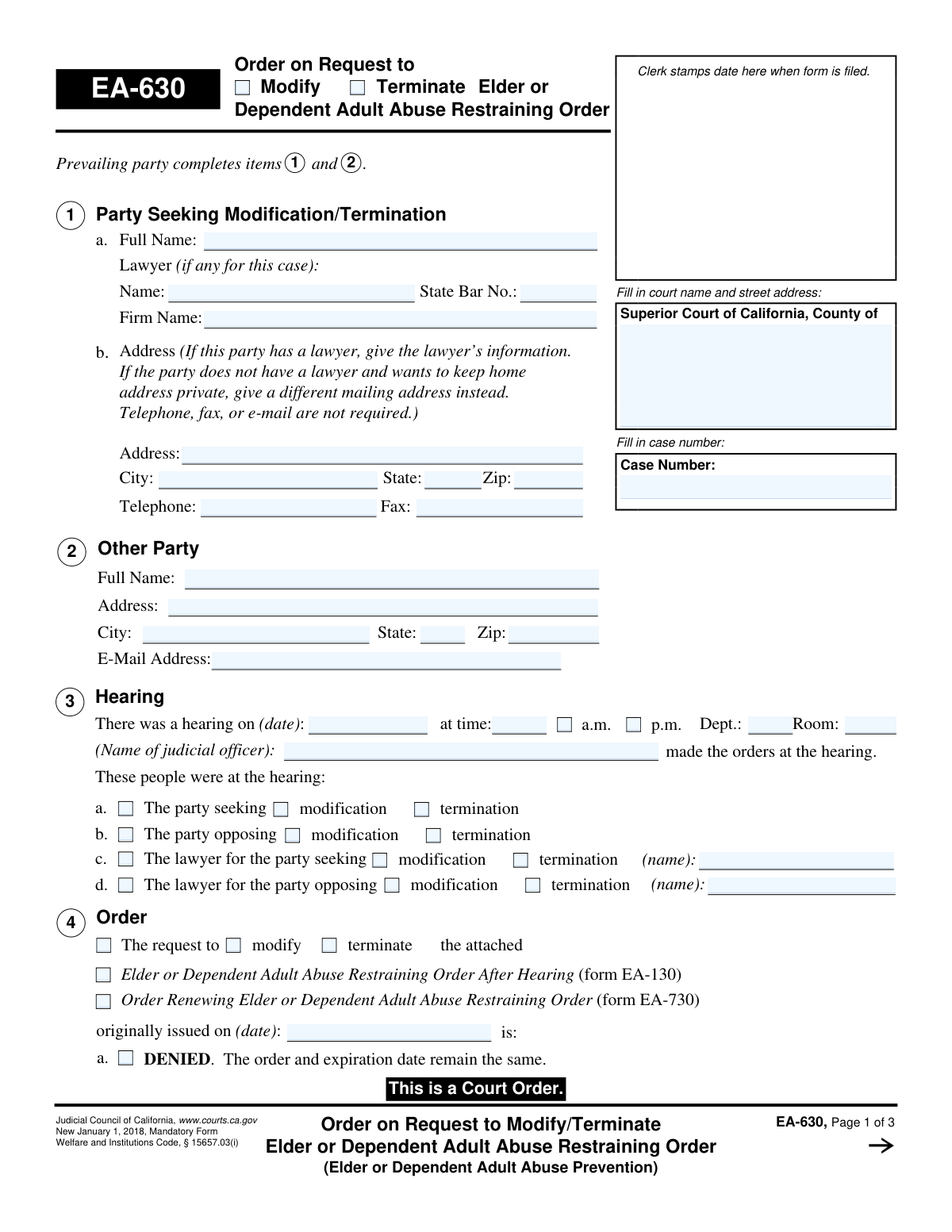
The AI does the filling. You just check it.
No typing into boxes, nothing to install.
What this form asks for
The AI fills all of it, from your answers or your documents.
The AI checks your answers before you download
13 checks built for this form, so a wrong date or a missing answer is caught before anyone else sees it.
This check ensures that the 'Case Number' field is filled on all pages of the form and that the value is identical on each page. This is critical for document integrity and correct filing, as mismatched case numbers can lead to the order being associated with the wrong legal case. If validation fails, the system should flag the discrepancy and require the user to correct the case numbers to match.
Validates that the 'Hearing on (date)' field in section 1 contains a validly formatted date that is not in the future. A hearing must have already occurred for an order to be issued based on it. An invalid or future date would render the order logically unsound and legally questionable, so the form cannot be processed until a valid past or present date is entered.
This check verifies that the 'originally issued on (date)' in section 3 is a date that occurs before the 'Hearing on (date)' in section 1. The original restraining order must exist before a hearing can be held to modify or terminate it. This validation prevents chronological errors that would invalidate the entire premise of the request.
Ensures the 'Date' next to the Judicial Officer's signature on page 3 is on or after the 'Hearing on (date)' from section 1. A judge cannot sign an order resulting from a hearing before the hearing has taken place. This check maintains the logical and legal timeline of court events, and failure would require correction before finalization.
Verifies that only one of the primary outcomes in section 4 is selected: 'DENIED' (4a), 'DENIED without prejudice' (4b), or 'GRANTED' (4c). These options are mutually exclusive. Selecting more than one creates an ambiguous and unenforceable order. The system should enforce a radio-button-like behavior, allowing only one choice.
If the order is 'GRANTED' (4c) and the 'MODIFIED' sub-option (4c(2)) is checked, this validation ensures that specific modification details are provided. The user must either fill in a new expiration date/time or check 'Below' or 'On Attachment 4c(2)' and provide the corresponding text. An order to modify without specifying the modification is incomplete and cannot be executed.
And 7 more checks
- Conditional Termination and Modification Exclusivity
- Future Expiration Date for Modifications
- Completeness of Party Information
- Lawyer State Bar Number Requirement
- Conditional Fee Award Details
- CARPOS Law Enforcement Agency Information
- Service Method for Non-Attending Party
Let AI fill out your EA-630
No typing. Every field filled in seconds, checked, ready to sign.
How to Fill Out EA-630 Online for Free in 2026
What the AI walks you through.
- Navigate to Instafill.ai and upload your Form EA-630 or select it from our template library.
- Provide the court and case information, including the court's name, address, and the specific case number.
- Enter the details of the hearing, such as the date, time, department, and the name of the judicial officer who made the order.
- Indicate the court's final decision by checking whether the request to modify or terminate the restraining order was granted, denied, or denied without prejudice.
- If the order was granted and modified, specify the exact changes, such as a new expiration date or other altered terms, as detailed by the court.
- Document any court-ordered lawyer's fees and costs, specifying who must pay whom and the amounts.
- Review the AI-populated form for accuracy, then download the completed EA-630 to be filed with the court and served as required.
Common Mistakes in Completing EA-630
The ones the AI is built to catch.
Incomplete Case Information on All Pages
Incorrectly Identifying Parties in Sections 1 and 2
Vague Description of Order Modifications
Contradictory or Missing Ruling Selection in Section 4
Disclosing a Private Home Address
Omitting Law Enforcement Agency for CARPOS Entry
Improper Personal Service by a Party
Inconsistent Checkbox Selections
Illegible Handwritten Information
Reversing Parties in the Lawyer's Fees Section
Frequently Asked Questions About EA-630
Is it really free for 7 days?
Can I fill other forms too?
How do I cancel?
How does the AI fill out EA-630?
What happens to my information?
How complex is EA-630 to fill out?
What is the purpose of Form EA-630?
Who fills out this form?
What is the difference between modifying and terminating an order?
What does it mean if the judge checks 'DENIED' in Section 4?
What happens if the judge checks 'GRANTED' in Section 4?
What is CARPOS/CLETS mentioned in Section 6?
Do I need to have this order served on the other party?
What does 'Denied without prejudice' mean?
What information is needed to complete this form?
Can the judge order the other party to pay my lawyer's fees?
Can AI tools help me prepare this form for the court?
How do I use Instafill.ai to fill out this form online?
What should I do if the PDF of Form EA-630 I downloaded is not fillable?
Get your EA-630 filled out by AI
$0 today. Cancel before Nov 1 and you pay nothing.
Other forms like this one
California court forms: Judicial Council of California Form SC-105, Request for Court Order and Answer (Small Claims), Judicial Council of California Form SC-120, Defendant’s Claim and ORDER to Go to Small Claims Court (Small Claims), Judicial Council of California Form SER-001, Request for Sheriff to Serve Court Papers, Judicial Council of California Form SER-001, Request for Sheriff to Serve Court Papers, Affidavit for Collection of Personal Property California Probate Code Section 13100, Form POS-040, Proof of Service—Civil, Declaration of Facts of Death (California Superior Court), declaration-of-marriage-for-court-proceeding-california-family-law, ADOPT-200, Adoption Request, ADOPT-200, Stepparent Adoption Request, ADOPT-210, Adoption Agreement, ADOPT-310, Contact After Adoption Agreement, Judicial Council of California Form ADOPT-200, Adoption Request, Form ADR-107, Mediation Attendance Sheet, Form ADR-110, Order Appointing Referee, Form ADR-109, Stipulation or Motion for Order Appointing Referee, Form ADR-102, Request for Trial De Novo After Judicial Arbitration, Form ADR-108, Referee's Report (Code Civ. Proc., §§ 638, 639), Form ADR-106, Petition to Confirm, Correct, or Vacate Contractual Arbitration Award, Form ADR-104, Rejection of Award and Request for Trial After Attorney-Client Fee Arbitration
restraining order forms: Form DV-100, Request for Domestic Violence Restraining Order, DV-100, Request for Domestic Violence Restraining Order (Domestic Violence Prevention), Judicial Council of California Form DV-110, Temporary Restraining Order (CLETS-TRO) (Domestic Violence Prevention), Form DV-116, Order on Request to Continue Court Hearing (Temporary Restraining Order) (CLETS-TRO) (Domestic Violence Prevention), Form DV-130, Restraining Order After Hearing (Order of Protection) (Domestic Violence Prevention), Form CH-110, Temporary Restraining Order (CLETS-TCH) (Civil Harassment Prevention), Form CH-120, Response to Request for Civil Harassment Restraining Orders, Form CH-130, Civil Harassment Restraining Order After Hearing (CLETS-CHO), Order on Request to Modify/Terminate Civil Harassment Restraining Order (Civil Harassment Prevention), Form CH-620, Response to Request to Modify/Terminate Civil Harassment Restraining Order (Civil Harassment Prevention), Form CIV-025, Application and Order for Reissuance of Order to Show Cause and Temporary Restraining Order, Form CD-190, Application for Temporary Restraining Order (Claim and Delivery), Order on Request to Continue Hearing (Temporary Restraining Order) (CLETS-TCH) (Civil Harassment Prevention), Form CH-610, Notice of Hearing on Request to Modify/Terminate Civil Harassment Restraining Order (Civil Harassment Prevention), Form CH-700, Request to Renew Restraining Order (Civil Harassment Prevention), Form CH-730, Order Renewing Civil Harassment Restraining Order (CLETS), Form DV-120, Response to Request for Domestic Violence Restraining Order (Domestic Violence Prevention), Form DV-300, Request to Change or End Restraining Order (Domestic Violence Prevention), Form DV-310, Notice of Court Hearing and Temporary Order to Change or End Restraining Order (Domestic Violence Prevention), Form DV-315, Request to Reschedule Hearing to Change or End Restraining Order (Domestic Violence Prevention)
Let AI fill out your EA-630
Your trial starts once a card is added. You pay nothing before Nov 1.
Our AI already knows this form, all 94 fields of it. Skip the typing: tell it about yourself, or upload what you have, and it fills the whole form in seconds.
- AI fills every field on all 3 pages, checkboxes included
- No typing into boxes: answer a few questions, or upload a document you already have, an old copy of this form, a photo of a document
- The AI checks the answers; you review and change anything before you download
- Download the finished PDF, print it, or sign it online
- Encrypted, and never used to train AI
Cancel before Nov 1 and you pay nothing.
A card is needed to start the trial. Cancel in two clicks from your account.
Terms · Privacy