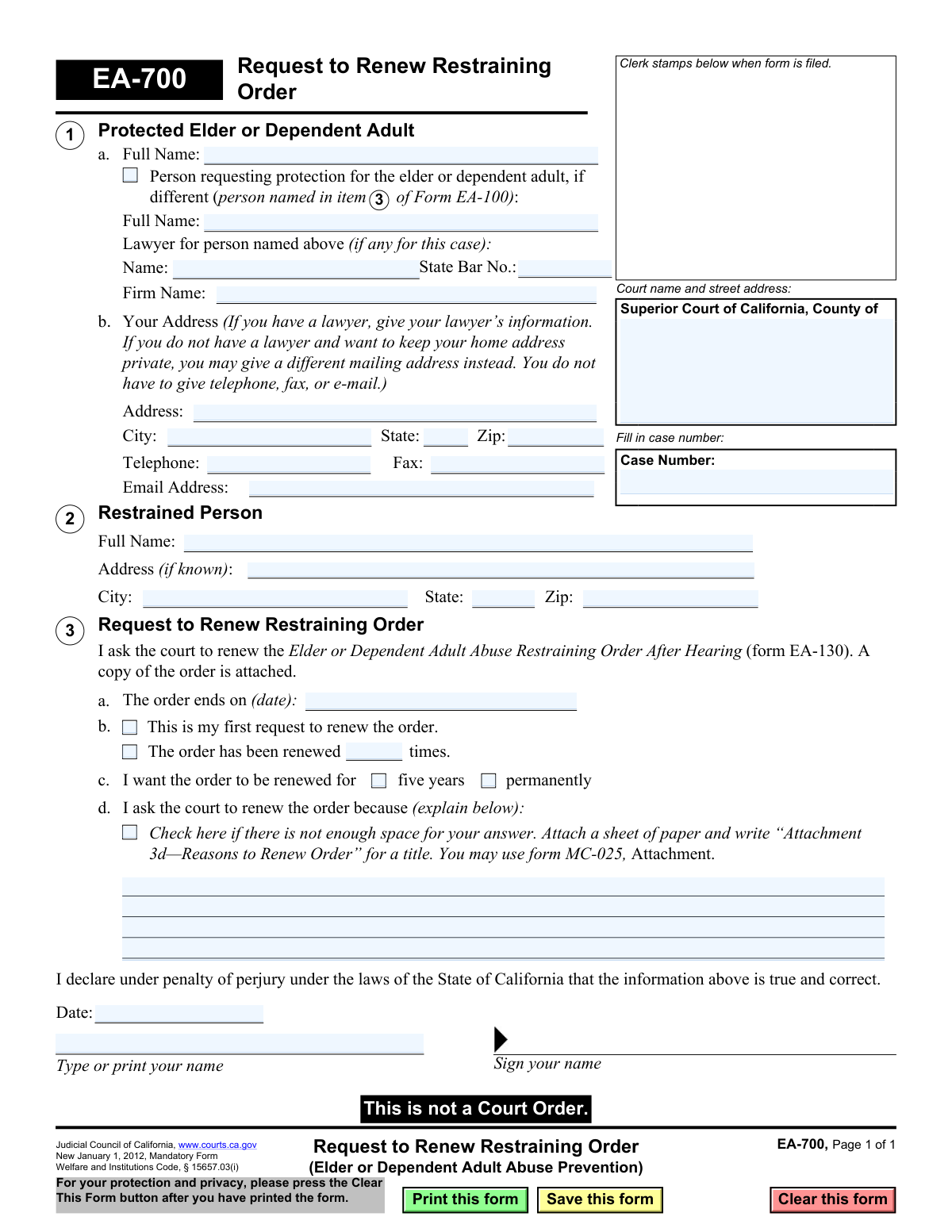
Yes! You can use AI to fill out Form EA-700, Request to Renew Restraining Order (Elder or Dependent Adult Abuse Prevention)

Form EA-700, Request to Renew Restraining Order, is a legal document filed in the Superior Court of California to extend the duration of an existing Elder or Dependent Adult Abuse Restraining Order. It is crucial for ensuring continued legal protection for a vulnerable person beyond the original order's expiration date. Today, this form can be filled out quickly and accurately using AI-powered services like Instafill.ai, which can also convert non-fillable PDF versions into interactive fillable forms.
EA-700 is part of the California court forms and restraining order forms categories on Instafill.
Our AI automatically handles information lookup, data retrieval, formatting, and form filling.
It takes less than a minute to fill out EA-700 using our AI form filling.
Securely upload your data. Information is encrypted in transit and deleted immediately after the form is filled out.

Form specifications

Form name: Form EA-700, Request to Renew Restraining Order (Elder or Dependent Adult Abuse Prevention)
Number of fields: 34
Number of pages: 1
Language: English
main-image

Instafill Demo: How to fill out PDF forms in seconds with AI

How to Fill Out EA-700 Online for Free in 2026

Are you looking to fill out a EA-700 form online quickly and accurately? Instafill.ai offers the #1 AI-powered PDF filling software of 2026, allowing you to complete your EA-700 form in just 37 seconds or less.
Follow these steps to fill out your EA-700 form online using Instafill.ai:
  1. 1 Navigate to Instafill.ai and upload or select the Form EA-700.
  2. 2 Provide the court name, address, and case number as it appears on your current restraining order.
  3. 3 Enter the full name and contact information for the protected person, their representative (if any), and the restrained person.
  4. 4 Specify the expiration date of the current restraining order and indicate if it has been renewed before.
  5. 5 Select the desired renewal period (five years or permanently) and write a clear explanation for why the renewal is necessary.
  6. 6 Use the AI to review the completed form for accuracy and completeness, then date and sign the declaration under penalty of perjury.
  7. 7 Download the completed EA-700, attach a copy of the current restraining order, and file it with the court clerk.

Our AI-powered system ensures each field is filled out correctly, reducing errors and saving you time.

Why Choose Instafill.ai for Your Fillable EA-700 Form?

Speed

Complete your EA-700 in as little as 37 seconds.

Up-to-Date

Always use the latest 2026 EA-700 form version.

Cost-effective

No need to hire expensive lawyers.

Accuracy

Our AI performs 10 compliance checks to ensure your form is error-free.

Security

Your personal information is protected with bank-level encryption.

Frequently Asked Questions About Form EA-700

Form EA-700, Request to Renew Restraining Order, is used to ask a California court to extend an existing Elder or Dependent Adult Abuse Restraining Order that is about to expire.

This form should be completed by the protected elder or dependent adult, or a person authorized to act on their behalf, who wants to continue the legal protection of a restraining order.

You should file this form with the court before your current restraining order's expiration date. It is recommended to file it several weeks in advance to allow for processing and a court hearing.

You must attach a copy of the current Elder or Dependent Adult Abuse Restraining Order After Hearing (Form EA-130) that you are asking the court to renew.

In this section, you need to explain why you still have a reasonable fear of future abuse from the restrained person. You do not have to prove new acts of abuse, but you must show why the continued protection is necessary.

Yes, the form gives you the option to request a renewal for five years or permanently. The judge will make the final decision based on the evidence and arguments presented at the hearing.

In Section 1, you may provide a different mailing address, like a P.O. Box or your lawyer's address, to keep your home address confidential. You are not required to list your home address if you have safety concerns.

Provide the most recent address you have for the restrained person in Section 2. If the address is completely unknown, you may write 'unknown' in the address fields.

No, this form is only a request for renewal. A judge must review your request and hold a hearing before deciding whether to grant the renewal and issue a new court order.

An Elder or Dependent Adult Abuse Restraining Order can be renewed multiple times. The form asks you to indicate if this is your first request or, if not, how many times it has been renewed previously.

Yes, services like Instafill.ai use AI to accurately auto-fill form fields, which can save you time and help prevent errors. This ensures all required information is entered correctly before you file.

Simply upload the EA-700 PDF to the Instafill.ai platform. The AI will identify all the form fields, allowing you to easily input your information and generate a completed, ready-to-file document.

If you have a non-fillable or 'flat' PDF, you can use a tool like Instafill.ai. It can convert the document into an interactive, fillable form online, so you can type your answers directly into the fields.

Compliance EA-700
Validation Checks by Instafill.ai

1
Case Number Presence and Format
This check ensures the 'Case Number' field is not empty and conforms to the expected format for the jurisdiction. The case number is the primary identifier linking this request to the existing court case, and its absence or incorrect format would prevent the clerk from filing the document correctly. If validation fails, the user is prompted to enter a valid case number.
2
Protected Person Name Completeness
Validates that the full name of the 'Protected Elder or Dependent Adult' in section 1 is provided. This field is mandatory as it identifies the person who the restraining order is meant to protect. A missing name makes the legal document ambiguous and unenforceable, so submission is blocked until the name is entered.
3
Restrained Person Name Completeness
Verifies that the full name of the 'Restrained Person' in section 2 has been filled in. Identifying the restrained person is a fundamental requirement for a restraining order. Failure to provide this name would make the renewal request invalid and legally meaningless, as the order would not specify who it applies to.
4
Order Expiration Date Validity
This check ensures the 'The order ends on (date)' field in section 3a contains a valid, non-empty date. This date is critical as it establishes the court's jurisdiction to renew the order before it expires. An invalid or missing date prevents the system from confirming the timeliness of the request, and the user must correct it before proceeding.
5
Mutually Exclusive Renewal History Selection
Confirms that in section 3b, the user has selected either 'This is my first request to renew' OR specified the number of previous renewals, but not both. These options are mutually exclusive and selecting both creates a logical contradiction. If both are selected, the form should display an error and require the user to choose only one option.
6
Conditional Renewal Count Requirement
This validation is triggered if the user checks 'The order has been renewed... times' in section 3b. It ensures the corresponding text field contains a positive integer (e.g., '1', '2'). This information is required by the court to understand the history of the order. If the box is checked but the number is missing or invalid, the user must provide a valid number.
7
Required Renewal Duration Selection
Ensures that in section 3c, the user has selected a renewal duration, either 'five years' or 'permanently'. The request is incomplete without specifying the desired length of the renewal. The system should prevent submission until one of these two options is chosen.
8
Renewal Justification Provided
This check verifies that a reason for renewal is provided in section 3d. It confirms that either the text box contains an explanation or the checkbox for attaching a separate sheet is checked. The justification is the legal basis for the request, and without it, a judge cannot grant the renewal. The form is invalid if no justification is indicated.
9
Declaration Date Validation
Validates that the 'Date' field in the signature section is filled with a valid date that is not in the future. This date legally attests to when the declaration was signed. A future date is logically impossible and invalidates the perjury declaration, so the system should reject it and prompt for the current or a past date.
10
Signer's Printed Name Requirement
This check ensures the 'Type or print your name' field below the signature line is completed. This field clearly identifies the person signing the document, which is essential for the declaration's validity. An empty field would make the signature difficult to attribute, so submission is blocked until the name is provided.
11
Lawyer Bar Number Consistency
If a lawyer's name is entered in section 1, this check ensures the 'State Bar No.' field is also filled and contains a numeric value. This allows the court to verify the lawyer's credentials and standing with the State Bar. An error is shown if the lawyer's name is present but the bar number is missing or non-numeric.
12
Email Address Format Validation
If a value is entered into the 'Email Address' field, this validation ensures it conforms to a standard email format (e.g., '[email protected]'). While optional, providing a valid email ensures the filer or their lawyer can receive electronic communications from the court. An invalid format could lead to missed notifications, so the user is prompted to correct it.
13
ZIP Code Format Validation
This check verifies that any entered ZIP code (for either the protected or restrained person) follows the standard 5-digit or 9-digit (ZIP+4) format. Correctly formatted ZIP codes are essential for mail delivery and data consistency within the court's system. The user is alerted to fix any non-conforming entries.
14
Court Name Completeness
Validates that the 'Court name and street address' field at the top of the form is not empty. This information is critical for routing the document to the correct courthouse for filing. A missing court name would make it impossible to process the form, so the system must require this information before submission.

Common Mistakes in Completing EA-700

Forgetting to Attach the Current Restraining Order

The form requires that a copy of the existing Elder or Dependent Adult Abuse Restraining Order (Form EA-130) be attached to the renewal request. People often forget this crucial step in their haste or due to misunderstanding, which can lead to the court clerk rejecting the filing or a judge delaying the hearing. To avoid this, locate your copy of the current order before you begin filling out the renewal form and make a clear copy to submit with your completed paperwork.

Entering an Incorrect Order Expiration Date

In section 3a, applicants must provide the exact date the current restraining order expires. A common error is guessing the date or misreading it from the original order, which can cause significant problems. If the request is filed after the order has already expired, the court cannot renew it, and the protected person would have to start the entire process over, leaving them without protection in the interim. Always double-check the expiration date on the original order (Form EA-130) before entering it.

Providing a Vague or Insufficient Reason for Renewal

Section 3d asks for an explanation of why the renewal is necessary, and simply stating 'I am still afraid' is often insufficient. The court needs to find a 'reasonable apprehension of future abuse.' Applicants frequently fail to provide specific facts, such as continued threats, stalking, third-party harassment, or violations of the current order. To avoid this, list specific incidents with dates and details, even if the restrained person has not made direct contact, and use an attachment (like Form MC-025) if more space is needed.

Incorrectly Entering the Case Number

The case number is the primary identifier for your legal proceedings, and entering it incorrectly or leaving it blank is a frequent mistake. This can cause the filing to be misdirected, delayed, or rejected outright, as the court clerk cannot link the renewal request to the existing case. To prevent this, carefully copy the complete case number from your existing court documents, such as the original restraining order. AI-powered form filling tools like Instafill.ai can help by storing and accurately populating this information across related documents.

Accidentally Disclosing a Confidential Address

Section 1b explicitly states that you can use a different mailing address to keep your home address private, which is a critical safety feature. However, out of habit, people often fill in their actual home address, potentially exposing their location to the person they are trying to be protected from. Always use a secure address, like a P.O. Box or a lawyer's address, if you have safety concerns. This mistake can have severe consequences for the protected person's safety.

Failing to Sign or Date the Form

An unsigned or undated form is legally invalid and will be immediately rejected by the court clerk. This mistake often happens when people are rushing to file and simply overlook the signature block at the bottom of the page. This can lead to critical delays, potentially causing the existing order to expire before a valid renewal can be filed. Always perform a final review of the form, paying special attention to the signature and date fields, before submitting it.

Confusing the 'Protected Person' and 'Person Requesting Protection'

In section 1, there are fields for both the 'Protected Elder or Dependent Adult' and, if different, the person requesting the protection on their behalf. Filers can get confused and put their own name in the 'Protected Person' field when they are actually a family member or guardian filing the request. This creates confusion and can delay the case. Carefully read the instructions to ensure the correct names are entered in the appropriate fields based on who the order is meant to protect.

Incomplete Information for the Restrained Person

Section 2 asks for the restrained person's information, including their address 'if known.' While it may be difficult to obtain, providing an incomplete or outdated address can hinder the legal requirement of serving the restrained person with notice of the renewal hearing. People may leave it blank even if they have a last known address. It is crucial to provide the most recent and complete address possible to ensure proper legal service and avoid delays or dismissal of the request.

Incorrectly Marking Renewal History

In section 3b, the form asks if this is the first renewal request or if the order has been renewed before. People sometimes misremember or fail to check their records, leading them to check the wrong box. This can cause confusion for the judge reviewing the case history. Before filling out this section, review your case file to confirm if any prior renewals have been granted and accurately report the number of times.

Using a Non-Fillable PDF and Submitting Illegible Handwriting

Many court forms are distributed as non-fillable PDFs, forcing users to print them and fill them out by hand. This often results in illegible handwriting, which can cause data entry errors by court staff, misinterpretation of crucial information, or outright rejection of the form. To avoid this, use a tool like Instafill.ai that can convert flat PDFs into fillable forms, allowing you to type your answers clearly and ensure the document is professional and easy to process.
Saved over 80 hours a year

“I was never sure if my IRS forms like W-9 were filled correctly. Now, I can complete the forms accurately without any external help.”

Kevin Martin Green

Your data stays secure with advanced protection from Instafill and our subprocessors

Robust compliance program

Transparent business model

You’re not the product. You always know where your data is and what it is processed for.

ISO 27001, HIPAA, and GDPR

Our subprocesses adhere to multiple compliance standards, including but not limited to ISO 27001, HIPAA, and GDPR.

Security & privacy by design

We consider security and privacy from the initial design phase of any new service or functionality. It’s not an afterthought, it’s built-in, including support for two-factor authentication (2FA) to further protect your account.

Fill out EA-700 with Instafill.ai

Worried about filling PDFs wrong? Instafill securely fills form-ea-700-request-to-renew-restraining-order-elder-or-dependent-adult-abuse-prevention forms, ensuring each field is accurate.

Related forms by category

California court forms Judicial Council of California Form SC-105, Request for Court Order and Answer (Small Claims), Judicial Council of California Form SC-120, Defendant’s Claim and ORDER to Go to Small Claims Court (Small Claims), Judicial Council of California Form SER-001, Request for Sheriff to Serve Court Papers, Judicial Council of California Form SER-001, Request for Sheriff to Serve Court Papers, Affidavit for Collection of Personal Property California Probate Code Section 13100, Form POS-040, Proof of Service—Civil, Declaration of Facts of Death (California Superior Court), declaration-of-marriage-for-court-proceeding-california-family-law, ADOPT-200, Adoption Request, ADOPT-200, Stepparent Adoption Request, ADOPT-210, Adoption Agreement, ADOPT-310, Contact After Adoption Agreement, Judicial Council of California Form ADOPT-200, Adoption Request, Form ADR-107, Mediation Attendance Sheet, Form ADR-110, Order Appointing Referee, Form ADR-109, Stipulation or Motion for Order Appointing Referee, Form ADR-102, Request for Trial De Novo After Judicial Arbitration, Form ADR-108, Referee's Report (Code Civ. Proc., §§ 638, 639), Form ADR-106, Petition to Confirm, Correct, or Vacate Contractual Arbitration Award, Form ADR-104, Rejection of Award and Request for Trial After Attorney-Client Fee Arbitration · + 268 more →
restraining order forms Form DV-100, Request for Domestic Violence Restraining Order, DV-100, Request for Domestic Violence Restraining Order (Domestic Violence Prevention), Judicial Council of California Form DV-110, Temporary Restraining Order (CLETS-TRO) (Domestic Violence Prevention), Form DV-116, Order on Request to Continue Court Hearing (Temporary Restraining Order) (CLETS-TRO) (Domestic Violence Prevention), Form DV-130, Restraining Order After Hearing (Order of Protection) (Domestic Violence Prevention), Form CH-110, Temporary Restraining Order (CLETS-TCH) (Civil Harassment Prevention), Form CH-120, Response to Request for Civil Harassment Restraining Orders, Form CH-130, Civil Harassment Restraining Order After Hearing (CLETS-CHO), Order on Request to Modify/Terminate Civil Harassment Restraining Order (Civil Harassment Prevention), Form CH-100, Request for Civil Harassment Restraining Orders (Civil Harassment Prevention), Form CH-620, Response to Request to Modify/Terminate Civil Harassment Restraining Order (Civil Harassment Prevention), Form CIV-025, Application and Order for Reissuance of Order to Show Cause and Temporary Restraining Order, Form CD-190, Application for Temporary Restraining Order (Claim and Delivery), Order on Request to Continue Hearing (Temporary Restraining Order) (CLETS-TCH) (Civil Harassment Prevention), Form CH-610, Notice of Hearing on Request to Modify/Terminate Civil Harassment Restraining Order (Civil Harassment Prevention), Form CH-700, Request to Renew Restraining Order (Civil Harassment Prevention), Form CH-730, Order Renewing Civil Harassment Restraining Order (CLETS), Form DV-120, Response to Request for Domestic Violence Restraining Order (Domestic Violence Prevention), Form DV-300, Request to Change or End Restraining Order (Domestic Violence Prevention), Form DV-310, Notice of Court Hearing and Temporary Order to Change or End Restraining Order (Domestic Violence Prevention) · + 23 more →