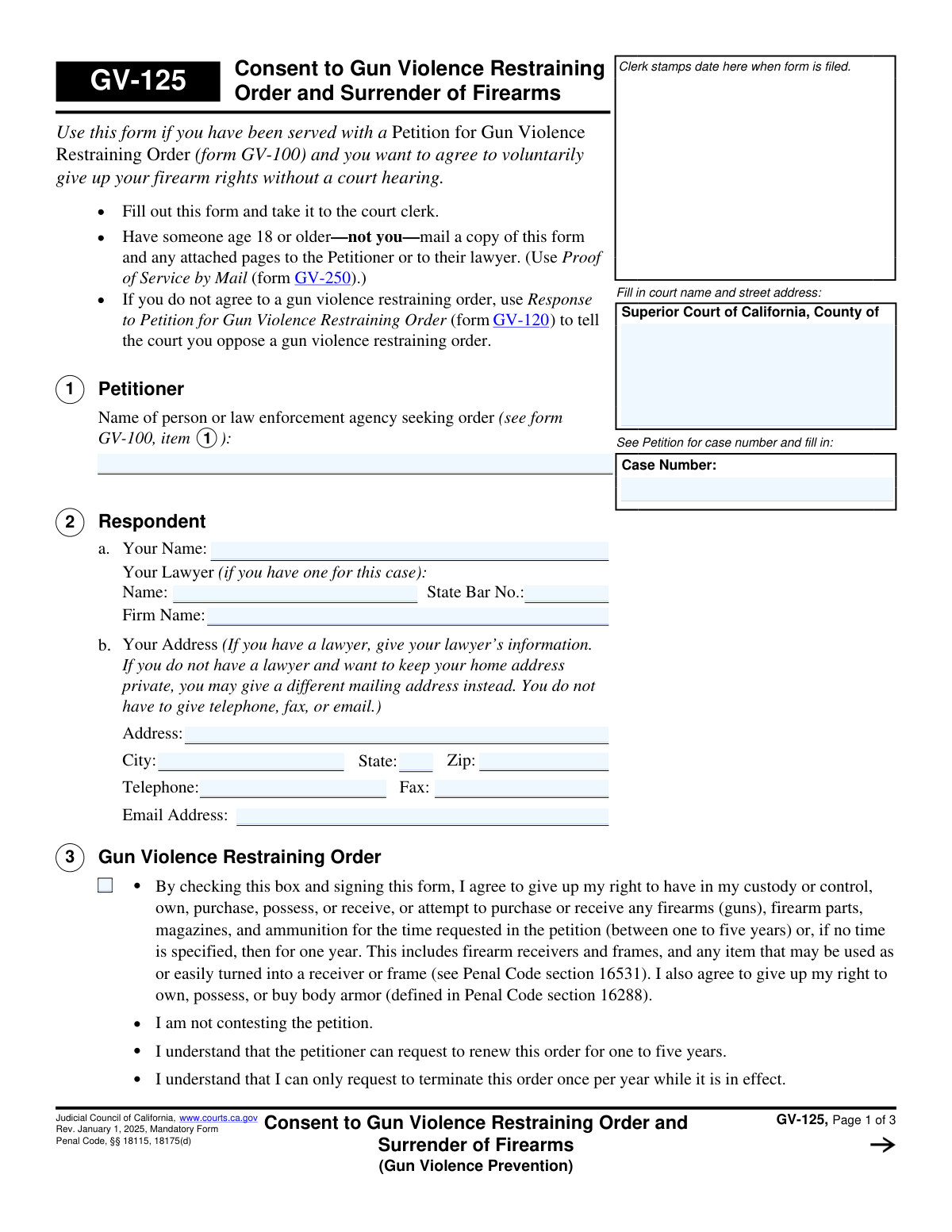
Yes! You can use AI to fill out Form GV-125, Consent to Gun Violence Restraining Order and Surrender of Firearms
Form GV-125, Consent to Gun Violence Restraining Order and Surrender of Firearms, is a legal document for respondents in California who wish to voluntarily agree to a gun violence restraining order without a court hearing. By filing this form, an individual consents to surrendering their firearms, ammunition, and body armor for a specified period, acknowledging they are not contesting the petition. Today, this form can be filled out quickly and accurately using AI-powered services like Instafill.ai, which can also convert non-fillable PDF versions into interactive fillable forms.
Our AI automatically handles information lookup, data retrieval, formatting, and form filling.
It takes less than a minute to fill out GV-125 using our AI form filling.
Securely upload your data. Information is encrypted in transit and deleted immediately after the form is filled out.
Form specifications
| Form name: | Form GV-125, Consent to Gun Violence Restraining Order and Surrender of Firearms |
| Number of fields: | 35 |
| Number of pages: | 1 |
| Language: | English |
Instafill Demo: How to fill out PDF forms in seconds with AI
How to Fill Out GV-125 Online for Free in 2026
Are you looking to fill out a GV-125 form online quickly and accurately? Instafill.ai offers the #1 AI-powered PDF filling software of 2026, allowing you to complete your GV-125 form in just 37 seconds or less.
Follow these steps to fill out your GV-125 form online using Instafill.ai:
- 1 Navigate to Instafill.ai and upload or select the GV-125 form.
- 2 Use the AI assistant to accurately fill in the Superior Court name, address, and the case number from the Petition (Form GV-100).
- 3 Enter your personal details and your lawyer's information (if applicable) in the Respondent section.
- 4 Review and check the box in Section 3 to formally consent to the Gun Violence Restraining Order and acknowledge the surrender of your rights.
- 5 Complete Sections 4 and 5, indicating whether you own firearms or body armor and detailing their surrender or sale, attaching receipts as necessary.
- 6 Electronically sign and date the form, declaring under penalty of perjury that the information is true and correct.
- 7 Download the completed form and follow the court's instructions for filing it with the court clerk and serving a copy on the petitioner.
Our AI-powered system ensures each field is filled out correctly, reducing errors and saving you time.
Why Choose Instafill.ai for Your Fillable GV-125 Form?
Speed
Complete your GV-125 in as little as 37 seconds.
Up-to-Date
Always use the latest 2026 GV-125 form version.
Cost-effective
No need to hire expensive lawyers.
Accuracy
Our AI performs 10 compliance checks to ensure your form is error-free.
Security
Your personal information is protected with bank-level encryption.
Frequently Asked Questions About Form GV-125
This form allows you to voluntarily agree to a Gun Violence Restraining Order and surrender your firearms without a court hearing. It is for individuals who have been served with a Petition for a Gun Violence Restraining Order (Form GV-100) and do not wish to contest it.
You should fill out this form if you are the 'Respondent' named in a Petition for a Gun Violence Restraining Order (GV-100) and you choose to consent to the order instead of opposing it in court.
If you do not agree to the restraining order, you should not use this form. Instead, you must fill out and file a 'Response to Petition for Gun Violence Restraining Order' (Form GV-120) to state your opposition to the court.
No, the purpose of this form is to consent to the order without a court hearing. By filing it, you are agreeing to the order, and the scheduled hearing will be canceled.
The order will last for the time requested in the original petition, which is typically between one and five years. If no time was specified, the order will last for one year.
You must sell your firearms to a licensed dealer, store them with a dealer, or turn them in to a law enforcement agency within 48 hours of filing this form. You must then file a receipt (like Form GV-800) with the court as proof.
You must still complete the form. In Section 4, check box 4a to declare you do not own firearms, and in Section 5, check box 5a to declare you do not own body armor.
You must file the completed form with the court clerk. Then, you must have someone who is 18 or older—and not you—mail a copy to the petitioner or their lawyer and complete a Proof of Service by Mail (Form GV-250).
The court will issue the Gun Violence Restraining Order (Form GV-130) and mail you a copy. The order will also be entered into the statewide California Restraining and Protective Order System (CARPOS), making it accessible to all law enforcement.
The order is in effect for one to five years and can be renewed by the petitioner. While the order is active, you can only request to terminate it once per year by filing a request with the court.
Yes, services like Instafill.ai use AI to help you accurately auto-fill form fields, which can save time and reduce errors. This is especially helpful for ensuring your personal information is entered correctly across all required forms.
You can use a service like Instafill.ai to fill out the form online. Their platform allows you to enter your information once and it will populate the correct fields on the form, which you can then download and print for filing.
If you have a non-fillable PDF, you can upload it to a service like Instafill.ai. Their technology can convert flat, non-interactive PDFs into fillable forms that you can complete on your computer.
Compliance GV-125
Validation Checks by Instafill.ai
1
Case Number Presence and Consistency
This check ensures that the 'Case Number' field is filled out on the first page and that the same number is populated consistently on all subsequent pages. The case number is the primary identifier linking this consent form to the original petition, and its absence or inconsistency would make it impossible for the court clerk to file the document correctly. Failure would result in the form being rejected for processing.
2
Petitioner Name Completeness
Validates that the 'Petitioner' name field in item 1 is not empty. This field identifies the person or law enforcement agency that initiated the restraining order process. This information is crucial for legal record-keeping and ensuring the consent is applied to the correct case. If this field is left blank, the form is incomplete and cannot be processed.
3
Respondent Name Completeness
Ensures that the respondent's name in item 2a, 'Your Name', is filled out. The respondent is the individual agreeing to the restraining order, making their identification fundamental to the form's validity. An empty name field would render the entire consent document legally meaningless. The form would be rejected by the court clerk.
4
Mandatory Consent Checkbox
This validation confirms that the checkbox in item 3, 'By checking this box and signing this form, I agree...', is selected. This checkbox signifies the respondent's explicit consent to the terms of the Gun Violence Restraining Order. Without this check, the form does not serve its purpose as a consent document and is invalid.
5
Mutually Exclusive Firearm Status Declaration
Verifies that in item 4, only one of the two main options is selected: either 4a ('I do not own...') or 4b ('I have turned in...'). A respondent cannot simultaneously own no firearms and have turned in firearms. Selecting both options creates a logical contradiction, while selecting neither leaves the firearm status ambiguous. The form should be flagged for correction if both or neither are checked.
6
Firearm Receipt Status Dependency
This check is dependent on the selection in item 4. If checkbox 4b ('I have turned in my firearms...') is selected, this validation ensures that one of the two sub-options ('is attached' or 'has already been filed with the court') is also checked. This provides the court with necessary information on the status of the firearm surrender receipt. Failure to select a sub-option makes the declaration in 4b incomplete.
7
Body Armor Status Completeness
Validates that at least one of the checkboxes in item 5 (5a, 5b, or 5c) regarding body armor has been selected. The respondent must make a declaration about their possession of body armor. Leaving this section blank fails to address a key prohibition of the restraining order, making the form incomplete and requiring user correction.
8
Respondent Signature and Date Presence
Confirms that the respondent has signed the form ('Sign your name') and provided a date under the perjury declaration. A signature is essential to legally bind the respondent to their declaration and consent. The date establishes when the declaration was made. An unsigned or undated form is legally invalid and will be rejected.
9
Signature Date Validity
Checks that the 'Date' provided next to the respondent's signature is a valid calendar date and is not a future date. A post-dated signature would invalidate the declaration, as one cannot declare something under penalty of perjury on a future date. This ensures the form is executed correctly at the time of submission.
10
Lawyer Information and Signature Consistency
If the 'Lawyer Name' field is filled out in item 2, this check ensures the corresponding 'State Bar No.' is also provided and that the lawyer's signature and printed name appear in the signature block at the end of page 2. This confirms that legal counsel has reviewed and is party to the filing. Incomplete lawyer information can cause processing delays or questions about representation.
11
State Bar Number Format
Validates that the 'State Bar No.' field in item 2, if provided, contains only numbers and conforms to the expected format (e.g., a 6-digit number for California). This helps ensure the attorney listed is legitimate and can be easily identified in the state bar's records. An invalid format could indicate a typo or incorrect information.
12
Court Information Presence
This check ensures the court name and street address fields at the top of page 1 are filled in. This information is mandatory for the court clerk to identify the correct jurisdiction and courthouse for filing. A form submitted without this information cannot be officially filed and will be returned to the submitter.
Common Mistakes in Completing GV-125
Respondents often mistype the case number from the original petition (GV-100) or forget to enter it on the top of pages 2 and 3. This happens due to simple oversight or difficulty locating the number on the source document. An incorrect case number can cause significant delays, as the clerk's office may be unable to match the consent form to the correct court file, potentially leading to a missed filing deadline. To avoid this, double-check the case number on form GV-100 and ensure it is transcribed accurately on all pages of this form.
The person filling out this form is the 'Respondent,' but they sometimes mistakenly enter their own name in the 'Petitioner' field (Item 1). This confusion arises because they are the one completing the document. This error can lead to the form being rejected by the court clerk, as it incorrectly identifies the parties involved in the legal action. Always copy the Petitioner's name exactly as it appears on the Petition for Gun Violence Restraining Order (form GV-100) and enter your own information in the 'Respondent' section (Item 2).
The instructions state that someone else, aged 18 or older, must mail a copy of the filed form to the Petitioner, but respondents often mail it themselves. This procedural error invalidates the 'proof of service' (form GV-250), which can nullify the filing and lead to complications if the petitioner claims they were never notified of the consent. To prevent this, you must have a third party handle the mailing and properly complete the Proof of Service by Mail form.
A common mistake is checking box 4b (indicating firearms were surrendered) but failing to attach or file the required receipt (form GV-800). Another error is checking both 4a ('I do not own any firearms') and 4b, creating a contradiction. These mistakes can lead to legal jeopardy, as it appears the respondent is either being dishonest or has not complied with the mandatory surrender process within the 48-hour deadline. Ensure you select only one option and, if choosing 4b, immediately surrender the items and file the receipt with the court.
Respondents may check the consent box in Item 3 without fully comprehending that they are voluntarily agreeing to a restraining order for one to five years without a court hearing. This is not a temporary measure; it is a binding legal agreement with significant consequences, including the loss of Second Amendment rights and entry into the CARPOS database. Before checking this box, carefully read the entire section and consider seeking legal advice to understand the long-term implications of consenting to the order.
Forgetting to sign and date the declaration under penalty of perjury on page 2 is a frequent and critical error. An unsigned form is legally invalid and will be rejected by the court, meaning your consent is not officially recorded. This can result in the court proceeding with the scheduled hearing as if you never responded. Always review the form before filing, ensuring you have provided a handwritten signature and the current date in the designated spaces.
Respondents without a lawyer often miss the instruction that they can provide an alternative mailing address to keep their home address private. Instead, they list their confidential home address, which then becomes part of the public court record. Conversely, if they do have a lawyer, they might fill in their own address instead of their lawyer's, which is incorrect. To avoid this, carefully read the instructions in Item 2b and provide the appropriate address based on your legal representation and privacy needs.
A person who wishes to fight the restraining order may mistakenly fill out this consent form (GV-125) instead of the 'Response to Petition for Gun Violence Restraining Order' (GV-120). This catastrophic error results in the court issuing the very order the person intended to oppose. To avoid this, read the form's purpose carefully; use this form (GV-125) only if you agree to the order, and use form GV-120 if you wish to present your case to a judge.
In Item 5, individuals may check conflicting options, such as both 'I do not own' and 'I have relinquished' body armor. Another common error is checking box 5c to request an exception without having or attaching the required letter of permission from a chief of police or sheriff. These errors create ambiguity and can lead to compliance issues, as the court cannot clearly determine your status. Carefully select only the checkboxes that apply to your situation and ensure you have the necessary documentation before claiming an exception.
Many court forms are provided as non-fillable PDFs, forcing users to print and fill them out by hand, which often leads to illegible handwriting and data entry errors. Even with fillable PDFs, users may not know how to properly select checkboxes or save their progress. This can result in a messy, unprofessional, or incomplete submission that may be difficult for the court to process. AI-powered tools like Instafill.ai can convert flat PDFs into fillable forms and help auto-fill information clearly and accurately, reducing the chance of manual errors.
Saved over 80 hours a year
“I was never sure if my IRS forms like W-9 were filled correctly. Now, I can complete the forms accurately without any external help.”
Kevin Martin Green
Your data stays secure with advanced protection from Instafill and our subprocessors

Robust compliance program
Transparent business model
You’re not the product. You always know where your data is and what it is processed for.
ISO 27001, HIPAA, and GDPR
Our subprocesses adhere to multiple compliance standards, including but not limited to ISO 27001, HIPAA, and GDPR.
Security & privacy by design
We consider security and privacy from the initial design phase of any new service or functionality. It’s not an afterthought, it’s built-in, including support for two-factor authentication (2FA) to further protect your account.
Fill out GV-125 with Instafill.ai
Worried about filling PDFs wrong? Instafill securely fills form-gv-125-consent-to-gun-violence-restraining-order-and-surrender-of-firearms forms, ensuring each field is accurate.