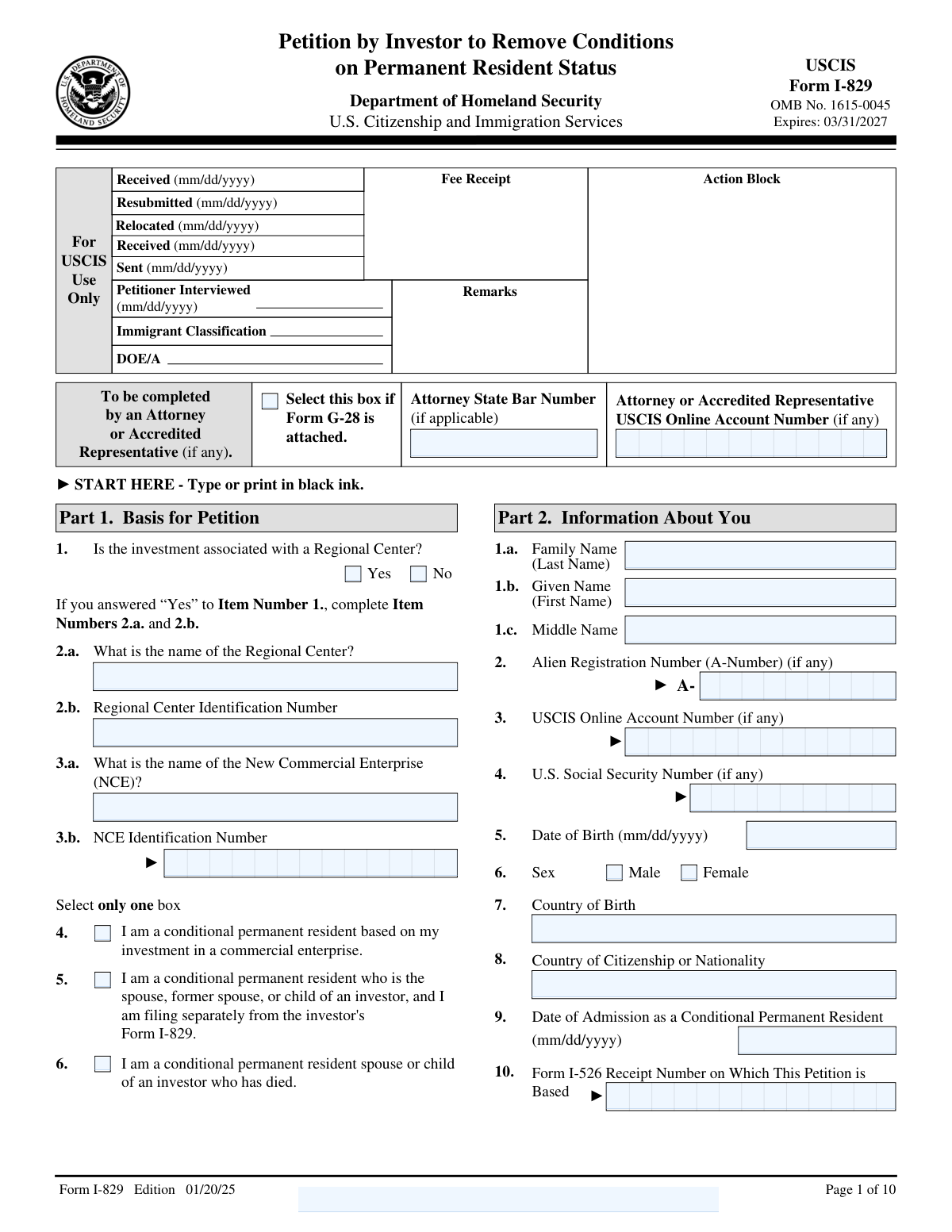
Yes! You can use AI to fill out Form I-829, Petition by Investor to Remove Conditions on Permanent Resident Status

Form I-829 is a petition filed with U.S. Citizenship and Immigration Services (USCIS) by an immigrant investor who obtained conditional permanent residency through the EB-5 program. This petition is the final step to prove that the investor has met all program requirements, such as sustaining their investment and creating the necessary jobs, in order to remove the conditions and become a lawful permanent resident. Filing this petition correctly is crucial for securing permanent status, and today this form can be filled out quickly and accurately using AI-powered services like Instafill.ai, which can also convert non-fillable PDF versions into interactive fillable forms.
Our AI automatically handles information lookup, data retrieval, formatting, and form filling.
It takes less than a minute to fill out I-829 using our AI form filling.
Securely upload your data. Information is encrypted in transit and deleted immediately after the form is filled out.

Form specifications

Form name: Form I-829, Petition by Investor to Remove Conditions on Permanent Resident Status
Number of fields: 359
Number of pages: 10
Language: English
main-image

Instafill Demo: How to fill out PDF forms in seconds with AI

How to Fill Out I-829 Online for Free in 2026

Are you looking to fill out a I-829 form online quickly and accurately? Instafill.ai offers the #1 AI-powered PDF filling software of 2026, allowing you to complete your I-829 form in just 37 seconds or less.
Follow these steps to fill out your I-829 form online using Instafill.ai:
  1. 1 Navigate to Instafill.ai and upload or select Form I-829 from the form library.
  2. 2 Provide your personal information, including your name, A-Number, USCIS Online Account Number, and contact details as prompted by the AI.
  3. 3 Enter detailed information about the New Commercial Enterprise (NCE) and the Regional Center, including ID numbers, investment amounts, and business details.
  4. 4 Fill in the sections for your spouse and children, providing their biographic data, immigration status, and addresses.
  5. 5 Supply information about the Job Creating Entity (JCE) and document the number of full-time jobs created or sustained as a result of your investment.
  6. 6 Complete the biographic and criminal history sections, then use the additional information part if you need to provide further explanations for any questions.
  7. 7 Review all the information auto-filled by the AI for accuracy, then download the completed, ready-to-print form, sign it, and file with USCIS along with required evidence.

Our AI-powered system ensures each field is filled out correctly, reducing errors and saving you time.

Why Choose Instafill.ai for Your Fillable I-829 Form?

Speed

Complete your I-829 in as little as 37 seconds.

Up-to-Date

Always use the latest 2026 I-829 form version.

Cost-effective

No need to hire expensive lawyers.

Accuracy

Our AI performs 10 compliance checks to ensure your form is error-free.

Security

Your personal information is protected with bank-level encryption.

Frequently Asked Questions About Form I-829

This form, likely the USCIS Form I-829, is used by conditional permanent residents who obtained status through an EB-5 investment to petition for the removal of conditions on their residency.

This form must be filed by an EB-5 investor who is a conditional permanent resident. Their conditional resident spouse and children may be included on the same petition if they are applying with the investor.

You will need your Alien Registration Number (A-Number), your U.S. Social Security Number (if any), and the receipt number from your original Form I-526 petition.

You must provide the full name of the Regional Center and its specific USCIS-assigned identification number. You will also need to provide details about the New Commercial Enterprise (NCE) associated with the center.

Part 3 is dedicated to information about your spouse, and Part 4 is for your children. You must provide their personal details and indicate whether they are applying with you on this form.

Enter your mailing address in Item Number 14. Then, select 'No' in Item Number 15 and provide your complete physical address in the fields for Item Number 16.

In Part 8, you must report the number of full-time jobs at the New Commercial Enterprise (NCE) when you invested and at the time of filing. If applicable, you must also provide details on indirect jobs created.

You must disclose in Part 8 if the investment or job creation did not follow the original business plan. Use Part 12, 'Additional Information,' to provide a full explanation of any changes.

Yes, in Item 17 you must disclose if you have EVER been arrested, cited, or charged for violating any law since becoming a conditional resident, excluding only minor traffic violations. You should provide details and any relevant court dispositions.

No, the form instructions state that you cannot type your name as a signature. You must print the completed form and provide a physical, handwritten signature in ink.

Yes, services like Instafill.ai use AI to help you accurately auto-fill form fields from your documents and data. This can save time and reduce the risk of errors on long, detailed forms like this one.

Simply upload the form to the Instafill.ai platform. The AI will identify all the fields, and you can answer straightforward questions to have your information automatically and accurately placed into the correct sections.

You can use a service like Instafill.ai, which is designed to convert flat, non-fillable PDFs into interactive, fillable forms. This allows you to easily type your information before printing the form for signature.

Compliance I-829
Validation Checks by Instafill.ai

1
Conditional Requirement for Attorney Information
This validation ensures that the 'Attorney State Bar Number' and 'Attorney or Accredited Representative USCIS Online Account Number' fields are only populated if the 'Select this box if Form G-28 is attached' checkbox is marked as 'Yes'. This prevents the submission of unnecessary or irrelevant attorney data and maintains the logical integrity of the form. If the G-28 box is not checked but attorney details are present, the system should flag an error and require the user to either check the box or clear the attorney fields.
2
Conditional Requirement for Regional Center Information
This check verifies that the 'Regional Center Identification Number' and 'Regional Center Name' fields are completed if, and only if, the 'Is the investment associated with a Regional Center? — Yes' option is selected. This is crucial for ensuring that all required information for a regional center-based petition is captured accurately. If 'Yes' is selected but the details are missing, the submission should be blocked until the information is provided.
3
Exclusive Selection for Regional Center Association
This validation confirms that the user has selected either 'Yes' or 'No' for the question 'Is the investment associated with a Regional Center?', but not both. This question is fundamental to the structure of the petition, and a single, unambiguous answer is required. A failure to select one option, or selecting both, should result in a validation error prompting the user to make a single, definitive choice.
4
Exclusive Selection for Basis of Petition
This check ensures that exactly one of the three eligibility categories under 'Basis for Petition' is selected. The petitioner's eligibility is a core component of the application, and selecting multiple or no categories would make the petition invalid and impossible to process. If this rule is violated, the form submission must be prevented, and the user must be instructed to select only one applicable basis for their petition.
5
Conditional Display and Requirement of Physical Address
This validation enforces the rule that the physical address fields (Item Numbers 16.a–16.h) are required and available for entry only when the user selects 'No' for the question 'Is your U.S. mailing address the same as your physical address?'. This prevents redundant data entry and ensures a physical address is captured when necessary for identity verification or other official purposes. If 'No' is selected, the physical address fields must be completed before submission is allowed.
6
Logical Date Sequence for Birth and Admission
This check verifies that the 'Date of Admission as a Conditional Permanent Resident' is chronologically after the petitioner's 'Date of Birth'. It is logically impossible for a person to be admitted to a country before they were born. This validation prevents data entry errors that could lead to immediate rejection or significant processing delays, flagging an error if the admission date precedes the birth date.
7
Completeness of Applicant's Legal Name
This validation ensures that the 'Given Name (First Name)' and 'Family Name (Last Name)' fields for the petitioner are not left blank. These fields are the primary identifiers for the individual and are mandatory for any legal or governmental form. A failure to provide this information would render the petition incomplete and unidentifiable, so submission must be blocked until both fields are populated.
8
Alien Registration Number (A-Number) Format
This check validates that the 'Alien Registration Number (A-Number)' follows the standard USCIS format, which is typically the letter 'A' followed by eight or nine digits (e.g., A123456789). Correct formatting is essential for matching the petition to the correct immigration file within government systems. An incorrectly formatted A-Number will cause a validation failure, prompting the user to correct the entry to match the required pattern.
9
Form I-526 Receipt Number Format
This validation ensures the 'Form I-526 Receipt Number' adheres to the standard USCIS receipt number format, which consists of three letters followed by ten digits (e.g., EAC2190151234). This number is critical as it links this petition to the original approved investor petition. If the format is incorrect, the system will be unable to locate the prerequisite case, so the user must be prompted to enter the number exactly as it appears on their receipt notice.
10
Job Creation Calculation Verification
This check validates the auto-calculated field 'difference in number of full - time direct and qualifying employees' (1.C). The system should verify that the value in this field is equal to the 'number of employees at time of filing' (1.B) minus the 'number of employees at time of initial investment' (1.A). This ensures the integrity of the form's calculations and confirms a key data point for petition eligibility. If the calculation is incorrect, it indicates a system error that must be resolved.
11
Logical Date Sequence for Marriage and Termination
This validation rule applies to the spouse information in Part 3 and ensures that if a 'Date Marriage Terminated' is entered, it must be on or after the 'Date of Marriage'. A marriage cannot end before it has begun, and this check prevents simple but critical data entry errors. If the termination date is earlier than the marriage date, the form should display an error and require the user to correct the dates before proceeding.
12
U.S. ZIP Code Format Validation
This check ensures that the 'ZIP Code' field for any U.S. address (mailing or physical) is in a valid format, either 5 digits (e.g., '12345') or 9 digits with a hyphen (e.g., '12345-6789'). A valid ZIP code is essential for mail delivery and address verification by USCIS. An invalid entry would trigger an error, requiring the user to correct the format for successful submission.
13
IRS Tax ID Number (EIN) Format
This validation checks that the 'IRS Tax Identification Number' for the New Commercial Enterprise (NCE) is in the correct format, which is typically nine digits with a hyphen after the second digit (XX-XXXXXXX). This Employer Identification Number (EIN) is a key identifier for the business entity in the United States. An incorrectly formatted number can cause issues with data matching and verification, so the system should enforce the proper structure.
14
Investment Date Logic
This check ensures that the 'Date of the Investor's Initial Investment' is on or after the 'Date Business Established' for the New Commercial Enterprise (NCE). An investor cannot logically invest in a business before that business legally exists. This validation prevents data entry mistakes that would create a nonsensical timeline of events, flagging an error if the investment date precedes the establishment date.

Common Mistakes in Completing I-829

Entering Incorrect or Incomplete Identification Numbers

Applicants frequently enter the wrong Form I-526 Receipt Number, Alien Registration Number (A-Number), or USCIS Online Account Number. This often happens due to typographical errors or by omitting the three-letter prefix (e.g., EAC, WAC, LIN) on receipt numbers. An incorrect identifier can cause significant processing delays, as USCIS may be unable to link the petition to the correct case file, leading to a Request for Evidence (RFE) or rejection. To avoid this, double-check every digit and letter against your official USCIS notices.

Confusing Mailing Address and Physical Address

The form requires a mailing address and a physical address, with conditional logic to skip the physical address section if it's the same as the mailing address. A common mistake is checking 'No' (indicating they are different) but then failing to complete the physical address fields in Item 16. This results in an incomplete application and an RFE. It is crucial to ensure all official correspondence can be delivered, so if your addresses differ, you must provide both completely and accurately.

Failing to List All Other Names Used

Applicants often neglect to list all previous names, such as maiden names, aliases, nicknames, or different spellings used on prior documents. This omission can create discrepancies during background checks and cross-referencing with other records, raising red flags and causing significant delays. To prevent this, carefully review your personal history and include every name you have ever used legally or by custom. Using a tool like Instafill.ai can help you consistently apply all known aliases across the entire form.

Misidentifying Regional Center, NCE, and JCE

This petition requires distinct information for the Regional Center (RC), the New Commercial Enterprise (NCE), and the Job-Creating Entity (JCE). Applicants often confuse these entities, entering the NCE's name in the RC field or failing to list the JCEs in Part 7, which is vital for proving indirect job creation. This error demonstrates a misunderstanding of the investment structure and can lead to an RFE or denial. Ensure you have the correct names and ID numbers for each entity and enter them in the appropriate sections.

Incomplete Information for Spouses and Children

The form contains detailed, repetitive sections for the petitioner's spouse and each child, and it is easy to miss required fields like their A-Number, date of birth, or whether they are applying with you. Leaving any of this information blank for a dependent who is also seeking to remove conditions will result in an incomplete application and processing delays. It is essential to meticulously fill out every required field for each family member listed.

Incorrectly Answering Criminal History Questions

The questions regarding arrests and crimes (Items 17 and 18) are intentionally broad, covering any instance of being arrested, cited, or charged, excluding only minor traffic violations. Applicants sometimes mistakenly believe that dismissed charges or minor incidents do not need to be disclosed, leading them to answer 'No' incorrectly. Failure to disclose can be considered misrepresentation, which has severe consequences, including denial and future inadmissibility. When in doubt, disclose the event and provide a full explanation and certified documentation.

Failing to Use the 'Additional Information' Section for Explanations

Many questions on the form, particularly those answered with 'Yes' regarding adverse events (e.g., changes to the NCE, criminal history), explicitly require a detailed explanation in 'Part 12. Additional Information.' A frequent error is checking 'Yes' but failing to provide the corresponding explanation. This automatically renders the petition incomplete and will trigger an RFE. Always review the form to see if an explanation is required and use Part 12 to provide clear, concise details, referencing the specific Page, Part, and Item Number.

Inaccurate Reporting of Job Creation Data

Part 8 requires precise figures on the number of jobs created or maintained by the investment, distinguishing between direct and indirect jobs. Applicants may provide inconsistent numbers, miscalculate the net increase in jobs, or fail to provide a supporting economic impact report for indirect job claims. These errors directly impact the core eligibility requirement of the petition and will lead to intense scrutiny and likely an RFE or Notice of Intent to Deny (NOID). Ensure all job creation figures are accurate, well-documented, and consistent with the original business plan or any documented material changes.

Inconsistent Investment Amount Reporting

The form asks for the initial investment amount, any subsequent investments, and the total capital investment sustained in the NCE. Applicants sometimes provide conflicting figures or fail to properly document subsequent investments in Part 6 and the 'Additional Information' section if needed. This inconsistency can cast doubt on whether the required capital has been fully invested and sustained at-risk. To avoid this, ensure all financial figures are accurate, consistent, and supported by bank statements, wire transfers, and NCE financial records. AI-powered tools like Instafill.ai can help prevent such data entry errors by validating numerical inputs.

Forgetting to Fill Conditionally Required Fields

Many fields on this form are only required if a specific checkbox is selected, such as providing the 'Attorney State Bar Number' only if Form G-28 is attached. Applicants often check the box but then forget to fill in the newly required information, or they fill in information that should have been left blank. This creates a confusing and incomplete record. If the form is a non-fillable PDF, a tool like Instafill.ai can convert it into a smart, fillable version that can help manage these dependencies and ensure all required fields are completed correctly.
Saved over 80 hours a year

“I was never sure if my IRS forms like W-9 were filled correctly. Now, I can complete the forms accurately without any external help.”

Kevin Martin Green

Your data stays secure with advanced protection from Instafill and our subprocessors

Robust compliance program

Transparent business model

You’re not the product. You always know where your data is and what it is processed for.

ISO 27001, HIPAA, and GDPR

Our subprocesses adhere to multiple compliance standards, including but not limited to ISO 27001, HIPAA, and GDPR.

Security & privacy by design

We consider security and privacy from the initial design phase of any new service or functionality. It’s not an afterthought, it’s built-in, including support for two-factor authentication (2FA) to further protect your account.

Fill out I-829 with Instafill.ai

Worried about filling PDFs wrong? Instafill securely fills form-i-829-petition-by-investor-to-remove-conditions-on-permanent-resident-status forms, ensuring each field is accurate.