Yes! You can use AI to fill out Form RC-300, Order to Show Cause and Temporary Restraining Order—Rents, Issues, and Profits

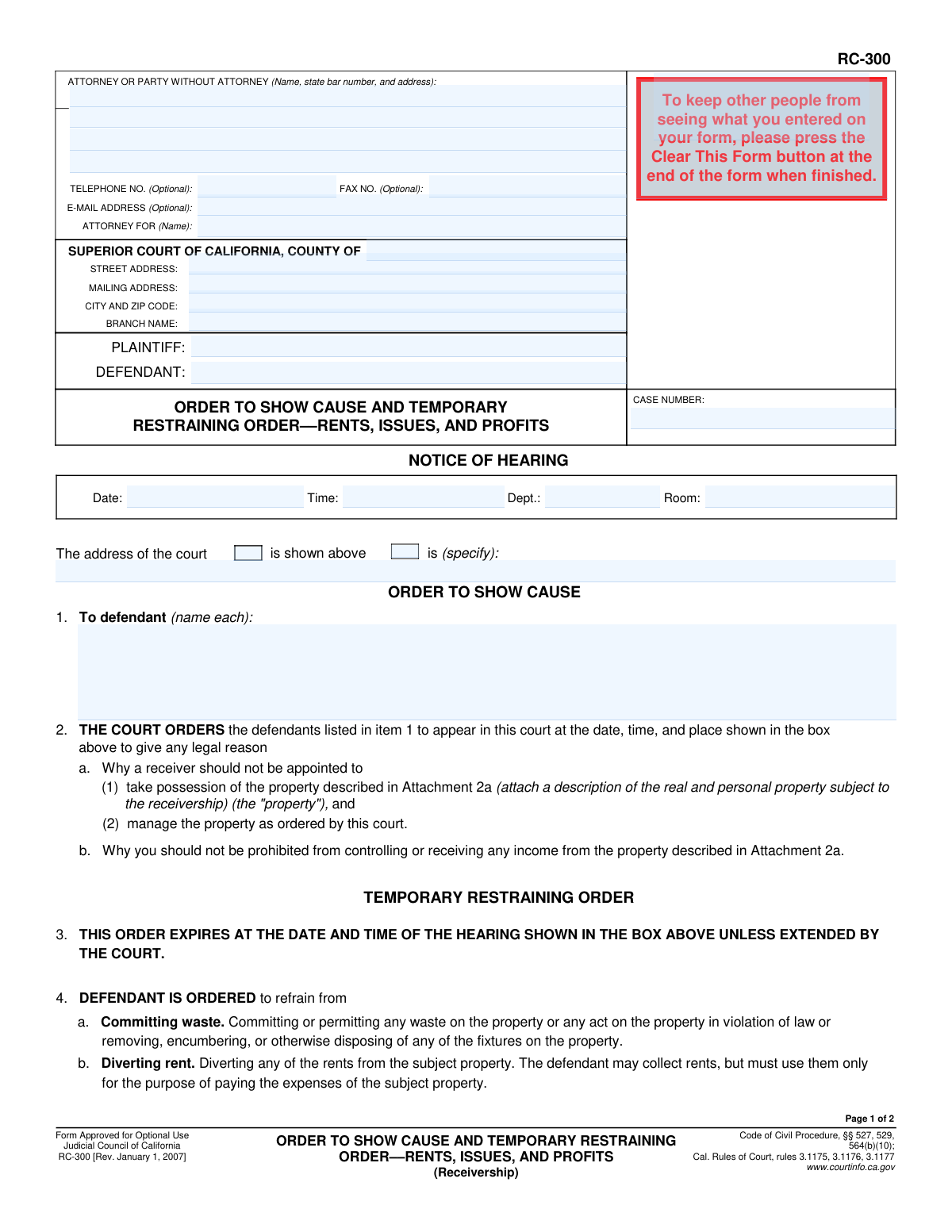
Form RC-300, the Order to Show Cause and Temporary Restraining Order—Rents, Issues, and Profits, is a legal document issued by a California Superior Court in receivership cases. It commands a defendant to appear at a hearing and provide legal reasons why a receiver should not be appointed to take control of a property and its income. The form also enacts a temporary restraining order to prevent the defendant from wasting assets or diverting rent before the hearing. Today, this form can be filled out quickly and accurately using AI-powered services like Instafill.ai, which can also convert non-fillable PDF versions into interactive fillable forms.
RC-300 is part of the California court forms and restraining order forms categories on Instafill.
Our AI automatically handles information lookup, data retrieval, formatting, and form filling.
It takes less than a minute to fill out RC-300 using our AI form filling.
Securely upload your data. Information is encrypted in transit and deleted immediately after the form is filled out.

Form specifications

Form name: Form RC-300, Order to Show Cause and Temporary Restraining Order—Rents, Issues, and Profits
Number of fields: 42
Number of pages: 1
Language: English
main-image

Instafill Demo: How to fill out PDF forms in seconds with AI

How to Fill Out RC-300 Online for Free in 2026

Are you looking to fill out a RC-300 form online quickly and accurately? Instafill.ai offers the #1 AI-powered PDF filling software of 2026, allowing you to complete your RC-300 form in just 37 seconds or less.
Follow these steps to fill out your RC-300 form online using Instafill.ai:
  1. 1 Navigate to Instafill.ai and upload or select Form RC-300.
  2. 2 Enter the court, plaintiff, defendant, and case number details in the header section.
  3. 3 Provide the information for the attorney or party filing the form.
  4. 4 Specify the hearing date, time, and location in the 'Notice of Hearing' box.
  5. 5 List the names of all defendants required to appear before the court.
  6. 6 Indicate the bond amount for the temporary restraining order and detail any other specific orders, attaching additional pages as necessary.
  7. 7 Review all entered information with the AI assistant for accuracy, then download the completed form for service and filing with the court.

Our AI-powered system ensures each field is filled out correctly, reducing errors and saving you time.

Why Choose Instafill.ai for Your Fillable RC-300 Form?

Speed

Complete your RC-300 in as little as 37 seconds.

Up-to-Date

Always use the latest 2026 RC-300 form version.

Cost-effective

No need to hire expensive lawyers.

Accuracy

Our AI performs 10 compliance checks to ensure your form is error-free.

Security

Your personal information is protected with bank-level encryption.

Frequently Asked Questions About Form RC-300

This form is a court order that compels a defendant to attend a hearing and justify why a receiver shouldn't be appointed to manage a property's income. It also imposes a Temporary Restraining Order (TRO) to protect the property and its revenue until the hearing occurs.

The plaintiff or their attorney prepares this form to be signed by a judge. Once the judge signs it, it becomes an official court order that is then served on the defendant.

An 'Order to Show Cause' is a directive from the court requiring a party to appear at a scheduled hearing and present legal reasons why the court should not grant the plaintiff's request, such as appointing a receiver.

The TRO forbids you from committing waste, diverting rents (except for property expenses), selling or encumbering the property, or canceling the property's insurance until the court hearing.

The TRO is temporary and automatically expires at the date and time of the hearing shown on the form, unless the court specifically orders an extension.

A receiver is a neutral person or entity appointed by the court to take control of, manage, and collect income from the property in question, following the court's instructions.

Yes, the order legally requires you to appear in court at the specified date and time to present your case as to why a receiver should not be appointed.

The plaintiff is required to post a bond to cover any financial damages the defendant might incur if the court later determines that the temporary restraining order was issued without sufficient cause.

The plaintiff must attach a detailed description of the property (Attachment 2a) and also file supporting documents such as a memorandum of points and authorities and sworn declarations.

You must prepare, file with the court, and serve your written opposition papers on the plaintiff by the deadline specified in item 8 of the 'Service and Briefing Schedule' section.

Yes, services like Instafill.ai use AI to auto-fill form fields accurately and save time, which can be particularly helpful for complex legal forms.

You can use a service like Instafill.ai to upload the PDF, fill it out using an interactive online interface, and then download the completed form for printing and filing.

Tools like Instafill.ai can convert flat, non-fillable PDFs into interactive forms that you can easily type into, saving you from having to fill it out by hand.

This section outlines the strict, court-ordered deadlines for the plaintiff to serve documents, for the defendant to file an opposition, and for the plaintiff to file a reply to that opposition.

Compliance RC-300
Validation Checks by Instafill.ai

1
Validates Case Number Format
This check ensures the 'CASE NUMBER' field is not empty and conforms to the standard format used by the California court system. A valid case number is essential for correctly filing and tracking the document within the court's records. If the format is incorrect, the document may be rejected by the court clerk, causing significant delays in the legal process.
2
Ensures All Parties are Identified
This validation verifies that both the 'PLAINTIFF' and 'DEFENDANT' fields in the case caption are filled out. Legal orders must clearly identify all parties involved to be enforceable. An omission could render the order legally deficient and lead to its rejection or a need for subsequent amendment.
3
Verifies Hearing Date is in the Future
This check confirms that the 'Date' specified in the 'NOTICE OF HEARING' box is a valid, future date. A hearing date must be set in the future to provide adequate notice to all parties as required by law. An invalid or past date would make the notice defective and invalidate the scheduled hearing.
4
Validates Hearing Time Format
This check ensures the 'Time' in the 'NOTICE OF HEARING' box is entered in a proper time format (e.g., HH:MM AM/PM). A clear and unambiguous time is critical for ensuring all parties appear at the correct moment. An improperly formatted time could lead to confusion, missed appearances, and potential default judgments.
5
Ensures Defendant Name Consistency
This validation cross-references the defendant names listed in item 1 ('To defendant (name each):') with the 'DEFENDANT' field in the main case caption. The names must be consistent to ensure the order is directed at the correct legal entities. A mismatch could create ambiguity and challenges in enforcing the order against the intended parties.
6
Verifies TRO Bond Amount is a Valid Number
This check ensures the value entered for the temporary restraining order bond in item 5 is a valid, positive numeric value. The bond amount is a critical financial component of the order, and it must be clearly and correctly stated. A non-numeric or negative value would be invalid and require correction before the order can be signed.
7
Checks for Conditional 'Other Orders' Text
This validation rule checks item 6. If the checkbox for 'are as follows (specify):' is selected, it ensures the corresponding text area is not empty. This prevents the submission of an incomplete order where the user indicated specific orders would be detailed but failed to provide them.
8
Validates Chronological Order of Service and Hearing Dates
This is a logical check that verifies the sequence of dates for service, opposition, reply, and the hearing. It ensures the Plaintiff's service date (item 7) is before the Defendant's opposition date (item 8), which is before the Plaintiff's reply date (item 9), and all are before the final Hearing Date. This sequence is legally required to ensure due process and allow all parties adequate time to respond.
9
Ensures Attachment Count is a Non-Negative Integer
This check validates that the 'Number of pages attached' in item 10 is a whole, non-negative number (0 or greater). This field provides a manifest of all supporting documents for the court and opposing parties. An invalid entry, such as text or a negative number, would create confusion and could lead to the document being considered incomplete.
10
Verifies Page 2 Header Consistency
This validation ensures that the 'PLAINTIFF', 'DEFENDANT', and 'CASE NUMBER' fields on the top of page 2 are identical to the corresponding fields on page 1. This consistency is crucial for multi-page legal documents to prevent misfiling or confusion about which case the subsequent pages belong to. Any discrepancy could cause the page to be misplaced or the document to be rejected.
11
Validates Attorney State Bar Number
This check verifies that if an attorney's name is provided in the 'ATTORNEY OR PARTY WITHOUT ATTORNEY' field, the associated State Bar Number is present and consists of only digits. The State Bar Number is a unique identifier required by the court to verify the attorney's credentials and standing. An invalid or missing number can lead to rejection of the filing.
12
Requires Court County Specification
This validation ensures that the 'COUNTY OF' field is filled out with a valid California county name. Specifying the county is essential for establishing the correct jurisdiction and ensuring the document is filed in the proper courthouse. Failure to provide this information would make it impossible to direct the filing correctly.

Common Mistakes in Completing RC-300

Incomplete or Incorrect Case Caption Information

Users often fail to accurately fill out the Plaintiff, Defendant, and Case Number fields at the top of the first page and the bottom of the second page. This can happen due to typographical errors or referencing outdated case information. An incorrect case caption can lead to the document being rejected by the court clerk, misfiled, or causing significant delays in processing the order. To avoid this, meticulously cross-reference the information with the official court summons and complaint.

Failing to List All Defendants

Item 1 requires listing the name of each defendant the order applies to. A common error is omitting one or more defendants, especially in cases with multiple parties. The order is only legally binding against the parties specifically named, so failing to include a defendant means the court's orders and restraints will not apply to them. Always review the complaint to ensure every relevant defendant is explicitly named in this section.

Forgetting the Property Description Attachment

The form explicitly requires a description of the real and personal property in 'Attachment 2a'. Many filers overlook this instruction and fail to attach the necessary document. Without a clear and legally sufficient description of the property, the order is ambiguous and may be deemed unenforceable by the court. Ensure a detailed property description is prepared, labeled as 'Attachment 2a', and included with the filing.

Omitting the TRO Bond Amount

In Item 5, the court orders the plaintiff to file a bond for a specific amount, which is required for a Temporary Restraining Order (TRO). Parties submitting a proposed order often leave this dollar amount blank, assuming the judge will fill it in. This can result in the judge rejecting the proposed order outright. It is crucial to propose a reasonable bond amount based on potential damages the defendant might incur.

Inconsistent Information on Page Two

The second page of the form includes a footer that requires re-entering the Plaintiff, Defendant, and Case Number. Filers frequently forget to complete this section, assuming the first page is sufficient. If the pages are separated, this omission can lead to administrative confusion and filing errors. This is a simple but critical step for ensuring the document remains intact and properly identified.

Missing or Unclear Service Deadlines

Items 7, 8, and 9 establish the court-ordered schedule for serving documents and filing opposition and reply briefs. Filers may leave these dates blank on the proposed order, which makes the order incomplete. The court needs these dates to create a clear and enforceable schedule for all parties. When preparing the proposed order, you must include specific, realistic dates for the court to review and approve.

Incorrectly Counting Attached Pages

Item 10 asks for the total number of pages attached to the form, such as the property description or other supporting declarations. People often miscount or forget to fill in this number entirely. An incorrect page count can cause the court clerk to question the completeness of the submission, potentially delaying the filing until the discrepancy is resolved. Carefully count all attachments before finalizing the form.

Failing to Specify Hearing Details

The 'NOTICE OF HEARING' box at the top of the form is critical, yet it is often left incomplete. Filers may forget to enter the date, time, department, or room number for the hearing. A notice without this information is defective and fails to properly inform the defendant of when and where to appear, which could be grounds for invalidating the hearing. This information must be obtained from the court and entered precisely. AI-powered tools like Instafill.ai can help prevent such omissions by flagging empty required fields.

Improperly Handling 'Other Orders'

In Item 6, a filer can specify additional orders by checking a box and referencing an attachment or writing them in. A common mistake is to check the 'Attachment 6' box but fail to include the actual attachment, or to write vague and unenforceable orders in the space provided. This creates ambiguity and can lead to the court disregarding the requested 'other orders'. Any additional requests must be clearly drafted and properly attached. Since this form is often a non-fillable PDF, a tool like Instafill.ai can convert it into a fillable version, making it easier to manage attachments and custom text.
Saved over 80 hours a year

“I was never sure if my IRS forms like W-9 were filled correctly. Now, I can complete the forms accurately without any external help.”

Kevin Martin Green

Your data stays secure with advanced protection from Instafill and our subprocessors

Robust compliance program

Transparent business model

You’re not the product. You always know where your data is and what it is processed for.

ISO 27001, HIPAA, and GDPR

Our subprocesses adhere to multiple compliance standards, including but not limited to ISO 27001, HIPAA, and GDPR.

Security & privacy by design

We consider security and privacy from the initial design phase of any new service or functionality. It’s not an afterthought, it’s built-in, including support for two-factor authentication (2FA) to further protect your account.

Fill out RC-300 with Instafill.ai

Worried about filling PDFs wrong? Instafill securely fills form-rc-300-order-to-show-cause-and-temporary-restraining-orderrents-issues-and-profits forms, ensuring each field is accurate.

Related forms by category

California court forms Judicial Council of California Form SC-105, Request for Court Order and Answer (Small Claims), Judicial Council of California Form SC-120, Defendant’s Claim and ORDER to Go to Small Claims Court (Small Claims), Judicial Council of California Form SER-001, Request for Sheriff to Serve Court Papers, Judicial Council of California Form SER-001, Request for Sheriff to Serve Court Papers, Affidavit for Collection of Personal Property California Probate Code Section 13100, Form POS-040, Proof of Service—Civil, Declaration of Facts of Death (California Superior Court), declaration-of-marriage-for-court-proceeding-california-family-law, ADOPT-200, Adoption Request, ADOPT-200, Stepparent Adoption Request, ADOPT-210, Adoption Agreement, ADOPT-310, Contact After Adoption Agreement, Judicial Council of California Form ADOPT-200, Adoption Request, Form ADR-107, Mediation Attendance Sheet, Form ADR-110, Order Appointing Referee, Form ADR-109, Stipulation or Motion for Order Appointing Referee, Form ADR-102, Request for Trial De Novo After Judicial Arbitration, Form ADR-108, Referee's Report (Code Civ. Proc., §§ 638, 639), Form ADR-106, Petition to Confirm, Correct, or Vacate Contractual Arbitration Award, Form ADR-104, Rejection of Award and Request for Trial After Attorney-Client Fee Arbitration · + 557 more →
restraining order forms Form DV-100, Request for Domestic Violence Restraining Order, DV-100, Request for Domestic Violence Restraining Order (Domestic Violence Prevention), Judicial Council of California Form DV-110, Temporary Restraining Order (CLETS-TRO) (Domestic Violence Prevention), Form DV-116, Order on Request to Continue Court Hearing (Temporary Restraining Order) (CLETS-TRO) (Domestic Violence Prevention), Form DV-130, Restraining Order After Hearing (Order of Protection) (Domestic Violence Prevention), Form CH-110, Temporary Restraining Order (CLETS-TCH) (Civil Harassment Prevention), Form CH-120, Response to Request for Civil Harassment Restraining Orders, Form CH-130, Civil Harassment Restraining Order After Hearing (CLETS-CHO), Order on Request to Modify/Terminate Civil Harassment Restraining Order (Civil Harassment Prevention), Form CH-100, Request for Civil Harassment Restraining Orders (Civil Harassment Prevention), Form CH-620, Response to Request to Modify/Terminate Civil Harassment Restraining Order (Civil Harassment Prevention), Form CIV-025, Application and Order for Reissuance of Order to Show Cause and Temporary Restraining Order, Form CD-190, Application for Temporary Restraining Order (Claim and Delivery), Order on Request to Continue Hearing (Temporary Restraining Order) (CLETS-TCH) (Civil Harassment Prevention), Form CH-610, Notice of Hearing on Request to Modify/Terminate Civil Harassment Restraining Order (Civil Harassment Prevention), Form CH-700, Request to Renew Restraining Order (Civil Harassment Prevention), Form CH-730, Order Renewing Civil Harassment Restraining Order (CLETS), Form DV-120, Response to Request for Domestic Violence Restraining Order (Domestic Violence Prevention), Form DV-300, Request to Change or End Restraining Order (Domestic Violence Prevention), Form DV-310, Notice of Court Hearing and Temporary Order to Change or End Restraining Order (Domestic Violence Prevention) · + 52 more →