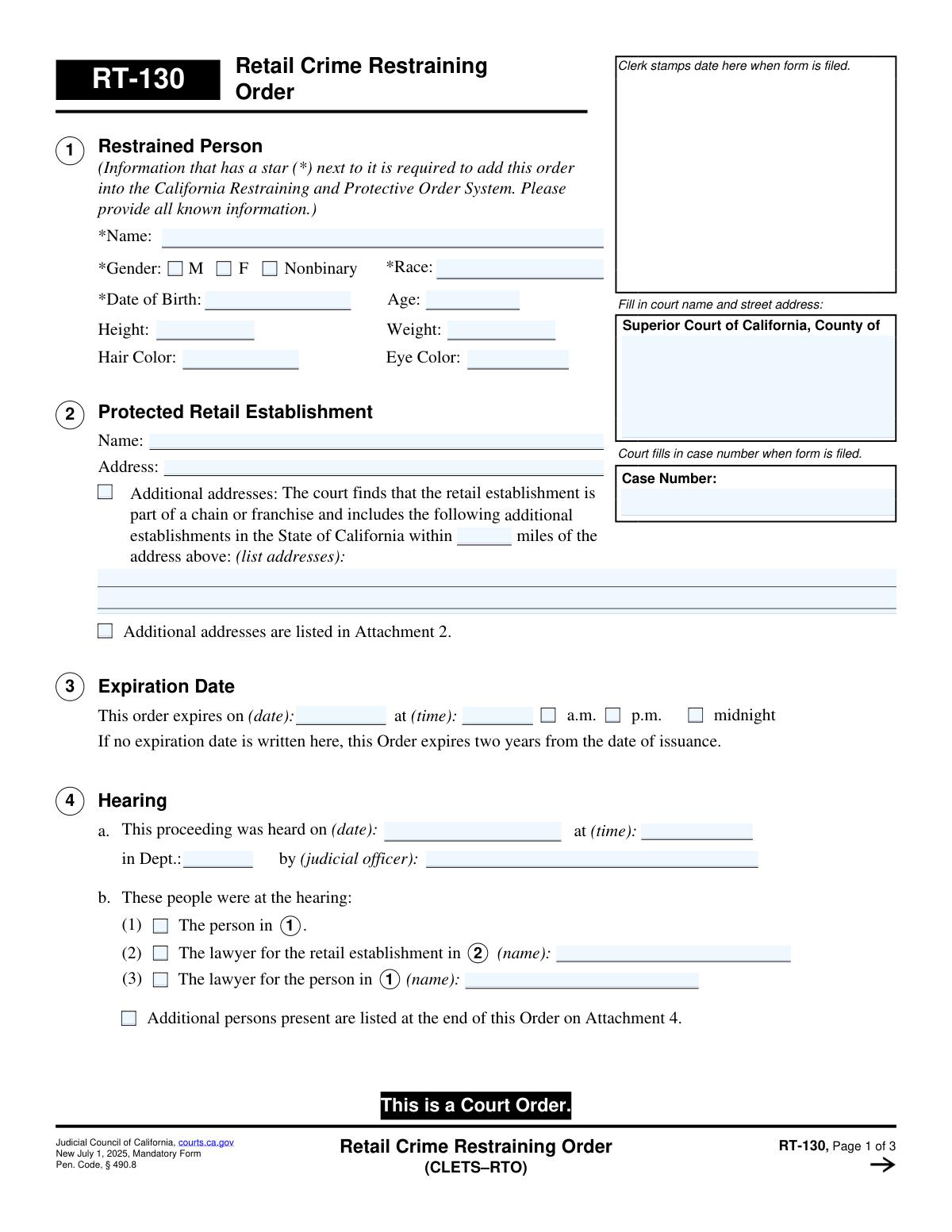
Yes! You can use AI to fill out Form RT-130, Retail Crime Restraining Order (CLETS-RTO)
Form RT-130, the Retail Crime Restraining Order, is a legal document issued by the Superior Court of California to prevent an individual from entering a specific retail establishment and its surrounding property. This court order is critical for businesses seeking to protect their assets and employees from individuals who have engaged in retail crime. Today, this form can be filled out quickly and accurately using AI-powered services like Instafill.ai, which can also convert non-fillable PDF versions into interactive fillable forms.
Our AI automatically handles information lookup, data retrieval, formatting, and form filling.
It takes less than a minute to fill out RT-130 using our AI form filling.
Securely upload your data. Information is encrypted in transit and deleted immediately after the form is filled out.
Form specifications
| Form name: | Form RT-130, Retail Crime Restraining Order (CLETS-RTO) |
| Number of fields: | 53 |
| Number of pages: | 1 |
| Language: | English |
Instafill Demo: How to fill out PDF forms in seconds with AI
How to Fill Out RT-130 Online for Free in 2026
Are you looking to fill out a RT-130 form online quickly and accurately? Instafill.ai offers the #1 AI-powered PDF filling software of 2026, allowing you to complete your RT-130 form in just 37 seconds or less.
Follow these steps to fill out your RT-130 form online using Instafill.ai:
- 1 Navigate to Instafill.ai and upload or select the RT-130, Retail Crime Restraining Order form.
- 2 Use the AI assistant to input the court name and address for the Superior Court of California, County of filing.
- 3 Provide all known information for the 'Restrained Person' in Section 1, including name, gender, date of birth, and physical description.
- 4 Enter the name and address(es) of the 'Protected Retail Establishment' in Section 2.
- 5 Follow the prompts to fill in the details of the court hearing in Section 4, as determined by the judicial officer.
- 6 Review all auto-filled information for accuracy, including the stay-away order details and service requirements, before the judicial officer signs the order.
- 7 Once the order is issued, ensure it is delivered to the appropriate law enforcement agency for entry into CARPOS/CLETS as specified in Section 8.
Our AI-powered system ensures each field is filled out correctly, reducing errors and saving you time.
Why Choose Instafill.ai for Your Fillable RT-130 Form?
Speed
Complete your RT-130 in as little as 37 seconds.
Up-to-Date
Always use the latest 2026 RT-130 form version.
Cost-effective
No need to hire expensive lawyers.
Accuracy
Our AI performs 10 compliance checks to ensure your form is error-free.
Security
Your personal information is protected with bank-level encryption.
Frequently Asked Questions About Form RT-130
This form is a court order issued by a California Superior Court to legally prohibit a specific person from entering a retail establishment, its grounds, and its parking lot due to past retail crime.
A representative of the protected retail establishment provides the necessary information, but the form is officially completed and signed by a judicial officer of the court after a hearing.
You must provide the person's name, gender, race, and date of birth. This information is required to enter the order into the California Restraining and Protective Order System (CARPOS).
Yes, in Section 2, the court can extend the order to include other establishments of the same chain or franchise within a specified distance of the primary store address.
The order expires on the date and time specified by the judge in Section 3. If no expiration date is listed, the order automatically expires two years from the date it was issued.
Violating this court order is a crime. The restrained person can be arrested, charged, and face penalties that include up to six months in jail.
The court clerk or the petitioner ensures the order is entered into the California Law Enforcement Telecommunications System (CLETS). This makes the order visible to any law enforcement agency in the state for verification and enforcement.
If the person was not at the hearing, a copy of the signed order must be personally served on them by a law enforcement officer or another adult who is not a party to the case.
This version of Form RT-130 is a mandatory form for all California courts beginning on July 1, 2025.
The Clerk's Certificate is used by the court clerk to certify that the document is a true and correct copy of the original restraining order on file with the court.
Yes, services like Instafill.ai use AI to help you accurately populate form fields, which can save time and reduce the chance of errors before submitting it to the court.
You can use a service like Instafill.ai to upload the form. Its AI technology helps you fill in the required information interactively and accurately directly on the document.
Platforms like Instafill.ai can convert flat, non-fillable PDFs into interactive forms. You can upload your document and the service will make it fillable online.
Compliance RT-130
Validation Checks by Instafill.ai
1
Ensures all CLETS-required fields for the Restrained Person are complete
This check verifies that the Name, Gender, Race, and Date of Birth fields for the Restrained Person (Section 1) are all filled out. These fields are marked with a star (*) and are mandatory for entering the order into the California Restraining and Protective Order System (CARPOS). Failure to provide this information would prevent the order from being filed electronically and would require the user to complete the missing fields before submission.
2
Validates Date of Birth and Age consistency
This validation compares the 'Date of Birth' (RestrainedDOB_dt) with the entered 'Age' (RestrainedAge). The system will calculate the age based on the date of birth and flag a mismatch if it does not correspond to the entered age. This is important for verifying the identity of the restrained person and preventing data entry errors. If a discrepancy is found, the user will be prompted to correct either the date of birth or the age.
3
Verifies Date of Birth is a valid past date
This check ensures that the 'Date of Birth' entered in Section 1 is a valid date and occurs before the current date. An individual subject to a restraining order cannot have a date of birth in the future. This prevents typographical errors and ensures the data is logically sound. If the date is invalid or in the future, the system will reject the entry and require the user to input a correct date.
4
Validates logical sequence of Hearing and Expiration Dates
This check ensures the 'Expiration Date' in Section 3 is after the 'Hearing Date' in Section 4. A restraining order cannot logically expire before the hearing for it has taken place. This validation is crucial for the legal validity and enforceability of the order. If the expiration date is not after the hearing date, the user must correct one of the dates to proceed.
5
Ensures Case Number consistency across all pages
This validation verifies that the 'Case Number' field is identical on page 1, page 2, and page 3 of the form. Maintaining consistency is critical for document integrity and ensures all pages are correctly associated with the same legal case. If a mismatch is detected, the system will alert the user to correct the case number on the non-matching pages to ensure the document is not misfiled or challenged.
6
Requires Law Enforcement Agency details if specified
This is a conditional check for Section 8. If option 'c' is selected, indicating the petitioner will deliver the order to a law enforcement agency, then the 'Name of Law Enforcement Agency' and its 'Address' fields must be filled. This information is essential for ensuring the order is correctly entered into the CARPOS system as directed by the court. If option 'c' is checked but the agency details are missing, the form submission will be blocked until the information is provided.
7
Ensures a single CARPOS entry method is selected
This validation checks the radio buttons in Section 8 ('Mandatory Entry of Order Into CARPOS') to ensure that exactly one option (a, b, or c) is selected. The form requires a clear directive on how the order will be entered into the system. If zero or more than one option is selected, the user will be prompted to make a single, valid choice.
8
Requires lawyer's name if presence is indicated
This check applies to Section 4b. If the checkbox indicating that a lawyer for either the retail establishment or the restrained person was present at the hearing is checked, the corresponding lawyer name field must be filled. This ensures a complete and accurate record of the hearing attendees. If a checkbox is ticked but the name is left blank, the user will be required to enter the name or uncheck the box.
9
Validates the 'Number of pages attached' field
This check ensures the value entered in Section 7 ('Number of pages attached') is a non-negative integer. Furthermore, it can perform a logical cross-check: if any 'Attachment' checkboxes on the form (e.g., Attachment 2, 4, or 8) are checked, this number must be greater than zero. This helps maintain document completeness and ensures all referenced attachments are accounted for. An invalid entry or a zero value with attachments indicated would trigger an error.
10
Ensures Protected Retail Establishment name is provided
This validation confirms that the 'Name' field for the 'Protected Retail Establishment' in Section 2 is not empty. The identity of the protected party is a fundamental component of the restraining order and is absolutely required for the order to be meaningful and enforceable. If this field is left blank, the submission will be rejected and the user will be forced to provide the establishment's name.
11
Validates Expiration Date is in the future
This check ensures the 'Expiration Date' in Section 3 is a date in the future relative to the 'Date' of the Judicial Officer's signature on page 2. An order cannot expire in the past or on the same day it is issued. This is critical for the order to have a valid period of enforcement. If the date is not in the future, the system will prompt the user for a correction.
12
Ensures a single Gender selection
This check verifies that for the 'Gender' field in Section 1, exactly one of the three options (M, F, Nonbinary) is selected. As a required field for the CLETS system, a single, unambiguous selection is necessary for proper record-keeping and identification. The system will display an error if no option or multiple options are selected.
13
Verifies a single Proof of Service status is selected
This validation ensures that in Section 6 ('Service'), only one of the two mutually exclusive options (6a or 6b) is selected. The form must clearly state whether the restrained person was present at the hearing (and thus served) or if they were not. Selecting both or neither would create ambiguity regarding the legal notification status of the order, so the system will require the user to choose exactly one.
Common Mistakes in Completing RT-130
Users often overlook the starred (*) fields in Section 1, such as the restrained person's full name, gender, race, and date of birth. This information is mandatory for entering the order into the California Restraining and Protective Order System (CARPOS). An incomplete submission will be rejected by the court clerk or will fail to be entered into the law enforcement database, making the order unenforceable by officers in the field.
In Section 1, people frequently enter guesses or vague descriptions for height, weight, hair color, and eye color. Law enforcement relies on these specific details to correctly identify the restrained individual. Inaccurate information can lead to misidentification or an officer's inability to confirm the person's identity, delaying or preventing enforcement of the order.
A common error is listing a generic name like 'The Gas Station' in Section 2 instead of the full legal or DBA (Doing Business As) name. An ambiguous name makes it difficult for law enforcement to determine the exact location being protected. This can render the order ineffective, as the restrained person could enter the premises and claim they were not at the specific location named in the order.
When a business has multiple locations, users often incorrectly fill out the subsection in Section 2 for protecting other chain or franchise stores. Mistakes include forgetting to specify the mileage radius, failing to list the full addresses of the additional stores, or not checking the box for 'Attachment 2' when listing many locations. This error limits the restraining order to only the primary address, leaving other nearby stores unprotected.
People may leave the expiration date and time in Section 3 blank, assuming the default two-year period is sufficient. While the form provides a default, the court may intend a different duration, and leaving it blank can lead to an order that doesn't match the judge's ruling. It is crucial to fill in the specific date and time ordered by the court and select a.m., p.m., or midnight to avoid ambiguity.
A frequent oversight is filling out the Case Number on the first page but neglecting to enter it on pages 2 and 3. Court documents can be separated during processing, and without the case number on every page, it becomes difficult to reassemble the complete order. This can cause critical enforcement information on later pages to be lost or ignored.
In Section 8, selecting the wrong party responsible for entering the order into the CARPOS/CLETS system, or failing to provide law enforcement agency details when required, is a critical error. If option 8c is chosen and the agency's name and address are omitted, the order will not be entered into the statewide system used by officers, making it invisible and unenforceable during an incident.
When a form is printed and filled out by hand, illegible writing can make critical data like names and dates of birth unreadable. This leads to data entry errors when court clerks input the information into the CARPOS system, compromising the order's enforceability. To prevent this, it's best to use a fillable PDF. If the form is a flat PDF, AI-powered tools like Instafill.ai can convert it into a fillable version to ensure clarity.
The petitioner may not understand the necessary follow-up actions when the restrained person did not attend the hearing (Section 6b). They might mistakenly believe the order is enforceable immediately after being signed. However, the order is not active against the person until they have been properly served with a copy and proof of that service is filed with the court.
Users who need to list additional addresses or persons often forget to use an attachment or use one without checking the corresponding box on the main form (e.g., 'Attachment 2' in Section 2). This results in an incomplete filing, as the information on the unreferenced attachment will not be considered part of the official court order. It is essential to check the box on the form to legally incorporate the attachment's information.
Inaccurately checking the boxes in Section 4b regarding who was present at the hearing is a significant error because it dictates the service requirements in Section 6. If the restrained person's attendance is incorrectly marked as 'present,' the petitioner might fail to properly serve the order, making it unenforceable until service is completed and proven.
Saved over 80 hours a year
“I was never sure if my IRS forms like W-9 were filled correctly. Now, I can complete the forms accurately without any external help.”
Kevin Martin Green
Your data stays secure with advanced protection from Instafill and our subprocessors

Robust compliance program
Transparent business model
You’re not the product. You always know where your data is and what it is processed for.
ISO 27001, HIPAA, and GDPR
Our subprocesses adhere to multiple compliance standards, including but not limited to ISO 27001, HIPAA, and GDPR.
Security & privacy by design
We consider security and privacy from the initial design phase of any new service or functionality. It’s not an afterthought, it’s built-in, including support for two-factor authentication (2FA) to further protect your account.
Fill out RT-130 with Instafill.ai
Worried about filling PDFs wrong? Instafill securely fills form-rt-130-retail-crime-restraining-order-clets-rto forms, ensuring each field is accurate.