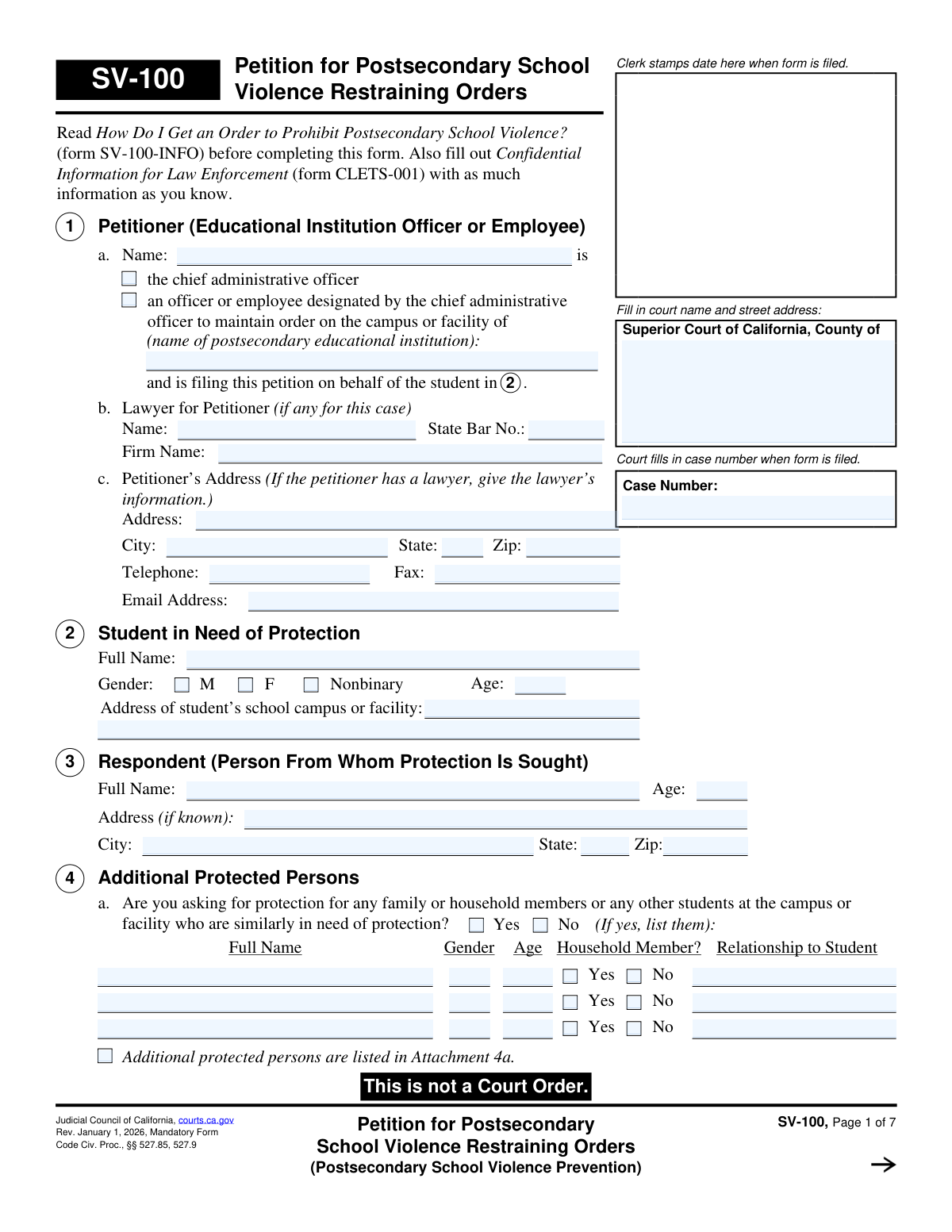
Yes! You can use AI to fill out Form SV-100, Petition for Postsecondary School Violence Restraining Orders

Form SV-100, Petition for Postsecondary School Violence Restraining Orders, is a legal document filed in California Superior Court by a postsecondary school on behalf of a student who has been stalked, assaulted, or has received a credible threat of violence. It initiates the legal process to obtain a restraining order, which can prohibit the respondent from contacting the student, coming near the campus, and require them to relinquish firearms. This form is the first step in obtaining a Temporary Restraining Order (TRO) and a long-term order after a hearing. Today, this form can be filled out quickly and accurately using AI-powered services like Instafill.ai, which can also convert non-fillable PDF versions into interactive fillable forms.
SV-100 is part of the California court forms and restraining order forms categories on Instafill.
Our AI automatically handles information lookup, data retrieval, formatting, and form filling.
It takes less than a minute to fill out SV-100 using our AI form filling.
Securely upload your data. Information is encrypted in transit and deleted immediately after the form is filled out.

Form specifications

Form name: Form SV-100, Petition for Postsecondary School Violence Restraining Orders
Number of fields: 212
Number of pages: 1
Language: English
main-image

Instafill Demo: How to fill out PDF forms in seconds with AI

How to Fill Out SV-100 Online for Free in 2026

Are you looking to fill out a SV-100 form online quickly and accurately? Instafill.ai offers the #1 AI-powered PDF filling software of 2026, allowing you to complete your SV-100 form in just 37 seconds or less.
Follow these steps to fill out your SV-100 form online using Instafill.ai:
  1. 1 Navigate to Instafill.ai and upload the SV-100 form or select it from the platform's library of official documents.
  2. 2 Provide the petitioner's information (the school official), the educational institution's details, and the full name and information of the student needing protection.
  3. 3 Identify the respondent (the person from whom protection is sought) by providing their full name, address, and any other known details, and describe their relationship to the student.
  4. 4 Detail the specific incidents of violence, stalking, or threats in Section 8, including dates, locations, any harm caused, and information about any witnesses.
  5. 5 Select the specific Personal Conduct and Stay-Away orders you are requesting in Sections 9 and 10, such as no contact and a minimum distance the respondent must keep from the student and school.
  6. 6 Disclose any other related court cases, provide information about firearms if known, and request a Temporary Restraining Order (TRO) if needed.
  7. 7 Carefully review all entered information for accuracy, then have the petitioner and student sign and date the form before filing it with the appropriate Superior Court.

Our AI-powered system ensures each field is filled out correctly, reducing errors and saving you time.

Why Choose Instafill.ai for Your Fillable SV-100 Form?

Speed

Complete your SV-100 in as little as 37 seconds.

Up-to-Date

Always use the latest 2026 SV-100 form version.

Cost-effective

No need to hire expensive lawyers.

Accuracy

Our AI performs 10 compliance checks to ensure your form is error-free.

Security

Your personal information is protected with bank-level encryption.

Frequently Asked Questions About Form SV-100

This form is used by a postsecondary educational institution (like a college or university) to ask a court for a restraining order to protect a student from violence, stalking, or credible threats of violence from another person.

The petition must be filed by the school's chief administrative officer or an employee they have designated to maintain order on campus. The student must also consent to the filing by signing the form.

No, Section 14 of the form states there is no filing fee for a petition alleging a credible threat of violence, assault, battery, or stalking. You can also ask the court to have the sheriff or marshal serve the orders for free.

The 'Petitioner' (Section 1) is the school official filing the form on behalf of the institution. The 'Student in Need of Protection' (Section 2) is the individual student who has been targeted by the violence or threats.

Yes, Section 4 allows you to list and request protection for other students, as well as the primary student's family or household members, who are also in need of protection from the respondent.

You must provide a detailed account of the incidents, including dates, starting with the most recent. Clearly describe what happened, who did what, identify any witnesses, and note any physical or emotional harm caused.

A TRO is a short-term order granted by a judge to provide immediate protection until the full court hearing. You can request one by checking the box in Section 12 and submitting form SV-110, Temporary Restraining Order, along with this petition.

In Section 11, if you are unsure about the respondent's possession of firearms, you can simply check the box for 'I don’t know'. If the restraining order is granted, the respondent will be legally required to turn in any firearms they possess.

The form instructions recommend also filling out the 'Confidential Information for Law Enforcement' (form CLETS-001). If you have copies of any existing restraining orders or police reports, you should attach those as well.

Yes, the student's consent is mandatory. The student must sign and date the 'Consent to the filing of the Petition' section on the last page of the form.

Yes, services like Instafill.ai use AI to accurately auto-fill form fields, which saves time and helps prevent errors. This is particularly useful for ensuring all required information is entered correctly.

You can upload the SV-100 PDF to the Instafill.ai platform. The service will make the document interactive, allowing you to type your information directly into the fields, save your progress, and easily complete the petition online.

If you have a non-fillable or 'flat' PDF, you can use a tool like Instafill.ai. It is designed to convert such documents into interactive, fillable forms that you can complete on your computer.

Compliance SV-100
Validation Checks by Instafill.ai

1
Petitioner Role and Institution Completeness
This check verifies that the petitioner's name, the educational institution's name, and a role selection (chief administrative officer or designated employee) are all provided in Section 1. This information is fundamental to establishing the petitioner's legal standing to file the petition on behalf of the institution. If this information is missing, the court cannot verify the petitioner's authority, which will lead to the rejection of the filing.
2
Student in Need of Protection Completeness
This validation ensures that the student's full name, age, and the address of the school campus or facility are all filled out in Section 2. This data is critical as it identifies the primary individual to be protected and the location where the alleged violence or threats occurred. A petition with missing student information is fundamentally incomplete and cannot be processed.
3
Respondent's Conduct Description Mandated
This check ensures that the narrative field in Section 8b, which describes the respondent's conduct, is not empty. This section provides the factual basis for the restraining order request and is the most critical piece of evidence for the judge. A failure to describe the incidents means there is no stated cause for action, and the petition will be denied.
4
Conditional Harm Description
This validation triggers if the 'Yes' box is checked in Section 8c, indicating the student was harmed or injured. It then verifies that the corresponding text field explaining the harm is filled out. This detail is crucial for the court to assess the severity of the situation. If 'Yes' is checked but no description is provided, the claim of injury is unsubstantiated and may be disregarded by the court.
5
Conditional Weapon Use Description
This check confirms that if 'Yes' is selected in Section 8d, indicating the respondent used or threatened to use a weapon, the associated description field is completed. Information about weapons is extremely important for risk assessment and directly impacts the scope of the restraining order, particularly regarding firearms prohibitions. A 'Yes' without a description weakens the claim and may prevent the court from issuing necessary protective orders.
6
Venue Justification Requirement
This validation ensures that at least one of the checkboxes in Section 6 is marked to establish the proper legal venue for the case. The court must have jurisdiction, which is determined by factors like where the respondent lives or where the incident occurred. If no venue is justified, or if 'Other' is checked without an explanation, the filing will be rejected for being in the wrong court.
7
Additional Protected Persons Logic
This check verifies that if 'Yes' is selected in Section 4a to request protection for others, the details for at least one person are provided in the table or an attachment is indicated. It also ensures the 'Why do these people need protection?' field is filled. This is necessary to justify extending the order beyond the primary student. An incomplete request will result in protection not being granted to these additional individuals.
8
Stay-Away Order Specificity
This validation confirms that if a distance is entered in the 'yards' field of Section 10a, at least one location checkbox (e.g., The student, The school) is also selected. A stay-away order must be specific to be enforceable by law enforcement. This check prevents the submission of an ambiguous request that the court would have to deny or return for clarification.
9
Stay-Away Distance Format
This check ensures that the value provided in the 'yards' field of Section 10a is a valid, positive number. The distance is a critical component of a stay-away order and must be unambiguous for enforcement purposes. Submitting non-numeric text or a negative number would render the request invalid and unenforceable.
10
TRO Notice Explanation Requirement
This validation ensures that if 'No' is checked in Section 12 (indicating the respondent was not notified of the TRO request), the corresponding explanation field is filled. Courts require a compelling reason to grant an order without prior notice to the other party. Failure to provide this justification will almost certainly result in the denial of the Temporary Restraining Order.
11
Other Court Cases Detail Requirement
This check validates that if 'Yes' is checked in Section 7a, indicating prior court cases with the respondent, at least one case type is selected and its corresponding 'Filed in (County/State)' and 'Year Filed' fields are completed. This history is vital for the judge to understand the context of the relationship and avoid issuing conflicting orders. Incomplete information here can delay the proceedings.
12
Mandatory Signature and Consent Verification
This validation confirms that the petitioner has provided a name, title, date, and signature, and that the student has provided a name, date, and signature in the final section. These signatures are legally required to certify the truthfulness of the petition under penalty of perjury and to confirm the student's consent. A missing signature from either party invalidates the entire filing.
13
State Bar Number Format
This check is performed if a lawyer's name is entered in Section 1b. It verifies that the 'State Bar No.' field contains a value that follows the expected format (typically numeric). This helps the court clerk verify the attorney's standing and ensures the petitioner is represented by a licensed professional. An invalid number could flag the filing for review.
14
Attachment Page Count Consistency
This validation checks that the number entered in Section 18 ('Number of pages attached') is a non-negative integer. It can also cross-reference this count against any checkboxes ticked throughout the form that state 'Response is stated in Attachment'. A mismatch, such as a zero page count when attachments are indicated, would flag the submission for being potentially incomplete.

Common Mistakes in Completing SV-100

Vague or Incomplete Incident Description

In Section 8b, petitioners often describe events using emotional or general terms instead of providing a clear, factual account. This happens because the events are stressful, and it's difficult to recall specifics. A vague narrative makes it hard for a judge to find a 'credible threat of violence,' which can lead to the petition being denied. To avoid this, list incidents chronologically (most recent first) with specific dates, locations, what was said or done, and the names of any witnesses.

Omitting or Guessing the Respondent's Address

Petitioners frequently leave the respondent's address in Section 3 blank or provide an old, incorrect one because they are unsure of the person's current location. This is a critical error because the court cannot proceed until the respondent is properly served with the legal papers, which requires a valid address. An incorrect address will cause significant delays or the dismissal of the case. It is vital to use all available resources to find the most current and complete address possible.

Forgetting the Student's Consent Signature

A common oversight is failing to have the student sign and date the consent section on the final page of the form. Because the educational institution is filing the petition on the student's behalf, the student's signature is mandatory to show they agree with the action. Without this signature, the court will reject the filing outright, halting the entire process and delaying protection. Always double-check that the student has provided their signature before submitting the form.

Failing to Justify Protection for Additional Persons

In Section 4, a petitioner may list other students or family members who also need protection but then fail to explain why in section 4b. The court needs a specific reason for each person; simply being near the primary student is not always sufficient. As a consequence, the judge will likely deny protection for the additional people listed, leaving them vulnerable. To prevent this, provide a brief but clear explanation of the threat or harm the respondent poses to each individual named.

Incomplete Disclosure of Other Court Cases

Petitioners often neglect to fill out Section 7 completely, which asks about other court cases involving the student and respondent. This may be due to forgetting past incidents or not knowing the case numbers. Failing to disclose this information can damage the petitioner's credibility and lead the judge to believe information is being hidden, potentially weakening the case. It is crucial to be thorough and list all known cases, even if you don't have all the details.

Unreasonable Stay-Away Order Request

When filling out Section 10, petitioners sometimes request an excessive stay-away distance or fail to consider if the order would prevent the respondent from accessing their own home, school, or job. A judge is less likely to grant an order that seems punitive or is logistically impossible to follow. This can result in the judge modifying the order to be less protective or denying it. Be specific and realistic with your request, and use section 10b to explain why the order is necessary and feasible.

Lack of Justification for an Immediate TRO

When requesting a Temporary Restraining Order (TRO) in Section 12, petitioners often fail to provide a compelling reason for not notifying the respondent in advance. Courts prefer both parties to be aware of proceedings, so a request for an immediate, one-sided order requires strong justification, such as a fear of retaliation. Without a good reason, a judge may deny the immediate TRO and wait for the full hearing, leaving the student unprotected in the interim.

Incorrect Venue Selection

A petitioner might file the form in the county where the school is located out of convenience, even if it's not a valid venue according to Section 6. The petition must be filed where the respondent lives or where the wrongful conduct occurred. Filing in the wrong county court will lead to the case being dismissed on jurisdictional grounds, forcing you to start the entire process over in the correct location. Carefully review the options in Section 6 to ensure you are filing in the proper court.

Forgetting or Mismatching Attachments

The form allows for attachments to provide more detail, but people often check a box like 'Response is stated in Attachment 8b' and then forget to include the page or label it incorrectly. This means the court cannot consider the crucial, detailed information needed to understand the full extent of the harassment or threats. Always ensure every attachment is clearly labeled to correspond with its section on the form and is securely fastened before filing. AI-powered tools like Instafill.ai can help manage and organize attachments digitally.

Improper Petitioner Identification

The person filing the petition in Section 1 may not have the correct title or may fail to check the box indicating they are the 'chief administrative officer' or an 'officer or employee designated' to do so. This is a procedural error that challenges the legal standing of the entire petition. If the filer lacks the proper authority, the case can be dismissed on a technicality. Ensure the person filing has documented authority from the institution and that their role is clearly and accurately stated on the form.
Saved over 80 hours a year

“I was never sure if my IRS forms like W-9 were filled correctly. Now, I can complete the forms accurately without any external help.”

Kevin Martin Green

Your data stays secure with advanced protection from Instafill and our subprocessors

Robust compliance program

Transparent business model

You’re not the product. You always know where your data is and what it is processed for.

ISO 27001, HIPAA, and GDPR

Our subprocesses adhere to multiple compliance standards, including but not limited to ISO 27001, HIPAA, and GDPR.

Security & privacy by design

We consider security and privacy from the initial design phase of any new service or functionality. It’s not an afterthought, it’s built-in, including support for two-factor authentication (2FA) to further protect your account.

Fill out SV-100 with Instafill.ai

Worried about filling PDFs wrong? Instafill securely fills form-sv-100-petition-for-postsecondary-school-violence-restraining-orders forms, ensuring each field is accurate.

Related forms by category

California court forms Judicial Council of California Form SC-105, Request for Court Order and Answer (Small Claims), Judicial Council of California Form SC-120, Defendant’s Claim and ORDER to Go to Small Claims Court (Small Claims), Judicial Council of California Form SER-001, Request for Sheriff to Serve Court Papers, Judicial Council of California Form SER-001, Request for Sheriff to Serve Court Papers, Affidavit for Collection of Personal Property California Probate Code Section 13100, Form POS-040, Proof of Service—Civil, Declaration of Facts of Death (California Superior Court), declaration-of-marriage-for-court-proceeding-california-family-law, ADOPT-200, Adoption Request, ADOPT-200, Stepparent Adoption Request, ADOPT-210, Adoption Agreement, ADOPT-310, Contact After Adoption Agreement, Judicial Council of California Form ADOPT-200, Adoption Request, Form ADR-107, Mediation Attendance Sheet, Form ADR-110, Order Appointing Referee, Form ADR-109, Stipulation or Motion for Order Appointing Referee, Form ADR-102, Request for Trial De Novo After Judicial Arbitration, Form ADR-108, Referee's Report (Code Civ. Proc., §§ 638, 639), Form ADR-106, Petition to Confirm, Correct, or Vacate Contractual Arbitration Award, Form ADR-104, Rejection of Award and Request for Trial After Attorney-Client Fee Arbitration · + 557 more →
restraining order forms Form DV-100, Request for Domestic Violence Restraining Order, DV-100, Request for Domestic Violence Restraining Order (Domestic Violence Prevention), Judicial Council of California Form DV-110, Temporary Restraining Order (CLETS-TRO) (Domestic Violence Prevention), Form DV-116, Order on Request to Continue Court Hearing (Temporary Restraining Order) (CLETS-TRO) (Domestic Violence Prevention), Form DV-130, Restraining Order After Hearing (Order of Protection) (Domestic Violence Prevention), Form CH-110, Temporary Restraining Order (CLETS-TCH) (Civil Harassment Prevention), Form CH-120, Response to Request for Civil Harassment Restraining Orders, Form CH-130, Civil Harassment Restraining Order After Hearing (CLETS-CHO), Order on Request to Modify/Terminate Civil Harassment Restraining Order (Civil Harassment Prevention), Form CH-100, Request for Civil Harassment Restraining Orders (Civil Harassment Prevention), Form CH-620, Response to Request to Modify/Terminate Civil Harassment Restraining Order (Civil Harassment Prevention), Form CIV-025, Application and Order for Reissuance of Order to Show Cause and Temporary Restraining Order, Form CD-190, Application for Temporary Restraining Order (Claim and Delivery), Order on Request to Continue Hearing (Temporary Restraining Order) (CLETS-TCH) (Civil Harassment Prevention), Form CH-610, Notice of Hearing on Request to Modify/Terminate Civil Harassment Restraining Order (Civil Harassment Prevention), Form CH-700, Request to Renew Restraining Order (Civil Harassment Prevention), Form CH-730, Order Renewing Civil Harassment Restraining Order (CLETS), Form DV-120, Response to Request for Domestic Violence Restraining Order (Domestic Violence Prevention), Form DV-300, Request to Change or End Restraining Order (Domestic Violence Prevention), Form DV-310, Notice of Court Hearing and Temporary Order to Change or End Restraining Order (Domestic Violence Prevention) · + 52 more →