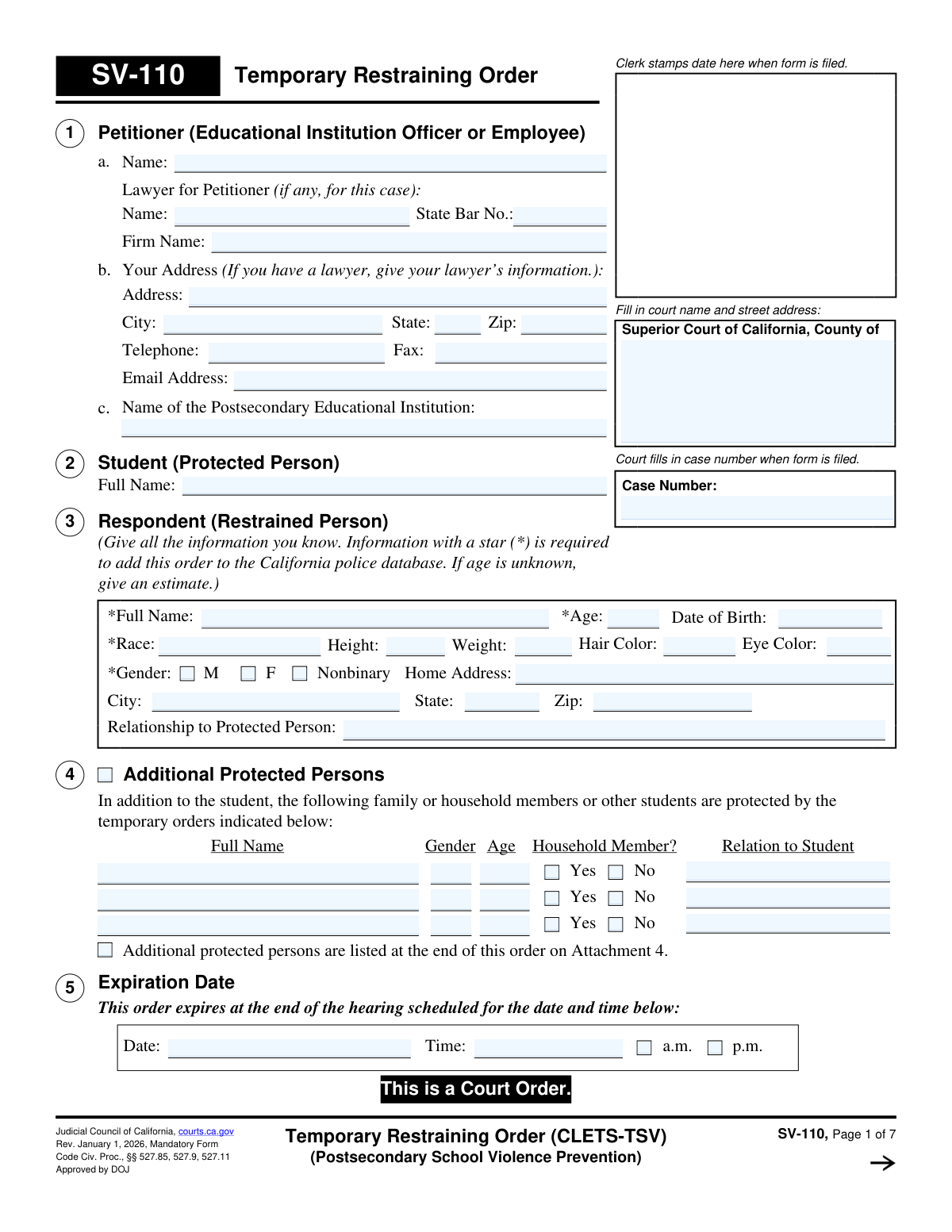
Yes! You can use AI to fill out Form SV-110, Temporary Restraining Order (CLETS-TSV) (Postsecondary School Violence Prevention)
Form SV-110, the Temporary Restraining Order for Postsecondary School Violence Prevention, is a legal document issued by a California Superior Court. It is initiated by an educational institution to protect a student from credible threats of violence, stalking, or harassment by another individual, known as the respondent. This court order sets temporary restrictions on the respondent's behavior, such as prohibiting contact and requiring them to stay a certain distance away from the student and school premises. Today, this form can be filled out quickly and accurately using AI-powered services like Instafill.ai, which can also convert non-fillable PDF versions into interactive fillable forms.
Our AI automatically handles information lookup, data retrieval, formatting, and form filling.
It takes less than a minute to fill out SV-110 using our AI form filling.
Securely upload your data. Information is encrypted in transit and deleted immediately after the form is filled out.
Form specifications
| Form name: | Form SV-110, Temporary Restraining Order (CLETS-TSV) (Postsecondary School Violence Prevention) |
| Number of fields: | 157 |
| Number of pages: | 1 |
| Language: | English |
Instafill Demo: How to fill out PDF forms in seconds with AI
How to Fill Out SV-110 Online for Free in 2026
Are you looking to fill out a SV-110 form online quickly and accurately? Instafill.ai offers the #1 AI-powered PDF filling software of 2026, allowing you to complete your SV-110 form in just 37 seconds or less.
Follow these steps to fill out your SV-110 form online using Instafill.ai:
- 1 Navigate to Instafill.ai and upload or select the Form SV-110.
- 2 Provide the court information, details about the petitioner (educational institution), the protected student, and all known information about the restrained person.
- 3 If necessary, list any additional protected persons, such as family or household members of the student, in Section 4.
- 4 Review the specific orders being requested, which the court will grant, deny, or modify. These include personal conduct orders, stay-away orders, and firearm prohibitions.
- 5 If known, provide details about any firearms, firearm parts, or ammunition in the possession of the restrained person in Section 9.
- 6 Identify the law enforcement agencies that need to be notified to enter the order into the California Restraining and Protective Order System (CARPOS).
- 7 Carefully review the entire completed form for accuracy before printing it for the judicial officer's signature and filing with the court clerk.
Our AI-powered system ensures each field is filled out correctly, reducing errors and saving you time.
Why Choose Instafill.ai for Your Fillable SV-110 Form?
Speed
Complete your SV-110 in as little as 37 seconds.
Up-to-Date
Always use the latest 2026 SV-110 form version.
Cost-effective
No need to hire expensive lawyers.
Accuracy
Our AI performs 10 compliance checks to ensure your form is error-free.
Security
Your personal information is protected with bank-level encryption.
Frequently Asked Questions About Form SV-110
This form is used by a postsecondary school official to request a temporary court order protecting a student from violence, threats, stalking, or harassment. It is effective immediately upon being signed by a judge and lasts until the scheduled court hearing.
An officer or employee of a postsecondary educational institution acts as the 'Petitioner' to file this form on behalf of a student, who is the 'Protected Person'.
You need to provide as much detail as possible in Section 3. To enter the order into the police database (CLETS), you must include the person's full name, gender, and race; an estimated age is acceptable if the date of birth is unknown.
This order is temporary and expires at the end of the court hearing scheduled on the date and time listed in Section 5. At that hearing, a judge may issue a longer-term order.
Yes, in Section 4, you can list the student's family or household members, or other students, to also be protected by the temporary orders.
The order prohibits them from possessing any firearms, firearm parts, or ammunition. They must turn them in to law enforcement or a licensed gun dealer within 24 hours of being served and file a receipt with the court.
Personal Conduct Orders (Section 6) forbid actions like harassment, stalking, and any form of contact. A Stay-Away Order (Section 7) requires the restrained person to maintain a specific physical distance from the protected person and places like their school or home.
The order must be officially served on the restrained person, and the court clerk ensures it is entered into the California Law Enforcement Telecommunications System (CLETS). This makes the order enforceable by any police officer in the state.
The restrained person must immediately obey all orders, including surrendering firearms. They have the right to respond by filing form SV-120 and should attend the scheduled court hearing to present their side.
No, the order remains in full effect and must be enforced by law enforcement, even if the protected person invites or consents to contact. Only a judge can change or terminate the order.
Section 14 indicates that there is no fee for the sheriff or marshal to serve the order if it is based on assault, battery, stalking, a credible threat of violence, or if the petitioner has a fee waiver.
Yes, services like Instafill.ai use AI to help you accurately auto-fill form fields, which saves time and reduces errors on complex legal documents like this one.
Simply upload the form to the Instafill.ai platform. The AI will identify all the fields, and you can provide the necessary information through a user-friendly interface to have the form filled out for you to review and download.
If you have a non-fillable or 'flat' PDF, you can use a service like Instafill.ai. It can convert the document into an interactive, fillable form, allowing you to easily type your information into the correct fields online.
Compliance SV-110
Validation Checks by Instafill.ai
1
Respondent Full Name Required for CLETS
This check ensures that the 'Full Name' field for the Restrained Person (Section 3) is not empty. This information is marked with a star, indicating it is mandatory for entering the restraining order into the California Law Enforcement Telecommunications System (CLETS). Failure to provide this name would prevent law enforcement from identifying the restrained person and enforcing the order.
2
Respondent Gender Required for CLETS
Validates that one of the 'Gender' options (M, F, or Nonbinary) for the Restrained Person (Section 3) is selected. This field is required for the police database (CLETS) to aid in positive identification. If this field is left blank, the order may be rejected by the system, delaying or preventing its enforcement.
3
Respondent Race Required for CLETS
Verifies that the 'Race' field for the Restrained Person (Section 3) has been filled out. As a required field for CLETS, this information is a key descriptor used by law enforcement to identify the individual subject to the order. An incomplete submission will result in the record being rejected by the state database.
4
Respondent Age and Date of Birth Consistency
This validation checks the logical consistency between the 'Age' and 'Date of Birth' fields for the Restrained Person (Section 3). If both fields are filled, the system will calculate the age from the date of birth and flag any discrepancy. This prevents data entry errors and ensures the identifying information is accurate, which is critical for legal and enforcement purposes.
5
Valid Future Expiration Date
Ensures the 'Expiration Date' in Section 5 is a valid date and is set in the future. A temporary restraining order is, by definition, for a future period of time leading up to a hearing. An invalid or past date would render the order nonsensical and legally void, so the form cannot be processed until a valid future date is provided.
6
Stay-Away Distance Must Be Specified if Granted
If the 'Stay-Away Order' in Section 7 is marked as 'Granted as Follows', this check confirms that the 'yards' field contains a positive number. The distance is a critical term of the order, and without it, the stay-away provision is ambiguous and unenforceable. The form submission will be blocked until a specific distance is entered.
7
Stay-Away Location Must Be Selected if Granted
This check ensures that if a stay-away distance is specified in Section 7, at least one of the location checkboxes (e.g., 'The student', 'The school', 'The student's home') is also selected. An order must clearly state what locations the restrained person must stay away from. Failure to select a location makes the order vague and impossible to enforce.
8
Petitioner and Institution Name Completeness
Validates that the petitioner's name (Section 1) and the name of the postsecondary educational institution (Section 1c) are both provided. These fields identify the party bringing the action and on whose behalf it is brought. Without this information, the order lacks proper legal standing and cannot be processed.
9
Protected Student Name Completeness
This check verifies that the 'Full Name' of the protected student in Section 2 is filled out. The student is the primary protected person in this type of order, and their identity must be clearly established. The form is invalid without the name of the person who requires protection.
10
Valid State Bar Number Format
If a lawyer's name is entered in Section 1, this validation checks that the 'State Bar No.' field is also filled and follows a valid format (e.g., a 6-digit number). This is important for verifying the lawyer's credentials and ensuring they are authorized to represent the petitioner. An invalid or missing number could cause issues with court filings and official communications.
11
Additional Protected Person Data Integrity
For each row in the 'Additional Protected Persons' table (Section 4), this check ensures that if a name is entered, the corresponding 'Gender' and 'Age' fields are also completed. Partial information is insufficient for creating a legally protective order for these individuals. The system should prompt the user to complete the information for each person listed to ensure they are properly identified and protected.
12
Case Number Consistency Across Pages
This validation confirms that the 'Case Number' entered at the top of the form is identical on all subsequent pages where the field appears (Pages 2, 3, 4, 5, 6, 7). Inconsistent case numbers can lead to pages being misfiled or the document being considered invalid. This check ensures the integrity and proper collation of the multi-page legal document.
13
Valid Date of Birth Format
Ensures the 'Date of Birth' field for the Restrained Person (Section 3) is in a valid date format (e.g., MM/DD/YYYY) and represents a date in the past. This is a fundamental data quality check for a critical identifier. An invalid format or a future date would be rejected to prevent nonsensical or incorrect data from being entered into the legal record and law enforcement systems.
14
Conditional Requirement for Law Enforcement Agency
This check verifies that if option 13b ('The clerk will transmit this order...to a law enforcement agency') is selected, then at least one agency name and address is provided in the corresponding table. The order cannot be transmitted if the destination is not specified. This validation ensures the action selected by the clerk is actually possible to execute.
Common Mistakes in Completing SV-110
Section 3 requires specific details about the restrained person, with several fields marked by a star (*) as mandatory for entry into the California police database (CLETS). A frequent and critical error is omitting the full name, race, or gender. This failure prevents the order from being entered into the system, making it nearly impossible for law enforcement to verify and enforce during a stop or incident, thus defeating a primary purpose of the order.
Users sometimes mistakenly list the protected student's name in Section 1 (Petitioner) instead of the required school official's name. The petitioner is the 'Educational Institution Officer or Employee' filing the order, while the student is the 'Protected Person' listed in Section 2. This error can cause significant procedural delays and legal confusion regarding who has standing to bring the action before the court.
In Section 7, the form requires specifying a distance (in yards) for the stay-away order and checking all applicable locations. People often forget to write in the distance or fail to check crucial locations like the student's home, vehicle, or workplace. This ambiguity makes the order difficult for law enforcement to interpret and enforce, creating dangerous loopholes that could compromise the student's safety.
Section 13c instructs the petitioner to deliver the order to relevant law enforcement agencies for entry into state systems. A common oversight is listing only the city police and forgetting the county sheriff's department or the specific campus police agency. This omission can significantly delay the order's entry into the CARPOS/CLETS database, leaving a dangerous gap where officers in other jurisdictions are unaware of the order's existence.
The form indicates that attachments can be used for listing additional protected persons (Section 4) or other orders (Section 12). Filers may check the box for an attachment but then forget to include the separate page, or they fail to label the attachment correctly as instructed (e.g., 'SV-110, Attachment 4'). This results in an incomplete filing, and the information on the missing or improperly labeled attachment will not be considered part of the court's order.
In Section 1c, the full, official name of the postsecondary educational institution is required. Users often write a common abbreviation (e.g., 'UCLA') or an informal name instead of the complete legal name (e.g., 'The Regents of the University of California'). This can create legal ambiguity about which entity is the official petitioner, potentially causing issues with the order's validity or enforcement down the line.
Section 3 asks for the respondent's physical details, including age, height, weight, and hair/eye color, noting to provide an estimate for age if unknown. Many people leave these fields blank if they don't know the exact information. However, providing best-guess estimates is far better than no information, as these details are crucial for helping law enforcement distinguish the respondent from other individuals, especially if they have a common name.
The petitioner's address in Section 1 should be the official address of the educational institution or its legal counsel, not the personal home address of the school employee filing the form. Entering a home address creates a serious privacy risk for the employee and can misdirect official legal correspondence. This mistake happens when filers misinterpret 'Your Address' as asking for personal, rather than professional, contact information.
In sections like 6a(7) or 7a(9), the form provides an 'Other (specify)' option to allow for customized protection. A frequent error is checking the 'Other' box but failing to write a clear, specific description of the behavior to be prohibited or the location to be protected. An empty 'specify' field makes the request meaningless and results in the court having nothing to grant for that item.
When listing family, household members, or other students for protection in Section 4, filers must complete all columns, including name, gender, age, relationship, and checking 'Yes' or 'No' for 'Household Member?'. People often forget to check the 'Household Member?' box or provide a vague relationship status. To avoid this, fill out every field for each person; AI-powered form-filling tools like Instafill.ai can help by flagging empty fields to ensure everyone intended for protection is properly and fully listed.
Legal documents require absolute clarity, but handwritten forms are often filled out hastily, leading to illegible writing, scratched-out words, and unclear information. This can cause the court clerk to reject the filing or lead to enforcement errors if police cannot read a name or address correctly. If the official form is a non-fillable PDF, tools like Instafill.ai can convert it into a fillable version, allowing you to type information for perfect legibility and professionalism.
Saved over 80 hours a year
“I was never sure if my IRS forms like W-9 were filled correctly. Now, I can complete the forms accurately without any external help.”
Kevin Martin Green
Your data stays secure with advanced protection from Instafill and our subprocessors

Robust compliance program
Transparent business model
You’re not the product. You always know where your data is and what it is processed for.
ISO 27001, HIPAA, and GDPR
Our subprocesses adhere to multiple compliance standards, including but not limited to ISO 27001, HIPAA, and GDPR.
Security & privacy by design
We consider security and privacy from the initial design phase of any new service or functionality. It’s not an afterthought, it’s built-in, including support for two-factor authentication (2FA) to further protect your account.
Fill out SV-110 with Instafill.ai
Worried about filling PDFs wrong? Instafill securely fills form-sv-110-temporary-restraining-order-clets-tsv-postsecondary-school-violence-prevention forms, ensuring each field is accurate.