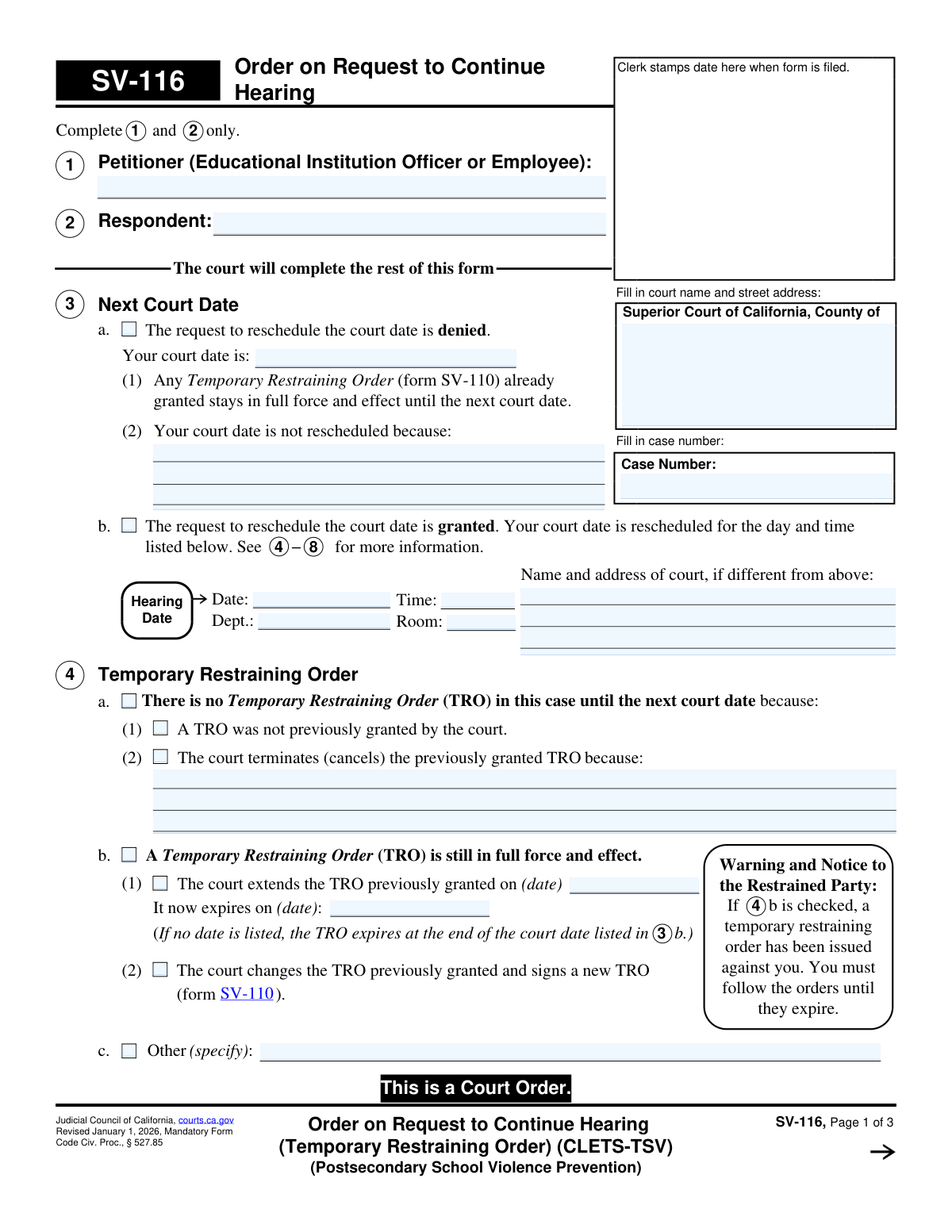
Yes! You can use AI to fill out Form SV-116, Order on Request to Continue Hearing (Temporary Restraining Order) (CLETS-TSV) (Postsecondary School Violence Prevention)
Form SV-116, the Order on Request to Continue Hearing, is a mandatory California judicial form used by the court to rule on a request to postpone a hearing for a temporary restraining order (TRO) concerning postsecondary school violence. The order specifies whether the continuance is granted or denied, sets a new court date if applicable, and clarifies the status of any existing TRO—whether it is extended, terminated, or modified. Today, this form can be filled out quickly and accurately using AI-powered services like Instafill.ai, which can also convert non-fillable PDF versions into interactive fillable forms.
Our AI automatically handles information lookup, data retrieval, formatting, and form filling.
It takes less than a minute to fill out SV-116 using our AI form filling.
Securely upload your data. Information is encrypted in transit and deleted immediately after the form is filled out.
Form specifications
| Form name: | Form SV-116, Order on Request to Continue Hearing (Temporary Restraining Order) (CLETS-TSV) (Postsecondary School Violence Prevention) |
| Number of fields: | 68 |
| Number of pages: | 1 |
| Language: | English |
Instafill Demo: How to fill out PDF forms in seconds with AI
How to Fill Out SV-116 Online for Free in 2026
Are you looking to fill out a SV-116 form online quickly and accurately? Instafill.ai offers the #1 AI-powered PDF filling software of 2026, allowing you to complete your SV-116 form in just 37 seconds or less.
Follow these steps to fill out your SV-116 form online using Instafill.ai:
- 1 Navigate to Instafill.ai and upload or select California Form SV-116.
- 2 Use the AI tool to accurately fill in the Superior Court information and the specific case number at the top of the form.
- 3 Enter the full name of the Petitioner (the educational institution officer or employee) in the field for Item 1.
- 4 Provide the full name of the Respondent in the field for Item 2.
- 5 Review the remaining sections (Items 3-9), which will be completed by the judicial officer, to understand the potential court orders regarding the new hearing date and the status of the TRO.
- 6 Once the court has completed and signed the order, use the platform to securely save, download, or print the official Form SV-116 for your records and for service as directed by the court.
Our AI-powered system ensures each field is filled out correctly, reducing errors and saving you time.
Why Choose Instafill.ai for Your Fillable SV-116 Form?
Speed
Complete your SV-116 in as little as 37 seconds.
Up-to-Date
Always use the latest 2026 SV-116 form version.
Cost-effective
No need to hire expensive lawyers.
Accuracy
Our AI performs 10 compliance checks to ensure your form is error-free.
Security
Your personal information is protected with bank-level encryption.
Frequently Asked Questions About Form SV-116
This form is a court order that either grants or denies a request to reschedule (continue) a hearing for a Temporary Restraining Order (TRO). It also clarifies the status of the TRO until the new court date, specifically in cases of postsecondary school violence prevention.
A party to the case (petitioner or respondent) will only fill in their name, the other party's name, and the case number in sections 1 and 2. The rest of the form is an order that is completed and signed by a judicial officer at the court.
If the court checks box 3a, your request has been denied, and the hearing will not be rescheduled. You must appear in court on the original date and time, and any existing TRO remains in effect until that hearing.
Check section 4 on the form. If box 4b is checked, the TRO is still in full force and has been extended to the new hearing date, so you must continue to obey it.
If the court checks box 4a(2), it means the previously granted Temporary Restraining Order has been canceled. There is no restraining order in effect while you wait for the new hearing date.
The petitioner (Section 1) is the officer or employee of the educational institution who requested the restraining order. The respondent (Section 2) is the person the restraining order is filed against.
Serving the order means formally delivering a copy to the other party so they are legally notified of the new hearing date and the status of the TRO. The judge's order in Section 6 will specify who must serve whom and by what method.
CLETS stands for the California Law Enforcement Telecommunications System. This means the restraining order details are entered into a statewide law enforcement database, making them accessible to police officers.
Not necessarily. Section 7 indicates that the sheriff or marshal will serve the order for free if it is based on violence or stalking, or if the petitioner has a fee waiver.
The form advises that you can request accommodations like a sign language interpreter by contacting the clerk's office at least five days before the hearing. You will likely need to fill out form MC-410.
Yes, services like Instafill.ai use AI to accurately auto-fill your initial information like names and case numbers, saving you time. However, remember that most of this form is an order completed and signed by a judicial officer.
You can upload the SV-116 form to Instafill.ai, which will make the fields interactive. You can then type your information directly into the form, and the AI can help auto-fill repeating fields accurately before you print it for filing.
You can use a service like Instafill.ai, which can convert flat, non-fillable PDFs into interactive, fillable forms. This allows you to easily type your information into the required fields before printing.
Compliance SV-116
Validation Checks by Instafill.ai
1
Case Number Consistency Across Pages
This check verifies that the Case Number entered on page 1 is identical to the Case Numbers on pages 2 and 3. Maintaining consistency is crucial for document integrity and ensures that all pages of the order are correctly associated with the same legal case. A mismatch could lead to misfiling, incomplete records, and legal challenges regarding the order's validity.
2
Required Petitioner and Respondent Names
Validates that the text fields for 'Petitioner' (Item 1) and 'Respondent' (Item 2) are not empty. These fields are fundamental to the order, as they identify the primary parties involved in the legal action. A form submitted without this information is critically incomplete and cannot be processed or enforced.
3
Exclusive Hearing Reschedule Decision
Ensures that only one of the primary checkboxes in section 3, either 3a (request denied) or 3b (request granted), is selected. These two outcomes are mutually exclusive, and selecting both would create a logical contradiction in the court's decision. This validation prevents ambiguity and ensures the order is clear and enforceable.
4
Completeness of New Hearing Information
If the checkbox for granting the reschedule request (3b) is checked, this validation confirms that the new hearing date, time, and either the department or room are provided. This information is essential for the parties to know when and where to appear for the rescheduled hearing. An order missing these details would be ineffective and fail to provide proper notice.
5
Logical Date Progression
Verifies that any new hearing date (section 3b) is in the future and that any new TRO expiration date (section 4b) is after the TRO's original grant date. This check maintains the logical and chronological integrity of the court order. An illogical date sequence would make the order nonsensical and could invalidate the specified timelines.
6
Exclusive TRO Status Selection
This check ensures that only one of the main options in section 4, 'No Temporary Restraining Order' (4a) or 'A Temporary Restraining Order is still in full force and effect' (4b), is selected. These are contradictory states, and selecting both would make the status of the restraining order dangerously unclear. This validation is critical for law enforcement and the parties to understand if a protective order is active.
7
Completeness of TRO Extension Details
If the court extends the TRO as indicated in section 4b(1), this validation confirms that both the original grant date and the new expiration date are filled in. Missing either date would create critical ambiguity about the TRO's timeline and enforceability. The order must be precise about the period of protection for it to be effective.
8
Required New TRO Form Number
When the court indicates it is changing the TRO and signing a new one (section 4b(2)), this validation ensures the corresponding form number is entered in the provided space. This is critical for referencing the correct, active order that governs the parties' conduct. Failure to specify the form number makes the order incomplete and difficult to enforce.
9
Exclusive Reason for Reschedule
Validates that if a reason for rescheduling is given in section 5, only one of the primary options (5a, 5b, or 5c) is selected. These options represent distinct legal justifications for the continuance. Selecting multiple options could create ambiguity in the court's official record and reasoning for the decision.
10
Exclusive Service Requester Selection
Validates that only one of the three main options in section 6 is checked: 6a (Petitioner), 6b (Respondent), or 6c (Court). These options determine who requested the continuance and who is responsible for subsequent actions. Selecting more than one would create conflicting and confusing instructions regarding service obligations.
11
Required Service Deadline Date
If any checkbox in section 6 indicates that a party must be served by a specific date (e.g., 6a(2), 6b(2)), this check verifies that the corresponding date field is completed. The service deadline is a critical legal requirement for ensuring due process. An order missing this date is unenforceable as the serving party has no clear deadline to meet.
12
Single Service Method per Party
If a primary service block like 6a (Petitioner) is selected, this validation ensures only one of its sub-options ((1), (2), (3), or (4)) is checked. The order must provide a single, clear instruction for service, not multiple conflicting methods. This prevents confusion about whether personal service, mail, or no service is required.
13
Required Explanation for 'Other' Selections
Verifies that if an 'Other' checkbox is selected (e.g., 4c, 5a(2), 6a(4)), the associated text field is not empty. The 'Other' option is meaningless without an explanation, as it is intended to capture specific circumstances not covered by the standard options. An empty 'Other' field renders that part of the order incomplete and ambiguous.
14
Presence of Judicial Officer Signature Date
This validation confirms that the date field next to the Judicial Officer's signature line is populated. The signature date is what makes the court order official and establishes its effective date. An undated order is legally deficient and may be considered invalid or unenforceable until dated.
15
Valid Attached Pages Count
Ensures that the value entered in the 'Number of pages attached' field (item 9) is a valid non-negative integer (e.g., 0, 1, 2). This is important for ensuring the complete document is filed and served, including any attachments that are part of the order. An invalid entry could lead to an incomplete record being transmitted.
Common Mistakes in Completing SV-116
The form explicitly states, 'Complete 1 and 2 only. The court will complete the rest of this form.' A frequent error is for the petitioner or respondent to fill out sections 3 through 8. This creates confusion, requires court staff to correct the document, and can delay the processing of the order. Always read instructions at the top of the form and only complete the sections designated for you.
The case number is the primary identifier linking this order to the correct legal proceeding. Users often mistype the number, omit parts of it, or leave it blank, especially on pages 2 and 3. An incorrect case number can lead to the order being misfiled or not entered into the system, rendering it ineffective and causing significant delays. Double-check the case number against previous court documents before submitting.
Section 1 asks for the 'Petitioner (Educational Institution Officer or Employee),' not the name of the school or university itself. A common mistake is to list the institution's name instead of the specific, authorized individual acting on its behalf. This can create legal ambiguity regarding who holds the protection order, potentially making it difficult to enforce. Ensure the full legal name of the authorized person is entered.
Spelling the respondent's name incorrectly or using an incomplete name can have severe consequences. Law enforcement relies on the exact name for entry into the California Law Enforcement Telecommunications System (CLETS) and for serving the order. An error here can make the restraining order unenforceable or lead to mistaken identity issues. Carefully verify the respondent's full legal name.
This form, SV-116, is the *Order* on a request to continue a hearing, which is filled out by the court. Parties sometimes mistakenly use this form to *make* the request itself. This is incorrect; a separate form (like SV-115, Request to Continue Court Hearing) should be used to ask for a continuance. Submitting this form as a request will lead to its rejection.
Parties may assume that if a hearing is continued, the Temporary Restraining Order (TRO) is automatically extended. However, Section 4 details the court's specific order, which could include terminating the TRO (4.a.2) or not having one in effect. Failing to read this section carefully can lead to a party mistakenly believing they are protected when they are not, or a respondent unknowingly violating an extended order. Always review the checked boxes in Section 4 to understand the current status of the TRO.
After the court issues the order, Section 6 specifies who must serve the order on the other party and by what method and date. A common failure is for the responsible party to overlook these instructions, serve the documents incorrectly (e.g., by mail when personal service is required), or miss the deadline. This failure can invalidate the service, jeopardizing the next court date and the effectiveness of any restraining orders. AI-powered tools like Instafill.ai can help by highlighting deadlines and instructions, reducing the chance of such oversights.
Court forms are periodically updated, and this one is marked as a 'Mandatory Form' revised on a specific date. Using an old version can result in the court clerk rejecting the filing because it may lack updated legal language or required fields. Always check the Judicial Council of California website for the most current version of any form before filling it out to avoid rejection and delays.
When a form is only available as a non-fillable PDF, users may print and handwrite the information. If the handwriting is illegible, it can lead to critical data entry errors by the court clerk for names, addresses, and case numbers. This can cause delays or legal complications. To prevent this, use a fillable PDF whenever possible. If you only have a flat PDF, a service like Instafill.ai can convert it into a fillable version, ensuring all entries are clear and legible.
The top of the form requires the user to fill in the court name and street address. People sometimes leave this section blank, assuming the clerk will fill it in. This can cause delays, especially if the form is filed in a large county with multiple courthouse locations. Providing the complete and correct court address ensures the document is routed and filed properly from the start.
Saved over 80 hours a year
“I was never sure if my IRS forms like W-9 were filled correctly. Now, I can complete the forms accurately without any external help.”
Kevin Martin Green
Your data stays secure with advanced protection from Instafill and our subprocessors

Robust compliance program
Transparent business model
You’re not the product. You always know where your data is and what it is processed for.
ISO 27001, HIPAA, and GDPR
Our subprocesses adhere to multiple compliance standards, including but not limited to ISO 27001, HIPAA, and GDPR.
Security & privacy by design
We consider security and privacy from the initial design phase of any new service or functionality. It’s not an afterthought, it’s built-in, including support for two-factor authentication (2FA) to further protect your account.
Fill out SV-116 with Instafill.ai
Worried about filling PDFs wrong? Instafill securely fills form-sv-116-order-on-request-to-continue-hearing-temporary-restraining-order-clets-tsv-postsecondary-school-violence forms, ensuring each field is accurate.