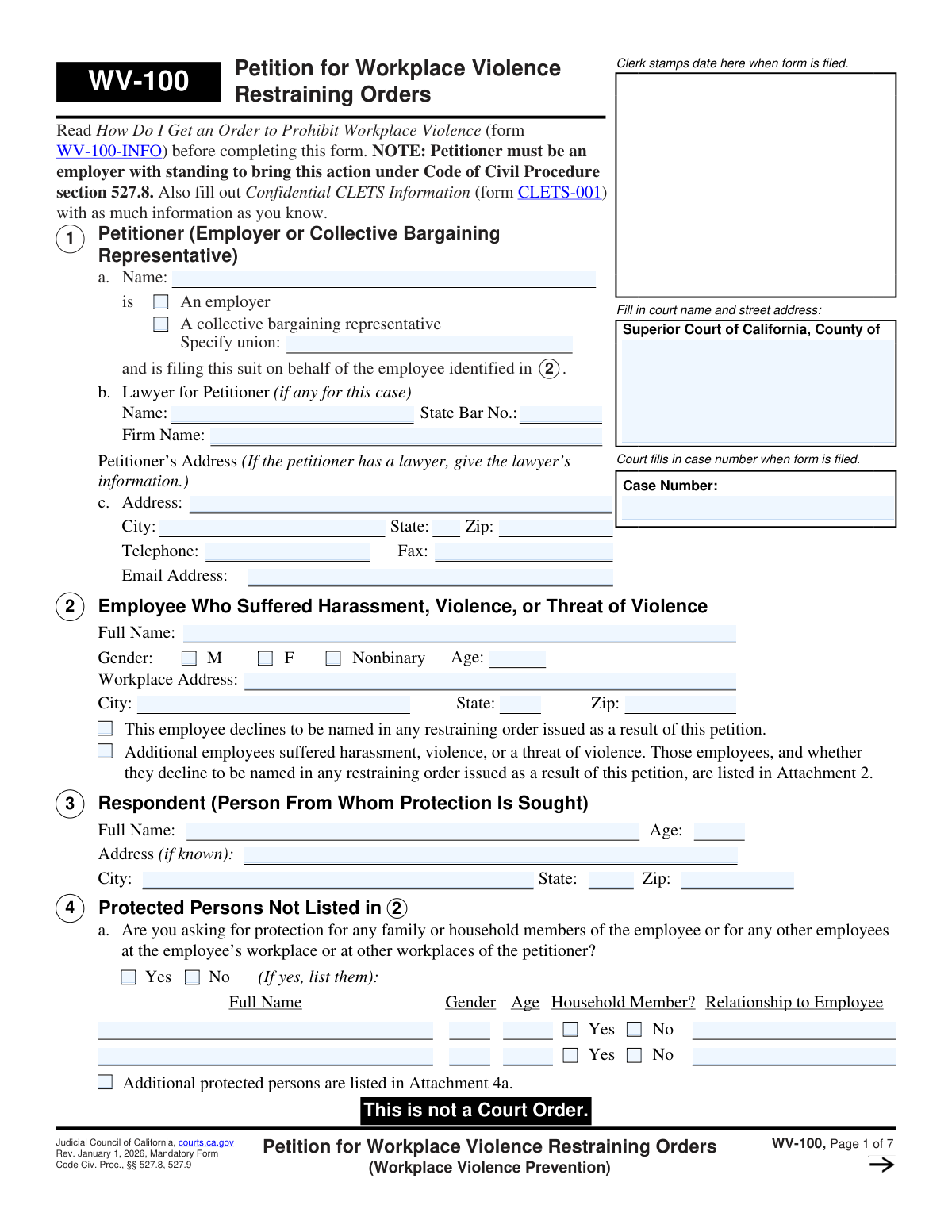
Yes! You can use AI to fill out Form WV-100, Petition for Workplace Violence Restraining Orders (Workplace Violence Prevention)
Form WV-100, Petition for Workplace Violence Restraining Orders, is a legal document filed in the Superior Court of California by an employer on behalf of an employee who has suffered unlawful violence or a credible threat of violence. Its purpose is to obtain a court order to prohibit a specific individual from engaging in further harmful conduct and to ensure a safe work environment. Today, this form can be filled out quickly and accurately using AI-powered services like Instafill.ai, which can also convert non-fillable PDF versions into interactive fillable forms.
Our AI automatically handles information lookup, data retrieval, formatting, and form filling.
It takes less than a minute to fill out WV-100 using our AI form filling.
Securely upload your data. Information is encrypted in transit and deleted immediately after the form is filled out.
Form specifications
| Form name: | Form WV-100, Petition for Workplace Violence Restraining Orders (Workplace Violence Prevention) |
| Number of fields: | 209 |
| Number of pages: | 1 |
| Language: | English |
Instafill Demo: How to fill out PDF forms in seconds with AI
How to Fill Out WV-100 Online for Free in 2026
Are you looking to fill out a WV-100 form online quickly and accurately? Instafill.ai offers the #1 AI-powered PDF filling software of 2026, allowing you to complete your WV-100 form in just 37 seconds or less.
Follow these steps to fill out your WV-100 form online using Instafill.ai:
- 1 Navigate to Instafill.ai and upload or select the Form WV-100.
- 2 Use the AI assistant to input petitioner (employer) information, employee details, and respondent (person to be restrained) information.
- 3 Describe the relationship between the employee and the respondent and detail any other relevant court cases.
- 4 Provide a detailed account of the respondent's conduct, including dates, locations, specific acts of violence, threats, or harassment.
- 5 Select the specific personal conduct and stay-away orders you are requesting from the court.
- 6 Answer questions regarding firearms and request a Temporary Restraining Order (TRO) if needed.
- 7 Review the entire completed petition for accuracy, then download the document to be filed with the appropriate California Superior Court.
Our AI-powered system ensures each field is filled out correctly, reducing errors and saving you time.
Why Choose Instafill.ai for Your Fillable WV-100 Form?
Speed
Complete your WV-100 in as little as 37 seconds.
Up-to-Date
Always use the latest 2026 WV-100 form version.
Cost-effective
No need to hire expensive lawyers.
Accuracy
Our AI performs 10 compliance checks to ensure your form is error-free.
Security
Your personal information is protected with bank-level encryption.
Frequently Asked Questions About Form WV-100
This form is used by an employer or collective bargaining representative in California to request a restraining order from the court to protect an employee from violence, threats of violence, or stalking that has occurred at the workplace.
The petition must be filed by an employer or a designated collective bargaining representative. An individual employee cannot file this specific form (WV-100) on their own behalf; they would use a different process for a personal civil harassment restraining order.
The 'Petitioner' is the employer or union representative filing the form. The 'Employee' is the individual who has been the target of the violence or threats and on whose behalf the protection is being sought.
Yes, Section 4 allows you to list and request protection for other employees, as well as the primary employee's family or household members, if they are also at risk. You must explain why these additional people need protection.
You must describe what happened in detail, including the dates of all incidents, starting with the most recent. Clearly state who did what to whom, identify any witnesses, and describe any harm or injuries that occurred.
A TRO is a short-term order granted by a judge to provide immediate protection until a full court hearing can be held. You should request one in Section 12 if you believe there is an immediate danger of harm to the employee.
Section 2 provides a checkbox to indicate if the employee declines to be named in the order. The employer can still pursue the restraining order to ensure the safety of the workplace.
You can request that there be no filing fee (Section 14) and that the sheriff or marshal serve the orders for free (Section 15) if the petition is based on a credible threat of violence or stalking.
You must also complete and file a Confidential CLETS Information form (CLETS-001). This form provides law enforcement with the respondent's identifying details to help them enforce the restraining order if it is granted.
After filing, you must arrange for the respondent to be personally served with the court documents at least five days before the hearing date. You will then need to file a Proof of Personal Service (Form WV-200) with the court.
Yes, services like Instafill.ai use AI to help you accurately auto-fill form fields from your saved information, which can save time and reduce the chance of errors.
You can use a platform like Instafill.ai to easily complete, sign, and manage this form digitally from any device. This simplifies the process of preparing the petition for filing.
If you have a non-fillable or 'flat' PDF, you can upload it to a service like Instafill.ai. The platform can convert it into an interactive, fillable form that you can complete online.
Compliance WV-100
Validation Checks by Instafill.ai
1
Petitioner Type Completeness
This check ensures that in Section 1, the petitioner has selected either 'An employer' or 'A collective bargaining representative'. If 'A collective bargaining representative' is chosen, the 'Specify union' field must be filled. This is critical for establishing the petitioner's legal standing to file the petition. A failure will result in an incomplete petition that cannot be processed.
2
Employee and Respondent Information Completeness
Validates that the full name of the employee in Section 2 and the full name of the respondent in Section 3 are provided. These fields are essential for identifying the parties involved in the restraining order. An order cannot be issued or enforced without clearly identifying the protected person and the person to be restrained.
3
Age Field Numeric Validation
Ensures that the 'Age' fields for the employee (Section 2), respondent (Section 3), and any additional protected persons (Section 4) contain only valid numerical characters. This data is important for identification and legal purposes. Non-numeric or unreasonable values (e.g., negative numbers) will be rejected to maintain data integrity.
4
Conditional Protection Justification
This check verifies that if 'Yes' is selected in Section 4a to request protection for other people, the corresponding explanation in Section 4b ('Why do these people need protection?') is filled out. The court requires a reason to extend protection beyond the primary employee. If the justification is missing, the request for additional protected persons may be denied.
5
Venue Justification Requirement
Ensures at least one checkbox is selected in Section 6 to establish why the petition is being filed in this specific court's county. If the 'Other' checkbox is selected, the corresponding text field must be filled. This is a jurisdictional requirement, and failure to provide a valid venue reason can lead to the case being dismissed.
6
Prior Court Case Details Logic
If the user answers 'Yes' to having other court cases with the respondent in Section 7a, this validation ensures that at least one case type is checked and that its corresponding 'Filed in (County/State)' and 'Year Filed' fields are completed. This information is crucial for the judge to understand the history between the parties. Incomplete entries will trigger an error.
7
Year Field Format Validation
Validates that all 'Year Filed' fields in Section 7 are entered as a valid 4-digit year (YYYY) and are not in the future. This maintains data consistency and ensures the court has accurate historical information. An invalid format would prevent proper case record linkage and review.
8
Basis for Petition Check
This check confirms that at least one checkbox is selected in Section 8a (describing the respondent's conduct) and at least one in Section 8b (linking the conduct to the workplace). These selections form the legal basis for the petition under Code of Civil Procedure § 527.8. Without this, the petition lacks a fundamental cause of action and cannot proceed.
9
Incident Description Mandate
Verifies that the narrative description of events in Section 8c is either filled in or the 'Response is stated in Attachment 8c' box is checked. This narrative is the core evidence supporting the petition. A submission without this detailed account is incomplete and provides no basis for the court to grant an order.
10
Conditional Harm and Weapon Description
This validation ensures that if 'Yes' is checked in Section 8d ('Was the employee harmed or injured?') or 8e ('Did the respondent use or threaten to use a gun...?'), the corresponding description text field is filled out. These details are critical for assessing the severity of the threat and the need for immediate orders. Failure to provide the description will result in an incomplete and less compelling petition.
11
Stay-Away Order Logical Consistency
Checks that if any location checkbox is selected in Section 10a, the 'stay at least __ yards away' distance field is filled with a positive number. Conversely, it also checks that if a distance is entered, at least one location is selected. This ensures the requested order is specific and enforceable. An incomplete request cannot be granted by the court.
12
Firearm Possession Details
If 'Yes' is checked in Section 11, indicating the respondent is believed to possess firearms, this validation ensures that details are provided in the subsequent table. This information is vital for law enforcement and public safety if an order is granted, as it triggers a requirement for the respondent to relinquish weapons. Missing details can hinder enforcement of the firearms restriction.
13
Attachment Count Consistency
Verifies that the value in Section 18, 'Number of pages attached,' is a non-negative integer. It also cross-references this number to ensure it is greater than zero if any 'stated in Attachment' checkbox is ticked throughout the form. This ensures all referenced documents are accounted for, preventing the submission of an incomplete filing package.
14
Declaration and Signature Date Requirement
This check confirms that the petitioner's name and a signature date are provided in the declaration section on the final page. The declaration under penalty of perjury is what makes the document a sworn statement. A missing name or date invalidates the legal standing of the petition, and it will be rejected by the clerk.
15
Lawyer State Bar Number Validation
If a lawyer's name is entered in Section 1b, this validation ensures the 'State Bar No.' field is also filled and contains a valid format (typically numeric). This is required for the court to verify the attorney's credentials and active status with the State Bar. An invalid or missing number will prevent the attorney from being officially recognized on the case.
Common Mistakes in Completing WV-100
In Section 1, the petitioner must be the legal business entity or a collective bargaining representative, not the individual HR manager filing the form. This mistake occurs when a person lists their own name, which can lead to the petition being rejected for lack of legal standing. To avoid this, always use the company's full, registered legal name. AI-powered tools like Instafill.ai can help by prompting for the 'Legal Business Name' to ensure the correct entity is listed.
The court relies on the facts in Section 8c to grant an order, but filers often provide vague summaries like 'The respondent was threatening.' This weakens the petition and may result in denial. To avoid this, describe each incident with specific dates, times, locations, direct quotes, witness names, and the impact on the employee. While an AI tool cannot write your story, it can ensure this critical section is not overlooked before submission.
When requesting protection for other people in Section 4, simply listing their names is not enough; Section 4b requires a specific explanation of the threat to each person. Many filers provide a generic reason or leave it blank, leading the court to deny protection for those individuals. You must clearly state how the respondent's conduct threatens each person listed. Smart form-filling tools can use conditional logic to require this field be filled if additional people are listed.
Providing a complete name and address for the respondent in Section 3 is crucial for serving legal papers and for law enforcement to enforce the order. People often provide a nickname or leave the address blank, which can cause significant delays or render the order unenforceable. Before filing, gather as much identifying information as possible, including full legal name and last known address. AI form fillers can flag these empty fields to ensure a more complete submission.
Checking the box in Section 12 to request a TRO is not enough; you must provide a compelling reason why immediate protection is necessary before the court hearing. Many filers neglect to explain the risk of immediate harm, causing the judge to deny the temporary order. To avoid this, clearly articulate the imminent danger in an attachment. An intelligent form filler can require an entry for the TRO justification if the request box is checked, preventing an incomplete submission.
This form uses checkboxes to define the respondent's conduct (Section 8a) and the orders you want (Sections 9 & 10). A common error is to check a box for an act, like 'stalked,' but then fail to describe any stalking behavior in the narrative. This inconsistency undermines the petition's credibility. To avoid this, ensure every checkbox you mark is fully supported by the detailed facts you provide in the narrative sections.
Many sections allow for details to be provided in attachments, but filers often check the 'stated in Attachment' box and then forget to include or properly label the document. Another common error is forgetting to enter the total number of attached pages in Section 18, which can cause the filing to be rejected. To prevent this, label each attachment with its corresponding section number and double-check the page count. Tools like Instafill.ai can help by automatically counting and numbering attachments.
The declaration on the final page, signed under penalty of perjury, makes the petition a valid legal document. It is surprisingly common for the petitioner to forget to date, print their name, and sign the form, especially when managing multiple attachments. An unsigned petition is invalid and will be immediately rejected by the court, causing critical delays. AI-powered tools like Instafill.ai can validate the form for completeness and flag empty signature fields before finalization.
Section 1c instructs the filer to use the lawyer's address if represented, or the employer's business address if not. A frequent mistake is listing the home address of the affected employee, which compromises their privacy and sends court notices to the wrong place. Always use the official business or legal representative's address. Since this form is a PDF, note that tools like Instafill.ai can convert it into a fillable version with clear guidance for each field.
Section 7 asks about any other court cases involving the parties, which filers sometimes omit because they forget or don't think it's relevant. This is a serious error that can damage credibility and be considered perjury if discovered by the court. A judge needs a complete history to make an informed decision. It is crucial to be thorough and disclose all known cases to maintain the integrity of your petition.
Saved over 80 hours a year
“I was never sure if my IRS forms like W-9 were filled correctly. Now, I can complete the forms accurately without any external help.”
Kevin Martin Green
Your data stays secure with advanced protection from Instafill and our subprocessors

Robust compliance program
Transparent business model
You’re not the product. You always know where your data is and what it is processed for.
ISO 27001, HIPAA, and GDPR
Our subprocesses adhere to multiple compliance standards, including but not limited to ISO 27001, HIPAA, and GDPR.
Security & privacy by design
We consider security and privacy from the initial design phase of any new service or functionality. It’s not an afterthought, it’s built-in, including support for two-factor authentication (2FA) to further protect your account.
Fill out WV-100 with Instafill.ai
Worried about filling PDFs wrong? Instafill securely fills form-wv-100-petition-for-workplace-violence-restraining-orders-workplace-violence-prevention forms, ensuring each field is accurate.